
Threads Content Agent

Ngoc Hong
October 30, 2026
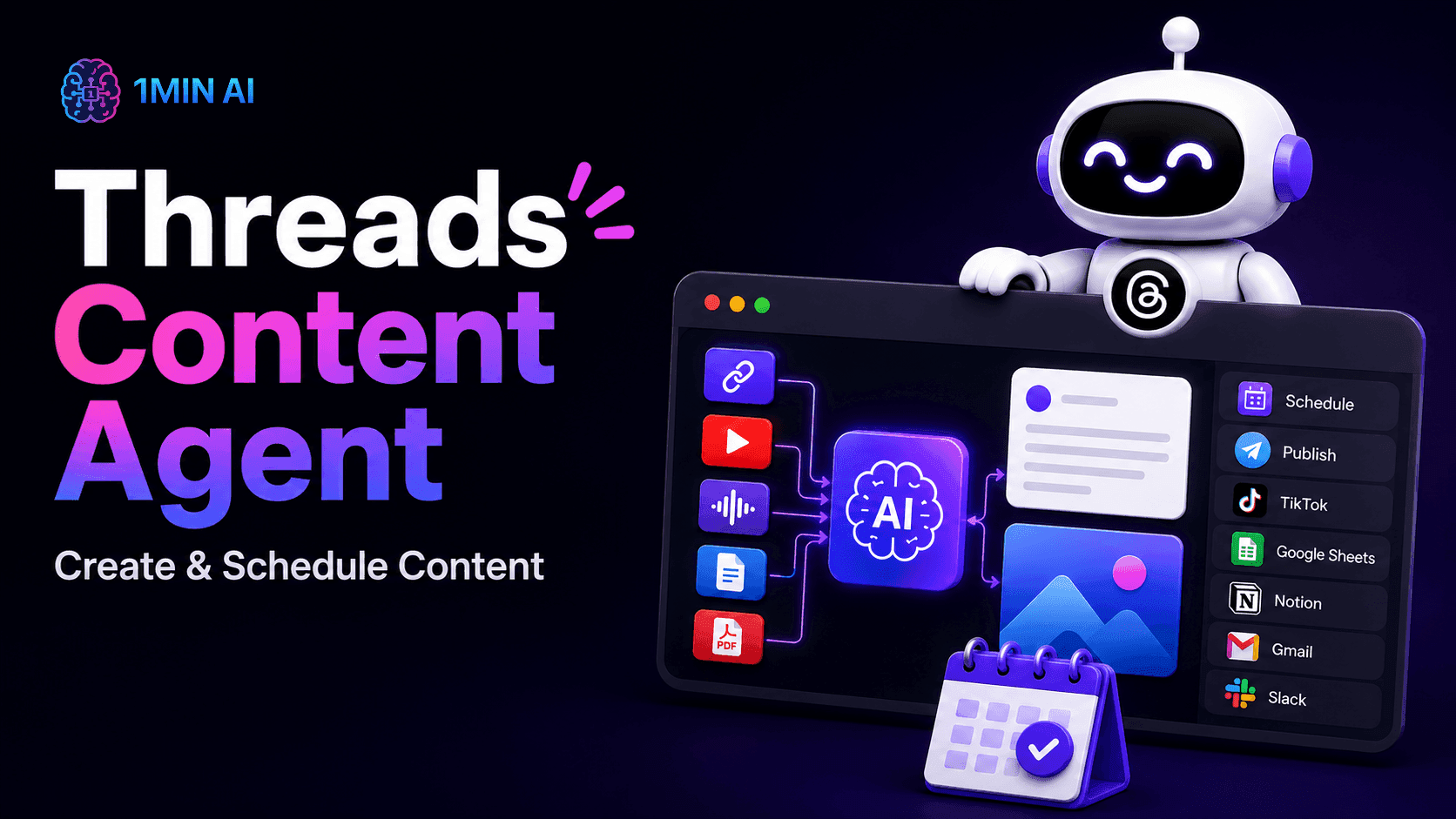
Create Threads content from files, links, research, and conversations with an AI Agent that generates visuals, schedules posts, and automates workflows.
Creating consistent content for Threads requires more than writing individual posts. Creators and marketers often need to research topics, extract information from documents or videos, generate content, create visuals, and manage publishing. When these tasks are handled separately, the workflow becomes fragmented and repetitive.
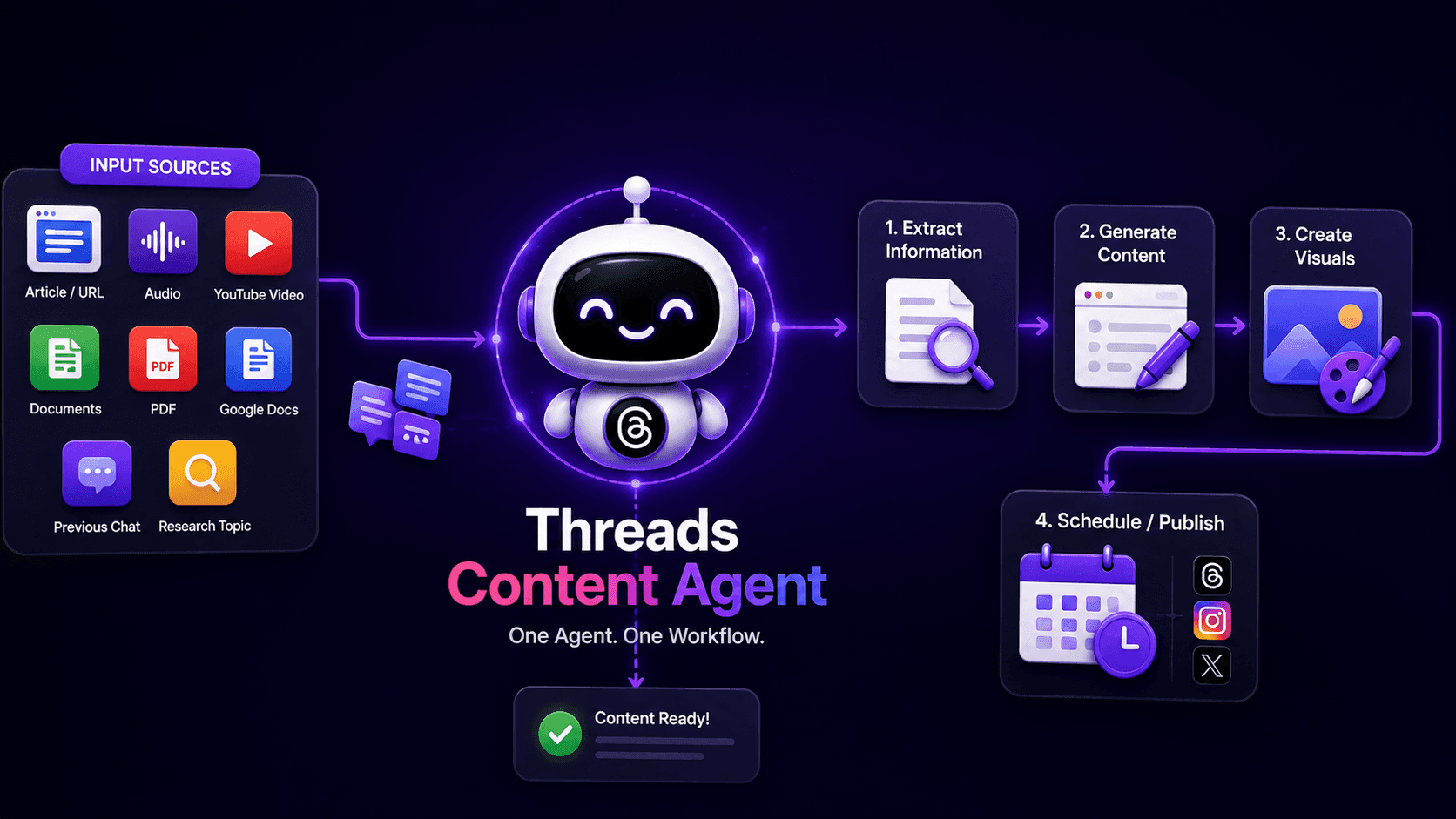
A Threads Content Agent connects these steps into one workflow. With 1minAI Agent, users can start from an article, audio, video, uploaded file, Google Docs, previous conversation, or a research topic. The Agent can extract information, generate content, create or source visuals, and move the final output toward scheduling or publishing.
Instead of using AI only as a writing assistant, an AI content agent can coordinate multiple stages of content production. This is particularly useful for creators and marketers who publish frequently and need a repeatable process for turning information into social media content.
A structured workflow also makes content production easier to manage. Users can define what information should be collected, how it should be processed, what type of content should be generated, and what should happen after the content is created. Each stage can then be reviewed or adjusted when necessary.
AI content agent workflow showing input sources, information extraction, generation, and publishing.
🎯 Benefits of Threads Content Agent
A Threads Content Agent is most valuable when content creation involves several connected steps. Instead of treating research, writing, visual creation, and publishing as separate tasks, the Agent organizes them into a repeatable workflow that can be customized at each stage.
📚 Turn Existing Information Into Threads Content
Great social content can come from information you already have. The Agent can begin with different types of source material and transform that information into content for Threads.
You can provide:
- Article links
- Audio links
- YouTube videos
- DOC or PDF files
- Google Docs
- Previous conversations
- A topic you want to research
The workflow can extract relevant information from these sources using tools such as web crawling and speech-to-text. This gives the content generation step structured information to work with instead of requiring users to start from a blank prompt.
This approach is useful for content repurposing because the creator does not need to manually copy information from one platform to another. A long article, video, research document, or existing conversation can become the starting point for a new social content workflow.
🔄 Connect Research and Content Creation
Research and content creation often happen in separate tools. A Threads Content Agent can connect these stages by collecting information before generating the final content.
When users provide a topic to research, the workflow can collect the latest information from the internet through a web crawler. When users provide existing material, the workflow can extract information from that source instead.
This creates two practical starting points: research something new or reuse knowledge you already have.
Connecting research with content generation can also make the process more consistent. Instead of researching a topic, switching to another application, writing a prompt, and manually transferring the results, the workflow can pass information between stages automatically.
⚡ Reduce Repetitive Social Media Work
Social media production involves many repetitive actions beyond writing. Content needs to be generated, visuals need to be prepared, and posts need to be published or scheduled.
By connecting these actions in one workflow, the Agent reduces the need to manually move information between different tools. Users can also edit the parameters of individual steps when they need more control over the final output.
This can be especially helpful for creators who follow a recurring publishing process. Once the workflow is configured, the same general structure can be reused for different topics and source materials while individual parameters can still be adjusted when required.
💡 Use Cases of Threads Content Agent
A Threads Content Agent can support different content workflows depending on the user's starting material and publishing goals. The workflow is designed to transform information into usable social content rather than simply generating text from a single prompt.
Because the workflow can accept different types of inputs, it can support both content repurposing and original research. This gives creators more flexibility when planning their Threads content calendar.
📝 Turn Articles and Documents Into Threads Content
Long-form content can contain multiple ideas that are suitable for social media. Instead of manually reading an article and rewriting every idea, users can provide the source directly to the workflow.
The Agent first extracts information from the source and then sends the processed information to the content-generation step. This can help turn existing articles, reports, PDFs, or documents into new Threads content while keeping the workflow connected to the original material.
This use case is particularly useful when a creator already has a library of published content. Existing knowledge can be reused across channels without requiring the entire article-to-social process to be completed manually every time.
🔎 Research a Topic Before Creating Content
Not every content idea starts with an existing document. Sometimes users only know the topic they want to discuss.
In this workflow, the user provides a research topic. The Agent then collects the latest information from the internet before moving into content generation. This creates a research → content workflow that can be used when users need current information before drafting social posts.
The research stage can help provide context for the generation stage, making it possible to build content from collected information rather than relying only on a short initial prompt.
🎨 Create Visuals for Social Content
Threads content can also include supporting visual assets. After content is generated, the workflow can either search for suitable stock images or generate images using internal AI tools.
The visual step can therefore support different content requirements, including:
- Stock image discovery
- AI-generated images
- Social media graphics
- Supporting visual content
Users can also edit the parameters of the workflow when they want more control over how the visual output is created.
Keeping visual production inside the same workflow reduces the need to manually download, organize, and transfer assets between separate applications. The exact visual process can also be adjusted depending on the type of content being produced.
📅 Schedule or Publish Content Automatically
Creating content is only one part of a social media workflow. The final step can move the completed content toward publishing or scheduling.
The workflow supports two possible outcomes:
- Publish the post directly to a connected social platform
- Schedule the post for a selected time
This allows the workflow to continue beyond content generation and connect creation with distribution.
For creators managing multiple publishing tasks, connecting content generation with distribution can make the overall workflow more structured. It also reduces the number of manual handoffs required between content creation and publishing.
🔮 Features of Threads Content Agent
The Threads Content Agent is built around a workflow engine that connects inputs, AI processing, tools, and publishing actions. Each workflow consists of individual steps that can be configured, monitored, rerun, or updated.
Rather than forcing every content project into the same sequence, the workflow approach gives users control over individual stages. Different inputs, AI models, tools, conditions, and publishing actions can be combined depending on the desired result.
🧠 Flexible Content Inputs
The workflow supports multiple input sources, allowing users to choose how they want to begin.
Inputs can include:
- URLs
- Audio
- YouTube videos
- Documents
- PDFs
- Google Docs
- Research topics
This flexibility makes the Agent suitable for both content repurposing and new topic research workflows.
Users can therefore start with information they already have or begin with a topic that requires additional research. The same workflow structure can then process the information and move it toward content generation.
✍️ AI Content Generation
After information is collected, the workflow sends the processed input to a Prompt Processor for content generation.
The system supports prompt processing and model selection, while default parameters can be used as a starting point. Users can also edit these parameters to customize how individual workflow steps operate.
This makes the content-generation stage more configurable than a single static prompt. Creators can adjust the instructions and parameters used by a specific step when they need a different output format, tone, or content direction.
🎨 Integrated AI Image Workflow
The visual-generation stage can use existing AI tools inside the 1minAI ecosystem. By default, the workflow can search for stock images or generate new visuals with an internal AI tool.
This allows content and visual production to remain connected inside the same workflow rather than requiring separate manual processes.
The visual stage can also be treated as an independent part of the workflow. This means users can modify or rerun the visual-generation step without necessarily rebuilding the entire content workflow.
🔗 Tool Integrations & Social Connections
The Agent can connect with external tools through a Tool Orchestrator. The foundation supports integrations such as TikTok, Google Sheets, Notion, Gmail, and Slack, while additional integrations can be connected through supported mechanisms.
Social publishing also uses credential management to manage third-party connections securely within the workflow.
These integrations allow the workflow to extend beyond content generation. Information can move between supported tools, while completed content can continue toward the appropriate publishing or productivity platform.
📊 Workflow Monitoring & Rerun
Each workflow step can display its current status, such as Running, Pass, or Fail. Users can view execution history, including date, duration, status, input, output, credit cost, and optional logs.
If a step needs to be repeated, users can rerun that step, rerun from that step, or rerun the workflow up to that step. This makes it easier to troubleshoot and refine individual parts without restarting everything.
Step-level monitoring is useful when a workflow contains multiple actions. Instead of treating the entire process as one operation, users can identify where an issue occurred and focus on that specific stage.
⚙️ Scheduling, Variables & Workflow Control
The workflow engine supports different triggers, including manual execution and scheduling. Variables can also pass information between steps, while workflow definitions can include nodes, outputs, edges, conditions, loops, branches, and parallel actions.
This makes the Agent more flexible than a simple content generator. Users can build a structured workflow where each stage receives information from previous steps and contributes to the final result.
Scheduling can also help turn a one-time content process into a repeatable production system. Depending on the workflow design, users can define when a process starts and how information should move through the different stages.
🚀 Build a Complete Threads Content Workflow
The main advantage of a Threads Content Agent is the connection between information, AI processing, content creation, visuals, and publishing. Instead of managing each task separately, users can build a repeatable workflow around the way they already create content.
A complete workflow can begin with almost any useful source. A creator may start with an article, document, video, audio recording, existing conversation, or a research topic. The workflow can then extract relevant information, process it with AI, generate Threads content, prepare supporting visuals, and move the result toward publishing.
This approach changes the role of AI from a simple text generator into a workflow assistant. The value comes not only from generating content, but also from connecting the steps that happen before and after generation.
A diagram illustrating a content creation workflow, from source material and AI processing to publishing.
With 1minAI Agent, users can customize workflow parameters, monitor each step, rerun individual stages, and connect supported tools and social platforms. This creates a more structured approach to Threads content creation while keeping control over the workflow.
For creators and marketers who publish regularly, a repeatable workflow can make content production easier to organize. Instead of rebuilding the same process for every post, users can create a workflow that reflects their preferred research, generation, visual, and publishing process, then adjust individual stages when the content requires a different approach.
- #Information
Alternatives
Discover the best alternatives to 1minAI and compare features, pricing, and use cases.

1min.AI vs OpenRouter
1min.AI vs. OpenRouter: Compare the ready-to-use AI creation product against the technical API tool. Find out if you need a zero-code creative studio or a coding infrastructure hub.
 Ngoc Hong
1minAI vs Postbeam for LinkedIn Content
Looking for a Postbeam alternative? Compare 1minAI vs Postbeam for AI LinkedIn content creation, research, image generation, scheduling, and B2B workflows.
 Tram Ta
1minAI vs Buffer for LinkedIn Content Creation
Looking for a Buffer alternative? Compare 1minAI vs Buffer for LinkedIn content creation, AI writing, image generation, scheduling, and automation.
Tram TaAI Tools
Discover the best AI tools to boost productivity, creativity, and everyday work.

Create Consistent Cartoon Content in Just a Few Steps
Create engaging cartoon videos for TikTok and Reels with 1min.AI. Research ideas, create characters, and turn images into animated videos in 3 simple steps.
 Lien Anh Vu
One Product, 10 UGC Creatives: How AI Makes Content Testing Easier
Create more authentic UGC with an AI UGC video generator, test more creative angles and scale affiliate content without filming every version.
Lien Anh Vu
Top 4 Affordable AI Tools for Startup Founders
Discover the top 4 affordable AI tools for startup founders to validate ideas, build products, create content, and launch faster without overspending.
Tram TaAI Features
Comprehensive AI features that streamline workflows, improve efficiency, and empower teams to achieve more.
Create Consistent Cartoon Content in Just a Few Steps
Create engaging cartoon videos for TikTok and Reels with 1min.AI. Research ideas, create characters, and turn images into animated videos in 3 simple steps.
Lien Anh VuOne Product, 10 UGC Creatives: How AI Makes Content Testing Easier
Create more authentic UGC with an AI UGC video generator, test more creative angles and scale affiliate content without filming every version.
Lien Anh Vu
1minAI: Free AI Grammar Checker
Check grammar for free with 1minAI’s AI grammar checker. Find grammar, spelling, and writing mistakes, improve clarity, and polish your content in seconds.
Tram TaAI Use Cases
A curated collection of AI use cases for business, productivity, and industry-specific applications.
Create Consistent Cartoon Content in Just a Few Steps
Create engaging cartoon videos for TikTok and Reels with 1min.AI. Research ideas, create characters, and turn images into animated videos in 3 simple steps.
Lien Anh VuOne Product, 10 UGC Creatives: How AI Makes Content Testing Easier
Create more authentic UGC with an AI UGC video generator, test more creative angles and scale affiliate content without filming every version.
Lien Anh Vu
Best Time to Post on Instagram: A Practical Guide for Better Engagement
Discover the best time to post on Instagram, including the best days and times for different audiences, plus tips to find the ideal posting schedule for your account.
Tram TaAI Tutorials
Learn how to use AI with practical, step-by-step tutorials.

Black Friday AI Tool Deals in 2026
Discover what Black Friday AI tool deals 2026 has to offer. Find out how to secure the 1min.AI lifetime deal via AppSumo, Dealify, Stack Social, and verify on Trustpilot, Slashdot, and Software Advice.
 Hang Nguyen
Create Consistent Cartoon Content in Just a Few Steps
Create engaging cartoon videos for TikTok and Reels with 1min.AI. Research ideas, create characters, and turn images into animated videos in 3 simple steps.
Lien Anh Vu
[Seedance 2.5 New] Better AI Product Videos, Less Rework in 1min.AI
Use Seedance 2.5 image to video on 1min.AI to create more consistent AI product videos, reduce failed generations, save credits, and improve UGC workflows.
Lien Anh VuAI Guides
Learn AI faster with practical guides, real-world examples, and actionable best practices.

Safely Buy AI Tools Online: 2026 Black Friday Guide
Discover how to find and secure the best Black Friday AI deals online. Learn expert strategies to avoid scams, combat subscription fatigue, and verify software.
Hang NguyenCreate Consistent Cartoon Content in Just a Few Steps
Create engaging cartoon videos for TikTok and Reels with 1min.AI. Research ideas, create characters, and turn images into animated videos in 3 simple steps.
Lien Anh Vu[Seedance 2.5 New] Better AI Product Videos, Less Rework in 1min.AI
Use Seedance 2.5 image to video on 1min.AI to create more consistent AI product videos, reduce failed generations, save credits, and improve UGC workflows.
Lien Anh VuAI Solutions
Browse the best AI solutions for automation, coding, research, productivity, customer support, marketing, and business workflows.
Safely Buy AI Tools Online: 2026 Black Friday Guide
Discover how to find and secure the best Black Friday AI deals online. Learn expert strategies to avoid scams, combat subscription fatigue, and verify software.
Hang NguyenCreate Consistent Cartoon Content in Just a Few Steps
Create engaging cartoon videos for TikTok and Reels with 1min.AI. Research ideas, create characters, and turn images into animated videos in 3 simple steps.
Lien Anh VuOne Product, 10 UGC Creatives: How AI Makes Content Testing Easier
Create more authentic UGC with an AI UGC video generator, test more creative angles and scale affiliate content without filming every version.
Lien Anh VuAI Models
Explore the world's leading AI models in one place.
Create Consistent Cartoon Content in Just a Few Steps
Create engaging cartoon videos for TikTok and Reels with 1min.AI. Research ideas, create characters, and turn images into animated videos in 3 simple steps.
Lien Anh VuOne Product, 10 UGC Creatives: How AI Makes Content Testing Easier
Create more authentic UGC with an AI UGC video generator, test more creative angles and scale affiliate content without filming every version.
Lien Anh Vu[Seedance 2.5 New] Better AI Product Videos, Less Rework in 1min.AI
Use Seedance 2.5 image to video on 1min.AI to create more consistent AI product videos, reduce failed generations, save credits, and improve UGC workflows.
Lien Anh VuAI Comparisons
Compare AI tools, models, and platforms to find the best fit for your needs.

Kling AI Vs Veo 3: Which Model Wins?
Kling AI vs Veo 3: compare motion, native audio, pricing & free tiers to see which AI video generator wins for your project - try both on 1min.AI.
 Trang Tran
[Seedance 2.5 New] Better AI Product Videos, Less Rework in 1min.AI
Use Seedance 2.5 image to video on 1min.AI to create more consistent AI product videos, reduce failed generations, save credits, and improve UGC workflows.
Lien Anh Vu
DeepSeek V4 Pro vs Flash Comparison
Compare DeepSeek V4 Pro vs DeepSeek V4 Flash metrics. Optimize your agentic apps and improve AI fact checking on 1min.ai today.
Ngoc HongAI Integrations
Seamlessly integrate AI with the tools you already use to automate work and boost productivity.

POV: You Have 10+ Posts to Make Every Day
Learn how to build an AI content workflow that helps content creators produce 10+ social media posts a day faster with AI brainstorming, image generation, and content creation.
Lien Anh Vu
How to Use an AI Fashion Video Generator for Fashion Week 2026
Turn Fashion Week 2026 ideas into stunning fashion videos with AI. Learn how to brainstorm, create visuals, and transform images into videos with one simple workflow.
Lien Anh Vu
Stop Switching Between AI Apps: How AI Integration Transforms Employer Branding
Discover how AI integration helps HR teams streamline employer branding by combining AI writing, documents, images, video, and multiple AI models into one workspace.
Tram TaAI for Industries
Find the best AI tools and workflows for healthcare, finance, education, legal, manufacturing, retail, real estate, and more
Free AI Video Generator From Image No Restrictions
Try a free AI video generator from image with no watermark. Turn photos into videos with audio using Kling, Veo 3.1 and Seedance in 1min.AI. Start now.
Trang Tran
Claude Startup Program: Benefits, Eligibility, and How Startups Can Build with Claude
Learn about the Claude Startup Program, including API credits, Claude Team benefits, eligibility, application steps, and AI tools startups can explore with 1minAI.
Tram Ta
TikTok Studio Analytics Tips for Better Content Performance
Learn how to use TikTok Studio Analytics to track views, watch time, and engagement. Turn your insights into better TikTok content with practical tips.
Lien Anh VuAI Agents
Discover and run AI agents to automate tasks across your work and daily life.
1minAI: Free AI Grammar Checker
Check grammar for free with 1minAI’s AI grammar checker. Find grammar, spelling, and writing mistakes, improve clarity, and polish your content in seconds.
Tram Ta
AI Agents for Facebook
Use an AI Agent for Facebook to create content, generate images, schedule posts, and publish from your documents and conversations.
Ngoc Hong
AI Agent vs AI Assistant: Which One Actually Saves Designers More Time?
Learn the difference between AI Agent vs AI Assistant and discover which solution helps designers automate repetitive work, reduce revisions, and save more time.
Lien Anh VuAI Workflows
Explore ready-to-use AI workflows for productivity, marketing, sales, support, and more.
Create Consistent Cartoon Content in Just a Few Steps
Create engaging cartoon videos for TikTok and Reels with 1min.AI. Research ideas, create characters, and turn images into animated videos in 3 simple steps.
Lien Anh VuOne Product, 10 UGC Creatives: How AI Makes Content Testing Easier
Create more authentic UGC with an AI UGC video generator, test more creative angles and scale affiliate content without filming every version.
Lien Anh VuPOV: You Have 10+ Posts to Make Every Day
Learn how to build an AI content workflow that helps content creators produce 10+ social media posts a day faster with AI brainstorming, image generation, and content creation.
Lien Anh VuNewsletter
Weekly AI Innovations with 1minAI

🔮 Weekly AI Innovations #144: LinkedIn Content Agent: Complete B2B Publishing Pipeline
Scale B2B influence with the LinkedIn Content Agent on 1min.ai. Discover an end-to-end 4-stage pipeline with zero redundant token burn and 1-click publishing.
Hang Nguyen
🔮 Weekly AI Innovations #143: Update GPT-6, GPT-6.1 & Ideogram 4.0
Access GPT-6 Sol, Luna, GPT-6.1 Sol, and Ideogram 4.0 on 1min.ai. Boost typography accuracy to 98.4% and cut reasoning latency by 45% in one platform.
Hang Nguyen
🔮 Weekly AI Innovations #142: Grok 4.7, Opus 5.5 & Sonnet 5.5 on 1min.ai
Access Grok 4.7, Claude Opus 5.5, and Sonnet 5.5 on 1min.ai. Cut subscription costs by up to 70% and process millions tokens in a single unified workspace.
Hang Nguyen