
SEO Client Reporting: Best Tools & AI Workflow

Ngoc Hong
October 20, 2026
Learn SEO client reporting for agencies. Compare tools, automate white-label reports, and use AI to turn SEO data into actionable client insights.
SEO Client Reporting: Best Tools & AI Workflow
SEO client reporting is essential for proving campaign value, retaining clients, and building long-term agency relationships. But when your team manages multiple accounts, collecting performance data, preparing dashboards, and explaining results can quickly become repetitive.
The challenge isn't just creating reports. It's turning SEO data into insights clients actually understand.
This guide explores five tools for SEO client reporting, explains how to automate repetitive reporting tasks, and shows where 1min.AI can help agencies streamline analysis and performance commentary.
What is SEO client reporting?
SEO client reporting is the process of tracking, analyzing, and communicating organic search performance to clients. It helps agencies demonstrate progress, identify opportunities, and explain how SEO activities support business objectives.
A useful SEO report goes beyond keyword rankings. It connects performance metrics with campaign activities and recommended next steps.
What should an SEO client report include?
| Metric | What it tells clients |
|---|---|
| Organic traffic | How search visibility translates into website visits |
| Keyword rankings | Changes in target keyword positions |
| Clicks and impressions | Performance in Google Search |
| Organic conversions | Leads, purchases, or other valuable actions |
| Technical SEO | Website issues and improvements |
| Completed work | SEO activities delivered during the reporting period |
| Next steps | Actions planned to improve performance |
Agencies should prioritize metrics aligned with each client's goals instead of overwhelming stakeholders with unnecessary data.
Why traditional SEO reporting slows agencies down
For small and mid-sized SEO agencies, reporting becomes increasingly complicated as client portfolios grow.
Each account may require different KPIs, reporting formats, dashboards, and explanations. Teams often spend additional time exporting data, switching between platforms, and preparing monthly commentary.
This creates three operational challenges:
- Repetitive work: Manually collecting and organizing data for every client.
- Inconsistent reporting: Different team members use different formats and explanations.
- Limited scalability: Reporting workload increases as agencies acquire more clients.
Automation can reduce these bottlenecks, but choosing the right tools matters.
5 SEO client reporting tools for agencies
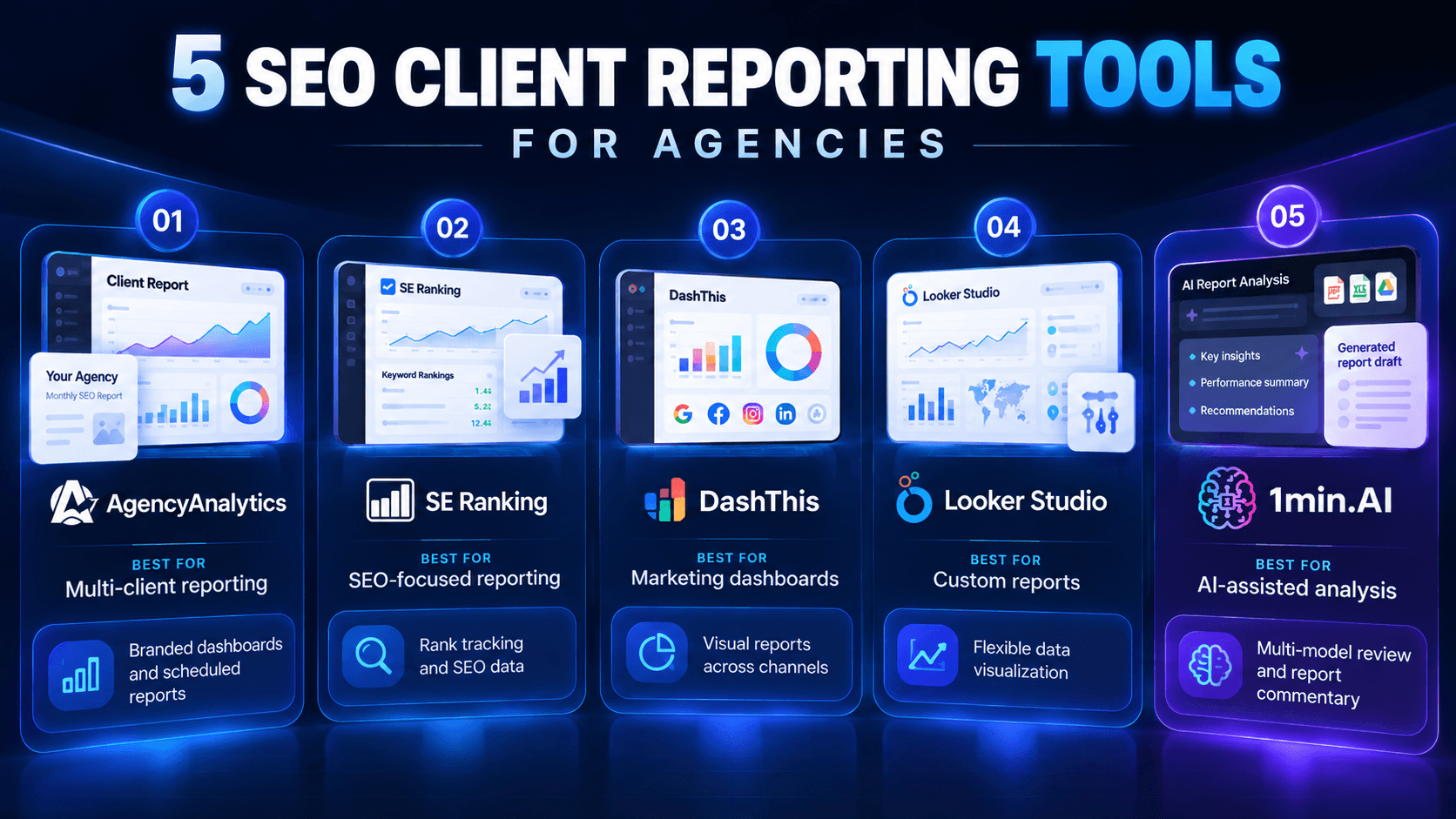
The best reporting stack depends on your client volume, branding requirements, available integrations, and budget.
These five tools address different stages of the reporting process.
| Tool | Best for | Key strength |
|---|---|---|
| AgencyAnalytics | Multi-client reporting | Branded dashboards and scheduled reports |
| SE Ranking | SEO-focused reporting | Rank tracking and SEO data |
| DashThis | Marketing dashboards | Visual reports across channels |
| Looker Studio | Custom reports | Flexible data visualization |
| 1min.AI | AI-assisted analysis | Multi-model review and report commentary |
1. AgencyAnalytics – Best for multi-client reporting
AgencyAnalytics is designed for marketing agencies that need to manage reports across multiple client accounts.
Its reporting capabilities include white-label branding, dashboards, automated scheduling, and integrations with marketing data sources.
Best for: Agencies that want centralized client reporting without manually rebuilding dashboards every month.
Consideration: Agencies should evaluate pricing against the number of client accounts and required features.
2. SE Ranking – Best for SEO performance tracking
SE Ranking combines SEO research, rank tracking, website analysis, and reporting capabilities.
It is useful for agencies that want SEO performance data and client-facing reports within the same ecosystem.
Best for: Teams prioritizing keyword rankings, SEO monitoring, and branded reporting.
Consideration: Check the reporting and agency features included in your chosen plan.
3. DashThis – Best for visual client dashboards
DashThis focuses on simplifying marketing reporting through customizable dashboards and data integrations.
Agencies can combine information from different marketing channels into reports designed for client communication.
Best for: Teams managing SEO alongside paid advertising and other digital marketing services.
Consideration: Specialized SEO research and detailed technical analysis may still require additional tools.
4. Looker Studio – Best for customizable reporting
Looker Studio enables agencies to create interactive reports using connected data sources.
Its flexibility makes it attractive to teams comfortable configuring dashboards and maintaining their own reporting templates.
Best for: Agencies that want customizable reports without relying entirely on a dedicated reporting platform.
Consideration: Initial setup, connector availability, and ongoing maintenance can require technical effort.
5. 1min.AI – Best for AI-assisted reporting insights
Traditional reporting platforms show what happened. Agencies still need to explain why performance changed and what clients should do next.
That's where 1min.AI can complement a reporting stack.
With Document Chat and multiple AI models, agencies can analyze approved performance exports, draft executive summaries, and identify questions requiring further investigation.
Best for: SEO teams looking to streamline reporting commentary, document analysis, and editorial review.
Consideration: 1min.AI is not a dedicated white-label SEO dashboard or a replacement for specialized analytics platforms.
How to automate SEO client reporting with AI
Automated SEO reporting works best when data collection, analysis, commentary, and approval are treated as connected stages.
Agencies can start improving this process without replacing their current reporting tools.
Step 1: Collect SEO performance data
Use Google Search Console, Google Analytics 4, and relevant SEO tracking tools to gather performance metrics.
Focus on data that matches the client's agreed KPIs, reporting period, and business objectives.
Step 2: Create a white-label SEO report
Use a reporting platform to organize metrics into branded dashboards or scheduled reports.
A consistent template helps clients understand results and reduces formatting work across accounts.
Step 3: Generate performance commentary with 1min.AI
Export the relevant report data and provide it to 1min.AI through supported document and chat features.
Ask AI to identify meaningful changes, summarize performance, and prepare client-friendly explanations.
For example:
Example prompt:
"Analyze this monthly SEO performance report. Compare the current and previous periods, identify meaningful changes, explain what the data supports, and draft a concise client summary. Do not invent metrics or claim causes that the data cannot establish."
This helps account managers prepare initial commentary without writing every explanation from scratch.
Step 4: Use multiple AI models for review
With 1min.AI's multi-model capabilities, teams can request a second evaluation of the report summary.
Check whether conclusions match the supplied data, whether recommendations are actionable, and whether the language is appropriate for the client.
AI review supports quality control, but it does not replace source verification.
Step 5: Approve and deliver the report
Before delivery, an account manager should verify key metrics, campaign activities, and recommendations.
The final report should tell clients what changed, what work was completed, and what happens next.
For broader agency workflows, explore our agency SEO software guide.
How future 1min.AI Agents could simplify reporting
Today's AI tools can support individual reporting tasks. The next opportunity is connecting these activities into repeatable workflows.
Future AI Agent capabilities could potentially help agencies coordinate SEO client reporting with less manual intervention.
A conceptual workflow could look like this:
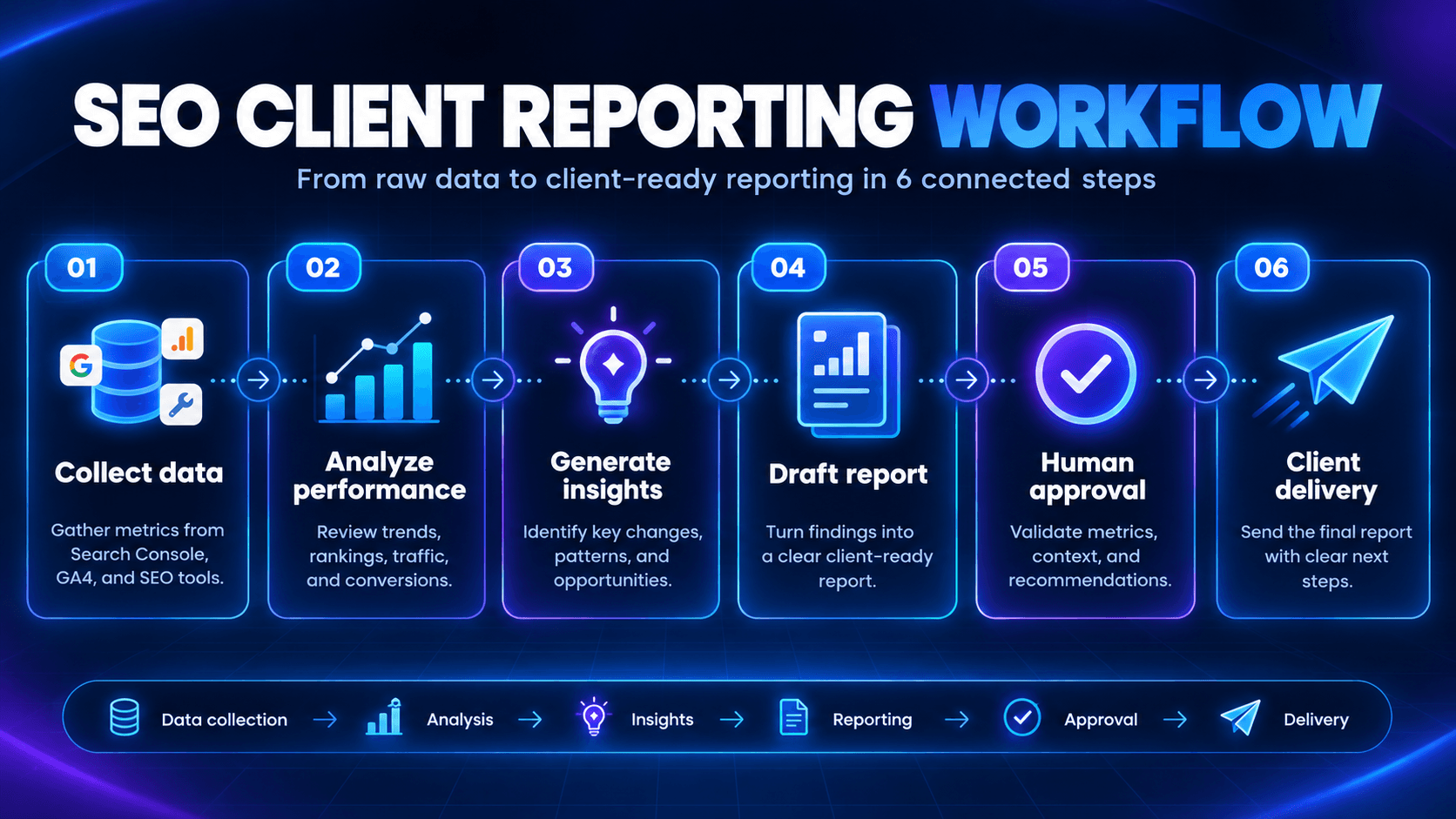
With appropriate integrations, permissions, and approval controls, a reporting agent could process client data, flag significant changes, and prepare reports for review.
This could be particularly valuable for agencies managing multiple clients with recurring monthly deliverables.
These are proposed future AI Agent applications, not confirmed currently available automated reporting integrations in 1min.AI.
The goal is to help agency teams spend less time assembling reports and more time providing strategic recommendations.
FAQ
What is SEO client reporting?
SEO client reporting involves tracking and communicating organic search performance, completed SEO work, and recommendations to clients.
What is white label SEO reporting?
White label SEO reporting allows agencies to present reports using their own branding rather than the reporting software provider's identity.
How can agencies automate SEO reports?
Agencies can use reporting platforms to collect data and schedule dashboards, then apply AI-assisted analysis to prepare performance summaries and recommendations.
Can AI generate SEO client reports?
AI can help analyze supplied data, summarize trends, and draft commentary. However, agencies must validate numbers, interpretations, and recommendations before delivery.
Can 1min.AI replace dedicated SEO reporting tools?
No. 1min.AI complements existing reporting software by supporting document analysis, AI-assisted writing, and multi-model review.
Make SEO client reporting more efficient with 1min.AI
Effective SEO client reporting isn't about sending more charts. It's about helping clients understand results and see the value of your agency's work.
By combining dedicated reporting software with AI-assisted analysis, agencies can reduce repetitive reporting tasks while maintaining quality and accountability.
Try 1min.AI to explore AI-powered document analysis, reporting commentary, and more connected workflows for your agency.
- #Commerce
Alternatives
Discover the best alternatives to 1minAI and compare features, pricing, and use cases.

1min.AI vs OpenRouter
1min.AI vs. OpenRouter: Compare the ready-to-use AI creation product against the technical API tool. Find out if you need a zero-code creative studio or a coding infrastructure hub.
 Ngoc Hong
1min.AI vs Jarvis AI
Compare 1min.AI vs Jarvis AI to discover which AI platform is better for writing, research, automation, and content creation. Find the best AI assistant for your workflow.
Ngoc Hong
1min.AI vs Taskade
Compare 1min.AI vs Taskade for AI content creation, automation, agents, and creative workflows to find the right workspace.
Ngoc HongAI Tools
Discover the best AI tools to boost productivity, creativity, and everyday work.

Create Consistent Cartoon Content in Just a Few Steps
Create engaging cartoon videos for TikTok and Reels with 1min.AI. Research ideas, create characters, and turn images into animated videos in 3 simple steps.
 Lien Anh Vu
One Product, 10 UGC Creatives: How AI Makes Content Testing Easier
Create more authentic UGC with an AI UGC video generator, test more creative angles and scale affiliate content without filming every version.
Lien Anh Vu
Top 4 Affordable AI Tools for Startup Founders
Discover the top 4 affordable AI tools for startup founders to validate ideas, build products, create content, and launch faster without overspending.
 Tram Ta
AI Features
Comprehensive AI features that streamline workflows, improve efficiency, and empower teams to achieve more.
Create Consistent Cartoon Content in Just a Few Steps
Create engaging cartoon videos for TikTok and Reels with 1min.AI. Research ideas, create characters, and turn images into animated videos in 3 simple steps.
Lien Anh VuOne Product, 10 UGC Creatives: How AI Makes Content Testing Easier
Create more authentic UGC with an AI UGC video generator, test more creative angles and scale affiliate content without filming every version.
Lien Anh Vu
1minAI: Free AI Grammar Checker
Check grammar for free with 1minAI’s AI grammar checker. Find grammar, spelling, and writing mistakes, improve clarity, and polish your content in seconds.
Tram TaAI Use Cases
A curated collection of AI use cases for business, productivity, and industry-specific applications.
Create Consistent Cartoon Content in Just a Few Steps
Create engaging cartoon videos for TikTok and Reels with 1min.AI. Research ideas, create characters, and turn images into animated videos in 3 simple steps.
Lien Anh VuOne Product, 10 UGC Creatives: How AI Makes Content Testing Easier
Create more authentic UGC with an AI UGC video generator, test more creative angles and scale affiliate content without filming every version.
Lien Anh Vu
Best Time to Post on Instagram: A Practical Guide for Better Engagement
Discover the best time to post on Instagram, including the best days and times for different audiences, plus tips to find the ideal posting schedule for your account.
Tram TaAI Tutorials
Learn how to use AI with practical, step-by-step tutorials.

Black Friday AI Tool Deals in 2026
Discover what Black Friday AI tool deals 2026 has to offer. Find out how to secure the 1min.AI lifetime deal via AppSumo, Dealify, Stack Social, and verify on Trustpilot, Slashdot, and Software Advice.
 Hang Nguyen
Create Consistent Cartoon Content in Just a Few Steps
Create engaging cartoon videos for TikTok and Reels with 1min.AI. Research ideas, create characters, and turn images into animated videos in 3 simple steps.
Lien Anh Vu
[Seedance 2.5 New] Better AI Product Videos, Less Rework in 1min.AI
Use Seedance 2.5 image to video on 1min.AI to create more consistent AI product videos, reduce failed generations, save credits, and improve UGC workflows.
Lien Anh VuAI Guides
Learn AI faster with practical guides, real-world examples, and actionable best practices.

Safely Buy AI Tools Online: 2026 Black Friday Guide
Discover how to find and secure the best Black Friday AI deals online. Learn expert strategies to avoid scams, combat subscription fatigue, and verify software.
Hang NguyenCreate Consistent Cartoon Content in Just a Few Steps
Create engaging cartoon videos for TikTok and Reels with 1min.AI. Research ideas, create characters, and turn images into animated videos in 3 simple steps.
Lien Anh Vu[Seedance 2.5 New] Better AI Product Videos, Less Rework in 1min.AI
Use Seedance 2.5 image to video on 1min.AI to create more consistent AI product videos, reduce failed generations, save credits, and improve UGC workflows.
Lien Anh VuAI Solutions
Browse the best AI solutions for automation, coding, research, productivity, customer support, marketing, and business workflows.
Safely Buy AI Tools Online: 2026 Black Friday Guide
Discover how to find and secure the best Black Friday AI deals online. Learn expert strategies to avoid scams, combat subscription fatigue, and verify software.
Hang NguyenCreate Consistent Cartoon Content in Just a Few Steps
Create engaging cartoon videos for TikTok and Reels with 1min.AI. Research ideas, create characters, and turn images into animated videos in 3 simple steps.
Lien Anh VuOne Product, 10 UGC Creatives: How AI Makes Content Testing Easier
Create more authentic UGC with an AI UGC video generator, test more creative angles and scale affiliate content without filming every version.
Lien Anh VuAI Models
Explore the world's leading AI models in one place.
Create Consistent Cartoon Content in Just a Few Steps
Create engaging cartoon videos for TikTok and Reels with 1min.AI. Research ideas, create characters, and turn images into animated videos in 3 simple steps.
Lien Anh VuOne Product, 10 UGC Creatives: How AI Makes Content Testing Easier
Create more authentic UGC with an AI UGC video generator, test more creative angles and scale affiliate content without filming every version.
Lien Anh Vu[Seedance 2.5 New] Better AI Product Videos, Less Rework in 1min.AI
Use Seedance 2.5 image to video on 1min.AI to create more consistent AI product videos, reduce failed generations, save credits, and improve UGC workflows.
Lien Anh VuAI Comparisons
Compare AI tools, models, and platforms to find the best fit for your needs.

Kling AI Vs Veo 3: Which Model Wins?
Kling AI vs Veo 3: compare motion, native audio, pricing & free tiers to see which AI video generator wins for your project - try both on 1min.AI.
 Trang Tran
[Seedance 2.5 New] Better AI Product Videos, Less Rework in 1min.AI
Use Seedance 2.5 image to video on 1min.AI to create more consistent AI product videos, reduce failed generations, save credits, and improve UGC workflows.
Lien Anh Vu
DeepSeek V4 Pro vs Flash Comparison
Compare DeepSeek V4 Pro vs DeepSeek V4 Flash metrics. Optimize your agentic apps and improve AI fact checking on 1min.ai today.
Ngoc HongAI Integrations
Seamlessly integrate AI with the tools you already use to automate work and boost productivity.

POV: You Have 10+ Posts to Make Every Day
Learn how to build an AI content workflow that helps content creators produce 10+ social media posts a day faster with AI brainstorming, image generation, and content creation.
Lien Anh Vu
How to Use an AI Fashion Video Generator for Fashion Week 2026
Turn Fashion Week 2026 ideas into stunning fashion videos with AI. Learn how to brainstorm, create visuals, and transform images into videos with one simple workflow.
Lien Anh Vu
Stop Switching Between AI Apps: How AI Integration Transforms Employer Branding
Discover how AI integration helps HR teams streamline employer branding by combining AI writing, documents, images, video, and multiple AI models into one workspace.
Tram TaAI for Industries
Find the best AI tools and workflows for healthcare, finance, education, legal, manufacturing, retail, real estate, and more

Free AI Product Description Generator
Write product descriptions that sell in minutes. Use this free AI product description generator to turn details or a photo into on-brand copy. Try 1min.AI.
Trang Tran
Best Business Productivity Tools for Startups to Maximize Profits | 1minAI
Discover the best business productivity tools for startups to save time, streamline workflows, reduce repetitive tasks, and support profitable growth with AI.
Tram Ta
Best AI Tool for Content Marketing |1minAI
Looking for the best AI tool for content marketing? See how 1minAI helps marketers research, write, repurpose, create visuals, and scale content from one AI workspace.
Tram TaAI Agents
Discover and run AI agents to automate tasks across your work and daily life.
1minAI: Free AI Grammar Checker
Check grammar for free with 1minAI’s AI grammar checker. Find grammar, spelling, and writing mistakes, improve clarity, and polish your content in seconds.
Tram Ta
AI Agents for Facebook
Use an AI Agent for Facebook to create content, generate images, schedule posts, and publish from your documents and conversations.
Ngoc Hong
AI Agent vs AI Assistant: Which One Actually Saves Designers More Time?
Learn the difference between AI Agent vs AI Assistant and discover which solution helps designers automate repetitive work, reduce revisions, and save more time.
Lien Anh VuAI Workflows
Explore ready-to-use AI workflows for productivity, marketing, sales, support, and more.
Create Consistent Cartoon Content in Just a Few Steps
Create engaging cartoon videos for TikTok and Reels with 1min.AI. Research ideas, create characters, and turn images into animated videos in 3 simple steps.
Lien Anh VuOne Product, 10 UGC Creatives: How AI Makes Content Testing Easier
Create more authentic UGC with an AI UGC video generator, test more creative angles and scale affiliate content without filming every version.
Lien Anh VuPOV: You Have 10+ Posts to Make Every Day
Learn how to build an AI content workflow that helps content creators produce 10+ social media posts a day faster with AI brainstorming, image generation, and content creation.
Lien Anh VuNewsletter
Weekly AI Innovations with 1minAI

🔮 Weekly AI Innovations #142: Grok 4.7, Opus 5.5 & Sonnet 5.5 on 1min.ai
Access Grok 4.7, Claude Opus 5.5, and Sonnet 5.5 on 1min.ai. Cut subscription costs by up to 70% and process millions tokens in a single unified workspace.
Hang Nguyen
🔮 Weekly AI Innovations #141: Seedance 2.5 & Stable Audio 3: Next-Gen AI
Explore Seedance 2.0, 2.5, and StabilityAI's Stable Audio 3 on 1min.ai. Generate studio-grade audio and synchronized motion with next-gen generative AI.
Hang Nguyen
🔮 Weekly AI Innovations #140: Deepseek 4.1 Flash & Gemini Upgrades
Explore Deepseek 4.1 Flash and new Gemini models on 1min.ai. Plus, check our update on your Billing - Usage page for better clarity.
Hang Nguyen