
[Seedance 2.5 New] Better AI Product Videos, Less Rework in 1min.AI

Lien Anh Vu
September 9, 2026
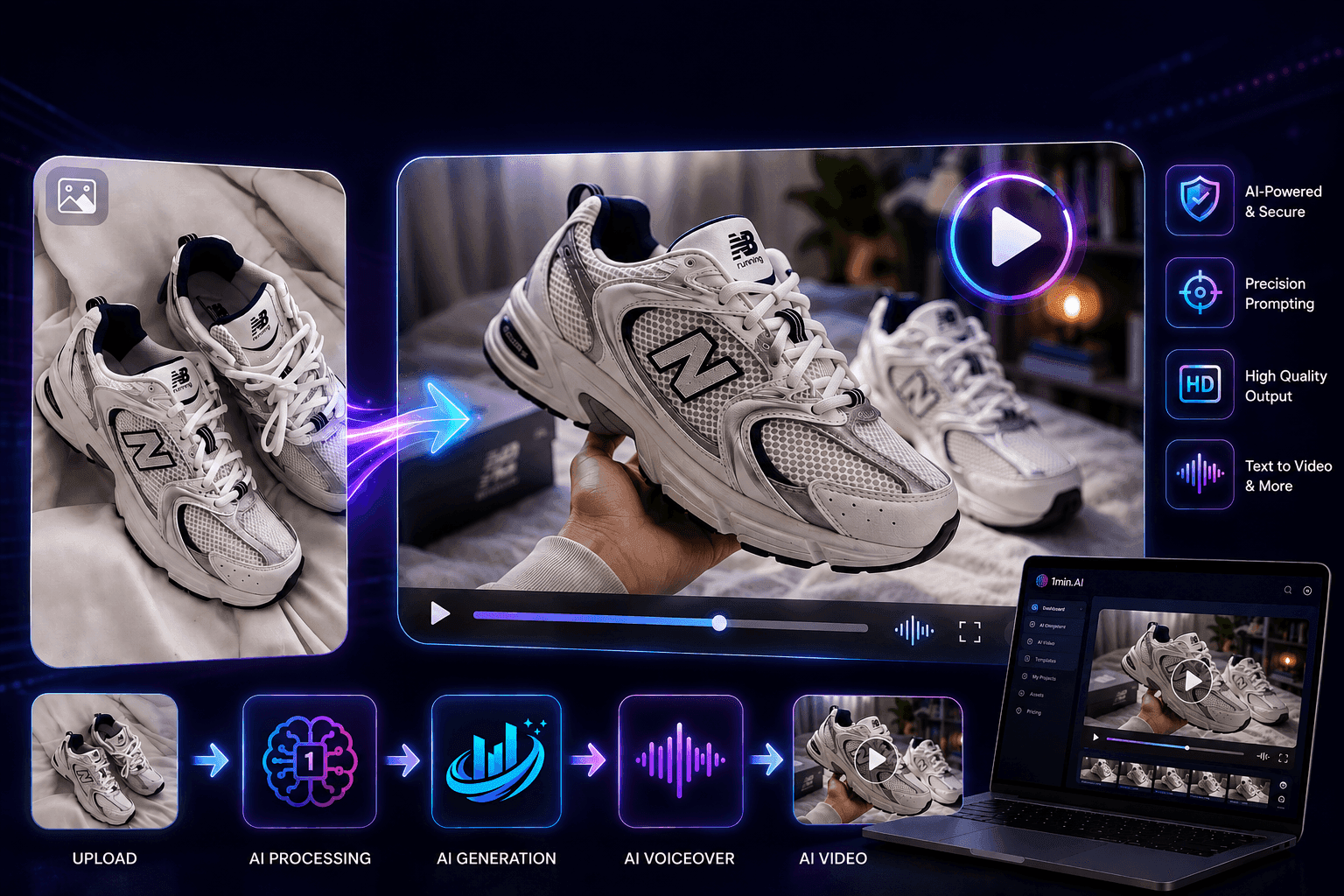
Discover how AI image-to-video product consistency helps creators reduce failed generations, save AI credits, and produce more usable commercial and UGC content.
AI image-to-video makes commercial and UGC content faster to produce—but speed means little when the product changes during generation. Warped logos, distorted shapes, unreadable text, inconsistent textures, and unnatural product-human interactions can turn a promising video into another regeneration. With better product consistency and motion control, creators can reduce wasted credits and waiting time while producing more usable content. This article explores how Seedance 2.5 helps address these challenges and why product consistency is ultimately a production efficiency issue, not just a quality issue.
AI Image-to-Video Product Consistency: Why It Matters for Commercial Content
AI image-to-video has made commercial and UGC content significantly faster to produce. Instead of setting up a camera, lighting, and a full product shoot, creators can start with a single product image and use AI to turn it into dynamic video content.
But faster generation does not always mean faster production.
One of the biggest challenges is product inconsistency. Once a static product image begins to move, its logo, shape, texture, material, or packaging text can change or become distorted. Human-product interactions can also break down, with unnatural hand movements, objects overlapping, or products deforming during the action. Some tools may even introduce unwanted visual elements or branding, creating another obstacle for creators and brands that need to maintain a consistent visual identity.
When the result is unusable, creators have to regenerate it. That means consuming more AI credits and spending more time waiting for another generation.
This is why product consistency is not simply a visual quality issue. It is a production efficiency issue.
Why Product Consistency Matters in AI Video
In commercial and UGC content, the product is the central subject. Whether it is a skincare product, fashion item, electronic device, or packaged good, viewers need to see the same product that is actually being promoted.
If the product changes during the video, the content can lose both accuracy and credibility. This is especially important for affiliate creators and influencers, where the video needs to represent the actual product clearly. For sponsored campaigns, inconsistent packaging, logos, or product details can also create additional rounds of review and revision.
Common AI video inconsistencies include:
- Logo distortion: Brand marks become warped, altered, or difficult to recognize.
- Text errors: Packaging labels and product text become unreadable or incorrect.
- Shape and proportion changes: The product becomes wider, thinner, larger, or otherwise visually different.
- Texture and material changes: Surfaces lose their original appearance or become artificial.
- Unnatural product interaction: Hands, objects, or other elements overlap with the product incorrectly.
- Strange human motion: Gestures and movements can look physically unnatural or disconnected from the product.
These problems show why a commercially useful AI video model needs to do more than create attractive visuals. It needs to maintain the identity of the subject while generating believable movement around it.
Seedance 2.5: From Product Reference to Controlled Motion
This is where Seedance 2.5 becomes relevant for product-focused image-to-video generation.
When transforming a product image into video, two capabilities are particularly important: reference fidelity and motion control.
Reference fidelity helps the generated video stay closer to the original product reference instead of freely changing its defining characteristics. Motion control, meanwhile, allows creators to describe how the product, camera, and surrounding elements should move.
A simple principle captures the workflow:
Reference defines the product → Prompt defines the motion.
The reference image establishes what the product should look like. The prompt then describes what should happen in the scene—such as a slow camera push-in, product rotation, a hand picking up the product, or a smooth product reveal.
This distinction is important for commercial content. Creators are not asking AI to invent a product that looks similar to their reference. They need to take the actual product visual and turn it into a dynamic, usable piece of content.
Compared with simply prioritizing cinematic output, a reference-driven workflow puts more emphasis on preserving what matters commercially: product appearance, brand identity, and the relationship between the product and the action.
Better Product Consistency Means Better Production Efficiency
The biggest benefit of product consistency is not necessarily that the final video looks better. It is that creators spend less time fixing videos that should never have required another generation.
Consider a typical AI video workflow. A creator generates a product video and notices that the logo has changed. They regenerate it. The second version preserves the logo but produces unnatural hand movement. They try again, only to find that the product shape has changed during the final shot.
Each failed generation costs resources.
The production logic is straightforward:
Better product consistency → fewer failed generations → fewer regenerations → fewer wasted credits → less waiting → more usable content.
For creators, this means more time can be spent developing creative ideas rather than correcting AI errors. A single product reference can also be used to create multiple variations, allowing creators to test different hooks, camera movements, angles, and UGC scenarios without starting the entire production process from scratch.
For brands and companies, the same principle can translate into lower production friction. When fewer outputs need to be regenerated or manually corrected, teams can produce and test more content with the same time and resources.
The goal of AI video production, therefore, should not simply be to generate more videos. It should be to generate more usable videos per generation.
How to Use Seedance 2.5 for AI Product Videos
Once you have a product reference image, creating a product video with Seedance 2.5 can be kept simple. The key is to use the reference image to preserve the product while using the prompt to control its movement.
1. Try Seedance 2.5
Start by selecting Seedance 2.5 in 1min.AI and click Try Now to open the video generation workflow.
2. Choose Your Video Ratio
Select the aspect ratio that matches where you plan to publish the content. For example, use 9:16 for TikTok and Reels, 1:1 for square social content, or 16:9 for YouTube and other landscape formats.
3. Set the Duration
Choose the video duration based on the type of content you want to create. Shorter clips work well for quick product reveals, UGC hooks, and social ads, while longer durations can support more detailed product demonstrations.
4. Add Your Reference Image
Upload a clear product image as the reference image. This gives Seedance 2.5 a visual foundation for the product and helps maintain important details such as its shape, packaging, and overall appearance.
5. Write a Clear, Motion-Focused Prompt
When writing a prompt for Seedance 2.5, avoid describing the product from scratch if you are already using a reference image. Instead, use the prompt to clearly define what happens, how the subject moves, how the camera moves, and what visual style you want.
A well-structured product video prompt should typically include:
- Subject & action: What the person or product is doing
- Interaction: How the person physically interacts with the product
- Camera movement: Push-in, pull-back, tracking shot, close-up, or static shot
- Motion quality: Natural, smooth, controlled, realistic movement
- Environment & lighting: Studio, lifestyle, outdoor, soft lighting, etc.
- Visual style: UGC, premium commercial, editorial, cinematic, or realistic
For example:
“A woman naturally picks up the skincare bottle from the table and holds it toward the camera. She moves her hand slowly and naturally while keeping the bottle clearly visible. Subtle camera push-in, soft studio lighting, realistic hand movement, natural product interaction, premium UGC style.”
Prompting Tips for Better Product Consistency
To reduce unnecessary changes to the product during generation:
1. Let the reference image define the product Use a clear, high-quality reference image and avoid unnecessarily rewriting the product's appearance in the prompt. This helps keep the prompt focused on motion rather than competing with the visual reference.
2. Describe one clear action at a time Avoid packing too many actions into a short clip. A simple sequence such as pick up → hold → show to camera is easier to control than several complex interactions happening simultaneously.
3. Be specific about product interaction Instead of saying “the woman uses the product,” describe the physical action: picks up the bottle, rotates it toward the camera, places it on the table, or holds it steadily at chest level.
4. Keep camera movement intentional Specify how the camera should move rather than using vague descriptions such as “make it cinematic.” For example: slow camera push-in or gentle side tracking shot.
5. Avoid conflicting instructions Do not combine contradictory directions such as “static camera” and “dynamic tracking shot” in the same prompt. Keep the movement, camera direction, and pacing consistent.
6. Check the product throughout the entire video A product may look correct in the first frame but change during motion. After generation, review the logo, text, shape, proportions, materials, texture, and product-human interaction from beginning to end.
A Simple Prompt Formula
A useful structure is:
[Subject] + [Action] + [Product Interaction] + [Camera Movement] + [Motion] + [Lighting/Environment] + [Style]
For example:
“A female creator picks up the skincare bottle and holds it toward the camera, keeping the product facing forward. Slow natural hand movement, subtle camera push-in, soft daylight, realistic product interaction, clean premium UGC style.”
The goal is not to make the prompt as long as possible. A clear reference image combined with a focused, specific motion prompt is often more useful than a long prompt filled with unnecessary product descriptions.
🚀 Navigate to 1min.AI now to unlock Seedance 2.5 and turn static product photos into distortion-free, high-converting UGC videos instantly!
Alternatives
Discover the best alternatives to 1minAI and compare features, pricing, and use cases.

1min.AI vs OpenRouter
1min.AI vs. OpenRouter: Compare the ready-to-use AI creation product against the technical API tool. Find out if you need a zero-code creative studio or a coding infrastructure hub.
 Ngoc Hong
1min.AI vs Chatplayground AI
Compare 1min.AI (Voice Cloning, Object Removal, Team Plans) vs. ChatPlayground AI (14+ Models, Teams/O365 Integration). Discover the superior platform for predictable pricing and long-term content production growth.
Ngoc Hong
1min.AI vs Krater AI
Compare 1min.AI vs Krater AI features, pricing, AI models, and workflows to find the best all-in-one AI tool for content, design, and productivity.
Ngoc HongAI Tools
Discover the best AI tools to boost productivity, creativity, and everyday work.

Top 4 Affordable AI Tools for Startup Founders
Discover the top 4 affordable AI tools for startup founders to validate ideas, build products, create content, and launch faster without overspending.
 Tram Ta
[Seedance 2.5 New] Better AI Product Videos, Less Rework in 1min.AI
Discover how AI image-to-video product consistency helps creators reduce failed generations, save AI credits, and produce more usable commercial and UGC content.
 Lien Anh Vu
Turn “Make It Better” Into Better Content With AI
Use AI to turn vague client feedback into clear revisions, reduce unnecessary edits, and deliver better content faster.
Lien Anh VuAI Features
Comprehensive AI features that streamline workflows, improve efficiency, and empower teams to achieve more.

One Product, 10 UGC Creatives: How AI Makes Content Testing Easier
Create more authentic UGC with an AI UGC video generator, test more creative angles and scale affiliate content without filming every version.
Lien Anh Vu
Create Consistent Cartoon Content in Just a Few Steps
Create cartoon videos for TikTok and Reels in 3 simple steps with 1min.AI, from researching ideas to characters and animated videos.
Lien Anh Vu
1minAI: Free AI Grammar Checker
Check grammar for free with 1minAI’s AI grammar checker. Find grammar, spelling, and writing mistakes, improve clarity, and polish your content in seconds.
Tram TaAI Use Cases
A curated collection of AI use cases for business, productivity, and industry-specific applications.
One Product, 10 UGC Creatives: How AI Makes Content Testing Easier
Create more authentic UGC with an AI UGC video generator, test more creative angles and scale affiliate content without filming every version.
Lien Anh Vu
Best Time to Post on Instagram: A Practical Guide for Better Engagement
Discover the best time to post on Instagram, including the best days and times for different audiences, plus tips to find the ideal posting schedule for your account.
Tram TaTurn “Make It Better” Into Better Content With AI
Use AI to turn vague client feedback into clear revisions, reduce unnecessary edits, and deliver better content faster.
Lien Anh VuAI Tutorials
Learn how to use AI with practical, step-by-step tutorials.

Black Friday AI Tool Deals in 2026
Discover what Black Friday AI tool deals 2026 has to offer. Find out how to secure the 1min.AI lifetime deal via AppSumo, Dealify, Stack Social, and verify on Trustpilot, Slashdot, and Software Advice.
 Hang Nguyen
Create Consistent Cartoon Content in Just a Few Steps
Create cartoon videos for TikTok and Reels in 3 simple steps with 1min.AI, from researching ideas to characters and animated videos.
Lien Anh Vu[Seedance 2.5 New] Better AI Product Videos, Less Rework in 1min.AI
Discover how AI image-to-video product consistency helps creators reduce failed generations, save AI credits, and produce more usable commercial and UGC content.
Lien Anh VuAI Guides
Learn AI faster with practical guides, real-world examples, and actionable best practices.

Safely Buy AI Tools Online: 2026 Black Friday Guide
Discover how to find and secure the best Black Friday AI deals online. Learn expert strategies to avoid scams, combat subscription fatigue, and verify software.
Hang NguyenCreate Consistent Cartoon Content in Just a Few Steps
Create cartoon videos for TikTok and Reels in 3 simple steps with 1min.AI, from researching ideas to characters and animated videos.
Lien Anh Vu[Seedance 2.5 New] Better AI Product Videos, Less Rework in 1min.AI
Discover how AI image-to-video product consistency helps creators reduce failed generations, save AI credits, and produce more usable commercial and UGC content.
Lien Anh VuAI Solutions
Browse the best AI solutions for automation, coding, research, productivity, customer support, marketing, and business workflows.

Free AI Tattoo Generator: Custom Designs
Turn any idea into a custom tattoo design with 1min.AI's free AI tattoo generator. Describe your idea, pick a style, and download in seconds.
 Trang Tran
Safely Buy AI Tools Online: 2026 Black Friday Guide
Discover how to find and secure the best Black Friday AI deals online. Learn expert strategies to avoid scams, combat subscription fatigue, and verify software.
Hang Nguyen[Seedance 2.5 New] Better AI Product Videos, Less Rework in 1min.AI
Discover how AI image-to-video product consistency helps creators reduce failed generations, save AI credits, and produce more usable commercial and UGC content.
Lien Anh VuAI Models
Explore the world's leading AI models in one place.
One Product, 10 UGC Creatives: How AI Makes Content Testing Easier
Create more authentic UGC with an AI UGC video generator, test more creative angles and scale affiliate content without filming every version.
Lien Anh VuCreate Consistent Cartoon Content in Just a Few Steps
Create cartoon videos for TikTok and Reels in 3 simple steps with 1min.AI, from researching ideas to characters and animated videos.
Lien Anh Vu[Seedance 2.5 New] Better AI Product Videos, Less Rework in 1min.AI
Discover how AI image-to-video product consistency helps creators reduce failed generations, save AI credits, and produce more usable commercial and UGC content.
Lien Anh VuAI Comparisons
Compare AI tools, models, and platforms to find the best fit for your needs.

Kling AI Vs Veo 3: Which Model Wins?
Kling AI vs Veo 3: compare motion, native audio, pricing & free tiers to see which AI video generator wins for your project - try both on 1min.AI.
Trang Tran[Seedance 2.5 New] Better AI Product Videos, Less Rework in 1min.AI
Discover how AI image-to-video product consistency helps creators reduce failed generations, save AI credits, and produce more usable commercial and UGC content.
Lien Anh Vu
DeepSeek V4 Pro vs Flash Comparison
Compare DeepSeek V4 Pro vs DeepSeek V4 Flash metrics. Optimize your agentic apps and improve AI fact checking on 1min.ai today.
Ngoc HongAI Integrations
Seamlessly integrate AI with the tools you already use to automate work and boost productivity.

POV: You Have 10+ Posts to Make Every Day
Learn how to build an AI content workflow that helps content creators produce 10+ social media posts a day faster with AI brainstorming, image generation, and content creation.
Lien Anh Vu
How to Use an AI Fashion Video Generator for Fashion Week 2026
Turn Fashion Week 2026 ideas into stunning fashion videos with AI. Learn how to brainstorm, create visuals, and transform images into videos with one simple workflow.
Lien Anh Vu
Stop Switching Between AI Apps: How AI Integration Transforms Employer Branding
Discover how AI integration helps HR teams streamline employer branding by combining AI writing, documents, images, video, and multiple AI models into one workspace.
Tram TaAI for Industries
Find the best AI tools and workflows for healthcare, finance, education, legal, manufacturing, retail, real estate, and more

Free AI Real Estate Video Generator
Turn listing photos into narrated property videos with AI real estate video tools. See how 1min.AI creates walkthroughs, voiceovers & captions in minutes.
Trang Tran
How to Launch an AI SaaS Without Building AI Models From Scratch
Learn how to launch an AI SaaS without building AI models from scratch. Explore white-label AI, product strategy, branding, pricing, and how 1minAI can help.
Tram Ta
Free AI Tools for Photographers to Elevate Creative Work
Discover free AI tools for photographers to edit images, create visuals and videos, develop content, and streamline client workflows with 1min.AI.
Lien Anh VuAI Agents
Discover and run AI agents to automate tasks across your work and daily life.
1minAI: Free AI Grammar Checker
Check grammar for free with 1minAI’s AI grammar checker. Find grammar, spelling, and writing mistakes, improve clarity, and polish your content in seconds.
Tram Ta
AI Agent vs AI Assistant: Which One Actually Saves Designers More Time?
Learn the difference between AI Agent vs AI Assistant and discover which solution helps designers automate repetitive work, reduce revisions, and save more time.
Lien Anh Vu
Free AI Picture Generator: Create Images in Minutes With 1minAI
Create images in minutes with a free AI picture generator. Learn how to generate high-quality visuals with 1minAI using simple prompts and AI models.
Tram TaAI Workflows
Explore ready-to-use AI workflows for productivity, marketing, sales, support, and more.
Create Consistent Cartoon Content in Just a Few Steps
Create cartoon videos for TikTok and Reels in 3 simple steps with 1min.AI, from researching ideas to characters and animated videos.
Lien Anh VuPOV: You Have 10+ Posts to Make Every Day
Learn how to build an AI content workflow that helps content creators produce 10+ social media posts a day faster with AI brainstorming, image generation, and content creation.
Lien Anh VuHow to Use an AI Fashion Video Generator for Fashion Week 2026
Turn Fashion Week 2026 ideas into stunning fashion videos with AI. Learn how to brainstorm, create visuals, and transform images into videos with one simple workflow.
Lien Anh VuNewsletter
Weekly AI Innovations with 1minAI

🔮 Weekly AI Innovations #136: Grok 4.6 and Smart Data Retention
Discover the latest 1min.ai updates! Upgrade to Grok 4.6 for blazing-fast AI, and check our new Data Retention policies to secure your files today.
Hang Nguyen
🔮 Weekly AI Innovations #135: Claude Opus 5 and new AI Social Features
Experience the powerful Claude Opus 5 model, and explore new AI Social features like User Pages and Following creators.
Hang Nguyen
🔮 Weekly AI Innovations #134: Experience Free Qwen on AI Chat; The 3.7 and 3.6 Series Update
Looking for a powerful, free AI assistant? Explore the latest Qwen 3.7 and 3.6 series on 1min.ai. Enjoy high-speed, accurate AI chat at zero cost today!
Hang Nguyen