
Free Claude Opus 5.5 on 1minAI: What It Is and How to Use It

Tram Ta
October 23, 2026
Discover what Claude Opus 5.5 can do, explore practical use cases, and learn how to try it on 1minAI for coding, research, and complex tasks.
Claude Opus 5.5 is an advanced AI model designed for demanding tasks such as software development, research, long-document analysis, and professional problem-solving. Instead of using AI only for quick questions, you can give it detailed context and ask it to work through a more complex task.
You can try Claude Opus 5.5 on 1minAI through its dedicated model page and use AI chat to explore real-world applications. This guide explains what the model is, what it can help you do, and how to get better results from your first prompts.
What Is Claude Opus 5.5?
Claude Opus 5.5 is a large language model developed by Anthropic and released on September 22, 2026. It is built for long-running coding tasks, complex reasoning, and knowledge work that requires handling substantial amounts of information.
According to Anthropic's official model documentation, Claude Opus 5.5 supports a context window of up to one million tokens and uses adaptive thinking. This allows the model to adjust its reasoning effort to the task rather than treating every request the same way.
Its main strengths include:
- Software development: Reviewing code, debugging, refactoring, and planning larger changes.
- Research and analysis: Organizing information, extracting findings, and identifying inconsistencies across documents.
- Professional writing: Drafting reports, proposals, technical explanations, and structured business documents.
- Complex problem-solving: Breaking complicated requests into smaller steps and producing organized recommendations.
These capabilities do not mean every answer will be correct. Important facts, calculations, code changes, and professional recommendations should still be checked.
Can You Use Claude Opus 5.5 for Free?
You can try Claude Opus 5.5 through the dedicated model page on 1minAI:
The page provides an entry point for chatting with the model without having to build your own API integration. However, access conditions, usage limits, and account requirements may change, so check the current interface for the latest details.
For users who want to experiment with a capable AI model, this is a practical way to test it on real tasks before deciding whether it fits their workflow.
How to Use Free Claude Opus 5.5 on 1minAI
Getting started is straightforward.
Step 1: Open the Claude Opus 5.5 page
Visit the Claude Opus 5.5 AI chat page on 1minAI and follow the available instructions to open the chat.
Step 2: Give it a specific task
Choose a task that benefits from reasoning or detailed context. For example, provide a section of code to review, a report to summarize, or a project brief to turn into an action plan.
Avoid prompts that are too vague. Instead of asking, “Help me with my project,” explain the goal, the available information, the constraints, and the output you need.
Step 3: Review and refine the result
Read the response critically. Ask follow-up questions, request evidence for important claims, or specify what needs to change.
For example, you might say, “Separate confirmed facts from assumptions, identify the three biggest risks, and recommend the next steps in priority order.”
This iterative approach often produces a more useful result than accepting the first response.
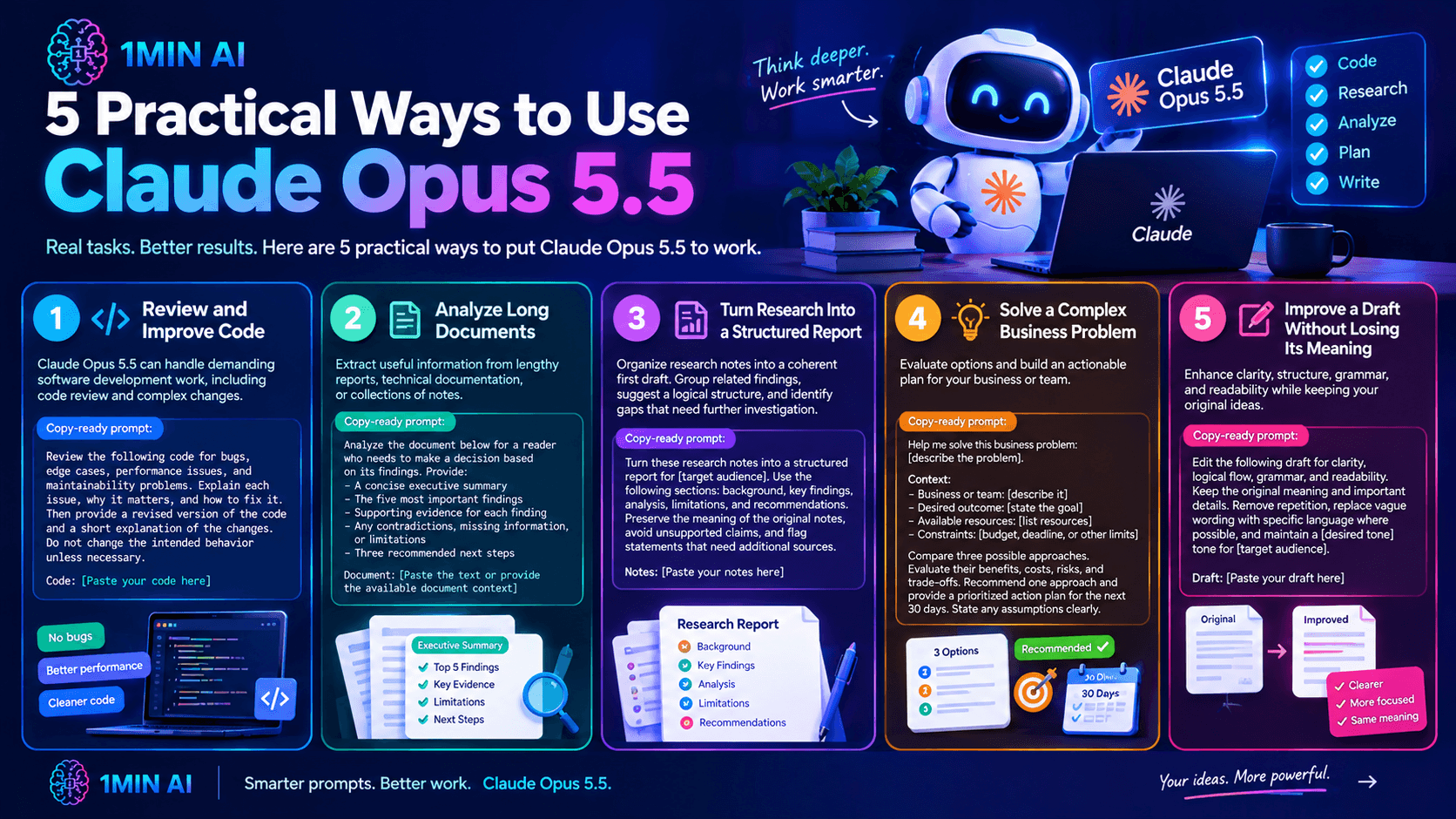
5 Practical Ways to Use Claude Opus 5.5
The best way to evaluate an AI model is to test it on tasks you actually need to complete. Here are five practical examples.
1. Review and Improve Code
Claude Opus 5.5 is designed to handle demanding software development work, including code review and complex changes. Developers can use it to examine code for potential bugs, maintainability issues, and edge cases.
Copy-ready prompt:
Review the following code for bugs, edge cases, performance issues, and maintainability problems.
Explain each issue, why it matters, and how to fix it. Then provide a revised version of the code and a short explanation of the changes. Do not change the intended behavior unless necessary.
Code:
[Paste your code here]
2. Analyze Long Documents
Researchers, students, and professionals often need to extract useful information from lengthy reports, technical documentation, or collections of notes.
Copy-ready prompt:
Analyze the document below for a reader who needs to make a decision based on its findings.
Provide:
- A concise executive summary
- The five most important findings
- Supporting evidence for each finding
- Any contradictions, missing information, or limitations
- Three recommended next steps
Clearly distinguish information stated in the document from your own interpretations.
Document:
[Paste the text or provide the available document context]
3. Turn Research Into a Structured Report
An AI model can help organize research notes into a coherent first draft. It can group related findings, suggest a logical structure, and identify gaps that require further investigation.
Copy-ready prompt:
Turn these research notes into a structured report for [target audience].
Use the following sections: background, key findings, analysis, limitations, and recommendations. Preserve the meaning of the original notes, avoid unsupported claims, and flag statements that need additional sources.
Notes:
[Paste your notes here]
4. Solve a Complex Business Problem
Business owners and team leaders can use Claude Opus 5.5 to evaluate options and build an actionable plan.
Copy-ready prompt:
Help me solve this business problem: [describe the problem].
Context:
- Business or team: [describe it]
- Desired outcome: [state the goal]
- Available resources: [list resources]
- Constraints: [budget, deadline, or other limits]
Compare three possible approaches. Evaluate their benefits, costs, risks, and trade-offs. Recommend one approach and provide a prioritized action plan for the next 30 days. State any assumptions clearly.
5. Improve a Draft Without Losing Its Meaning
Writers can use the model to improve clarity, structure, and tone while retaining their original ideas.
Copy-ready prompt:
Edit the following draft for clarity, logical flow, grammar, and readability.
Keep the original meaning and important details. Remove repetition, replace vague wording with specific language where possible, and maintain a [desired tone] tone for [target audience].
After the revised version, briefly list the most important changes you made.
Draft:
[Paste your draft here]
Explore Claude Opus 5.5 With 1minAI's AI Chat Tools
Claude Opus 5.5 can be a useful starting point for complex tasks, but different models may approach the same problem differently. 1minAI brings AI chat capabilities and other tools into one workspace, making it easier to explore different approaches.
Here are three resources to help you build a more consistent workflow:
- Claude Opus 5.5 on 1minAI: Open the dedicated page and try the model on your own tasks.
- 1minAI Multi AI Chat:Explore multi-model chat to compare responses and approaches. When the relevant models are available, try sending the same prompt to each and compare accuracy, clarity, reasoning, and usefulness.
- 1minAI AI Chat Memory: Explore chat memory features that can help maintain relevant context across ongoing work. Check the available settings and behavior for your workflow.
For example, you could ask Claude Opus 5.5 to review a project plan, use another available model to critique its assumptions, and then combine the strongest suggestions into a final version. Always verify important conclusions before acting on them.
Can Developers Build With Claude Opus 5.5?
If you want to integrate AI chat into an application rather than use it only through a chat interface, explore the 1minAI Chat With AI API documentation.
An API-based workflow can help developers incorporate AI responses into their own products or processes. Before implementing it, review the documentation for supported models, request parameters, authentication, response handling, and applicable usage limits.
Conclusion
Claude Opus 5.5 is designed for work that benefits from detailed context, structured reasoning, and multi-step problem-solving. It is worth testing on practical tasks such as code review, document analysis, research synthesis, and business planning rather than judging it only by simple questions.
To get started, visit Claude Opus 5.5 on 1minAI, try one of the prompts in this guide, and refine the output against your actual requirements. Check current access and usage conditions, and verify important results before using them in production.
For further information, explore 1minAI Multi AI Chat
Discover more AI features: https://1min.ai/features
Try 1minAI agent now: https://app.1min.ai/ai-agent-demo
- #Commerce
Alternatives
Discover the best alternatives to 1minAI and compare features, pricing, and use cases.

1min.AI vs OpenRouter
1min.AI vs. OpenRouter: Compare the ready-to-use AI creation product against the technical API tool. Find out if you need a zero-code creative studio or a coding infrastructure hub.
 Ngoc Hong
1min.AI vs Lovart
Looking for a Lovart alternative? Compare creative workflows, pricing considerations, and practical prompts to see whether 1min.AI fits your team.
Ngoc Hong
1min.AI vs Jarvis AI
Compare 1min.AI vs Jarvis AI to discover which AI platform is better for writing, research, automation, and content creation. Find the best AI assistant for your workflow.
Ngoc HongAI Tools
Discover the best AI tools to boost productivity, creativity, and everyday work.

Create Consistent Cartoon Content in Just a Few Steps
Create engaging cartoon videos for TikTok and Reels with 1min.AI. Research ideas, create characters, and turn images into animated videos in 3 simple steps.
 Lien Anh Vu
One Product, 10 UGC Creatives: How AI Makes Content Testing Easier
Create more authentic UGC with an AI UGC video generator, test more creative angles and scale affiliate content without filming every version.
Lien Anh Vu
Top 4 Affordable AI Tools for Startup Founders
Discover the top 4 affordable AI tools for startup founders to validate ideas, build products, create content, and launch faster without overspending.
 Tram Ta
AI Features
Comprehensive AI features that streamline workflows, improve efficiency, and empower teams to achieve more.
Create Consistent Cartoon Content in Just a Few Steps
Create engaging cartoon videos for TikTok and Reels with 1min.AI. Research ideas, create characters, and turn images into animated videos in 3 simple steps.
Lien Anh VuOne Product, 10 UGC Creatives: How AI Makes Content Testing Easier
Create more authentic UGC with an AI UGC video generator, test more creative angles and scale affiliate content without filming every version.
Lien Anh Vu
1minAI: Free AI Grammar Checker
Check grammar for free with 1minAI’s AI grammar checker. Find grammar, spelling, and writing mistakes, improve clarity, and polish your content in seconds.
Tram TaAI Use Cases
A curated collection of AI use cases for business, productivity, and industry-specific applications.
Create Consistent Cartoon Content in Just a Few Steps
Create engaging cartoon videos for TikTok and Reels with 1min.AI. Research ideas, create characters, and turn images into animated videos in 3 simple steps.
Lien Anh VuOne Product, 10 UGC Creatives: How AI Makes Content Testing Easier
Create more authentic UGC with an AI UGC video generator, test more creative angles and scale affiliate content without filming every version.
Lien Anh Vu
Best Time to Post on Instagram: A Practical Guide for Better Engagement
Discover the best time to post on Instagram, including the best days and times for different audiences, plus tips to find the ideal posting schedule for your account.
Tram TaAI Tutorials
Learn how to use AI with practical, step-by-step tutorials.

Black Friday AI Tool Deals in 2026
Discover what Black Friday AI tool deals 2026 has to offer. Find out how to secure the 1min.AI lifetime deal via AppSumo, Dealify, Stack Social, and verify on Trustpilot, Slashdot, and Software Advice.
 Hang Nguyen
Create Consistent Cartoon Content in Just a Few Steps
Create engaging cartoon videos for TikTok and Reels with 1min.AI. Research ideas, create characters, and turn images into animated videos in 3 simple steps.
Lien Anh Vu
[Seedance 2.5 New] Better AI Product Videos, Less Rework in 1min.AI
Use Seedance 2.5 image to video on 1min.AI to create more consistent AI product videos, reduce failed generations, save credits, and improve UGC workflows.
Lien Anh VuAI Guides
Learn AI faster with practical guides, real-world examples, and actionable best practices.

Safely Buy AI Tools Online: 2026 Black Friday Guide
Discover how to find and secure the best Black Friday AI deals online. Learn expert strategies to avoid scams, combat subscription fatigue, and verify software.
Hang NguyenCreate Consistent Cartoon Content in Just a Few Steps
Create engaging cartoon videos for TikTok and Reels with 1min.AI. Research ideas, create characters, and turn images into animated videos in 3 simple steps.
Lien Anh Vu[Seedance 2.5 New] Better AI Product Videos, Less Rework in 1min.AI
Use Seedance 2.5 image to video on 1min.AI to create more consistent AI product videos, reduce failed generations, save credits, and improve UGC workflows.
Lien Anh VuAI Solutions
Browse the best AI solutions for automation, coding, research, productivity, customer support, marketing, and business workflows.
Safely Buy AI Tools Online: 2026 Black Friday Guide
Discover how to find and secure the best Black Friday AI deals online. Learn expert strategies to avoid scams, combat subscription fatigue, and verify software.
Hang NguyenCreate Consistent Cartoon Content in Just a Few Steps
Create engaging cartoon videos for TikTok and Reels with 1min.AI. Research ideas, create characters, and turn images into animated videos in 3 simple steps.
Lien Anh VuOne Product, 10 UGC Creatives: How AI Makes Content Testing Easier
Create more authentic UGC with an AI UGC video generator, test more creative angles and scale affiliate content without filming every version.
Lien Anh VuAI Models
Explore the world's leading AI models in one place.
Create Consistent Cartoon Content in Just a Few Steps
Create engaging cartoon videos for TikTok and Reels with 1min.AI. Research ideas, create characters, and turn images into animated videos in 3 simple steps.
Lien Anh VuOne Product, 10 UGC Creatives: How AI Makes Content Testing Easier
Create more authentic UGC with an AI UGC video generator, test more creative angles and scale affiliate content without filming every version.
Lien Anh Vu[Seedance 2.5 New] Better AI Product Videos, Less Rework in 1min.AI
Use Seedance 2.5 image to video on 1min.AI to create more consistent AI product videos, reduce failed generations, save credits, and improve UGC workflows.
Lien Anh VuAI Comparisons
Compare AI tools, models, and platforms to find the best fit for your needs.

Kling AI Vs Veo 3: Which Model Wins?
Kling AI vs Veo 3: compare motion, native audio, pricing & free tiers to see which AI video generator wins for your project - try both on 1min.AI.
 Trang Tran
[Seedance 2.5 New] Better AI Product Videos, Less Rework in 1min.AI
Use Seedance 2.5 image to video on 1min.AI to create more consistent AI product videos, reduce failed generations, save credits, and improve UGC workflows.
Lien Anh Vu
DeepSeek V4 Pro vs Flash Comparison
Compare DeepSeek V4 Pro vs DeepSeek V4 Flash metrics. Optimize your agentic apps and improve AI fact checking on 1min.ai today.
Ngoc HongAI Integrations
Seamlessly integrate AI with the tools you already use to automate work and boost productivity.

POV: You Have 10+ Posts to Make Every Day
Learn how to build an AI content workflow that helps content creators produce 10+ social media posts a day faster with AI brainstorming, image generation, and content creation.
Lien Anh Vu
How to Use an AI Fashion Video Generator for Fashion Week 2026
Turn Fashion Week 2026 ideas into stunning fashion videos with AI. Learn how to brainstorm, create visuals, and transform images into videos with one simple workflow.
Lien Anh Vu
Stop Switching Between AI Apps: How AI Integration Transforms Employer Branding
Discover how AI integration helps HR teams streamline employer branding by combining AI writing, documents, images, video, and multiple AI models into one workspace.
Tram TaAI for Industries
Find the best AI tools and workflows for healthcare, finance, education, legal, manufacturing, retail, real estate, and more

Free AI Product Description Generator
Write product descriptions that sell in minutes. Use this free AI product description generator to turn details or a photo into on-brand copy. Try 1min.AI.
Trang Tran
Best Business Productivity Tools for Startups to Maximize Profits | 1minAI
Discover the best business productivity tools for startups to save time, streamline workflows, reduce repetitive tasks, and support profitable growth with AI.
Tram Ta
Best AI Tool for Content Marketing |1minAI
Looking for the best AI tool for content marketing? See how 1minAI helps marketers research, write, repurpose, create visuals, and scale content from one AI workspace.
Tram TaAI Agents
Discover and run AI agents to automate tasks across your work and daily life.
1minAI: Free AI Grammar Checker
Check grammar for free with 1minAI’s AI grammar checker. Find grammar, spelling, and writing mistakes, improve clarity, and polish your content in seconds.
Tram Ta
AI Agents for Facebook
Use an AI Agent for Facebook to create content, generate images, schedule posts, and publish from your documents and conversations.
Ngoc Hong
AI Agent vs AI Assistant: Which One Actually Saves Designers More Time?
Learn the difference between AI Agent vs AI Assistant and discover which solution helps designers automate repetitive work, reduce revisions, and save more time.
Lien Anh VuAI Workflows
Explore ready-to-use AI workflows for productivity, marketing, sales, support, and more.
Create Consistent Cartoon Content in Just a Few Steps
Create engaging cartoon videos for TikTok and Reels with 1min.AI. Research ideas, create characters, and turn images into animated videos in 3 simple steps.
Lien Anh VuOne Product, 10 UGC Creatives: How AI Makes Content Testing Easier
Create more authentic UGC with an AI UGC video generator, test more creative angles and scale affiliate content without filming every version.
Lien Anh VuPOV: You Have 10+ Posts to Make Every Day
Learn how to build an AI content workflow that helps content creators produce 10+ social media posts a day faster with AI brainstorming, image generation, and content creation.
Lien Anh VuNewsletter
Weekly AI Innovations with 1minAI

🔮 Weekly AI Innovations #142: Grok 4.7, Opus 5.5 & Sonnet 5.5 on 1min.ai
Access Grok 4.7, Claude Opus 5.5, and Sonnet 5.5 on 1min.ai. Cut subscription costs by up to 70% and process millions tokens in a single unified workspace.
Hang Nguyen
🔮 Weekly AI Innovations #141: Seedance 2.5 & Stable Audio 3: Next-Gen AI
Explore Seedance 2.0, 2.5, and StabilityAI's Stable Audio 3 on 1min.ai. Generate studio-grade audio and synchronized motion with next-gen generative AI.
Hang Nguyen
🔮 Weekly AI Innovations #140: Deepseek 4.1 Flash & Gemini Upgrades
Explore Deepseek 4.1 Flash and new Gemini models on 1min.ai. Plus, check our update on your Billing - Usage page for better clarity.
Hang Nguyen