
Free AI Chat With Claude Opus 5.5 Online

Trang Tran
October 4, 2026
Try free AI chat with Claude Opus 5.5 on 1min.AI. Just open and use it for coding, long documents and analysis with a 1M-token context.
Want to know if Claude Opus 5.5 lives up to the hype on your own work? On 1min.AI, you can start a free AI chat with Claude Opus 5.5 in seconds. There is nothing to set up and no API key to manage. Open Multi AI Chat, choose the model, paste a real task, and judge the answer yourself.
Anthropic released Claude Opus 5.5 on September 22, 2026, as the first model in its Claude 5.5 family. It performs at the level of Claude Fable 5.1 on most work, costs 40% less to run than Opus 5, and writes more clearly than earlier Opus models. This guide shows how to start, what to test first, how Opus 5.5 compares with Opus 5 and Fable 5.1, and which 1min.AI tools it works inside. Facts come from Anthropic's Opus 5.5 announcement and the 1min.AI model listing. Last updated: October 3, 2026.
At a glance
- Model: Claude 5.5 Opus (AWS Bedrock US)
- Where: Multi AI Chat on 1min.AI
- Access: free to try, just open the chat and start
- Context window: up to 1,000,000 tokens
- Best for: agentic coding, code review, computer use, long-document research, financial analysis
Can You Use Claude Opus 5.5 for Free?
Yes. On 1min.AI, you can use Claude Opus 5.5 for free, directly in Multi AI Chat. Open the chat, select Claude 5.5 Opus, and send your first task.
Claude Opus 5.5 Without Subscription: What You Get on 1min.AI
| What you get | Details |
|---|---|
| Model | Claude 5.5 Opus (AWS Bedrock US) |
| Where to use it | Multi AI Chat and selected writing, document and code tools |
| Context window | Up to 1,000,000 tokens |
| Setup | None. No registration is needed to start chatting |
| Best first tests | Code review, long-document analysis, financial summaries |
You get a ready-made chat, so there is no billing setup, key management or code between you and your first result.
How to Chat With Claude Opus 5.5 on 1min.AI in 3 Steps
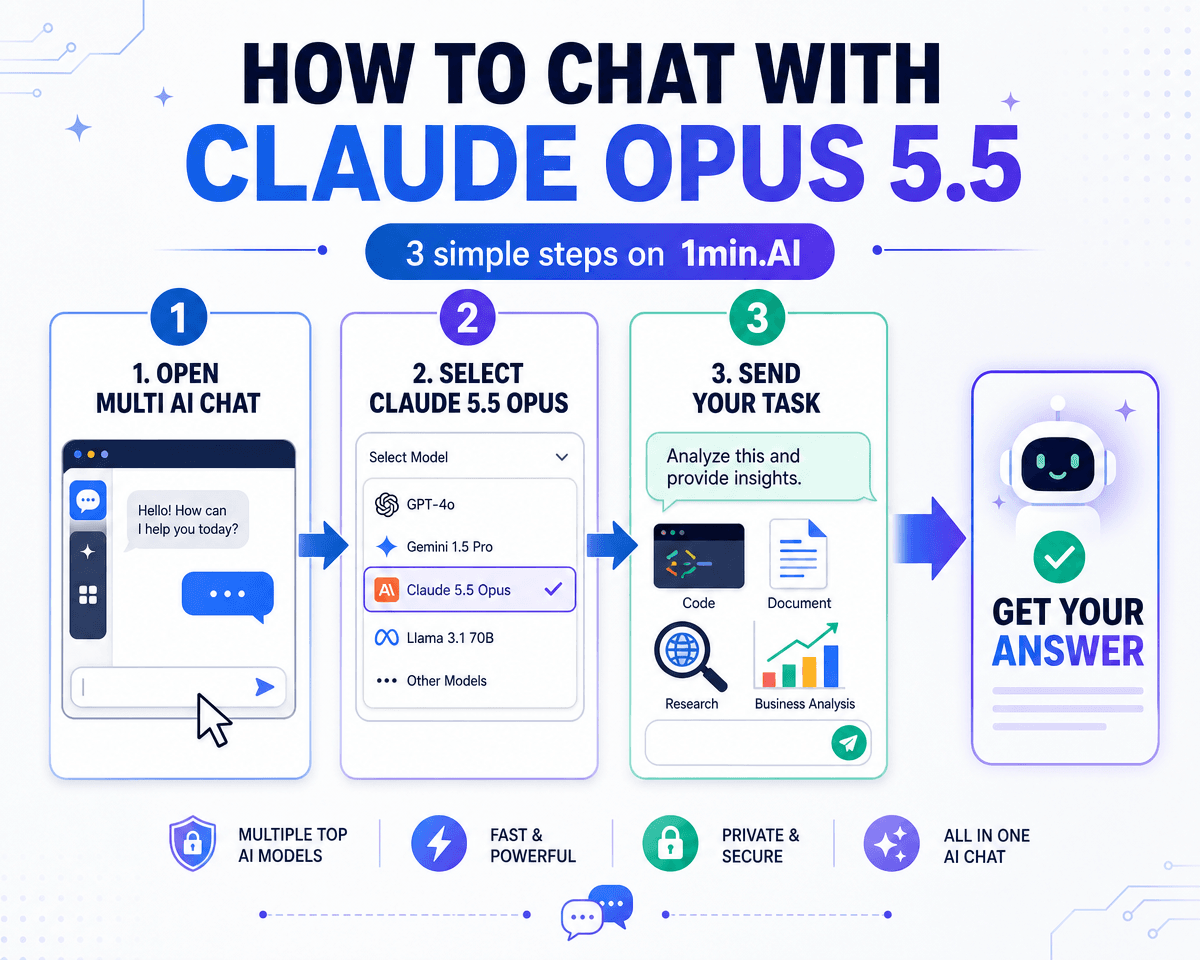
- Open Multi AI Chat on 1min.AI.
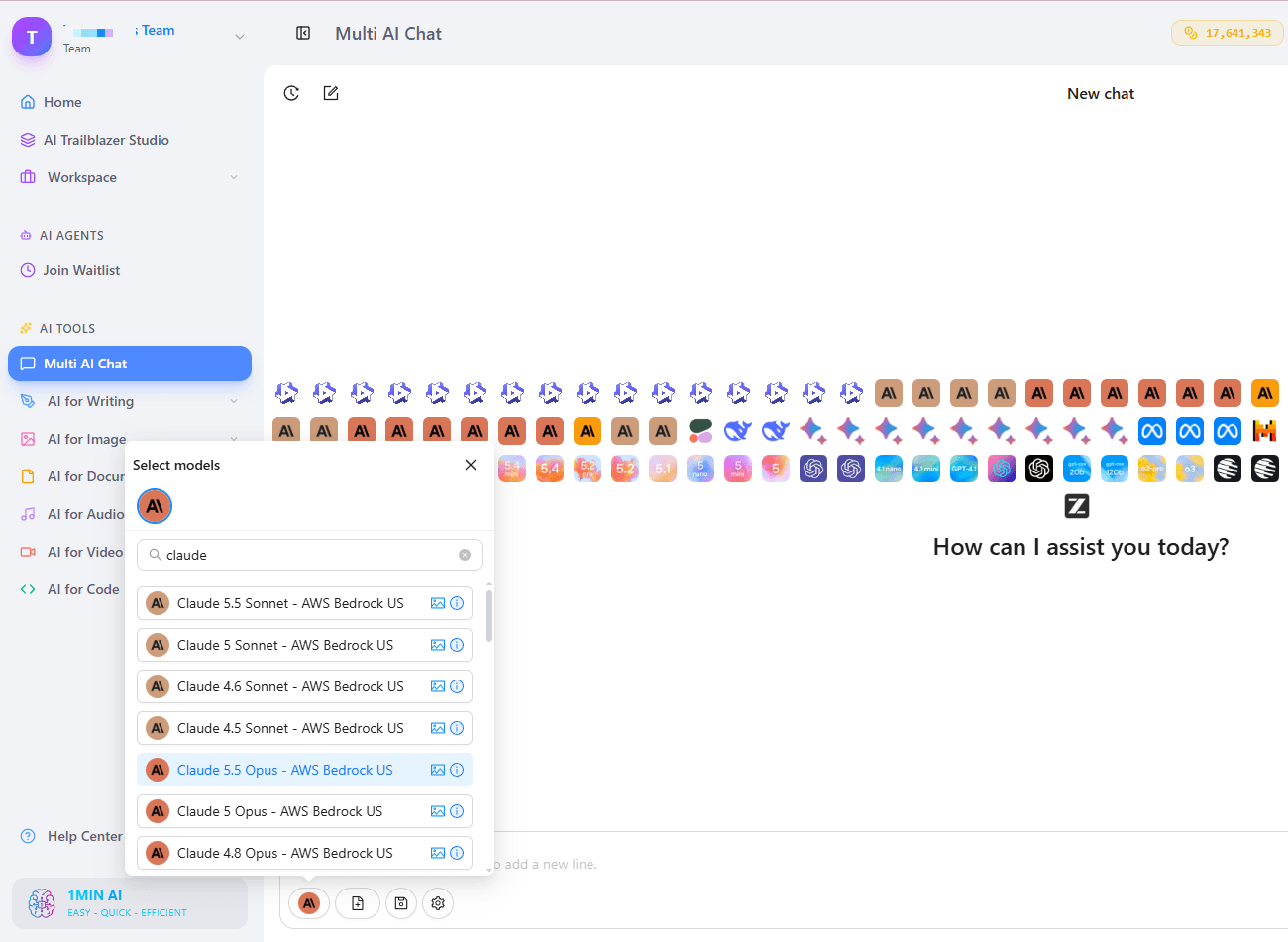
- Select Claude 5.5 Opus (AWS Bedrock US) in the model picker.
- Send your task with full context. Paste the code, document or brief, and say what "done" looks like.
Free Claude Opus 5.5 Chat Online: Get the Best First Result
Opus 5.5 is built for long, multi-step jobs, so give it a real one.
- Bring the full context: Paste the whole module, report or brief to use the 1M-token window.
- Bundle related questions into one structured prompt instead of many short ones.
- State the completion condition, such as "list the risks, then give a one-paragraph verdict." Anthropic's own guidance for long tasks is to define what "done" means.
- Ask for the key finding first: Opus 5.5 already puts the most important information up front, and a clear request sharpens that.
Why Claude Opus 5.5 Is Worth Trying
Anthropic describes Opus 5.5 as a major step up from Opus 5. It generates output more than 30% faster than Opus 5 and uses fewer tokens per task. Anthropic also reports its best score yet on its automated behavioral audit, and says the model is more resistant to prompt injection than Opus 5.
Claude Opus 5.5 Benchmark Results
| Benchmark | Opus 5.5 | Fable 5.1 | Opus 5 | GPT-6 Astra |
|---|---|---|---|---|
| Terminal-Bench 4.0 (agentic coding) | 66.4% | 55.8% | 52.3% | 57.9% |
| FrontierCode v1.1 (agentic coding) | 54.4% | 50.3% | 48.0% | 53.3% |
| GDPval-AA v2.1 (knowledge work, Elo) | 1846 | 1735 | 1708 | 1542 |
| Humanity's Last Exam (with tools) | 67.7% | 65.6% | 63.6% | 57.2% |
Source: Anthropic, vendor-reported. Anthropic notes that benchmark margins are a less reliable guide to real-world differences at this capability level, and that the gap between Opus 5.5 and Fable 5.1 is narrower in practice than the scores suggest.
Anthropic's own tests show what the numbers mean on real work:
- An early tester finished a 680,000-line code migration in under a day.
- A 200,000-line codebase was audited and fixed in under three hours, where Opus 5 took over 20 hours.
- In a research test, 16 of 18 reports cleared a quality bar where any invented figure or quote meant failure. Neither Fable 5.1 nor Opus 5 cleared it.
- In a merger analysis, Opus 5.5 built the Excel model and the executive presentation in 63 minutes, compared with 93 for Opus 5.
Is Opus 5.5 Better Than Opus 5?
On Anthropic's published tests, yes. It is stronger, faster and more efficient.
| Feature | Opus 5.5 | Opus 5 |
|---|---|---|
| Agentic coding (Terminal-Bench 4.0) | 66.4% | 52.3% |
| Output speed | More than 30% faster | Baseline |
| Typical workload cost | 40% lower | Baseline |
| Default thinking effort | Medium (adaptive, always on) | High |
| Writing style | Key information first, less jargon | More verbose |
| Context window | 1M tokens | 1M tokens |
How Adaptive Thinking Helps in Chat
Opus 5.5 always uses adaptive thinking. It reasons longer on hard problems and shorter on easy ones, so you do not have to configure anything. The practical tip: give it a hard, specific task and let it work through the steps. Short trivia questions will not show what it can do.
Best Tasks to Try First With Claude Opus 5.5
The 1min.AI model listing highlights six strengths. Here is how to test each one.
Agentic Coding and Code Review
Paste a module or a diff and ask for bugs, risks and fixes. Opus 5.5 is built for multi-step software work such as large migrations and audits. In Anthropic's tests it also found inefficiencies in code, cutting page load times in 39 of 40 attempts. Routine bug fixing works normally, but Opus 5.5 ships with cybersecurity safeguards, so some sensitive security tasks may be routed to a fallback model.
Long-Document Research and Knowledge Work
Add a long report, contract or research set and ask for the key findings, the supporting figures and anything that looks inconsistent. With a 1M-token context window, you can keep a whole document set in one conversation. Anthropic says Opus 5.5 is a reliable researcher that puts key information first.
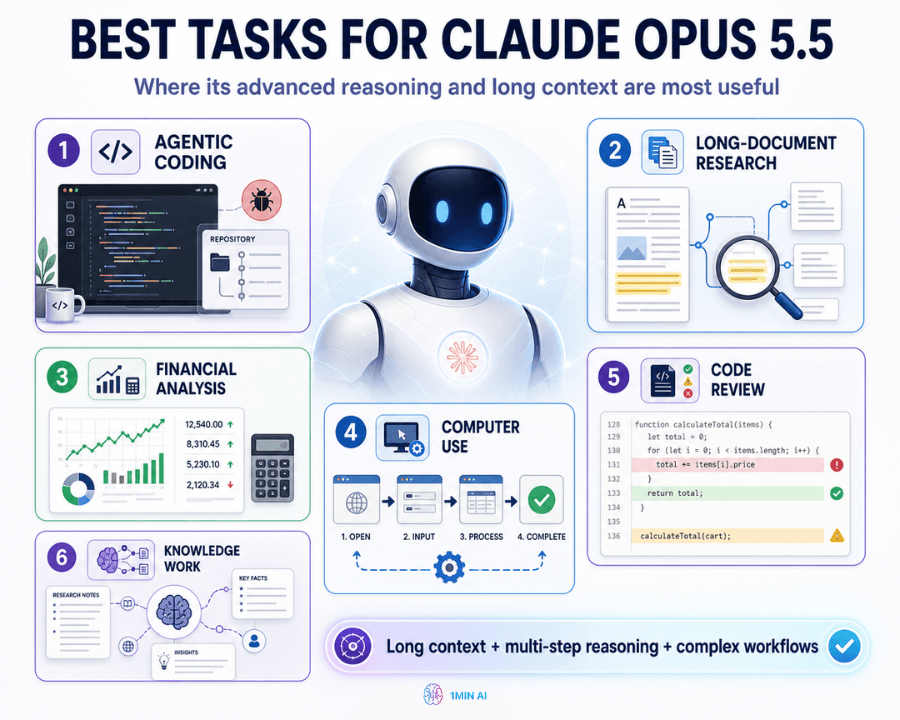
Financial Analysis and Modeling
Turn raw numbers into a structured analysis with trends, risks and a short executive summary. Anthropic's early tester Walleye Capital reported that Opus 5.5 even noticed an error in its evaluation instructions and corrected for it.
Computer Use and Workflow Automation
Anthropic reports 81.8% on OSWorld 2.1 (partial), a computer use benchmark, and 40.0% on AutomationBench for business workflows. Use Multi AI Chat to plan and draft the steps of a workflow, then compare the result with other models.
Compare Models Side by Side
Run the same prompt on Opus 5.5 and our free AI chat with Claude Fable to see the difference yourself.
Claude Opus 5.5 Across 1min.AI Tools
Opus 5.5 powers more than one chat window. On 1min.AI it is integrated into several tools, so one model can carry a project from research to final output.
- Multi AI Chat: open-ended reasoning, review and analysis.
- Code Generator: write, refactor and migrate code.
- Keyword Research, Content Generator, Content Expander, Content Shortener: plan and produce content.
- Rewriter, Paraphraser, Grammar Checker: polish drafts.
- Content Translator and Document Translator: adapt text and files for global audiences.
- Summarizer: condense long material into key points.
- Presentation Generator: turn analysis into slides.
Save and Share Your Work in the 1min.AI Workspace
When a project grows, sign in to your 1min.AI account to keep everything in one place. The workspace includes History for past chats, Shared Zone for team collaboration, Brand Voice List, Prompt List for reusable prompts, Tag List and Asset List.
Why Trust 1min.AI for Claude Opus 5.5 Access
1min.AI brings many AI models and tools into one workspace. Claude 5.5 Opus runs through AWS Bedrock in the US. 1min.AI is rated Excellent on Trustpilot and recognized on SourceForge, Slashdot (Top Business Software), Capterra, Software Advice and GetApp. You can review the 1min.AI privacy policy for details on data handling.
Claude Opus 5.5 FAQ
Can I get Claude Opus 5.5 for free?
Yes. On 1min.AI, you can chat with Claude Opus 5.5 for free in Multi AI Chat. Open the chat, select Claude 5.5 Opus, and start.
When was Opus 5.5 released?
Anthropic released Claude Opus 5.5 on September 22, 2026, as the first model in the Claude 5.5 family.
Is Opus 5.5 cheaper than Opus 5?
Yes. Anthropic's API rates are $4 per million input tokens and $20 per million output tokens, versus $5 and $25 for Opus 5. Anthropic reports a 40% lower cost on typical workloads.
Is Opus 5.5 better than Opus 5?
On Anthropic's tests, yes. It scores higher on coding, knowledge work and computer use, runs more than 30% faster, and uses fewer tokens per task.
What is the context window of Claude Opus 5.5?
Up to 1,000,000 tokens, enough for a large repository section or a full set of documents in one conversation.
Is Sonnet 5.5 released?
Anthropic said Claude Sonnet 5.5 and Claude Haiku 5.5 will follow Opus 5.5 in the coming weeks. Check the Multi AI Chat model list for what is available.
What is Claude Opus 5.5 best for?
Long, multi-step work: codebase migrations, code review, financial modeling, research reports and large-document analysis.
Start Chatting With Claude Opus 5.5
Pick one real task, such as a code review, a report summary or a content brief. Open Multi AI Chat, select Claude 5.5 Opus, and see the result in minutes.
Alternatives
Discover the best alternatives to 1minAI and compare features, pricing, and use cases.

1min.AI vs OpenRouter
1min.AI vs. OpenRouter: Compare the ready-to-use AI creation product against the technical API tool. Find out if you need a zero-code creative studio or a coding infrastructure hub.
 Ngoc Hong
1min.AI vs Lovart
Compare 1min.AI vs Lovart across features, pricing, credits, brand tools, and use cases to find the right AI platform for your workflow.
Ngoc Hong
1min. AI vs Dola AI
Looking for a Dola AI alternative? Compare 1min.AI vs Dola AI on video generation, free plans, pricing and privacy to pick the right AI app.
Ngoc HongAI Tools
Discover the best AI tools to boost productivity, creativity, and everyday work.

Create Consistent Cartoon Content in Just a Few Steps
Create engaging cartoon videos for TikTok and Reels with 1min.AI. Research ideas, create characters, and turn images into animated videos in 3 simple steps.
 Lien Anh Vu
One Product, 10 UGC Creatives: How AI Makes Content Testing Easier
Create more authentic UGC with an AI UGC video generator, test more creative angles and scale affiliate content without filming every version.
Lien Anh Vu
Top 4 Affordable AI Tools for Startup Founders
Discover the top 4 affordable AI tools for startup founders to validate ideas, build products, create content, and launch faster without overspending.
 Tram Ta
AI Features
Comprehensive AI features that streamline workflows, improve efficiency, and empower teams to achieve more.
Create Consistent Cartoon Content in Just a Few Steps
Create engaging cartoon videos for TikTok and Reels with 1min.AI. Research ideas, create characters, and turn images into animated videos in 3 simple steps.
Lien Anh VuOne Product, 10 UGC Creatives: How AI Makes Content Testing Easier
Create more authentic UGC with an AI UGC video generator, test more creative angles and scale affiliate content without filming every version.
Lien Anh Vu
1minAI: Free AI Grammar Checker
Check grammar for free with 1minAI’s AI grammar checker. Find grammar, spelling, and writing mistakes, improve clarity, and polish your content in seconds.
Tram TaAI Use Cases
A curated collection of AI use cases for business, productivity, and industry-specific applications.
Create Consistent Cartoon Content in Just a Few Steps
Create engaging cartoon videos for TikTok and Reels with 1min.AI. Research ideas, create characters, and turn images into animated videos in 3 simple steps.
Lien Anh VuOne Product, 10 UGC Creatives: How AI Makes Content Testing Easier
Create more authentic UGC with an AI UGC video generator, test more creative angles and scale affiliate content without filming every version.
Lien Anh Vu
Best Time to Post on Instagram: A Practical Guide for Better Engagement
Discover the best time to post on Instagram, including the best days and times for different audiences, plus tips to find the ideal posting schedule for your account.
Tram TaAI Tutorials
Learn how to use AI with practical, step-by-step tutorials.
Create Consistent Cartoon Content in Just a Few Steps
Create engaging cartoon videos for TikTok and Reels with 1min.AI. Research ideas, create characters, and turn images into animated videos in 3 simple steps.
Lien Anh Vu
Black Friday AI Tool Deals in 2026
Discover what Black Friday AI tool deals 2026 has to offer. Find out how to secure the 1min.AI lifetime deal via AppSumo, Dealify, Stack Social, and verify on Trustpilot, Slashdot, and Software Advice.
 Hang Nguyen
[Seedance 2.5 New] Better AI Product Videos, Less Rework in 1min.AI
Use Seedance 2.5 image to video on 1min.AI to create more consistent AI product videos, reduce failed generations, save credits, and improve UGC workflows.
Lien Anh VuAI Guides
Learn AI faster with practical guides, real-world examples, and actionable best practices.
Create Consistent Cartoon Content in Just a Few Steps
Create engaging cartoon videos for TikTok and Reels with 1min.AI. Research ideas, create characters, and turn images into animated videos in 3 simple steps.
Lien Anh Vu
Safely Buy AI Tools Online: 2026 Black Friday Guide
Discover how to find and secure the best Black Friday AI deals online. Learn expert strategies to avoid scams, combat subscription fatigue, and verify software.
Hang Nguyen[Seedance 2.5 New] Better AI Product Videos, Less Rework in 1min.AI
Use Seedance 2.5 image to video on 1min.AI to create more consistent AI product videos, reduce failed generations, save credits, and improve UGC workflows.
Lien Anh VuAI Solutions
Browse the best AI solutions for automation, coding, research, productivity, customer support, marketing, and business workflows.
Create Consistent Cartoon Content in Just a Few Steps
Create engaging cartoon videos for TikTok and Reels with 1min.AI. Research ideas, create characters, and turn images into animated videos in 3 simple steps.
Lien Anh VuOne Product, 10 UGC Creatives: How AI Makes Content Testing Easier
Create more authentic UGC with an AI UGC video generator, test more creative angles and scale affiliate content without filming every version.
Lien Anh Vu
Free AI Tattoo Generator: Custom Designs
Turn any idea into a custom tattoo design with 1min.AI's free AI tattoo generator. Describe your idea, pick a style, and download in seconds.
 Trang Tran
AI Models
Explore the world's leading AI models in one place.
Create Consistent Cartoon Content in Just a Few Steps
Create engaging cartoon videos for TikTok and Reels with 1min.AI. Research ideas, create characters, and turn images into animated videos in 3 simple steps.
Lien Anh VuOne Product, 10 UGC Creatives: How AI Makes Content Testing Easier
Create more authentic UGC with an AI UGC video generator, test more creative angles and scale affiliate content without filming every version.
Lien Anh Vu[Seedance 2.5 New] Better AI Product Videos, Less Rework in 1min.AI
Use Seedance 2.5 image to video on 1min.AI to create more consistent AI product videos, reduce failed generations, save credits, and improve UGC workflows.
Lien Anh VuAI Comparisons
Compare AI tools, models, and platforms to find the best fit for your needs.

Kling AI Vs Veo 3: Which Model Wins?
Kling AI vs Veo 3: compare motion, native audio, pricing & free tiers to see which AI video generator wins for your project - try both on 1min.AI.
Trang Tran[Seedance 2.5 New] Better AI Product Videos, Less Rework in 1min.AI
Use Seedance 2.5 image to video on 1min.AI to create more consistent AI product videos, reduce failed generations, save credits, and improve UGC workflows.
Lien Anh Vu
DeepSeek V4 Pro vs Flash Comparison
Compare DeepSeek V4 Pro vs DeepSeek V4 Flash metrics. Optimize your agentic apps and improve AI fact checking on 1min.ai today.
Ngoc HongAI Integrations
Seamlessly integrate AI with the tools you already use to automate work and boost productivity.

POV: You Have 10+ Posts to Make Every Day
Learn how to build an AI content workflow that helps content creators produce 10+ social media posts a day faster with AI brainstorming, image generation, and content creation.
Lien Anh Vu
How to Use an AI Fashion Video Generator for Fashion Week 2026
Turn Fashion Week 2026 ideas into stunning fashion videos with AI. Learn how to brainstorm, create visuals, and transform images into videos with one simple workflow.
Lien Anh Vu
Stop Switching Between AI Apps: How AI Integration Transforms Employer Branding
Discover how AI integration helps HR teams streamline employer branding by combining AI writing, documents, images, video, and multiple AI models into one workspace.
Tram TaAI for Industries
Find the best AI tools and workflows for healthcare, finance, education, legal, manufacturing, retail, real estate, and more

7 Low-Cost AI Business Ideas for Your Startup
Explore 7 low-cost AI business ideas you can start with a small budget, from content and video services to AI consulting, reselling, and automation.
Tram Ta
Free AI Image Generator For Ecommerce
Turn phone photos into studio, white-background, and lifestyle product images. Try the best AI image generator for ecommerce online free with 1min.AI.
Trang Tran
Free Property Management Email Templates
Free property management email templates for tenants and owners: rent reminders, renewals, maintenance updates. Copy, customize, and send in minutes.
Trang TranAI Agents
Discover and run AI agents to automate tasks across your work and daily life.
1minAI: Free AI Grammar Checker
Check grammar for free with 1minAI’s AI grammar checker. Find grammar, spelling, and writing mistakes, improve clarity, and polish your content in seconds.
Tram Ta
AI Agents for Facebook
Use an AI Agent for Facebook to create content, generate images, schedule posts, and publish from your documents and conversations.
Ngoc Hong
AI Agent vs AI Assistant: Which One Actually Saves Designers More Time?
Learn the difference between AI Agent vs AI Assistant and discover which solution helps designers automate repetitive work, reduce revisions, and save more time.
Lien Anh VuAI Workflows
Explore ready-to-use AI workflows for productivity, marketing, sales, support, and more.
Create Consistent Cartoon Content in Just a Few Steps
Create engaging cartoon videos for TikTok and Reels with 1min.AI. Research ideas, create characters, and turn images into animated videos in 3 simple steps.
Lien Anh VuOne Product, 10 UGC Creatives: How AI Makes Content Testing Easier
Create more authentic UGC with an AI UGC video generator, test more creative angles and scale affiliate content without filming every version.
Lien Anh VuPOV: You Have 10+ Posts to Make Every Day
Learn how to build an AI content workflow that helps content creators produce 10+ social media posts a day faster with AI brainstorming, image generation, and content creation.
Lien Anh VuNewsletter
Weekly AI Innovations with 1minAI

🔮 Weekly AI Innovations #136: Grok 4.6 and Smart Data Retention
Discover the latest 1min.ai updates! Upgrade to Grok 4.6 for blazing-fast AI, and check our new Data Retention policies to secure your files today.
Hang Nguyen
🔮 Weekly AI Innovations #139: Dawn of the next-gen AI
Discover the immense power of GPT-6 Astra and Claude Fable 5.1. Unlock next-generation AI models on 1min.ai to solve complex tasks effortlessly.
Hang Nguyen
🔮 Weekly AI Innovations #138: Claude Sonnet 5, Fable 5 & Wan 2.7
Explode your creative potential with massive 1min.ai updates! Access Claude Sonnet 5, Fable 5, and Alibaba Wan 2.7 for unmatched multi-modal generation today.
Hang Nguyen