
AI Music Generator From Text Create Music From Any Idea

Lien Anh Vu
October 1, 2026
Create music from text with AI using 1min.AI. Learn how to write better music prompts, choose genre, mood, instruments, and vocals, then turn an idea into a track for videos, social media, podcasts, and more.
You may already know exactly how your video should feel but still spend too much time searching for music that matches it. The track needs to fit the mood, pacing, platform, and content without distracting from what is happening on screen.
An AI music generator from text offers another way to start. Instead of browsing through endless tracks, you describe the genre, mood, instruments, vocals, and purpose of the music you want, then use AI to turn that direction into a track.
The better your description, the easier it is to guide the result toward the sound you have in mind.
What Is an AI Music Generator From Text
An AI music generator from text takes a written description and uses it as creative direction for generating music.
Your input does not need to look like traditional music notation. You can describe the result in ordinary language, such as:
Warm lo fi background music for a late night coffee shop video with soft piano, mellow bass, light drums, and no vocals.
The AI uses details in that description to understand the musical direction.
A simple request might only specify a mood. A more detailed prompt can also describe genre, tempo, instruments, vocals, atmosphere, and where the music will be used.
This makes text to music AI especially useful when you have a creative idea but do not have the time or production experience to build the track manually.
What Should You Include in an AI Music Prompt
A good AI music prompt does not have to be long. It needs to tell the model which musical decisions matter.
A useful structure is:
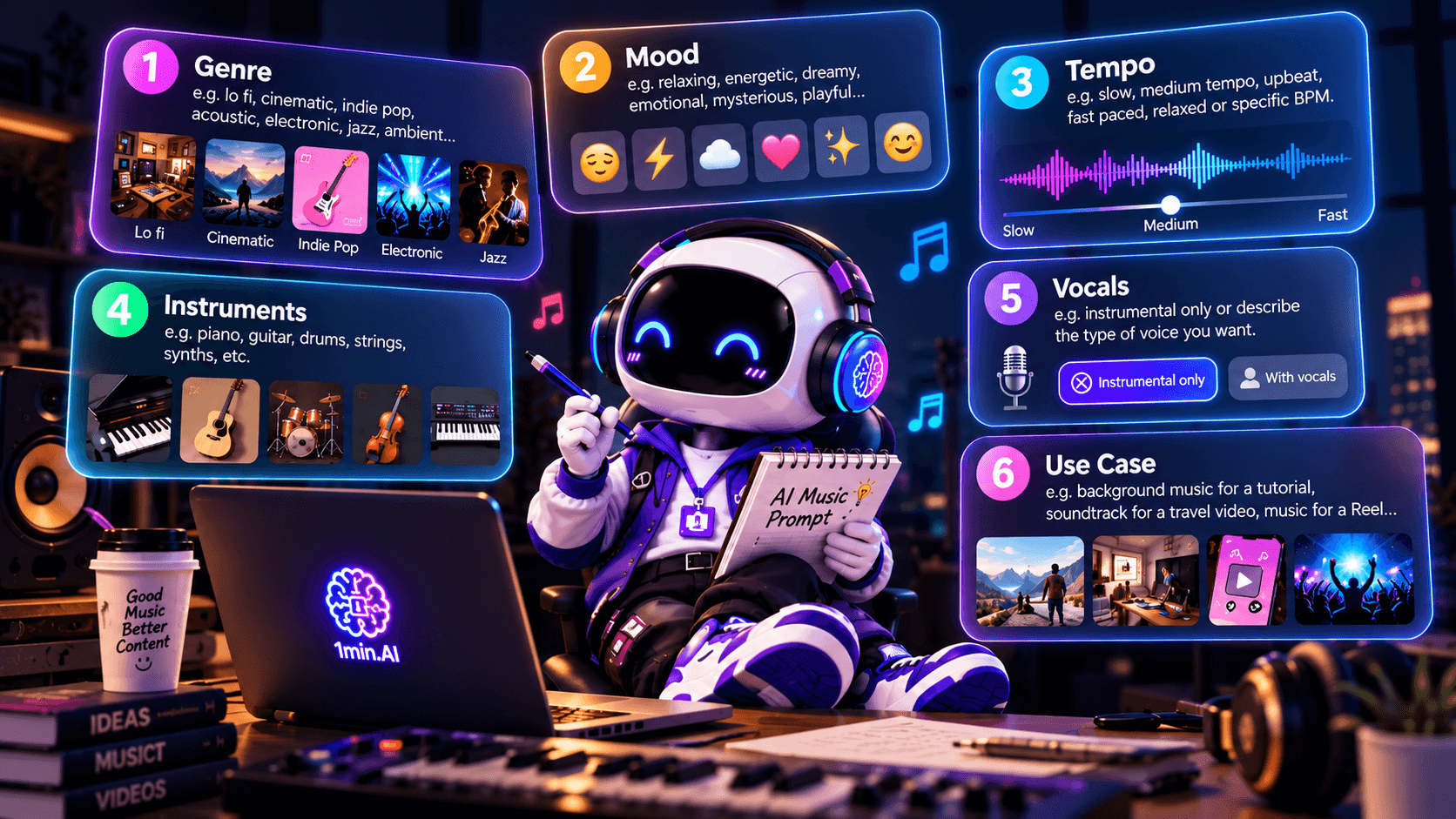
Genre + Mood + Tempo + Instruments + Vocals + Use Case
For example:
Modern indie pop with an uplifting summer mood, medium fast tempo, bright electric guitar, light drums, no vocals, created as background music for a lifestyle Reel.
That gives the generator much more direction than simply asking for “happy music.”
Genre
Genre tells the AI what musical world the track should belong to.
You could describe it as lo fi, cinematic, indie pop, acoustic, electronic, jazz, ambient, or another style that fits your content.
Genre is usually a good starting point, but it should not be the only information in the prompt.
Mood
Mood describes how the music should feel.
A track might be relaxing, energetic, dreamy, emotional, mysterious, playful, nostalgic, premium, or uplifting.
Try to be more specific when possible. Instead of writing only “emotional,” you might ask for something that feels “nostalgic and emotional but not sad.”
Tempo
Tempo helps control the energy of the track.
You can describe it naturally with phrases such as slow, medium tempo, upbeat, fast paced, or relaxed.
If you already know the approximate BPM you want, you can include that too, but it is not necessary for every prompt.
Instruments
Mentioning instruments can change the identity of the track significantly.
Soft piano and strings may work for an emotional video, while synths and punchy drums can fit a faster social media edit.
You can also tell the AI which instruments should stay subtle instead of dominating the track.
Vocals
Decide whether you want a song or background music.
For instrumental content, say something clear such as:
Instrumental only, no vocals.
For a vocal track, you can describe the type of voice and delivery you want, such as a warm female vocal, soft male vocal, energetic pop vocal, or intimate acoustic vocal.
Use Case
One of the easiest ways to improve a prompt is to tell the AI where the music will be used.
“Background music for a tutorial” communicates something different from “soundtrack for a cinematic travel sequence.”
This extra context can help the generated track better match the role it needs to play.
Weak AI Music Prompt vs Better AI Music Prompt
The difference between a vague prompt and a useful one can be significant.
A weak prompt might be:
Make happy music.
The AI knows the general emotion, but nearly everything else is still open to interpretation.
A better version would be:
Create upbeat indie pop background music with bright electric guitar, light drums, a medium fast tempo, and a positive summer mood for a 15 second lifestyle Reel. Keep it instrumental.
Now the prompt defines style, energy, instruments, length context, mood, and whether vocals should appear.
Another vague example would be:
Cinematic music.
A stronger version could be:
Create slow cinematic background music with soft piano, atmospheric strings, deep bass, and a gradual emotional build for a dramatic nighttime travel video. Keep it instrumental and avoid an overly intense trailer sound.
The goal is not to make every prompt extremely long. It is to remove unnecessary guesswork.
How to Create Music From Text With 1min.AI
Once you know the general direction of the track, the workflow can stay simple.
Start with your idea, choose the music model, describe the sound you want, generate the track, then refine anything that does not fit your content.
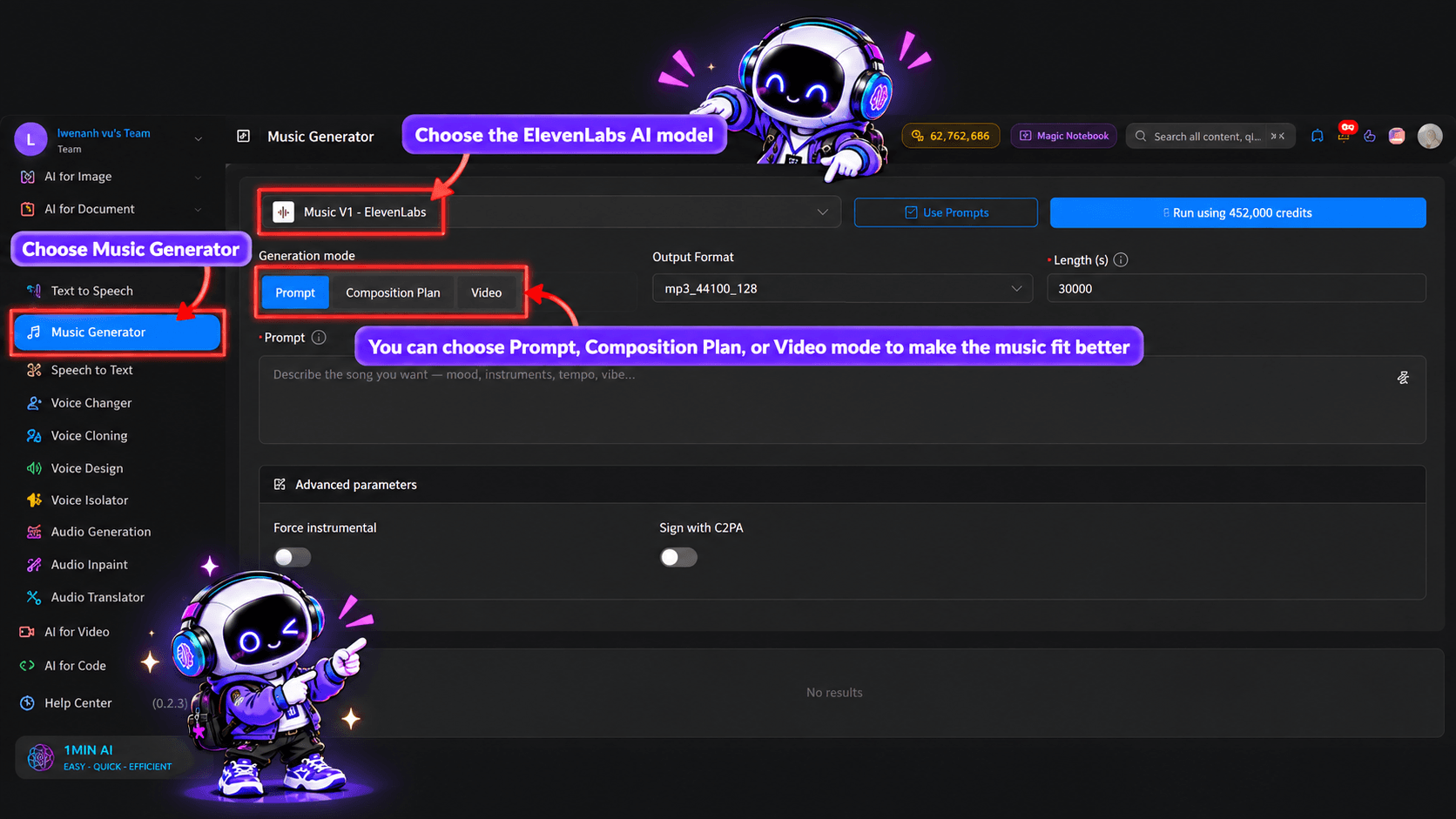
Open the AI Music Generator
Open the AI Music Generator in 1min.AI and start from the music creation workspace.
You do not need to begin with technical music terminology. A clear description of what you want is enough to establish the first direction.
Choose an AI Music Model
Select the AI music model you want to use.
Different models may respond differently to the same description, so model choice can become another way to explore variations once you have a prompt that already describes the music clearly.
Describe the Music You Want
Write the prompt around the elements that matter most.
For example:
Warm lo fi instrumental for a late night coffee shop vlog, relaxed tempo, soft Rhodes piano, mellow bass, subtle vinyl texture, and a calm intimate atmosphere. No vocals.
This is already detailed enough to establish a clear musical identity without turning the prompt into a long technical specification.
Generate and Listen
Generate the track and listen to how the AI interpreted your description.
If the result is almost right, avoid rewriting everything immediately. Identify what needs to change.
You might ask for a slower tempo, softer drums, more cinematic atmosphere, less energy, a different vocal style, or no vocals at all.
The workflow becomes:
Idea → Prompt → Generate → Listen → Refine
AI Music Prompt Examples for Content Creators
Different content formats need different kinds of music. A strong prompt should reflect the job the track needs to do.
AI Music Prompt for TikTok and Reels
Create upbeat modern pop instrumental music with bright synths, punchy drums, and a playful energetic mood for a fast paced lifestyle Reel. Start with an immediate hook and keep the arrangement clean. No vocals.
This kind of prompt works better than simply asking for “TikTok music” because it describes the actual energy and structure you need.
AI Music Prompt for YouTube Videos
Create warm chill electronic background music with soft synth pads, subtle percussion, and a relaxed modern mood for a YouTube tutorial. Keep the arrangement light and steady so it does not compete with narration.
For educational or talking head content, telling the AI that narration will sit above the track can be especially useful.
AI Music Prompt for Product Videos
Create clean modern electronic music with a confident premium mood, subtle bass, crisp percussion, and a gradual build for a minimalist technology product launch video. Keep the sound polished and avoid aggressive drops.
The prompt communicates both the brand feeling and how intense the track should become.
AI Music Prompt for Podcasts
Create short podcast intro music with soft piano, warm ambient textures, light percussion, and a professional welcoming mood. Keep the opening memorable but subtle enough to transition naturally into speech.
Podcast music does not need to dominate. The prompt should reflect that.
AI Music Prompt for Cinematic Videos
Create an emotional cinematic soundtrack with soft piano, atmospheric strings, low percussion, and a gradual dramatic build for a nighttime travel sequence. Keep it instrumental and immersive without becoming overly epic.
This gives the AI a clearer cinematic direction than using “cinematic” alone.
Create Instrumental Music or Music With Vocals
One of the most important decisions is whether the track should contain vocals.
Instrumental music is often the better choice when the audio needs to support narration, product demonstrations, tutorials, podcasts, advertisements, or other content where another voice is already present.
A prompt can make this explicit:
Instrumental only, no vocals.
If the goal is to create a song, jingle, or music led social post, vocals may make more sense.
For example:
Create upbeat indie pop with a warm female vocal, bright guitar, light drums, and an optimistic summer mood. Keep the chorus catchy and suitable for a short lifestyle video.
An AI music generator from text with vocals needs more direction because the voice becomes part of the identity of the result. Describe the vocal character as clearly as you describe the instrumental style.
Use Multi AI Chat to Improve Your Music Prompt
You do not have to structure every music prompt manually.
Multi AI Chat on 1min.AI can be used as an optional step when you know what you want but are unsure how to translate the idea into a clear generation prompt.
For example, you could provide:
Goal: Background music for social media
Platform: Instagram Reel
Subject: Summer fashion campaign
Mood: Energetic and premium
Music style: Modern electronic pop
Vocals: No vocals
Length: Short social video
Then ask:
Turn these requirements into a clear AI music generation prompt with genre, mood, tempo, instruments, and energy described naturally.
The result can then be reviewed and adjusted before sending it to the AI Music Generator.
This creates an optional workflow:
Idea → Multi AI Chat → Music Prompt → AI Music Generator
If your original prompt is already clear, you can skip this step entirely.
How to Get Better Results From an AI Music Generator
The first generation does not always need to be the final track. Small prompt changes can help you move closer to the sound you want without changing the whole concept.
Instead of replacing everything, identify the part that feels wrong.
If the track is too energetic, ask for a slower tempo and softer percussion. If it feels too generic, add more specific instruments or atmosphere. If the vocals distract from the video, switch to instrumental only.
The same idea applies to mood. “Relaxing” can mean many things, while “warm, intimate, late night, and slightly nostalgic” gives the model a more specific emotional direction.
It also helps to explain how the music will function in your content. Music under narration usually needs different dynamics from music designed to be the main focus of a short video.
AI Music Generator From Text FAQ
Can AI Generate Music From Text
Yes. A text to music generator uses a written description as creative direction for producing music. The prompt can specify elements such as genre, mood, tempo, instruments, vocals, and intended use.
What Should I Write in an AI Music Prompt
Start with the genre and mood, then add tempo, instruments, vocal preference, and where the music will be used. You do not need to use technical language if you can describe the result clearly in ordinary words.
Can an AI Music Generator Create Vocals
Some AI music models support vocals as part of the generated result. When using them, describe whether you want male or female vocals, the vocal mood, the overall song style, and any lyrics direction that matters to the concept.
Can I Generate Instrumental Music With AI
Yes. Tell the AI clearly that you want instrumental music and no vocals. You can then describe the instruments, mood, tempo, and content use case in the rest of the prompt.
Can I Use AI Music for YouTube or TikTok
AI music can be created for social and video content, but usage rights can depend on the specific tool, model, account, and license involved. Check the applicable usage terms before publishing generated music commercially.
Can I Generate Music From My Own Lyrics
If the music model you choose supports lyric based generation, you can provide your lyrics alongside direction for genre, mood, vocals, tempo, and arrangement.
Do I Need Music Production Experience to Use an AI Music Generator
No music production background is required to start describing a track in natural language. Understanding basic concepts such as genre, mood, tempo, and instrumentation can help you give the AI clearer direction, but you can refine those details as you generate.
Turn Your Idea Into Music
A useful AI music prompt is less about knowing technical music theory and more about communicating creative direction clearly. Describe the genre, mood, tempo, instruments, vocals, and purpose of the track, then refine the result based on what you hear.
Instead of starting from a blank timeline or searching through large music libraries, you can begin with the idea already in your head and turn it into something you can actually use.
Alternatives
Discover the best alternatives to 1minAI and compare features, pricing, and use cases.

1min.AI vs OpenRouter
1min.AI vs. OpenRouter: Compare the ready-to-use AI creation product against the technical API tool. Find out if you need a zero-code creative studio or a coding infrastructure hub.
 Ngoc Hong
1min.AI vs Lovart
Compare 1min.AI vs Lovart across features, pricing, credits, brand tools, and use cases to find the right AI platform for your workflow.
Ngoc Hong
1min. AI vs Dola AI
Looking for a Dola AI alternative? Compare 1min.AI vs Dola AI on video generation, free plans, pricing and privacy to pick the right AI app.
Ngoc HongAI Tools
Discover the best AI tools to boost productivity, creativity, and everyday work.

Create Consistent Cartoon Content in Just a Few Steps
Create engaging cartoon videos for TikTok and Reels with 1min.AI. Research ideas, create characters, and turn images into animated videos in 3 simple steps.
 Lien Anh Vu
One Product, 10 UGC Creatives: How AI Makes Content Testing Easier
Create more authentic UGC with an AI UGC video generator, test more creative angles and scale affiliate content without filming every version.
Lien Anh Vu
Top 4 Affordable AI Tools for Startup Founders
Discover the top 4 affordable AI tools for startup founders to validate ideas, build products, create content, and launch faster without overspending.
 Tram Ta
AI Features
Comprehensive AI features that streamline workflows, improve efficiency, and empower teams to achieve more.
Create Consistent Cartoon Content in Just a Few Steps
Create engaging cartoon videos for TikTok and Reels with 1min.AI. Research ideas, create characters, and turn images into animated videos in 3 simple steps.
Lien Anh VuOne Product, 10 UGC Creatives: How AI Makes Content Testing Easier
Create more authentic UGC with an AI UGC video generator, test more creative angles and scale affiliate content without filming every version.
Lien Anh Vu
1minAI: Free AI Grammar Checker
Check grammar for free with 1minAI’s AI grammar checker. Find grammar, spelling, and writing mistakes, improve clarity, and polish your content in seconds.
Tram TaAI Use Cases
A curated collection of AI use cases for business, productivity, and industry-specific applications.
Create Consistent Cartoon Content in Just a Few Steps
Create engaging cartoon videos for TikTok and Reels with 1min.AI. Research ideas, create characters, and turn images into animated videos in 3 simple steps.
Lien Anh VuOne Product, 10 UGC Creatives: How AI Makes Content Testing Easier
Create more authentic UGC with an AI UGC video generator, test more creative angles and scale affiliate content without filming every version.
Lien Anh Vu
Best Time to Post on Instagram: A Practical Guide for Better Engagement
Discover the best time to post on Instagram, including the best days and times for different audiences, plus tips to find the ideal posting schedule for your account.
Tram TaAI Tutorials
Learn how to use AI with practical, step-by-step tutorials.
Create Consistent Cartoon Content in Just a Few Steps
Create engaging cartoon videos for TikTok and Reels with 1min.AI. Research ideas, create characters, and turn images into animated videos in 3 simple steps.
Lien Anh Vu
Black Friday AI Tool Deals in 2026
Discover what Black Friday AI tool deals 2026 has to offer. Find out how to secure the 1min.AI lifetime deal via AppSumo, Dealify, Stack Social, and verify on Trustpilot, Slashdot, and Software Advice.
 Hang Nguyen
[Seedance 2.5 New] Better AI Product Videos, Less Rework in 1min.AI
Use Seedance 2.5 image to video on 1min.AI to create more consistent AI product videos, reduce failed generations, save credits, and improve UGC workflows.
Lien Anh VuAI Guides
Learn AI faster with practical guides, real-world examples, and actionable best practices.
Create Consistent Cartoon Content in Just a Few Steps
Create engaging cartoon videos for TikTok and Reels with 1min.AI. Research ideas, create characters, and turn images into animated videos in 3 simple steps.
Lien Anh Vu
Safely Buy AI Tools Online: 2026 Black Friday Guide
Discover how to find and secure the best Black Friday AI deals online. Learn expert strategies to avoid scams, combat subscription fatigue, and verify software.
Hang Nguyen[Seedance 2.5 New] Better AI Product Videos, Less Rework in 1min.AI
Use Seedance 2.5 image to video on 1min.AI to create more consistent AI product videos, reduce failed generations, save credits, and improve UGC workflows.
Lien Anh VuAI Solutions
Browse the best AI solutions for automation, coding, research, productivity, customer support, marketing, and business workflows.
Create Consistent Cartoon Content in Just a Few Steps
Create engaging cartoon videos for TikTok and Reels with 1min.AI. Research ideas, create characters, and turn images into animated videos in 3 simple steps.
Lien Anh VuOne Product, 10 UGC Creatives: How AI Makes Content Testing Easier
Create more authentic UGC with an AI UGC video generator, test more creative angles and scale affiliate content without filming every version.
Lien Anh Vu
Free AI Tattoo Generator: Custom Designs
Turn any idea into a custom tattoo design with 1min.AI's free AI tattoo generator. Describe your idea, pick a style, and download in seconds.
 Trang Tran
AI Models
Explore the world's leading AI models in one place.
Create Consistent Cartoon Content in Just a Few Steps
Create engaging cartoon videos for TikTok and Reels with 1min.AI. Research ideas, create characters, and turn images into animated videos in 3 simple steps.
Lien Anh VuOne Product, 10 UGC Creatives: How AI Makes Content Testing Easier
Create more authentic UGC with an AI UGC video generator, test more creative angles and scale affiliate content without filming every version.
Lien Anh Vu[Seedance 2.5 New] Better AI Product Videos, Less Rework in 1min.AI
Use Seedance 2.5 image to video on 1min.AI to create more consistent AI product videos, reduce failed generations, save credits, and improve UGC workflows.
Lien Anh VuAI Comparisons
Compare AI tools, models, and platforms to find the best fit for your needs.

Kling AI Vs Veo 3: Which Model Wins?
Kling AI vs Veo 3: compare motion, native audio, pricing & free tiers to see which AI video generator wins for your project - try both on 1min.AI.
Trang Tran[Seedance 2.5 New] Better AI Product Videos, Less Rework in 1min.AI
Use Seedance 2.5 image to video on 1min.AI to create more consistent AI product videos, reduce failed generations, save credits, and improve UGC workflows.
Lien Anh Vu
DeepSeek V4 Pro vs Flash Comparison
Compare DeepSeek V4 Pro vs DeepSeek V4 Flash metrics. Optimize your agentic apps and improve AI fact checking on 1min.ai today.
Ngoc HongAI Integrations
Seamlessly integrate AI with the tools you already use to automate work and boost productivity.

POV: You Have 10+ Posts to Make Every Day
Learn how to build an AI content workflow that helps content creators produce 10+ social media posts a day faster with AI brainstorming, image generation, and content creation.
Lien Anh Vu
How to Use an AI Fashion Video Generator for Fashion Week 2026
Turn Fashion Week 2026 ideas into stunning fashion videos with AI. Learn how to brainstorm, create visuals, and transform images into videos with one simple workflow.
Lien Anh Vu
Stop Switching Between AI Apps: How AI Integration Transforms Employer Branding
Discover how AI integration helps HR teams streamline employer branding by combining AI writing, documents, images, video, and multiple AI models into one workspace.
Tram TaAI for Industries
Find the best AI tools and workflows for healthcare, finance, education, legal, manufacturing, retail, real estate, and more

Free AI Image Generator For Ecommerce
Turn phone photos into studio, white-background, and lifestyle product images. Try the best AI image generator for ecommerce online free with 1min.AI.
Trang Tran
Free Property Management Email Templates
Free property management email templates for tenants and owners: rent reminders, renewals, maintenance updates. Copy, customize, and send in minutes.
Trang Tran
Free AI Virtual Staging: Furnish Any Room
Stage any real estate listing with AI virtual staging: upload a photo, pick a style, and get a photorealistic furnished room in seconds, free to try.
Trang TranAI Agents
Discover and run AI agents to automate tasks across your work and daily life.
1minAI: Free AI Grammar Checker
Check grammar for free with 1minAI’s AI grammar checker. Find grammar, spelling, and writing mistakes, improve clarity, and polish your content in seconds.
Tram Ta
AI Agents for Facebook
Use an AI Agent for Facebook to create content, generate images, schedule posts, and publish from your documents and conversations.
Ngoc Hong
AI Agent vs AI Assistant: Which One Actually Saves Designers More Time?
Learn the difference between AI Agent vs AI Assistant and discover which solution helps designers automate repetitive work, reduce revisions, and save more time.
Lien Anh VuAI Workflows
Explore ready-to-use AI workflows for productivity, marketing, sales, support, and more.
Create Consistent Cartoon Content in Just a Few Steps
Create engaging cartoon videos for TikTok and Reels with 1min.AI. Research ideas, create characters, and turn images into animated videos in 3 simple steps.
Lien Anh VuOne Product, 10 UGC Creatives: How AI Makes Content Testing Easier
Create more authentic UGC with an AI UGC video generator, test more creative angles and scale affiliate content without filming every version.
Lien Anh VuPOV: You Have 10+ Posts to Make Every Day
Learn how to build an AI content workflow that helps content creators produce 10+ social media posts a day faster with AI brainstorming, image generation, and content creation.
Lien Anh VuNewsletter
Weekly AI Innovations with 1minAI

🔮 Weekly AI Innovations #139: Dawn of the next-gen AI
Discover the immense power of GPT-6 Astra and Claude Fable 5.1. Unlock next-generation AI models on 1min.ai to solve complex tasks effortlessly.
Hang Nguyen
🔮 Weekly AI Innovations #138: Claude Sonnet 5, Fable 5 & Wan 2.7
Explode your creative potential with massive 1min.ai updates! Access Claude Sonnet 5, Fable 5, and Alibaba Wan 2.7 for unmatched multi-modal generation today.
Hang Nguyen
🔮 Weekly AI Innovations #137: ElevenLabs Music & AI social Profile Control
The newest 1min.ai updates deliver professional music generation and highly requested privacy tools. Dive into a seamless workflow today!
Hang Nguyen