
Free AI Face Swap Video in 1 Minute | 1minAI

Tram Ta
September 29, 2026
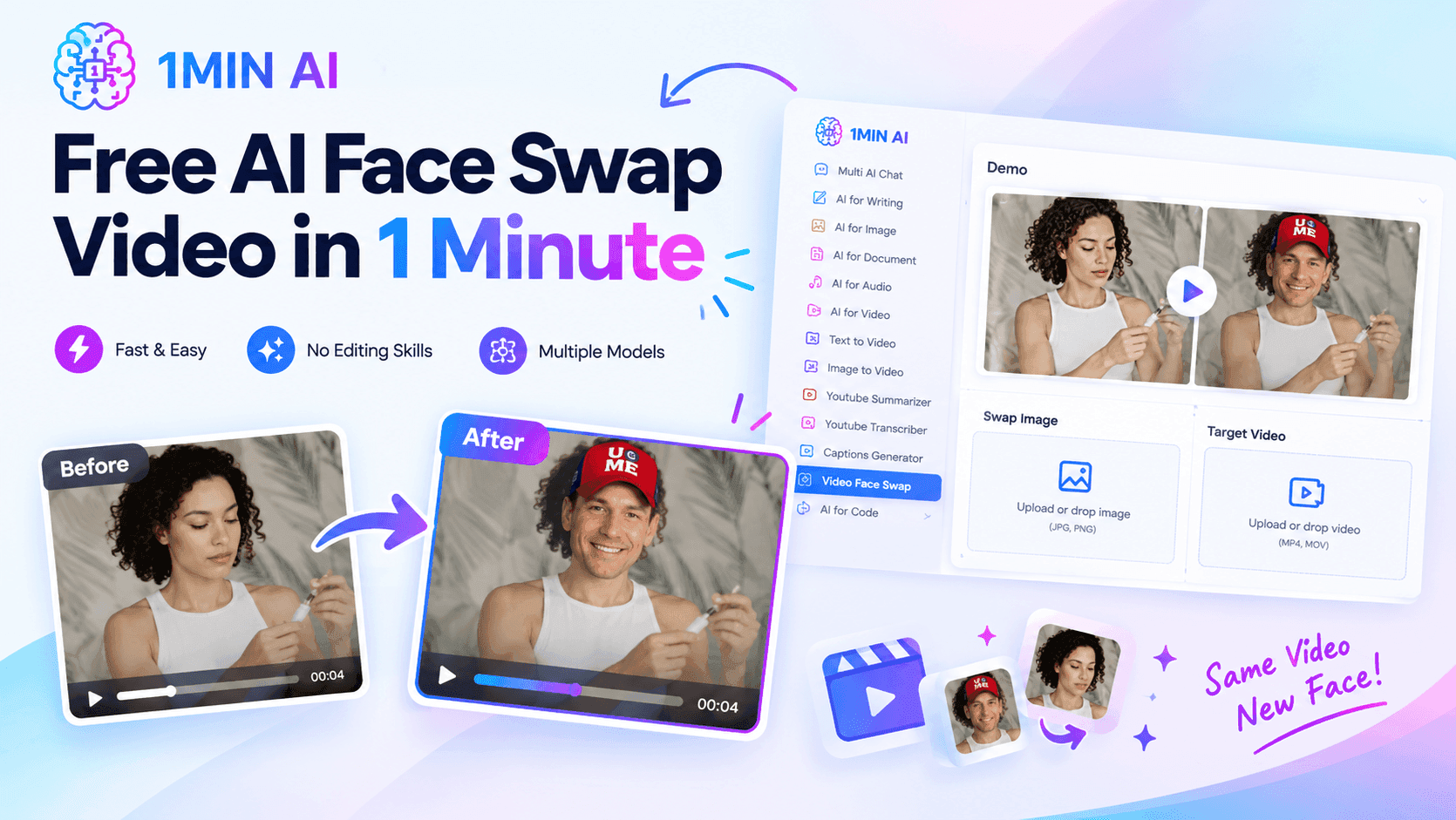
Try a free AI face swap video in 1 minute. Learn how to swap faces in videos, handle multiple faces, and create AI face swap videos with 1minAI.
Want to put a different face into a video without spending hours editing frames manually?
A free AI face swap tool can do the work automatically. Instead of opening complicated video-editing software, creating masks, tracking faces, and adjusting every frame, you can upload your face image and target video and let AI process the swap.
With 1minAI, the video face swap workflow is designed around two files: a Swap Image containing the face you want to use and a Target Video containing the face you want to replace. You can then map the faces and run the process.
This makes AI face swapping useful for social media content, creative experiments, marketing mockups, video concepts, and other visual projects.
What Is a Free AI Face Swap Video?
A free AI face swap video is a video edited with artificial intelligence to replace one person's face with another face.
The basic workflow is:
Face image + Target video → AI face detection → Face mapping → Video face swap → Finished video
Traditional face replacement can require manual masking, tracking, compositing, and frame-by-frame adjustments.
AI automates much of this process.
For example, imagine you have:
- A portrait of yourself
- A short fashion video
- A movie-style scene
- A social media clip
- A marketing concept video
You can use the portrait as the swap image and the video as the target video. The AI then applies the selected face to the target video.
Free AI face swap for photos vs videos
It is important to distinguish between an AI face swap photo and an AI face swap video.
If you only want to replace a face in a still image, 1minAI has a dedicated AI Face Swap tool. It requires a target image and a swap image, then automatically matches facial landmarks, lighting, skin tone, and other visual characteristics.
If your goal is to replace a face throughout a moving clip, use the AI Video Face Swap tool instead.
The distinction matters because video face swapping needs to maintain the replacement across movement and changing frames, rather than producing a single edited image.
How to Create a Free AI Face Swap Video in 1 Minute with 1minAI
You don't need professional video-editing skills to get started.
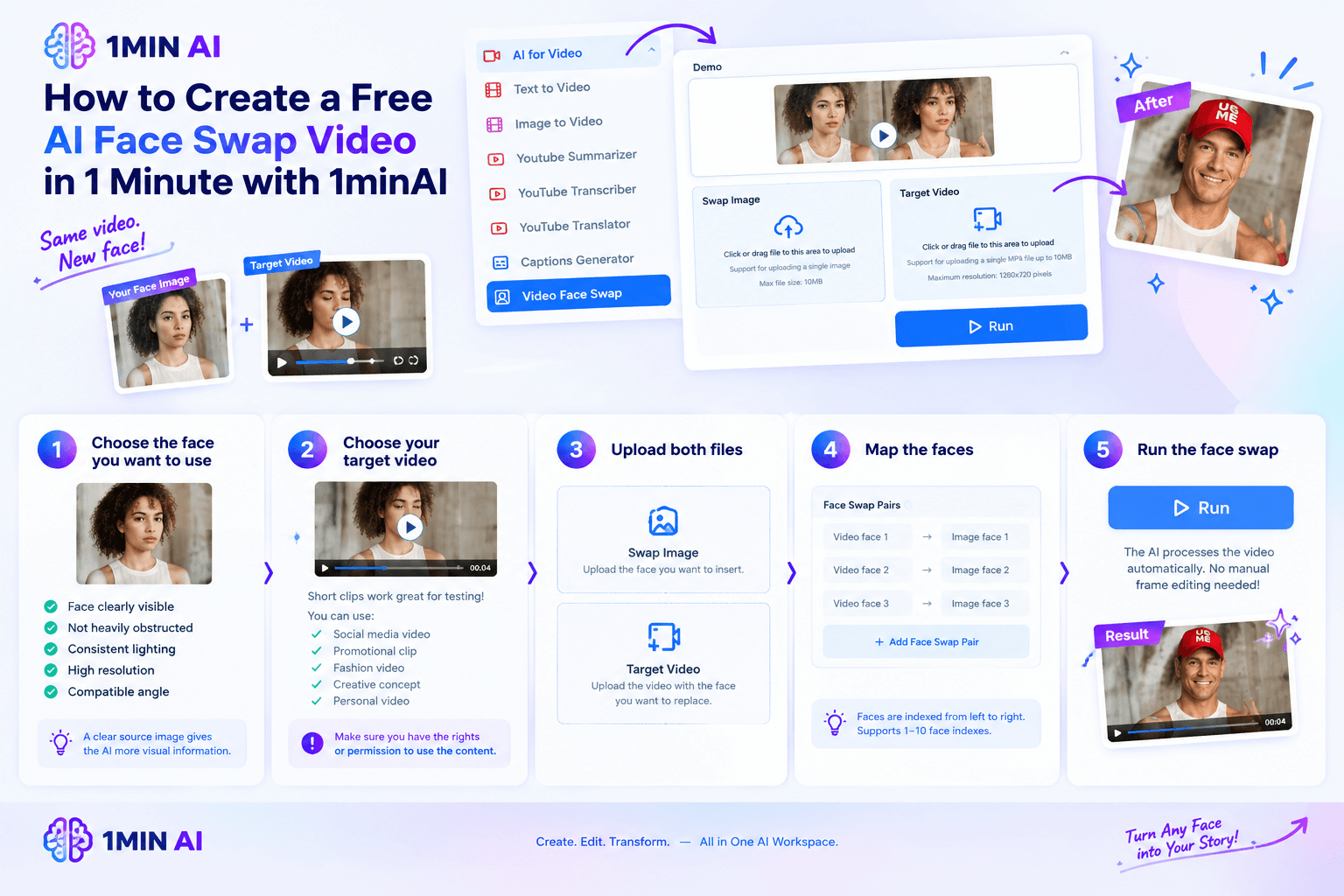
Step 1: Choose the face you want to use
Start with a clear image of the face you want to place into the video.
For better results, choose an image where:
- The face is clearly visible.
- The face is not heavily obstructed.
- Lighting is reasonably consistent.
- The face has enough resolution.
- The angle is reasonably compatible with the target video.
A clear source image gives the AI more visual information to work with.
Step 2: Choose your target video
Next, select the video where you want to replace a face.
Short clips are particularly useful for experimenting with AI face swap because you can quickly test different images and concepts.
You might use:
- A short social media video
- A promotional clip
- A fashion video
- A creative video concept
- A personal video
- A video prototype
Make sure you have the necessary rights or permission to use the video and face images, especially when the content includes other people.
Step 3: Upload both files
Open 1minAI's Video Face Swap tool and upload:
Swap Image: the face you want to insert.
Target Video: the video containing the face you want to replace.
The tool is designed around this two-file workflow, so you don't need to manually mark every frame.
Step 4: Map the faces
If your video contains one person, the process can be straightforward.
For videos containing multiple people, 1minAI allows you to create Face Swap Pairs.
Faces are indexed from left to right. For example:
- Video face 1 → Image face 1
- Video face 2 → Image face 2
- Video face 3 → Image face 3
This gives you more control over which face should be replaced when several people appear in the same scene. The current tool supports face indexes from 1 to 10 and lets you add multiple face-swap pairs.
Step 5: Run the face swap
Once the face mapping is configured, run the tool.
The AI processes the video automatically instead of requiring you to edit each frame individually.
The result can then be used as a finished clip or as a starting point for additional creative work.
7 Ways to Use Free AI Face Swap Video
AI face swapping isn't limited to entertainment. It can also be useful as a visual prototyping and content-production technique.
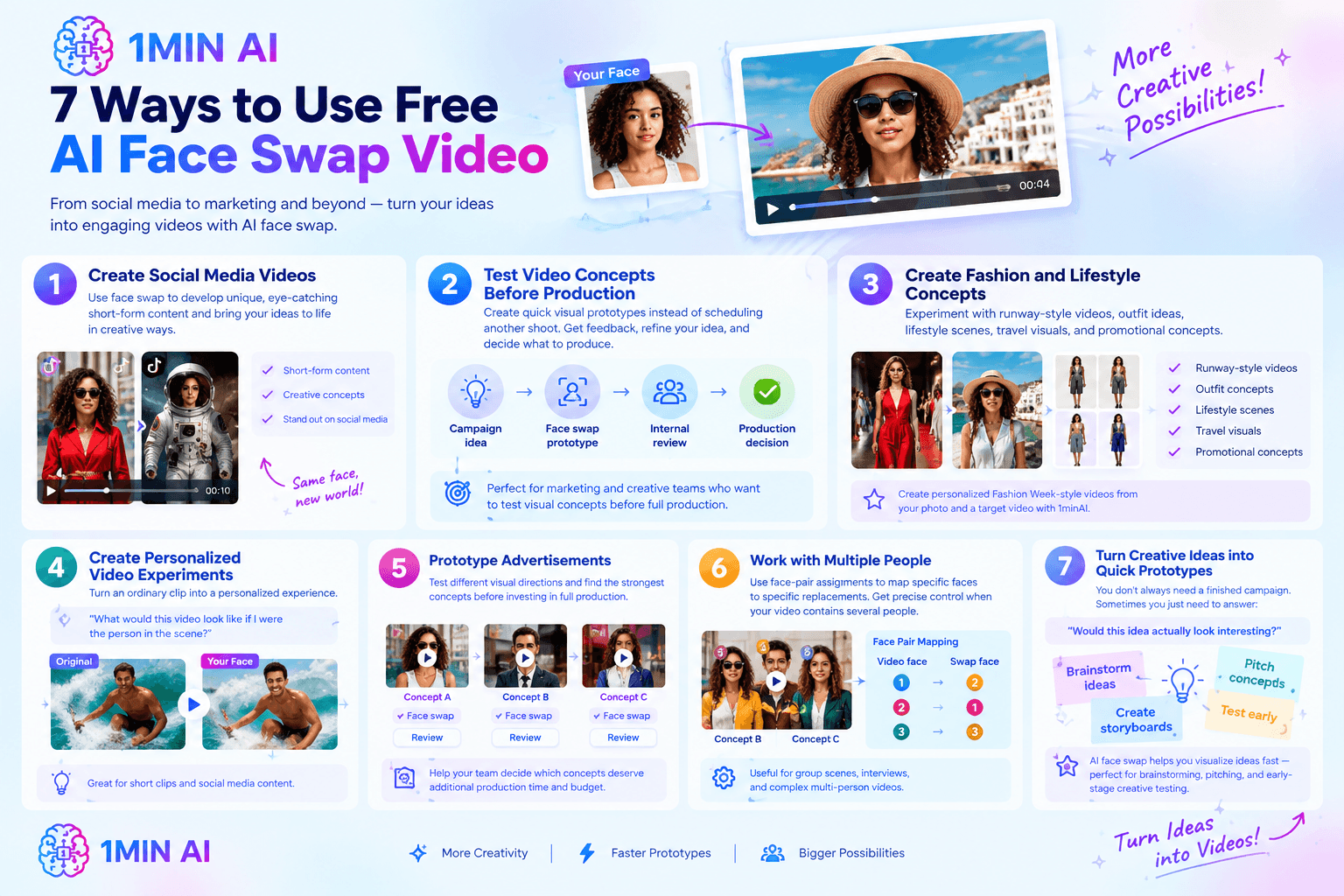
1. Create social media videos
Creators can use face swap to develop unusual visual concepts for short-form content.
For example, you could create a themed video where your face appears in a completely different visual environment.
The important part is to use face-swapped content transparently and responsibly when viewers could otherwise mistake the content for authentic footage.
2. Test video concepts before production
Marketing and creative teams can use face swap to create quick visual mockups.
Instead of scheduling another shoot just to test an idea, you can create a rough visual prototype first.
1minAI specifically positions its Video Face Swap for marketing and creative teams that want to test visual concepts before committing to full production.
For example:
Campaign idea → Face swap prototype → Internal review → Production decision
This can make early-stage creative discussions easier because stakeholders can see the concept rather than simply imagining it.
3. Create fashion and lifestyle concepts
Fashion content is another natural application.
You can experiment with:
- Runway-style videos
- Outfit concepts
- Lifestyle scenes
- Travel visuals
- Promotional concepts
1minAI has also demonstrated face-swap workflows for creating personalized Fashion Week-style videos from a user's photo and a target video.
4. Create personalized video experiments
A face swap can turn an ordinary clip into a personalized visual experiment.
For example:
“What would this video look like if I were the person in the scene?”
This can work particularly well for short clips designed for social media.
5. Prototype advertisements
Advertisers can use AI face swap during the concept stage to test different visual directions.
A team could create several variations:
Concept A → Face swap → Review
Concept B → Face swap → Review
Concept C → Face swap → Review
The purpose is not necessarily to replace professional production. Instead, AI can help teams decide which concepts deserve additional production time and budget.
6. Work with videos containing multiple people
Multiple-person videos are one area where a simple one-to-one face swap can become complicated.
1minAI's current Video Face Swap lets users map individual video faces to image faces using face-pair assignments. This makes it possible to specify which person should receive which replacement face.
For example:
| Video face | Swap image face | Result |
|---|---|---|
| Face 1 | Face 2 | Video person 1 gets image face 2 |
| Face 2 | Face 1 | Video person 2 gets image face 1 |
| Face 3 | Face 3 | Video person 3 gets image face 3 |
This is useful when a scene contains several people and you need more precise control.
7. Turn creative ideas into quick prototypes
Sometimes you don't need a finished production-quality campaign immediately.
You simply need to answer:
“Would this idea actually look interesting?”
AI face swap can provide a fast way to visualize that idea.
That makes it useful for brainstorming, storyboarding, pitching, and early-stage creative testing.
Create a Free AI Face Swap Video With 1minAI
If you want to create a free AI face swap video in 1 minute, 1minAI gives you a straightforward workflow without requiring traditional video-editing software.
The process starts with two assets:
- Swap Image: the face you want to use
- Target Video: the video where you want the face to appear
After uploading both files, you can map the faces and start the AI face swap. For videos containing multiple people, you can create individual face-swap pairs to control which face is replaced. This is useful for group scenes where a simple one-face replacement would not provide enough control.
Why use 1minAI for AI face swap?
The main benefit is that face swapping becomes part of a broader AI content workflow rather than an isolated editing task.
With 1minAI, you can move from face swapping to additional AI content creation without having to switch between multiple platforms.
For example, a creator could use this workflow:
Face photo → AI Face Swap → Video Face Swap → Captions → Social video
A marketing team could use:
Campaign concept → Face Swap → Video editing → Captions → Promotional content
And a creative team could use:
Reference image → Face Swap → Video prototype → Review → Final production
This makes 1minAI particularly useful when the goal is not simply to create one face-swapped clip, but to turn that clip into a finished piece of content.
1minAI for both photo and video face swapping
1minAI provides separate workflows depending on the type of content you're creating.
For a still image, you can use AI Face Swap to replace a face in a photo. This is useful for profile images, creative photos, advertising concepts, social graphics, and other image-based projects.
For a video, use AI Video Face Swap. You can upload the source face and target video, configure face mappings when necessary, and let AI process the video.
Keeping these workflows separate makes it easier to choose the right tool for the job:
| Your goal | 1minAI tool |
|---|---|
| Swap a face in a photo | AI Face Swap |
| Swap a face throughout a video | AI Video Face Swap |
| Create videos from images | 1minAI video tools |
| Add captions to videos | 1minAI Captions Generator |
| Create other AI visual content | 1minAI image and video tools |
More than an AI face swap tool
Another advantage of using 1minAI is that face swapping can be combined with other AI tools in the same workspace.
After creating a face-swapped video, you may want to:
- Generate captions
- Create additional video variations
- Turn an image into a video
- Generate supporting images
- Rewrite promotional copy
- Create social media captions
- Translate content for another market
- Repurpose the video for different platforms
Instead of treating each step as a separate production task, you can build a broader AI-assisted workflow around the original asset.
This can be especially useful for creators, marketers, ecommerce teams, agencies, and small businesses that need to produce multiple versions of visual content without maintaining a large collection of specialized tools.
Start your free AI face swap video
If your goal is simply to experiment, start with a short video and a clear face image. Upload both to 1minAI, map the faces if needed, and process the video.
If the result works, you can continue using the same asset in other AI workflows for captions, video variations, social content, or marketing materials.
Try 1minAI's AI Video Face Swap to create your first free AI face swap video, or use AI Face Swap when you're working with photos.
This makes the final section stronger because it sells the workflow and 1minAI ecosystem, rather than simply repeating “upload image → upload video → generate.”
Discover more AI features: https://1min.ai/features
Try 1minAI agent now: https://app.1min.ai/ai-agent-demo
Alternatives
Discover the best alternatives to 1minAI and compare features, pricing, and use cases.

1min.AI vs OpenRouter
1min.AI vs. OpenRouter: Compare the ready-to-use AI creation product against the technical API tool. Find out if you need a zero-code creative studio or a coding infrastructure hub.
 Ngoc Hong
1min.AI vs Lovart
Compare 1min.AI vs Lovart across features, pricing, credits, brand tools, and use cases to find the right AI platform for your workflow.
Ngoc Hong
1min. AI vs Dola AI
Looking for a Dola AI alternative? Compare 1min.AI vs Dola AI on video generation, free plans, pricing and privacy to pick the right AI app.
Ngoc HongAI Tools
Discover the best AI tools to boost productivity, creativity, and everyday work.

Create Consistent Cartoon Content in Just a Few Steps
Create engaging cartoon videos for TikTok and Reels with 1min.AI. Research ideas, create characters, and turn images into animated videos in 3 simple steps.
 Lien Anh Vu
One Product, 10 UGC Creatives: How AI Makes Content Testing Easier
Create more authentic UGC with an AI UGC video generator, test more creative angles and scale affiliate content without filming every version.
Lien Anh Vu
Top 4 Affordable AI Tools for Startup Founders
Discover the top 4 affordable AI tools for startup founders to validate ideas, build products, create content, and launch faster without overspending.
 Tram Ta
AI Features
Comprehensive AI features that streamline workflows, improve efficiency, and empower teams to achieve more.
Create Consistent Cartoon Content in Just a Few Steps
Create engaging cartoon videos for TikTok and Reels with 1min.AI. Research ideas, create characters, and turn images into animated videos in 3 simple steps.
Lien Anh VuOne Product, 10 UGC Creatives: How AI Makes Content Testing Easier
Create more authentic UGC with an AI UGC video generator, test more creative angles and scale affiliate content without filming every version.
Lien Anh Vu
1minAI: Free AI Grammar Checker
Check grammar for free with 1minAI’s AI grammar checker. Find grammar, spelling, and writing mistakes, improve clarity, and polish your content in seconds.
Tram TaAI Use Cases
A curated collection of AI use cases for business, productivity, and industry-specific applications.
Create Consistent Cartoon Content in Just a Few Steps
Create engaging cartoon videos for TikTok and Reels with 1min.AI. Research ideas, create characters, and turn images into animated videos in 3 simple steps.
Lien Anh VuOne Product, 10 UGC Creatives: How AI Makes Content Testing Easier
Create more authentic UGC with an AI UGC video generator, test more creative angles and scale affiliate content without filming every version.
Lien Anh Vu
Best Time to Post on Instagram: A Practical Guide for Better Engagement
Discover the best time to post on Instagram, including the best days and times for different audiences, plus tips to find the ideal posting schedule for your account.
Tram TaAI Tutorials
Learn how to use AI with practical, step-by-step tutorials.
Create Consistent Cartoon Content in Just a Few Steps
Create engaging cartoon videos for TikTok and Reels with 1min.AI. Research ideas, create characters, and turn images into animated videos in 3 simple steps.
Lien Anh Vu
Black Friday AI Tool Deals in 2026
Discover what Black Friday AI tool deals 2026 has to offer. Find out how to secure the 1min.AI lifetime deal via AppSumo, Dealify, Stack Social, and verify on Trustpilot, Slashdot, and Software Advice.
 Hang Nguyen
[Seedance 2.5 New] Better AI Product Videos, Less Rework in 1min.AI
Use Seedance 2.5 image to video on 1min.AI to create more consistent AI product videos, reduce failed generations, save credits, and improve UGC workflows.
Lien Anh VuAI Guides
Learn AI faster with practical guides, real-world examples, and actionable best practices.
Create Consistent Cartoon Content in Just a Few Steps
Create engaging cartoon videos for TikTok and Reels with 1min.AI. Research ideas, create characters, and turn images into animated videos in 3 simple steps.
Lien Anh Vu
Safely Buy AI Tools Online: 2026 Black Friday Guide
Discover how to find and secure the best Black Friday AI deals online. Learn expert strategies to avoid scams, combat subscription fatigue, and verify software.
Hang Nguyen[Seedance 2.5 New] Better AI Product Videos, Less Rework in 1min.AI
Use Seedance 2.5 image to video on 1min.AI to create more consistent AI product videos, reduce failed generations, save credits, and improve UGC workflows.
Lien Anh VuAI Solutions
Browse the best AI solutions for automation, coding, research, productivity, customer support, marketing, and business workflows.
Create Consistent Cartoon Content in Just a Few Steps
Create engaging cartoon videos for TikTok and Reels with 1min.AI. Research ideas, create characters, and turn images into animated videos in 3 simple steps.
Lien Anh VuOne Product, 10 UGC Creatives: How AI Makes Content Testing Easier
Create more authentic UGC with an AI UGC video generator, test more creative angles and scale affiliate content without filming every version.
Lien Anh Vu
Free AI Tattoo Generator: Custom Designs
Turn any idea into a custom tattoo design with 1min.AI's free AI tattoo generator. Describe your idea, pick a style, and download in seconds.
 Trang Tran
AI Models
Explore the world's leading AI models in one place.
Create Consistent Cartoon Content in Just a Few Steps
Create engaging cartoon videos for TikTok and Reels with 1min.AI. Research ideas, create characters, and turn images into animated videos in 3 simple steps.
Lien Anh VuOne Product, 10 UGC Creatives: How AI Makes Content Testing Easier
Create more authentic UGC with an AI UGC video generator, test more creative angles and scale affiliate content without filming every version.
Lien Anh Vu[Seedance 2.5 New] Better AI Product Videos, Less Rework in 1min.AI
Use Seedance 2.5 image to video on 1min.AI to create more consistent AI product videos, reduce failed generations, save credits, and improve UGC workflows.
Lien Anh VuAI Comparisons
Compare AI tools, models, and platforms to find the best fit for your needs.

Kling AI Vs Veo 3: Which Model Wins?
Kling AI vs Veo 3: compare motion, native audio, pricing & free tiers to see which AI video generator wins for your project - try both on 1min.AI.
Trang Tran[Seedance 2.5 New] Better AI Product Videos, Less Rework in 1min.AI
Use Seedance 2.5 image to video on 1min.AI to create more consistent AI product videos, reduce failed generations, save credits, and improve UGC workflows.
Lien Anh Vu
DeepSeek V4 Pro vs Flash Comparison
Compare DeepSeek V4 Pro vs DeepSeek V4 Flash metrics. Optimize your agentic apps and improve AI fact checking on 1min.ai today.
Ngoc HongAI Integrations
Seamlessly integrate AI with the tools you already use to automate work and boost productivity.

POV: You Have 10+ Posts to Make Every Day
Learn how to build an AI content workflow that helps content creators produce 10+ social media posts a day faster with AI brainstorming, image generation, and content creation.
Lien Anh Vu
How to Use an AI Fashion Video Generator for Fashion Week 2026
Turn Fashion Week 2026 ideas into stunning fashion videos with AI. Learn how to brainstorm, create visuals, and transform images into videos with one simple workflow.
Lien Anh Vu
Stop Switching Between AI Apps: How AI Integration Transforms Employer Branding
Discover how AI integration helps HR teams streamline employer branding by combining AI writing, documents, images, video, and multiple AI models into one workspace.
Tram TaAI for Industries
Find the best AI tools and workflows for healthcare, finance, education, legal, manufacturing, retail, real estate, and more

How to Start a One-Person AI Business: 7 Models You Can Run Solo
Learn how to start a one-person AI business with 7 practical models, from AI consulting and content services to automation and software reselling.
Tram Ta
7 Low-Cost AI Business Ideas for Your Startup
Explore 7 low-cost AI business ideas you can start with a small budget, from content and video services to AI consulting, reselling, and automation.
Tram Ta
Free AI Image Generator For Ecommerce
Turn phone photos into studio, white-background, and lifestyle product images. Try the best AI image generator for ecommerce online free with 1min.AI.
Trang TranAI Agents
Discover and run AI agents to automate tasks across your work and daily life.
1minAI: Free AI Grammar Checker
Check grammar for free with 1minAI’s AI grammar checker. Find grammar, spelling, and writing mistakes, improve clarity, and polish your content in seconds.
Tram Ta
AI Agents for Facebook
Use an AI Agent for Facebook to create content, generate images, schedule posts, and publish from your documents and conversations.
Ngoc Hong
AI Agent vs AI Assistant: Which One Actually Saves Designers More Time?
Learn the difference between AI Agent vs AI Assistant and discover which solution helps designers automate repetitive work, reduce revisions, and save more time.
Lien Anh VuAI Workflows
Explore ready-to-use AI workflows for productivity, marketing, sales, support, and more.
Create Consistent Cartoon Content in Just a Few Steps
Create engaging cartoon videos for TikTok and Reels with 1min.AI. Research ideas, create characters, and turn images into animated videos in 3 simple steps.
Lien Anh VuOne Product, 10 UGC Creatives: How AI Makes Content Testing Easier
Create more authentic UGC with an AI UGC video generator, test more creative angles and scale affiliate content without filming every version.
Lien Anh VuPOV: You Have 10+ Posts to Make Every Day
Learn how to build an AI content workflow that helps content creators produce 10+ social media posts a day faster with AI brainstorming, image generation, and content creation.
Lien Anh VuNewsletter
Weekly AI Innovations with 1minAI

🔮 Weekly AI Innovations #140: Deepseek 4.1 Flash & Gemini Upgrades
Explore Deepseek 4.1 Flash and new Gemini models on 1min.ai. Plus, check our update on your Billing - Usage page for better clarity.
Hang Nguyen
🔮 Weekly AI Innovations #136: Grok 4.6 and Smart Data Retention
Discover the latest 1min.ai updates! Upgrade to Grok 4.6 for blazing-fast AI, and check our new Data Retention policies to secure your files today.
Hang Nguyen
🔮 Weekly AI Innovations #139: Dawn of the next-gen AI
Discover the immense power of GPT-6 Astra and Claude Fable 5.1. Unlock next-generation AI models on 1min.ai to solve complex tasks effortlessly.
Hang Nguyen