
Muse Spark AI: Features, Versions & How to Use

Ngoc Hong
November 19, 2026

Discover Meta Muse Spark AI, its multimodal features, reasoning capabilities, Muse Spark 1.3 updates, and how to access the model.
Muse Spark AI: What It Is and What It Can Do
Meta is developing a new generation of AI models through Meta Superintelligence Labs. One of its key releases is Muse Spark, a multimodal reasoning model designed to understand information, use tools, and handle more complex tasks.
Unlike a traditional chatbot that mainly responds to prompts, Muse Spark is built to support reasoning, visual understanding, and multi-agent workflows.
So, what makes Muse Spark different? What can it do, and how can you access it?
This guide covers its main features, model updates, practical use cases, and availability.
What Is Muse Spark?
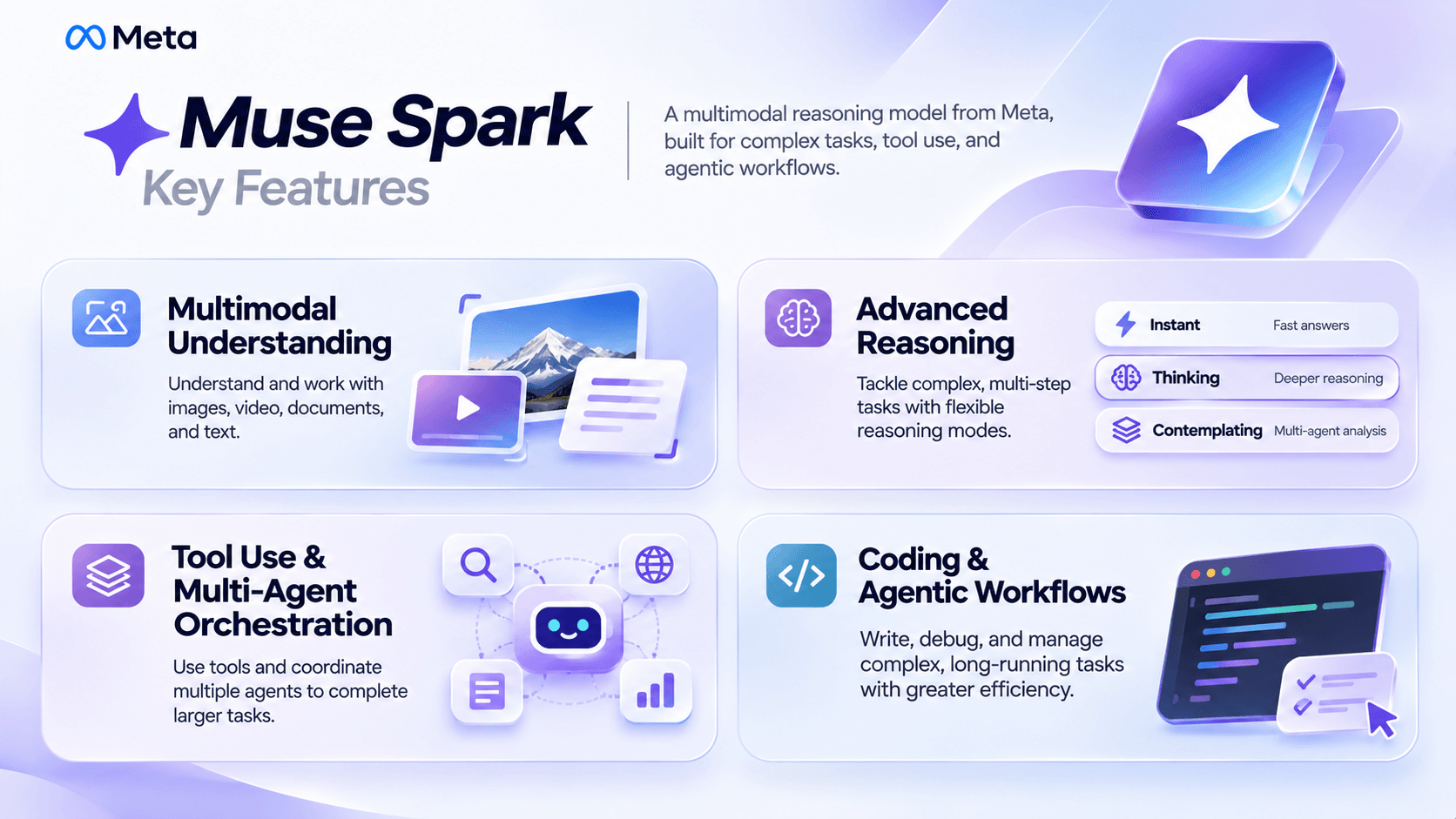
Muse Spark is the first model in the Muse family, developed by Meta Superintelligence Labs (MSL).
Introduced on April 8, 2026, it is a natively multimodal reasoning model with support for tool use, visual chain of thought, and multi-agent orchestration.
Muse Spark at a glance
| Category | Details |
|---|---|
| Developer | Meta Superintelligence Labs |
| Model family | Muse |
| First release | April 8, 2026 |
| Model type | Multimodal reasoning model |
| Key capabilities | Reasoning, visual understanding, tool use, multi-agent orchestration |
| Main access | Meta AI, Meta AI app, Meta Model API |
| Latest open-weight release | Muse Spark Open |
Is Muse Spark a New AI Model From Meta?
Yes. Muse Spark is the first model in Meta's Muse family.
It represents a new direction in Meta's AI development, with a focus on multimodal reasoning and more capable AI assistants.
Muse Spark is separate from the Llama model family. Although both are developed by Meta, they belong to different model series.
Key Features of Muse Spark
Muse Spark combines several capabilities to support more complex AI tasks.
1. Multimodal Understanding
Muse Spark is designed to understand visual information alongside text.
This allows users to ask questions about images, interpret visual content, and work with information beyond a standard text conversation.
Potential use cases include:
- Understanding images and visual references.
- Identifying objects in photos.
- Explaining charts and visual information.
- Answering questions about uploaded images.
2. Advanced Reasoning
Muse Spark is built to handle tasks that require multiple reasoning steps.
Meta highlights its performance in areas such as multimodal perception, reasoning, and health-related tasks.
It also offers different reasoning experiences, including Instant, Thinking, and Contemplating modes.
- Instant: For faster, straightforward responses.
- Thinking: For tasks that benefit from additional reasoning.
- Contemplating: Uses multiple agents reasoning in parallel for more challenging problems.
Availability of these modes may depend on the product and rollout.
3. Tool Use and Multi-Agent Orchestration
Muse Spark supports tool use and multi-agent orchestration.
Instead of handling every step in one response, an AI system can coordinate multiple agents to work on different parts of a task.
For example, a research workflow could:
- Collect information from available sources.
- Organize findings by topic.
- Compare relevant details.
- Prepare a structured summary.
The tools and actions available depend on the environment connected to the model.
4. Coding and Agentic Workflows
Later Muse Spark versions place greater emphasis on coding and long-running tasks.
Muse Spark 1.3 improves how the model manages complex instructions, coordinates multiple workflows, and uses tools to complete tasks.
This makes it relevant to developers exploring AI-powered coding assistants and autonomous workflows.
Muse Spark Versions: What's New?
Meta has released several updates to the Muse Spark family.
| Version | Release | Main focus |
|---|---|---|
| Muse Spark | April 8, 2026 | Multimodal reasoning and multi-agent orchestration |
| Muse Spark 1.1 | July 9, 2026 | Improved tool use, computer use, coding, and multimodal understanding |
| Muse Spark 1.3 | September 2, 2026 | Better agentic workflows and coding performance |
| Muse Spark Open | October 15, 2026 | Open-weight release for developers |
What Changed in Muse Spark 1.3?
Muse Spark 1.3 focuses on making the model more useful for real-world agentic and coding tasks.
According to Meta, the update improves:
- Long-running workflows: Handles extended tasks and multiple workflows in a single thread.
- Instruction following: Preserves detailed requirements across multi-step tasks.
- Task coordination: Routes new requests and follow-ups to the right task.
- Tool use: Uses tools to fill information gaps and correct its plan.
- User collaboration: Asks clarifying questions and confirms before consequential actions.
Meta also reported that Muse Spark 1.3 used approximately 20% fewer tool calls and 25% fewer tokens than Muse Spark 1.2 in its internal coding comparisons.
These are Meta-reported results, not independent benchmark scores.
What Is Muse Spark Open?
Muse Spark Open is Meta's open-weight release of the Muse Spark model, announced on October 15, 2026.
Its technical specifications include:
| Specification | Muse Spark Open |
|---|---|
| Total parameters | 816 billion |
| Active parameters | 42 billion |
| Architecture | Sparse Mixture of Experts |
| Context window | 1,048,576 tokens |
| Input | Text, image, audio, and video |
| Output | Text |
Developers can download the model weights and run them using supported inference frameworks such as SGLang or vLLM. It can also be accessed through supported hosted inference providers.
Important: Muse Spark Open is an open-weight release. This does not mean every Muse Spark version is open-weight or that the model can run on an ordinary laptop.
What Can You Use Muse Spark For?
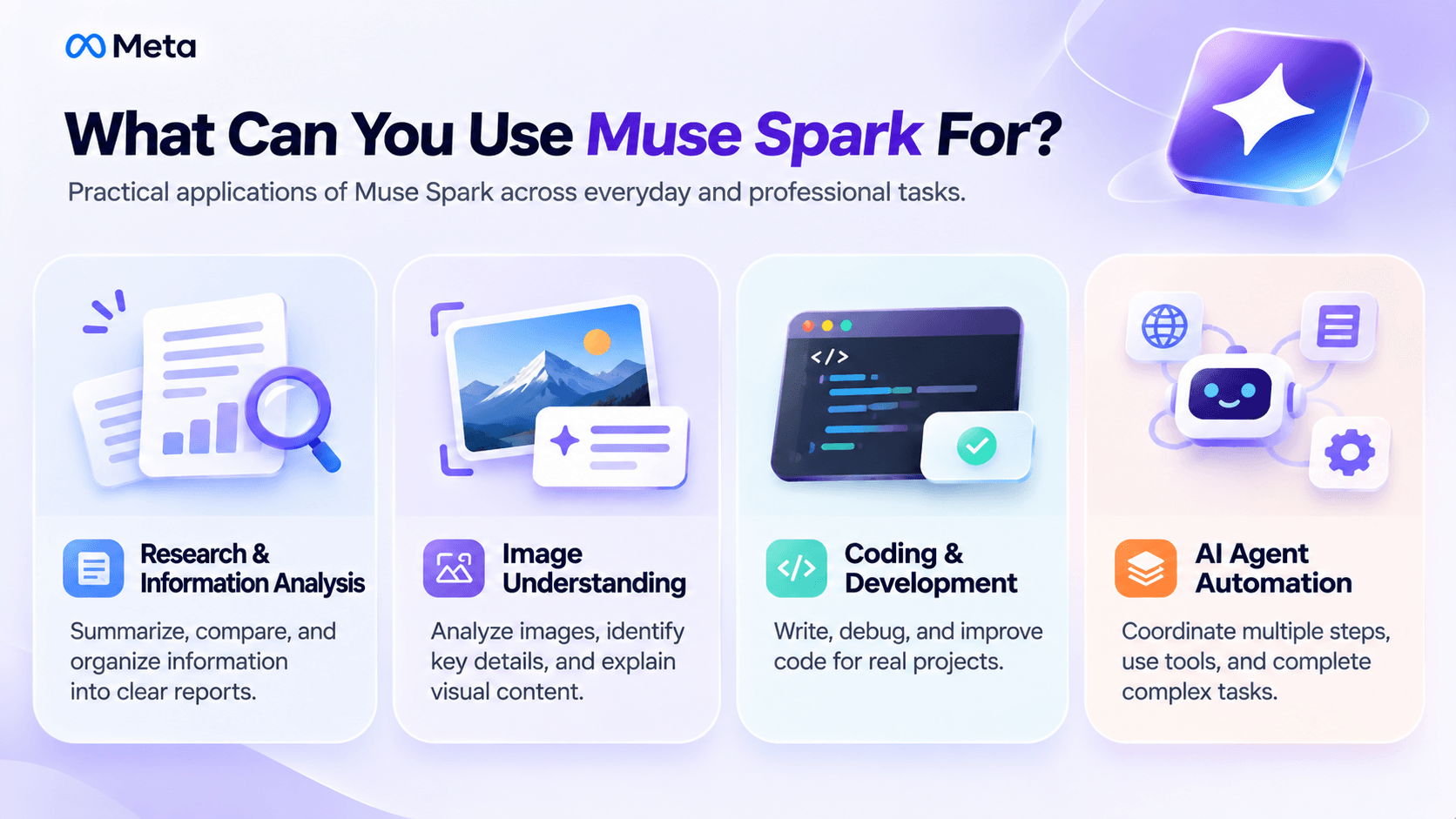
Muse Spark's capabilities make it relevant to several practical applications.
1. Research and Information Analysis
Muse Spark can help organize information and work through complex questions.
For example, users can ask it to:
- Summarize research materials.
- Compare different sources.
- Identify key findings.
- Organize information into a report.
2. Image Understanding
Its multimodal capabilities allow users to work with visual information.
For example, you can provide an image and ask the model to describe its contents, identify important details, or explain a visual reference.
3. Coding and Software Development
Muse Spark 1.3 is designed to improve coding and agentic workflows.
Potential applications include:
- Writing and reviewing code.
- Debugging common issues.
- Working with complex instructions.
- Coordinating multi-step development tasks.
Always review and test AI-generated code before using it in production.
4. AI Agent Automation
Muse Spark's tool-use and multi-agent capabilities can support workflows that require multiple connected actions.
For example, an AI-powered research assistant could:
- Receive a research objective.
- Gather information using available tools.
- Organize relevant findings.
- Identify missing information.
- Prepare a final report.
The actual workflow depends on the tools, permissions, and agent framework being used.
Muse Spark Benchmarks and Performance
Meta has highlighted Muse Spark's performance in multimodal perception, reasoning, and agentic tasks.
For Muse Spark 1.3, the company places particular emphasis on coding efficiency and long-horizon workflows.
When evaluating the model, consider these areas:
| Evaluation area | What it measures |
|---|---|
| Reasoning | Handling complex questions and multi-step problems |
| Multimodal perception | Understanding visual information |
| Coding | Code generation and software engineering tasks |
| Agentic workflows | Planning, tool use, and task completion |
| Efficiency | Token usage and number of tool calls |
Meta also published a dedicated evaluation report for Muse Spark 1.3. Benchmark results should be interpreted alongside the testing methodology and compared under equivalent conditions.
See the Muse Spark 1.3 Evaluation Report.
How to Access Muse Spark
There are several ways to explore Muse Spark, depending on your needs.
1. Meta AI
Muse Spark was initially introduced as the model powering Meta AI.
Visit Meta AI or use the Meta AI app to explore its available features.
Access may vary depending on your region and product rollout.
2. Meta Model API
Developers can access supported Muse Spark versions through the Meta Model API.
This option is useful for building applications that need reasoning, tool use, coding, or multimodal capabilities.
3. Muse Code
Muse Code is Meta's coding agent environment.
It uses Muse models to support software engineering tasks, including planning changes, writing code, and validating results.
Visit the Meta developer platform to learn more.
4. Muse Spark Open
Developers can download Muse Spark Open weights and run the model using supported inference frameworks.
You can also explore hosted inference providers listed in Meta's documentation.
See the official Muse Spark Open documentation for deployment options and hardware requirements.
Should You Try Muse Spark?
Muse Spark is worth exploring if you're interested in multimodal AI, advanced reasoning, and agentic workflows.
Here is who may benefit from trying it:
| User type | Why explore Muse Spark? |
|---|---|
| Everyday users | Explore multimodal AI assistance through Meta AI |
| Researchers | Experiment with reasoning and information analysis |
| Developers | Explore coding and agentic workflows |
| AI enthusiasts | Follow Meta's latest model developments |
The best way to evaluate an AI model is to test it with tasks you actually need to complete. Compare its results, accuracy, and efficiency rather than relying only on feature descriptions.
Frequently Asked Questions
1. What is Muse Spark AI?
Muse Spark is a multimodal reasoning model developed by Meta Superintelligence Labs. It supports visual understanding, reasoning, tool use, and multi-agent orchestration.
2. Is Muse Spark free to use?
Users can explore Muse Spark through Meta AI, subject to availability and product limitations. API access may have separate pricing and usage conditions.
3. Is Muse Spark open source?
Meta has released Muse Spark Open as an open-weight model. However, the original hosted Muse Spark models are separate from this release.
4. What is Muse Spark 1.3?
Muse Spark 1.3 is an updated version released in September 2026. It improves agentic workflows, coding efficiency, and long-running task execution.
5. What is the difference between Muse Spark and Muse Spark Open?
Muse Spark refers to Meta's model family and hosted versions. Muse Spark Open is the open-weight release that developers can download and deploy using supported infrastructure.
6. Can Muse Spark generate code?
Yes. Coding is one of the model family's development priorities. Muse Spark 1.3 improves coding workflows, while Muse Code provides a dedicated environment for software engineering tasks.
Final: Is Muse Spark Worth Exploring?
Muse Spark is an important development in Meta's AI model ecosystem.
Its combination of multimodal reasoning, tool use, and agentic capabilities makes it relevant to users exploring more advanced AI applications.
Muse Spark 1.3 improves long-running workflows and coding efficiency, while Muse Spark Open gives developers more flexibility to experiment with downloadable model weights.
Whether you're a developer, researcher, or everyday AI user, Muse Spark is a model worth keeping an eye on as Meta continues to expand its AI ecosystem.
- #Informational
Alternatives
Discover the best alternatives to 1minAI and compare features, pricing, and use cases.

1min.AI vs OpenRouter
1min.AI vs. OpenRouter: Compare the ready-to-use AI creation product against the technical API tool. Find out if you need a zero-code creative studio or a coding infrastructure hub.
 Ngoc Hong

1min.AI vs. Metricool: Which Platform Does More for Your Marketing Workflow?
Compare 1min.AI vs. Metricool across content creation, visual production, scheduling, analytics, MCP, and pricing to find the right platform for your marketing workflow.

1min.AI vs. Hootsuite: Which Social Media Tool Fits Your Workflow?
Compare 1min.AI vs. Hootsuite to explore their AI content creation, social media publishing, analytics, pricing, and collaboration features. Find the right tool for your workflow.
AI Tools
Discover the best AI tools to boost productivity, creativity, and everyday work.

Create Consistent Cartoon Content in Just a Few Steps
Create engaging cartoon videos for TikTok and Reels with 1min.AI. Research ideas, create characters, and turn images into animated videos in 3 simple steps.
 Lien Anh Vu

One Product, 10 UGC Creatives: How AI Makes Content Testing Easier
Create more authentic UGC with an AI UGC video generator, test more creative angles and scale affiliate content without filming every version.
Lien Anh Vu
Top 4 Affordable AI Tools for Startup Founders
Discover the top 4 affordable AI tools for startup founders to validate ideas, build products, create content, and launch faster without overspending.
 Tram Ta
AI Features
Comprehensive AI features that streamline workflows, improve efficiency, and empower teams to achieve more.
Create Consistent Cartoon Content in Just a Few Steps
Create engaging cartoon videos for TikTok and Reels with 1min.AI. Research ideas, create characters, and turn images into animated videos in 3 simple steps.
Lien Anh VuOne Product, 10 UGC Creatives: How AI Makes Content Testing Easier
Create more authentic UGC with an AI UGC video generator, test more creative angles and scale affiliate content without filming every version.
Lien Anh Vu
1minAI: Free AI Grammar Checker
Check grammar for free with 1minAI’s AI grammar checker. Find grammar, spelling, and writing mistakes, improve clarity, and polish your content in seconds.
Tram TaAI Use Cases
A curated collection of AI use cases for business, productivity, and industry-specific applications.
Create Consistent Cartoon Content in Just a Few Steps
Create engaging cartoon videos for TikTok and Reels with 1min.AI. Research ideas, create characters, and turn images into animated videos in 3 simple steps.
Lien Anh VuOne Product, 10 UGC Creatives: How AI Makes Content Testing Easier
Create more authentic UGC with an AI UGC video generator, test more creative angles and scale affiliate content without filming every version.
Lien Anh Vu
Best Time to Post on Instagram: A Practical Guide for Better Engagement
Discover the best time to post on Instagram, including the best days and times for different audiences, plus tips to find the ideal posting schedule for your account.
Tram TaAI Tutorials
Learn how to use AI with practical, step-by-step tutorials.

Black Friday AI Tool Deals in 2026
Discover what Black Friday AI tool deals 2026 has to offer. Find out how to secure the 1min.AI lifetime deal via AppSumo, Dealify, Stack Social, and verify on Trustpilot, Slashdot, and Software Advice.
 Hang Nguyen
Create Consistent Cartoon Content in Just a Few Steps
Create engaging cartoon videos for TikTok and Reels with 1min.AI. Research ideas, create characters, and turn images into animated videos in 3 simple steps.
Lien Anh Vu
[Seedance 2.5 New] Better AI Product Videos, Less Rework in 1min.AI
Use Seedance 2.5 image to video on 1min.AI to create more consistent AI product videos, reduce failed generations, save credits, and improve UGC workflows.
Lien Anh VuAI Guides
Learn AI faster with practical guides, real-world examples, and actionable best practices.

Safely Buy AI Tools Online: 2026 Black Friday Guide
Discover how to find and secure the best Black Friday AI deals online. Learn expert strategies to avoid scams, combat subscription fatigue, and verify software.
Hang NguyenCreate Consistent Cartoon Content in Just a Few Steps
Create engaging cartoon videos for TikTok and Reels with 1min.AI. Research ideas, create characters, and turn images into animated videos in 3 simple steps.
Lien Anh Vu[Seedance 2.5 New] Better AI Product Videos, Less Rework in 1min.AI
Use Seedance 2.5 image to video on 1min.AI to create more consistent AI product videos, reduce failed generations, save credits, and improve UGC workflows.
Lien Anh VuAI Solutions
Browse the best AI solutions for automation, coding, research, productivity, customer support, marketing, and business workflows.
Safely Buy AI Tools Online: 2026 Black Friday Guide
Discover how to find and secure the best Black Friday AI deals online. Learn expert strategies to avoid scams, combat subscription fatigue, and verify software.
Hang NguyenCreate Consistent Cartoon Content in Just a Few Steps
Create engaging cartoon videos for TikTok and Reels with 1min.AI. Research ideas, create characters, and turn images into animated videos in 3 simple steps.
Lien Anh VuOne Product, 10 UGC Creatives: How AI Makes Content Testing Easier
Create more authentic UGC with an AI UGC video generator, test more creative angles and scale affiliate content without filming every version.
Lien Anh VuAI Models
Explore the world's leading AI models in one place.
Create Consistent Cartoon Content in Just a Few Steps
Create engaging cartoon videos for TikTok and Reels with 1min.AI. Research ideas, create characters, and turn images into animated videos in 3 simple steps.
Lien Anh VuOne Product, 10 UGC Creatives: How AI Makes Content Testing Easier
Create more authentic UGC with an AI UGC video generator, test more creative angles and scale affiliate content without filming every version.
Lien Anh Vu[Seedance 2.5 New] Better AI Product Videos, Less Rework in 1min.AI
Use Seedance 2.5 image to video on 1min.AI to create more consistent AI product videos, reduce failed generations, save credits, and improve UGC workflows.
Lien Anh VuAI Comparisons
Compare AI tools, models, and platforms to find the best fit for your needs.

Kling AI Vs Veo 3: Which Model Wins?
Kling AI vs Veo 3: compare motion, native audio, pricing & free tiers to see which AI video generator wins for your project - try both on 1min.AI.
 Trang Tran
[Seedance 2.5 New] Better AI Product Videos, Less Rework in 1min.AI
Use Seedance 2.5 image to video on 1min.AI to create more consistent AI product videos, reduce failed generations, save credits, and improve UGC workflows.
Lien Anh Vu
DeepSeek V4 Pro vs Flash Comparison
Compare DeepSeek V4 Pro vs DeepSeek V4 Flash metrics. Optimize your agentic apps and improve AI fact checking on 1min.ai today.
Ngoc HongAI Integrations
Seamlessly integrate AI with the tools you already use to automate work and boost productivity.

POV: You Have 10+ Posts to Make Every Day
Learn how to build an AI content workflow that helps content creators produce 10+ social media posts a day faster with AI brainstorming, image generation, and content creation.
Lien Anh Vu
How to Use an AI Fashion Video Generator for Fashion Week 2026
Turn Fashion Week 2026 ideas into stunning fashion videos with AI. Learn how to brainstorm, create visuals, and transform images into videos with one simple workflow.
Lien Anh Vu
Stop Switching Between AI Apps: How AI Integration Transforms Employer Branding
Discover how AI integration helps HR teams streamline employer branding by combining AI writing, documents, images, video, and multiple AI models into one workspace.
Tram TaAI for Industries
Find the best AI tools and workflows for healthcare, finance, education, legal, manufacturing, retail, real estate, and more

No Photoshoot? Create AI Fashion Videos With Seedance 2.5
No photoshoot needed! Create stunning AI fashion videos with Seedance 2.5 on 1min.AI using outfit references, cinematic prompts, and surreal scenes.
Lien Anh Vu
Voice Cloning AI Free: How to Clone Any Voice Online in Minutes
Try voice cloning AI free with 1min.AI. Upload a 5-second clip, pick an ElevenLabs model, choose from 32 languages, and turn text to speech in your own voice.
Trang Tran
Text To Video AI Free Without Watermark Online
Create text to video AI free without watermark online with 1min.AI. Pick top models, turn prompts into HD clips, and download clean videos fast. Try it free.
Trang TranAI Agents
Discover and run AI agents to automate tasks across your work and daily life.
1minAI: Free AI Grammar Checker
Check grammar for free with 1minAI’s AI grammar checker. Find grammar, spelling, and writing mistakes, improve clarity, and polish your content in seconds.
Tram Ta
AI Agents for Facebook
Use an AI Agent for Facebook to create content, generate images, schedule posts, and publish from your documents and conversations.
Ngoc Hong
AI Agent vs AI Assistant: Which One Actually Saves Designers More Time?
Learn the difference between AI Agent vs AI Assistant and discover which solution helps designers automate repetitive work, reduce revisions, and save more time.
Lien Anh VuAI Workflows
Explore ready-to-use AI workflows for productivity, marketing, sales, support, and more.
Create Consistent Cartoon Content in Just a Few Steps
Create engaging cartoon videos for TikTok and Reels with 1min.AI. Research ideas, create characters, and turn images into animated videos in 3 simple steps.
Lien Anh VuOne Product, 10 UGC Creatives: How AI Makes Content Testing Easier
Create more authentic UGC with an AI UGC video generator, test more creative angles and scale affiliate content without filming every version.
Lien Anh VuPOV: You Have 10+ Posts to Make Every Day
Learn how to build an AI content workflow that helps content creators produce 10+ social media posts a day faster with AI brainstorming, image generation, and content creation.
Lien Anh VuNewsletter
Weekly AI Innovations with 1minAI

🔮 Weekly AI Innovations #146: Mistral 3.5, Qwen Image & Cohere A+ are ready on 1min.ai
Deploy Mistral Large 3, Qwen Image 3.0, and Cohere Command A+ on 1min.ai. Boost RAG accuracy and cut visual generation latency in one unified AI workspace.
Hang Nguyen
🔮 Weekly AI Innovations #145: X Content Agent & GPT 6.1 Terra on 1min.ai
Scale viral reach with the X Content Agent on 1min.ai. Discover an end-to-end 4-stage pipeline with zero token burn, plus the launch of GPT 6.1 Terra.
Hang Nguyen
🔮 Weekly AI Innovations #144: LinkedIn Content Agent: Complete B2B Publishing Pipeline
Scale B2B influence with the LinkedIn Content Agent on 1min.ai. Discover an end-to-end 4-stage pipeline with zero redundant token burn and 1-click publishing.
Hang Nguyen