
What Does GPT Stand For? A Simple Guide to GPT and How It Works

Tram Ta
August 19, 2026
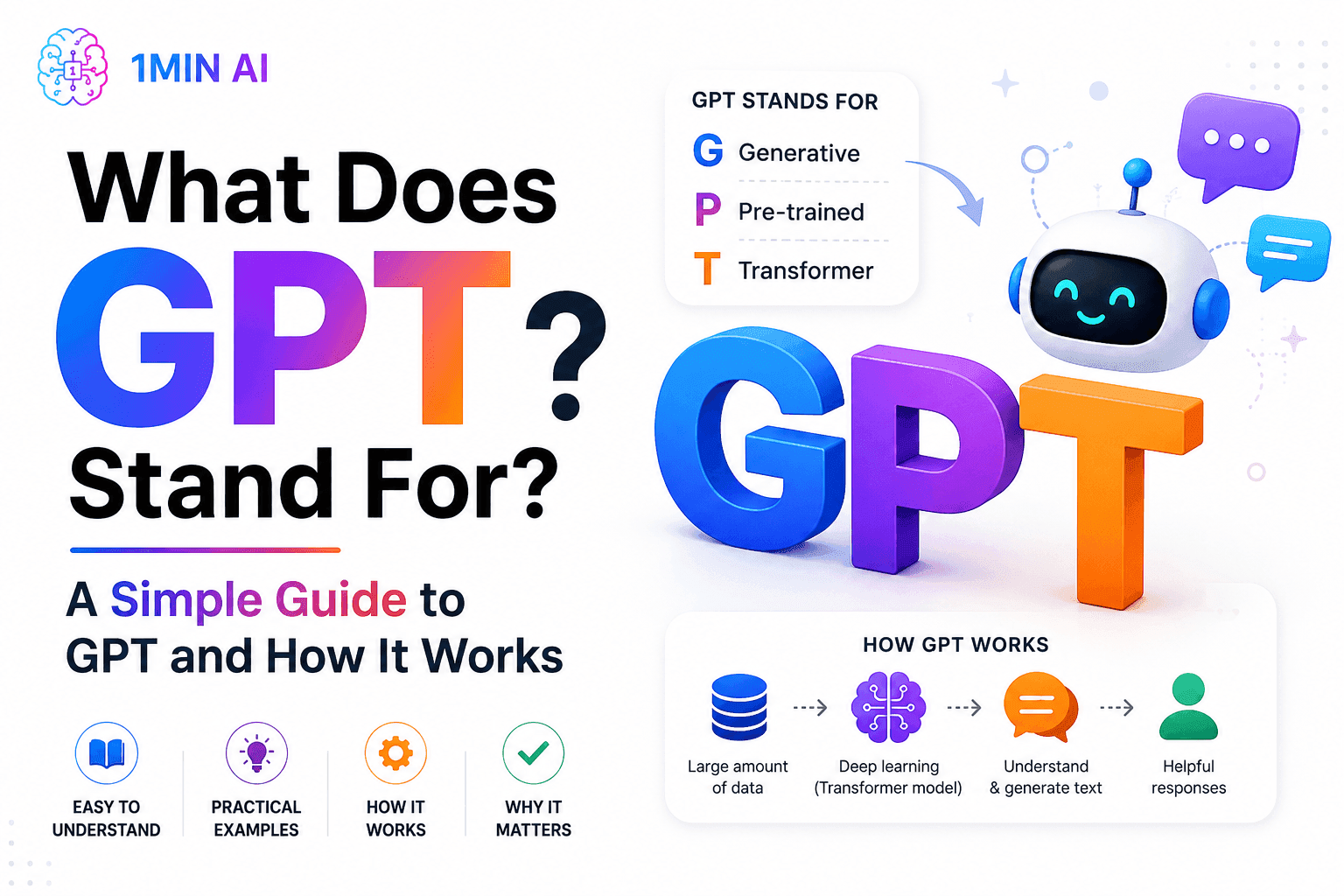
What does GPT stand for? Learn what GPT means, how Generative Pre-trained Transformer technology works, and why GPT models are important to modern AI.
Artificial intelligence has become part of everyday life, but some of the terminology behind popular AI tools can still be confusing.
One term you'll see almost everywhere is GPT. So, what does GPT stand for?
GPT stands for Generative Pre-trained Transformer. It refers to a type of AI model designed to understand and generate human-like text and other forms of content. GPT technology powers many modern AI applications, including chatbots, writing assistants, coding tools, research assistants, and content-generation platforms.
But what do the three words in GPT actually mean? And how does GPT work? Let's break it down.
What Does GPT Stand For?
GPT stands for Generative Pre-trained Transformer.
Each word describes an important part of how the technology works:
| Term | Meaning | What It Means |
|---|---|---|
| Generative | Creates content | The model can generate new text and other outputs based on a user's prompt. |
| Pre-trained | Trained beforehand | The model learns patterns from large amounts of data before users interact with it. |
| Transformer | AI architecture | A neural-network architecture that helps the model understand relationships between words and pieces of information. |
Together, Generative Pre-trained Transformer describes an AI system that has been trained to understand patterns in data and generate new responses.
What Does "Generative" Mean in GPT?
The word generative means that the model can create something new.
Traditional software generally follows predefined instructions. A generative AI model, on the other hand, can produce an output based on the information and instructions provided by the user.
For example, you could ask a GPT-powered AI to:
- Write an email
- Summarize an article
- Create a blog outline
- Explain a complicated topic
- Generate marketing copy
- Write or explain code
- Brainstorm business ideas
- Translate text
The AI generates a response based on patterns it learned during training and the context provided in the conversation.
What Does "Pre-trained" Mean?
Pre-trained means the model goes through an extensive training process before being made available for users.
During training, the model processes large amounts of data and learns statistical patterns in language and other information.
It doesn't simply memorize a giant collection of answers.
Instead, training helps the model learn relationships between words, concepts, structures, and contexts.
After this initial training, models can undergo additional processes to make their responses more useful, safe, and aligned with how people expect an AI assistant to behave.
What Is a "Transformer"?
The Transformer is the underlying neural-network architecture used by GPT models.
Transformers are particularly effective at processing sequences of information, such as sentences.
One of the key ideas behind transformers is attention.
Attention allows the model to consider how different parts of an input relate to one another. This helps it understand context rather than treating every word as completely independent.
For example, in a sentence containing the word "bank," the surrounding words can provide clues about whether the sentence refers to a financial institution or the side of a river.
This ability to consider context is one reason transformer-based models became so important in modern AI.
How Does GPT Work?
Now that we know what GPT stands for, it's useful to understand the basic idea behind how GPT models generate responses.
At a simplified level, GPT predicts what information should come next based on the context it has received.
For example, if you provide a sentence such as:
"The sun rises in the..."
The model can recognize the linguistic pattern and predict a likely continuation such as "east."
Modern GPT systems are vastly more sophisticated than this simple example. They process large amounts of context and can generate long, coherent responses based on complex instructions.
GPT Starts With Your Prompt
A GPT-powered application usually begins with a prompt.
The prompt might be a simple question:
"What does GPT stand for?"
Or it could be a more detailed instruction:
"Explain GPT to a beginner using a simple example."
The model analyzes the words and context in the prompt before generating a response.
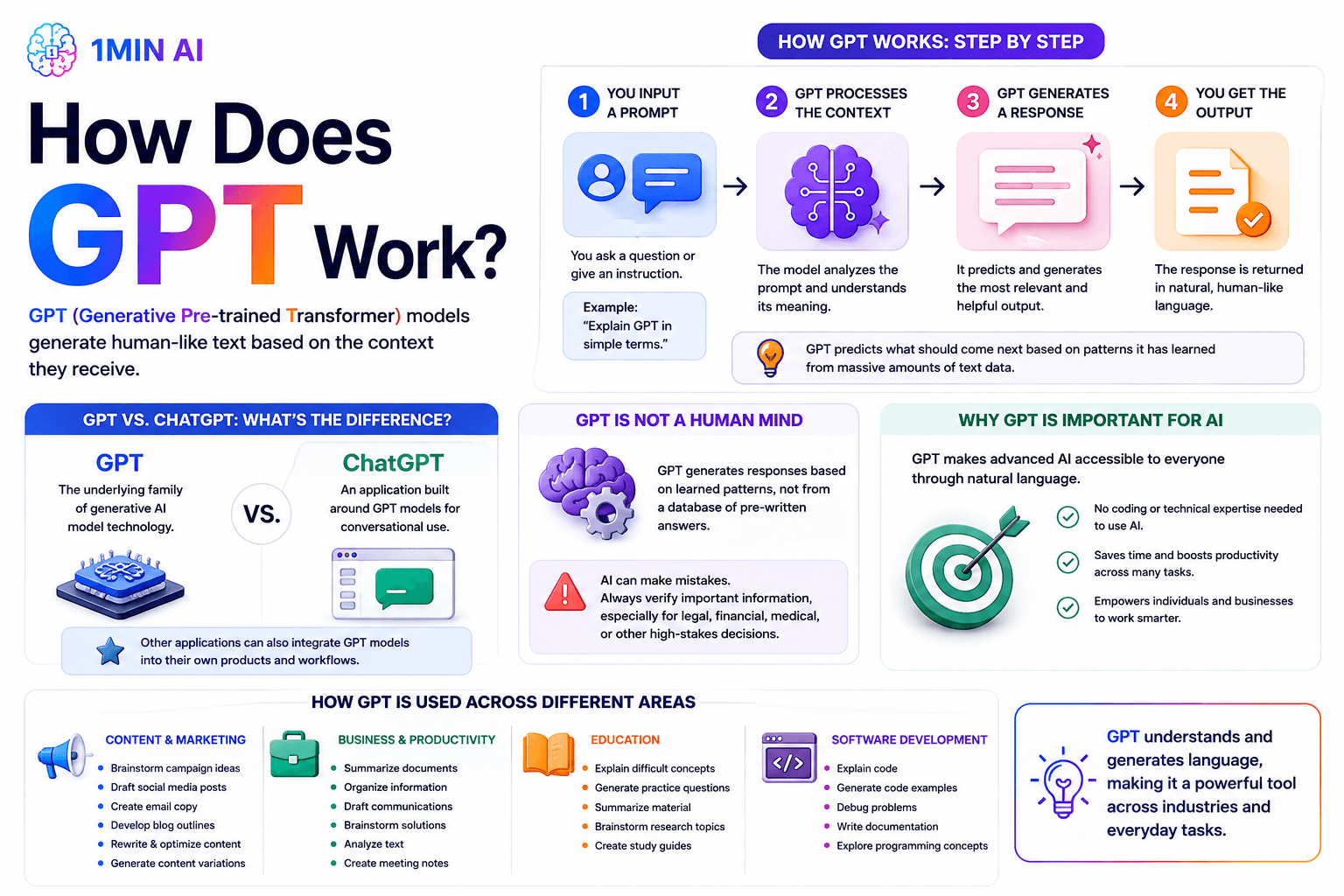
GPT Generates a Response
The model then produces an output based on its learned patterns and the context available to it.
This can include:
- Text
- Summaries
- Explanations
- Code
- Lists
- Creative writing
- Structured content
Depending on the specific AI application, GPT-based systems may also work with other types of inputs and outputs.
GPT Doesn't "Think" Exactly Like a Human
One important distinction is that GPT isn't a human mind.
When a GPT model produces an answer, it isn't necessarily retrieving a pre-written answer from a database.
Instead, it generates a response based on learned patterns and the information available in the current context.
This is also why AI-generated answers can sometimes contain mistakes.
Users should still verify important information, particularly when using AI for legal, financial, medical, or other high-stakes decisions.
GPT vs. ChatGPT: What's the Difference?
A common question after learning what does GPT stand for is whether GPT and ChatGPT are the same thing.
They're related, but they're not exactly the same.
GPT refers to the underlying family of generative AI models.
ChatGPT is an AI product designed for conversational interaction that uses GPT models and additional systems to provide an interactive assistant experience.
A simple way to think about it is:
GPT = the underlying AI model technology
ChatGPT = an application built around AI models for conversational use
Other applications can also integrate GPT models into their own products and workflows.
Why Is GPT Important for AI?
GPT has played an important role in making generative AI accessible to everyday users.
Instead of needing to understand programming or machine learning, people can interact with AI using natural language.
For businesses, this opens up applications across many areas.
Content and Marketing
Marketing teams can use GPT-powered tools to help:
- Brainstorm campaign ideas
- Draft social media posts
- Create email copy
- Develop blog outlines
- Rewrite existing content
- Generate content variations
Business and Productivity
Professionals can use AI to:
- Summarize documents
- Organize information
- Draft communications
- Brainstorm solutions
- Analyze text
- Create meeting notes
Education
Students and educators can use AI to:
- Explain difficult concepts
- Generate practice questions
- Summarize material
- Brainstorm research topics
- Create study guides
Software Development
Developers can use GPT-powered tools to:
- Explain code
- Generate code examples
- Debug problems
- Write documentation
- Explore programming concepts
The important point is that GPT is not limited to one particular industry. Its ability to understand and generate language makes it useful across many types of knowledge work.
How 1minAI Uses Multiple AI Models in One Workspace
Understanding what GPT stands for is also useful when choosing an AI platform.
Not every AI model works exactly the same way, and different models can have different strengths.
Instead of relying on a single model for every task, an AI workspace can give users access to multiple models and capabilities.
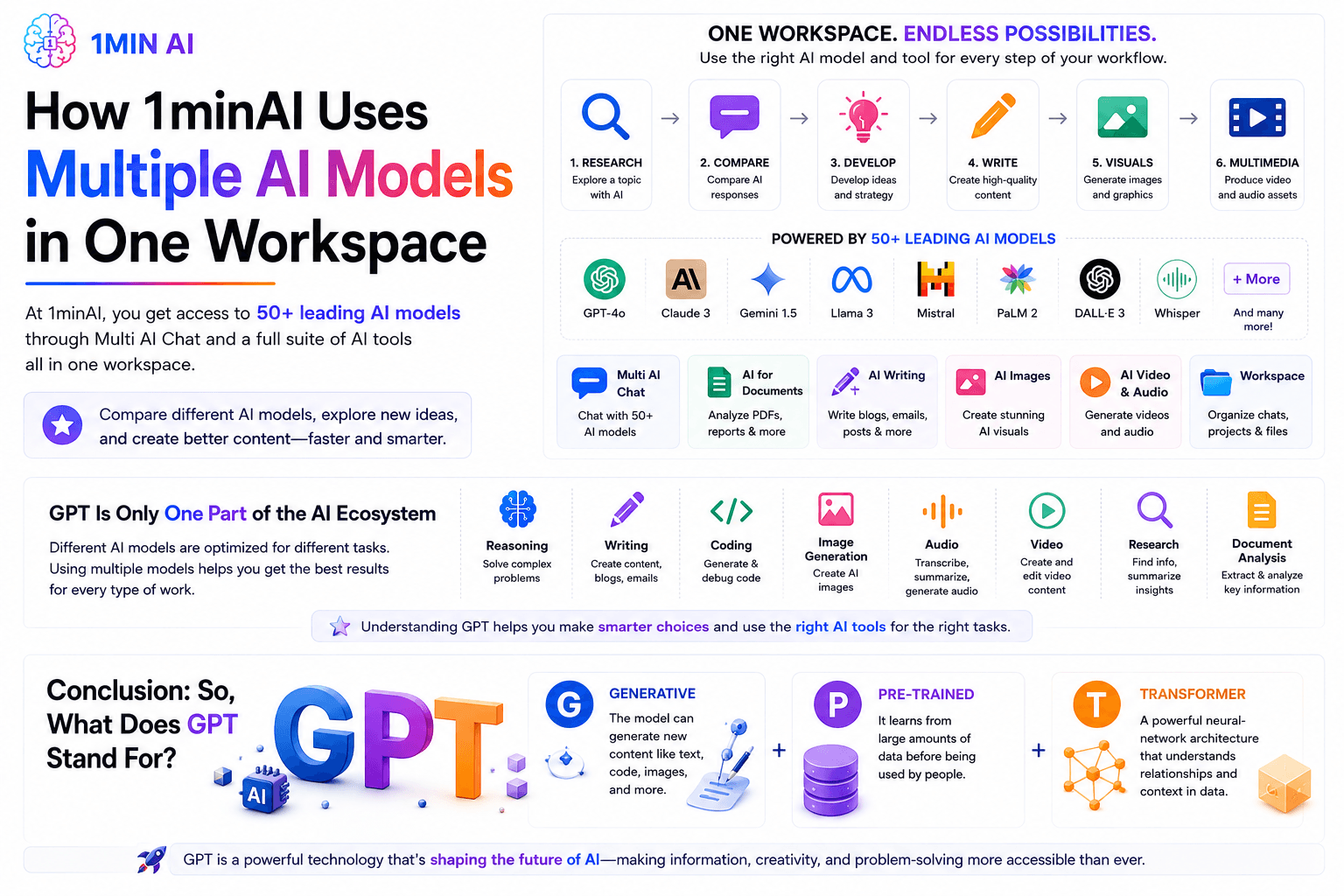
With 1minAI, users can access 50+ leading AI models through Multi AI Chat and use different AI capabilities for tasks such as writing, documents, images, video, and audio.
This can be useful when you want to compare different AI responses or choose an approach that fits a particular task.
For example:
Research a topic
→ Compare AI responses
→ Develop an idea
→ Write content
→ Create visuals
→ Produce multimedia assets
Rather than treating AI as a single chatbot, an integrated AI workspace allows users to apply different AI capabilities throughout the same workflow.
GPT Is Only One Part of the AI Ecosystem
GPT is one of the most recognizable names in generative AI, but it's important to remember that the broader AI ecosystem includes many different models and technologies.
Different AI models can be optimized for different tasks, such as:
- Reasoning
- Writing
- Coding
- Image generation
- Audio
- Video
- Research
- Document analysis
That's why understanding the basics of GPT can help users become more informed about the wider world of AI.
Conclusion: So, What Does GPT Stand For?
So, what does GPT stand for?
GPT stands for Generative Pre-trained Transformer.
- Generative means the model can generate new content.
- Pre-trained means it learns from large amounts of data before being used by people.
- Transformer refers to the neural-network architecture that helps the model understand relationships and context in information.
GPT technology has become a major part of modern generative AI, powering applications for writing, research, coding, education, business, and many other use cases.
Understanding the term is a useful first step toward understanding how today's AI tools work—and how you can use them more effectively.
👉 Official Website: https://1min.ai/
👉 Try 1minAI agent now: https://app.1min.ai/ai-agent-demo
Alternatives
Discover the best alternatives to 1minAI and compare features, pricing, and use cases.

1min.AI vs OpenRouter
1min.AI vs. OpenRouter: Compare the ready-to-use AI creation product against the technical API tool. Find out if you need a zero-code creative studio or a coding infrastructure hub.
 Ngoc Hong
1min.AI vs Lovart
Compare 1min.AI vs Lovart across features, pricing, credits, brand tools, and use cases to find the right AI platform for your workflow.
Ngoc Hong
1min. AI vs Dola AI
Looking for a Dola AI alternative? Compare 1min.AI vs Dola AI on video generation, free plans, pricing and privacy to pick the right AI app.
Ngoc HongAI Tools
Discover the best AI tools to boost productivity, creativity, and everyday work.

Create Consistent Cartoon Content in Just a Few Steps
Create engaging cartoon videos for TikTok and Reels with 1min.AI. Research ideas, create characters, and turn images into animated videos in 3 simple steps.
 Lien Anh Vu
One Product, 10 UGC Creatives: How AI Makes Content Testing Easier
Create more authentic UGC with an AI UGC video generator, test more creative angles and scale affiliate content without filming every version.
Lien Anh Vu
Top 4 Affordable AI Tools for Startup Founders
Discover the top 4 affordable AI tools for startup founders to validate ideas, build products, create content, and launch faster without overspending.
 Tram Ta
AI Features
Comprehensive AI features that streamline workflows, improve efficiency, and empower teams to achieve more.
Create Consistent Cartoon Content in Just a Few Steps
Create engaging cartoon videos for TikTok and Reels with 1min.AI. Research ideas, create characters, and turn images into animated videos in 3 simple steps.
Lien Anh VuOne Product, 10 UGC Creatives: How AI Makes Content Testing Easier
Create more authentic UGC with an AI UGC video generator, test more creative angles and scale affiliate content without filming every version.
Lien Anh Vu
1minAI: Free AI Grammar Checker
Check grammar for free with 1minAI’s AI grammar checker. Find grammar, spelling, and writing mistakes, improve clarity, and polish your content in seconds.
Tram TaAI Use Cases
A curated collection of AI use cases for business, productivity, and industry-specific applications.
Create Consistent Cartoon Content in Just a Few Steps
Create engaging cartoon videos for TikTok and Reels with 1min.AI. Research ideas, create characters, and turn images into animated videos in 3 simple steps.
Lien Anh VuOne Product, 10 UGC Creatives: How AI Makes Content Testing Easier
Create more authentic UGC with an AI UGC video generator, test more creative angles and scale affiliate content without filming every version.
Lien Anh Vu
Best Time to Post on Instagram: A Practical Guide for Better Engagement
Discover the best time to post on Instagram, including the best days and times for different audiences, plus tips to find the ideal posting schedule for your account.
Tram TaAI Tutorials
Learn how to use AI with practical, step-by-step tutorials.
Create Consistent Cartoon Content in Just a Few Steps
Create engaging cartoon videos for TikTok and Reels with 1min.AI. Research ideas, create characters, and turn images into animated videos in 3 simple steps.
Lien Anh Vu
Black Friday AI Tool Deals in 2026
Discover what Black Friday AI tool deals 2026 has to offer. Find out how to secure the 1min.AI lifetime deal via AppSumo, Dealify, Stack Social, and verify on Trustpilot, Slashdot, and Software Advice.
 Hang Nguyen
[Seedance 2.5 New] Better AI Product Videos, Less Rework in 1min.AI
Use Seedance 2.5 image to video on 1min.AI to create more consistent AI product videos, reduce failed generations, save credits, and improve UGC workflows.
Lien Anh VuAI Guides
Learn AI faster with practical guides, real-world examples, and actionable best practices.
Create Consistent Cartoon Content in Just a Few Steps
Create engaging cartoon videos for TikTok and Reels with 1min.AI. Research ideas, create characters, and turn images into animated videos in 3 simple steps.
Lien Anh Vu
Safely Buy AI Tools Online: 2026 Black Friday Guide
Discover how to find and secure the best Black Friday AI deals online. Learn expert strategies to avoid scams, combat subscription fatigue, and verify software.
Hang Nguyen[Seedance 2.5 New] Better AI Product Videos, Less Rework in 1min.AI
Use Seedance 2.5 image to video on 1min.AI to create more consistent AI product videos, reduce failed generations, save credits, and improve UGC workflows.
Lien Anh VuAI Solutions
Browse the best AI solutions for automation, coding, research, productivity, customer support, marketing, and business workflows.
Create Consistent Cartoon Content in Just a Few Steps
Create engaging cartoon videos for TikTok and Reels with 1min.AI. Research ideas, create characters, and turn images into animated videos in 3 simple steps.
Lien Anh VuOne Product, 10 UGC Creatives: How AI Makes Content Testing Easier
Create more authentic UGC with an AI UGC video generator, test more creative angles and scale affiliate content without filming every version.
Lien Anh Vu
Free AI Tattoo Generator: Custom Designs
Turn any idea into a custom tattoo design with 1min.AI's free AI tattoo generator. Describe your idea, pick a style, and download in seconds.
 Trang Tran
AI Models
Explore the world's leading AI models in one place.
Create Consistent Cartoon Content in Just a Few Steps
Create engaging cartoon videos for TikTok and Reels with 1min.AI. Research ideas, create characters, and turn images into animated videos in 3 simple steps.
Lien Anh VuOne Product, 10 UGC Creatives: How AI Makes Content Testing Easier
Create more authentic UGC with an AI UGC video generator, test more creative angles and scale affiliate content without filming every version.
Lien Anh Vu[Seedance 2.5 New] Better AI Product Videos, Less Rework in 1min.AI
Use Seedance 2.5 image to video on 1min.AI to create more consistent AI product videos, reduce failed generations, save credits, and improve UGC workflows.
Lien Anh VuAI Comparisons
Compare AI tools, models, and platforms to find the best fit for your needs.

Kling AI Vs Veo 3: Which Model Wins?
Kling AI vs Veo 3: compare motion, native audio, pricing & free tiers to see which AI video generator wins for your project - try both on 1min.AI.
Trang Tran[Seedance 2.5 New] Better AI Product Videos, Less Rework in 1min.AI
Use Seedance 2.5 image to video on 1min.AI to create more consistent AI product videos, reduce failed generations, save credits, and improve UGC workflows.
Lien Anh Vu
DeepSeek V4 Pro vs Flash Comparison
Compare DeepSeek V4 Pro vs DeepSeek V4 Flash metrics. Optimize your agentic apps and improve AI fact checking on 1min.ai today.
Ngoc HongAI Integrations
Seamlessly integrate AI with the tools you already use to automate work and boost productivity.

POV: You Have 10+ Posts to Make Every Day
Learn how to build an AI content workflow that helps content creators produce 10+ social media posts a day faster with AI brainstorming, image generation, and content creation.
Lien Anh Vu
How to Use an AI Fashion Video Generator for Fashion Week 2026
Turn Fashion Week 2026 ideas into stunning fashion videos with AI. Learn how to brainstorm, create visuals, and transform images into videos with one simple workflow.
Lien Anh Vu
Stop Switching Between AI Apps: How AI Integration Transforms Employer Branding
Discover how AI integration helps HR teams streamline employer branding by combining AI writing, documents, images, video, and multiple AI models into one workspace.
Tram TaAI for Industries
Find the best AI tools and workflows for healthcare, finance, education, legal, manufacturing, retail, real estate, and more

How to Start a One-Person AI Business: 7 Models You Can Run Solo
Learn how to start a one-person AI business with 7 practical models, from AI consulting and content services to automation and software reselling.
Tram Ta
7 Low-Cost AI Business Ideas for Your Startup
Explore 7 low-cost AI business ideas you can start with a small budget, from content and video services to AI consulting, reselling, and automation.
Tram Ta
Free AI Image Generator For Ecommerce
Turn phone photos into studio, white-background, and lifestyle product images. Try the best AI image generator for ecommerce online free with 1min.AI.
Trang TranAI Agents
Discover and run AI agents to automate tasks across your work and daily life.
1minAI: Free AI Grammar Checker
Check grammar for free with 1minAI’s AI grammar checker. Find grammar, spelling, and writing mistakes, improve clarity, and polish your content in seconds.
Tram Ta
AI Agents for Facebook
Use an AI Agent for Facebook to create content, generate images, schedule posts, and publish from your documents and conversations.
Ngoc Hong
AI Agent vs AI Assistant: Which One Actually Saves Designers More Time?
Learn the difference between AI Agent vs AI Assistant and discover which solution helps designers automate repetitive work, reduce revisions, and save more time.
Lien Anh VuAI Workflows
Explore ready-to-use AI workflows for productivity, marketing, sales, support, and more.
Create Consistent Cartoon Content in Just a Few Steps
Create engaging cartoon videos for TikTok and Reels with 1min.AI. Research ideas, create characters, and turn images into animated videos in 3 simple steps.
Lien Anh VuOne Product, 10 UGC Creatives: How AI Makes Content Testing Easier
Create more authentic UGC with an AI UGC video generator, test more creative angles and scale affiliate content without filming every version.
Lien Anh VuPOV: You Have 10+ Posts to Make Every Day
Learn how to build an AI content workflow that helps content creators produce 10+ social media posts a day faster with AI brainstorming, image generation, and content creation.
Lien Anh VuNewsletter
Weekly AI Innovations with 1minAI

🔮 Weekly AI Innovations #140: Deepseek 4.1 Flash & Gemini Upgrades
Explore Deepseek 4.1 Flash and new Gemini models on 1min.ai. Plus, check our update on your Billing - Usage page for better clarity.
Hang Nguyen
🔮 Weekly AI Innovations #136: Grok 4.6 and Smart Data Retention
Discover the latest 1min.ai updates! Upgrade to Grok 4.6 for blazing-fast AI, and check our new Data Retention policies to secure your files today.
Hang Nguyen
🔮 Weekly AI Innovations #139: Dawn of the next-gen AI
Discover the immense power of GPT-6 Astra and Claude Fable 5.1. Unlock next-generation AI models on 1min.ai to solve complex tasks effortlessly.
Hang Nguyen