
What Are Impressions on LinkedIn and How to Boost Your Post?

Tram Ta
November 17, 2026
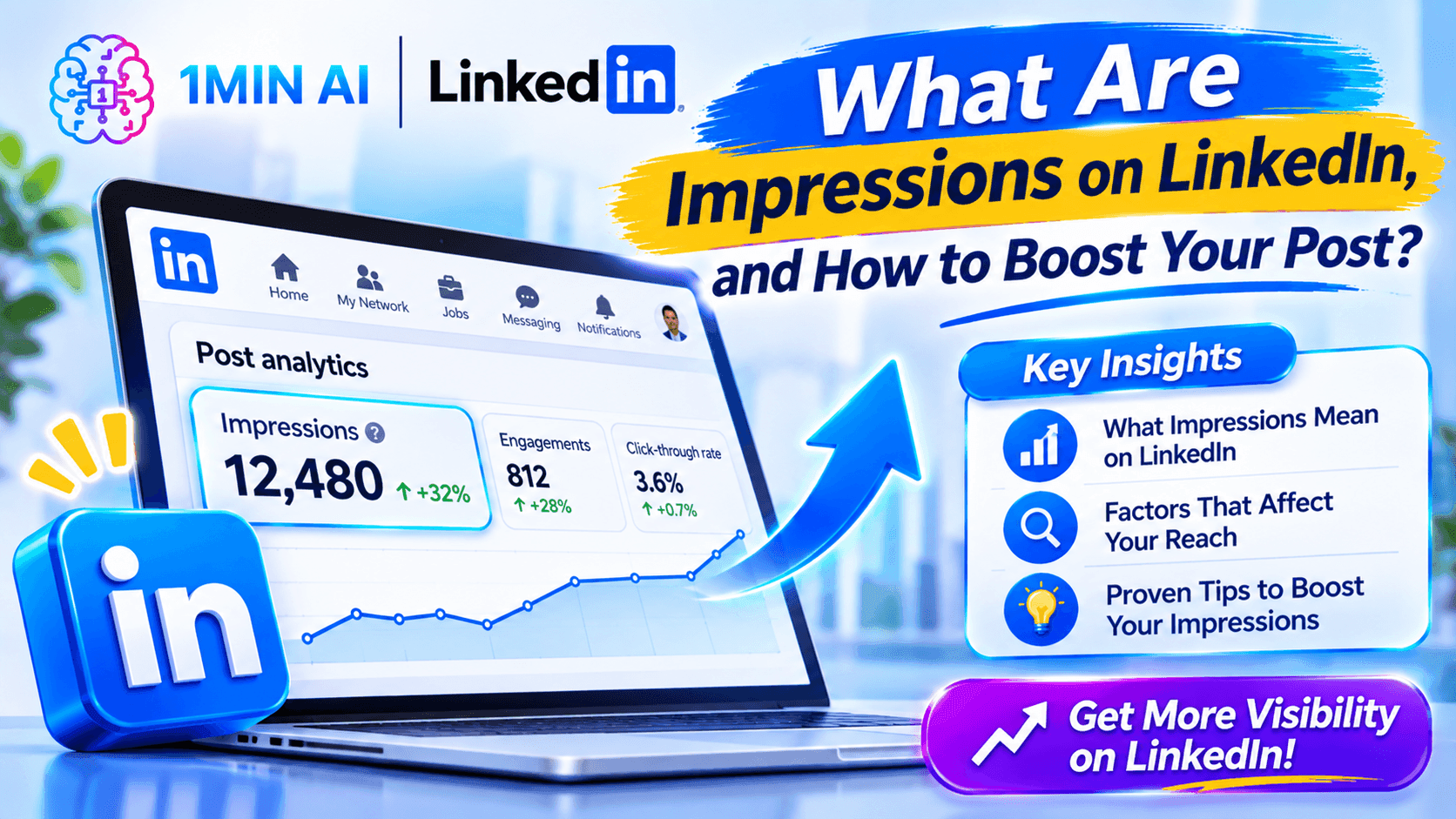
Learn what LinkedIn impressions mean, how they differ from reach and engagement, and 10 practical ways to increase your post visibility.
Understanding impressions on LinkedIn is essential if you want to build a professional presence, grow your personal brand, attract potential customers, or increase awareness of your business.
However, getting more impressions is not simply about posting every day or adding dozens of hashtags. You need content that reaches the right audience, communicates a useful idea, and encourages genuine interaction.
In this guide, we'll explain what LinkedIn impressions are, how they differ from reach and engagement, where to find your analytics, and 10 practical ways to increase your post visibility. We'll also explore how 1minAI can help you create and schedule LinkedIn content more consistently.
What Are Impressions on LinkedIn?
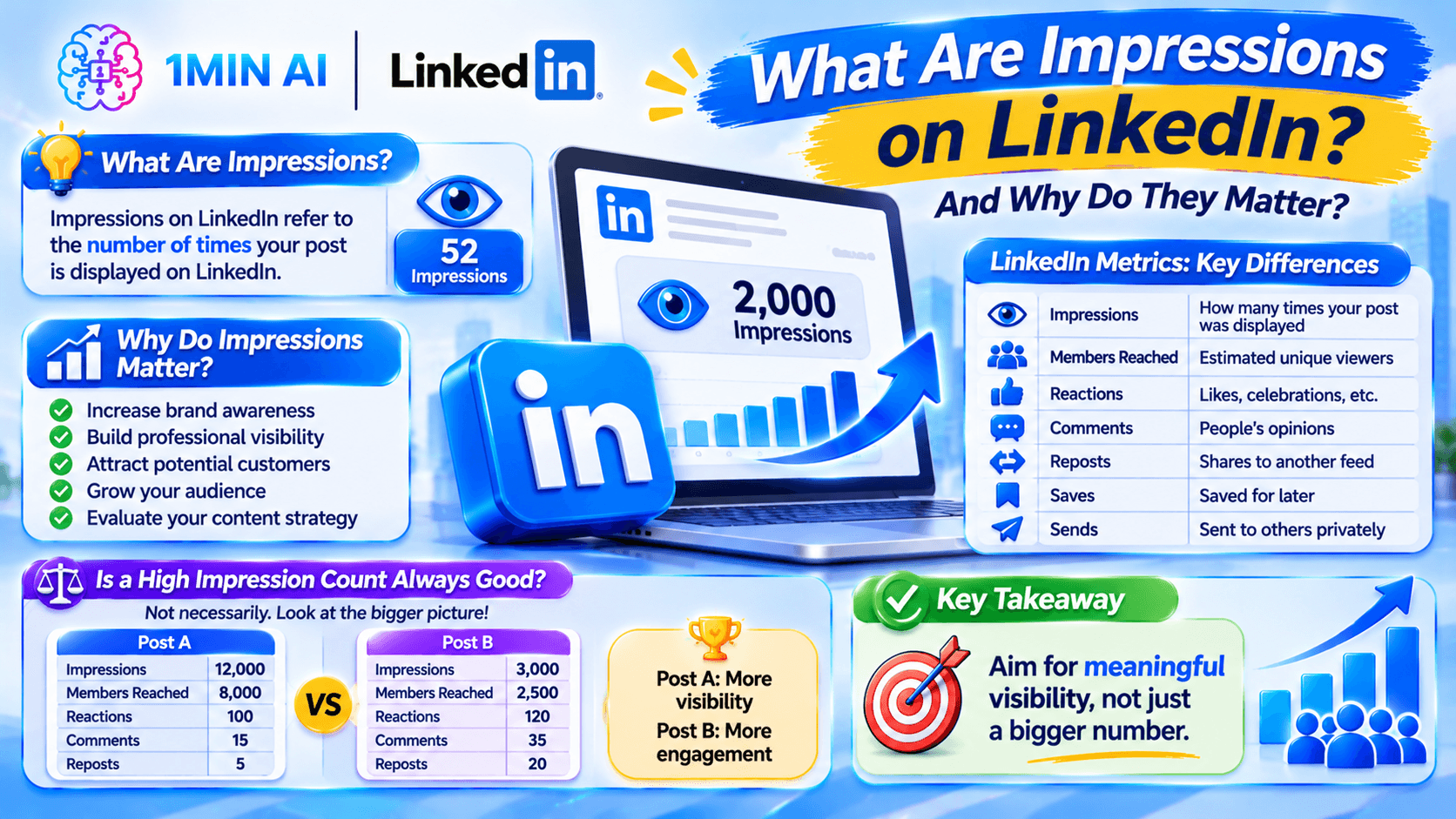
Impressions on LinkedIn refer to the number of times your post is displayed on LinkedIn.
Every time your content appears on someone's LinkedIn screen, it can contribute to your impression count. The same person may see your post more than once, so multiple displays can count as multiple impressions.
For example:
- You publish a post about AI marketing.
- A connection sees it in their feed in the morning.
- The same connection sees it again later.
- Another 50 people see it throughout the day.
Your post can receive 52 impressions even though only 51 distinct people saw it.
This is why impressions should not be interpreted as the number of people who read your post. They measure content visibility, not necessarily attention, understanding, or engagement.
LinkedIn describes post impressions as an estimate, so the number may not be perfectly precise.
Why Do LinkedIn Impressions Matter?
Impressions help you understand whether your content is being distributed to an audience.
If you consistently publish useful posts but receive very few impressions, it may be worth reviewing your topics, audience relevance, publishing habits, and content format.
More impressions can help you:
- Increase brand awareness: More people have opportunities to discover your professional profile or business.
- Build professional visibility: Your ideas can reach people outside your immediate network.
- Attract potential customers: Relevant content can introduce your expertise to potential buyers.
- Grow your audience: People who find your content useful may visit your profile or follow you.
- Evaluate your content strategy: Comparing impressions across posts helps identify topics and formats that attract visibility.
However, a large impression count does not automatically mean a successful LinkedIn strategy. Reaching 10,000 people outside your target market may be less valuable than reaching 1,000 relevant decision-makers.
The goal should be to increase meaningful visibility, not just chase a bigger number.
LinkedIn Impressions vs. Reach vs. Engagement: What's the Difference?
These metrics are related, but they measure different aspects of content performance.
| Metric | What it measures | Example |
|---|---|---|
| Impressions | How many times your post was displayed | One person sees your post three times = 3 impressions |
| Members reached | Estimated number of distinct members and Pages that saw your post | The same person sees your post three times = 1 member reached |
| Reactions | How many times people reacted to your post | Likes, celebrations, and other reactions |
| Comments | How many comments your post received | People sharing opinions or asking questions |
| Reposts | How many times your content was shared to another feed | A connection reposts your post |
| Saves | How many times people saved your post | Someone saves your checklist for later |
| Sends | How many times people sent your post to others on LinkedIn | A user shares your post privately |
Consider this example:
Imagine your LinkedIn post receives 2,000 impressions and reaches 1,200 distinct members.
That means the content was displayed 2,000 times, but the estimated number of unique members and Pages who saw it was 1,200.
Now imagine the post also receives 80 reactions, 20 comments, and 15 reposts.
These additional metrics help you understand whether people did something after seeing your content.
The important distinction: Impressions measure visibility, members reached measure estimated unique exposure, and engagement measures how people interacted with your post.
Is a High Impression Count Always Good?
Not necessarily.
Consider two LinkedIn posts:
| Performance metric | Post A | Post B |
|---|---|---|
| Impressions | 12,000 | 3,000 |
| Members reached | 8,000 | 2,500 |
| Reactions | 100 | 120 |
| Comments | 15 | 35 |
| Reposts | 5 | 20 |
Post A achieved more visibility, but Post B generated more interactions despite reaching fewer people.
If your goal is brand awareness, Post A may be the stronger performer. If your goal is meaningful professional discussion, Post B may offer more valuable results.
Always evaluate impressions alongside the audience reached and the actions people take.
How to Check Your Impressions on LinkedIn
You don't need a paid analytics platform to check your post impressions. LinkedIn provides analytics for individual posts and combined content performance.
Method 1: Check Impressions on an Individual Post
Follow these steps on desktop:
- Open LinkedIn and click the Me icon.
- Under Manage, select Posts & Activity.
- Choose the relevant content tab, such as Posts, Videos, Images, or Articles.
- Find the post you want to analyze.
- Click the impression number or select View analytics.
- Review the available discovery, profile activity, and engagement metrics.
On mobile, open your profile, find the Activity section, select Show all posts, and open the analytics for the relevant post.
Depending on the content type, you can review metrics such as:
- Impressions.
- Members reached.
- In-network and out-of-network impressions.
- Profile viewers from the post.
- Followers gained.
- Reactions, comments, and reposts.
- Saves and sends.
- Link visits, where available.
Method 2: Review Your Combined Post Analytics
If you publish regularly, checking every post individually can take time.
LinkedIn's combined post analytics allow you to review the performance of your content over a selected period.
You can:
- Select a date range from the available options.
- Compare impressions and engagements.
- Review performance trends.
- Identify top-performing posts.
- Export analytics to an Excel file.
This is useful when you want to understand whether your overall LinkedIn content strategy is improving rather than focusing on a single post.
Method 3: Understand In-Network and Out-of-Network Impressions
LinkedIn also separates impressions into two useful categories.
In-network impressions come from members who follow or are connected to you.
Out-of-network impressions come from people who do not follow or have a connection with you.
Why does this matter?
If most of your impressions come from your existing network, your content is primarily reaching people who already know you.
If your out-of-network impressions increase, it may indicate that your content is reaching beyond your existing connections.
For professionals trying to grow their audience, this is an important metric to monitor.
How to Boost Your LinkedIn Post Organically: 10 Practical Strategies
Now that you understand impressions, let's look at how to increase them.
There is no guaranteed formula for making every LinkedIn post go viral. Distribution depends on many factors, including relevance, audience interests, content quality, and how people interact with your posts.
However, these 10 strategies can help you build a more effective content routine.
1. Write a Strong Opening Hook
The first few lines of your LinkedIn post influence whether someone decides to continue reading.
A weak opening may cause people to scroll past your content, even if the rest of the post contains valuable information.
Compare these examples:
Weak hook:
"Today, I want to share some thoughts about content marketing."
Stronger hook:
"Your LinkedIn posts might not have a visibility problem. They might have a relevance problem."
The second version introduces a specific idea and gives readers a reason to continue.
Try these hook formats:
- Unexpected insight: "The biggest mistake I made when building a personal brand wasn't posting too little."
- Specific problem: "Struggling to turn LinkedIn connections into meaningful conversations?"
- Useful promise: "Here are five ways to improve your LinkedIn content without increasing your posting frequency."
- Experience-based opening: "After reviewing dozens of B2B content campaigns, I noticed one pattern."
A good hook should attract the right audience without misleading them.
2. Create Content for a Clearly Defined Audience
One common mistake is trying to write for everyone.
A post that targets founders, recruiters, students, marketers, designers, and sales professionals simultaneously may struggle to communicate a clear message.
Instead, define who you want to reach.
For example:
| Target audience | Relevant LinkedIn topics |
|---|---|
| Startup founders | Growth challenges, hiring, fundraising, product development |
| B2B marketers | Lead generation, content strategy, campaign performance |
| HR professionals | Recruitment, workplace culture, employee development |
| Freelancers | Client acquisition, pricing, personal branding |
| Software developers | Coding workflows, technical lessons, new technologies |
When your content consistently covers topics relevant to a particular audience, it becomes easier for people to recognize the value of following you.
LinkedIn's feed ranking systems also use information about members' interests, professional backgrounds, and engagement to personalize content recommendations.
3. Share Useful Insights Instead of Generic Updates
People don't need another post that simply says, "Work hard and never give up."
They need something they can learn from, apply, or discuss.
Try creating content around:
- A problem you solved at work.
- A mistake you learned from.
- A useful industry observation.
- A practical tutorial.
- A framework that helps people make decisions.
- A case study with a clear lesson.
For example, instead of writing:
"AI is changing marketing. Businesses should start using AI tools."
You could write:
"We used AI to turn one research report into five LinkedIn content ideas. Here's the process: identify the main findings, group them by audience problem, create one post per insight, and review every claim before publishing."
The second example provides a specific process that readers can understand and reuse.
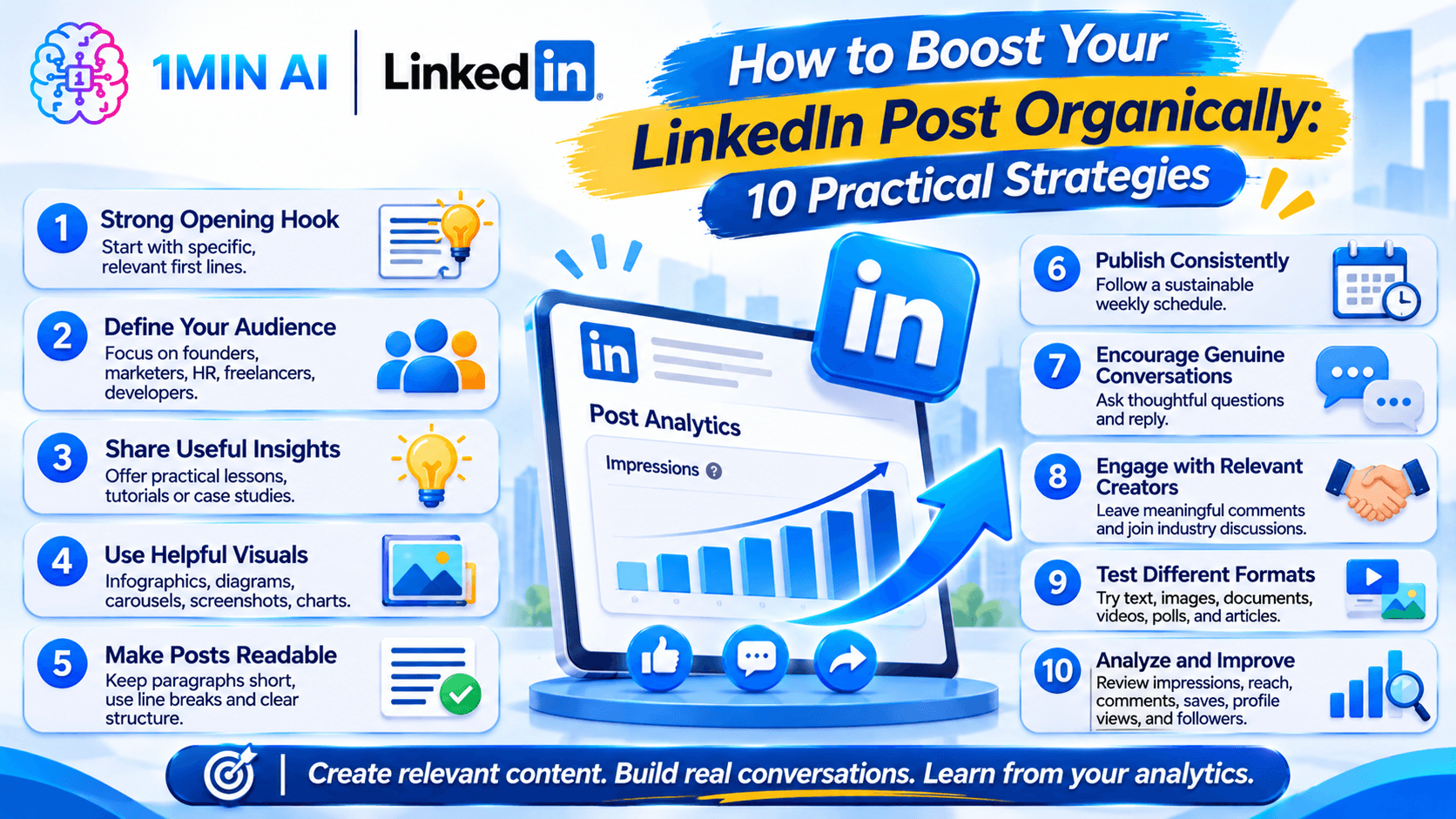
4. Use Visual Content to Explain Your Ideas
Text-only posts can work well, but visual content offers another way to communicate information.
Depending on your topic, consider using:
- Infographics.
- Step-by-step diagrams.
- Carousel-style documents.
- Product screenshots.
- Short videos.
- Charts and data visualizations.
For example, if you are explaining five ways to improve LinkedIn engagement, a simple visual checklist may make the information easier to scan and save.
However, don't add images simply because you believe every post needs one. The visual should support the message rather than distract from it.
5. Write Readable Posts With Clear Structure
LinkedIn users often browse their feeds between meetings, during breaks, or while checking professional updates.
A large block of text can make your post difficult to read on a small screen.
Improve readability by:
- Keeping paragraphs relatively short.
- Using line breaks between ideas.
- Organizing longer explanations into numbered points.
- Highlighting important takeaways.
- Removing unnecessary introductions.
- Using emojis selectively rather than in every sentence.
For example:
Hard to scan:
"Creating consistent LinkedIn content requires a clear strategy, a good understanding of your audience, regular research, and a process for writing and publishing useful posts."
Easier to scan:
"Consistent LinkedIn content starts with four things:
- Know your audience.
- Choose relevant topics.
- Share useful insights.
- Publish on a sustainable schedule.
You don't need to make every post complicated. You need to make every post useful."
The goal is to make your message easier to understand, not simply to make the post longer.
6. Publish Consistently, Not Randomly
Posting once every few months makes it difficult to build a recognizable content presence.
But publishing several low-quality posts every day is not a sustainable solution either.
Start with a schedule you can maintain.
For example:
| Day | Content idea |
|---|---|
| Monday | Industry insight or opinion |
| Tuesday | Practical tutorial |
| Wednesday | Personal experience or lesson |
| Thursday | Case study or customer problem |
| Friday | Weekly takeaway or discussion |
You don't have to publish five times a week. Two or three useful posts may be a more realistic starting point.
Review your analytics over several weeks and adjust the frequency based on your results and available time.
Consistency helps you develop a recognizable voice and gives you more opportunities to learn what resonates with your audience.
7. Encourage Genuine Conversations
LinkedIn is a professional networking platform, not just a broadcasting channel.
A thoughtful discussion can help your content reach more people while building relationships with your audience.
Instead of ending every post with "Agree?" try asking questions that invite specific experiences.
For example:
- "Which part of content creation takes the most time for your team?"
- "Have you tested this approach in your own business?"
- "What would you change about this process?"
- "What's one LinkedIn strategy that has worked well for you?"
When people comment, respond with something relevant. Ask follow-up questions, share additional context, or acknowledge a different perspective.
Avoid artificial engagement tactics such as engagement pods, automated comments, and repetitive requests to comment just to increase visibility.
LinkedIn has publicly stated that it is working to reduce inauthentic engagement and generic engagement bait. Meaningful conversations are a better long-term strategy.
8. Engage With Other Relevant Creators
Your LinkedIn strategy should not stop when you publish a post.
Spend time engaging with people in your industry.
You can:
- Comment thoughtfully on relevant posts.
- Share useful perspectives on industry discussions.
- Congratulate people on meaningful professional milestones.
- Respond to questions from your network.
- Join conversations where you have genuine expertise.
For example, if you work in B2B marketing, follow marketers, founders, and industry publications that share relevant insights.
Don't leave generic comments such as "Great post!" on dozens of updates. Add a useful observation or explain why you agree or disagree.
This helps you build relationships and makes your professional perspective more recognizable.
9. Experiment With Different LinkedIn Content Formats
Not every audience responds to the same type of content.
Some people prefer short, direct insights. Others engage more with detailed explanations, videos, or visual documents.
Experiment with formats such as:
| Format | Best used for |
|---|---|
| Text posts | Opinions, lessons, and short insights |
| Image posts | Visual explanations and simple concepts |
| Document posts | Tutorials, frameworks, and checklists |
| Videos | Demonstrations, interviews, and explanations |
| Polls | Gathering opinions on a specific question |
| Articles | Longer-form professional insights |
Don't assume that one format is always better than another.
Test different formats with similar topics and compare impressions, members reached, comments, saves, and other relevant outcomes.
10. Analyze Your Results and Improve Your Next Post
A successful LinkedIn strategy requires experimentation.
After publishing, review your post analytics and ask:
- Which topics generated the most impressions?
- Which posts reached people outside my network?
- Which formats attracted more comments?
- Which posts generated profile views or new followers?
- Which content received saves and sends?
- Which posts attracted the audience I actually want?
Look for patterns across multiple posts rather than making decisions based on one unusually successful or unsuccessful update.
For example, if educational posts consistently generate more saves and relevant comments than promotional updates, consider making educational content a larger part of your publishing strategy.
The objective is to turn analytics into better content decisions.
Common Mistakes That Can Hurt Your LinkedIn Post Performance
Even when you publish consistently, certain habits can make your content less useful or less relevant to your audience.
1. Writing for Impressions Instead of People
Trying to maximize impressions at any cost can lead to vague hooks, exaggerated claims, and clickbait.
A post might attract attention but fail to build trust.
Focus on the needs of the people you want to reach.
2. Copying Viral Posts Without Adding Your Perspective
A format that works for another creator may not work for your audience.
Instead of copying a popular post, understand why it works and adapt the underlying idea to your own experience.
3. Using Too Many Irrelevant Hashtags
Hashtags can provide context, but adding a long list of unrelated hashtags does not guarantee more impressions.
Use only a small number of relevant hashtags when they genuinely help describe your topic.
4. Publishing Generic AI-Generated Content
AI can help you brainstorm, research, and structure a post. But publishing unedited AI-generated content can result in repetitive wording and generic advice.
Add your own experience, examples, data, and professional perspective.
5. Ignoring Comments and Conversations
Publishing without participating in discussions misses an opportunity to build relationships.
Respond to relevant comments and use the feedback to identify future content ideas.
6. Treating One Post as a Complete Performance Test
A single post may perform differently because of its topic, timing, audience, and other factors.
Compare results across multiple posts before changing your entire strategy.
How 1minAI Helps You Create Better LinkedIn Posts Consistently
Understanding how to increase LinkedIn impressions is one challenge. Creating useful content consistently is another.
You need to research topics, gather information, write posts, prepare visuals, review the content, and manage your publishing schedule.
For busy founders, marketers, and small teams, these activities can become time-consuming.
This is where the 1minAI LinkedIn Content Agent can help.
Instead of using separate tools for research, writing, image creation, and publishing preparation, you can connect these stages in one AI-assisted workflow.
1. Gather Information Before Writing
A good LinkedIn post needs a useful idea and enough context to explain it accurately.
With 1minAI, you can start from a topic or use saved Assets containing relevant company, product, or service information.
For example, a SaaS founder could use existing business information to develop posts about:
- Common customer challenges.
- Product use cases.
- Industry trends.
- Lessons from building a business.
- Practical advice for potential customers.
This helps you develop content from actual business knowledge rather than relying entirely on generic ideas.
2. Generate LinkedIn Posts With AI
Once you have a topic and relevant information, the LinkedIn Content Agent can help turn those inputs into a structured post.
You can configure the available writing settings and model options to create content that suits your intended audience.
For example, try this prompt:
"Write a LinkedIn post for B2B marketing professionals about three practical ways to improve content visibility.
Start with a specific hook, explain three actionable strategies, and include a real-world example. Use a professional but conversational tone. Avoid generic motivational language and exaggerated claims. End with a question that encourages a meaningful discussion."
Always review the result and add your own experience or expertise before publishing.
3. Generate Supporting Images
Some LinkedIn topics are easier to understand with a visual.
The 1minAI Agent includes a Design Image stage, allowing you to generate an image that supports the main message of your post.
For example, if you're explaining the difference between impressions, reach, and engagement, you could create a simple visual comparison to help readers understand the three metrics.
This can make the content creation process more connected and reduce the need to switch between separate writing and image-generation tools.
4. Build a Repeatable Publishing Schedule
Once your post and image are ready, you can move to the publishing stage.
The LinkedIn Content Agent supports publishing workflows with manual runs, one-time scheduling, and recurring scheduling options.
This helps you build a more consistent routine.
You can prepare several content ideas, review the generated materials, and configure a schedule that matches your capacity.
The important point is that AI should support your content strategy, not replace your judgment. Review the information, tone, visuals, and timing before publishing.
5. Explore More Social Media AI Tools
If you manage more than one social channel, you may also benefit from exploring 1minAI's broader social media capabilities.
The AI Agent for Social Media Management can help connect content-related tasks across social media workflows.
You can also explore the wider collection of 1minAI AI Agents to discover other ways to organize AI-assisted work.
1minAI vs. Other LinkedIn Content Tools: What Should You Choose?
There are several tools available for LinkedIn content creation and social media management.
The right choice depends on whether you need help creating content, scheduling posts, managing multiple channels, or identifying sales opportunities.
1minAI vs. Postbeam
Postbeam is positioned around LinkedIn content and B2B social selling, including lead-focused workflows and pipeline intelligence.
1minAI focuses more on the content production process.
Its LinkedIn Content Agent connects information gathering, post writing, image generation, and publishing preparation.
If your main challenge is producing relevant LinkedIn content consistently, 1minAI is worth exploring as a Postbeam alternative.
If your priority is lead detection and sales pipeline intelligence, evaluate those specific capabilities separately.
1minAI vs. Buffer
Buffer is a social media management platform that helps creators and teams organize, schedule, and publish content across supported channels.
1minAI focuses on connecting AI-assisted content production with publishing workflows.
| Area | 1minAI | Buffer |
|---|---|---|
| Main focus | AI-assisted content production and publishing | Social media management and scheduling |
| LinkedIn content writing | LinkedIn Content Agent | AI Assistant |
| Information gathering | Topic research and saved business Assets | Content ideas and planning |
| Image creation | Image generation within the Agent workflow | Media preparation and integrations |
| Scheduling | LinkedIn Agent publishing workflow | Multi-channel scheduling |
| Best suited for | Users who want help creating content | Users who prioritize managing and scheduling channels |
If you mainly need a publishing calendar, Buffer may be a suitable choice. If you want to connect research, writing, and image creation into your LinkedIn workflow, explore 1minAI as a Buffer alternative.
Frequently Asked Questions About LinkedIn Impressions
1. What is a good number of impressions on LinkedIn?
There is no universal number that defines a good LinkedIn post. Performance depends on your audience size, industry, content topic, network, and objectives.
Instead of comparing yourself with unrelated creators, compare your posts with your own historical performance and the relevance of the audience you reach.
2. Do LinkedIn impressions count the same person more than once?
Yes. Impressions count displays, not unique people. If the same member sees your post multiple times, each display can contribute to the impression count.
For unique exposure, review the Members reached metric.
3. Why are my LinkedIn impressions so low?
Low impressions can have several causes:
- Your topic may not be relevant to your intended audience.
- Your opening may not communicate a clear reason to read.
- Your content may be too generic.
- Your network may not be interested in the topic.
- You may not publish consistently enough to learn what works.
- Your posts may not provide enough value for people to interact with or share.
Review several posts and look for patterns before changing your strategy.
4. How often should I post on LinkedIn to increase impressions?
Start with a realistic schedule, such as two or three useful posts per week.
There is no guaranteed posting frequency that produces the most impressions for every account. Consistency and content relevance matter more than publishing as often as possible.
5. Do hashtags increase LinkedIn impressions?
Relevant hashtags can provide additional context about your post, but they do not guarantee wider distribution.
Use a few hashtags that accurately describe your topic rather than adding a long list of unrelated terms.
Conclusion: Focus on Meaningful Impressions, Not Just Bigger Numbers
LinkedIn impressions tell you how many times your content was displayed, but they do not tell the whole story.
To build a stronger professional presence, you need to understand who sees your content, what they do after seeing it, and whether your posts attract the audience you want to reach.
Start with a clear audience, write stronger hooks, share practical insights, experiment with different formats, and use analytics to improve your next post.
And if creating content consistently is taking too much time, an AI-assisted workflow can help.
With 1minAI, you can gather information, generate LinkedIn posts, create supporting images, and organize publishing through the LinkedIn Content Agent.
Explore the AI Agent for Social Media Management and discover how to make your LinkedIn content workflow more efficient.
For more AI capabilities, visit 1minAI Features and try the 1minAI Agent.
- #Information
- #Commerce
Alternatives
Discover the best alternatives to 1minAI and compare features, pricing, and use cases.

1min.AI vs OpenRouter
1min.AI vs. OpenRouter: Compare the ready-to-use AI creation product against the technical API tool. Find out if you need a zero-code creative studio or a coding infrastructure hub.
 Ngoc Hong

1min.AI vs. Metricool: Which Platform Does More for Your Marketing Workflow?
Compare 1min.AI vs. Metricool across content creation, visual production, scheduling, analytics, MCP, and pricing to find the right platform for your marketing workflow.

1min.AI vs. Hootsuite: Which Social Media Tool Fits Your Workflow?
Compare 1min.AI vs. Hootsuite to explore their AI content creation, social media publishing, analytics, pricing, and collaboration features. Find the right tool for your workflow.
AI Tools
Discover the best AI tools to boost productivity, creativity, and everyday work.

Create Consistent Cartoon Content in Just a Few Steps
Create engaging cartoon videos for TikTok and Reels with 1min.AI. Research ideas, create characters, and turn images into animated videos in 3 simple steps.
 Lien Anh Vu

One Product, 10 UGC Creatives: How AI Makes Content Testing Easier
Create more authentic UGC with an AI UGC video generator, test more creative angles and scale affiliate content without filming every version.
Lien Anh Vu
Top 4 Affordable AI Tools for Startup Founders
Discover the top 4 affordable AI tools for startup founders to validate ideas, build products, create content, and launch faster without overspending.
 Tram Ta
AI Features
Comprehensive AI features that streamline workflows, improve efficiency, and empower teams to achieve more.
Create Consistent Cartoon Content in Just a Few Steps
Create engaging cartoon videos for TikTok and Reels with 1min.AI. Research ideas, create characters, and turn images into animated videos in 3 simple steps.
Lien Anh VuOne Product, 10 UGC Creatives: How AI Makes Content Testing Easier
Create more authentic UGC with an AI UGC video generator, test more creative angles and scale affiliate content without filming every version.
Lien Anh Vu
1minAI: Free AI Grammar Checker
Check grammar for free with 1minAI’s AI grammar checker. Find grammar, spelling, and writing mistakes, improve clarity, and polish your content in seconds.
Tram TaAI Use Cases
A curated collection of AI use cases for business, productivity, and industry-specific applications.
Create Consistent Cartoon Content in Just a Few Steps
Create engaging cartoon videos for TikTok and Reels with 1min.AI. Research ideas, create characters, and turn images into animated videos in 3 simple steps.
Lien Anh VuOne Product, 10 UGC Creatives: How AI Makes Content Testing Easier
Create more authentic UGC with an AI UGC video generator, test more creative angles and scale affiliate content without filming every version.
Lien Anh Vu
Best Time to Post on Instagram: A Practical Guide for Better Engagement
Discover the best time to post on Instagram, including the best days and times for different audiences, plus tips to find the ideal posting schedule for your account.
Tram TaAI Tutorials
Learn how to use AI with practical, step-by-step tutorials.

Black Friday AI Tool Deals in 2026
Discover what Black Friday AI tool deals 2026 has to offer. Find out how to secure the 1min.AI lifetime deal via AppSumo, Dealify, Stack Social, and verify on Trustpilot, Slashdot, and Software Advice.
 Hang Nguyen
Create Consistent Cartoon Content in Just a Few Steps
Create engaging cartoon videos for TikTok and Reels with 1min.AI. Research ideas, create characters, and turn images into animated videos in 3 simple steps.
Lien Anh Vu
[Seedance 2.5 New] Better AI Product Videos, Less Rework in 1min.AI
Use Seedance 2.5 image to video on 1min.AI to create more consistent AI product videos, reduce failed generations, save credits, and improve UGC workflows.
Lien Anh VuAI Guides
Learn AI faster with practical guides, real-world examples, and actionable best practices.

Safely Buy AI Tools Online: 2026 Black Friday Guide
Discover how to find and secure the best Black Friday AI deals online. Learn expert strategies to avoid scams, combat subscription fatigue, and verify software.
Hang NguyenCreate Consistent Cartoon Content in Just a Few Steps
Create engaging cartoon videos for TikTok and Reels with 1min.AI. Research ideas, create characters, and turn images into animated videos in 3 simple steps.
Lien Anh Vu[Seedance 2.5 New] Better AI Product Videos, Less Rework in 1min.AI
Use Seedance 2.5 image to video on 1min.AI to create more consistent AI product videos, reduce failed generations, save credits, and improve UGC workflows.
Lien Anh VuAI Solutions
Browse the best AI solutions for automation, coding, research, productivity, customer support, marketing, and business workflows.
Safely Buy AI Tools Online: 2026 Black Friday Guide
Discover how to find and secure the best Black Friday AI deals online. Learn expert strategies to avoid scams, combat subscription fatigue, and verify software.
Hang NguyenCreate Consistent Cartoon Content in Just a Few Steps
Create engaging cartoon videos for TikTok and Reels with 1min.AI. Research ideas, create characters, and turn images into animated videos in 3 simple steps.
Lien Anh VuOne Product, 10 UGC Creatives: How AI Makes Content Testing Easier
Create more authentic UGC with an AI UGC video generator, test more creative angles and scale affiliate content without filming every version.
Lien Anh VuAI Models
Explore the world's leading AI models in one place.
Create Consistent Cartoon Content in Just a Few Steps
Create engaging cartoon videos for TikTok and Reels with 1min.AI. Research ideas, create characters, and turn images into animated videos in 3 simple steps.
Lien Anh VuOne Product, 10 UGC Creatives: How AI Makes Content Testing Easier
Create more authentic UGC with an AI UGC video generator, test more creative angles and scale affiliate content without filming every version.
Lien Anh Vu[Seedance 2.5 New] Better AI Product Videos, Less Rework in 1min.AI
Use Seedance 2.5 image to video on 1min.AI to create more consistent AI product videos, reduce failed generations, save credits, and improve UGC workflows.
Lien Anh VuAI Comparisons
Compare AI tools, models, and platforms to find the best fit for your needs.

Kling AI Vs Veo 3: Which Model Wins?
Kling AI vs Veo 3: compare motion, native audio, pricing & free tiers to see which AI video generator wins for your project - try both on 1min.AI.
 Trang Tran
[Seedance 2.5 New] Better AI Product Videos, Less Rework in 1min.AI
Use Seedance 2.5 image to video on 1min.AI to create more consistent AI product videos, reduce failed generations, save credits, and improve UGC workflows.
Lien Anh Vu
DeepSeek V4 Pro vs Flash Comparison
Compare DeepSeek V4 Pro vs DeepSeek V4 Flash metrics. Optimize your agentic apps and improve AI fact checking on 1min.ai today.
Ngoc HongAI Integrations
Seamlessly integrate AI with the tools you already use to automate work and boost productivity.

POV: You Have 10+ Posts to Make Every Day
Learn how to build an AI content workflow that helps content creators produce 10+ social media posts a day faster with AI brainstorming, image generation, and content creation.
Lien Anh Vu
How to Use an AI Fashion Video Generator for Fashion Week 2026
Turn Fashion Week 2026 ideas into stunning fashion videos with AI. Learn how to brainstorm, create visuals, and transform images into videos with one simple workflow.
Lien Anh Vu
Stop Switching Between AI Apps: How AI Integration Transforms Employer Branding
Discover how AI integration helps HR teams streamline employer branding by combining AI writing, documents, images, video, and multiple AI models into one workspace.
Tram TaAI for Industries
Find the best AI tools and workflows for healthcare, finance, education, legal, manufacturing, retail, real estate, and more

No Photoshoot? Create AI Fashion Videos With Seedance 2.5
No photoshoot needed! Create stunning AI fashion videos with Seedance 2.5 on 1min.AI using outfit references, cinematic prompts, and surreal scenes.
Lien Anh Vu
Voice Cloning AI Free: How to Clone Any Voice Online in Minutes
Try voice cloning AI free with 1min.AI. Upload a 5-second clip, pick an ElevenLabs model, choose from 32 languages, and turn text to speech in your own voice.
Trang Tran
Text To Video AI Free Without Watermark Online
Create text to video AI free without watermark online with 1min.AI. Pick top models, turn prompts into HD clips, and download clean videos fast. Try it free.
Trang TranAI Agents
Discover and run AI agents to automate tasks across your work and daily life.
1minAI: Free AI Grammar Checker
Check grammar for free with 1minAI’s AI grammar checker. Find grammar, spelling, and writing mistakes, improve clarity, and polish your content in seconds.
Tram Ta
AI Agents for Facebook
Use an AI Agent for Facebook to create content, generate images, schedule posts, and publish from your documents and conversations.
Ngoc Hong
AI Agent vs AI Assistant: Which One Actually Saves Designers More Time?
Learn the difference between AI Agent vs AI Assistant and discover which solution helps designers automate repetitive work, reduce revisions, and save more time.
Lien Anh VuAI Workflows
Explore ready-to-use AI workflows for productivity, marketing, sales, support, and more.
Create Consistent Cartoon Content in Just a Few Steps
Create engaging cartoon videos for TikTok and Reels with 1min.AI. Research ideas, create characters, and turn images into animated videos in 3 simple steps.
Lien Anh VuOne Product, 10 UGC Creatives: How AI Makes Content Testing Easier
Create more authentic UGC with an AI UGC video generator, test more creative angles and scale affiliate content without filming every version.
Lien Anh VuPOV: You Have 10+ Posts to Make Every Day
Learn how to build an AI content workflow that helps content creators produce 10+ social media posts a day faster with AI brainstorming, image generation, and content creation.
Lien Anh VuNewsletter
Weekly AI Innovations with 1minAI

🔮 Weekly AI Innovations #146: Mistral 3.5, Qwen Image & Cohere A+ are ready on 1min.ai
Deploy Mistral Large 3, Qwen Image 3.0, and Cohere Command A+ on 1min.ai. Boost RAG accuracy and cut visual generation latency in one unified AI workspace.
Hang Nguyen
🔮 Weekly AI Innovations #145: X Content Agent & GPT 6.1 Terra on 1min.ai
Scale viral reach with the X Content Agent on 1min.ai. Discover an end-to-end 4-stage pipeline with zero token burn, plus the launch of GPT 6.1 Terra.
Hang Nguyen
🔮 Weekly AI Innovations #144: LinkedIn Content Agent: Complete B2B Publishing Pipeline
Scale B2B influence with the LinkedIn Content Agent on 1min.ai. Discover an end-to-end 4-stage pipeline with zero redundant token burn and 1-click publishing.
Hang Nguyen