
[Guide] Follow Up Email After Sales Call: 3 Templates

Ngoc Hong
October 2, 2026
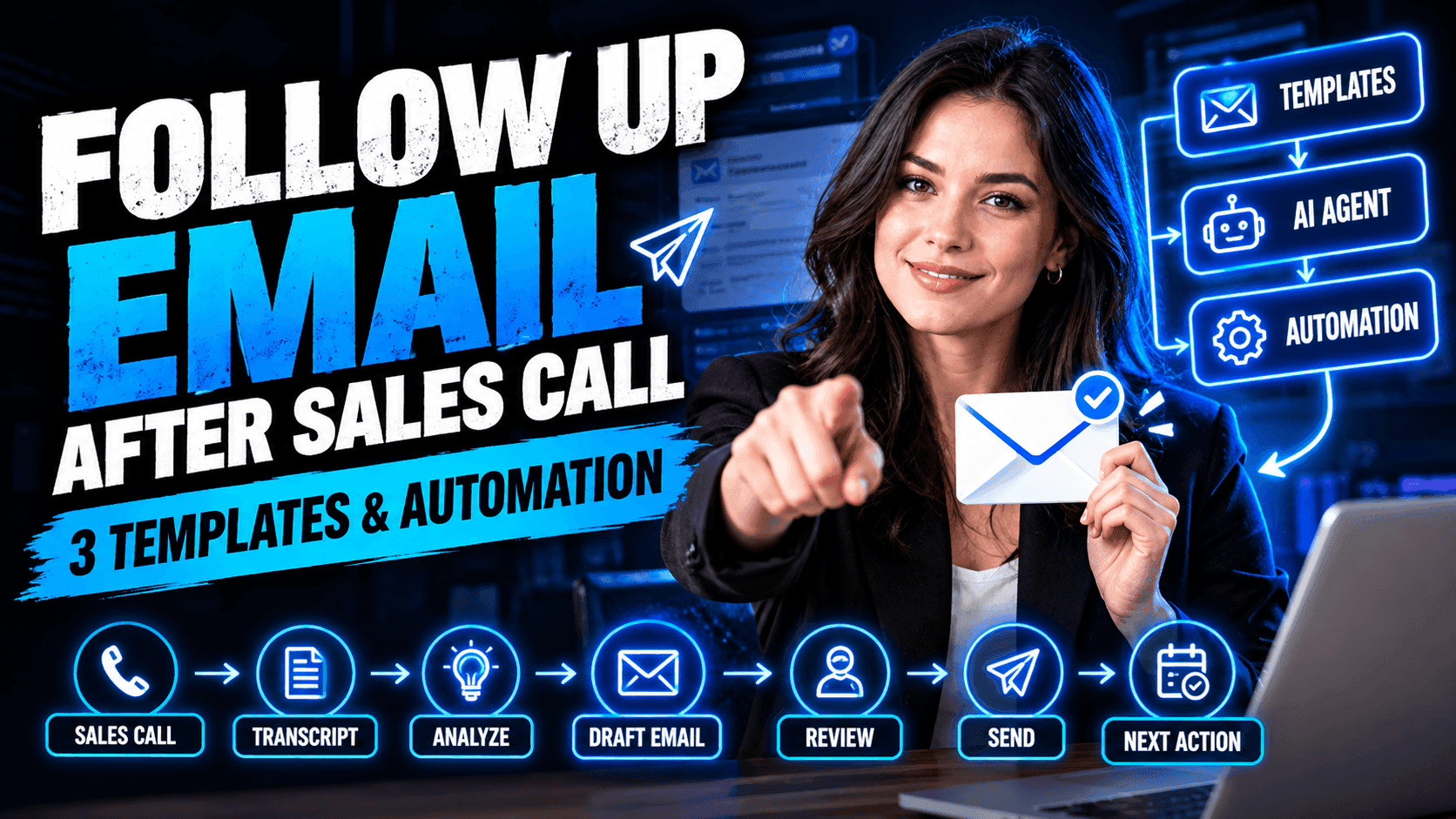
Learn how to write a follow up email after sales call with 3 practical templates, timing tips, and an AI workflow to save time.
Follow Up Email After Sales Call: 3 Templates & Automation
A timely follow up email after sales call keeps prospects engaged while the conversation is still fresh. But writing every recap manually can take time, especially when Account Executives manage multiple calls, prospects, and follow-up tasks each day.
This guide provides three practical sales follow-up email templates for common post-call situations. You’ll also learn how an AI Agent can automate the process from analyzing call transcripts to preparing personalized follow-up emails.
3 Follow Up Email After Sales Call Templates
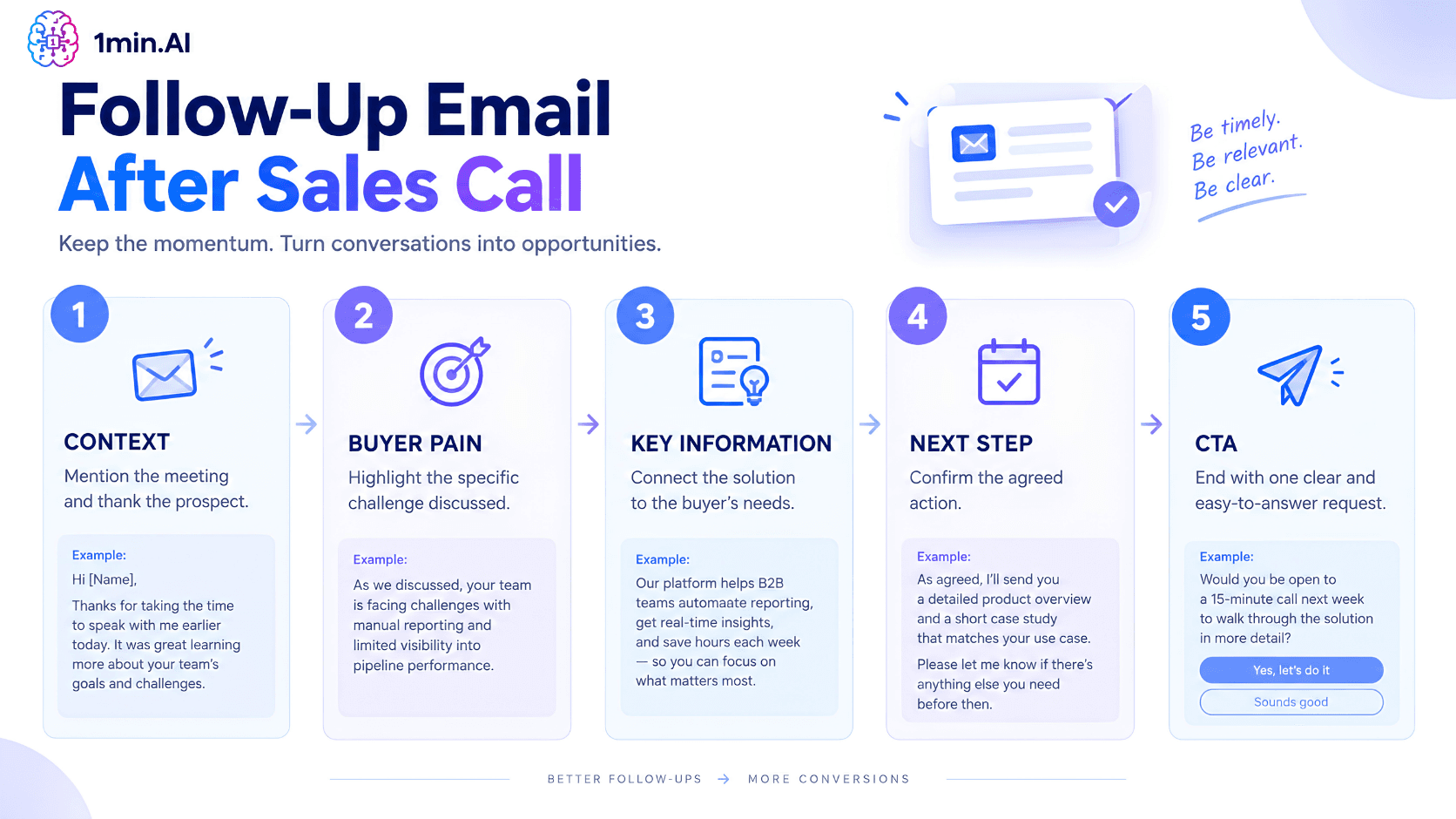
A good sales follow-up email should do more than thank the prospect for their time. It should show that you understood their priorities, address relevant questions, and make the next step clear.
Use these templates as frameworks rather than scripts. Personalize each message with details from the actual conversation.
1. Meeting Summary Follow-Up
Best for: Discovery calls, qualification calls, and initial sales meetings.
A short recap helps both sides stay aligned on the priorities and actions discussed during the call.
Subject: Thank you, [Client Name] — next steps for [Project Name]
Email:
Hi [Client Name],
It was great speaking with you today. Thanks for sharing more about [specific business challenge].
Here’s my understanding of the key priorities we discussed:
- [Priority or pain point]
- [Goal or desired outcome]
- [Timeline or requirement]
Based on our conversation, [Product Name] can help by [specific benefit related to their priority].
As discussed, I’ll [your action] by [date]. Would [day/time] work for a quick call to review the next steps?
Best, [Your Name]
Why it works: The email reflects the prospect’s priorities instead of sending a generic meeting recap.
2. Post-Demo Follow-Up
Best for: Product demonstrations where the prospect asked questions or identified specific features they need.
After a demo, connect the product to the buyer’s requirements and address any important questions from the conversation.
Subject: [Product Name] demo — next steps
Email:
Hi [Client Name],
Thanks for taking the time to walk through [Product Name] today.
Based on our conversation, the most relevant areas for your team are:
- [Feature connected to pain point]
- [Feature connected to business goal]
You also asked about [specific question or concern]. The answer is [short answer or resource].
I’ve included [proposal / case study / recording / pricing] for reference.
Would you prefer to [schedule a follow-up call] or [start a trial / review the proposal] next?
Best, [Your Name]
Why it works: It gives the prospect useful information while making the next action easy to choose.
3. Re-Engagement Follow-Up
Best for: Prospects who showed interest during a sales call but have stopped responding.
When a prospect goes quiet, avoid simply repeating your original pitch. Reference the previous conversation and provide a relevant reason to reconnect.
Subject: Quick follow-up on [Client Problem]
Email:
Hi [Client Name],
I wanted to follow up on our conversation about [specific challenge].
You mentioned that [specific priority or pain point] was an important focus for your team.
I came across [relevant resource, case study, insight, or update] and thought it might be useful as you evaluate your options.
Is [project/initiative] still on your roadmap for [month/quarter]?
If the timing has changed, no problem. I’d be happy to reconnect when it becomes relevant.
Best, [Your Name]
Why it works: The message gives the prospect a useful reason to respond without creating unnecessary pressure.
Why Automate Your Sales Follow-Up Workflow?
Writing one follow-up email is simple. Managing dozens of post-call follow-ups every week is much more difficult.
After each sales call, an Account Executive may need to review the transcript, identify buyer priorities, update CRM information, write a personalized email, and remember the next follow-up action.
A repeatable automated sales follow-up workflow can reduce this repetitive work:
Sales Call → Transcript → Key Information → Email Draft → Review → Send → Next Action
The goal is not to remove the salesperson from the process. Instead, automation handles repetitive preparation so the AE can spend more time on conversations and higher-value sales activities.
The Hidden Cost of Manual Post-Call Work
Important details can easily get buried when sales reps move between meeting transcripts, notes, CRM records, and email tools.
A prospect may have mentioned a specific pain point, objection, technical requirement, or timeline during the call. If those details are missed, the follow-up can feel generic even when the salesperson understands the account.
An automated workflow helps organize this information before the email is written.
Create Consistent Follow-Up Workflows
Instead of starting every message from a blank page, sales teams can standardize the post-call process around a few repeatable steps:
- Capture the meeting information
- Extract buyer priorities
- Summarize objections and requirements
- Identify agreed next steps
- Generate a personalized email
- Review the message
- Complete the follow-up action
This creates consistency without forcing every prospect to receive the same generic message.
Automate Follow-Up Emails with an AI Agent
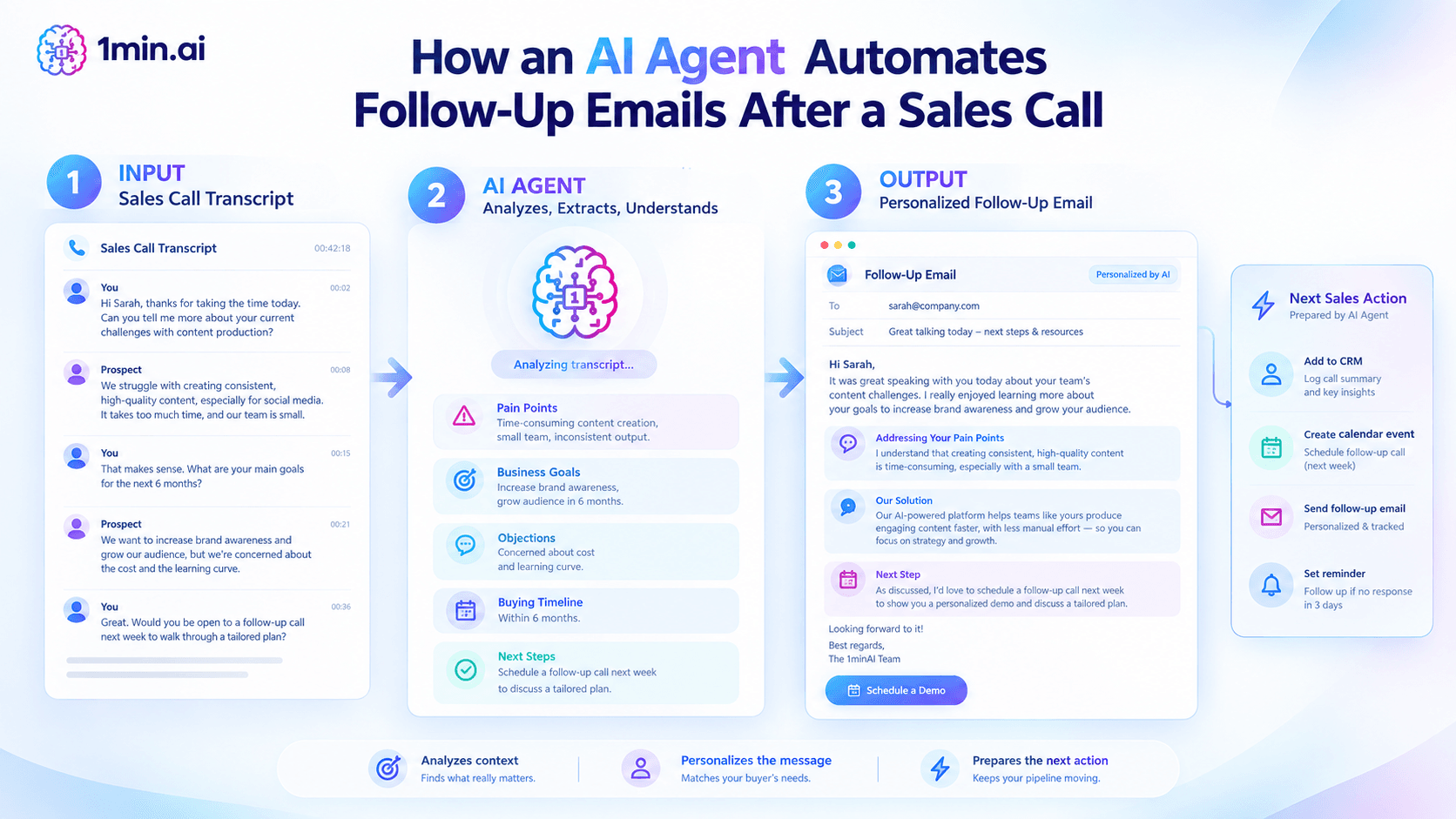
An AI Agent can take the automation one step further. Instead of only generating an email from a prompt, it can help coordinate multiple steps in the post-call workflow.
For sales teams handling multiple meetings every day, the workflow can look like this:
Sales Call → Transcript → Analyze → Personalize → Follow-Up → Next Action
Turn Call Transcripts Into Personalized Emails
After a sales call, an AI Agent can analyze the available conversation context and identify information such as:
- Prospect pain points
- Business goals
- Product requirements
- Objections and concerns
- Buying timeline
- Decision criteria
- Agreed next steps
The Agent can then use these details to prepare a personalized follow up email after sales call.
For example, instead of generating:
“Thanks for your time today. Let me know if you have any questions.”
the workflow can create a message that references the specific challenge discussed during the call, the solution discussed, and the next action agreed by both sides.
Automate More Than Email Drafting
An AI Agent can support the broader post-call workflow rather than treating email generation as an isolated task.
A typical workflow could include:
- Analyze the sales call and extract relevant information.
- Summarize the conversation for the sales team.
- Identify priorities and objections that should appear in the follow-up.
- Generate a personalized email using the conversation context.
- Prepare the next sales action based on the agreed timeline.
- Update relevant information in the sales workflow.
- Trigger the next follow-up when the required condition is met.
This turns a repetitive email-writing task into a structured sales follow-up workflow.
Keep Humans in Control
Automation works best when AI handles repetitive preparation while the salesperson remains responsible for the final communication.
Before sending an AI-generated email, the AE should review the message and verify important details. This is especially important when the email includes pricing, timelines, technical requirements, commitments, or information discussed during the call.
The human review step can be simple:
AI generates → AE checks → AE edits → AE approves → Email sends
This keeps the communication personalized while reducing the time spent turning raw call information into a usable follow-up.
Streamline Sales Follow-Up with 1min.AI
Once the workflow is defined, the next challenge is having the right AI capabilities available without constantly switching between different tools.
1min.AI brings multiple AI models and capabilities into one workspace, supporting writing, research, document analysis, and AI workflows in a unified environment.
For a post-call workflow, sales teams can use AI to:
- Analyze and summarize sales information
- Extract important buyer details
- Generate personalized follow-up content
- Refine email tone and clarity
- Prepare supporting sales content
- Build repeatable AI-powered workflows
Instead of treating AI as a single prompt-and-response tool, the workflow can connect multiple tasks together:
Call Information → Research & Analysis → Email Generation → Review → Follow-Up
This approach aligns with the broader 1min.AI workflow concept: build workflows, not prompts.
For sales teams, the value is not simply generating another email. It is creating a repeatable process that helps turn every sales conversation into a clear next action.
Conclusion
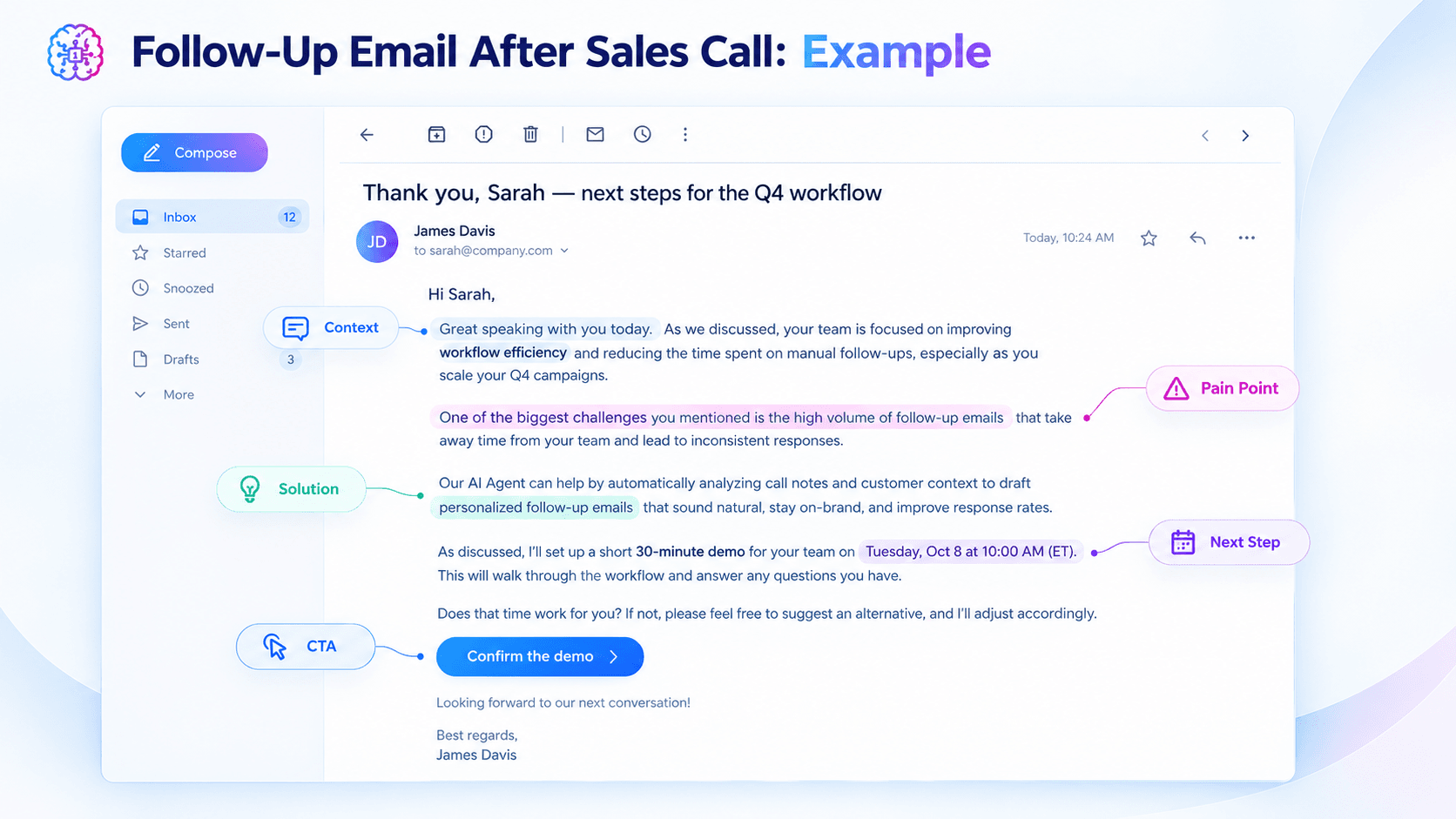
A strong follow up email after sales call should be timely, relevant, and easy for the prospect to respond to. Start with the buyer’s priorities, summarize the important points, and finish with one clear next step.
For teams managing multiple sales conversations, AI Agents can help automate the repetitive work behind each follow-up. From analyzing call transcripts to preparing personalized emails and next actions, automation can make post-call execution more consistent.
Use the templates in this guide as a starting point, then build a workflow that combines AI automation with human review. This lets sales teams spend less time on repetitive post-call tasks and more time building relationships and moving opportunities forward.
Alternatives
Discover the best alternatives to 1minAI and compare features, pricing, and use cases.

1min.AI vs OpenRouter
1min.AI vs. OpenRouter: Compare the ready-to-use AI creation product against the technical API tool. Find out if you need a zero-code creative studio or a coding infrastructure hub.
 Ngoc Hong
1min.AI vs Lovart
Compare 1min.AI vs Lovart across features, pricing, credits, brand tools, and use cases to find the right AI platform for your workflow.
Ngoc Hong
1min. AI vs Dola AI
Looking for a Dola AI alternative? Compare 1min.AI vs Dola AI on video generation, free plans, pricing and privacy to pick the right AI app.
Ngoc HongAI Tools
Discover the best AI tools to boost productivity, creativity, and everyday work.

Create Consistent Cartoon Content in Just a Few Steps
Create engaging cartoon videos for TikTok and Reels with 1min.AI. Research ideas, create characters, and turn images into animated videos in 3 simple steps.
 Lien Anh Vu
One Product, 10 UGC Creatives: How AI Makes Content Testing Easier
Create more authentic UGC with an AI UGC video generator, test more creative angles and scale affiliate content without filming every version.
Lien Anh Vu
Top 4 Affordable AI Tools for Startup Founders
Discover the top 4 affordable AI tools for startup founders to validate ideas, build products, create content, and launch faster without overspending.
 Tram Ta
AI Features
Comprehensive AI features that streamline workflows, improve efficiency, and empower teams to achieve more.
Create Consistent Cartoon Content in Just a Few Steps
Create engaging cartoon videos for TikTok and Reels with 1min.AI. Research ideas, create characters, and turn images into animated videos in 3 simple steps.
Lien Anh VuOne Product, 10 UGC Creatives: How AI Makes Content Testing Easier
Create more authentic UGC with an AI UGC video generator, test more creative angles and scale affiliate content without filming every version.
Lien Anh Vu
1minAI: Free AI Grammar Checker
Check grammar for free with 1minAI’s AI grammar checker. Find grammar, spelling, and writing mistakes, improve clarity, and polish your content in seconds.
Tram TaAI Use Cases
A curated collection of AI use cases for business, productivity, and industry-specific applications.
Create Consistent Cartoon Content in Just a Few Steps
Create engaging cartoon videos for TikTok and Reels with 1min.AI. Research ideas, create characters, and turn images into animated videos in 3 simple steps.
Lien Anh VuOne Product, 10 UGC Creatives: How AI Makes Content Testing Easier
Create more authentic UGC with an AI UGC video generator, test more creative angles and scale affiliate content without filming every version.
Lien Anh Vu
Best Time to Post on Instagram: A Practical Guide for Better Engagement
Discover the best time to post on Instagram, including the best days and times for different audiences, plus tips to find the ideal posting schedule for your account.
Tram TaAI Tutorials
Learn how to use AI with practical, step-by-step tutorials.
Create Consistent Cartoon Content in Just a Few Steps
Create engaging cartoon videos for TikTok and Reels with 1min.AI. Research ideas, create characters, and turn images into animated videos in 3 simple steps.
Lien Anh Vu
Black Friday AI Tool Deals in 2026
Discover what Black Friday AI tool deals 2026 has to offer. Find out how to secure the 1min.AI lifetime deal via AppSumo, Dealify, Stack Social, and verify on Trustpilot, Slashdot, and Software Advice.
 Hang Nguyen
[Seedance 2.5 New] Better AI Product Videos, Less Rework in 1min.AI
Use Seedance 2.5 image to video on 1min.AI to create more consistent AI product videos, reduce failed generations, save credits, and improve UGC workflows.
Lien Anh VuAI Guides
Learn AI faster with practical guides, real-world examples, and actionable best practices.
Create Consistent Cartoon Content in Just a Few Steps
Create engaging cartoon videos for TikTok and Reels with 1min.AI. Research ideas, create characters, and turn images into animated videos in 3 simple steps.
Lien Anh Vu
Safely Buy AI Tools Online: 2026 Black Friday Guide
Discover how to find and secure the best Black Friday AI deals online. Learn expert strategies to avoid scams, combat subscription fatigue, and verify software.
Hang Nguyen[Seedance 2.5 New] Better AI Product Videos, Less Rework in 1min.AI
Use Seedance 2.5 image to video on 1min.AI to create more consistent AI product videos, reduce failed generations, save credits, and improve UGC workflows.
Lien Anh VuAI Solutions
Browse the best AI solutions for automation, coding, research, productivity, customer support, marketing, and business workflows.
Create Consistent Cartoon Content in Just a Few Steps
Create engaging cartoon videos for TikTok and Reels with 1min.AI. Research ideas, create characters, and turn images into animated videos in 3 simple steps.
Lien Anh VuOne Product, 10 UGC Creatives: How AI Makes Content Testing Easier
Create more authentic UGC with an AI UGC video generator, test more creative angles and scale affiliate content without filming every version.
Lien Anh Vu
Free AI Tattoo Generator: Custom Designs
Turn any idea into a custom tattoo design with 1min.AI's free AI tattoo generator. Describe your idea, pick a style, and download in seconds.
 Trang Tran
AI Models
Explore the world's leading AI models in one place.
Create Consistent Cartoon Content in Just a Few Steps
Create engaging cartoon videos for TikTok and Reels with 1min.AI. Research ideas, create characters, and turn images into animated videos in 3 simple steps.
Lien Anh VuOne Product, 10 UGC Creatives: How AI Makes Content Testing Easier
Create more authentic UGC with an AI UGC video generator, test more creative angles and scale affiliate content without filming every version.
Lien Anh Vu[Seedance 2.5 New] Better AI Product Videos, Less Rework in 1min.AI
Use Seedance 2.5 image to video on 1min.AI to create more consistent AI product videos, reduce failed generations, save credits, and improve UGC workflows.
Lien Anh VuAI Comparisons
Compare AI tools, models, and platforms to find the best fit for your needs.

Kling AI Vs Veo 3: Which Model Wins?
Kling AI vs Veo 3: compare motion, native audio, pricing & free tiers to see which AI video generator wins for your project - try both on 1min.AI.
Trang Tran[Seedance 2.5 New] Better AI Product Videos, Less Rework in 1min.AI
Use Seedance 2.5 image to video on 1min.AI to create more consistent AI product videos, reduce failed generations, save credits, and improve UGC workflows.
Lien Anh Vu
DeepSeek V4 Pro vs Flash Comparison
Compare DeepSeek V4 Pro vs DeepSeek V4 Flash metrics. Optimize your agentic apps and improve AI fact checking on 1min.ai today.
Ngoc HongAI Integrations
Seamlessly integrate AI with the tools you already use to automate work and boost productivity.

POV: You Have 10+ Posts to Make Every Day
Learn how to build an AI content workflow that helps content creators produce 10+ social media posts a day faster with AI brainstorming, image generation, and content creation.
Lien Anh Vu
How to Use an AI Fashion Video Generator for Fashion Week 2026
Turn Fashion Week 2026 ideas into stunning fashion videos with AI. Learn how to brainstorm, create visuals, and transform images into videos with one simple workflow.
Lien Anh Vu
Stop Switching Between AI Apps: How AI Integration Transforms Employer Branding
Discover how AI integration helps HR teams streamline employer branding by combining AI writing, documents, images, video, and multiple AI models into one workspace.
Tram TaAI for Industries
Find the best AI tools and workflows for healthcare, finance, education, legal, manufacturing, retail, real estate, and more

7 Low-Cost AI Business Ideas for Your Startup
Explore 7 low-cost AI business ideas you can start with a small budget, from content and video services to AI consulting, reselling, and automation.
Tram Ta
Free AI Image Generator For Ecommerce
Turn phone photos into studio, white-background, and lifestyle product images. Try the best AI image generator for ecommerce online free with 1min.AI.
Trang Tran
Free Property Management Email Templates
Free property management email templates for tenants and owners: rent reminders, renewals, maintenance updates. Copy, customize, and send in minutes.
Trang TranAI Agents
Discover and run AI agents to automate tasks across your work and daily life.
1minAI: Free AI Grammar Checker
Check grammar for free with 1minAI’s AI grammar checker. Find grammar, spelling, and writing mistakes, improve clarity, and polish your content in seconds.
Tram Ta
AI Agents for Facebook
Use an AI Agent for Facebook to create content, generate images, schedule posts, and publish from your documents and conversations.
Ngoc Hong
AI Agent vs AI Assistant: Which One Actually Saves Designers More Time?
Learn the difference between AI Agent vs AI Assistant and discover which solution helps designers automate repetitive work, reduce revisions, and save more time.
Lien Anh VuAI Workflows
Explore ready-to-use AI workflows for productivity, marketing, sales, support, and more.
Create Consistent Cartoon Content in Just a Few Steps
Create engaging cartoon videos for TikTok and Reels with 1min.AI. Research ideas, create characters, and turn images into animated videos in 3 simple steps.
Lien Anh VuOne Product, 10 UGC Creatives: How AI Makes Content Testing Easier
Create more authentic UGC with an AI UGC video generator, test more creative angles and scale affiliate content without filming every version.
Lien Anh VuPOV: You Have 10+ Posts to Make Every Day
Learn how to build an AI content workflow that helps content creators produce 10+ social media posts a day faster with AI brainstorming, image generation, and content creation.
Lien Anh VuNewsletter
Weekly AI Innovations with 1minAI

🔮 Weekly AI Innovations #136: Grok 4.6 and Smart Data Retention
Discover the latest 1min.ai updates! Upgrade to Grok 4.6 for blazing-fast AI, and check our new Data Retention policies to secure your files today.
Hang Nguyen
🔮 Weekly AI Innovations #139: Dawn of the next-gen AI
Discover the immense power of GPT-6 Astra and Claude Fable 5.1. Unlock next-generation AI models on 1min.ai to solve complex tasks effortlessly.
Hang Nguyen
🔮 Weekly AI Innovations #138: Claude Sonnet 5, Fable 5 & Wan 2.7
Explode your creative potential with massive 1min.ai updates! Access Claude Sonnet 5, Fable 5, and Alibaba Wan 2.7 for unmatched multi-modal generation today.
Hang Nguyen