
Does 1minAI Store Your Prompts

Lien Anh Vu
October 27, 2026
Learn how 1min.AI handles prompts and customer data including storage retention deletion AI training and third party processing.
If you use AI for business or client work, one of the first privacy questions you may have is simple: does 1min.AI store your prompts?
The short answer is that 1min.AI does store certain user data and uploaded content as part of providing its services. However, data storage and AI model training are two different things. 1min.AI states that customer data is not used to train AI models, while its Privacy Policy and product plans describe how certain data and uploaded content may be retained.
For agencies, B2B teams, freelancers, marketers, and creators, this distinction matters before uploading client briefs, internal documents, research, or other sensitive information into an AI platform.
Does 1min.AI Store Your Prompts
1min.AI's public documentation shows that the service stores certain types of user information.
Its Privacy Policy says the platform may collect personal data, usage data, and other information uploaded to the service, including documents and voice content. It also states that personal data is retained only as long as necessary for the purposes described in the policy, with a maximum retention period of one year, subject to legal and operational exceptions.
The 1min.AI pricing information also lists storage availability by plan:
- Free plan with 3 days of storage
- Pro plan with 3 months of storage
- Business plan with 12 months of storage
- Enterprise plan with unlimited storage
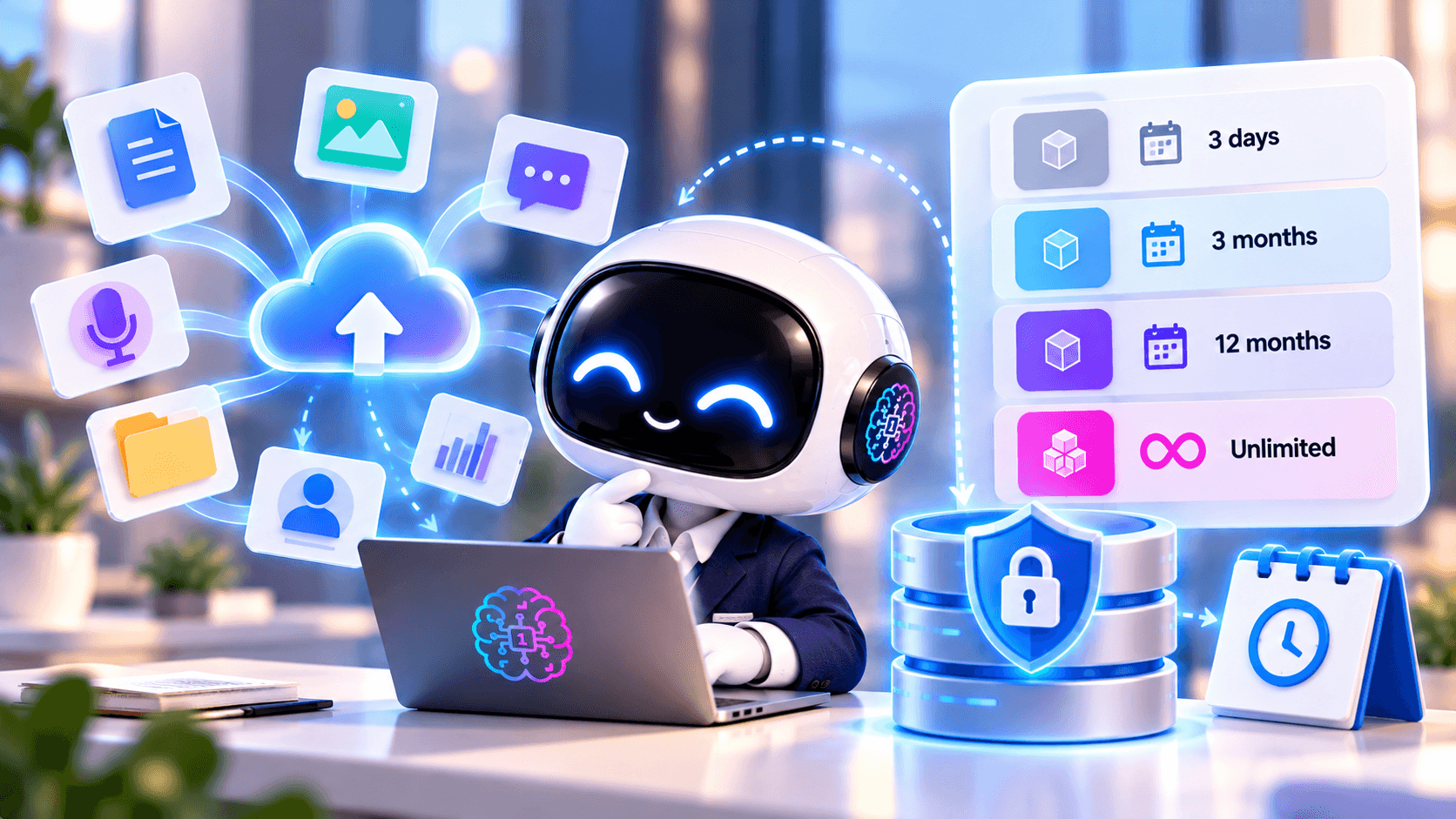
These storage periods show that content can remain available inside the service for different lengths of time depending on the plan. However, they should not automatically be interpreted as the exact retention period for every prompt, uploaded file, system log, or backend record.
For business use, a better question is:
How long are prompts, uploaded files, outputs, and associated logs retained for the exact feature and plan we intend to use?
That gives your team a more useful answer than simply asking whether information is stored.
Prompt Storage Is Not the Same as AI Training
One of the most common misunderstandings about AI privacy is assuming that if a platform stores a prompt, it must also use that prompt to train an AI model.
These are separate activities.
Storage means information remains available in the service or its systems for a period of time. This may support features such as conversation history, workspace content, account functionality, troubleshooting, or other product operations.
Model training means customer information is used to improve or train an AI model.
An AI platform can therefore retain content without using that content for model training.
1min.AI currently states:
“We never use your data to train AI models.”
That is an important privacy signal for businesses that do not want client or company information used as AI training material.
However, a no-training statement does not mean that nothing is stored. Storage, retention, access, deletion, and third-party processing still need to be evaluated separately.
What Happens to Your Data After You Upload It
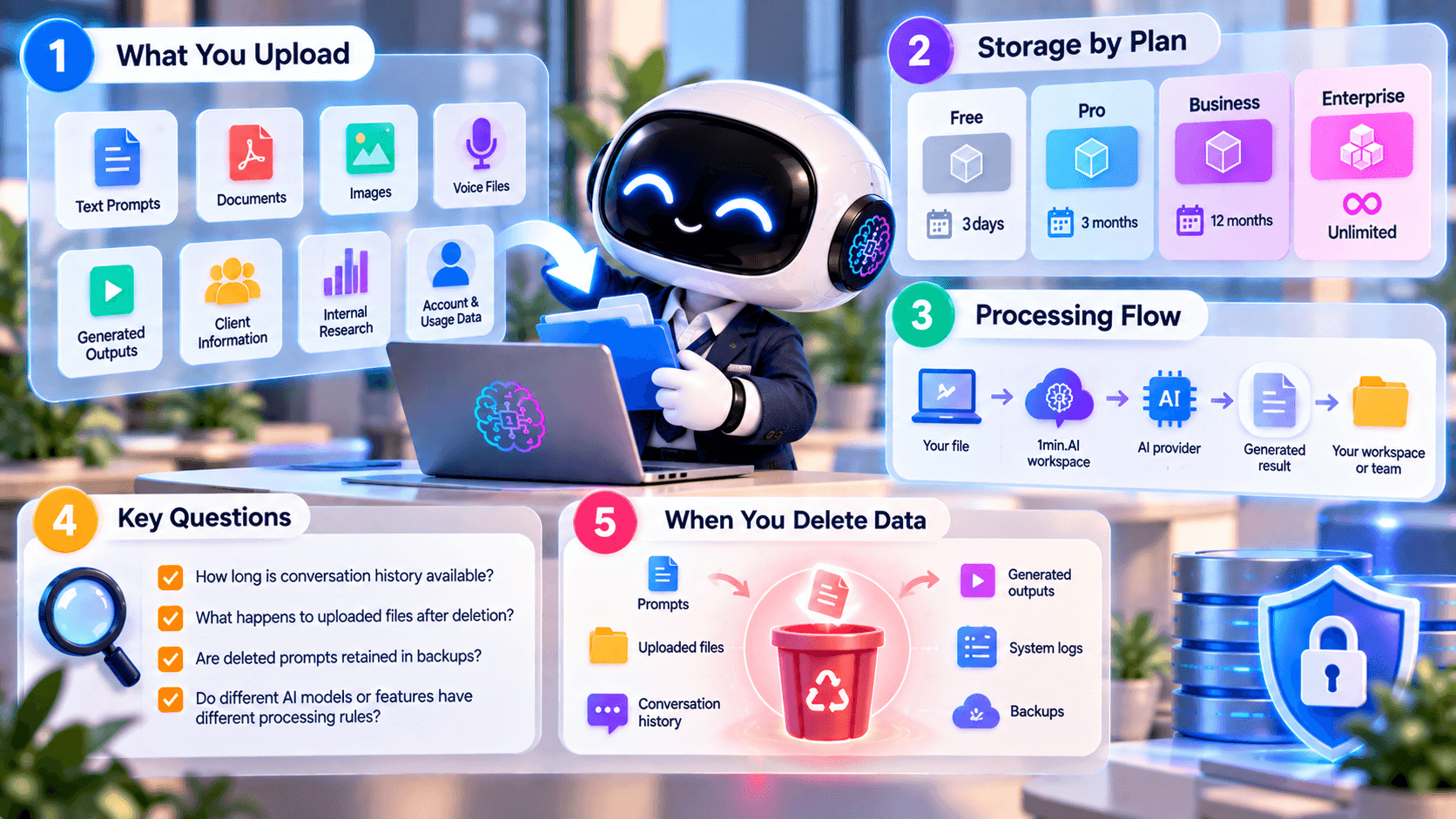
When people think about AI privacy, they often focus only on text prompts. In practice, an AI workflow can include much more.
1min.AI's Privacy Policy states that the platform may collect account information such as name and email, usage information generated while using the service, and other data uploaded to the platform such as documents and voice content.
Depending on how you use the platform, your workflow may contain:
- Text prompts
- Uploaded documents
- Images
- Voice files
- Generated outputs
- Client information
- Internal research
- Account and usage information
The sensitivity of that information matters.
A creator using AI to rewrite a public social media caption may face relatively low privacy risk. An agency uploading an unreleased campaign plan or a B2B team analyzing an internal business report deserves a more careful review.
How Long Does 1min.AI Keep Your Data
It is useful to separate product storage from privacy-policy retention.
1min.AI's current plan information lists 3 days of storage on Free, 3 months on Pro, 12 months on Business, and unlimited storage on Enterprise.
Separately, its Privacy Policy says personal data is retained only as long as necessary for the purposes described in the policy, with a maximum retention period of one year. It also notes that some information may need to be retained for legal obligations, disputes, or enforcement of agreements.
These statements address different contexts.
A storage allowance shown on a pricing plan does not necessarily define every internal retention rule, while a general privacy policy does not provide a feature-by-feature schedule for every prompt, output, or log.
For agencies and business teams, the safest approach is to verify the exact retention behavior of the workflow they plan to approve.
Useful questions include:
- How long is conversation history available?
- What happens to uploaded files after deletion?
- Are deleted prompts retained in backups for any period?
- Do different AI models or features have different processing rules?
These questions become more important when the content includes confidential information.
Who Else May Process Your Data
AI platforms often rely on external service providers for cloud infrastructure, AI models, analytics, security, engineering, or other operational functions.
1min.AI publishes information about subprocessors through its security documentation and Trust Center. Its public security material lists providers across infrastructure, artificial intelligence, security compliance, collaboration, analytics, and related services.
For business teams, this means 1min.AI's own privacy policy is only one part of the complete data flow.
If a task uses an external AI provider through the platform, teams should understand which providers participate in the workflow and which terms apply.
A simplified flow may look like this:
Your file → 1min.AI workspace → relevant AI provider → generated result → your workspace or team
Understanding this path helps businesses identify where privacy questions need to be answered.
What Happens When You Delete Data
Deletion is another area where businesses should avoid assumptions.
1min.AI's Privacy Policy provides mechanisms related to personal-data deletion while noting that some information may still need to be retained where required by law or other legitimate obligations.
For business users, it may be necessary to verify how deletion applies to:
- Prompts
- Conversation history
- Uploaded files
- Generated outputs
- System logs
- Backups
This is particularly important when a client contract includes its own retention or deletion requirements.
Deleting something from the interface should not automatically be assumed to answer every backend retention question.
How to Use 1min.AI Safely With Business Data
There is no universal yes or no answer to whether every type of client data should be uploaded to 1min.AI.
The risk depends on the information being processed and the requirements of your business or client.
1min.AI documents security measures including encryption in transit and at rest, access controls, MFA for staff accessing critical systems, backups, incident response procedures, and continuous compliance monitoring.
Those controls are useful evidence, but they do not automatically make every category of data appropriate to upload.
A practical approach is to classify information before using AI.
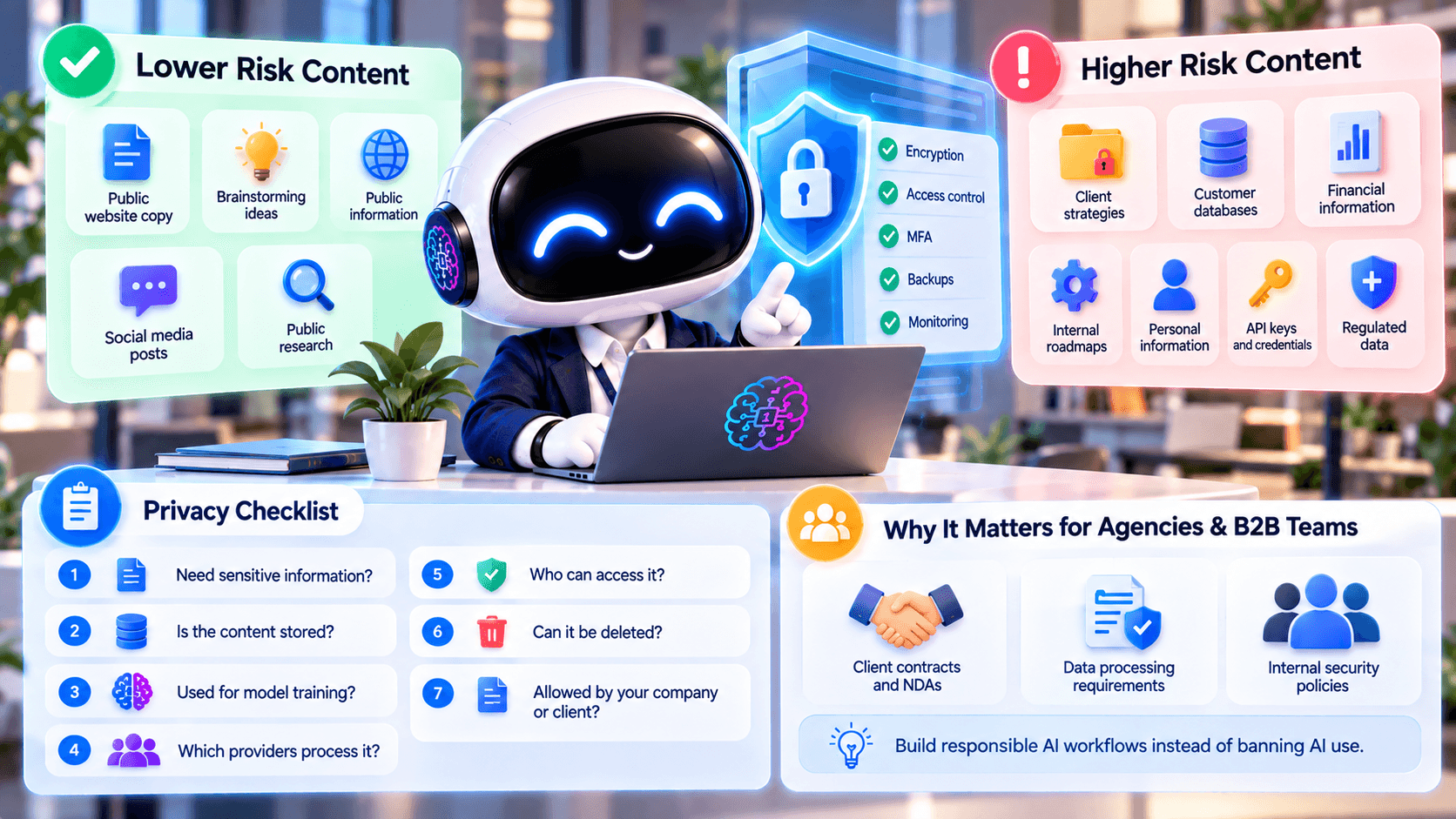
Lower Risk Content
Examples include:
- Public website copy
- Generic brainstorming
- Public product information
- Non-confidential social media ideas
- Publicly available research
These workflows generally expose less sensitive information and can be a sensible starting point when introducing AI into a team.
Higher Risk Content
Examples include:
- Unpublished client strategies
- Customer databases
- Confidential financial information
- Internal product roadmaps
- Personally identifiable information
- Credentials or API keys
- Regulated information
These workflows require stronger internal approval and more detailed vendor review.
If the AI does not need the complete sensitive document to perform the task, remove unnecessary information before uploading it.
A Simple Privacy Checklist
Before putting business or client information into 1min.AI or any other AI platform, ask:
1. Does this task actually require sensitive information? If not, remove it.
2. Is the content stored? Check the storage and retention rules for your plan and feature.
3. Is it used for model training? Do not confuse training with storage.
4. Which external providers process it? Review subprocessors and relevant provider terms.
5. Who can access the content? Check workspace permissions and vendor access controls.
6. Can the content be deleted? Understand what deletion covers and whether exceptions apply.
7. Is the workflow allowed by your company or client? Your internal policy may be stricter than the AI provider's policy.
This checklist is more useful than assuming that an AI platform is either completely private or completely unsafe.
Why This Matters for Agencies and B2B Teams
Agencies and B2B teams often work with information that belongs to someone else.
That changes the privacy calculation.
An individual creator can decide what personal information they are comfortable submitting. An agency may also need to respect client contracts, NDAs, data-processing requirements, or internal security policies.
The same applies to B2B teams using AI for company documents.
Understanding what is stored, what is used for training, and who processes the information makes it easier to build responsible AI workflows instead of simply banning AI use altogether.
For many teams, the goal should be responsible use rather than zero use.
Frequently Asked Questions
Does 1min.AI store prompts
1min.AI stores some user content as part of providing its service, and its plans currently include different storage periods. However, its Privacy Policy does not provide one simple feature-specific retention period for every prompt, file, output, or log. Business users should verify the exact workflow they intend to use.
Does 1min.AI use my prompts to train AI models
1min.AI currently states that it does not use customer data to train AI models.
Is storing a prompt the same as training on it
No. Data can be retained for product or operational purposes without being used to train an AI model.
How long does 1min.AI store data
Current product plans list storage periods ranging from 3 days on Free to unlimited storage on Enterprise. The Privacy Policy separately states a maximum one-year retention period for personal data, subject to specified exceptions. These statements should not be interpreted as one universal retention period for every type of content.
Should I upload confidential client data to 1min.AI
Only after confirming that the intended workflow, retention rules, providers, access controls, and your own client or company policies allow it. For sensitive work, minimize unnecessary data before submitting it.
The key distinction is that storing customer content and using customer content for AI training are not the same thing.
1min.AI stores certain user content and data as part of providing the service while separately stating that customer data is not used to train AI models.
For everyday low-risk tasks, that may be enough to make the privacy decision straightforward. For agencies and B2B teams handling confidential business information, it is worth checking retention, deletion, subprocessors, access controls, and the exact requirements of the workflow before uploading sensitive data.
Review the 1min.AI Privacy Policy and Trust Center before using AI with confidential business or client data.
- #Informational
Alternatives
Discover the best alternatives to 1minAI and compare features, pricing, and use cases.

1min.AI vs OpenRouter
1min.AI vs. OpenRouter: Compare the ready-to-use AI creation product against the technical API tool. Find out if you need a zero-code creative studio or a coding infrastructure hub.
 Ngoc Hong

1min.AI vs. Metricool: Which Platform Does More for Your Marketing Workflow?
Compare 1min.AI vs. Metricool across content creation, visual production, scheduling, analytics, MCP, and pricing to find the right platform for your marketing workflow.

1min.AI vs. Hootsuite: Which Social Media Tool Fits Your Workflow?
Compare 1min.AI vs. Hootsuite to explore their AI content creation, social media publishing, analytics, pricing, and collaboration features. Find the right tool for your workflow.
AI Tools
Discover the best AI tools to boost productivity, creativity, and everyday work.

Create Consistent Cartoon Content in Just a Few Steps
Create engaging cartoon videos for TikTok and Reels with 1min.AI. Research ideas, create characters, and turn images into animated videos in 3 simple steps.
 Lien Anh Vu

One Product, 10 UGC Creatives: How AI Makes Content Testing Easier
Create more authentic UGC with an AI UGC video generator, test more creative angles and scale affiliate content without filming every version.
Lien Anh Vu
Top 4 Affordable AI Tools for Startup Founders
Discover the top 4 affordable AI tools for startup founders to validate ideas, build products, create content, and launch faster without overspending.
 Tram Ta
AI Features
Comprehensive AI features that streamline workflows, improve efficiency, and empower teams to achieve more.
Create Consistent Cartoon Content in Just a Few Steps
Create engaging cartoon videos for TikTok and Reels with 1min.AI. Research ideas, create characters, and turn images into animated videos in 3 simple steps.
Lien Anh VuOne Product, 10 UGC Creatives: How AI Makes Content Testing Easier
Create more authentic UGC with an AI UGC video generator, test more creative angles and scale affiliate content without filming every version.
Lien Anh Vu
1minAI: Free AI Grammar Checker
Check grammar for free with 1minAI’s AI grammar checker. Find grammar, spelling, and writing mistakes, improve clarity, and polish your content in seconds.
Tram TaAI Use Cases
A curated collection of AI use cases for business, productivity, and industry-specific applications.
Create Consistent Cartoon Content in Just a Few Steps
Create engaging cartoon videos for TikTok and Reels with 1min.AI. Research ideas, create characters, and turn images into animated videos in 3 simple steps.
Lien Anh VuOne Product, 10 UGC Creatives: How AI Makes Content Testing Easier
Create more authentic UGC with an AI UGC video generator, test more creative angles and scale affiliate content without filming every version.
Lien Anh Vu
Best Time to Post on Instagram: A Practical Guide for Better Engagement
Discover the best time to post on Instagram, including the best days and times for different audiences, plus tips to find the ideal posting schedule for your account.
Tram TaAI Tutorials
Learn how to use AI with practical, step-by-step tutorials.

Black Friday AI Tool Deals in 2026
Discover what Black Friday AI tool deals 2026 has to offer. Find out how to secure the 1min.AI lifetime deal via AppSumo, Dealify, Stack Social, and verify on Trustpilot, Slashdot, and Software Advice.
 Hang Nguyen
Create Consistent Cartoon Content in Just a Few Steps
Create engaging cartoon videos for TikTok and Reels with 1min.AI. Research ideas, create characters, and turn images into animated videos in 3 simple steps.
Lien Anh Vu
[Seedance 2.5 New] Better AI Product Videos, Less Rework in 1min.AI
Use Seedance 2.5 image to video on 1min.AI to create more consistent AI product videos, reduce failed generations, save credits, and improve UGC workflows.
Lien Anh VuAI Guides
Learn AI faster with practical guides, real-world examples, and actionable best practices.

Safely Buy AI Tools Online: 2026 Black Friday Guide
Discover how to find and secure the best Black Friday AI deals online. Learn expert strategies to avoid scams, combat subscription fatigue, and verify software.
Hang NguyenCreate Consistent Cartoon Content in Just a Few Steps
Create engaging cartoon videos for TikTok and Reels with 1min.AI. Research ideas, create characters, and turn images into animated videos in 3 simple steps.
Lien Anh Vu[Seedance 2.5 New] Better AI Product Videos, Less Rework in 1min.AI
Use Seedance 2.5 image to video on 1min.AI to create more consistent AI product videos, reduce failed generations, save credits, and improve UGC workflows.
Lien Anh VuAI Solutions
Browse the best AI solutions for automation, coding, research, productivity, customer support, marketing, and business workflows.
Safely Buy AI Tools Online: 2026 Black Friday Guide
Discover how to find and secure the best Black Friday AI deals online. Learn expert strategies to avoid scams, combat subscription fatigue, and verify software.
Hang NguyenCreate Consistent Cartoon Content in Just a Few Steps
Create engaging cartoon videos for TikTok and Reels with 1min.AI. Research ideas, create characters, and turn images into animated videos in 3 simple steps.
Lien Anh VuOne Product, 10 UGC Creatives: How AI Makes Content Testing Easier
Create more authentic UGC with an AI UGC video generator, test more creative angles and scale affiliate content without filming every version.
Lien Anh VuAI Models
Explore the world's leading AI models in one place.
Create Consistent Cartoon Content in Just a Few Steps
Create engaging cartoon videos for TikTok and Reels with 1min.AI. Research ideas, create characters, and turn images into animated videos in 3 simple steps.
Lien Anh VuOne Product, 10 UGC Creatives: How AI Makes Content Testing Easier
Create more authentic UGC with an AI UGC video generator, test more creative angles and scale affiliate content without filming every version.
Lien Anh Vu[Seedance 2.5 New] Better AI Product Videos, Less Rework in 1min.AI
Use Seedance 2.5 image to video on 1min.AI to create more consistent AI product videos, reduce failed generations, save credits, and improve UGC workflows.
Lien Anh VuAI Comparisons
Compare AI tools, models, and platforms to find the best fit for your needs.

Kling AI Vs Veo 3: Which Model Wins?
Kling AI vs Veo 3: compare motion, native audio, pricing & free tiers to see which AI video generator wins for your project - try both on 1min.AI.
 Trang Tran
[Seedance 2.5 New] Better AI Product Videos, Less Rework in 1min.AI
Use Seedance 2.5 image to video on 1min.AI to create more consistent AI product videos, reduce failed generations, save credits, and improve UGC workflows.
Lien Anh Vu
DeepSeek V4 Pro vs Flash Comparison
Compare DeepSeek V4 Pro vs DeepSeek V4 Flash metrics. Optimize your agentic apps and improve AI fact checking on 1min.ai today.
Ngoc HongAI Integrations
Seamlessly integrate AI with the tools you already use to automate work and boost productivity.

POV: You Have 10+ Posts to Make Every Day
Learn how to build an AI content workflow that helps content creators produce 10+ social media posts a day faster with AI brainstorming, image generation, and content creation.
Lien Anh Vu
How to Use an AI Fashion Video Generator for Fashion Week 2026
Turn Fashion Week 2026 ideas into stunning fashion videos with AI. Learn how to brainstorm, create visuals, and transform images into videos with one simple workflow.
Lien Anh Vu
Stop Switching Between AI Apps: How AI Integration Transforms Employer Branding
Discover how AI integration helps HR teams streamline employer branding by combining AI writing, documents, images, video, and multiple AI models into one workspace.
Tram TaAI for Industries
Find the best AI tools and workflows for healthcare, finance, education, legal, manufacturing, retail, real estate, and more

No Photoshoot? Create AI Fashion Videos With Seedance 2.5
No photoshoot needed! Create stunning AI fashion videos with Seedance 2.5 on 1min.AI using outfit references, cinematic prompts, and surreal scenes.
Lien Anh Vu
Voice Cloning AI Free: How to Clone Any Voice Online in Minutes
Try voice cloning AI free with 1min.AI. Upload a 5-second clip, pick an ElevenLabs model, choose from 32 languages, and turn text to speech in your own voice.
Trang Tran
Text To Video AI Free Without Watermark Online
Create text to video AI free without watermark online with 1min.AI. Pick top models, turn prompts into HD clips, and download clean videos fast. Try it free.
Trang TranAI Agents
Discover and run AI agents to automate tasks across your work and daily life.
1minAI: Free AI Grammar Checker
Check grammar for free with 1minAI’s AI grammar checker. Find grammar, spelling, and writing mistakes, improve clarity, and polish your content in seconds.
Tram Ta
AI Agents for Facebook
Use an AI Agent for Facebook to create content, generate images, schedule posts, and publish from your documents and conversations.
Ngoc Hong
AI Agent vs AI Assistant: Which One Actually Saves Designers More Time?
Learn the difference between AI Agent vs AI Assistant and discover which solution helps designers automate repetitive work, reduce revisions, and save more time.
Lien Anh VuAI Workflows
Explore ready-to-use AI workflows for productivity, marketing, sales, support, and more.
Create Consistent Cartoon Content in Just a Few Steps
Create engaging cartoon videos for TikTok and Reels with 1min.AI. Research ideas, create characters, and turn images into animated videos in 3 simple steps.
Lien Anh VuOne Product, 10 UGC Creatives: How AI Makes Content Testing Easier
Create more authentic UGC with an AI UGC video generator, test more creative angles and scale affiliate content without filming every version.
Lien Anh VuPOV: You Have 10+ Posts to Make Every Day
Learn how to build an AI content workflow that helps content creators produce 10+ social media posts a day faster with AI brainstorming, image generation, and content creation.
Lien Anh VuNewsletter
Weekly AI Innovations with 1minAI

🔮 Weekly AI Innovations #145: X Content Agent & GPT 6.1 Terra on 1min.ai
Scale viral reach with the X Content Agent on 1min.ai. Discover an end-to-end 4-stage pipeline with zero token burn, plus the launch of GPT 6.1 Terra.
Hang Nguyen
🔮 Weekly AI Innovations #144: LinkedIn Content Agent: Complete B2B Publishing Pipeline
Scale B2B influence with the LinkedIn Content Agent on 1min.ai. Discover an end-to-end 4-stage pipeline with zero redundant token burn and 1-click publishing.
Hang Nguyen
🔮 Weekly AI Innovations #143: Update GPT-6, GPT-6.1 & Ideogram 4.0
Access GPT-6 Sol, Luna, GPT-6.1 Sol, and Ideogram 4.0 on 1min.ai. Boost typography accuracy to 98.4% and cut reasoning latency by 45% in one platform.
Hang Nguyen