
How Freelance Developers Can Use AI Agents to Code Faster and Earn More

Tram Ta
September 17, 2026
Learn how freelance developers can use AI agents to code faster, manage client projects, automate repetitive tasks, improve delivery, and take on more freelance work.
Freelance developers don't just write code. They also need to understand client requirements, estimate projects, investigate bugs, work with unfamiliar codebases, test features, communicate changes, and deliver projects on time.
That makes time one of a freelancer's most valuable resources.
AI agents can reduce repetitive development work by helping with multi-step tasks such as understanding a codebase, planning changes, modifying files, running tests, and fixing issues. The goal isn't to let AI replace your expertise. It's to use AI to spend less time on repetitive work and more time on client communication, architecture, problem-solving, and higher-value development.
Here are practical ways freelance developers can use AI agents to improve their workflow and business.
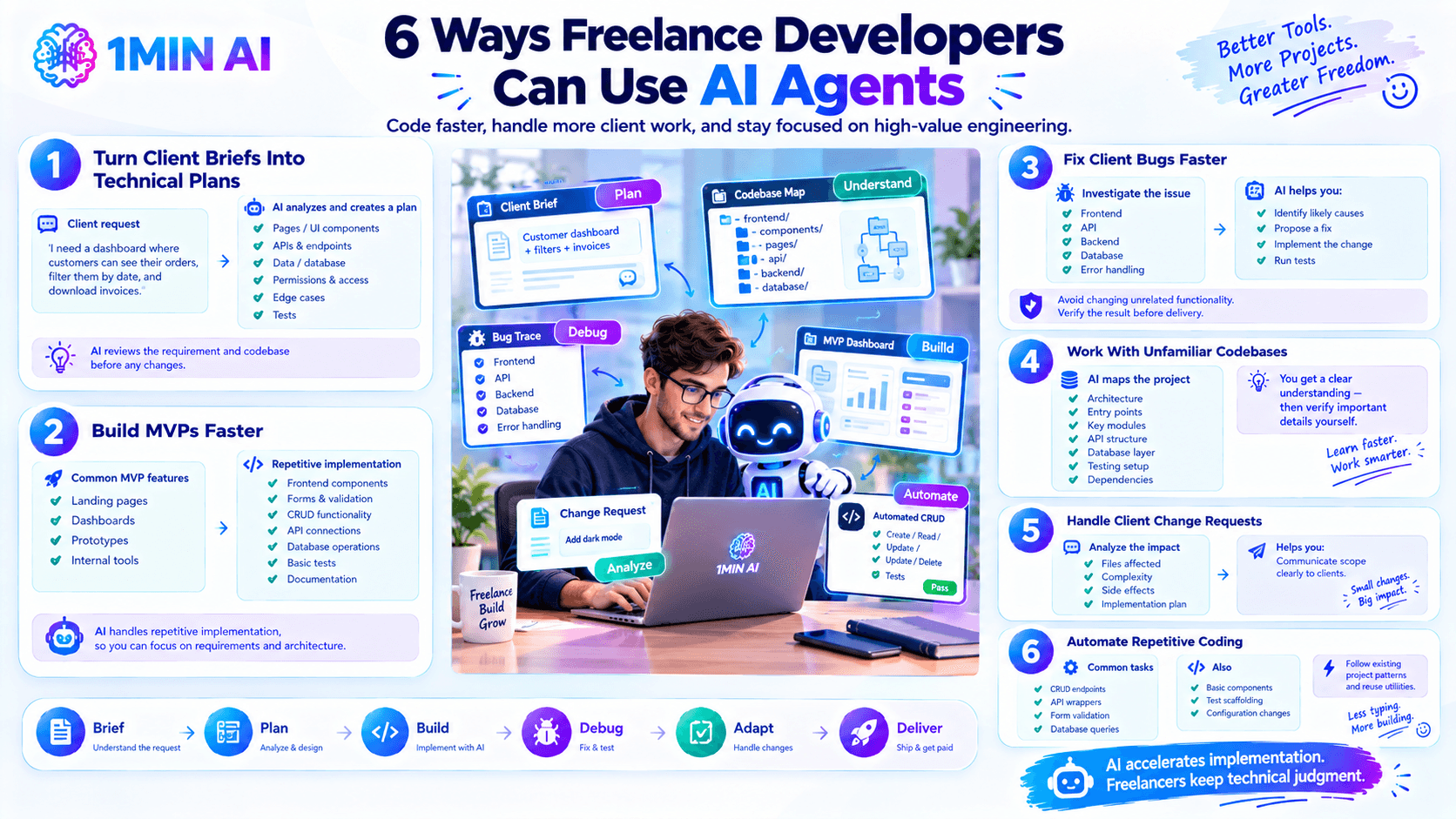
1. Turn Client Briefs Into Technical Plans
Client requests are rarely written like technical specifications.
A client might say:
Prompt: I need a dashboard where customers can see their orders, filter them by date, and download invoices.
Before coding, you need to determine the required pages, APIs, data, permissions, edge cases, and tests.
An AI agent can inspect the existing project and turn the request into a technical plan.
Prompt: Analyze this client requirement and the existing codebase. Break the work into development tasks, identify relevant files and APIs, list potential edge cases, and propose tests. Do not modify the code yet.
This gives you something concrete to review before implementation and can reduce the time spent figuring out where to start.
2. Build MVPs Faster
Freelancers are often hired to build landing pages, dashboards, prototypes, internal tools, and MVPs.
These projects contain plenty of repetitive implementation work, including:
- Frontend components
- Forms and validation
- CRUD functionality
- API connections
- Database operations
- Basic tests
- Documentation
An AI agent can handle some of this implementation while you focus on requirements, architecture, and the parts of the project that require deeper technical judgment.
This can be particularly useful for fixed-scope projects where delivery speed matters.
3. Fix Client Bugs Faster
Bug fixing can consume a large amount of freelance development time.
A simple client message such as "checkout sometimes stops working" may require investigating frontend code, APIs, backend logic, database operations, and error handling.
An AI agent can help trace the relevant code and identify potential causes.
Prompt: Investigate the checkout failure described here. Inspect the relevant frontend, API, and backend code, identify likely causes, and propose a fix. Do not modify unrelated functionality.
After identifying the problem, you can ask the agent to implement and test the fix.
You should still verify the result before delivering it to the client.
4. Work With Unfamiliar Codebases
Freelancers frequently inherit projects they didn't build.
You may encounter poor documentation, unfamiliar frameworks, outdated dependencies, or inconsistent coding patterns.
Before making changes, ask an AI agent to map the project.
Prompt: Analyze this codebase and explain its main architecture, entry points, key modules, API structure, database layer, testing setup, and major dependencies.
This can shorten the initial investigation and help you understand where important functionality lives.
You should treat the agent's explanation as a starting point and verify important details yourself.
5. Handle Client Change Requests
Scope changes are common in freelance development.
A client might ask: "Can we also add dark mode?"
Before jumping into implementation, use an AI agent to determine the technical impact.
Prompt: Analyze this new client request against the current implementation. Identify which files need to change, estimate the technical complexity, list potential side effects, and propose a small implementation plan.
This helps you distinguish between a small change and a request that could significantly expand the project scope.
It can also help you communicate the technical work more clearly to clients.
6. Automate Repetitive Coding
Freelancers often spend time on tasks that aren't difficult but occur repeatedly.
Examples include:
- CRUD endpoints
- API wrappers
- Form validation
- Database queries
- Basic components
- Test scaffolding
- Configuration changes
These are good candidates for AI assistance because the requirements are usually clear.
Prompt: Follow the existing CRUD pattern used by the customer module and create equivalent functionality for the projects module. Reuse existing utilities and conventions and add tests for the new endpoints.
The key is to give the agent an existing pattern to follow instead of asking it to invent a completely new architecture.
7. Generate Tests Before Delivery
A freelancer's reputation depends on delivering reliable work.
Before handing a project to a client, ask an AI agent to identify missing tests and important edge cases.
Prompt: Review the changes made for this feature. Identify important untested behaviors and edge cases, add appropriate tests, and run the relevant test suite.
This can help uncover issues involving:
- Empty input
- Invalid values
- Missing permissions
- API failures
- Duplicate records
- Unexpected data
- Boundary conditions
AI-generated tests should still be reviewed to ensure they test the intended behavior.
8. Use AI for Preliminary Code Reviews
Before sending a pull request or delivering a project, you can use an AI agent as an additional review layer.
Ask it to look for:
- Bugs
- Security problems
- Missing tests
- Performance issues
- Breaking changes
- Unnecessary complexity
- Inconsistent project patterns
For example:
Prompt: Review these changes as a senior software engineer. Identify potential bugs, security issues, missing tests, performance concerns, and unnecessary complexity. Prioritize findings by severity.
This doesn't replace your own review, but it can help identify problems before the client or another developer finds them.
9. Create Better Client Documentation
Documentation is often left until the end of a project.
An AI agent can help create or update:
- README files
- Installation instructions
- API documentation
- Environment variable guides
- Deployment instructions
- Feature documentation
- Client handoff notes
For example:
Prompt: Review the completed project and create a client-friendly setup and handoff guide. Explain installation, configuration, deployment, important features, and common troubleshooting steps.
Better documentation can make the final delivery more professional and easier for clients to maintain.
10. Take on More Work Without Simply Working More
The biggest business opportunity isn't necessarily charging clients for "AI-generated code."
It's increasing your development capacity.
If AI agents reduce time spent on repetitive implementation, debugging, testing, and documentation, you can potentially spend more time on:
- Client communication
- Architecture
- Technical strategy
- Complex problems
- Business development
- Additional projects
The objective should be higher-value output per hour, not simply writing more code.
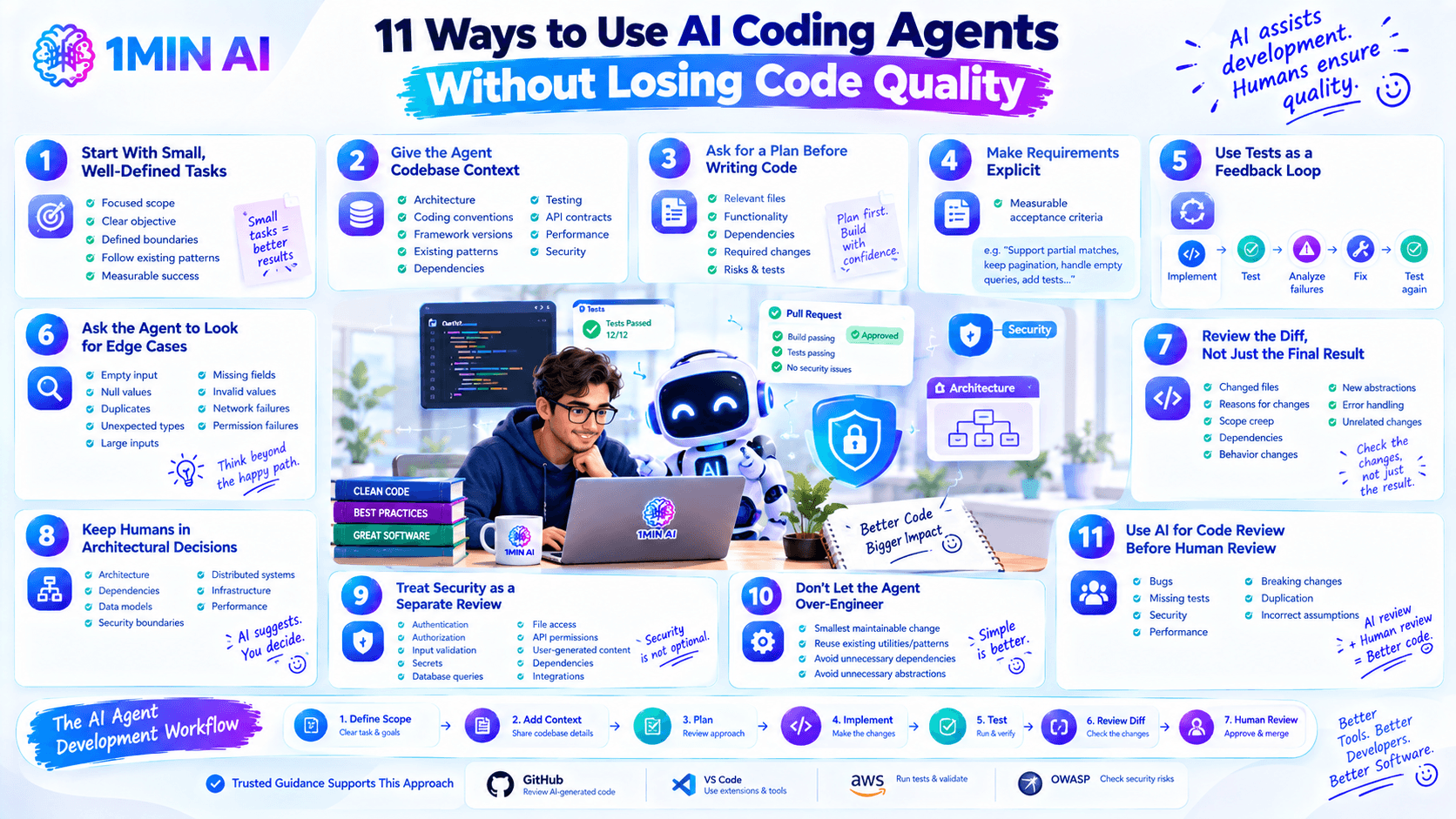
A Practical AI Agent Workflow for Freelancers
You can combine these techniques into one repeatable process:
1. Understand the requirement
Clarify the client's business goal and acceptance criteria.
2. Inspect the codebase
Identify relevant files, dependencies, and existing patterns.
3. Create a plan
Break the request into small implementation tasks.
4. Review the plan
Check the approach before allowing code changes.
5. Implement
Use the AI agent for clearly defined development work.
6. Test
Run automated tests and investigate failures.
7. Review
Inspect the diff, security implications, architecture, and overall quality.
8. Document and deliver
Prepare the client handoff and explain what changed.
This creates a simple loop:
Client brief → Plan → Code → Test → Review → Deliver
The AI agent accelerates the middle of the workflow while the freelancer remains responsible for the final result.
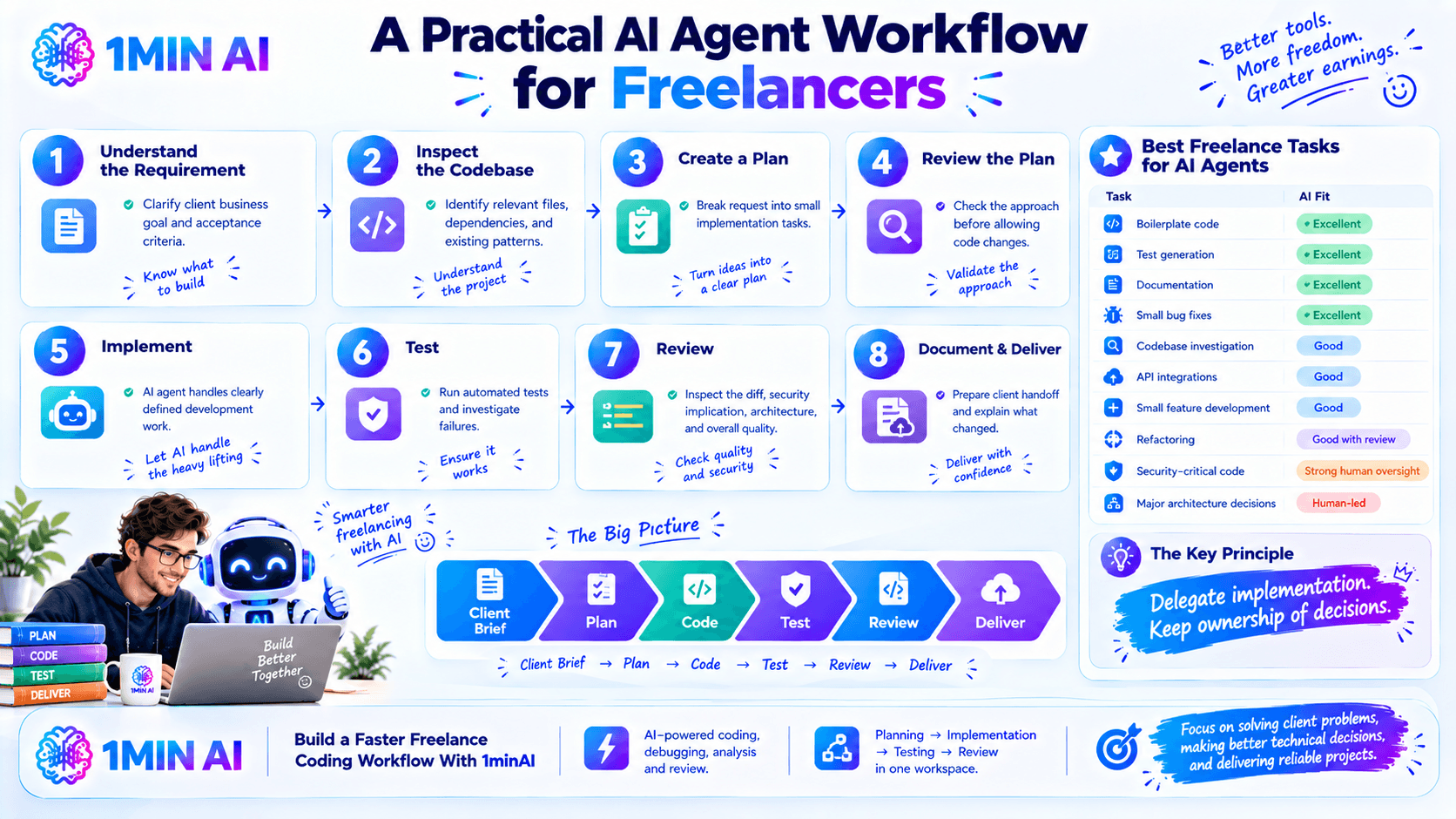
Best Freelance Tasks for AI Agents
| Freelance task | AI agent fit |
|---|---|
| Boilerplate code | Excellent |
| Test generation | Excellent |
| Documentation | Excellent |
| Small bug fixes | Excellent |
| Codebase investigation | Good |
| API integrations | Good |
| Small feature development | Good |
| Refactoring | Good with review |
| Security-critical code | Strong human oversight |
| Major architecture decisions | Human-led |
The general rule is simple:
Delegate implementation. Keep ownership of decisions.
Build a Faster Freelance Coding Workflow With 1minAI
1minAI can help freelance developers bring AI-powered coding, debugging, analysis, and review into one workspace. Its AI agent for software development is designed around a broader development workflow, helping developers move from planning and implementation to testing and review.
For freelancers, the goal isn't to replace technical expertise. It's to reduce repetitive work so you can focus more on solving client problems, making better technical decisions, and delivering reliable projects.
For further information, read here: AI Agent for Software Development.
Alternatives
Discover the best alternatives to 1minAI and compare features, pricing, and use cases.

1min.AI vs OpenRouter
1min.AI vs. OpenRouter: Compare the ready-to-use AI creation product against the technical API tool. Find out if you need a zero-code creative studio or a coding infrastructure hub.
 Ngoc Hong
1min.AI vs Lovart
Compare 1min.AI vs Lovart across features, pricing, credits, brand tools, and use cases to find the right AI platform for your workflow.
Ngoc Hong
1min.AI vs Chatplayground AI
Compare 1min.AI (Voice Cloning, Object Removal, Team Plans) vs. ChatPlayground AI (14+ Models, Teams/O365 Integration). Discover the superior platform for predictable pricing and long-term content production growth.
Ngoc HongAI Tools
Discover the best AI tools to boost productivity, creativity, and everyday work.

Top 4 Affordable AI Tools for Startup Founders
Discover the top 4 affordable AI tools for startup founders to validate ideas, build products, create content, and launch faster without overspending.
 Tram Ta
[Seedance 2.5 New] Better AI Product Videos, Less Rework in 1min.AI
Discover how AI image-to-video product consistency helps creators reduce failed generations, save AI credits, and produce more usable commercial and UGC content.
 Lien Anh Vu
Turn “Make It Better” Into Better Content With AI
Use AI to turn vague client feedback into clear revisions, reduce unnecessary edits, and deliver better content faster.
Lien Anh VuAI Features
Comprehensive AI features that streamline workflows, improve efficiency, and empower teams to achieve more.

One Product, 10 UGC Creatives: How AI Makes Content Testing Easier
Create more authentic UGC with an AI UGC video generator, test more creative angles and scale affiliate content without filming every version.
Lien Anh Vu
Create Consistent Cartoon Content in Just a Few Steps
Create cartoon videos for TikTok and Reels in 3 simple steps with 1min.AI, from researching ideas to characters and animated videos.
Lien Anh Vu
1minAI: Free AI Grammar Checker
Check grammar for free with 1minAI’s AI grammar checker. Find grammar, spelling, and writing mistakes, improve clarity, and polish your content in seconds.
Tram TaAI Use Cases
A curated collection of AI use cases for business, productivity, and industry-specific applications.
One Product, 10 UGC Creatives: How AI Makes Content Testing Easier
Create more authentic UGC with an AI UGC video generator, test more creative angles and scale affiliate content without filming every version.
Lien Anh Vu
Best Time to Post on Instagram: A Practical Guide for Better Engagement
Discover the best time to post on Instagram, including the best days and times for different audiences, plus tips to find the ideal posting schedule for your account.
Tram Ta
Build a Portfolio Website Faster with 1min.AI
Learn how freelance creatives can use 1min.AI to plan, write, design, and generate a professional portfolio website faster, even without strong coding skills.
Lien Anh VuAI Tutorials
Learn how to use AI with practical, step-by-step tutorials.

Black Friday AI Tool Deals in 2026
Discover what Black Friday AI tool deals 2026 has to offer. Find out how to secure the 1min.AI lifetime deal via AppSumo, Dealify, Stack Social, and verify on Trustpilot, Slashdot, and Software Advice.
 Hang Nguyen
Create Consistent Cartoon Content in Just a Few Steps
Create cartoon videos for TikTok and Reels in 3 simple steps with 1min.AI, from researching ideas to characters and animated videos.
Lien Anh Vu[Seedance 2.5 New] Better AI Product Videos, Less Rework in 1min.AI
Discover how AI image-to-video product consistency helps creators reduce failed generations, save AI credits, and produce more usable commercial and UGC content.
Lien Anh VuAI Guides
Learn AI faster with practical guides, real-world examples, and actionable best practices.

Safely Buy AI Tools Online: 2026 Black Friday Guide
Discover how to find and secure the best Black Friday AI deals online. Learn expert strategies to avoid scams, combat subscription fatigue, and verify software.
Hang NguyenCreate Consistent Cartoon Content in Just a Few Steps
Create cartoon videos for TikTok and Reels in 3 simple steps with 1min.AI, from researching ideas to characters and animated videos.
Lien Anh Vu[Seedance 2.5 New] Better AI Product Videos, Less Rework in 1min.AI
Discover how AI image-to-video product consistency helps creators reduce failed generations, save AI credits, and produce more usable commercial and UGC content.
Lien Anh VuAI Solutions
Browse the best AI solutions for automation, coding, research, productivity, customer support, marketing, and business workflows.

Free AI Tattoo Generator: Custom Designs
Turn any idea into a custom tattoo design with 1min.AI's free AI tattoo generator. Describe your idea, pick a style, and download in seconds.
 Trang Tran
Safely Buy AI Tools Online: 2026 Black Friday Guide
Discover how to find and secure the best Black Friday AI deals online. Learn expert strategies to avoid scams, combat subscription fatigue, and verify software.
Hang Nguyen[Seedance 2.5 New] Better AI Product Videos, Less Rework in 1min.AI
Discover how AI image-to-video product consistency helps creators reduce failed generations, save AI credits, and produce more usable commercial and UGC content.
Lien Anh VuAI Models
Explore the world's leading AI models in one place.
One Product, 10 UGC Creatives: How AI Makes Content Testing Easier
Create more authentic UGC with an AI UGC video generator, test more creative angles and scale affiliate content without filming every version.
Lien Anh VuCreate Consistent Cartoon Content in Just a Few Steps
Create cartoon videos for TikTok and Reels in 3 simple steps with 1min.AI, from researching ideas to characters and animated videos.
Lien Anh Vu[Seedance 2.5 New] Better AI Product Videos, Less Rework in 1min.AI
Discover how AI image-to-video product consistency helps creators reduce failed generations, save AI credits, and produce more usable commercial and UGC content.
Lien Anh VuAI Comparisons
Compare AI tools, models, and platforms to find the best fit for your needs.

Kling AI Vs Veo 3: Which Model Wins?
Kling AI vs Veo 3: compare motion, native audio, pricing & free tiers to see which AI video generator wins for your project - try both on 1min.AI.
Trang Tran[Seedance 2.5 New] Better AI Product Videos, Less Rework in 1min.AI
Discover how AI image-to-video product consistency helps creators reduce failed generations, save AI credits, and produce more usable commercial and UGC content.
Lien Anh Vu
DeepSeek V4 Pro vs Flash Comparison
Compare DeepSeek V4 Pro vs DeepSeek V4 Flash metrics. Optimize your agentic apps and improve AI fact checking on 1min.ai today.
Ngoc HongAI Integrations
Seamlessly integrate AI with the tools you already use to automate work and boost productivity.

POV: You Have 10+ Posts to Make Every Day
Learn how to build an AI content workflow that helps content creators produce 10+ social media posts a day faster with AI brainstorming, image generation, and content creation.
Lien Anh Vu
How to Use an AI Fashion Video Generator for Fashion Week 2026
Turn Fashion Week 2026 ideas into stunning fashion videos with AI. Learn how to brainstorm, create visuals, and transform images into videos with one simple workflow.
Lien Anh Vu
Stop Switching Between AI Apps: How AI Integration Transforms Employer Branding
Discover how AI integration helps HR teams streamline employer branding by combining AI writing, documents, images, video, and multiple AI models into one workspace.
Tram TaAI for Industries
Find the best AI tools and workflows for healthcare, finance, education, legal, manufacturing, retail, real estate, and more

The Problem With AI Design? It Looks Too AI
AI-generated designs can look polished but still feel artificial. Here are 5 prompt techniques designers can use to create more realistic, intentional visuals.
Lien Anh Vu
Free AI Real Estate Video Generator
Turn listing photos into narrated property videos with AI real estate video tools. See how 1min.AI creates walkthroughs, voiceovers & captions in minutes.
Trang Tran
How to Launch an AI SaaS Without Building AI Models From Scratch
Learn how to launch an AI SaaS without building AI models from scratch. Explore white-label AI, product strategy, branding, pricing, and how 1minAI can help.
Tram TaAI Agents
Discover and run AI agents to automate tasks across your work and daily life.
1minAI: Free AI Grammar Checker
Check grammar for free with 1minAI’s AI grammar checker. Find grammar, spelling, and writing mistakes, improve clarity, and polish your content in seconds.
Tram Ta
AI Agents for Facebook
Use an AI Agent for Facebook to create content, generate images, schedule posts, and publish from your documents and conversations.
Ngoc Hong
AI Agent vs AI Assistant: Which One Actually Saves Designers More Time?
Learn the difference between AI Agent vs AI Assistant and discover which solution helps designers automate repetitive work, reduce revisions, and save more time.
Lien Anh VuAI Workflows
Explore ready-to-use AI workflows for productivity, marketing, sales, support, and more.
Create Consistent Cartoon Content in Just a Few Steps
Create cartoon videos for TikTok and Reels in 3 simple steps with 1min.AI, from researching ideas to characters and animated videos.
Lien Anh VuPOV: You Have 10+ Posts to Make Every Day
Learn how to build an AI content workflow that helps content creators produce 10+ social media posts a day faster with AI brainstorming, image generation, and content creation.
Lien Anh VuHow to Use an AI Fashion Video Generator for Fashion Week 2026
Turn Fashion Week 2026 ideas into stunning fashion videos with AI. Learn how to brainstorm, create visuals, and transform images into videos with one simple workflow.
Lien Anh VuNewsletter
Weekly AI Innovations with 1minAI

🔮 Weekly AI Innovations #137: ElevenLabs Music & AI social Profile Control
The newest 1min.ai updates deliver professional music generation and highly requested privacy tools. Dive into a seamless workflow today!
Hang Nguyen
🔮 Weekly AI Innovations #136: Grok 4.6 and Smart Data Retention
Discover the latest 1min.ai updates! Upgrade to Grok 4.6 for blazing-fast AI, and check our new Data Retention policies to secure your files today.
Hang Nguyen
🔮 Weekly AI Innovations #135: Claude Opus 5 and new AI Social Features
Experience the powerful Claude Opus 5 model, and explore new AI Social features like User Pages and Following creators.
Hang Nguyen