
Google Gemini Pro: Try It for Free on 1minAI in 2026

Tram Ta
September 23, 2026
Learn what Google Gemini Pro is, what it can do in 2026, how it compares with Gemini Flash models, and how to try Google Gemini Pro for free on 1minAI.
Google Gemini has evolved rapidly, with new models designed for everything from fast everyday questions to complex reasoning, research, coding, and multimodal tasks.
For users searching for Google Gemini Pro, the main question is no longer simply what Gemini can do. It is which Gemini model fits a particular task, and whether you can try Google Gemini Pro for free before committing to a paid AI plan.
Google's Gemini 3.1 Pro was introduced as a model for complex problem-solving, with Google highlighting improved reasoning, data synthesis, visual explanations, creative coding, and more. Google later expanded the Gemini family with faster Flash models, including Gemini 3.5 Flash, giving users more choices between capability, speed, and cost.
This guide explains what Google Gemini Pro means in 2026, what you can use it for, how Pro differs from Flash models, and how to try Gemini Pro for free on 1minAI.
What Is Google Gemini Pro?
Google Gemini Pro refers to Google's higher-capability Gemini models designed for more demanding tasks.
The Gemini lineup has changed over time, so it is important to pay attention to the specific model version when comparing tools. In February 2026, Google introduced Gemini 3.1 Pro, describing it as a model designed for tasks where a simple answer is not enough. Google said the model was intended for complex reasoning, data synthesis, visual explanations, creative coding, and other demanding workflows.
Gemini 3.1 Pro became available across Google's consumer and developer ecosystem, including the Gemini app, NotebookLM, Gemini API, Google AI Studio, and other developer products.
Meanwhile, Google's newer Flash models focus more heavily on speed and efficient execution. At Google I/O 2026, Google introduced Gemini 3.5 Flash as a newer generation model designed to combine advanced intelligence with fast action and agentic workflows.
In practical terms, you can think about the lineup this way:
| Model type | General focus | Useful for |
|---|---|---|
| Gemini Pro | Advanced reasoning and complex tasks | Research, analysis, coding, long-form work |
| Gemini Flash | Speed and efficient responses | Everyday questions, quick generation, high-volume tasks |
| Gemini Flash Lite | Lightweight, efficient processing | Simple tasks, fast responses, lower-complexity workflows |
The exact capabilities and availability can change as Google releases new model versions, so always check the specific model name when choosing one.
What Can You Do With Google Gemini Pro?
One reason people search for Google Gemini Pro is that it can be used for much more than basic chatbot conversations.
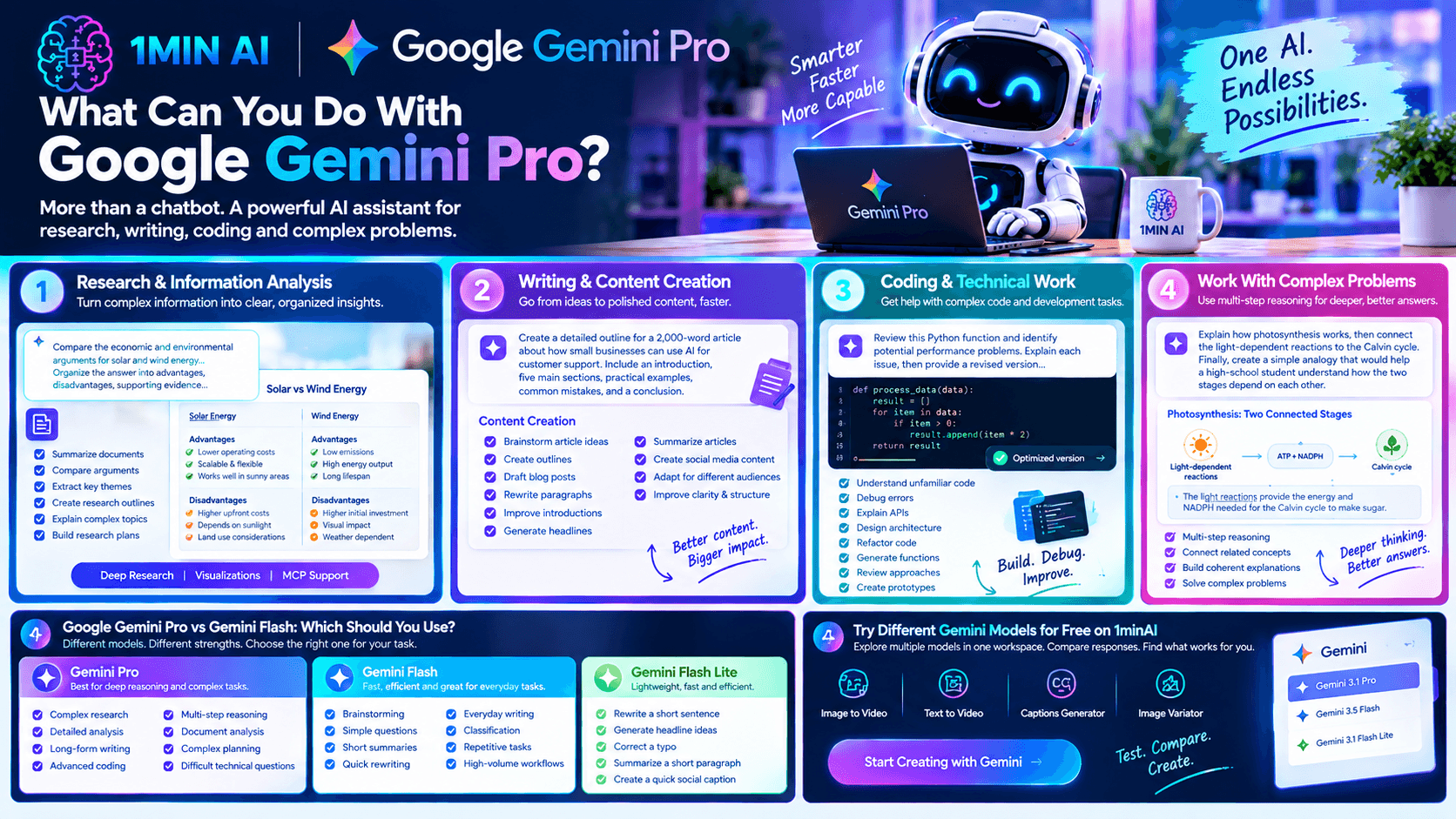
1. Research and Information Analysis
Gemini Pro can help break down complicated subjects and organize information into a more useful structure.
For example, you can ask it to:
- Summarize a long document
- Compare different arguments
- Extract important themes
- Turn research notes into an outline
- Identify relationships between concepts
- Explain a difficult topic step by step
- Create a research plan
Google has also highlighted Gemini 3.1 Pro as a foundation for advanced research workflows. Its Deep Research capabilities were expanded with features such as MCP support and native visualizations for longer research tasks.
Instead of asking:
“Tell me about renewable energy.”
Try:
“Compare the economic and environmental arguments for solar and wind energy. Organize the answer into advantages, disadvantages, supporting evidence, and questions I should investigate further.”
The second prompt gives the model a much clearer analytical task.
2. Writing and Content Creation
Google Gemini Pro can also be useful for creating and refining written content.
You can use it to:
- Brainstorm article ideas
- Create outlines
- Draft blog posts
- Rewrite paragraphs
- Improve introductions
- Generate headlines
- Summarize articles
- Create social media content
- Adapt content for different audiences
- Improve clarity and structure
For example:
Prompt:
“Create a detailed outline for a 2,000-word article about how small businesses can use AI for customer support. Include an introduction, five main sections, practical examples, common mistakes, and a conclusion.”
Once you have an outline, you can work through each section separately instead of asking AI to generate the entire article in one response.
3. Coding and Technical Work
Gemini Pro is also designed for demanding technical tasks.
Google has demonstrated Gemini 3.1 Pro generating code-based animations, configuring complex APIs, and building interactive applications from natural-language instructions.
Developers can use a Pro model for tasks such as:
- Understanding unfamiliar code
- Debugging errors
- Explaining APIs
- Designing application architecture
- Refactoring code
- Generating functions
- Reviewing implementation approaches
- Creating prototypes
For example:
Prompt:
“Review this Python function and identify potential performance problems. Explain each issue, then provide a revised version and explain what changed.”
For larger software projects, it is still important to test generated code rather than assuming the first output is production-ready.
4. Working With Complex Problems
The main reason to consider a Pro model is when the task requires multiple steps.
Instead of a simple question like: “What is photosynthesis?”
you might ask: “Explain how photosynthesis works, then connect the light-dependent reactions to the Calvin cycle. Finally, create a simple analogy that would help a high-school student understand how the two stages depend on each other.”
The model needs to understand the relationship between several parts of the request and produce a coherent answer.
That type of multi-step reasoning is closer to the use case Google emphasizes for Gemini 3.1 Pro.
Google Gemini Pro vs Gemini Flash: Which Should You Use?
The difference between Pro and Flash is not simply “good versus bad.” They are designed around different trade-offs.
Google Gemini Pro
A Pro model makes more sense when you need deeper reasoning or more complex outputs.
Consider it for:
- Complex research
- Detailed analysis
- Long-form writing
- Advanced coding
- Multi-step reasoning
- Document analysis
- Complex planning
- Difficult technical questions
Gemini Flash
Flash models are designed to respond quickly and efficiently.
They can be useful for:
- Brainstorming
- Simple questions
- Short summaries
- Quick rewriting
- Everyday writing
- Classification
- Repetitive tasks
- High-volume workflows
Google introduced Gemini 3.5 Flash in 2026 specifically around the combination of advanced intelligence and fast action, particularly for agentic workflows.
Gemini Flash Lite
A lightweight Flash model can make sense when your task is relatively simple and speed or efficiency matters more than advanced reasoning.
For example, you may not need a Pro model to:
- Rewrite a short sentence
- Generate five headline ideas
- Correct a typo
- Summarize a short paragraph
- Create a quick social caption
For more complex tasks, you can move up to a Pro model.
This is why having access to several Gemini models can be useful: you don't have to use the same model for every task.
Try Different Gemini Models for Free
If you want to experiment with Gemini models before deciding which one fits your workflow, 1minAI provides access to multiple Gemini options in one AI workspace.
You can explore:
- Free AI Chat with Gemini 3.1 Pro — useful for more demanding reasoning, analysis, writing, and technical tasks.
- Free AI Chat with Gemini 3.5 Flash — useful when you want a faster Gemini workflow.
- Free AI Chat with Gemini 3.1 Flash Lite — useful for lighter, faster tasks.
This makes it possible to test different models against the same prompt.
For example, take this prompt:
Prompt:
“Analyze this product description and rewrite it for a professional B2B audience. Keep the key information, remove unnecessary claims, and make the value proposition clearer.”
Run it through different Gemini models and compare:
- Response quality
- Reasoning depth
- Writing style
- Response speed
- Amount of editing required
This gives you a practical way to understand which model works for your own workflow rather than choosing based only on model names.
How to Try Google Gemini Pro for Free on 1minAI
If your goal is specifically to try Google Gemini Pro for free, 1minAI provides a convenient way to access the Gemini 3.1 Pro model through its AI chat experience.
The basic workflow is straightforward:
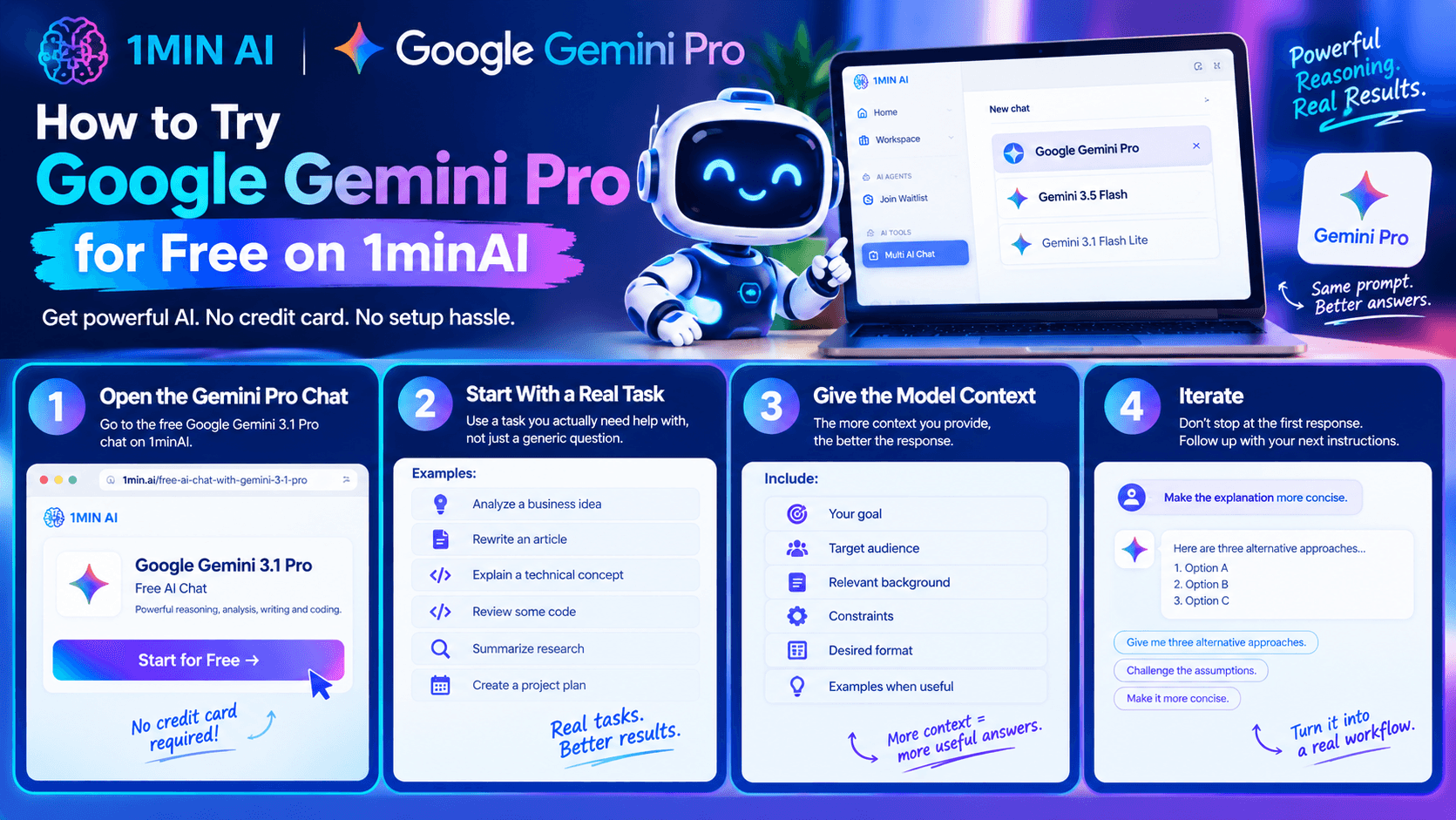
Step 1: Open the Gemini Pro chat
Go to the free Google Gemini 3.1 Pro chat on 1minAI.
Step 2: Start with a real task
Instead of testing the model with a generic question, use something you actually need help with.
For example:
- Analyze a business idea
- Rewrite an article
- Explain a technical concept
- Review some code
- Summarize research
- Create a project plan
Step 3: Give the model context
The more useful context you provide, the easier it is for the model to understand the task.
Include:
- Your goal
- Target audience
- Relevant background
- Constraints
- Desired format
- Examples when useful
Step 4: Iterate
Don't stop at the first response.
Follow up with instructions such as: “Make the explanation more concise.”
or: “Give me three alternative approaches.”
or: “Challenge the assumptions in your previous answer.”
This turns the conversation into an iterative workflow instead of a one-shot prompt.
7 Useful Google Gemini Pro Prompts to Try
If you're testing Google Gemini Pro, these prompts can help you explore different capabilities.
For research
Prompt:
“Analyze this topic from three different perspectives. Identify the strongest arguments for each perspective and explain what evidence would be needed to evaluate them.”
For writing
Prompt:
“Turn these rough notes into a structured article outline. Keep my original ideas but reorganize them into a logical progression.”
For business
Prompt:
“Analyze this business idea for a small startup. Identify the target customer, core problem, possible revenue model, major risks, and five questions I should answer before launching.”
For coding
Prompt:
“Review this code for bugs, edge cases, maintainability issues, and unnecessary complexity. Explain the problems before suggesting changes.”
For learning
Prompt:
“Teach me this concept as if I understand the basics but struggle with the advanced parts. Explain it step by step and give me a practical example.”
For document analysis
Prompt:
“Summarize this document into key findings, important numbers, unresolved questions, and recommended areas for further investigation.”
For decision support
Prompt:
“Compare these three options using cost, complexity, implementation time, risks, and expected benefits. Present the trade-offs without selecting an option for me.”
These prompts are more useful than simply asking Gemini to “do everything” because they define the task and the output you expect.
How to Get More From Google Gemini Pro
A powerful model still depends heavily on the quality of the instructions you give it.
Give it a role
Instead of: “Analyze this.”
Try: “Act as a product marketing analyst and analyze this landing page for positioning, messaging, and conversion problems.”
Specify the output
Tell Gemini whether you want:
- A table
- Bullet points
- A report
- An outline
- Step-by-step instructions
- JSON
- A short summary
- A detailed explanation
Provide constraints
For example:
“Keep the response under 500 words and explain the three most important issues first.”
Ask for iteration
After receiving an answer, ask Gemini to improve or challenge it.
You can say:
“What assumptions did you make?”
“What information is missing?”
“Give me a stronger alternative.”
“Check your previous answer for inconsistencies.”
This iterative approach can be particularly useful for complex tasks.
Why Try Google Gemini Pro on 1minAI?
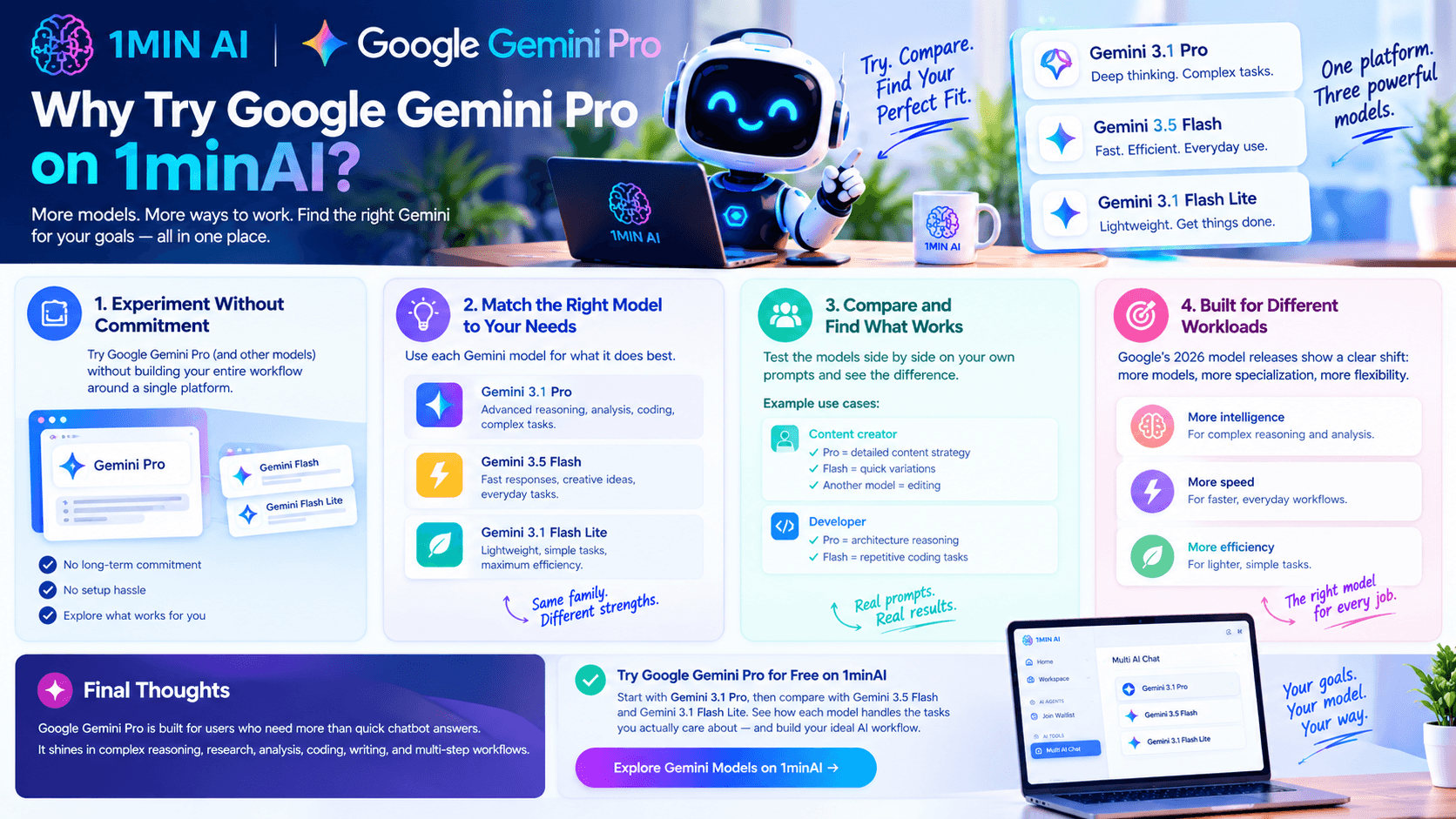
If you're curious about Google Gemini Pro but don't want to immediately build your workflow around a single AI platform, trying the model through 1minAI gives you a way to experiment with Gemini alongside other AI models.
You can use Gemini 3.1 Pro for demanding reasoning and analysis, switch to Gemini 3.5 Flash when speed is more important, and test Gemini 3.1 Flash Lite for lighter tasks.
The bigger benefit is being able to compare model behavior on your own prompts.
For example, a content creator might use Pro for developing a detailed content strategy, Flash for generating variations quickly, and another model for editing. A developer might use Pro to reason through architecture and a faster model for repetitive coding tasks.
Google's own 2026 model releases reflect this broader direction: instead of one model being designed for every workload, the Gemini family now includes different models aimed at different combinations of intelligence, speed, and efficiency.
Conclusion
Google Gemini Pro is designed for users who need more than quick chatbot answers. Its strongest use cases include complex reasoning, research, analysis, coding, writing, and other multi-step workflows.
At the same time, Google's newer Flash models provide alternatives when speed and efficiency matter more.
The easiest way to understand the difference is to test the models on your own work.
If you want to try Google Gemini Pro for free, start with Gemini 3.1 Pro on 1minAI, then compare the experience with Gemini 3.5 Flash and Gemini 3.1 Flash Lite. This lets you see how different Gemini models handle the tasks you actually care about before building them into your daily workflow.
For further information, explore Grok vs Gemini for Freelancers
Discover more AI features: https://1min.ai/features
Try 1minAI agent now: https://app.1min.ai/ai-agent-demo
Alternatives
Discover the best alternatives to 1minAI and compare features, pricing, and use cases.

1min.AI vs OpenRouter
1min.AI vs. OpenRouter: Compare the ready-to-use AI creation product against the technical API tool. Find out if you need a zero-code creative studio or a coding infrastructure hub.
 Ngoc Hong
1min.AI vs Easy Peasy AI
Looking for an Easy Peasy AI alternative? Compare Easy Peasy AI and 1min.AI for content workflows, AI models, and professional teams.
Ngoc Hong
1min.AI vs Taskade
Compare 1min.AI vs Taskade for AI content creation, automation, agents, and creative workflows to find the right workspace.
Ngoc HongAI Tools
Discover the best AI tools to boost productivity, creativity, and everyday work.

Create Consistent Cartoon Content in Just a Few Steps
Create engaging cartoon videos for TikTok and Reels with 1min.AI. Research ideas, create characters, and turn images into animated videos in 3 simple steps.
 Lien Anh Vu
One Product, 10 UGC Creatives: How AI Makes Content Testing Easier
Create more authentic UGC with an AI UGC video generator, test more creative angles and scale affiliate content without filming every version.
Lien Anh Vu
Top 4 Affordable AI Tools for Startup Founders
Discover the top 4 affordable AI tools for startup founders to validate ideas, build products, create content, and launch faster without overspending.
 Tram Ta
AI Features
Comprehensive AI features that streamline workflows, improve efficiency, and empower teams to achieve more.
Create Consistent Cartoon Content in Just a Few Steps
Create engaging cartoon videos for TikTok and Reels with 1min.AI. Research ideas, create characters, and turn images into animated videos in 3 simple steps.
Lien Anh VuOne Product, 10 UGC Creatives: How AI Makes Content Testing Easier
Create more authentic UGC with an AI UGC video generator, test more creative angles and scale affiliate content without filming every version.
Lien Anh Vu
1minAI: Free AI Grammar Checker
Check grammar for free with 1minAI’s AI grammar checker. Find grammar, spelling, and writing mistakes, improve clarity, and polish your content in seconds.
Tram TaAI Use Cases
A curated collection of AI use cases for business, productivity, and industry-specific applications.
Create Consistent Cartoon Content in Just a Few Steps
Create engaging cartoon videos for TikTok and Reels with 1min.AI. Research ideas, create characters, and turn images into animated videos in 3 simple steps.
Lien Anh VuOne Product, 10 UGC Creatives: How AI Makes Content Testing Easier
Create more authentic UGC with an AI UGC video generator, test more creative angles and scale affiliate content without filming every version.
Lien Anh Vu
Best Time to Post on Instagram: A Practical Guide for Better Engagement
Discover the best time to post on Instagram, including the best days and times for different audiences, plus tips to find the ideal posting schedule for your account.
Tram TaAI Tutorials
Learn how to use AI with practical, step-by-step tutorials.
Create Consistent Cartoon Content in Just a Few Steps
Create engaging cartoon videos for TikTok and Reels with 1min.AI. Research ideas, create characters, and turn images into animated videos in 3 simple steps.
Lien Anh Vu
Black Friday AI Tool Deals in 2026
Discover what Black Friday AI tool deals 2026 has to offer. Find out how to secure the 1min.AI lifetime deal via AppSumo, Dealify, Stack Social, and verify on Trustpilot, Slashdot, and Software Advice.
 Hang Nguyen
[Seedance 2.5 New] Better AI Product Videos, Less Rework in 1min.AI
Discover how AI image-to-video product consistency helps creators reduce failed generations, save AI credits, and produce more usable commercial and UGC content.
Lien Anh VuAI Guides
Learn AI faster with practical guides, real-world examples, and actionable best practices.
Create Consistent Cartoon Content in Just a Few Steps
Create engaging cartoon videos for TikTok and Reels with 1min.AI. Research ideas, create characters, and turn images into animated videos in 3 simple steps.
Lien Anh Vu
Safely Buy AI Tools Online: 2026 Black Friday Guide
Discover how to find and secure the best Black Friday AI deals online. Learn expert strategies to avoid scams, combat subscription fatigue, and verify software.
Hang Nguyen[Seedance 2.5 New] Better AI Product Videos, Less Rework in 1min.AI
Discover how AI image-to-video product consistency helps creators reduce failed generations, save AI credits, and produce more usable commercial and UGC content.
Lien Anh VuAI Solutions
Browse the best AI solutions for automation, coding, research, productivity, customer support, marketing, and business workflows.
Create Consistent Cartoon Content in Just a Few Steps
Create engaging cartoon videos for TikTok and Reels with 1min.AI. Research ideas, create characters, and turn images into animated videos in 3 simple steps.
Lien Anh VuOne Product, 10 UGC Creatives: How AI Makes Content Testing Easier
Create more authentic UGC with an AI UGC video generator, test more creative angles and scale affiliate content without filming every version.
Lien Anh Vu
Free AI Tattoo Generator: Custom Designs
Turn any idea into a custom tattoo design with 1min.AI's free AI tattoo generator. Describe your idea, pick a style, and download in seconds.
 Trang Tran
AI Models
Explore the world's leading AI models in one place.
Create Consistent Cartoon Content in Just a Few Steps
Create engaging cartoon videos for TikTok and Reels with 1min.AI. Research ideas, create characters, and turn images into animated videos in 3 simple steps.
Lien Anh VuOne Product, 10 UGC Creatives: How AI Makes Content Testing Easier
Create more authentic UGC with an AI UGC video generator, test more creative angles and scale affiliate content without filming every version.
Lien Anh Vu[Seedance 2.5 New] Better AI Product Videos, Less Rework in 1min.AI
Discover how AI image-to-video product consistency helps creators reduce failed generations, save AI credits, and produce more usable commercial and UGC content.
Lien Anh VuAI Comparisons
Compare AI tools, models, and platforms to find the best fit for your needs.

Kling AI Vs Veo 3: Which Model Wins?
Kling AI vs Veo 3: compare motion, native audio, pricing & free tiers to see which AI video generator wins for your project - try both on 1min.AI.
Trang Tran[Seedance 2.5 New] Better AI Product Videos, Less Rework in 1min.AI
Discover how AI image-to-video product consistency helps creators reduce failed generations, save AI credits, and produce more usable commercial and UGC content.
Lien Anh Vu
DeepSeek V4 Pro vs Flash Comparison
Compare DeepSeek V4 Pro vs DeepSeek V4 Flash metrics. Optimize your agentic apps and improve AI fact checking on 1min.ai today.
Ngoc HongAI Integrations
Seamlessly integrate AI with the tools you already use to automate work and boost productivity.

POV: You Have 10+ Posts to Make Every Day
Learn how to build an AI content workflow that helps content creators produce 10+ social media posts a day faster with AI brainstorming, image generation, and content creation.
Lien Anh Vu
How to Use an AI Fashion Video Generator for Fashion Week 2026
Turn Fashion Week 2026 ideas into stunning fashion videos with AI. Learn how to brainstorm, create visuals, and transform images into videos with one simple workflow.
Lien Anh Vu
Stop Switching Between AI Apps: How AI Integration Transforms Employer Branding
Discover how AI integration helps HR teams streamline employer branding by combining AI writing, documents, images, video, and multiple AI models into one workspace.
Tram TaAI for Industries
Find the best AI tools and workflows for healthcare, finance, education, legal, manufacturing, retail, real estate, and more

Free AI Real Estate Video Generator
Turn listing photos into narrated property videos with AI real estate video tools. See how 1min.AI creates walkthroughs, voiceovers & captions in minutes.
Trang Tran
Free AI Virtual Staging: Furnish Any Room
Stage any real estate listing with AI virtual staging: upload a photo, pick a style, and get a photorealistic furnished room in seconds, free to try.
Trang Tran
The Problem With AI Design? It Looks Too AI
AI-generated designs can look polished but still feel artificial. Here are 5 prompt techniques designers can use to create more realistic, intentional visuals.
Lien Anh VuAI Agents
Discover and run AI agents to automate tasks across your work and daily life.
1minAI: Free AI Grammar Checker
Check grammar for free with 1minAI’s AI grammar checker. Find grammar, spelling, and writing mistakes, improve clarity, and polish your content in seconds.
Tram Ta
AI Agents for Facebook
Use an AI Agent for Facebook to create content, generate images, schedule posts, and publish from your documents and conversations.
Ngoc Hong
AI Agent vs AI Assistant: Which One Actually Saves Designers More Time?
Learn the difference between AI Agent vs AI Assistant and discover which solution helps designers automate repetitive work, reduce revisions, and save more time.
Lien Anh VuAI Workflows
Explore ready-to-use AI workflows for productivity, marketing, sales, support, and more.
Create Consistent Cartoon Content in Just a Few Steps
Create engaging cartoon videos for TikTok and Reels with 1min.AI. Research ideas, create characters, and turn images into animated videos in 3 simple steps.
Lien Anh VuOne Product, 10 UGC Creatives: How AI Makes Content Testing Easier
Create more authentic UGC with an AI UGC video generator, test more creative angles and scale affiliate content without filming every version.
Lien Anh VuPOV: You Have 10+ Posts to Make Every Day
Learn how to build an AI content workflow that helps content creators produce 10+ social media posts a day faster with AI brainstorming, image generation, and content creation.
Lien Anh VuNewsletter
Weekly AI Innovations with 1minAI

🔮 Weekly AI Innovations #138: Claude Sonnet 5, Fable 5 & Wan 2.7
Explode your creative potential with massive 1min.ai updates! Access Claude Sonnet 5, Fable 5, and Alibaba Wan 2.7 for unmatched multi-modal generation today.
Hang Nguyen
🔮 Weekly AI Innovations #137: ElevenLabs Music & AI social Profile Control
The newest 1min.ai updates deliver professional music generation and highly requested privacy tools. Dive into a seamless workflow today!
Hang Nguyen
🔮 Weekly AI Innovations #136: Grok 4.6 and Smart Data Retention
Discover the latest 1min.ai updates! Upgrade to Grok 4.6 for blazing-fast AI, and check our new Data Retention policies to secure your files today.
Hang Nguyen