
5 Best Prompts for Free Chat With GLM-5.2 to Create a Marketing Plan

Tram Ta
September 24, 2026
Create a better marketing plan with these 5 prompts for free chat with GLM-5.2. Use AI for market research, positioning, content strategy, campaigns, and marketing KPIs.
Creating a marketing plan from scratch can be difficult when you don't know where to start.
You need to understand your target audience, identify competitors, define your positioning, choose the right marketing channels, plan content, set a budget, and decide how you'll measure results.
An AI chat tool can help organize that process.
Instead of asking AI to simply “create a marketing plan,” you can give it a series of structured prompts that turn a vague business idea into a practical marketing strategy.
GLM-5.2 is particularly interesting for this workflow because it is designed for long-horizon tasks and can handle up to a 1-million-token context, making it useful when a marketing plan needs to incorporate substantial business, customer, product, or research information.
In this guide, you'll find 5 practical prompts for free chat with GLM-5.2 that can help you build a marketing plan from research and positioning to campaigns and measurement.
Why Use AI Chat to Build a Marketing Plan?
A marketing plan usually contains several connected decisions.
For example:
Target audience → Positioning → Messaging → Channels → Content → Campaigns → KPIs
These decisions influence one another.
If your target customer changes, your messaging may need to change. If your positioning changes, your content strategy may need to change. If you choose a different acquisition channel, your campaign structure and budget may also change.
This is where an AI chat workflow can be useful.
Rather than generating one generic marketing plan, you can use AI to work through each stage and ask it to maintain the context from previous decisions.
That approach is especially useful with a long-context model. GLM-5.2 is designed for long-horizon work and supports a 1M-token context, which can make it practical for keeping large amounts of business information available within one workflow.
You can provide information such as:
- Product descriptions
- Customer research
- Competitor information
- Existing marketing materials
- Customer reviews
- Sales notes
- Brand guidelines
- Previous campaign results
- Website copy
- Product positioning
Then use a series of prompts to turn that information into a structured marketing plan.
Prompt 1: Create a Marketing Strategy From Your Business Information
The first step is to give AI enough context to understand the business.
Don't start with: “Create a marketing plan for my business.”
That prompt leaves too many assumptions for the AI to make.
Instead, give it your actual business information.
Prompt:
Act as a senior marketing strategist. I will provide information about my business, product, customers, competitors, current marketing channels, and business goals.
Analyze the information and create a strategic marketing plan.
Include:
Business objective
Target customer
Customer pain points
Value proposition
Market positioning
Key marketing messages
Recommended acquisition channels
Content strategy
Campaign ideas
KPIs
Separate facts directly supported by my information from assumptions you are making. If important information is missing, list the questions I should answer before finalizing the strategy.
Here is my business information:
[PASTE YOUR INFORMATION]
This is a good first prompt because it creates the strategic foundation before you start producing individual campaigns.
If you're working with a large amount of business information, you can provide more context rather than compressing everything into a short paragraph. That's one situation where a long-context model such as GLM-5.2 can be useful.
Prompt 2: Identify the Best Target Audience and Customer Segments
A marketing plan becomes much more useful when it defines who you're actually marketing to.
Many businesses make the mistake of targeting everyone.
Instead, ask AI to divide your potential customers into meaningful segments.
Prompt:
Based on the business information I provided, identify the most important customer segments for this product.
For each segment, analyze:
- Customer profile
- Primary problem
- Purchase motivation
- Biggest objections
- Desired outcome
- Likely buying trigger
- Best marketing message
- Most relevant marketing channels
Then compare the segments based on:
- Problem severity
- Potential customer value
- Ease of reaching the audience
- Likelihood of purchasing
- Potential for repeat purchases
Do not simply rank the audiences based on assumptions. Explain the reasoning behind each assessment and identify what information I should validate with real customers.
This prompt transforms a broad audience into several potential customer profiles.
For example, a B2B software company might discover that its audience includes:
- Small business owners
- Marketing agencies
- Freelancers
- Enterprise marketing teams
Each group could require completely different messaging.
You can then take the strongest customer segments and use them in the next prompts.
Prompt 3: Build a Competitor and Positioning Strategy
Knowing your customers isn't enough.
You also need to understand what alternatives they already have.
Those alternatives might include direct competitors, competing software, agencies, freelancers, spreadsheets, or simply doing the task manually.
Use this prompt:
Prompt:
Analyze the competitive landscape for my product using the competitor information and market research I provide.
Create a competitor analysis covering:
- Competitor positioning
- Target audience
- Main value proposition
- Key features
- Pricing or business model, if provided
- Marketing messages
- Strengths
- Weaknesses
- Content and acquisition channels
Then identify gaps in the market that my product could potentially use for differentiation.
Based only on the information provided, propose 3–5 positioning directions for my product.
For each positioning direction, provide:
- Core message
- Target audience
- Customer problem
- Differentiator
- Example headline
- Example value proposition
Clearly label assumptions that require market validation.
This prompt is particularly useful when you already have competitor research.
Instead of asking AI to invent a competitive landscape, provide your actual research and let it organize the information.
You can also use AI chat to turn competitor research into follow-up questions for customer interviews or surveys.
That makes the workflow:
Competitor research → Positioning hypotheses → Customer validation → Final positioning
rather than treating the AI-generated positioning as automatically correct.
Prompt 4: Turn the Strategy Into a 30-Day Marketing Campaign
Once you have your audience and positioning, turn the strategy into actions.
A marketing plan becomes much more useful when you know what to do next week—not just what your company should theoretically do over the next year.
Prompt:
Based on the marketing strategy, target audience, positioning, and campaign goals we developed, create a practical 30-day marketing plan.
Divide the plan into four weeks.
For each week, specify:
- Primary objective
- Marketing channels
- Content to publish
- Campaign activities
- Audience segment
- Key message
- Call to action
- KPI to track
Include a realistic mix of:
- Educational content
- Product-focused content
- Social media
- Email marketing
- Lead generation
- Customer proof or case studies
Prioritize activities based on potential impact and implementation effort.
Assume I have a small marketing team and a limited budget. Do not recommend activities that require a large advertising budget unless you clearly identify them as optional.
Now you have something actionable.
Instead of a document that simply says “use social media,” the AI should help translate that strategy into specific activities.
You can also ask it to convert the 30-day plan into a weekly checklist.
Prompt 5: Create a Marketing Dashboard and KPI Plan
The final part of the marketing plan is measurement.
Without KPIs, it is difficult to know whether your strategy is actually working.
Use this prompt:
Prompt:
Based on the marketing plan we created, build a practical KPI and measurement framework.
Organize the KPIs into:
- Awareness
- Traffic
- Engagement
- Leads
- Conversion
- Revenue
- Customer retention
For each KPI, explain:
- What it measures
- Why it matters
- How it should be calculated
- What marketing activity influences it
- How frequently it should be reviewed
Then create a simple weekly marketing dashboard that a small business owner could maintain without an analytics team.
Do not invent benchmark numbers. If a target cannot be determined from the information provided, explain what data should be collected first.
This final prompt turns your marketing strategy into a measurement system.
It also prevents one common problem with AI-generated marketing plans: producing dozens of impressive-looking metrics without explaining which ones actually matter.
How to Combine the 5 GLM-5.2 Marketing Prompts
The five prompts work best as a sequence rather than isolated prompts.
Your workflow can look like this:
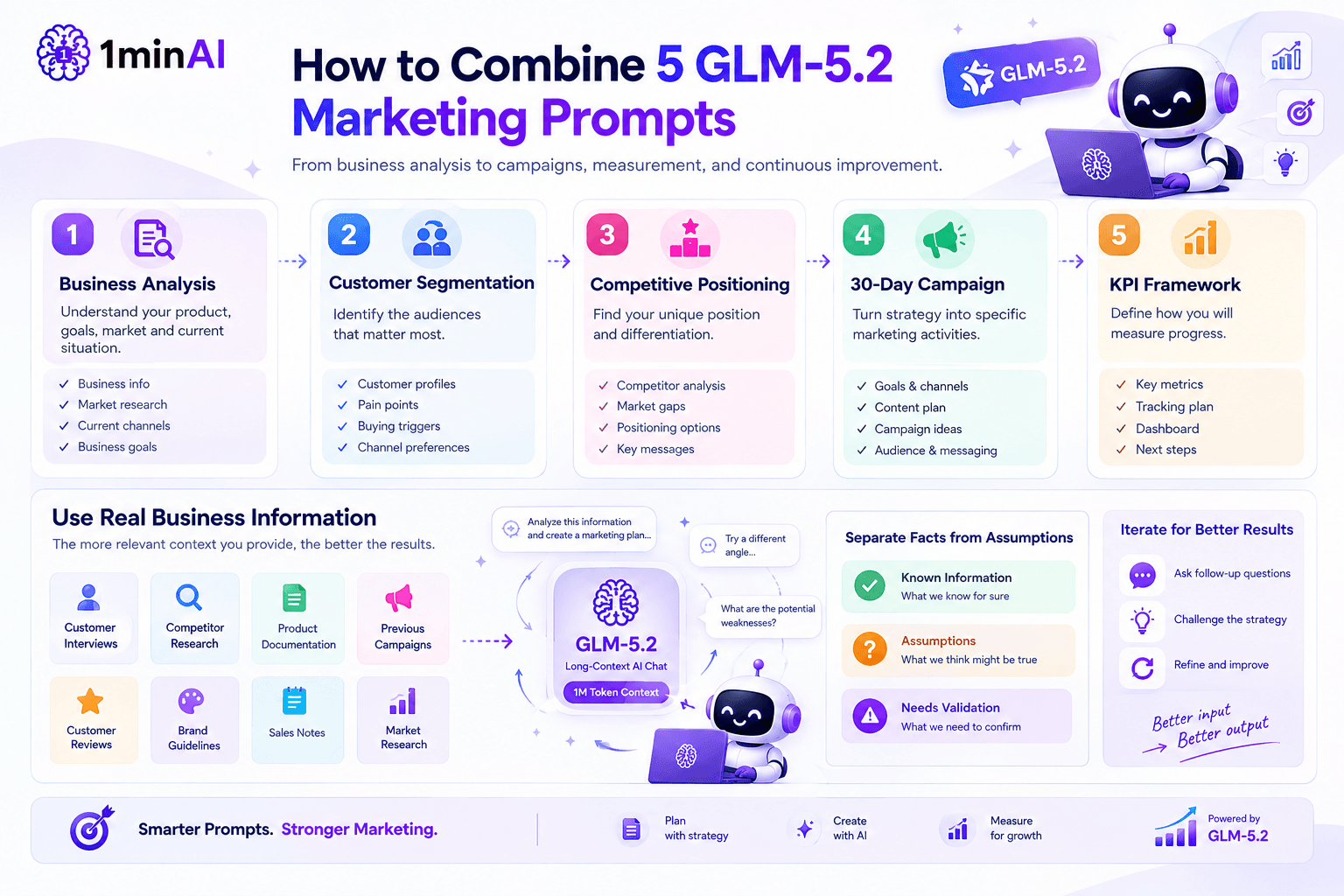
1. Business analysis
Understand the product, business goals, market, and current situation.
↓
2. Customer segmentation
Identify the audiences that matter most.
↓
3. Competitive positioning
Determine how the product can differentiate itself.
↓
4. 30-day campaign
Turn the strategy into specific marketing activities.
↓
5. KPI framework
Define how you will measure progress.
The result is much more useful than asking AI to generate a generic 2,000-word marketing plan.
You can also return to earlier steps.
For example, after researching your competitors, you may discover that your original target audience isn't attractive enough. You can then ask GLM-5.2 to reconsider the segmentation using the new information.
That's where conversational AI becomes more useful than a one-time marketing template.
How to Get Better Results From Free Chat With GLM-5.2
The prompts above will work better if you provide good input.
Give AI real business information
Instead of: “I run an online clothing store.”
provide:
- Product categories
- Average order value
- Target market
- Existing customers
- Best-selling products
- Current acquisition channels
- Competitors
- Customer reviews
- Marketing budget
- Business goals
The more relevant information you provide, the less the model needs to guess.
Ask AI to separate facts from assumptions
This is especially important for marketing strategy.
Tell it to identify:
Known information
versus
Assumptions
versus
Information that needs validation
This helps prevent an AI-generated marketing plan from looking more certain than the underlying data supports.
Use follow-up prompts
Don't treat the first response as the final marketing strategy.
Try: “Challenge this strategy. What are its three biggest weaknesses?”
Then: “What assumptions could cause this strategy to fail?”
And finally: “Revise the strategy based on those weaknesses.”
This creates a much stronger iterative process.
When Should You Use a Long-Context AI Chat for Marketing?
Not every marketing task requires a large-context model.
If you simply need five Instagram captions, a lightweight AI model may be enough.
But the situation changes when you're working with a large amount of information.
For example, a marketing strategist might need to analyze:
- 50 customer interviews
- Competitor websites
- Product documentation
- Previous campaigns
- Customer reviews
- Brand guidelines
- Sales notes
- Market research
Trying to compress all of that into a short prompt can remove important context.
GLM-5.2 is designed around long-horizon work and a 1M-token context, making this type of context-heavy workflow one of the more relevant ways to experiment with it.
The goal isn't to use the biggest context window simply because it exists.
The goal is to keep the information that actually affects the marketing decision available to the AI.
Try Free Chat With GLM-5.2 for Your Marketing Plan
If you want to test these prompts yourself, you can try free chat with GLM-5.2 on 1minAI.
Start with Prompt 1 and provide your actual business information.
Then continue the conversation through the customer segmentation, positioning, campaign planning, and KPI prompts.
The 1minAI GLM-5.2 page specifically highlights enterprise strategy and operational planning, including comprehensive go-to-market strategies and large-scale planning documents, making marketing planning a natural workflow to test. It also provides access through 1minAI's unified AI workspace rather than requiring you to manage your own model infrastructure.
For the best test, don't use a fictional company.
Use a real product, real customer information, or an actual marketing challenge you are working on. That will show you much more clearly whether AI can save time in your workflow.
Conclusion
A good AI marketing plan isn't created by one giant prompt.
It is built through a sequence of decisions:
Business → Audience → Positioning → Campaign → Measurement
These five free chat with GLM-5.2 prompts give you a practical starting framework for working through that process.
The biggest improvement comes from giving the AI useful context and asking it to challenge assumptions rather than simply accepting the first marketing strategy it generates.
If you're working with substantial customer research, competitor information, product documentation, or previous campaign data, a long-context model can also make it easier to keep those materials together while developing the plan.
Ready to test the workflow? Try free chat with GLM-5.2 on 1minAI and use the five prompts above to build a marketing plan around your own business.
For further information, explore Free AI Chat with GLM-5.2
Discover more AI features: https://1min.ai/features
Try 1minAI agent now: https://app.1min.ai/ai-agent-demo
Alternatives
Discover the best alternatives to 1minAI and compare features, pricing, and use cases.

1min.AI vs OpenRouter
1min.AI vs. OpenRouter: Compare the ready-to-use AI creation product against the technical API tool. Find out if you need a zero-code creative studio or a coding infrastructure hub.
 Ngoc Hong
1min.AI vs Easy Peasy AI
Looking for an Easy Peasy AI alternative? Compare Easy Peasy AI and 1min.AI for content workflows, AI models, and professional teams.
Ngoc Hong
1min.AI vs Taskade
Compare 1min.AI vs Taskade for AI content creation, automation, agents, and creative workflows to find the right workspace.
Ngoc HongAI Tools
Discover the best AI tools to boost productivity, creativity, and everyday work.

Create Consistent Cartoon Content in Just a Few Steps
Create engaging cartoon videos for TikTok and Reels with 1min.AI. Research ideas, create characters, and turn images into animated videos in 3 simple steps.
 Lien Anh Vu
One Product, 10 UGC Creatives: How AI Makes Content Testing Easier
Create more authentic UGC with an AI UGC video generator, test more creative angles and scale affiliate content without filming every version.
Lien Anh Vu
Top 4 Affordable AI Tools for Startup Founders
Discover the top 4 affordable AI tools for startup founders to validate ideas, build products, create content, and launch faster without overspending.
 Tram Ta
AI Features
Comprehensive AI features that streamline workflows, improve efficiency, and empower teams to achieve more.
Create Consistent Cartoon Content in Just a Few Steps
Create engaging cartoon videos for TikTok and Reels with 1min.AI. Research ideas, create characters, and turn images into animated videos in 3 simple steps.
Lien Anh VuOne Product, 10 UGC Creatives: How AI Makes Content Testing Easier
Create more authentic UGC with an AI UGC video generator, test more creative angles and scale affiliate content without filming every version.
Lien Anh Vu
1minAI: Free AI Grammar Checker
Check grammar for free with 1minAI’s AI grammar checker. Find grammar, spelling, and writing mistakes, improve clarity, and polish your content in seconds.
Tram TaAI Use Cases
A curated collection of AI use cases for business, productivity, and industry-specific applications.
Create Consistent Cartoon Content in Just a Few Steps
Create engaging cartoon videos for TikTok and Reels with 1min.AI. Research ideas, create characters, and turn images into animated videos in 3 simple steps.
Lien Anh VuOne Product, 10 UGC Creatives: How AI Makes Content Testing Easier
Create more authentic UGC with an AI UGC video generator, test more creative angles and scale affiliate content without filming every version.
Lien Anh Vu
Best Time to Post on Instagram: A Practical Guide for Better Engagement
Discover the best time to post on Instagram, including the best days and times for different audiences, plus tips to find the ideal posting schedule for your account.
Tram TaAI Tutorials
Learn how to use AI with practical, step-by-step tutorials.
Create Consistent Cartoon Content in Just a Few Steps
Create engaging cartoon videos for TikTok and Reels with 1min.AI. Research ideas, create characters, and turn images into animated videos in 3 simple steps.
Lien Anh Vu
Black Friday AI Tool Deals in 2026
Discover what Black Friday AI tool deals 2026 has to offer. Find out how to secure the 1min.AI lifetime deal via AppSumo, Dealify, Stack Social, and verify on Trustpilot, Slashdot, and Software Advice.
 Hang Nguyen
[Seedance 2.5 New] Better AI Product Videos, Less Rework in 1min.AI
Use Seedance 2.5 image to video on 1min.AI to create more consistent AI product videos, reduce failed generations, save credits, and improve UGC workflows.
Lien Anh VuAI Guides
Learn AI faster with practical guides, real-world examples, and actionable best practices.
Create Consistent Cartoon Content in Just a Few Steps
Create engaging cartoon videos for TikTok and Reels with 1min.AI. Research ideas, create characters, and turn images into animated videos in 3 simple steps.
Lien Anh Vu
Safely Buy AI Tools Online: 2026 Black Friday Guide
Discover how to find and secure the best Black Friday AI deals online. Learn expert strategies to avoid scams, combat subscription fatigue, and verify software.
Hang Nguyen[Seedance 2.5 New] Better AI Product Videos, Less Rework in 1min.AI
Use Seedance 2.5 image to video on 1min.AI to create more consistent AI product videos, reduce failed generations, save credits, and improve UGC workflows.
Lien Anh VuAI Solutions
Browse the best AI solutions for automation, coding, research, productivity, customer support, marketing, and business workflows.
Create Consistent Cartoon Content in Just a Few Steps
Create engaging cartoon videos for TikTok and Reels with 1min.AI. Research ideas, create characters, and turn images into animated videos in 3 simple steps.
Lien Anh VuOne Product, 10 UGC Creatives: How AI Makes Content Testing Easier
Create more authentic UGC with an AI UGC video generator, test more creative angles and scale affiliate content without filming every version.
Lien Anh Vu
Free AI Tattoo Generator: Custom Designs
Turn any idea into a custom tattoo design with 1min.AI's free AI tattoo generator. Describe your idea, pick a style, and download in seconds.
 Trang Tran
AI Models
Explore the world's leading AI models in one place.
Create Consistent Cartoon Content in Just a Few Steps
Create engaging cartoon videos for TikTok and Reels with 1min.AI. Research ideas, create characters, and turn images into animated videos in 3 simple steps.
Lien Anh VuOne Product, 10 UGC Creatives: How AI Makes Content Testing Easier
Create more authentic UGC with an AI UGC video generator, test more creative angles and scale affiliate content without filming every version.
Lien Anh Vu[Seedance 2.5 New] Better AI Product Videos, Less Rework in 1min.AI
Use Seedance 2.5 image to video on 1min.AI to create more consistent AI product videos, reduce failed generations, save credits, and improve UGC workflows.
Lien Anh VuAI Comparisons
Compare AI tools, models, and platforms to find the best fit for your needs.

Kling AI Vs Veo 3: Which Model Wins?
Kling AI vs Veo 3: compare motion, native audio, pricing & free tiers to see which AI video generator wins for your project - try both on 1min.AI.
Trang Tran[Seedance 2.5 New] Better AI Product Videos, Less Rework in 1min.AI
Use Seedance 2.5 image to video on 1min.AI to create more consistent AI product videos, reduce failed generations, save credits, and improve UGC workflows.
Lien Anh Vu
DeepSeek V4 Pro vs Flash Comparison
Compare DeepSeek V4 Pro vs DeepSeek V4 Flash metrics. Optimize your agentic apps and improve AI fact checking on 1min.ai today.
Ngoc HongAI Integrations
Seamlessly integrate AI with the tools you already use to automate work and boost productivity.

POV: You Have 10+ Posts to Make Every Day
Learn how to build an AI content workflow that helps content creators produce 10+ social media posts a day faster with AI brainstorming, image generation, and content creation.
Lien Anh Vu
How to Use an AI Fashion Video Generator for Fashion Week 2026
Turn Fashion Week 2026 ideas into stunning fashion videos with AI. Learn how to brainstorm, create visuals, and transform images into videos with one simple workflow.
Lien Anh Vu
Stop Switching Between AI Apps: How AI Integration Transforms Employer Branding
Discover how AI integration helps HR teams streamline employer branding by combining AI writing, documents, images, video, and multiple AI models into one workspace.
Tram TaAI for Industries
Find the best AI tools and workflows for healthcare, finance, education, legal, manufacturing, retail, real estate, and more

Free AI Real Estate Video Generator
Turn listing photos into narrated property videos with AI real estate video tools. See how 1min.AI creates walkthroughs, voiceovers & captions in minutes.
Trang Tran
Free AI Virtual Staging: Furnish Any Room
Stage any real estate listing with AI virtual staging: upload a photo, pick a style, and get a photorealistic furnished room in seconds, free to try.
Trang Tran
The Problem With AI Design? It Looks Too AI
AI-generated designs can look polished but still feel artificial. Here are 5 prompt techniques designers can use to create more realistic, intentional visuals.
Lien Anh VuAI Agents
Discover and run AI agents to automate tasks across your work and daily life.
1minAI: Free AI Grammar Checker
Check grammar for free with 1minAI’s AI grammar checker. Find grammar, spelling, and writing mistakes, improve clarity, and polish your content in seconds.
Tram Ta
AI Agents for Facebook
Use an AI Agent for Facebook to create content, generate images, schedule posts, and publish from your documents and conversations.
Ngoc Hong
AI Agent vs AI Assistant: Which One Actually Saves Designers More Time?
Learn the difference between AI Agent vs AI Assistant and discover which solution helps designers automate repetitive work, reduce revisions, and save more time.
Lien Anh VuAI Workflows
Explore ready-to-use AI workflows for productivity, marketing, sales, support, and more.
Create Consistent Cartoon Content in Just a Few Steps
Create engaging cartoon videos for TikTok and Reels with 1min.AI. Research ideas, create characters, and turn images into animated videos in 3 simple steps.
Lien Anh VuOne Product, 10 UGC Creatives: How AI Makes Content Testing Easier
Create more authentic UGC with an AI UGC video generator, test more creative angles and scale affiliate content without filming every version.
Lien Anh VuPOV: You Have 10+ Posts to Make Every Day
Learn how to build an AI content workflow that helps content creators produce 10+ social media posts a day faster with AI brainstorming, image generation, and content creation.
Lien Anh VuNewsletter
Weekly AI Innovations with 1minAI

🔮 Weekly AI Innovations #138: Claude Sonnet 5, Fable 5 & Wan 2.7
Explode your creative potential with massive 1min.ai updates! Access Claude Sonnet 5, Fable 5, and Alibaba Wan 2.7 for unmatched multi-modal generation today.
Hang Nguyen
🔮 Weekly AI Innovations #137: ElevenLabs Music & AI social Profile Control
The newest 1min.ai updates deliver professional music generation and highly requested privacy tools. Dive into a seamless workflow today!
Hang Nguyen
🔮 Weekly AI Innovations #136: Grok 4.6 and Smart Data Retention
Discover the latest 1min.ai updates! Upgrade to Grok 4.6 for blazing-fast AI, and check our new Data Retention policies to secure your files today.
Hang Nguyen