
Email Marketing Campaigns: 10 Strategies, Examples & AI Workflows for 2026

Tram Ta
September 28, 2026
Learn how to create effective email marketing campaigns in 2026 with 10 campaign ideas, examples, segmentation tips, automation workflows, and AI tools.
Email remains one of the most useful channels for businesses that want to communicate directly with customers, nurture leads, promote products, and drive repeat purchases.
But an effective email marketing campaign is more than sending a promotional message to a large contact list.
A strong campaign starts with a specific objective, the right audience, a relevant offer or message, and a clear reason for the recipient to open and act on the email.
AI is also changing how marketers build campaigns. Instead of manually researching ideas, writing every variation, creating subject lines, and repurposing content, marketers can use AI to speed up many parts of the workflow while keeping strategy and final decisions under human control.
In this guide, you'll learn how to plan email marketing campaigns, explore 10 campaign types you can use in 2026, and see how AI can help with research, copywriting, segmentation, personalization, testing, and campaign planning.
What Is an Email Marketing Campaign?
An email marketing campaign is a coordinated set of emails designed to achieve a specific marketing objective.
The campaign might consist of a single email or a sequence delivered over several days or weeks.
Common objectives include:
- Generating sales
- Welcoming new subscribers
- Nurturing leads
- Promoting a product
- Recovering abandoned purchases
- Re-engaging inactive customers
- Announcing a launch
- Sharing educational content
- Increasing event registrations
- Retaining existing customers
The important distinction is between sending emails and running a campaign.
Sending an email might mean writing one newsletter and distributing it to your list.
A campaign starts with a business goal.
For example:
Goal: Increase trial-to-paid conversions.
Audience: Users who started a free trial but haven't upgraded.
Message: Show the value of the paid plan.
Sequence: Education → use case → objection handling → offer → final reminder.
KPI: Trial-to-paid conversion rate.
This campaign structure gives every email a role instead of turning your email list into a constant stream of unrelated promotions.
10 Email Marketing Campaigns You Can Run in 2026
Different customer situations require different campaigns. The best approach is to build a collection of campaign types that match the customer journey.
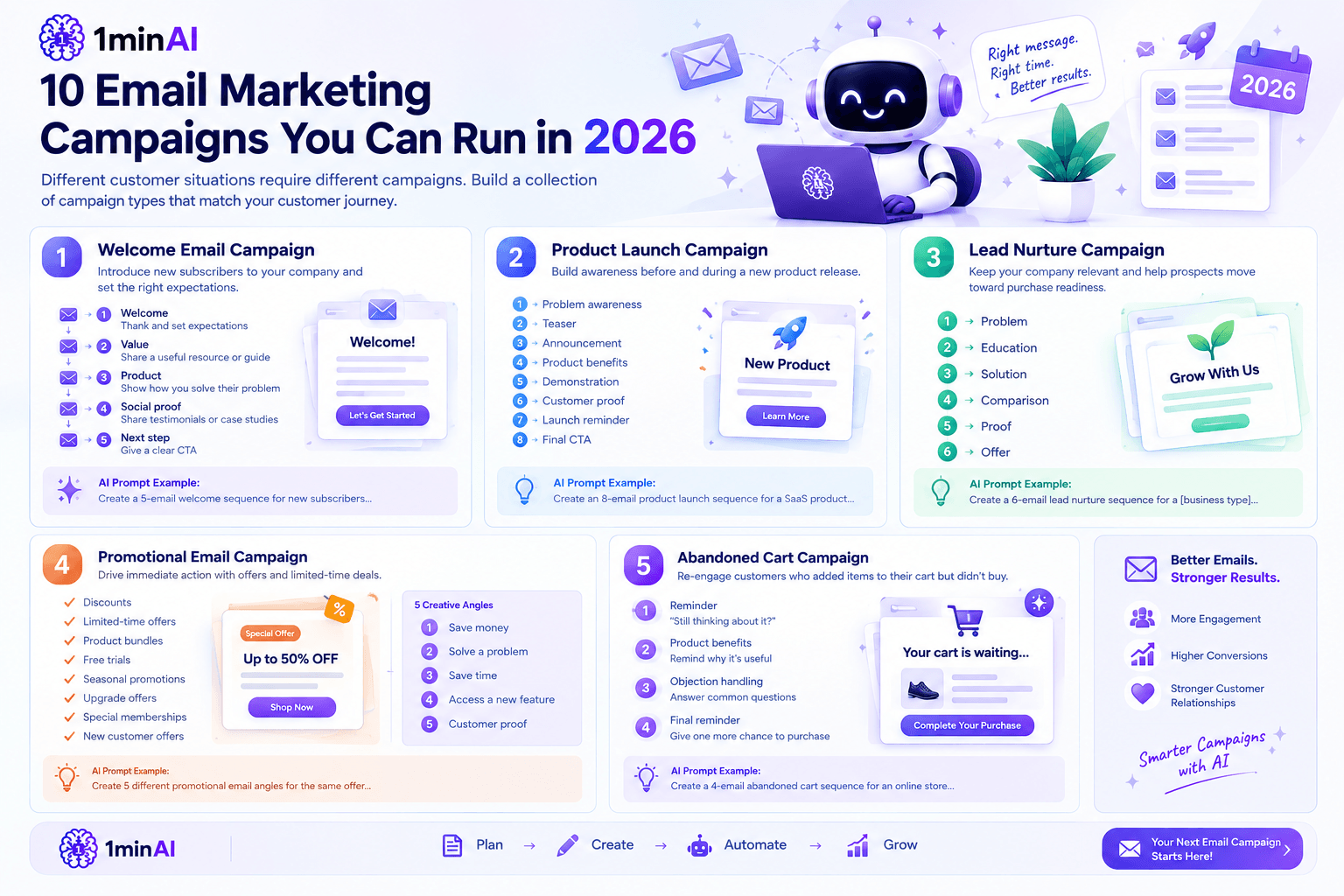
1. Welcome Email Campaign
A welcome campaign introduces new subscribers to your company after they sign up.
Instead of immediately trying to sell something, use the first few emails to establish expectations and explain why the subscriber should continue opening your messages.
A simple sequence could be:
Email 1 — Welcome
Thank the subscriber and explain what they can expect.
Email 2 — Value
Share a useful resource, guide, checklist, or educational insight.
Email 3 — Product
Explain how your product solves a problem related to the reason they subscribed.
Email 4 — Social proof
Share customer results, testimonials, case studies, or use cases.
Email 5 — Next step
Give the subscriber a clear CTA.
AI can help you create different versions of the welcome sequence based on the subscriber's reason for signing up.
For example:
Prompt:
Create a 5-email welcome sequence for new subscribers to a [business type]. The goal is to educate subscribers before introducing the product. For each email, provide the objective, subject line, key message, CTA, and recommended send timing. Avoid aggressive sales language.
2. Product Launch Campaign
A product launch campaign builds awareness before and during a new product release.
Instead of announcing the product once, create anticipation.
A launch sequence could include:
- Problem awareness
- Teaser
- Announcement
- Product benefits
- Demonstration
- Customer proof
- Launch reminder
- Final CTA
For example, a SaaS company launching a new AI feature might begin by discussing the problem the feature solves.
The next email can reveal the solution.
The launch email then introduces the product, followed by practical examples and a CTA to try it.
AI can accelerate the creative process by generating different angles for the same launch while keeping the central positioning consistent.
3. Lead Nurture Campaign
Not every prospect is ready to buy immediately.
A lead nurture campaign keeps your company relevant while gradually helping potential customers understand the problem, evaluate solutions, and become more prepared to purchase.
A typical sequence might be:
Problem → Education → Solution → Comparison → Proof → Offer
For example, an accounting software company could send:
- Why manual bookkeeping creates problems
- Five signs your bookkeeping process needs an upgrade
- How automated bookkeeping works
- Manual vs automated workflows
- Customer case study
- Free trial invitation
The goal isn't to force a sale in every email.
It is to move the subscriber from problem awareness toward purchase readiness.
4. Promotional Email Campaign
Promotional campaigns are designed to generate immediate action.
Common promotions include:
- Discounts
- Limited-time offers
- Product bundles
- Free trials
- Seasonal promotions
- Upgrade offers
- Special memberships
- New customer offers
The mistake is making every promotional email sound identical.
AI can help create different creative angles around the same offer.
For example:
Angle 1: Save money
Angle 2: Solve a specific problem
Angle 3: Save time
Angle 4: Access a new feature
Angle 5: Customer proof
You can then test which message resonates with different audience segments.
5. Abandoned Cart Campaign
An abandoned cart campaign targets customers who added products to their cart but didn't complete the purchase.
A basic sequence could be:
Email 1: Reminder
“Still thinking about it?”
Email 2: Product benefits
Remind the customer why the product may be useful.
Email 3: Objection handling
Answer common questions about shipping, pricing, returns, or product functionality.
Email 4: Final reminder
Give the customer another opportunity to complete the purchase.
Not every abandoned cart needs a discount.
Sometimes the customer simply needs more information or reassurance.
AI can help you identify likely objections and create different versions of the follow-up sequence.
6. Re-Engagement Campaign
Email lists naturally accumulate inactive subscribers.
Some people stop opening emails because they aren't interested anymore. Others may simply have become distracted or no longer recognize the value of the content.
A re-engagement campaign attempts to bring inactive subscribers back.
For example:
Email 1: “Still want to hear from us?”
Email 2: Best recent content or product updates
Email 3: Preference center
Email 4: Final re-engagement message
The campaign can also give subscribers an opportunity to choose what types of emails they want to receive.
This can improve the relevance of future communication rather than simply sending more emails to everyone.
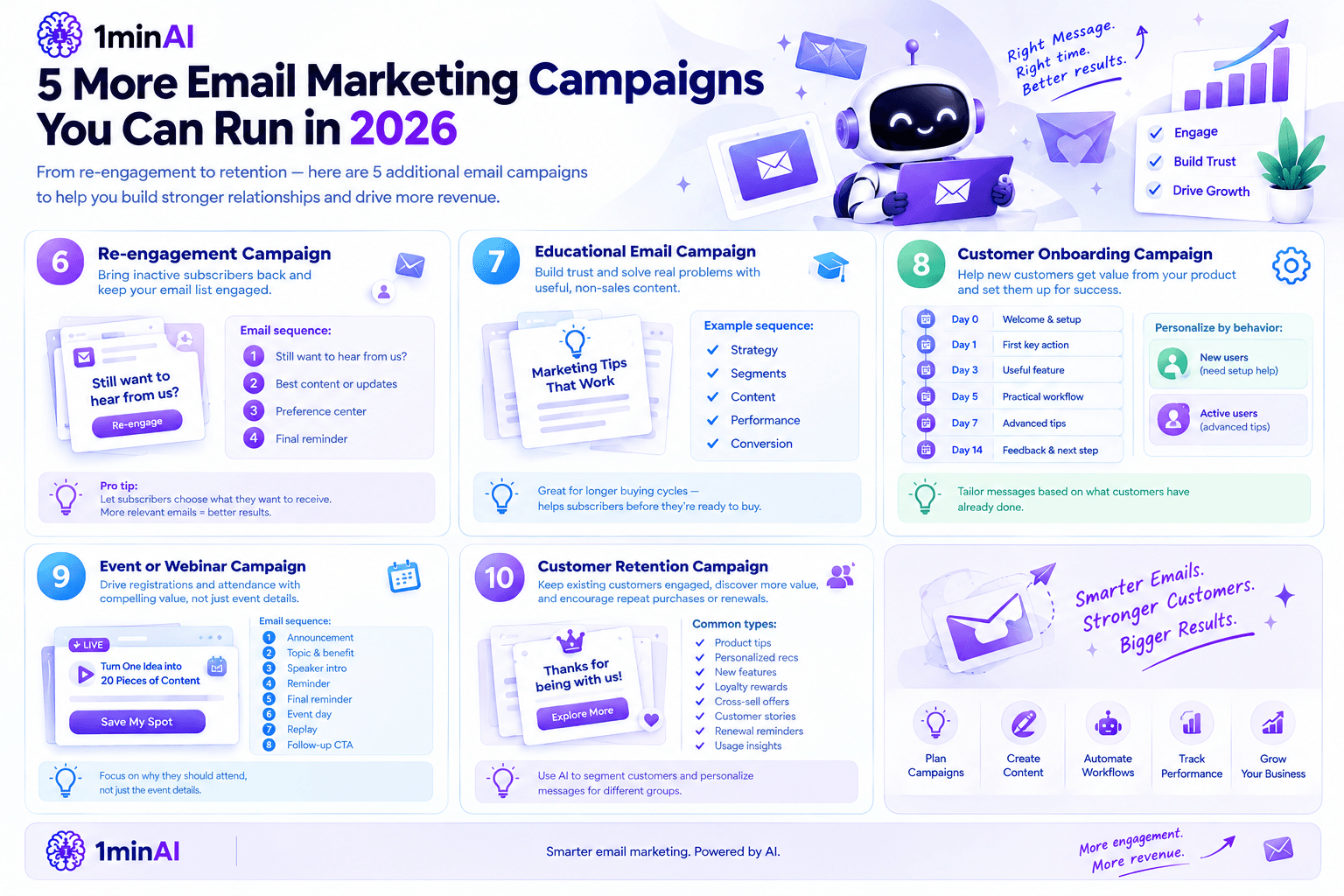
7. Educational Email Campaign
Not every email needs to sell.
Educational campaigns can build trust by helping subscribers solve problems related to your product or industry.
For example, a marketing agency might create a sequence around:
- Building a marketing strategy
- Understanding customer segments
- Creating better content
- Measuring campaign performance
- Improving conversion rates
The final emails can naturally connect the educational material to the company's services.
This type of campaign works particularly well for businesses with longer buying cycles because subscribers can receive useful information before they are ready to purchase.
8. Customer Onboarding Campaign
An onboarding sequence helps new customers get value from a product after purchase.
This is especially important for SaaS companies.
A simple onboarding campaign could look like:
Day 0: Welcome and account setup
Day 1: Complete the first important action
Day 3: Introduce a useful feature
Day 5: Show a practical workflow
Day 7: Share advanced tips
Day 14: Ask for feedback and recommend the next step
AI can help personalize onboarding based on what the customer has already done.
For example, customers who haven't completed setup could receive a different message from customers who are already actively using the product.
9. Event or Webinar Campaign
Email is also useful for driving registrations and attendance.
A webinar campaign could include:
- Announcement
- Topic and benefit
- Speaker introduction
- Reminder
- Final registration reminder
- Event-day email
- Replay
- Follow-up CTA
The important part is to communicate why the recipient should attend, not simply provide the event details.
Instead of:“Join our webinar on AI marketing.”
Try : “Learn how to turn one campaign idea into 20 pieces of marketing content without creating everything from scratch.”
The second version communicates a clearer benefit.
10. Customer Retention Campaign
Acquiring a customer is only part of the marketing process.
Retention campaigns can help existing customers discover more value, return to your product, renew subscriptions, or make another purchase.
Depending on the business model, retention emails might include:
- Product tips
- Personalized recommendations
- New features
- Loyalty rewards
- Cross-sell opportunities
- Customer stories
- Renewal reminders
- Usage insights
AI can help analyze customer behavior and generate different messaging for different customer groups.
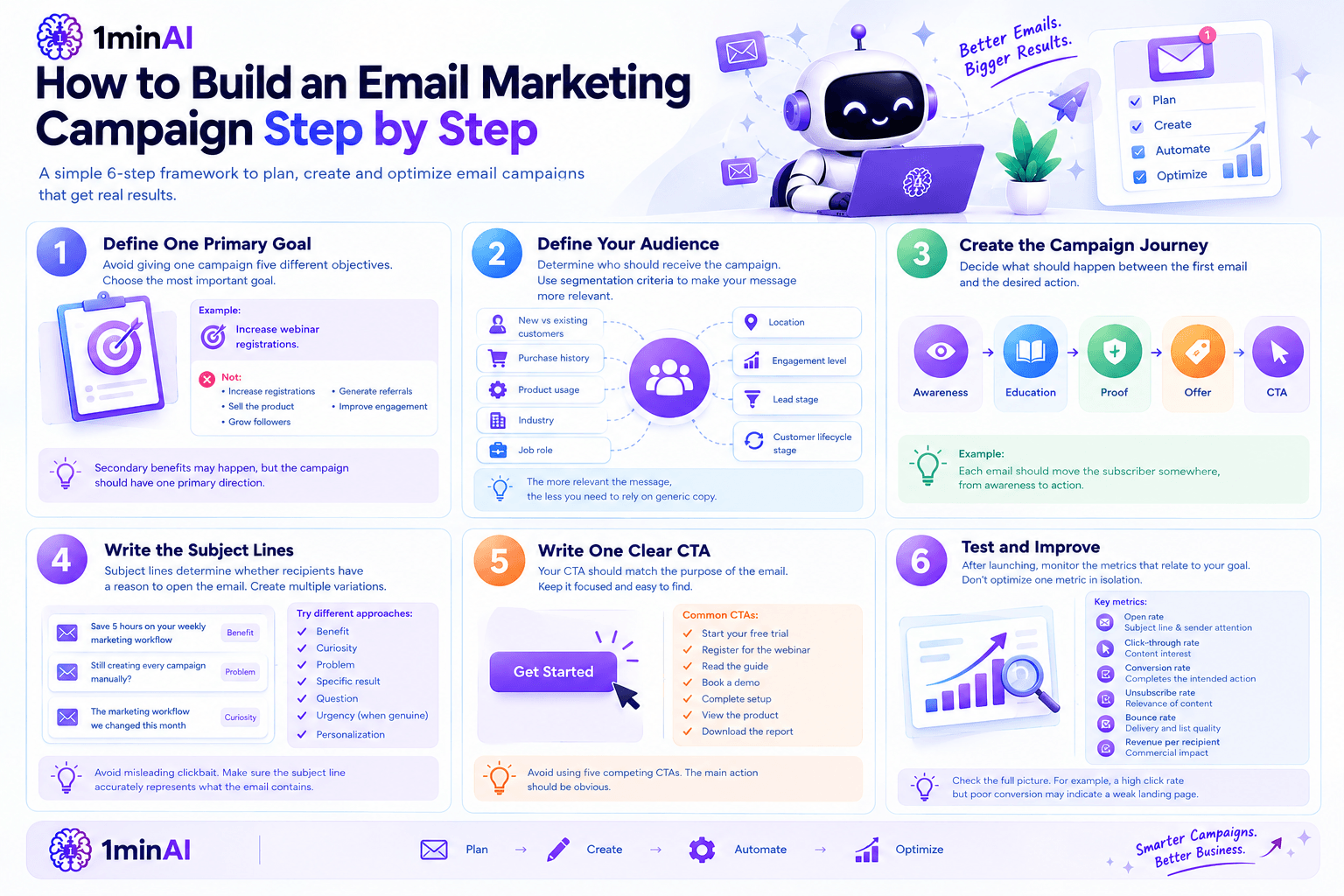
How to Build an Email Marketing Campaign Step by Step
Regardless of the campaign type, a repeatable planning framework makes execution easier.
Step 1: Define One Primary Goal
Avoid giving one campaign five different objectives.
Choose the most important goal.
For example:
Increase webinar registrations.
Not: Increase registrations, sell the product, grow followers, generate referrals, and improve engagement.
Secondary benefits may happen, but the campaign should have one primary direction.
Step 2: Define Your Audience
Determine who should receive the campaign.
Useful segmentation criteria include:
- New vs existing customers
- Purchase history
- Product usage
- Industry
- Job role
- Location
- Engagement level
- Lead stage
- Customer lifecycle stage
The more relevant the message, the less you need to rely on generic copy.
Step 3: Create the Campaign Journey
Decide what should happen between the first email and the desired action.
For example:
Awareness → Education → Proof → Offer → CTA
Each email should move the subscriber somewhere.
Step 4: Write the Subject Lines
Subject lines determine whether recipients have a reason to open the email.
Create multiple variations rather than relying on one.
Try different approaches:
- Benefit
- Curiosity
- Problem
- Specific result
- Question
- Urgency, when genuine
- Personalization
For example:
Benefit:
“Save 5 hours on your weekly marketing workflow”
Problem:
“Still creating every campaign manually?”
Curiosity:
“The marketing workflow we changed this month”
Avoid misleading clickbait. A strong subject line should accurately represent what the email contains.
Step 5: Write One Clear CTA
Your CTA should match the purpose of the email.
Examples:
- Start your free trial
- Register for the webinar
- Read the guide
- Book a demo
- Complete setup
- View the product
- Download the report
If every email contains five competing CTAs, the main action becomes less obvious.
Step 6: Test and Improve
After launching, monitor the metrics that relate to your goal.
Useful metrics include:
| Metric | What It Tells You |
|---|---|
| Open rate | How effectively the subject line and sender information attract attention |
| Click-through rate | Whether the content generates interest |
| Conversion rate | Whether recipients complete the intended action |
| Unsubscribe rate | Whether the campaign is becoming irrelevant |
| Bounce rate | Whether your list contains delivery problems |
| Revenue per recipient | How the campaign contributes commercially |
Don't optimize one metric in isolation.
A campaign with a high click rate but poor conversion may indicate that the email generates curiosity but doesn't deliver a strong enough landing-page experience.
How AI Can Improve Email Marketing Campaigns
AI can assist with almost every stage of campaign development.
Campaign Planning
Give AI your product, audience, goal, and previous campaign information.
Ask it to suggest:
- Campaign concepts
- Email sequences
- Audience segments
- Content angles
- CTAs
- Testing ideas
Email Copywriting
AI can generate first drafts for:
- Subject lines
- Preview text
- Body copy
- CTAs
- Follow-up emails
- Product announcements
But treat AI output as a starting point.
Your brand voice, product knowledge, customer insights, and final review should remain part of the process.
Personalization
Instead of writing one email for everyone, AI can help create variations for different segments.
For example:
Segment A: New leads
Segment B: Existing customers
Segment C: High-value customers
Segment D: Inactive subscribers
The underlying campaign remains consistent while the message changes according to the audience.
Content Repurposing
A single piece of content can become several emails.
For example:
Blog article → Newsletter → 3-email educational sequence → Product email → Social posts
This is where an integrated AI marketing workflow becomes valuable.
1minAI's AI marketing workspace combines writing, research, images, video, and multiple AI models, which can help marketers turn one campaign concept into assets for multiple channels rather than creating everything separately.
5 AI Prompts for Better Email Marketing Campaigns
Prompt 1: Campaign Strategy
Prompt:
Act as an email marketing strategist. Based on this business, target audience, product, and campaign goal, create a 5-email campaign. For each email, provide the objective, audience stage, subject line, key message, CTA, and recommended timing. Make each email contribute a different step toward the campaign goal.
Prompt 2: Subject Line Ideas
Prompt:
Generate 15 subject lines for this email. Create five benefit-focused options, five curiosity-driven options, and five problem-focused options. Keep them specific to the audience and avoid misleading urgency or clickbait.
Prompt 3: Customer Segmentation
Prompt:
Analyze this customer list information and suggest useful segments for an email campaign. For each segment, explain the customer's likely needs, appropriate message, offer, CTA, and reason this segment should receive different messaging.
Prompt 4: Email Sequence Optimization
Prompt:
Review this email sequence and identify repeated ideas, weak transitions, unclear CTAs, and emails that do not contribute directly to the campaign goal. Then suggest specific improvements while preserving the overall strategy.
Prompt 5: Campaign Performance Analysis
Prompt:
Analyze these email campaign results. Compare open rate, click-through rate, conversion rate, unsubscribe rate, and revenue per recipient. Identify the strongest and weakest parts of the campaign and propose three experiments for the next campaign. Do not assume causation when the data does not support it.
Building an AI-Powered Email Marketing Workflow With 1minAI
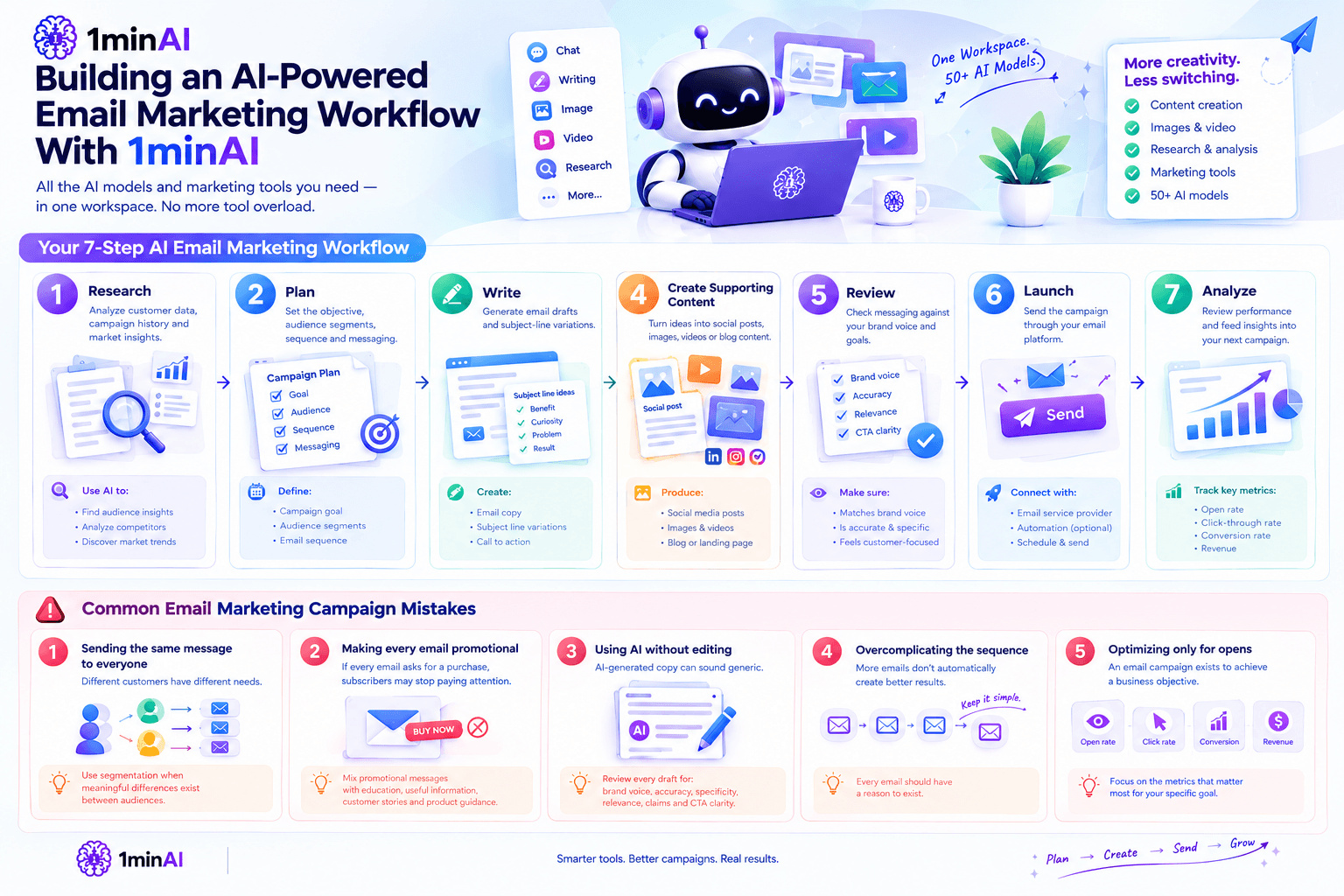
If your team is already using AI for marketing, the challenge can quickly become tool overload.
One application might handle email copy.
Another handles images.
Another handles video.
Another handles research.
Another handles brainstorming.
The result can be more subscriptions and more context switching.
1minAI's approach is to bring multiple AI models and marketing capabilities into one workspace. Its current marketing platform supports content creation, images, video, research, and other marketing tasks alongside access to 50+ AI models.
A practical workflow could look like:
1. Research
Use AI to analyze customer information, campaign history, and market insights.
2. Plan
Create the campaign objective, audience segments, sequence, and messaging.
3. Write
Generate initial email drafts and subject-line variations.
4. Create supporting content
Turn campaign ideas into social posts, images, videos, or blog content.
5. Review
Check the messaging against your brand voice and campaign objective.
6. Launch
Send the campaign through your email platform.
7. Analyze
Review performance and feed the findings into the next campaign.
This is more useful than treating AI as simply an email copy generator.
Common Email Marketing Campaign Mistakes
Even a well-written email campaign can underperform because of strategic problems.
Sending the same message to everyone
Different customers have different needs.
Use segmentation whenever meaningful differences exist between audiences.
Making every email promotional
If every email asks for a purchase, subscribers may stop paying attention.
Mix promotional messages with education, useful information, customer stories, and product guidance.
Using AI without editing
AI-generated email copy can sound generic.
Review every draft for:
- Brand voice
- Accuracy
- Specificity
- Customer relevance
- Claims
- CTA clarity
Overcomplicating the sequence
More emails don't automatically create better results.
Every email should have a reason to exist.
Optimizing only for opens
An email campaign exists to achieve a business objective.
Open rate can be useful, but conversion and revenue may be more important depending on the campaign.
Conclusion
Effective email marketing campaigns start with strategy, not copywriting.
Before asking AI to write an email, define the audience, campaign objective, customer journey, offer, and desired action.
Then use AI to accelerate the work around that strategy.
You can use AI to brainstorm campaign ideas, build sequences, generate subject lines, personalize messaging, repurpose content, analyze results, and develop supporting marketing assets.
For businesses managing multiple channels, an all-in-one AI marketing workspace can make the process more efficient. 1minAI's AI marketing tools bring writing, research, image creation, video generation, and multiple AI models into one workspace, helping marketers move from campaign idea to execution without constantly switching between separate AI applications.
The goal isn't to automate every marketing decision.
It's to use AI where it saves time while keeping the strategy, customer understanding, brand voice, and final decisions in human hands.
Start with one campaign, test one workflow, and use the results to build a more repeatable email marketing system.
For further information, explore Best AI Marketing Tools: Why Businesses Choose 1minAI
Discover more AI features: https://1min.ai/features
Try 1minAI agent now: https://app.1min.ai/ai-agent-demo
Alternatives
Discover the best alternatives to 1minAI and compare features, pricing, and use cases.

1min.AI vs OpenRouter
1min.AI vs. OpenRouter: Compare the ready-to-use AI creation product against the technical API tool. Find out if you need a zero-code creative studio or a coding infrastructure hub.
 Ngoc Hong
1minAI vs Hix AI
Compare 5 HIX AI alternatives for AI chat, research, writing, images, video, pricing, and flexible AI workflows.
Ngoc Hong
1min.AI vs Easy Peasy AI
Looking for an Easy Peasy AI alternative? Compare Easy Peasy AI and 1min.AI for content workflows, AI models, and professional teams.
Ngoc HongAI Tools
Discover the best AI tools to boost productivity, creativity, and everyday work.

Create Consistent Cartoon Content in Just a Few Steps
Create engaging cartoon videos for TikTok and Reels with 1min.AI. Research ideas, create characters, and turn images into animated videos in 3 simple steps.
 Lien Anh Vu
One Product, 10 UGC Creatives: How AI Makes Content Testing Easier
Create more authentic UGC with an AI UGC video generator, test more creative angles and scale affiliate content without filming every version.
Lien Anh Vu
Top 4 Affordable AI Tools for Startup Founders
Discover the top 4 affordable AI tools for startup founders to validate ideas, build products, create content, and launch faster without overspending.
 Tram Ta
AI Features
Comprehensive AI features that streamline workflows, improve efficiency, and empower teams to achieve more.
Create Consistent Cartoon Content in Just a Few Steps
Create engaging cartoon videos for TikTok and Reels with 1min.AI. Research ideas, create characters, and turn images into animated videos in 3 simple steps.
Lien Anh VuOne Product, 10 UGC Creatives: How AI Makes Content Testing Easier
Create more authentic UGC with an AI UGC video generator, test more creative angles and scale affiliate content without filming every version.
Lien Anh Vu
1minAI: Free AI Grammar Checker
Check grammar for free with 1minAI’s AI grammar checker. Find grammar, spelling, and writing mistakes, improve clarity, and polish your content in seconds.
Tram TaAI Use Cases
A curated collection of AI use cases for business, productivity, and industry-specific applications.
Create Consistent Cartoon Content in Just a Few Steps
Create engaging cartoon videos for TikTok and Reels with 1min.AI. Research ideas, create characters, and turn images into animated videos in 3 simple steps.
Lien Anh VuOne Product, 10 UGC Creatives: How AI Makes Content Testing Easier
Create more authentic UGC with an AI UGC video generator, test more creative angles and scale affiliate content without filming every version.
Lien Anh Vu
Best Time to Post on Instagram: A Practical Guide for Better Engagement
Discover the best time to post on Instagram, including the best days and times for different audiences, plus tips to find the ideal posting schedule for your account.
Tram TaAI Tutorials
Learn how to use AI with practical, step-by-step tutorials.
Create Consistent Cartoon Content in Just a Few Steps
Create engaging cartoon videos for TikTok and Reels with 1min.AI. Research ideas, create characters, and turn images into animated videos in 3 simple steps.
Lien Anh Vu
Black Friday AI Tool Deals in 2026
Discover what Black Friday AI tool deals 2026 has to offer. Find out how to secure the 1min.AI lifetime deal via AppSumo, Dealify, Stack Social, and verify on Trustpilot, Slashdot, and Software Advice.
 Hang Nguyen
[Seedance 2.5 New] Better AI Product Videos, Less Rework in 1min.AI
Use Seedance 2.5 image to video on 1min.AI to create more consistent AI product videos, reduce failed generations, save credits, and improve UGC workflows.
Lien Anh VuAI Guides
Learn AI faster with practical guides, real-world examples, and actionable best practices.
Create Consistent Cartoon Content in Just a Few Steps
Create engaging cartoon videos for TikTok and Reels with 1min.AI. Research ideas, create characters, and turn images into animated videos in 3 simple steps.
Lien Anh Vu
Safely Buy AI Tools Online: 2026 Black Friday Guide
Discover how to find and secure the best Black Friday AI deals online. Learn expert strategies to avoid scams, combat subscription fatigue, and verify software.
Hang Nguyen[Seedance 2.5 New] Better AI Product Videos, Less Rework in 1min.AI
Use Seedance 2.5 image to video on 1min.AI to create more consistent AI product videos, reduce failed generations, save credits, and improve UGC workflows.
Lien Anh VuAI Solutions
Browse the best AI solutions for automation, coding, research, productivity, customer support, marketing, and business workflows.
Create Consistent Cartoon Content in Just a Few Steps
Create engaging cartoon videos for TikTok and Reels with 1min.AI. Research ideas, create characters, and turn images into animated videos in 3 simple steps.
Lien Anh VuOne Product, 10 UGC Creatives: How AI Makes Content Testing Easier
Create more authentic UGC with an AI UGC video generator, test more creative angles and scale affiliate content without filming every version.
Lien Anh Vu
Free AI Tattoo Generator: Custom Designs
Turn any idea into a custom tattoo design with 1min.AI's free AI tattoo generator. Describe your idea, pick a style, and download in seconds.
 Trang Tran
AI Models
Explore the world's leading AI models in one place.
Create Consistent Cartoon Content in Just a Few Steps
Create engaging cartoon videos for TikTok and Reels with 1min.AI. Research ideas, create characters, and turn images into animated videos in 3 simple steps.
Lien Anh VuOne Product, 10 UGC Creatives: How AI Makes Content Testing Easier
Create more authentic UGC with an AI UGC video generator, test more creative angles and scale affiliate content without filming every version.
Lien Anh Vu[Seedance 2.5 New] Better AI Product Videos, Less Rework in 1min.AI
Use Seedance 2.5 image to video on 1min.AI to create more consistent AI product videos, reduce failed generations, save credits, and improve UGC workflows.
Lien Anh VuAI Comparisons
Compare AI tools, models, and platforms to find the best fit for your needs.

Kling AI Vs Veo 3: Which Model Wins?
Kling AI vs Veo 3: compare motion, native audio, pricing & free tiers to see which AI video generator wins for your project - try both on 1min.AI.
Trang Tran[Seedance 2.5 New] Better AI Product Videos, Less Rework in 1min.AI
Use Seedance 2.5 image to video on 1min.AI to create more consistent AI product videos, reduce failed generations, save credits, and improve UGC workflows.
Lien Anh Vu
DeepSeek V4 Pro vs Flash Comparison
Compare DeepSeek V4 Pro vs DeepSeek V4 Flash metrics. Optimize your agentic apps and improve AI fact checking on 1min.ai today.
Ngoc HongAI Integrations
Seamlessly integrate AI with the tools you already use to automate work and boost productivity.

POV: You Have 10+ Posts to Make Every Day
Learn how to build an AI content workflow that helps content creators produce 10+ social media posts a day faster with AI brainstorming, image generation, and content creation.
Lien Anh Vu
How to Use an AI Fashion Video Generator for Fashion Week 2026
Turn Fashion Week 2026 ideas into stunning fashion videos with AI. Learn how to brainstorm, create visuals, and transform images into videos with one simple workflow.
Lien Anh Vu
Stop Switching Between AI Apps: How AI Integration Transforms Employer Branding
Discover how AI integration helps HR teams streamline employer branding by combining AI writing, documents, images, video, and multiple AI models into one workspace.
Tram TaAI for Industries
Find the best AI tools and workflows for healthcare, finance, education, legal, manufacturing, retail, real estate, and more

Free AI Virtual Staging: Furnish Any Room
Stage any real estate listing with AI virtual staging: upload a photo, pick a style, and get a photorealistic furnished room in seconds, free to try.
Trang Tran
Free AI Real Estate Video Generator
Turn listing photos into narrated property videos with AI real estate video tools. See how 1min.AI creates walkthroughs, voiceovers & captions in minutes.
Trang Tran
The Problem With AI Design? It Looks Too AI
AI-generated designs can look polished but still feel artificial. Here are 5 prompt techniques designers can use to create more realistic, intentional visuals.
Lien Anh VuAI Agents
Discover and run AI agents to automate tasks across your work and daily life.
1minAI: Free AI Grammar Checker
Check grammar for free with 1minAI’s AI grammar checker. Find grammar, spelling, and writing mistakes, improve clarity, and polish your content in seconds.
Tram Ta
AI Agents for Facebook
Use an AI Agent for Facebook to create content, generate images, schedule posts, and publish from your documents and conversations.
Ngoc Hong
AI Agent vs AI Assistant: Which One Actually Saves Designers More Time?
Learn the difference between AI Agent vs AI Assistant and discover which solution helps designers automate repetitive work, reduce revisions, and save more time.
Lien Anh VuAI Workflows
Explore ready-to-use AI workflows for productivity, marketing, sales, support, and more.
Create Consistent Cartoon Content in Just a Few Steps
Create engaging cartoon videos for TikTok and Reels with 1min.AI. Research ideas, create characters, and turn images into animated videos in 3 simple steps.
Lien Anh VuOne Product, 10 UGC Creatives: How AI Makes Content Testing Easier
Create more authentic UGC with an AI UGC video generator, test more creative angles and scale affiliate content without filming every version.
Lien Anh VuPOV: You Have 10+ Posts to Make Every Day
Learn how to build an AI content workflow that helps content creators produce 10+ social media posts a day faster with AI brainstorming, image generation, and content creation.
Lien Anh VuNewsletter
Weekly AI Innovations with 1minAI

🔮 Weekly AI Innovations #138: Claude Sonnet 5, Fable 5 & Wan 2.7
Explode your creative potential with massive 1min.ai updates! Access Claude Sonnet 5, Fable 5, and Alibaba Wan 2.7 for unmatched multi-modal generation today.
Hang Nguyen
🔮 Weekly AI Innovations #137: ElevenLabs Music & AI social Profile Control
The newest 1min.ai updates deliver professional music generation and highly requested privacy tools. Dive into a seamless workflow today!
Hang Nguyen
🔮 Weekly AI Innovations #136: Grok 4.6 and Smart Data Retention
Discover the latest 1min.ai updates! Upgrade to Grok 4.6 for blazing-fast AI, and check our new Data Retention policies to secure your files today.
Hang Nguyen