
Free AI Resume Builder: How to Create a Better Resume With 1minAI

Tram Ta
September 28, 2026
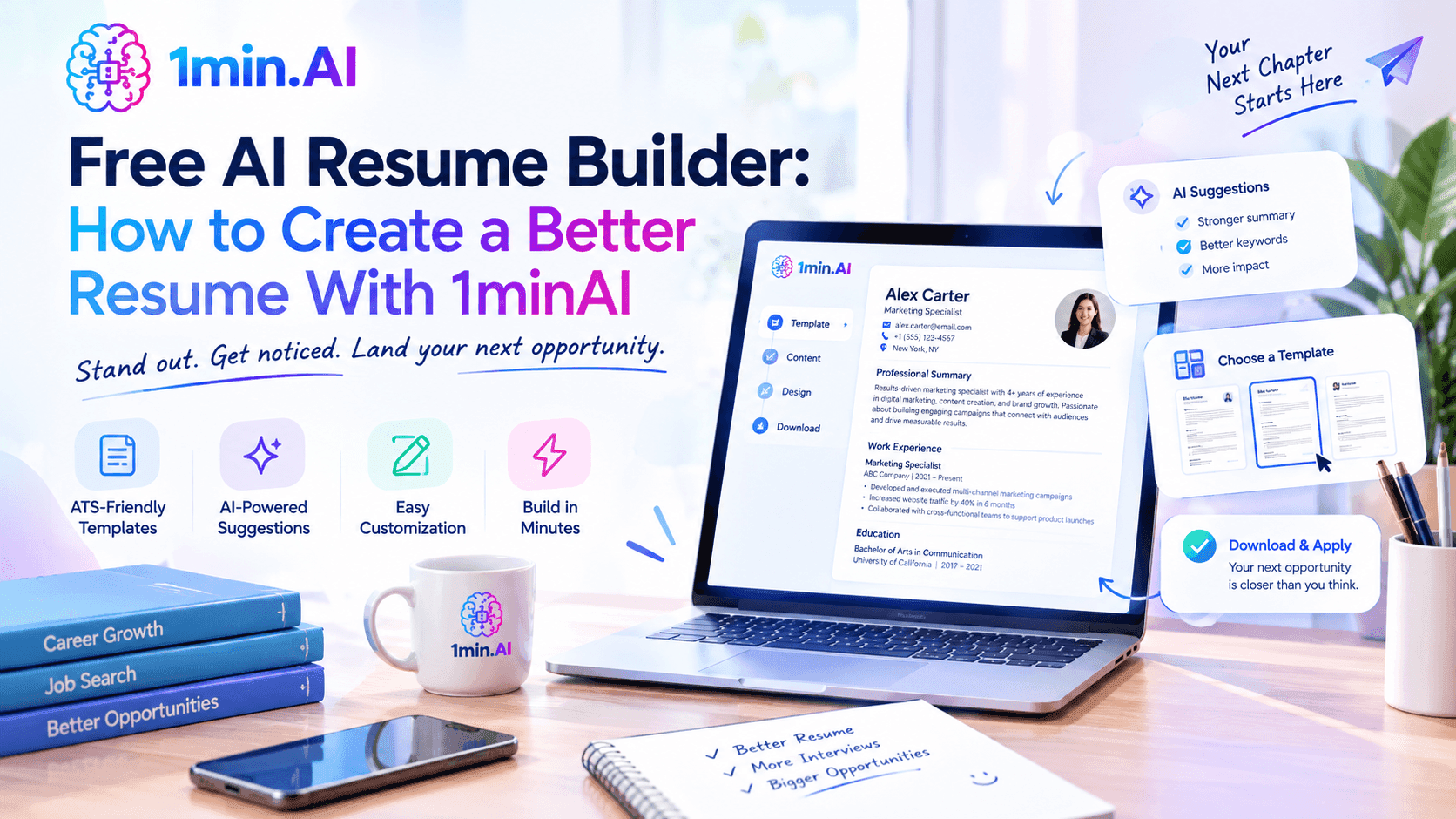
Build a better resume with an AI resume builder. Learn how to use AI to write, tailor, edit, and proofread your resume with 1minAI.
Creating a resume can take hours, especially when you are applying for multiple jobs.
You need to decide what experience to include, write clear achievement-focused bullet points, match your resume to the job description, and check everything for grammar and consistency. If you're starting from an old resume or a blank document, the process can feel even more difficult.
A free AI resume builder can make this process easier.
Instead of asking AI to generate an entire resume and submitting the result without reviewing it, you can use AI throughout the process. It can help organize your experience, improve your writing, tailor your resume to a specific position, and polish the final version.
In this guide, you'll learn how to use a free AI resume builder effectively and how 1minAI can support different stages of the resume-building workflow.
What Is a Free AI Resume Builder?
A free AI resume builder uses artificial intelligence to help you create, rewrite, and improve resume content.
Depending on the tool, AI can help with tasks such as:
- Creating a resume structure
- Writing a professional summary
- Turning rough notes into resume bullet points
- Improving descriptions of work experience
- Identifying relevant skills and terminology
- Tailoring content to a job description
- Rewriting repetitive or unclear sentences
- Checking grammar and spelling
The important difference is that AI should work from your real career information.
It should not invent a job title, certification, skill, achievement, employer, or performance metric simply to make your resume look stronger.
A better approach is to use a free AI resume builder as a writing, editing, and tailoring assistant while you remain responsible for the facts.
How to Build a Resume With AI for Free
You don't need to start by asking AI to “write my entire resume.”
A more effective workflow is:
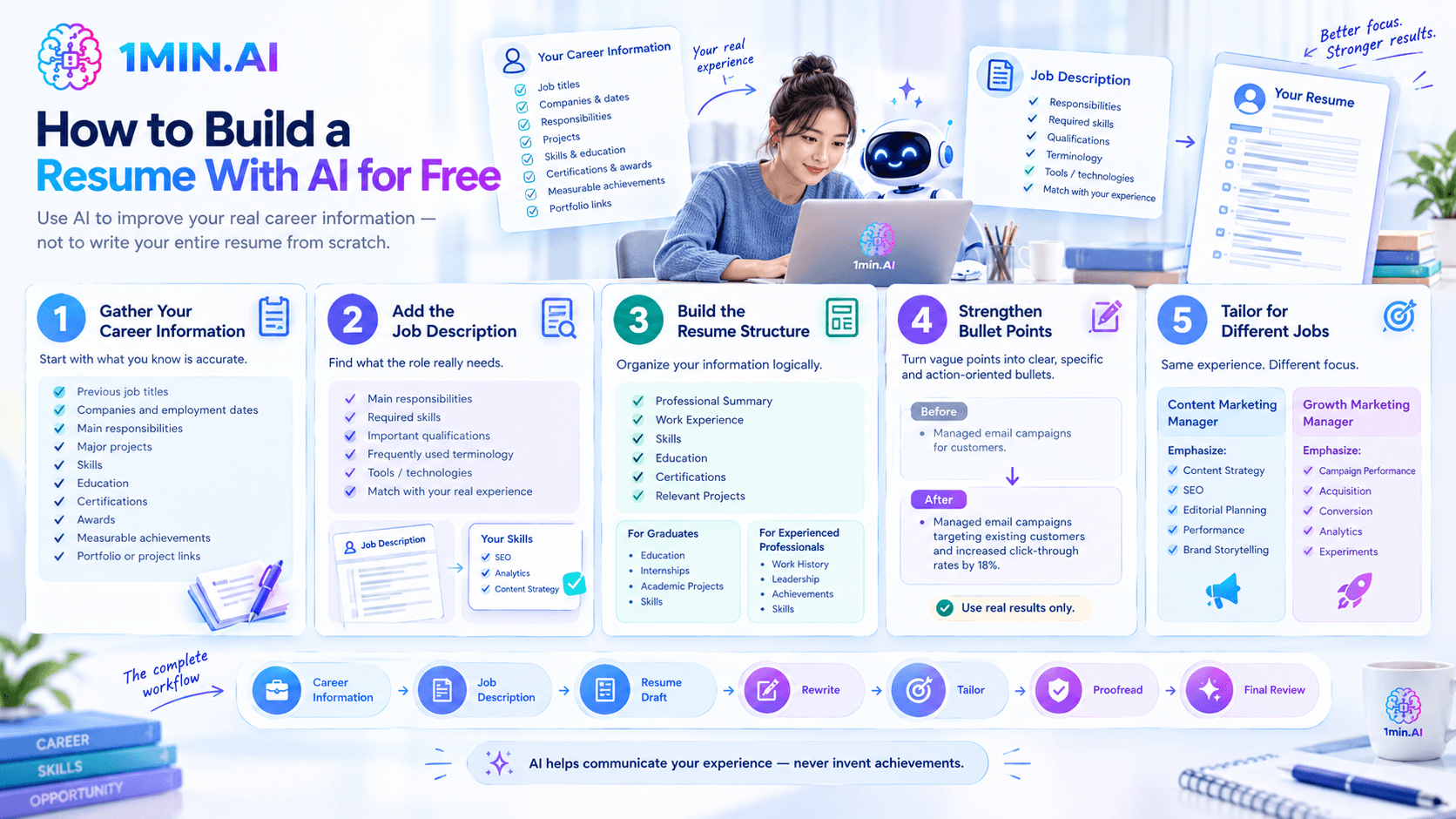
Career information → Job description → Resume draft → Rewrite → Tailor → Proofread → Final review
Here's how to use it.
1. Gather Your Career Information
Start with the information that you know is accurate.
Collect:
- Previous job titles
- Companies and employment dates
- Main responsibilities
- Major projects
- Skills
- Education
- Certifications
- Awards
- Measurable achievements
- Portfolio or project links
Don't worry about perfect wording at this stage.
For example, your original notes might say: Managed social media for a SaaS company. Created content, coordinated with designers, and increased engagement.
That's enough information for AI to help turn the rough notes into polished resume content.
The quality of your input matters. Give AI real details instead of asking it to fill in missing information.
2. Add the Job Description
If you're applying for a specific role, provide the job description along with your career information.
Ask AI to identify:
- Main responsibilities
- Required skills
- Important qualifications
- Frequently used terminology
- Relevant tools or technologies
- Experience that appears most important
Then compare those requirements with your own background.
For example, if a marketing job emphasizes SEO, content strategy, analytics, and campaign management, review your experience and identify which of those areas you genuinely have experience with.
This creates a more targeted resume without resorting to keyword stuffing.
3. Build the Resume Structure
Use AI to organize your information into a logical resume structure.
A typical resume might include:
- Professional summary
- Work experience
- Skills
- Education
- Certifications
- Relevant projects
However, the best structure depends on your situation.
A recent graduate may want to emphasize education, internships, academic projects, and skills.
An experienced professional may want to focus more heavily on work history, leadership, and measurable achievements.
Ask the AI to prioritize the information most relevant to the position rather than forcing every applicant into the same template.
4. Turn Responsibilities Into Stronger Bullet Points
One of the biggest benefits of a free AI resume builder is improving the wording of work experience.
For example, you might start with: Managed email campaigns for customers.
AI can help make the sentence more specific: Managed email campaigns targeting existing customers and monitored campaign performance.
If you have an actual measurable result, you can make it even stronger: Managed email campaigns for 20,000+ subscribers, increasing click-through rates by 18%.
The last example should only be used if the number is real.
AI should help you communicate achievements, not create achievements for you.
5. Tailor Your Resume to Different Jobs
You may not need a completely different resume for every application, but different positions can require different emphasis.
Imagine you're a marketing professional applying for two positions:
Content Marketing Manager
You might emphasize:
- Content strategy
- SEO
- Editorial planning
- Content performance
- Brand storytelling
Growth Marketing Manager
You might emphasize:
- Campaign performance
- Customer acquisition
- Conversion optimization
- Analytics
- Marketing experiments
Your underlying experience remains the same. AI can help you present the most relevant parts more clearly for each position.
This is one of the most practical ways to use a free AI resume builder.
Free AI Resume Builder Prompts You Can Use
You don't need hundreds of prompts. A few well-structured prompts can support most of the process.
Create a Resume Draft
Act as a professional resume writer. Using the career information below, create a clear resume structure for a [TARGET ROLE]. Prioritize experience relevant to the position. Do not invent skills, qualifications, responsibilities, or achievements. Use concise professional language and identify any missing information I should provide.
Tailor a Resume to a Job
Compare my resume with the job description below. Identify the responsibilities, skills, and terminology that match my existing experience. Suggest specific changes that make my resume more relevant to this position without adding qualifications or experience that I do not have.
Improve Work Experience
Rewrite the following work experience into concise resume bullet points. Focus on actions, responsibilities, and measurable outcomes where provided. Preserve all facts and numbers exactly. Do not invent achievements.
Review the Final Resume
Review this resume as a professional editor. Identify grammar problems, repetition, vague wording, unnecessary information, and areas that could be more specific. Do not invent or change any facts.
How 1minAI Works as a Free AI Resume Builder
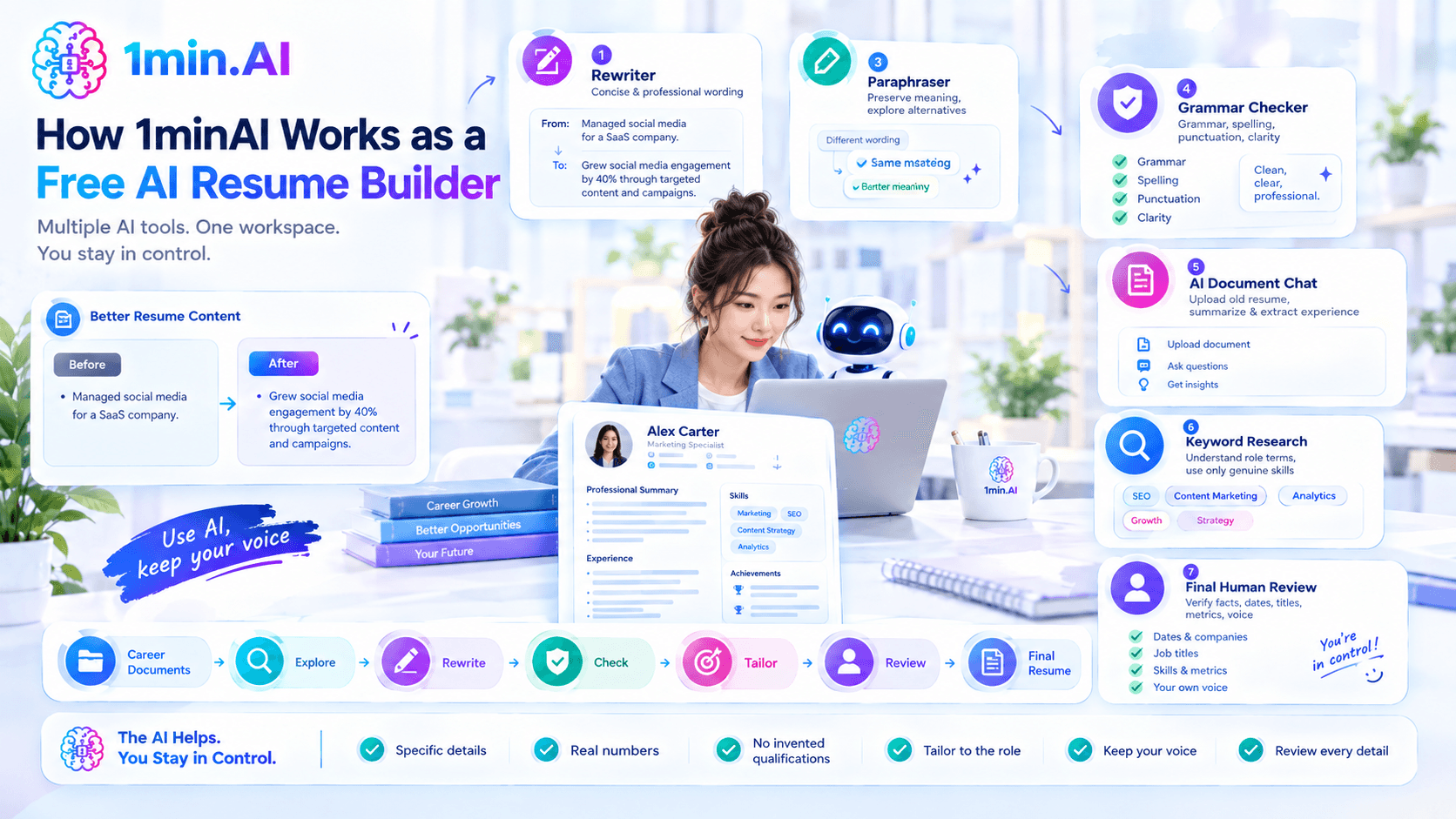
1minAI isn't limited to one resume-generation feature. Its current platform combines multiple AI tools in one workspace, including Multi AI Chat, AI Document Chat, Grammar Checker, Rewriter, Paraphraser, Summarizer, and Keyword Research.
That makes it possible to use different AI capabilities at different stages of building a resume.
Use Multi AI Chat to Develop Your Resume
When you aren't sure how to present your experience, Multi AI Chat can help you explore different approaches.
For example, provide your career history and target job, then ask: Based on this career history and job description, suggest three different professional summary approaches. Keep every claim supported by my actual experience.
You can compare the responses and choose the approach that best represents your background.
This is useful when you want multiple perspectives rather than accepting the first AI-generated response.
Use Rewriter and Paraphraser to Improve Resume Content
Resume writing often involves several rounds of editing.
A bullet point might be technically correct but too long. Your professional summary might repeat the same idea. An older resume may use wording that no longer fits the type of role you're targeting.
1minAI's Rewriter and Paraphraser can help you explore alternative wording while preserving the original meaning. These tools are part of its broader AI writing toolkit.
For example: Rewrite this resume bullet in three concise professional styles. Preserve the original meaning, responsibilities, and metrics.
You can then select and edit the version that sounds most natural.
Use Grammar Checker Before Submitting
A polished resume should be easy to read and free of avoidable writing mistakes.
1minAI's Grammar Checker can check grammar, spelling, punctuation, sentence structure, and clarity. The tool also lets users choose an AI model and review the suggested changes before using them.
A useful workflow is:
Write → Rewrite → Review → Grammar Check → Final edit
This is better than treating AI-generated content as finished the moment it appears.
Use AI Document Chat With Your Existing Resume
If you already have an old resume or other career documents, you can use 1minAI's AI Document Chat to work with supported files.
The feature lets you upload documents and ask questions, summarize information, or extract relevant insights from them.
For example, you could upload an old resume and ask: Summarize my professional experience by job title, responsibilities, skills, and measurable achievements.
You can then use the extracted information as the starting point for a new, targeted resume.
This can be especially helpful if you've changed roles several times and your career information is spread across multiple documents.
Use Keyword Research to Understand Relevant Terms
Keywords can help you understand how a particular role or industry describes skills and responsibilities.
1minAI includes a Keyword Research feature among its AI writing tools.
For resume writing, use this information as research rather than stuffing keywords into your resume.
For example, if a job description uses “performance marketing” and you genuinely have that experience, make sure your resume communicates it clearly.
If you don't have that experience, don't add the phrase just because it appears frequently in job listings.
How to Use a Free AI Resume Builder Without Sounding Generic
One common problem with AI-generated resumes is that they can sound polished but vague.
Avoid this by following a few principles.
Use specific details. Mention real projects, responsibilities, tools, industries, or outcomes when relevant.
Include real numbers. Metrics can make achievements more concrete, but only use numbers you can verify.
Don't invent qualifications. Never let AI create certifications, skills, job responsibilities, or achievements you don't have.
Tailor the content. Adjust your resume based on the position you're actually applying for.
Keep your own voice. AI-generated wording should be edited until it sounds natural and accurately represents you.
Review every detail. Check company names, dates, job titles, skills, metrics, and other factual information before submitting.
Free AI Resume Builder Checklist
Before sending your resume, review these points:
- Is all information accurate?
- Is the resume relevant to the target position?
- Are your strongest qualifications easy to find?
- Are your achievements specific?
- Are the keywords relevant and truthful?
- Have you removed unnecessary repetition?
- Is the writing concise and clear?
- Have you checked grammar and spelling?
- Are all dates, titles, and numbers correct?
- Does the final resume still sound like you?
Conclusion
A free AI resume builder can help reduce the time and effort involved in creating a professional resume, but the best results don't come from generating a resume and submitting it immediately.
Start with your real experience. Add the target job description. Use AI to organize your information, improve your bullet points, tailor relevant sections, and proofread the final version.
With 1minAI, you can support this process with Multi AI Chat, AI Document Chat, Rewriter, Paraphraser, Grammar Checker, Summarizer, and Keyword Research in one AI workspace.
The goal isn't to create a resume that simply sounds impressive. It's to create a resume that clearly communicates your actual experience and makes the most relevant parts easier for employers to understand.
Discover more AI features: https://1min.ai/features
Try 1minAI agent now: https://app.1min.ai/ai-agent-demo
Alternatives
Discover the best alternatives to 1minAI and compare features, pricing, and use cases.

1min.AI vs OpenRouter
1min.AI vs. OpenRouter: Compare the ready-to-use AI creation product against the technical API tool. Find out if you need a zero-code creative studio or a coding infrastructure hub.
 Ngoc Hong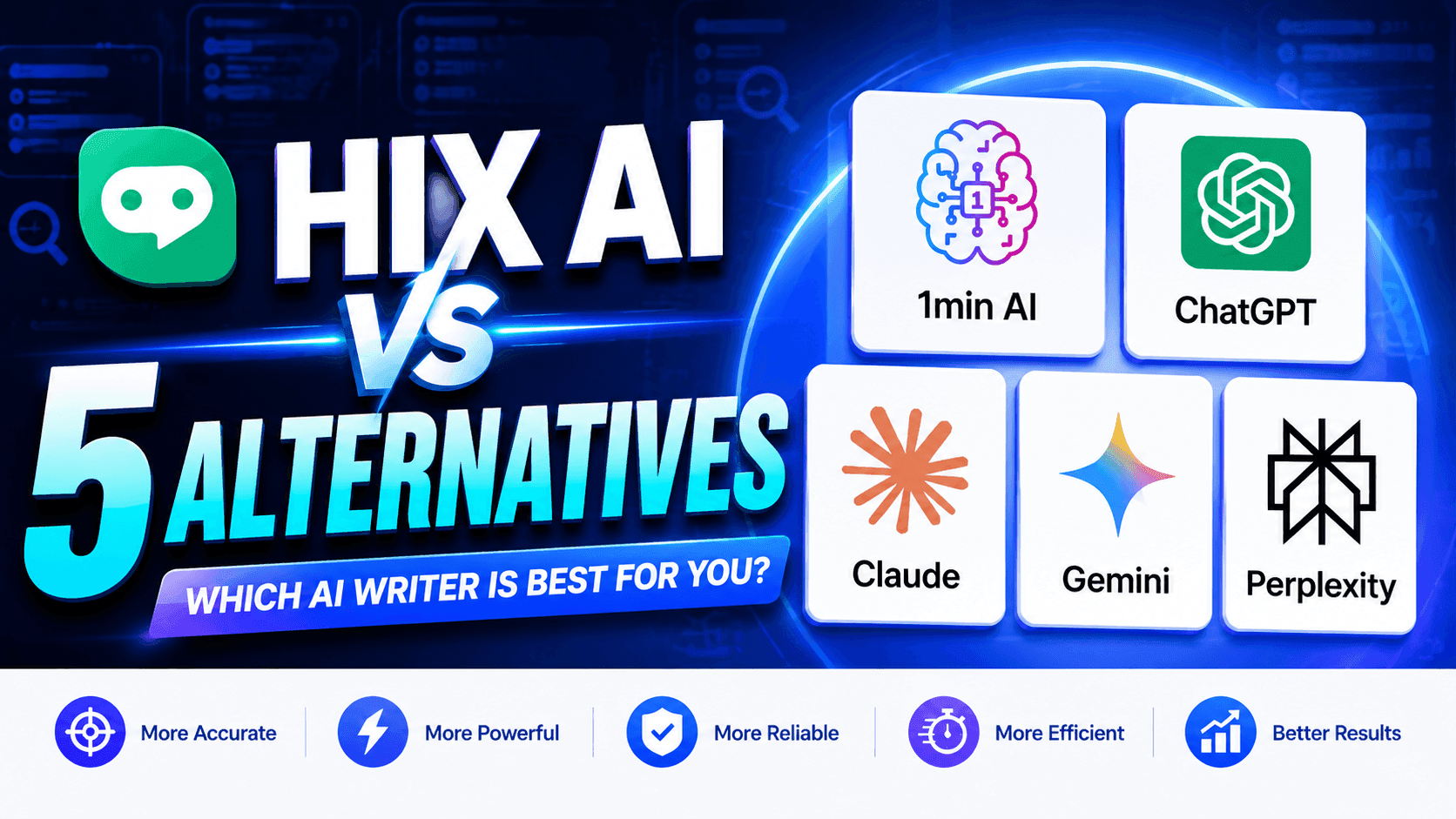
1minAI vs Hix AI
Compare 5 HIX AI alternatives for AI chat, research, writing, images, video, pricing, and flexible AI workflows.
Ngoc Hong
1min.AI vs Easy Peasy AI
Looking for an Easy Peasy AI alternative? Compare Easy Peasy AI and 1min.AI for content workflows, AI models, and professional teams.
Ngoc HongAI Tools
Discover the best AI tools to boost productivity, creativity, and everyday work.

Create Consistent Cartoon Content in Just a Few Steps
Create engaging cartoon videos for TikTok and Reels with 1min.AI. Research ideas, create characters, and turn images into animated videos in 3 simple steps.
 Lien Anh Vu
One Product, 10 UGC Creatives: How AI Makes Content Testing Easier
Create more authentic UGC with an AI UGC video generator, test more creative angles and scale affiliate content without filming every version.
Lien Anh Vu
Top 4 Affordable AI Tools for Startup Founders
Discover the top 4 affordable AI tools for startup founders to validate ideas, build products, create content, and launch faster without overspending.
 Tram Ta
AI Features
Comprehensive AI features that streamline workflows, improve efficiency, and empower teams to achieve more.
Create Consistent Cartoon Content in Just a Few Steps
Create engaging cartoon videos for TikTok and Reels with 1min.AI. Research ideas, create characters, and turn images into animated videos in 3 simple steps.
Lien Anh VuOne Product, 10 UGC Creatives: How AI Makes Content Testing Easier
Create more authentic UGC with an AI UGC video generator, test more creative angles and scale affiliate content without filming every version.
Lien Anh Vu
1minAI: Free AI Grammar Checker
Check grammar for free with 1minAI’s AI grammar checker. Find grammar, spelling, and writing mistakes, improve clarity, and polish your content in seconds.
Tram TaAI Use Cases
A curated collection of AI use cases for business, productivity, and industry-specific applications.
Create Consistent Cartoon Content in Just a Few Steps
Create engaging cartoon videos for TikTok and Reels with 1min.AI. Research ideas, create characters, and turn images into animated videos in 3 simple steps.
Lien Anh VuOne Product, 10 UGC Creatives: How AI Makes Content Testing Easier
Create more authentic UGC with an AI UGC video generator, test more creative angles and scale affiliate content without filming every version.
Lien Anh Vu
Best Time to Post on Instagram: A Practical Guide for Better Engagement
Discover the best time to post on Instagram, including the best days and times for different audiences, plus tips to find the ideal posting schedule for your account.
Tram TaAI Tutorials
Learn how to use AI with practical, step-by-step tutorials.
Create Consistent Cartoon Content in Just a Few Steps
Create engaging cartoon videos for TikTok and Reels with 1min.AI. Research ideas, create characters, and turn images into animated videos in 3 simple steps.
Lien Anh Vu
Black Friday AI Tool Deals in 2026
Discover what Black Friday AI tool deals 2026 has to offer. Find out how to secure the 1min.AI lifetime deal via AppSumo, Dealify, Stack Social, and verify on Trustpilot, Slashdot, and Software Advice.
 Hang Nguyen
[Seedance 2.5 New] Better AI Product Videos, Less Rework in 1min.AI
Use Seedance 2.5 image to video on 1min.AI to create more consistent AI product videos, reduce failed generations, save credits, and improve UGC workflows.
Lien Anh VuAI Guides
Learn AI faster with practical guides, real-world examples, and actionable best practices.
Create Consistent Cartoon Content in Just a Few Steps
Create engaging cartoon videos for TikTok and Reels with 1min.AI. Research ideas, create characters, and turn images into animated videos in 3 simple steps.
Lien Anh Vu
Safely Buy AI Tools Online: 2026 Black Friday Guide
Discover how to find and secure the best Black Friday AI deals online. Learn expert strategies to avoid scams, combat subscription fatigue, and verify software.
Hang Nguyen[Seedance 2.5 New] Better AI Product Videos, Less Rework in 1min.AI
Use Seedance 2.5 image to video on 1min.AI to create more consistent AI product videos, reduce failed generations, save credits, and improve UGC workflows.
Lien Anh VuAI Solutions
Browse the best AI solutions for automation, coding, research, productivity, customer support, marketing, and business workflows.
Create Consistent Cartoon Content in Just a Few Steps
Create engaging cartoon videos for TikTok and Reels with 1min.AI. Research ideas, create characters, and turn images into animated videos in 3 simple steps.
Lien Anh VuOne Product, 10 UGC Creatives: How AI Makes Content Testing Easier
Create more authentic UGC with an AI UGC video generator, test more creative angles and scale affiliate content without filming every version.
Lien Anh Vu
Free AI Tattoo Generator: Custom Designs
Turn any idea into a custom tattoo design with 1min.AI's free AI tattoo generator. Describe your idea, pick a style, and download in seconds.
 Trang Tran
AI Models
Explore the world's leading AI models in one place.
Create Consistent Cartoon Content in Just a Few Steps
Create engaging cartoon videos for TikTok and Reels with 1min.AI. Research ideas, create characters, and turn images into animated videos in 3 simple steps.
Lien Anh VuOne Product, 10 UGC Creatives: How AI Makes Content Testing Easier
Create more authentic UGC with an AI UGC video generator, test more creative angles and scale affiliate content without filming every version.
Lien Anh Vu[Seedance 2.5 New] Better AI Product Videos, Less Rework in 1min.AI
Use Seedance 2.5 image to video on 1min.AI to create more consistent AI product videos, reduce failed generations, save credits, and improve UGC workflows.
Lien Anh VuAI Comparisons
Compare AI tools, models, and platforms to find the best fit for your needs.

Kling AI Vs Veo 3: Which Model Wins?
Kling AI vs Veo 3: compare motion, native audio, pricing & free tiers to see which AI video generator wins for your project - try both on 1min.AI.
Trang Tran[Seedance 2.5 New] Better AI Product Videos, Less Rework in 1min.AI
Use Seedance 2.5 image to video on 1min.AI to create more consistent AI product videos, reduce failed generations, save credits, and improve UGC workflows.
Lien Anh Vu
DeepSeek V4 Pro vs Flash Comparison
Compare DeepSeek V4 Pro vs DeepSeek V4 Flash metrics. Optimize your agentic apps and improve AI fact checking on 1min.ai today.
Ngoc HongAI Integrations
Seamlessly integrate AI with the tools you already use to automate work and boost productivity.

POV: You Have 10+ Posts to Make Every Day
Learn how to build an AI content workflow that helps content creators produce 10+ social media posts a day faster with AI brainstorming, image generation, and content creation.
Lien Anh Vu
How to Use an AI Fashion Video Generator for Fashion Week 2026
Turn Fashion Week 2026 ideas into stunning fashion videos with AI. Learn how to brainstorm, create visuals, and transform images into videos with one simple workflow.
Lien Anh Vu
Stop Switching Between AI Apps: How AI Integration Transforms Employer Branding
Discover how AI integration helps HR teams streamline employer branding by combining AI writing, documents, images, video, and multiple AI models into one workspace.
Tram TaAI for Industries
Find the best AI tools and workflows for healthcare, finance, education, legal, manufacturing, retail, real estate, and more

Free AI Virtual Staging: Furnish Any Room
Stage any real estate listing with AI virtual staging: upload a photo, pick a style, and get a photorealistic furnished room in seconds, free to try.
Trang Tran
Free AI Real Estate Video Generator
Turn listing photos into narrated property videos with AI real estate video tools. See how 1min.AI creates walkthroughs, voiceovers & captions in minutes.
Trang Tran
The Problem With AI Design? It Looks Too AI
AI-generated designs can look polished but still feel artificial. Here are 5 prompt techniques designers can use to create more realistic, intentional visuals.
Lien Anh VuAI Agents
Discover and run AI agents to automate tasks across your work and daily life.
1minAI: Free AI Grammar Checker
Check grammar for free with 1minAI’s AI grammar checker. Find grammar, spelling, and writing mistakes, improve clarity, and polish your content in seconds.
Tram Ta
AI Agents for Facebook
Use an AI Agent for Facebook to create content, generate images, schedule posts, and publish from your documents and conversations.
Ngoc Hong
AI Agent vs AI Assistant: Which One Actually Saves Designers More Time?
Learn the difference between AI Agent vs AI Assistant and discover which solution helps designers automate repetitive work, reduce revisions, and save more time.
Lien Anh VuAI Workflows
Explore ready-to-use AI workflows for productivity, marketing, sales, support, and more.
Create Consistent Cartoon Content in Just a Few Steps
Create engaging cartoon videos for TikTok and Reels with 1min.AI. Research ideas, create characters, and turn images into animated videos in 3 simple steps.
Lien Anh VuOne Product, 10 UGC Creatives: How AI Makes Content Testing Easier
Create more authentic UGC with an AI UGC video generator, test more creative angles and scale affiliate content without filming every version.
Lien Anh VuPOV: You Have 10+ Posts to Make Every Day
Learn how to build an AI content workflow that helps content creators produce 10+ social media posts a day faster with AI brainstorming, image generation, and content creation.
Lien Anh VuNewsletter
Weekly AI Innovations with 1minAI

🔮 Weekly AI Innovations #138: Claude Sonnet 5, Fable 5 & Wan 2.7
Explode your creative potential with massive 1min.ai updates! Access Claude Sonnet 5, Fable 5, and Alibaba Wan 2.7 for unmatched multi-modal generation today.
Hang Nguyen
🔮 Weekly AI Innovations #137: ElevenLabs Music & AI social Profile Control
The newest 1min.ai updates deliver professional music generation and highly requested privacy tools. Dive into a seamless workflow today!
Hang Nguyen
🔮 Weekly AI Innovations #136: Grok 4.6 and Smart Data Retention
Discover the latest 1min.ai updates! Upgrade to Grok 4.6 for blazing-fast AI, and check our new Data Retention policies to secure your files today.
Hang Nguyen