
From LinkedIn Idea to Multi-Channel Campaign: Automate Your Content Workflow With AI Agent

Tram Ta
August 17, 2026
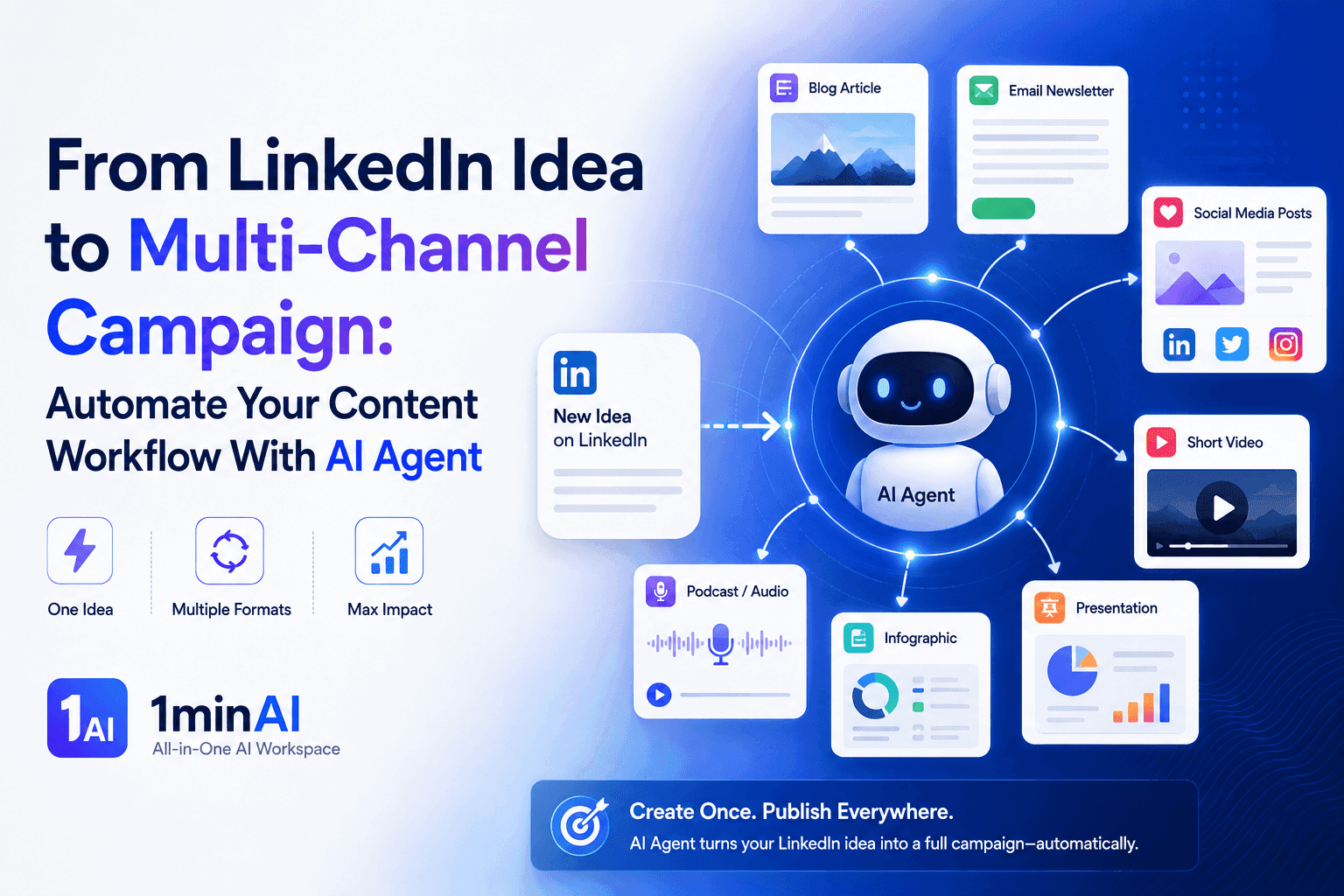
Turn one LinkedIn idea into a multi-channel campaign with 1minAI Agent. Create posts, videos, visuals, and social content from one connected workflow.
A strong LinkedIn idea shouldn't have to end with one post. For marketers and content creators, a single insight can become a Facebook post, TikTok or Reels script, visual assets, email content, and more. But turning one idea into a complete multi-channel campaign can quickly become a time-consuming production process. The challenge is especially familiar for small marketing teams. They may have plenty of expertise and ideas but limited time to adapt every piece of content for every channel.
An AI agent can connect those steps into one workflow. Instead of asking AI to rewrite the same content separately for each platform, you can give 1minAI Agent the original idea and let it help analyze, adapt, create, and organize the campaign across multiple channels.
Why One Good Content Idea Usually Creates Five More Tasks
Coming up with a valuable content idea is only the beginning of modern content production.
Imagine a marketer has developed a strong LinkedIn idea about how AI agents are changing marketing workflows. The LinkedIn post may take 20 minutes to create—but turning that same idea into a complete campaign can take several hours.
The marketer may need to:
- Refine the original LinkedIn post
- Rewrite it for Facebook
- Create a TikTok or Reels script
- Develop a visual concept
- Generate an image or video
- Write platform-specific captions
- Prepare calls to action
- Organize everything for publishing
Each task may also involve a different AI application.
The marketer might use one tool for writing, another for images, another for video, and a social media platform for publishing. Every transition means copying information, rewriting prompts, and re-explaining the original idea.
The Content Idea Isn't the Bottleneck
The problem is rarely a lack of ideas.
Most marketers already have:
- Industry knowledge
- Customer insights
- Campaign themes
- Product announcements
- Expert opinions
- Existing blog posts
- LinkedIn content
The challenge is getting more value from each idea.
If one strong insight produces only one LinkedIn post, much of its potential is left unused.
A better workflow is:
One idea → Multiple formats → Multiple channels → One coordinated campaign
This allows marketers to extend the life of their best ideas without manually recreating the content from scratch.
From Content Repurposing to Content Orchestration
Traditional content repurposing usually means taking an existing post and asking AI:
"Rewrite this for Facebook."
Then:
"Turn it into a TikTok script."
Then:
"Create an image for it."
Each request is handled separately.
An AI agent can approach the task at a higher level.
Instead of giving the Agent five disconnected instructions, the marketer can define the desired outcome:
"Turn this LinkedIn idea into a multi-channel campaign for B2B marketers."
The Agent can then help coordinate the steps required to achieve that goal:
Analyze the idea → Create the core message → Adapt it for each platform → Generate supporting assets → Organize the campaign
The marketer provides the strategy and final approval. The Agent handles more of the repetitive execution.
That shift—from asking AI to perform individual tasks to giving an AI agent a complete content objective—is what makes the workflow scalable.
What an AI Agent Can Do That a Writing Tool Can't
A standard AI writing tool is useful when you already know what you need and want AI to produce it.
For example:
“Rewrite this LinkedIn post for Facebook.”
You get an output, review it, and then decide what to ask AI to do next.
An AI agent works at a higher level. Instead of focusing on one piece of content, you can give it a broader objective and let it coordinate multiple tasks required to complete that objective.
Traditional AI Workflow
A typical content repurposing process looks like:
LinkedIn idea
→ Prompt AI to rewrite
→ Copy output
→ Open another tool
→ Create visual
→ Write video script
→ Adapt caption
→ Organize files
→ Publish
The marketer acts as the connector between every task.
AI Agent Workflow
With an AI agent, the marketer can start with the desired outcome:
“Turn this LinkedIn idea into a multi-channel campaign for B2B marketers.”
The workflow can then become:
Analyze → Plan → Generate → Adapt → Create assets → Organize
The Agent helps coordinate the individual tasks while maintaining the context of the original campaign.
The Difference Is Workflow Orchestration
Think of it this way:
| Traditional AI Tool | AI Agent |
|---|---|
| Completes a task | Works toward an outcome |
| Responds to individual prompts | Coordinates multiple steps |
| Usually produces one output | Can produce multiple connected outputs |
| User moves between tasks | Agent connects the workflow |
| Prompt-focused | Goal-focused |
This doesn't mean the Agent independently decides what a brand should say.
The marketer still defines the audience, objective, positioning, tone, and final direction.
The Agent simply takes more responsibility for the work required to turn that direction into a campaign.
That's why the most useful way to think about an AI agent for marketing isn't as a better writing assistant.
It's as a digital workflow orchestrator that can help move an idea from one starting point to multiple finished content assets.
How 1minAI Agent Turns One LinkedIn Idea Into a Multi-Channel Campaign
The most useful way to understand an AI agent for marketing is to follow one idea from beginning to end.
Suppose a marketer has this LinkedIn idea:
“AI agents won't replace marketing teams. They'll replace the repetitive workflows that slow them down.”
Instead of publishing this idea once, 1minAI Agent can help turn it into a complete campaign.
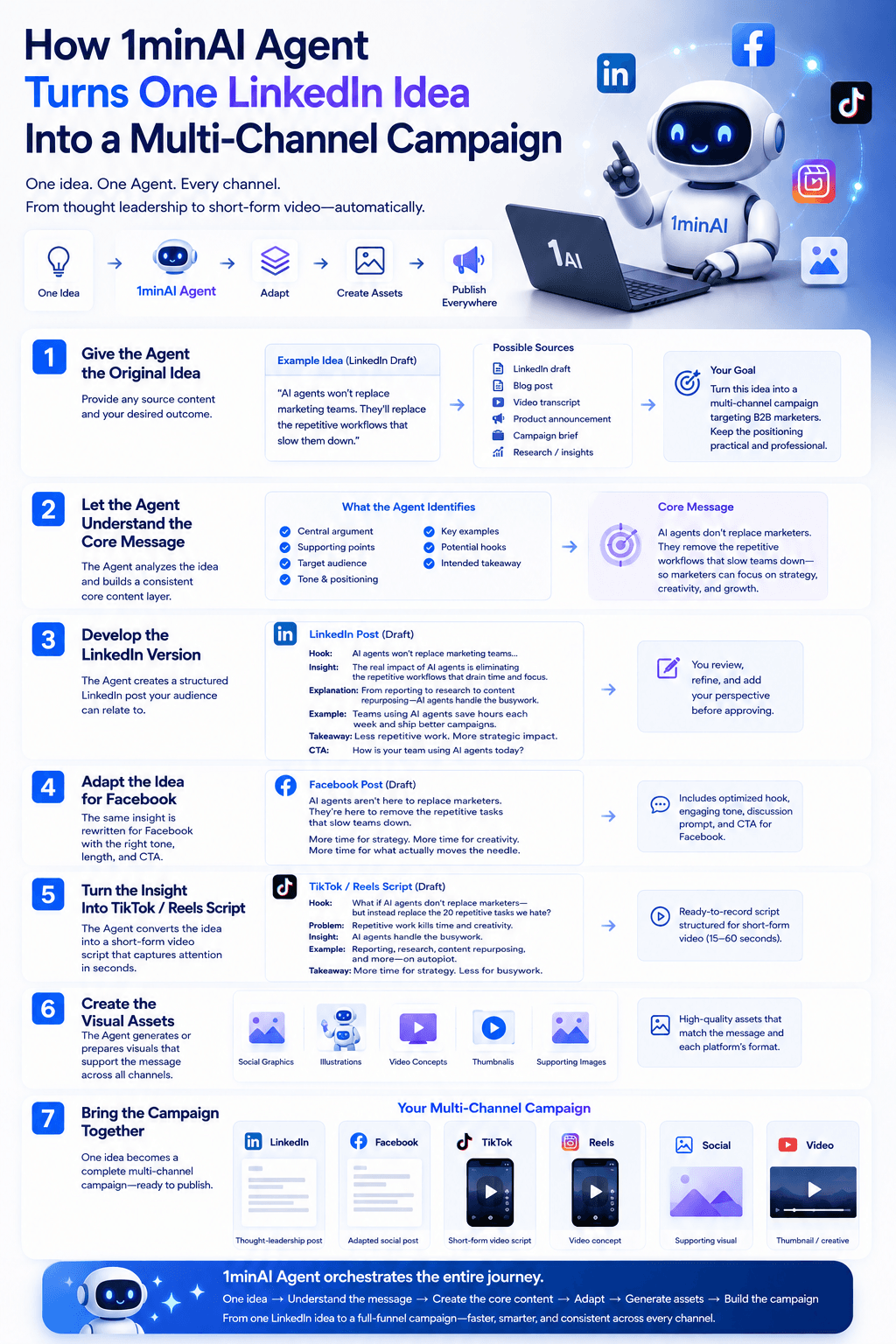
Step 1: Give the Agent the Original Idea
The starting point can be almost any existing content:
- A LinkedIn draft
- A blog post
- A video transcript
- A product announcement
- A campaign brief
- A personal insight
- Research or industry findings
The marketer provides the Agent with the source and defines the desired outcome.
For example:
“Turn this idea into a multi-channel campaign targeting B2B marketers. Keep the positioning practical and professional.”
This gives the Agent both the source material and the campaign objective.
Step 2: Let the Agent Understand the Core Message
Before creating multiple pieces of content, the Agent needs to understand what should remain consistent.
It can identify:
- The central argument
- Supporting points
- Target audience
- Tone
- Key examples
- Potential hooks
- The intended takeaway
This creates a core content layer that becomes the foundation for the rest of the campaign.
The advantage is consistency.
The LinkedIn post, Facebook content, and TikTok script aren't created as unrelated pieces. They all originate from the same underlying idea.
Step 3: Develop the LinkedIn Version
LinkedIn can serve as the campaign's primary thought-leadership format.
The Agent can help turn the original idea into a structured post with:
Hook → Insight → Explanation → Example → Takeaway → CTA
For a B2B audience, the content can emphasize practical implications rather than simply explaining what AI agents are.
The marketer can then add personal experience, adjust the opinion, or refine the language before approving the core message.
Step 4: Adapt the Idea for Facebook
The same idea can then be transformed for Facebook.
Rather than copying the LinkedIn post, the Agent can adjust:
- Opening hook
- Length
- Tone
- Paragraph structure
- Discussion prompts
- Call to action
The underlying insight stays consistent, while the presentation becomes more appropriate for the platform.
Step 5: Turn the Insight Into a TikTok or Reels Script
Short-form video requires another transformation.
The Agent can convert the same idea into a structure such as:
Hook → Problem → Insight → Example → Takeaway
For example:
“What if AI agents don't actually replace marketers—but instead replace the 20 repetitive tasks marketers hate doing every week?”
From there, the Agent can develop the supporting points into a short-form script.
The marketer now has a video concept without having to start a new content workflow from scratch.
Step 6: Create the Visual Assets
The campaign can then move beyond written content.
Based on the same core message, the Agent can help generate or prepare:
- Social graphics
- Illustrations
- Video concepts
- Thumbnails
- Supporting images
This is where the workflow becomes more powerful than simple AI content repurposing.
The Agent isn't merely changing the wording.
It's helping transform the original idea into different content formats.
Step 7: Bring the Campaign Together
At the end of the workflow, the marketer has something much larger than one LinkedIn post:
| Channel | Campaign Asset |
|---|---|
| Thought-leadership post | |
| Adapted social post | |
| TikTok | Short-form video script |
| Reels | Video concept |
| Social | Supporting visual |
| Video | Thumbnail / creative |
The content still revolves around one strategic idea, but each asset has been adapted to its own format.
That's the real role of 1minAI Agent in this workflow:
One idea → Understand the message → Create the core content → Adapt → Generate assets → Build the campaign
Instead of acting as another writing tool, the Agent helps orchestrate the entire journey from an initial idea to a multi-channel campaign.
Why 1minAI Agent Is More Than an AI Writing Tool
The biggest advantage of 1minAI Agent is that it can connect different AI capabilities around one marketing objective.
A marketer doesn't have to think:
“Which AI tool should I use for this next task?”
Instead, the workflow can start with:
“I have this idea. Turn it into a multi-channel campaign.”
From there, the Agent can help coordinate the work across the 1minAI ecosystem.
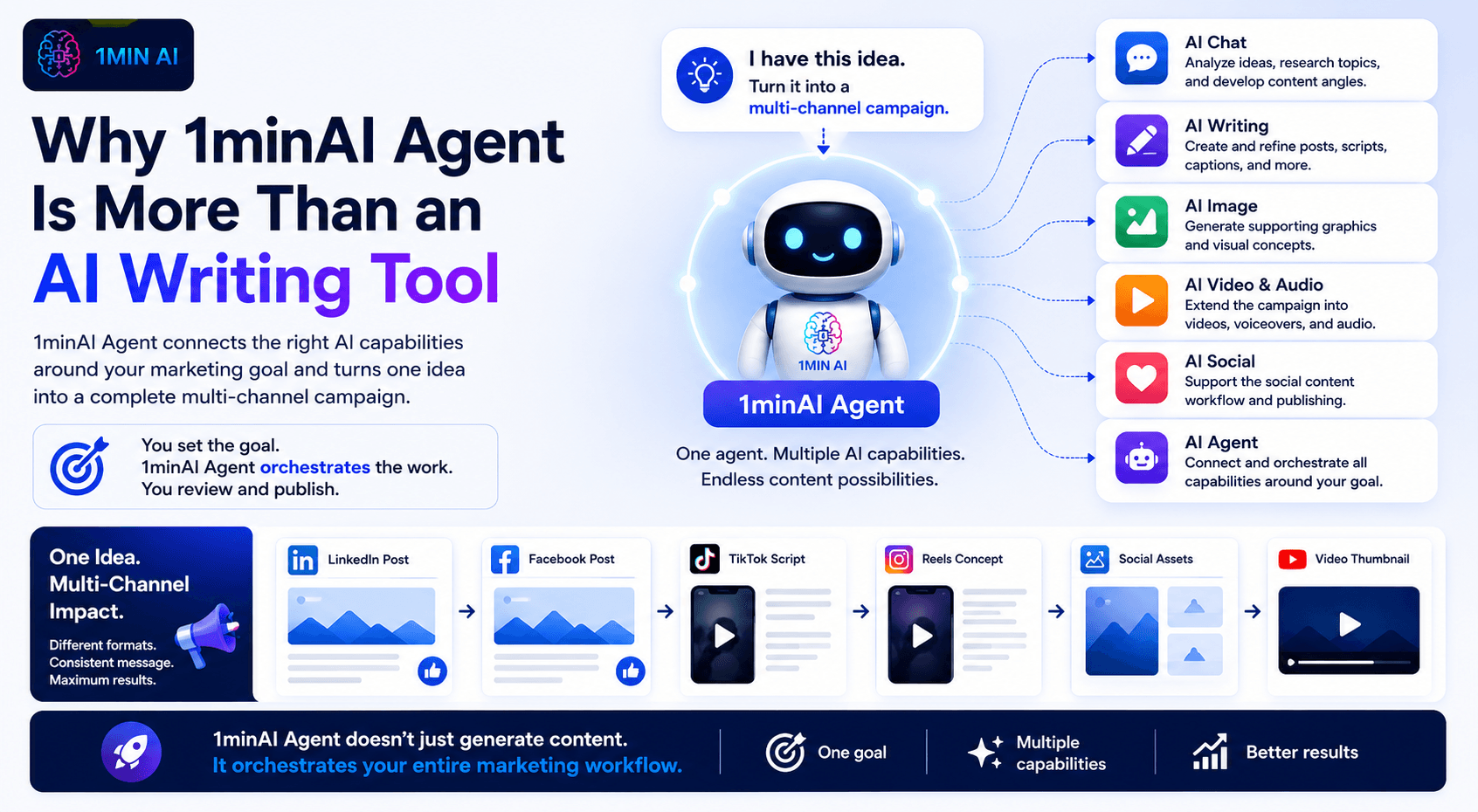
One Campaign, Multiple AI Capabilities
A typical campaign may require several types of AI:
AI Chat
→ Analyze the idea, research the topic, and develop content angles.
AI Writing
→ Create and refine posts, scripts, captions, and other written content.
AI Image
→ Generate supporting graphics and visual concepts.
AI Video & Audio
→ Extend the campaign into multimedia formats.
AI Social
→ Support the social content workflow and publishing process.
AI Agent
→ Connect these capabilities around the broader campaign objective.
This is the difference between having a collection of AI features and having an AI agent that can orchestrate them around a workflow.
The Agent Becomes the Connection Between Tasks
Without an agent, the marketer is often responsible for connecting everything:
Idea → Tool A → Copy → Tool B → Image → Tool C → Video → Social Platform
With an agent-based approach:
Campaign Goal → 1minAI Agent → Multiple AI Capabilities → Campaign Outputs
The marketer provides the direction and reviews the result, while the Agent helps coordinate the execution.
Built for Content Teams That Need to Scale
This workflow is particularly useful when marketers need to produce more content without proportionally increasing manual work.
A single campaign idea can become:
- 1 LinkedIn post
- 1 Facebook post
- 1 TikTok script
- 1 Reels concept
- Multiple visual assets
- Supporting multimedia content
Instead of treating these as separate projects, the Agent helps treat them as different outputs of the same campaign.
That is the real value of AI-agent-powered content creation: the ability to orchestrate work across formats and channels rather than simply generate another piece of text.
FAQ: About AI Agents for Marketing
What is an AI agent for marketing?
An AI agent for marketing is an AI system that can work toward a broader marketing objective rather than simply responding to one isolated prompt. It can help coordinate multiple tasks, such as content planning, writing, adaptation, and asset creation.
How is an AI agent different from an AI writing tool?
An AI writing tool primarily helps generate or edit text. An AI agent can work toward a broader outcome and coordinate multiple steps required to achieve it. In a multi-channel campaign, that could mean moving from an original idea to platform-specific posts, scripts, and visual assets.
Can an AI agent replace a content marketer?
An AI agent can help reduce repetitive execution, but it doesn't replace the marketer's strategic role. Marketers still need to define the audience, positioning, campaign objective, brand voice, and final direction, and review the content before publication.
Why use an AI agent for social media content?
Social media campaigns often require multiple versions of the same idea. An AI agent can help marketers adapt one core message into different formats and channels, reducing repetitive work while keeping the campaign concept connected.
Conclusion: Turn One Idea Into an Entire Campaign
Content marketers don't necessarily need more ideas.
They need a better way to extract more value from the ideas they already have.
A strong LinkedIn insight can become a complete campaign when the workflow connects:
Idea → Strategy → LinkedIn → Facebook → TikTok/Reels → Visuals → Multimedia → Publishing
An AI writing tool can help with individual steps.
An AI agent can help coordinate the journey between them.
With 1minAI Agent, marketers and content creators can give an overarching campaign objective and use multiple AI capabilities to move from the original idea to a collection of channel-specific assets—all within a connected workflow.
The human remains responsible for the strategy, expertise, brand voice, and final judgment.
The Agent takes on more of the repetitive execution.
One idea shouldn't mean one post. Give your next idea the workflow it deserves with 1minAI Agent.
👉 Official Website: https://1min.ai/
👉 Try 1minAI agent now: https://app.1min.ai/ai-agent-demo
Alternatives
Discover the best alternatives to 1minAI and compare features, pricing, and use cases.

1min.AI vs OpenRouter
1min.AI vs. OpenRouter: Compare the ready-to-use AI creation product against the technical API tool. Find out if you need a zero-code creative studio or a coding infrastructure hub.
 Ngoc Hong
1minAI vs Hix AI
Compare 5 HIX AI alternatives for AI chat, research, writing, images, video, pricing, and flexible AI workflows.
Ngoc Hong
1min.AI vs Easy Peasy AI
Looking for an Easy Peasy AI alternative? Compare Easy Peasy AI and 1min.AI for content workflows, AI models, and professional teams.
Ngoc HongAI Tools
Discover the best AI tools to boost productivity, creativity, and everyday work.

Create Consistent Cartoon Content in Just a Few Steps
Create engaging cartoon videos for TikTok and Reels with 1min.AI. Research ideas, create characters, and turn images into animated videos in 3 simple steps.
 Lien Anh Vu
One Product, 10 UGC Creatives: How AI Makes Content Testing Easier
Create more authentic UGC with an AI UGC video generator, test more creative angles and scale affiliate content without filming every version.
Lien Anh Vu
Top 4 Affordable AI Tools for Startup Founders
Discover the top 4 affordable AI tools for startup founders to validate ideas, build products, create content, and launch faster without overspending.
 Tram Ta
AI Features
Comprehensive AI features that streamline workflows, improve efficiency, and empower teams to achieve more.
Create Consistent Cartoon Content in Just a Few Steps
Create engaging cartoon videos for TikTok and Reels with 1min.AI. Research ideas, create characters, and turn images into animated videos in 3 simple steps.
Lien Anh VuOne Product, 10 UGC Creatives: How AI Makes Content Testing Easier
Create more authentic UGC with an AI UGC video generator, test more creative angles and scale affiliate content without filming every version.
Lien Anh Vu
1minAI: Free AI Grammar Checker
Check grammar for free with 1minAI’s AI grammar checker. Find grammar, spelling, and writing mistakes, improve clarity, and polish your content in seconds.
Tram TaAI Use Cases
A curated collection of AI use cases for business, productivity, and industry-specific applications.
Create Consistent Cartoon Content in Just a Few Steps
Create engaging cartoon videos for TikTok and Reels with 1min.AI. Research ideas, create characters, and turn images into animated videos in 3 simple steps.
Lien Anh VuOne Product, 10 UGC Creatives: How AI Makes Content Testing Easier
Create more authentic UGC with an AI UGC video generator, test more creative angles and scale affiliate content without filming every version.
Lien Anh Vu
Best Time to Post on Instagram: A Practical Guide for Better Engagement
Discover the best time to post on Instagram, including the best days and times for different audiences, plus tips to find the ideal posting schedule for your account.
Tram TaAI Tutorials
Learn how to use AI with practical, step-by-step tutorials.
Create Consistent Cartoon Content in Just a Few Steps
Create engaging cartoon videos for TikTok and Reels with 1min.AI. Research ideas, create characters, and turn images into animated videos in 3 simple steps.
Lien Anh Vu
Black Friday AI Tool Deals in 2026
Discover what Black Friday AI tool deals 2026 has to offer. Find out how to secure the 1min.AI lifetime deal via AppSumo, Dealify, Stack Social, and verify on Trustpilot, Slashdot, and Software Advice.
 Hang Nguyen
[Seedance 2.5 New] Better AI Product Videos, Less Rework in 1min.AI
Use Seedance 2.5 image to video on 1min.AI to create more consistent AI product videos, reduce failed generations, save credits, and improve UGC workflows.
Lien Anh VuAI Guides
Learn AI faster with practical guides, real-world examples, and actionable best practices.
Create Consistent Cartoon Content in Just a Few Steps
Create engaging cartoon videos for TikTok and Reels with 1min.AI. Research ideas, create characters, and turn images into animated videos in 3 simple steps.
Lien Anh Vu
Safely Buy AI Tools Online: 2026 Black Friday Guide
Discover how to find and secure the best Black Friday AI deals online. Learn expert strategies to avoid scams, combat subscription fatigue, and verify software.
Hang Nguyen[Seedance 2.5 New] Better AI Product Videos, Less Rework in 1min.AI
Use Seedance 2.5 image to video on 1min.AI to create more consistent AI product videos, reduce failed generations, save credits, and improve UGC workflows.
Lien Anh VuAI Solutions
Browse the best AI solutions for automation, coding, research, productivity, customer support, marketing, and business workflows.
Create Consistent Cartoon Content in Just a Few Steps
Create engaging cartoon videos for TikTok and Reels with 1min.AI. Research ideas, create characters, and turn images into animated videos in 3 simple steps.
Lien Anh VuOne Product, 10 UGC Creatives: How AI Makes Content Testing Easier
Create more authentic UGC with an AI UGC video generator, test more creative angles and scale affiliate content without filming every version.
Lien Anh Vu
Free AI Tattoo Generator: Custom Designs
Turn any idea into a custom tattoo design with 1min.AI's free AI tattoo generator. Describe your idea, pick a style, and download in seconds.
 Trang Tran
AI Models
Explore the world's leading AI models in one place.
Create Consistent Cartoon Content in Just a Few Steps
Create engaging cartoon videos for TikTok and Reels with 1min.AI. Research ideas, create characters, and turn images into animated videos in 3 simple steps.
Lien Anh VuOne Product, 10 UGC Creatives: How AI Makes Content Testing Easier
Create more authentic UGC with an AI UGC video generator, test more creative angles and scale affiliate content without filming every version.
Lien Anh Vu[Seedance 2.5 New] Better AI Product Videos, Less Rework in 1min.AI
Use Seedance 2.5 image to video on 1min.AI to create more consistent AI product videos, reduce failed generations, save credits, and improve UGC workflows.
Lien Anh VuAI Comparisons
Compare AI tools, models, and platforms to find the best fit for your needs.

Kling AI Vs Veo 3: Which Model Wins?
Kling AI vs Veo 3: compare motion, native audio, pricing & free tiers to see which AI video generator wins for your project - try both on 1min.AI.
Trang Tran[Seedance 2.5 New] Better AI Product Videos, Less Rework in 1min.AI
Use Seedance 2.5 image to video on 1min.AI to create more consistent AI product videos, reduce failed generations, save credits, and improve UGC workflows.
Lien Anh Vu
DeepSeek V4 Pro vs Flash Comparison
Compare DeepSeek V4 Pro vs DeepSeek V4 Flash metrics. Optimize your agentic apps and improve AI fact checking on 1min.ai today.
Ngoc HongAI Integrations
Seamlessly integrate AI with the tools you already use to automate work and boost productivity.

POV: You Have 10+ Posts to Make Every Day
Learn how to build an AI content workflow that helps content creators produce 10+ social media posts a day faster with AI brainstorming, image generation, and content creation.
Lien Anh Vu
How to Use an AI Fashion Video Generator for Fashion Week 2026
Turn Fashion Week 2026 ideas into stunning fashion videos with AI. Learn how to brainstorm, create visuals, and transform images into videos with one simple workflow.
Lien Anh Vu
Stop Switching Between AI Apps: How AI Integration Transforms Employer Branding
Discover how AI integration helps HR teams streamline employer branding by combining AI writing, documents, images, video, and multiple AI models into one workspace.
Tram TaAI for Industries
Find the best AI tools and workflows for healthcare, finance, education, legal, manufacturing, retail, real estate, and more

Free AI Virtual Staging: Furnish Any Room
Stage any real estate listing with AI virtual staging: upload a photo, pick a style, and get a photorealistic furnished room in seconds, free to try.
Trang Tran
Free AI Real Estate Video Generator
Turn listing photos into narrated property videos with AI real estate video tools. See how 1min.AI creates walkthroughs, voiceovers & captions in minutes.
Trang Tran
The Problem With AI Design? It Looks Too AI
AI-generated designs can look polished but still feel artificial. Here are 5 prompt techniques designers can use to create more realistic, intentional visuals.
Lien Anh VuAI Agents
Discover and run AI agents to automate tasks across your work and daily life.
1minAI: Free AI Grammar Checker
Check grammar for free with 1minAI’s AI grammar checker. Find grammar, spelling, and writing mistakes, improve clarity, and polish your content in seconds.
Tram Ta
AI Agents for Facebook
Use an AI Agent for Facebook to create content, generate images, schedule posts, and publish from your documents and conversations.
Ngoc Hong
AI Agent vs AI Assistant: Which One Actually Saves Designers More Time?
Learn the difference between AI Agent vs AI Assistant and discover which solution helps designers automate repetitive work, reduce revisions, and save more time.
Lien Anh VuAI Workflows
Explore ready-to-use AI workflows for productivity, marketing, sales, support, and more.
Create Consistent Cartoon Content in Just a Few Steps
Create engaging cartoon videos for TikTok and Reels with 1min.AI. Research ideas, create characters, and turn images into animated videos in 3 simple steps.
Lien Anh VuOne Product, 10 UGC Creatives: How AI Makes Content Testing Easier
Create more authentic UGC with an AI UGC video generator, test more creative angles and scale affiliate content without filming every version.
Lien Anh VuPOV: You Have 10+ Posts to Make Every Day
Learn how to build an AI content workflow that helps content creators produce 10+ social media posts a day faster with AI brainstorming, image generation, and content creation.
Lien Anh VuNewsletter
Weekly AI Innovations with 1minAI

🔮 Weekly AI Innovations #138: Claude Sonnet 5, Fable 5 & Wan 2.7
Explode your creative potential with massive 1min.ai updates! Access Claude Sonnet 5, Fable 5, and Alibaba Wan 2.7 for unmatched multi-modal generation today.
Hang Nguyen
🔮 Weekly AI Innovations #137: ElevenLabs Music & AI social Profile Control
The newest 1min.ai updates deliver professional music generation and highly requested privacy tools. Dive into a seamless workflow today!
Hang Nguyen
🔮 Weekly AI Innovations #136: Grok 4.6 and Smart Data Retention
Discover the latest 1min.ai updates! Upgrade to Grok 4.6 for blazing-fast AI, and check our new Data Retention policies to secure your files today.
Hang Nguyen