1minAI: How to use this AI tool to create successful LinkedIn Posts

Tram Ta
July 20, 2026
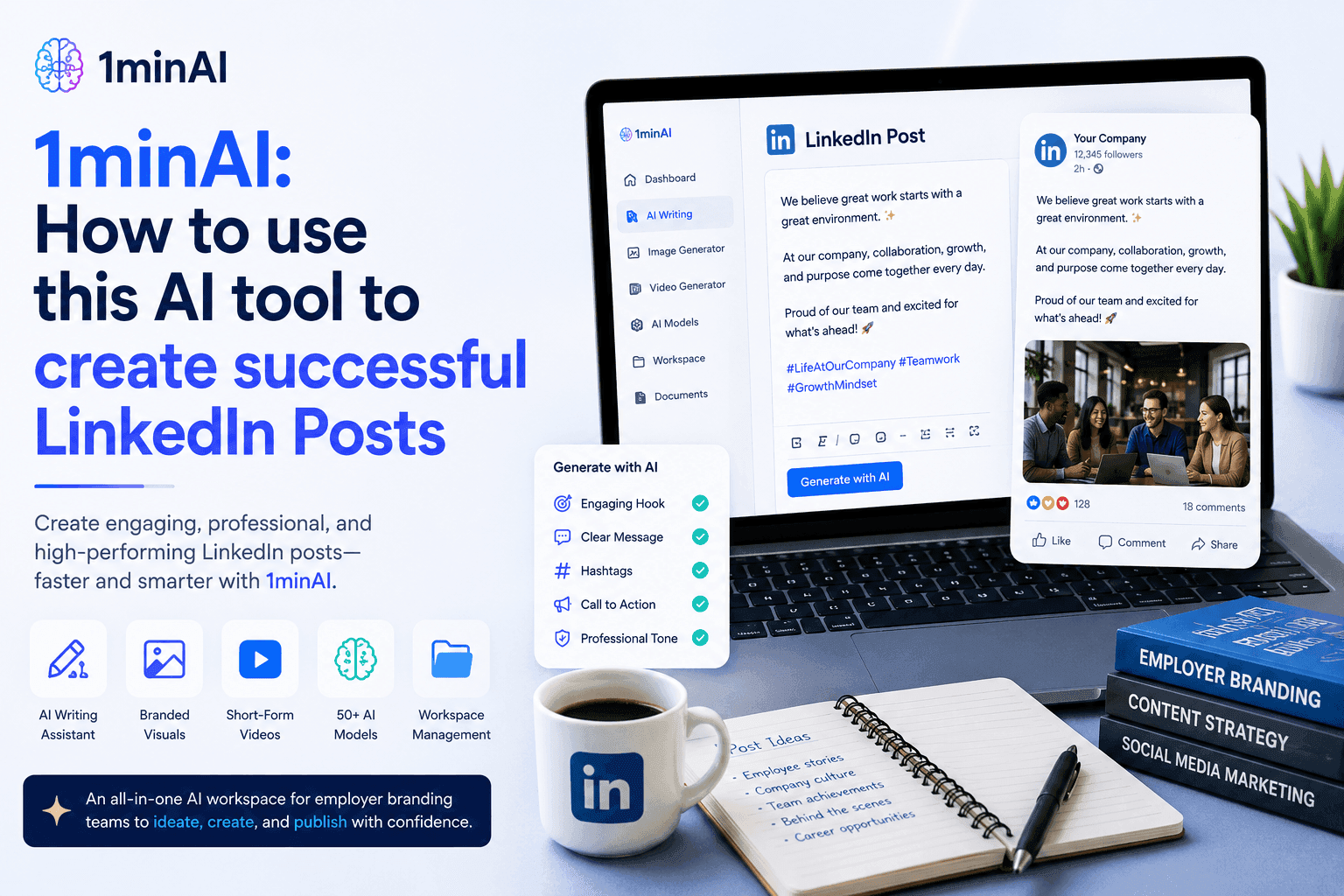
Learn how AI tools help HR teams create engaging LinkedIn employer branding posts with 1minAI. Follow this step-by-step guide to generate professional content faster.
For HR teams and employer branding specialists, LinkedIn is more than just another social media platform—it's where potential candidates form their first impression of your company. The challenge is that creating professional LinkedIn content consistently requires time, creativity, and strong copywriting skills.
That's where 1minAI's AI Content Generator makes a difference. Instead of writing every post from scratch, HR professionals can use this powerful AI tool to generate polished LinkedIn employer branding posts in just a few clicks. Simply choose the LinkedIn Post template, provide your topic, customize a few settings, and let AI produce a high-quality first draft ready for review and publishing. In this guide, you'll learn how to use 1minAI step by step to create LinkedIn posts that help your company build credibility, engage professionals, and strengthen its employer brand.
Why LinkedIn Is the Most Important Platform for Employer Branding
Today's job seekers don't just read job descriptions—they research the companies behind them. LinkedIn has become the go-to platform for professionals looking to evaluate potential employers, making it one of the most influential channels for employer branding.
An active LinkedIn presence helps organizations showcase what it's really like to work at the company. From employee achievements and workplace culture to learning opportunities and community initiatives, every post contributes to the perception of your employer brand.
Companies that consistently publish valuable LinkedIn content can:
- Increase brand recognition among professionals
- Build trust before candidates apply
- Highlight company culture and values
- Showcase employee success stories
- Strengthen thought leadership within their industry
- Improve recruitment marketing performance
For HR and employer branding teams, LinkedIn is no longer optional—it's an essential communication channel for attracting and engaging top talent.
Why Many HR Teams Struggle to Stay Consistent
Despite its importance, maintaining an active LinkedIn presence isn't always easy.
Common challenges include:
- Running out of fresh content ideas
- Finding time to write professional posts
- Maintaining a consistent brand voice
- Balancing recruitment with content creation
- Adapting messages for LinkedIn's professional audience
As a result, many company pages become inactive or publish only job openings, missing valuable opportunities to build relationships with future candidates.
Fortunately, AI tools can simplify the entire writing process.
Instead of starting with a blank page every time, HR teams can use 1minAI's AI Content Generator to quickly create professional LinkedIn posts tailored for employer branding. In the next section, we'll walk through the exact steps to generate engaging LinkedIn content using 1minAI.
How to Create Employer Branding LinkedIn Posts with 1minAI
Creating engaging employer branding content doesn't have to take hours. With 1minAI's AI Content Generator, HR teams can turn a simple idea into a polished LinkedIn post in just a few steps.
Instead of brainstorming, drafting, and editing from scratch, you simply choose the dedicated LinkedIn template, customize a few settings, and let AI generate a professional first draft that you can personalize before publishing.
Follow the workflow below.
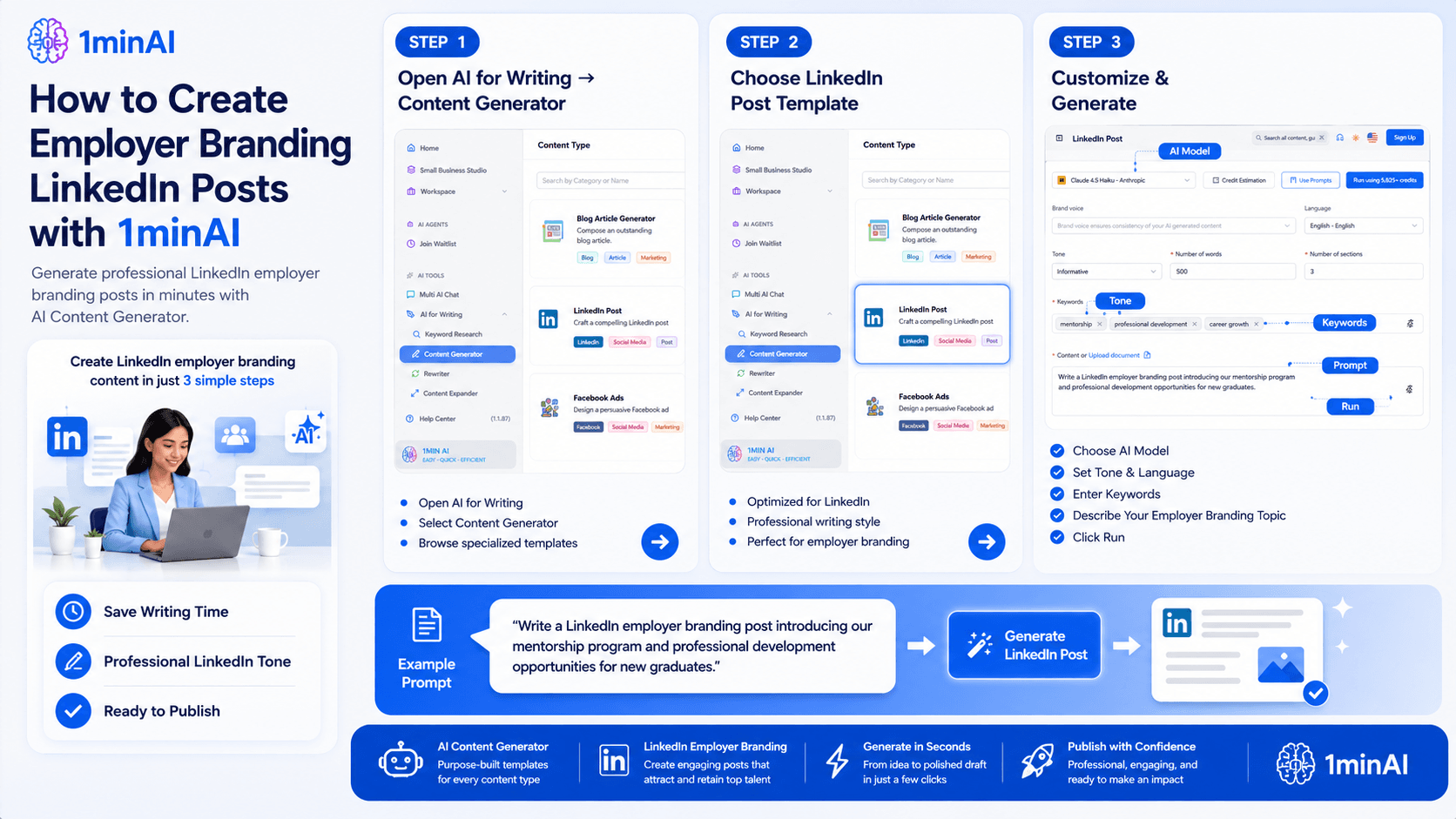
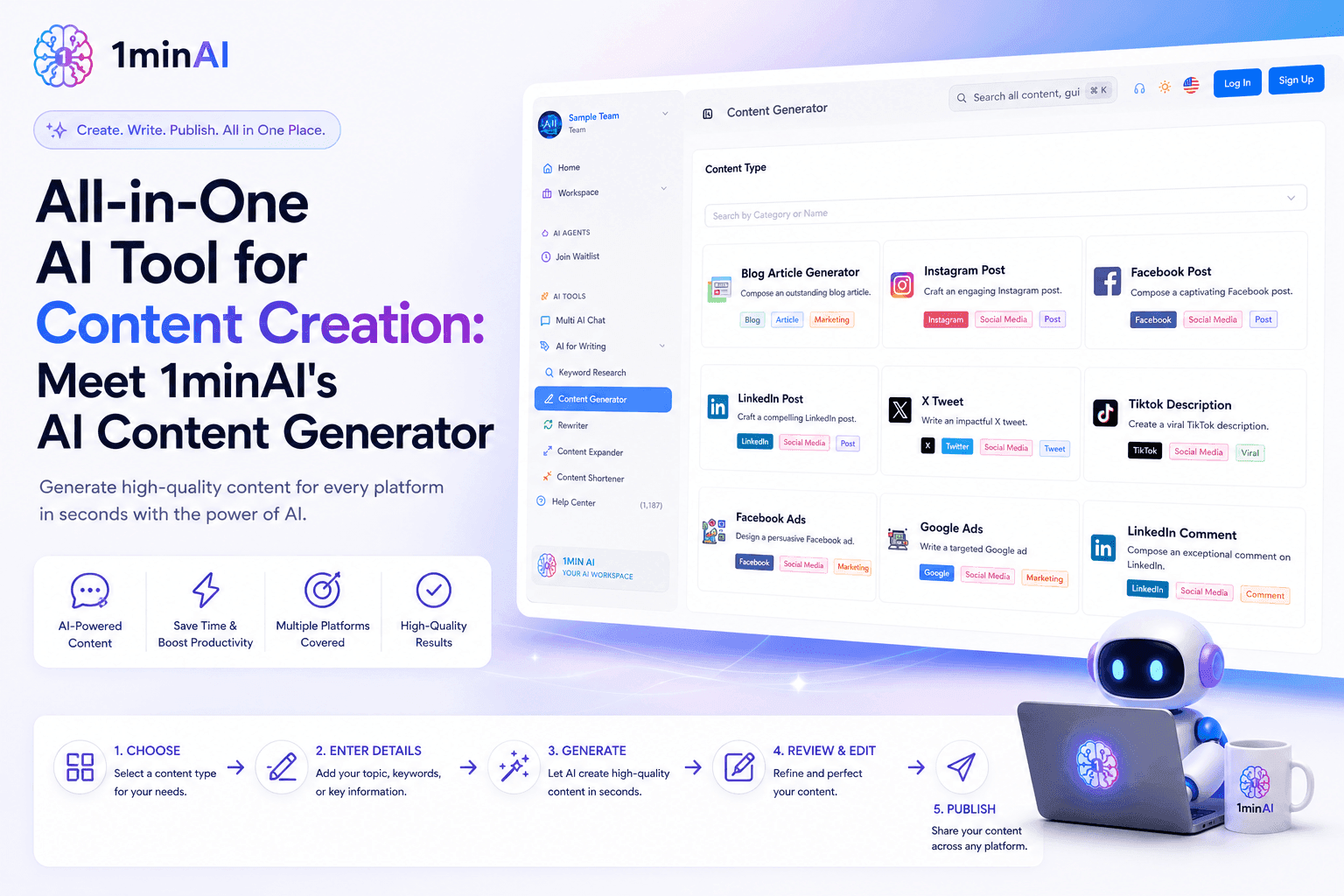
Step 1. Navigate to AI for Writing → Content Generator
After logging into 1minAI, open the left-hand navigation menu and select:
AI for Writing → Content Generator
The Content Generator is a collection of specialized AI writing templates designed for different business and marketing needs. Rather than using a generic chatbot, each template is optimized for a specific content format, helping you create better results with fewer prompts.
Within this section, you'll find generators for:
- Blog articles
- LinkedIn posts
- Facebook posts
- Instagram captions
- Google Ads
- Facebook Ads
- Email campaigns
- Brand voice
- And many other content formats
By organizing content into dedicated templates, 1minAI makes it easy to generate platform-specific content without worrying about formatting or writing style.
Step 2. Select the LinkedIn Post Template
Next, choose LinkedIn Post from the available content types.
Unlike a standard AI chat interface, this template is specifically built for LinkedIn's professional environment. It understands the structure, tone, and style that work best for employer branding content, allowing HR teams to create posts that feel natural and engaging.
The LinkedIn Post generator is ideal for creating content such as:
- Employee spotlights and success stories
- Company culture updates
- Hiring announcements
- Team celebrations
- Learning and development initiatives
- Workplace events
- CSR and community activities
- Leadership insights
- Employer branding campaigns
Using a dedicated template significantly reduces editing time because the AI already understands the intended platform and audience.
Step 3. Customize Your Content and Click Run
After selecting the LinkedIn Post generator, you'll see a simple configuration page where you can customize the output before generating your content.
Adjust the following settings based on your needs:
- AI Model – Choose the language model that best matches your preferred writing style.
- Language – Generate posts in your target language.
- Tone – Select an appropriate tone, such as Professional, Friendly, Inspirational, or Informative.
- Number of Words – Control the length of your LinkedIn post.
- Keywords – Include important employer branding or recruitment keywords to guide the AI.
- Content Prompt – Briefly describe what you'd like the AI to write.
For example, your prompt could be:
"Write a LinkedIn employer branding post introducing our mentorship program and professional development opportunities for new graduates."
Once you've completed the settings, click Run.
Within seconds, 1minAI generates a polished LinkedIn post that follows a professional structure and is ready for review. You can then personalize the draft by adding company-specific details, employee quotes, images, or your organization's unique voice before publishing it on LinkedIn.
Why This Workflow Works for Busy HR Teams
Creating LinkedIn content consistently is often more challenging than creating it once. HR professionals juggle recruitment, onboarding, employee engagement, and internal communications, leaving little time for writing social media posts from scratch.
With 1minAI, the entire process becomes much more efficient. Instead of staring at a blank page, you begin with a well-structured draft that you can quickly refine.
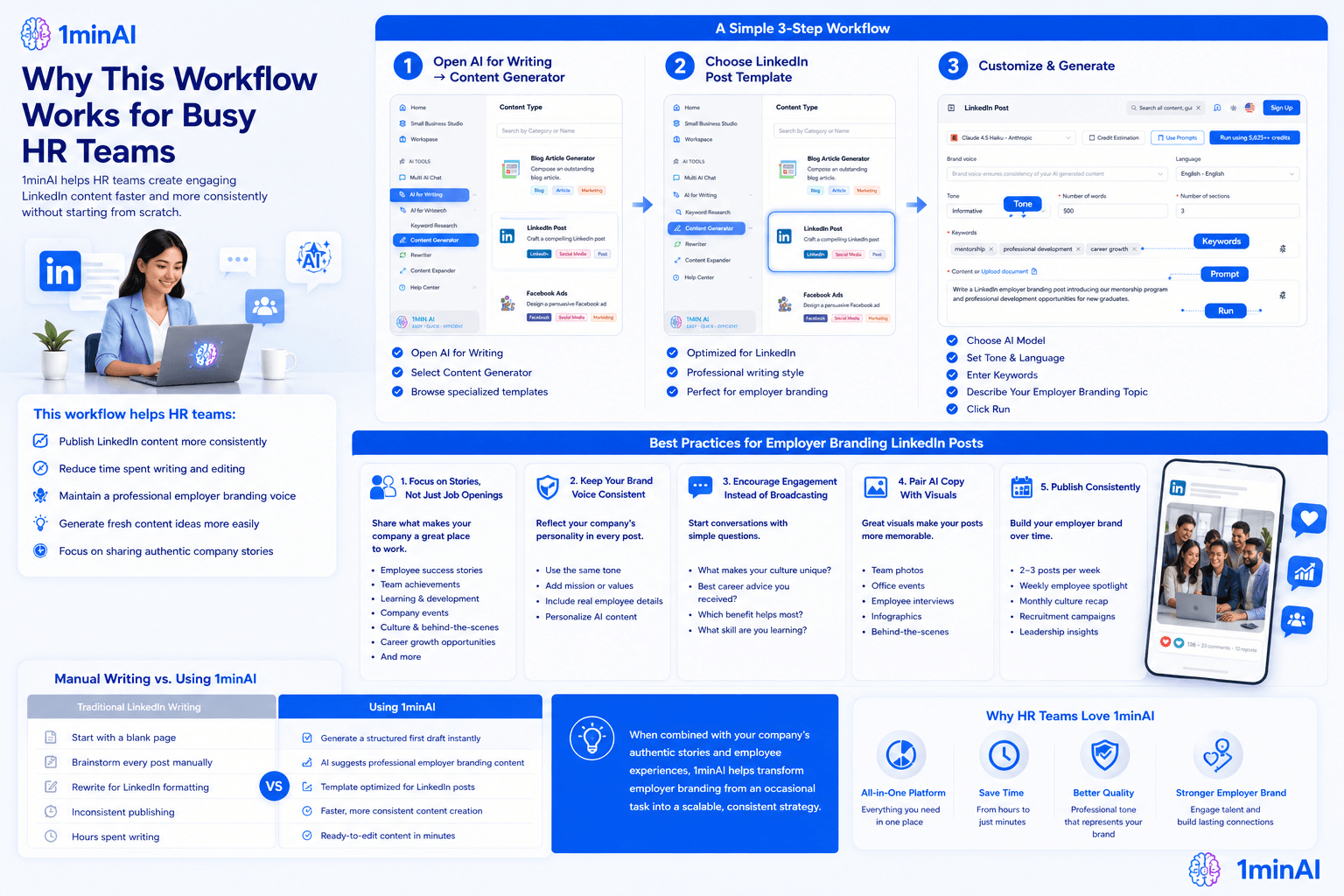
The result is a workflow that helps HR teams:
- Publish LinkedIn content more consistently
- Reduce time spent writing and editing
- Maintain a professional employer branding voice
- Generate fresh content ideas more easily
- Focus on sharing authentic company stories instead of formatting every post
By following these three simple steps, your team can spend less time creating content and more time building meaningful relationships with current and future employees.
Best Practices for Employer Branding LinkedIn Posts
Using AI can dramatically reduce the time it takes to create LinkedIn content, but the most effective employer branding posts combine AI efficiency with authentic company stories. Think of 1minAI as your writing assistant—it helps you build a professional first draft while you add the unique experiences and culture that make your organization stand out.
To maximize engagement and strengthen your employer brand, follow these best practices when creating LinkedIn posts.
Focus on Stories, Not Just Job Openings
Many companies only post when they're hiring. While recruitment announcements are important, candidates also want to understand what it's like to work at your organization.
Create a balanced content strategy by sharing:
- Employee success stories
- Team achievements
- Learning and development programs
- Company events
- Volunteer and CSR activities
- Workplace culture
- Leadership insights
- Employee testimonials
- Behind-the-scenes moments
- Career growth opportunities
These posts help candidates connect with your organization long before they apply.
Keep Your Brand Voice Consistent
Whether your company is innovative, professional, friendly, or people-first, every LinkedIn post should reflect that personality.
When generating content with 1minAI:
- Use the same tone across all employer branding posts.
- Add your company's mission or values where appropriate.
- Include real employee names, departments, or achievements.
- Personalize AI-generated content with authentic details.
Consistency helps build recognition and trust over time.
Encourage Engagement Instead of Broadcasting
The best LinkedIn posts start conversations rather than simply delivering announcements.
Consider ending your posts with questions such as:
- What makes your workplace culture unique?
- What's the best career advice you've received?
- Which employee benefit has made the biggest difference for you?
- What professional skill are you learning this year?
Small engagement prompts can significantly increase comments and visibility within LinkedIn's algorithm.
Pair AI-Generated Copy With Visual Content
Strong visuals make employer branding posts more memorable.
After generating your LinkedIn copy with 1minAI, pair it with:
- Team photos
- Office events
- Employee interviews
- Workplace celebrations
- Infographics
- Company milestone graphics
- Behind-the-scenes images
Combining compelling visuals with well-written content helps your posts capture attention as professionals scroll through their feeds.
Publish Consistently
Employer branding is built over time—not through a single viral post.
Aim for a regular publishing schedule, such as:
- 2–3 employer branding posts each week
- Weekly employee spotlight
- Monthly culture recap
- Recruitment campaigns when positions open
- Leadership or industry insight posts every month
Because 1minAI can generate high-quality drafts in minutes, maintaining a consistent content calendar becomes much more manageable for busy HR and employer branding teams.
Manual Writing vs. Using 1minAI
| Traditional LinkedIn Writing | Using 1minAI |
|---|---|
| Start with a blank page | Generate a structured first draft instantly |
| Brainstorm every post manually | AI suggests professional employer branding content |
| Rewrite for LinkedIn formatting | Template optimized for LinkedIn posts |
| Inconsistent publishing | Faster, more consistent content creation |
| Hours spent writing | Ready-to-edit content in minutes |
When combined with your company's authentic stories and employee experiences, 1minAI helps transform employer branding from an occasional task into a scalable, consistent strategy.
Conclusion
Build a Stronger Employer Brand With 1minAI
Creating engaging LinkedIn content doesn't have to compete with your recruitment priorities. With 1minAI's AI Content Generator, HR teams can quickly produce professional LinkedIn posts that showcase company culture, celebrate employees, and strengthen employer branding—all without starting from scratch.
Whether you're sharing hiring updates, employee success stories, workplace initiatives, or leadership insights, 1minAI helps you create polished content faster so you can focus on attracting and engaging top talent.
Start Creating Better LinkedIn Employer Branding Posts Today
Use 1minAI's AI Content Generator to turn simple ideas into professional LinkedIn posts in minutes. Choose the dedicated LinkedIn Post template, customize your tone and content, and generate engaging employer branding posts that help increase brand recognition, build trust with candidates, and attract top talent—all from one powerful AI tool.
👉 Discover All AI Features: https://1min.ai/features
👉 View Latest Product Updates: https://1min.ai/changelog