
Free Essay Writer: Best AI Tools to Write Better Essays in 2026

Tram Ta
23 September 2026
Looking for a free essay writer? Explore the best AI essay writing tools in 2026 for brainstorming, outlining, drafting, expanding, grammar checking, and editing.
Writing an essay from a blank page can take hours. You need to understand the topic, develop a thesis, organize your argument, write supporting paragraphs, check grammar, and revise everything before submitting.
In 2026, an AI essay writer can make many of these steps faster. Modern AI tools can help you brainstorm ideas, create an outline, develop a rough draft, improve paragraphs, expand underdeveloped arguments, and polish grammar.
However, the most useful approach is not simply asking AI to generate an entire essay and submitting the result. AI works better as a writing assistant that helps you move from idea → outline → draft → revision → final essay while you remain responsible for the argument, evidence, and final wording. OpenAI's current guidance for students similarly emphasizes using AI to support revision, structure, and clarity while keeping ownership of the underlying ideas.
Here are some of the best AI tools and workflows to consider if you're looking for a free essay writer in 2026.
What Is an AI Essay Writer?
An AI essay writer is a writing tool powered by artificial intelligence that can help create or improve essay content from instructions.
Depending on the tool, you may be able to provide:
- An essay topic
- Your thesis or research question
- Essay type
- Academic level
- Desired word count
- Notes or source material
- Required tone or writing style
- Citation or formatting requirements
The AI can then help generate an outline, suggest arguments, draft sections, rewrite paragraphs, or provide editing suggestions.
There is an important distinction between AI essay generation and AI-assisted essay writing.
A generator may produce a complete essay from a short prompt. An AI writing assistant can instead help you work through individual stages of the assignment. For academic work, the second workflow gives you more opportunities to check facts, replace weak arguments, add your own analysis, and make sure the final essay actually reflects your understanding.
This matters because fluent AI-generated text can still contain unsupported claims, inaccurate information, or citations that need verification. Current AI-writing guidance recommends reviewing generated material rather than treating it as a final authority.
5 Best AI Essay Writer Tools and Workflows in 2026
Different AI tools are useful at different stages of essay writing. Instead of looking only for a tool that can generate the most words, consider what part of the writing process you need help with.
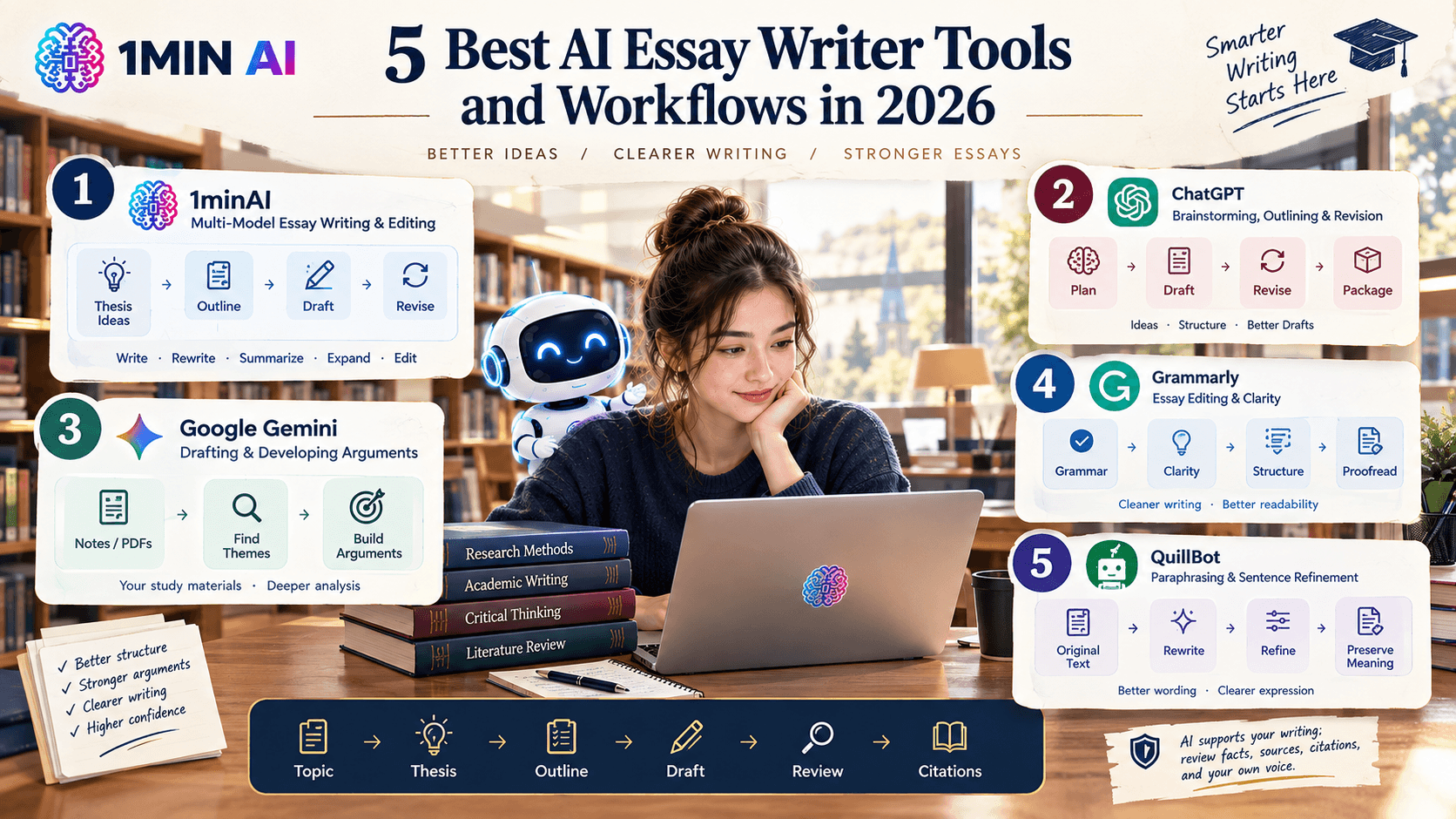
1. 1minAI — Multi-Model Essay Writing and Editing
Best for: Writing, brainstorming, rewriting, expanding, and editing in one workspace.
1minAI can be useful when you want more than a basic one-click essay generator. Its AI writing tools can support different stages of the writing process, including drafting, rewriting, summarizing, expanding, and refining content.
One advantage of a multi-model workspace is that you can experiment with different AI models rather than relying on one response. For an essay, this can be useful when you want to generate several thesis ideas, compare outlines, or ask for alternative ways to explain the same argument.
A practical workflow is:
- Start with your assignment topic.
- Ask AI to generate possible thesis directions.
- Select and refine your own thesis.
- Build an outline.
- Draft one section at a time.
- Review the argument and evidence.
- Expand sections that lack explanation.
- Run a grammar and clarity check.
Prompt quality also matters. Instead of simply typing “write an essay about climate change,” provide the topic, audience, academic level, essay type, argument, and desired structure. Clear prompts give AI more useful context and make the resulting draft easier to revise.
For more examples, you can also explore these AI chat prompts for writing, research, brainstorming, and studying and adapt the same prompting principles to your essay assignment.
1minAI's Free AI Content Expander is designed for this type of workflow. It can expand short paragraphs, rough drafts, or outlines while attempting to preserve the original meaning, tone, and structure. Its stated use cases specifically include academic writing, essays, research papers, case studies, and reports.
The key is to expand ideas, not simply add words. A longer paragraph is not automatically a better paragraph. Ask AI to add useful explanation or analysis rather than filler.
2. ChatGPT — Brainstorming, Outlining, and Revision
Best for: Flexible essay planning and iterative writing support.
ChatGPT can help with several parts of the essay process rather than only generating paragraphs.
For example, you can ask it to:
- Brainstorm thesis ideas
- Explain a difficult topic
- Create an essay outline
- Identify gaps in your argument
- Improve topic sentences
- Rewrite awkward paragraphs
- Suggest transitions
- Give feedback on structure
- Turn notes into a rough draft
OpenAI's current writing guidance recommends a workflow of Plan → Draft → Revise → Package, with specific instructions and constraints at each stage.
A useful essay prompt might be:
Prompt:
“I'm writing a 1,500-word argumentative essay about [topic]. My position is [thesis]. Help me create a detailed outline with an introduction, three main arguments, counterargument, rebuttal, and conclusion. For each body section, suggest what evidence I should look for. Do not invent sources.”
This approach gives you a structure to work with before you start writing.
3. Google Gemini — Drafting and Developing Arguments
Best for: First drafts, argument development, and working with study materials.
Google describes Gemini as a writing assistant that can help users get to a first draft, work on arguments, and fine-tune ideas. Its current student-oriented tools also support working with uploaded documents and study materials.
This makes Gemini useful when your essay starts with existing material such as:
- Lecture notes
- Class readings
- Research notes
- PDFs
- Assignment instructions
- Study guides
Instead of asking it to immediately write your final essay, you can upload relevant material and ask it to identify the major themes first.
For example:
Prompt:
“Analyze these notes and identify the three strongest arguments I could develop into an essay about [topic]. For each argument, list the supporting evidence already present in my notes and identify what additional evidence I should research.”
That gives you a research roadmap rather than a generic essay.
4. Grammarly — Essay Editing and Clarity
Best for: Grammar, spelling, sentence clarity, and final proofreading.
Even a well-structured essay can lose quality because of small writing problems. Long assignments often contain repeated words, awkward sentences, punctuation mistakes, inconsistent wording, and unclear transitions.
An AI grammar checker can help identify these issues before you submit your work.
For example, after completing your essay, you can review:
- Grammar
- Spelling
- Punctuation
- Sentence structure
- Word choice
- Clarity
- Readability
The important point is to distinguish editing from rewriting. You don't necessarily want an AI tool to transform your entire essay into a completely different voice. Often, targeted corrections are more useful because they preserve your original argument and writing style.
For a free option, you can also use the 1minAI Free AI Grammar Checker to identify grammar, spelling, punctuation, and sentence-structure problems before your final review. 1minAI's tool lets you paste your writing, select an AI model, run the check, and review suggested improvements.
5. QuillBot — Paraphrasing and Sentence Refinement
Best for: Reworking sentences and improving readability.
Sometimes your essay contains the right idea but the sentence doesn't communicate it clearly.
A paraphrasing tool can help you experiment with different wording while keeping the underlying idea intact.
For example, you might have a sentence that is: “The development of technology has made communication better but it also creates some problems for people.”
You could ask an AI writing tool to produce several alternatives and then choose the version that most accurately represents what you mean.
Use this type of tool carefully. Paraphrasing should not be used to disguise copied material or remove the need for proper attribution. When an idea comes from a source, you still need to follow the citation requirements for your assignment.
How to Use a Free Essay Writer Without Losing Your Own Voice
The fastest workflow is not always the best workflow.
Instead of: Topic → AI → Complete Essay → Submit
try: Topic → Brainstorm → Thesis → Outline → Draft → AI Feedback → Revision → Final Review
This gives you more control over the final result.
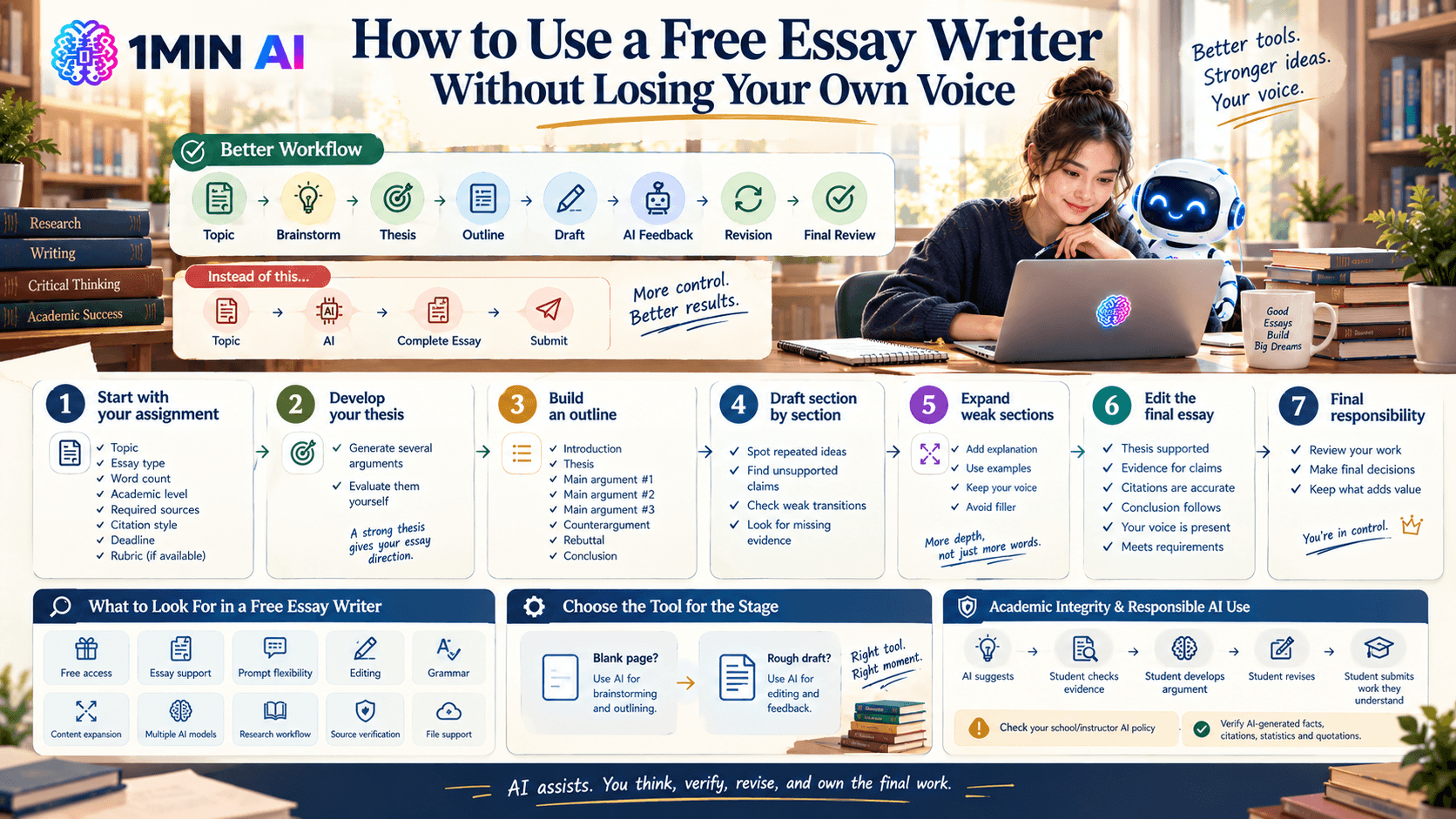
Step 1: Start with your assignment
Give AI the actual assignment requirements.
Include:
- Topic
- Essay type
- Word count
- Academic level
- Required sources
- Citation style
- Deadline
- Rubric, if available
Step 2: Develop your thesis
Ask AI for several possible arguments rather than accepting the first answer.
Then evaluate them yourself.
A strong thesis should give your essay a clear direction. If you cannot explain why you believe the argument, the AI-generated thesis probably needs more work.
Step 3: Build an outline
Create a structure before drafting.
For a basic argumentative essay, this might look like:
- Introduction
- Thesis
- Main argument #1
- Main argument #2
- Main argument #3
- Counterargument
- Rebuttal
- Conclusion
Step 4: Draft section by section
Rather than generating 2,000 words at once, work through the essay in smaller sections.
This makes it easier to spot:
- Repeated ideas
- Unsupported claims
- Weak transitions
- Missing evidence
- Incorrect assumptions
Step 5: Expand weak sections
If one paragraph contains a strong idea but little explanation, use an AI content expander to develop the reasoning.
Ask for additional context or examples rather than generic filler.
Step 6: Edit the final essay
Run a grammar and clarity check, then read the essay yourself.
Check whether:
- The thesis is actually supported.
- Every major claim has appropriate evidence.
- Citations are accurate.
- The conclusion follows from the argument.
- The writing sounds like you.
- The essay follows your instructor's requirements.
Free Essay Writer: What Should You Look For?
Not every tool marketed as a free essay writer works the same way. Some focus on complete drafts, while others are better for research, editing, or brainstorming.
Before choosing a tool, consider these factors:
| Feature | Why It Matters |
|---|---|
| Free access | Useful if you only need occasional writing assistance |
| Essay support | Helps structure arguments instead of producing generic text |
| Prompt flexibility | Lets you control topic, audience, tone, and format |
| Editing tools | Useful after the first draft is complete |
| Grammar checking | Helps catch language and punctuation problems |
| Content expansion | Useful for underdeveloped paragraphs |
| Multiple AI models | Lets you compare different responses |
| Research workflow | Important for evidence-heavy assignments |
| Source verification | Helps reduce the risk of unsupported claims |
| File support | Useful when your essay starts from notes or documents |
A good free essay writer should fit the specific stage of writing you're struggling with. If you already have a strong draft, you may need an editor rather than an essay generator. If you're staring at a blank page, brainstorming and outlining may be more valuable than generating 2,000 words immediately.
Academic Integrity and AI Essay Writers
Before using an AI essay writer for an assignment, check your school's or instructor's AI policy.
Policies can differ. Some assignments may allow AI for brainstorming or editing but restrict the use of generated text. Others may require disclosure of AI assistance.
You should also avoid treating AI-generated citations, statistics, quotations, or factual claims as automatically correct.
A responsible workflow keeps the student in control:
AI generates suggestions → Student checks evidence → Student develops the argument → Student revises → Student submits work they understand
This is also consistent with current guidance from OpenAI Academy, which recommends using AI to support revision and writing development while retaining responsibility for the final academic work.
Why 1minAI Can Be Useful for Essay Writing
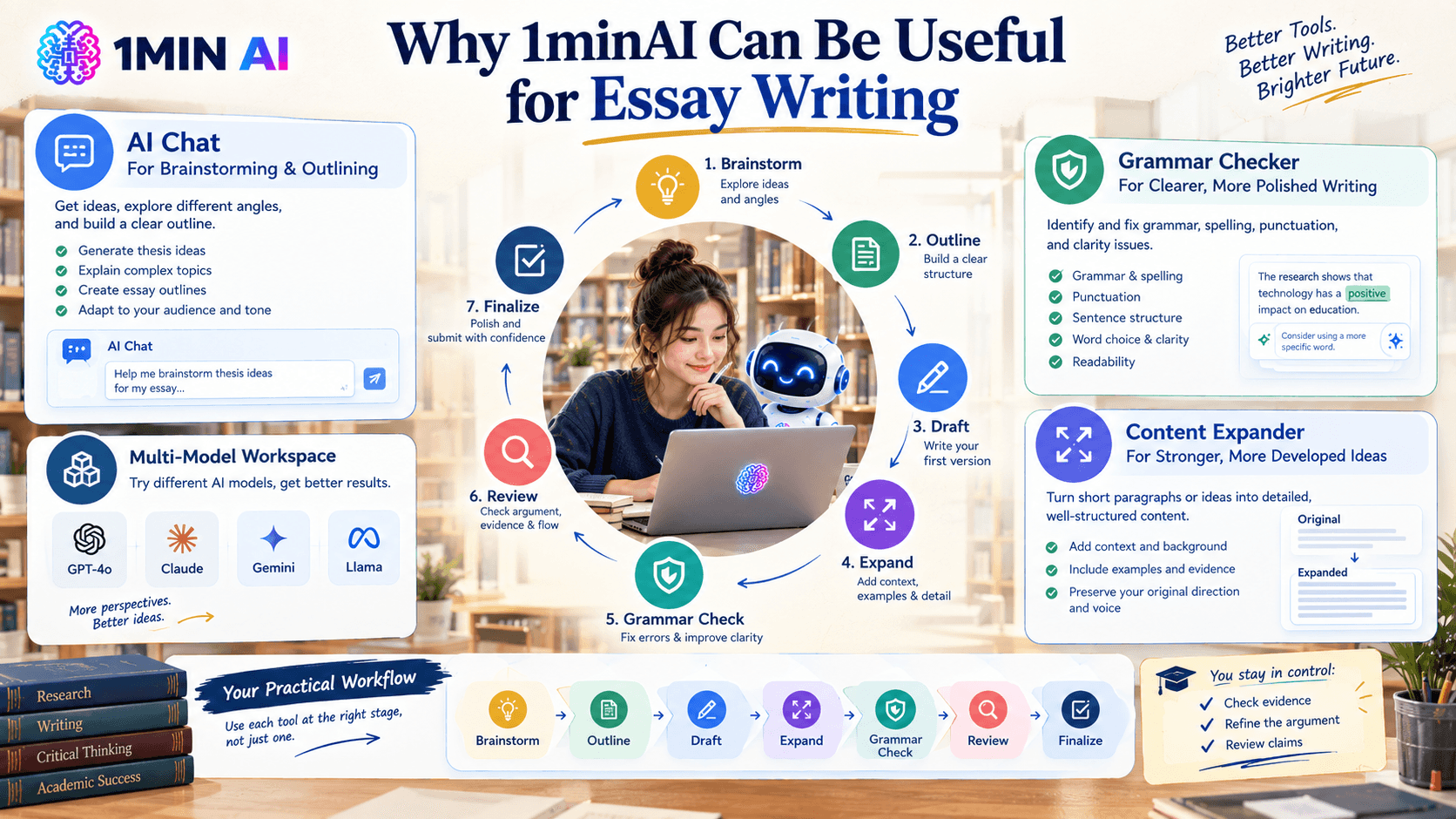
If you want a free essay writer workflow rather than a single-purpose generator, 1minAI can bring several writing tasks together in one workspace.
You can use AI chat for brainstorming and outlining, then move into writing and editing tools as your essay develops. The AI chat prompt guide can help you create clearer prompts for research, writing, summarization, brainstorming, and studying.
Once you have a draft, the Free AI Grammar Checker can help identify grammar, spelling, punctuation, and clarity issues.
If a paragraph is too short or an argument needs more explanation, the Free AI Content Expander can help develop the existing material with additional context, examples, and supporting detail while preserving the original direction of the draft.
That creates a practical essay workflow:
Brainstorm → Outline → Draft → Expand → Grammar Check → Review → Finalize
The advantage is that you're not forced to use one tool for every stage. You can choose the AI workflow based on what your essay needs at each point.
Conclusion
A free essay writer can save time, but the most useful AI essay workflow goes beyond generating a complete paper.
Use AI to overcome writer's block, develop thesis ideas, organize an outline, improve difficult paragraphs, expand explanations, and catch grammar problems. Then bring your own judgment into the process by checking evidence, refining the argument, and reviewing every important claim.
In 2026, the strongest use of AI for essay writing is not simply producing more words faster. It is making the writing process more structured, iterative, and manageable while keeping the final work under your control.
For further information, explore 10+ Best AI Chat Prompts to Get Better Answers From GPT-3.5
Discover more AI features: https://1min.ai/features
Try 1minAI agent now: https://app.1min.ai/ai-agent-demo
Alternatives
Discover the best alternatives to 1minAI and compare features, pricing, and use cases.

1min.AI vs OpenRouter
1min.AI vs. OpenRouter: Compare the ready-to-use AI creation product against the technical API tool. Find out if you need a zero-code creative studio or a coding infrastructure hub.
 Ngoc Hong
1min.AI vs Easy Peasy AI
Looking for an Easy Peasy AI alternative? Compare Easy Peasy AI and 1min.AI for content workflows, AI models, and professional teams.
Ngoc Hong
1min.AI vs Taskade
Compare 1min.AI vs Taskade for AI content creation, automation, agents, and creative workflows to find the right workspace.
Ngoc HongAI Tools
Discover the best AI tools to boost productivity, creativity, and everyday work.

Create Consistent Cartoon Content in Just a Few Steps
Create engaging cartoon videos for TikTok and Reels with 1min.AI. Research ideas, create characters, and turn images into animated videos in 3 simple steps.
 Lien Anh Vu
One Product, 10 UGC Creatives: How AI Makes Content Testing Easier
Create more authentic UGC with an AI UGC video generator, test more creative angles and scale affiliate content without filming every version.
Lien Anh Vu
Top 4 Affordable AI Tools for Startup Founders
Discover the top 4 affordable AI tools for startup founders to validate ideas, build products, create content, and launch faster without overspending.
 Tram Ta
AI Features
Comprehensive AI features that streamline workflows, improve efficiency, and empower teams to achieve more.
Create Consistent Cartoon Content in Just a Few Steps
Create engaging cartoon videos for TikTok and Reels with 1min.AI. Research ideas, create characters, and turn images into animated videos in 3 simple steps.
Lien Anh VuOne Product, 10 UGC Creatives: How AI Makes Content Testing Easier
Create more authentic UGC with an AI UGC video generator, test more creative angles and scale affiliate content without filming every version.
Lien Anh Vu
1minAI: Free AI Grammar Checker
Check grammar for free with 1minAI’s AI grammar checker. Find grammar, spelling, and writing mistakes, improve clarity, and polish your content in seconds.
Tram TaAI Use Cases
A curated collection of AI use cases for business, productivity, and industry-specific applications.
Create Consistent Cartoon Content in Just a Few Steps
Create engaging cartoon videos for TikTok and Reels with 1min.AI. Research ideas, create characters, and turn images into animated videos in 3 simple steps.
Lien Anh VuOne Product, 10 UGC Creatives: How AI Makes Content Testing Easier
Create more authentic UGC with an AI UGC video generator, test more creative angles and scale affiliate content without filming every version.
Lien Anh Vu
Best Time to Post on Instagram: A Practical Guide for Better Engagement
Discover the best time to post on Instagram, including the best days and times for different audiences, plus tips to find the ideal posting schedule for your account.
Tram TaAI Tutorials
Learn how to use AI with practical, step-by-step tutorials.
Create Consistent Cartoon Content in Just a Few Steps
Create engaging cartoon videos for TikTok and Reels with 1min.AI. Research ideas, create characters, and turn images into animated videos in 3 simple steps.
Lien Anh Vu
Black Friday AI Tool Deals in 2026
Discover what Black Friday AI tool deals 2026 has to offer. Find out how to secure the 1min.AI lifetime deal via AppSumo, Dealify, Stack Social, and verify on Trustpilot, Slashdot, and Software Advice.
 Hang Nguyen
[Seedance 2.5 New] Better AI Product Videos, Less Rework in 1min.AI
Discover how AI image-to-video product consistency helps creators reduce failed generations, save AI credits, and produce more usable commercial and UGC content.
Lien Anh VuAI Guides
Learn AI faster with practical guides, real-world examples, and actionable best practices.
Create Consistent Cartoon Content in Just a Few Steps
Create engaging cartoon videos for TikTok and Reels with 1min.AI. Research ideas, create characters, and turn images into animated videos in 3 simple steps.
Lien Anh Vu
Safely Buy AI Tools Online: 2026 Black Friday Guide
Discover how to find and secure the best Black Friday AI deals online. Learn expert strategies to avoid scams, combat subscription fatigue, and verify software.
Hang Nguyen[Seedance 2.5 New] Better AI Product Videos, Less Rework in 1min.AI
Discover how AI image-to-video product consistency helps creators reduce failed generations, save AI credits, and produce more usable commercial and UGC content.
Lien Anh VuAI Solutions
Browse the best AI solutions for automation, coding, research, productivity, customer support, marketing, and business workflows.
Create Consistent Cartoon Content in Just a Few Steps
Create engaging cartoon videos for TikTok and Reels with 1min.AI. Research ideas, create characters, and turn images into animated videos in 3 simple steps.
Lien Anh VuOne Product, 10 UGC Creatives: How AI Makes Content Testing Easier
Create more authentic UGC with an AI UGC video generator, test more creative angles and scale affiliate content without filming every version.
Lien Anh Vu
Free AI Tattoo Generator: Custom Designs
Turn any idea into a custom tattoo design with 1min.AI's free AI tattoo generator. Describe your idea, pick a style, and download in seconds.
 Trang Tran
AI Models
Explore the world's leading AI models in one place.
Create Consistent Cartoon Content in Just a Few Steps
Create engaging cartoon videos for TikTok and Reels with 1min.AI. Research ideas, create characters, and turn images into animated videos in 3 simple steps.
Lien Anh VuOne Product, 10 UGC Creatives: How AI Makes Content Testing Easier
Create more authentic UGC with an AI UGC video generator, test more creative angles and scale affiliate content without filming every version.
Lien Anh Vu[Seedance 2.5 New] Better AI Product Videos, Less Rework in 1min.AI
Discover how AI image-to-video product consistency helps creators reduce failed generations, save AI credits, and produce more usable commercial and UGC content.
Lien Anh VuAI Comparisons
Compare AI tools, models, and platforms to find the best fit for your needs.

Kling AI Vs Veo 3: Which Model Wins?
Kling AI vs Veo 3: compare motion, native audio, pricing & free tiers to see which AI video generator wins for your project - try both on 1min.AI.
Trang Tran[Seedance 2.5 New] Better AI Product Videos, Less Rework in 1min.AI
Discover how AI image-to-video product consistency helps creators reduce failed generations, save AI credits, and produce more usable commercial and UGC content.
Lien Anh Vu
DeepSeek V4 Pro vs Flash Comparison
Compare DeepSeek V4 Pro vs DeepSeek V4 Flash metrics. Optimize your agentic apps and improve AI fact checking on 1min.ai today.
Ngoc HongAI Integrations
Seamlessly integrate AI with the tools you already use to automate work and boost productivity.

POV: You Have 10+ Posts to Make Every Day
Learn how to build an AI content workflow that helps content creators produce 10+ social media posts a day faster with AI brainstorming, image generation, and content creation.
Lien Anh Vu
How to Use an AI Fashion Video Generator for Fashion Week 2026
Turn Fashion Week 2026 ideas into stunning fashion videos with AI. Learn how to brainstorm, create visuals, and transform images into videos with one simple workflow.
Lien Anh Vu
Stop Switching Between AI Apps: How AI Integration Transforms Employer Branding
Discover how AI integration helps HR teams streamline employer branding by combining AI writing, documents, images, video, and multiple AI models into one workspace.
Tram TaAI for Industries
Find the best AI tools and workflows for healthcare, finance, education, legal, manufacturing, retail, real estate, and more

Free AI Real Estate Video Generator
Turn listing photos into narrated property videos with AI real estate video tools. See how 1min.AI creates walkthroughs, voiceovers & captions in minutes.
Trang Tran
Free AI Virtual Staging: Furnish Any Room
Stage any real estate listing with AI virtual staging: upload a photo, pick a style, and get a photorealistic furnished room in seconds, free to try.
Trang Tran
The Problem With AI Design? It Looks Too AI
AI-generated designs can look polished but still feel artificial. Here are 5 prompt techniques designers can use to create more realistic, intentional visuals.
Lien Anh VuAI Agents
Discover and run AI agents to automate tasks across your work and daily life.
1minAI: Free AI Grammar Checker
Check grammar for free with 1minAI’s AI grammar checker. Find grammar, spelling, and writing mistakes, improve clarity, and polish your content in seconds.
Tram Ta
AI Agents for Facebook
Use an AI Agent for Facebook to create content, generate images, schedule posts, and publish from your documents and conversations.
Ngoc Hong
AI Agent vs AI Assistant: Which One Actually Saves Designers More Time?
Learn the difference between AI Agent vs AI Assistant and discover which solution helps designers automate repetitive work, reduce revisions, and save more time.
Lien Anh VuAI Workflows
Explore ready-to-use AI workflows for productivity, marketing, sales, support, and more.
Create Consistent Cartoon Content in Just a Few Steps
Create engaging cartoon videos for TikTok and Reels with 1min.AI. Research ideas, create characters, and turn images into animated videos in 3 simple steps.
Lien Anh VuOne Product, 10 UGC Creatives: How AI Makes Content Testing Easier
Create more authentic UGC with an AI UGC video generator, test more creative angles and scale affiliate content without filming every version.
Lien Anh VuPOV: You Have 10+ Posts to Make Every Day
Learn how to build an AI content workflow that helps content creators produce 10+ social media posts a day faster with AI brainstorming, image generation, and content creation.
Lien Anh VuNewsletter
Weekly AI Innovations with 1minAI

🔮 Weekly AI Innovations #138: Claude Sonnet 5, Fable 5 & Wan 2.7
Explode your creative potential with massive 1min.ai updates! Access Claude Sonnet 5, Fable 5, and Alibaba Wan 2.7 for unmatched multi-modal generation today.
Hang Nguyen
🔮 Weekly AI Innovations #137: ElevenLabs Music & AI social Profile Control
The newest 1min.ai updates deliver professional music generation and highly requested privacy tools. Dive into a seamless workflow today!
Hang Nguyen
🔮 Weekly AI Innovations #136: Grok 4.6 and Smart Data Retention
Discover the latest 1min.ai updates! Upgrade to Grok 4.6 for blazing-fast AI, and check our new Data Retention policies to secure your files today.
Hang Nguyen