
1min.AI vs Easy Peasy AI

Ngoc Hong
21 September 2026

Looking for an Easy Peasy AI alternative? Compare Easy Peasy AI and 1min.AI for content workflows, AI models, and professional teams.
Easy Peasy AI Alternative: When Fun Tools Aren’t Enough for Serious Content Teams
Easy Peasy AI is an all-in-one AI platform that brings together writing tools, image generation, video creation, research, AI agents, and automated workflows. Its broad selection of tools serves users across personal, creative, and professional use cases.
You can use AI to solve a riddle, write a love letter, generate a property description, create an image, or produce a video. These specialized tools make it easier to complete individual tasks without building every prompt from scratch.
But what happens when your needs go beyond one-off tasks?
Writing one property description is different from managing content for 50 properties. Creating one social media image is different from producing a complete campaign with consistent messaging, visuals, videos, and publishing assets.
That is where an Easy Peasy AI alternative such as 1min.AI becomes worth exploring. Both platforms offer broad AI capabilities, but their workflows may suit different users. Easy Peasy AI provides an extensive collection of templates and creative tools, while 1min.AI focuses on combining multiple AI models and productivity features in one workspace.
This guide compares both platforms through practical use cases and explains when each option may fit your needs.
What Is Easy Peasy AI Designed For?
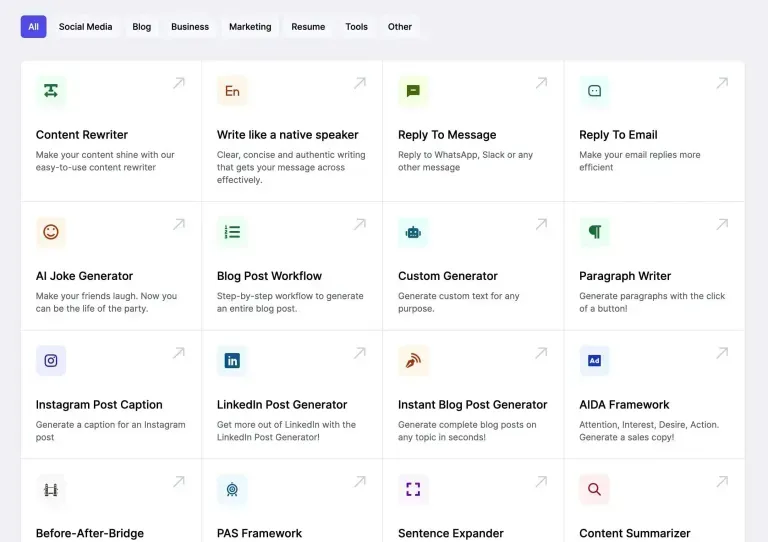
Easy Peasy AI is built as a broad AI studio rather than a single-purpose writing or chatbot tool. Its platform includes AI models, content templates, image and video generation, audio tools, research features, AI agents, and workflow automation.
Its use cases can be grouped into three main categories.
1. Entertainment and personal tasks
Easy Peasy AI supports a wide range of specialized writing and creative tools. Users may search for use cases such as a riddle solver, love letter generator, rhyme generator, or fake news article maker.
These tools are useful when the goal is to complete a simple task quickly. For example, someone might want to generate a playful poem, create a fictional news story, or find ideas for a personal message.
This category does not necessarily need to be replaced. Specialized templates can be convenient for users who want a fast result without designing a detailed prompt.
The main consideration is whether these individual tools can support your workflow as your content requirements become more complex.
2. Visual and educational content
AI image tools can support educational diagrams, cartoon illustrations, coloring pages, and other visual projects. Examples include a heart diagram, human lungs diagram, cartoon girl, or ladybug coloring page.
These use cases may be helpful for teachers, parents, students, and creators who need simple visual assets for a specific purpose.
However, visual content requirements vary significantly. An educational illustration may need a clear layout and accurate labels, while a commercial campaign may require brand consistency, product presentation, multiple formats, and video assets.
Easy Peasy AI also provides broader image and video capabilities. Therefore, the comparison should focus on output quality, model selection, creative control, workflow requirements, and usage limits rather than assuming that the platform only supports simple static images.
3. B2B and professional writing
Easy Peasy AI also supports professional writing tasks through templates and AI models. Users may search for tools related to:
-
Case study generation.
-
AI property descriptions.
-
Real estate listing descriptions.
-
Executive summaries.
-
Document expansion.
-
Business writing.
-
Research and content creation.
These tools can be useful when the user needs a fast first draft. A property manager, freelancer, or small business owner may only need a few descriptions or summaries at a time.
However, professional content teams often need more than individual outputs. They may also need to manage brand guidelines, research sources, review content, create supporting visuals, and repurpose content across several channels.
As the volume of content increases, the workflow connecting these tasks becomes just as important as the generation tool itself.
The Challenge of a Tool-by-Tool Workflow
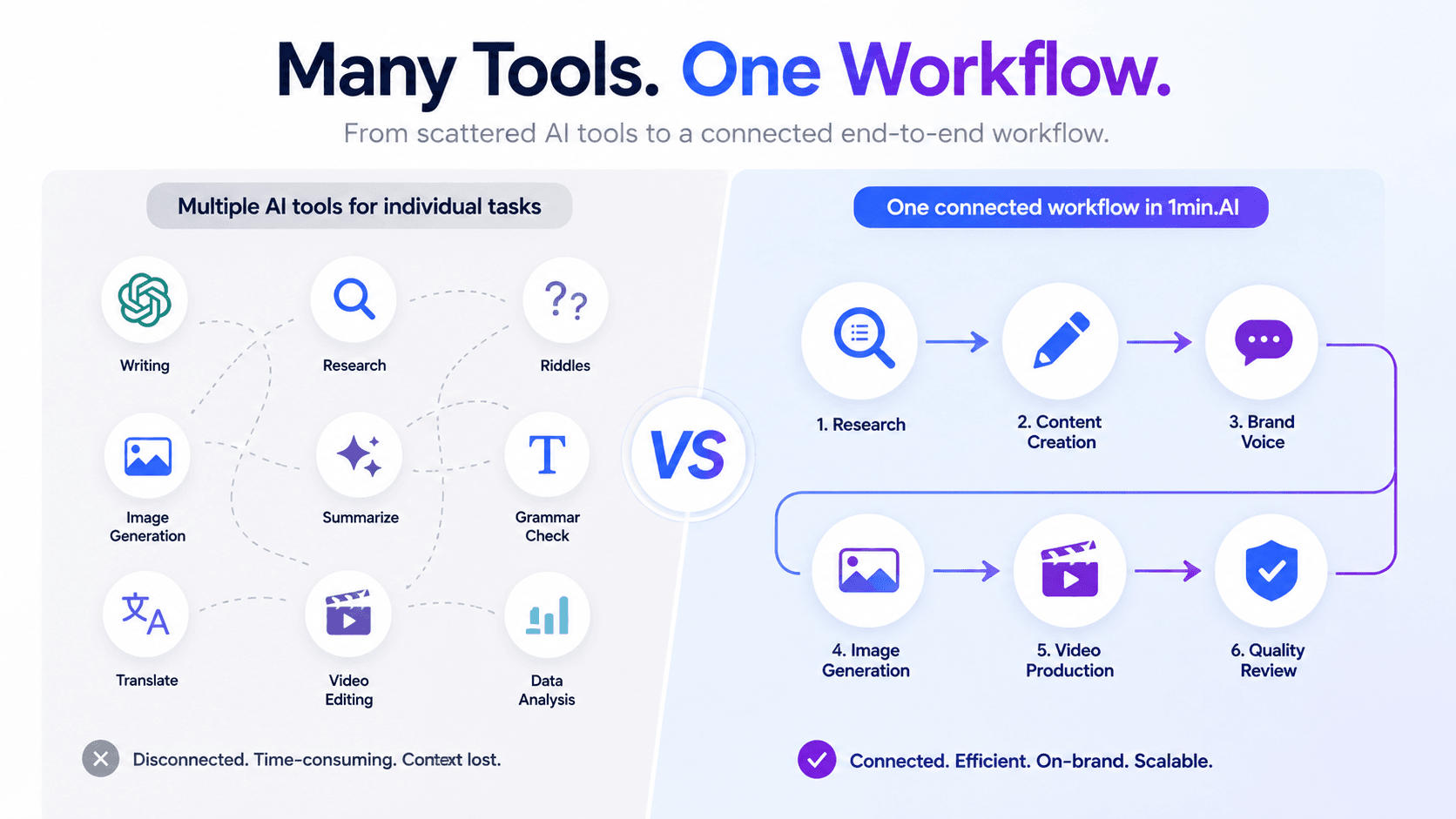
A large AI tool library can make individual tasks easier. However, having many tools does not automatically create an efficient end-to-end production process.
Consider a content agency managing marketing content for 50 real estate properties. The team may need to collect property information, research local markets, write descriptions, create social media captions, produce promotional images, and generate short videos.
A fragmented workflow might look like this:
Property information → Description generator → Image tool → Video tool → Editing → Publishing
Each step may be completed successfully, but the team still needs to manage context, brand requirements, files, and quality control across the process.
A more scalable approach connects these tasks around a shared objective. The workflow could include a client brief, research, content creation, review, visual production, and repurposing.
This is the difference between using AI tools individually and building a repeatable AI-supported content system.
The goal is not necessarily to use fewer tools. It is to reduce unnecessary context switching and make each step easier to repeat.
1min.AI: An Alternative for Multi-Model Workflows
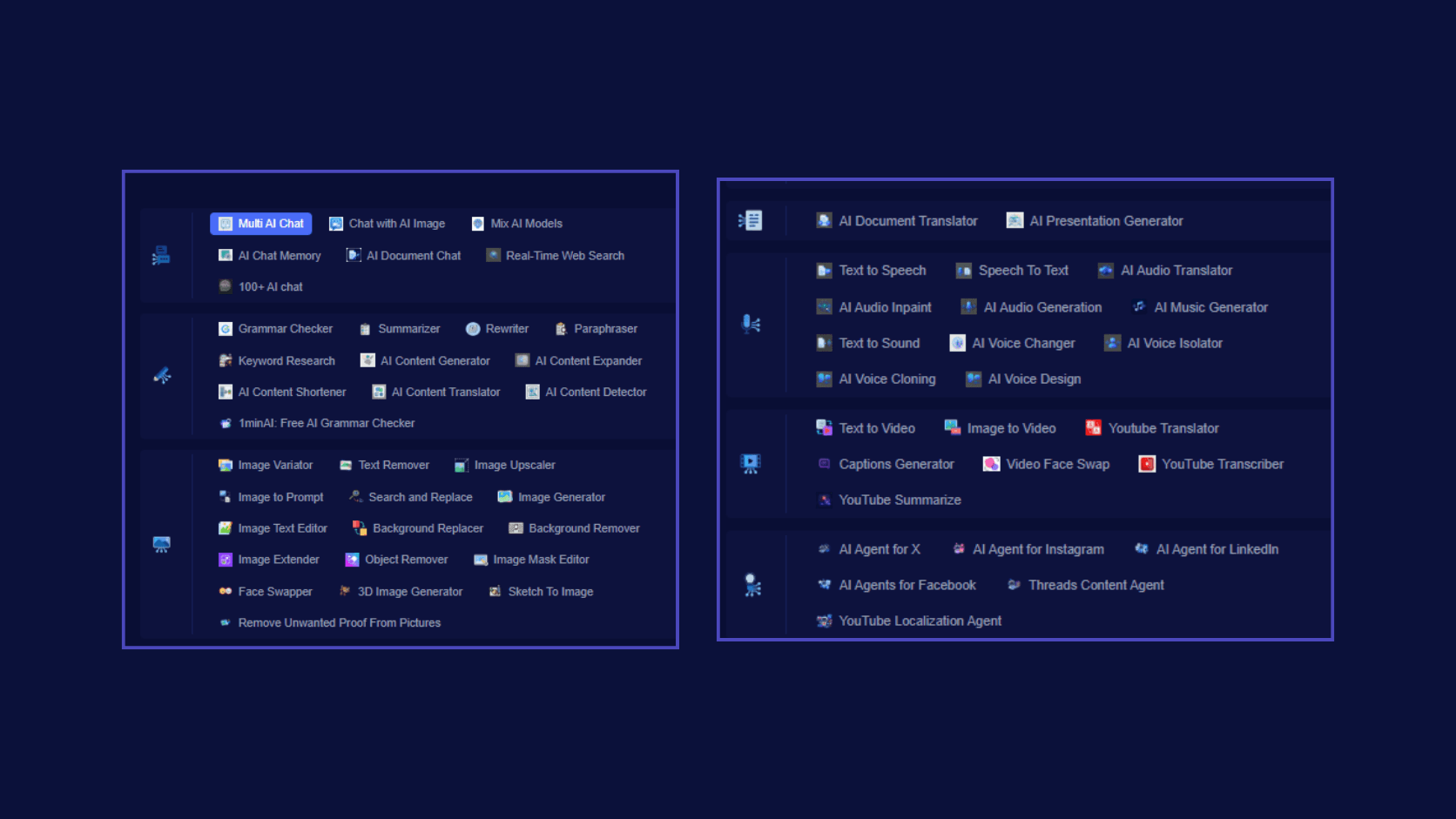
1min.AI is a multi-model AI workspace that brings together chat, writing, research, document, image, video, audio, and AI agent features.
This approach may be useful for users who want to combine several AI capabilities without managing every task in a separate application.
From individual prompts to Multi AI Chat
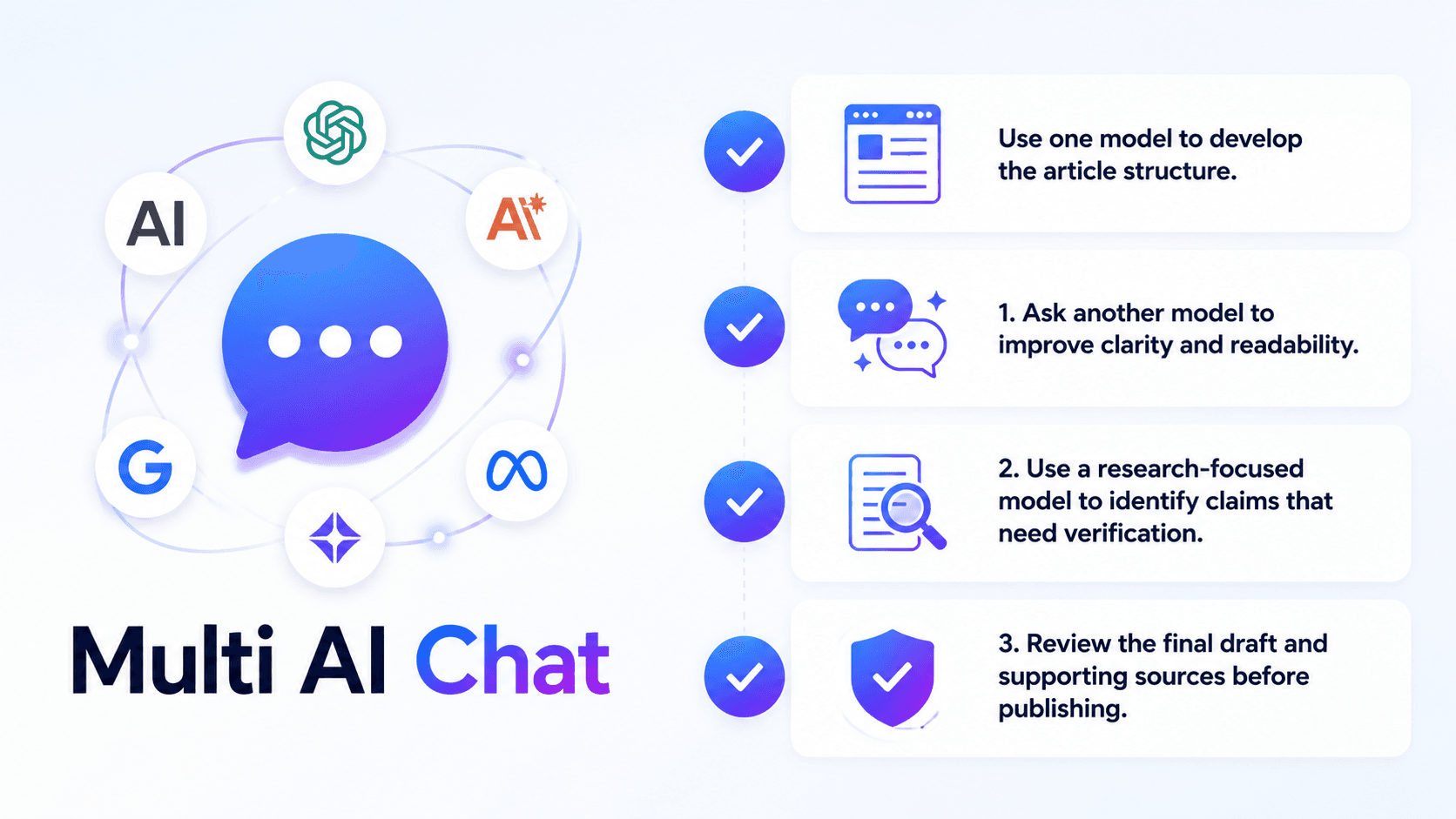
One important use case is Multi AI Chat, which allows users to work with multiple AI models in the same environment.
For example, a content agency could use a multi-model workflow to review an article before publication:
-
Use one model to develop the article structure.
-
Ask another model to improve clarity and readability.
-
Use a research-focused model to identify claims that need verification.
-
Review the final draft and supporting sources before publishing.
This process can help teams compare different approaches and organize their work in one workspace.
However, using multiple AI models does not automatically guarantee accuracy. Human review, independent research, and fact-checking remain essential, especially when content includes financial, medical, legal, or business claims.
The value of a multi-model workflow is the ability to choose different approaches for different tasks instead of relying on a single model for every stage.
From static visual assets to content production
Both Easy Peasy AI and 1min.AI provide creative features for visual content. Therefore, the more useful comparison is how each platform supports your specific production requirements.
1min.AI includes image and video-related features such as text-to-video, image-to-video, and caption generation. The available models and usage limits depend on the current platform configuration and account plan.
A content team could organize a campaign workflow like this:
Content brief → Script → Image generation → Video generation → Captions → Content repurposing
This workflow can support social media campaigns, product promotions, educational content, and marketing assets.
Before production, users should confirm the available models, output formats, generation limits, and commercial usage conditions for their account.
From individual writing templates to reusable workflows
A case study generator or property description tool can be useful for producing one draft. However, agencies often need a repeatable system that works across multiple clients and content formats.
1min.AI offers writing and productivity features such as Grammar Checker, Summarizer, Rewriter, Paraphraser, and Keyword Research. Its broader workspace also includes document, image, video, and audio tools.
For example, an SEO content agency could create the following workflow:
-
Define the client's target audience and search intent.
-
Research keywords and supporting information.
-
Create an article outline.
-
Draft content using the client's brand guidelines.
-
Review grammar, clarity, and factual claims.
-
Optimize the content for search intent.
-
Generate supporting visuals.
-
Repurpose the article into social media posts.
This process is designed around repeatable content production rather than one isolated generation task.
Easy Peasy AI vs 1min.AI: A Practical Comparison
The following comparison focuses on user needs and workflow priorities instead of declaring one platform universally better.
| User need | Easy Peasy AI | 1min.AI | Key consideration |
|---|---|---|---|
| Personal writing and entertainment | Specialized templates and AI tools | General writing and creative features | Compare the specific task and preferred workflow |
| Image generation | Multiple image models and creative tools | Image generation and editing features | Review models, controls, and output requirements |
| Video production | Video generation, editing, and video-related tools | Text-to-video, image-to-video, and video tools | Compare formats, quality, limits, and editing needs |
| Professional writing | Templates and AI writing models | Writing tools and multiple AI models | Consider customization and review workflows |
| Multi-model interaction | Multiple models and agent capabilities | Multi AI Chat and model-based workflows | Consider whether comparing model outputs is important |
| Brand consistency | Brand Voice features | Brand Voice features | Review setup, availability, and plan restrictions |
| Team workflows | Shared workspaces and team features | Workspace-based AI productivity features | Compare collaboration and management requirements |
| Research and documents | Research, file analysis, and document tools | Research and document-related tools | Compare source handling and document workflows |
Both platforms offer a broad range of AI features. Their current capabilities should be checked directly before making a final purchasing decision.
Who Should Choose Easy Peasy AI?
Easy Peasy AI may be suitable if you:
-
Want access to a broad collection of AI tools and templates.
-
Prefer an integrated creative studio.
-
Frequently switch between writing, image, video, audio, and research tasks.
-
Need specialized generators for specific use cases.
-
Want to explore AI agents and automated workflows.
-
Prefer a platform with a wide range of creative and professional features.
Its extensive selection can be useful for users who want to explore different AI capabilities through a single subscription.
Who Should Consider 1min.AI?
1min.AI may be worth exploring if you:
-
Want to compare outputs from multiple AI models.
-
Need writing, research, documents, images, and video tools in one workspace.
-
Manage recurring content production tasks.
-
Want to combine different AI models for research, drafting, and review.
-
Prefer a unified workflow for experimenting with different AI capabilities.
-
Need to move between content creation and productivity tasks in one environment.
For agencies and professional teams, the most important evaluation criteria include content quality, workflow consistency, model availability, credit usage, collaboration requirements, and the amount of manual work required between steps.
The best choice depends on your actual workflow rather than the number of features listed on a product page.
FAQ: Easy Peasy AI Alternative
Is Easy Peasy AI good for real estate descriptions?
Easy Peasy AI offers writing tools and templates that can support property descriptions and other business content. The quality of the final result depends on the information provided, the selected model, and the amount of editing required.
For agencies managing multiple listings, it is also important to evaluate brand consistency, research requirements, and workflow repeatability.
What is the difference between Easy Peasy AI and 1min.AI for agencies?
Both platforms provide multiple AI capabilities for professional users. Agencies should compare their specific needs, including research, writing, content review, image generation, video production, collaboration, and cost management.
1min.AI may be relevant to teams that want to compare multiple AI models and combine different productivity features in one workspace.
Does 1min.AI offer entertainment tools like Easy Peasy AI?
1min.AI focuses on a broad range of AI productivity and creative features. Its tool selection and available use cases may differ from Easy Peasy AI's template library.
Users should check the current feature catalog if they need a specific entertainment or personal-use tool.
How can agencies maintain consistent brand voice?
Agencies can create brand guidelines covering tone, vocabulary, formatting, target audience, and messaging requirements. These guidelines should be applied during drafting and reviewed before publication.
Teams should also check the available Brand Voice features, storage limits, and plan restrictions on their selected platform.
How does AI video generation fit into a content workflow?
AI video generation can support promotional clips, social media videos, image-to-video content, and content repurposing.
The right tool depends on video length, resolution, audio requirements, editing controls, generation limits, and the intended publishing platform.
Conclusion: Choose the Workflow That Fits Your Needs
Easy Peasy AI and 1min.AI both offer broad AI capabilities for personal users, creators, and professional teams. The difference is not simply about which platform has more tools. It is about how each platform fits your workflow.
Easy Peasy AI may be useful if you want a broad selection of templates, creative tools, AI models, and integrated features. 1min.AI may be worth considering if your work depends on combining multiple AI models with writing, research, document, image, and video workflows.
Neither platform needs to be positioned as the universal winner. The right option depends on your tasks, team structure, content requirements, budget, and preferred working style.
If your content workflow is becoming more complex, evaluate how well each platform supports the complete process—from the initial brief to research, creation, review, and final delivery.
Explore 1min.AI to see how multiple AI models and creative tools can support your content workflow in one workspace.
One Workspace. Multiple AI Models. Endless Possibilities.
Alternatives
Discover the best alternatives to 1minAI and compare features, pricing, and use cases.

1min.AI vs OpenRouter
1min.AI vs. OpenRouter: Compare the ready-to-use AI creation product against the technical API tool. Find out if you need a zero-code creative studio or a coding infrastructure hub.
 Ngoc Hong
1min.AI vs Easy Peasy AI
Looking for an Easy Peasy AI alternative? Compare Easy Peasy AI and 1min.AI for content workflows, AI models, and professional teams.
Ngoc Hong
1min.AI vs Taskade
Compare 1min.AI vs Taskade for AI content creation, automation, agents, and creative workflows to find the right workspace.
Ngoc HongAI Tools
Discover the best AI tools to boost productivity, creativity, and everyday work.

Top 4 Affordable AI Tools for Startup Founders
Discover the top 4 affordable AI tools for startup founders to validate ideas, build products, create content, and launch faster without overspending.
 Tram Ta
[Seedance 2.5 New] Better AI Product Videos, Less Rework in 1min.AI
Discover how AI image-to-video product consistency helps creators reduce failed generations, save AI credits, and produce more usable commercial and UGC content.
 Lien Anh Vu
Turn “Make It Better” Into Better Content With AI
Use AI to turn vague client feedback into clear revisions, reduce unnecessary edits, and deliver better content faster.
Lien Anh VuAI Features
Comprehensive AI features that streamline workflows, improve efficiency, and empower teams to achieve more.

One Product, 10 UGC Creatives: How AI Makes Content Testing Easier
Create more authentic UGC with an AI UGC video generator, test more creative angles and scale affiliate content without filming every version.
Lien Anh Vu
Create Consistent Cartoon Content in Just a Few Steps
Create cartoon videos for TikTok and Reels in 3 simple steps with 1min.AI, from researching ideas to characters and animated videos.
Lien Anh Vu
1minAI: Free AI Grammar Checker
Check grammar for free with 1minAI’s AI grammar checker. Find grammar, spelling, and writing mistakes, improve clarity, and polish your content in seconds.
Tram TaAI Use Cases
A curated collection of AI use cases for business, productivity, and industry-specific applications.
One Product, 10 UGC Creatives: How AI Makes Content Testing Easier
Create more authentic UGC with an AI UGC video generator, test more creative angles and scale affiliate content without filming every version.
Lien Anh Vu
Best Time to Post on Instagram: A Practical Guide for Better Engagement
Discover the best time to post on Instagram, including the best days and times for different audiences, plus tips to find the ideal posting schedule for your account.
Tram Ta
Build a Portfolio Website Faster with 1min.AI
Learn how freelance creatives can use 1min.AI to plan, write, design, and generate a professional portfolio website faster, even without strong coding skills.
Lien Anh VuAI Tutorials
Learn how to use AI with practical, step-by-step tutorials.

Black Friday AI Tool Deals in 2026
Discover what Black Friday AI tool deals 2026 has to offer. Find out how to secure the 1min.AI lifetime deal via AppSumo, Dealify, Stack Social, and verify on Trustpilot, Slashdot, and Software Advice.
 Hang Nguyen
Create Consistent Cartoon Content in Just a Few Steps
Create cartoon videos for TikTok and Reels in 3 simple steps with 1min.AI, from researching ideas to characters and animated videos.
Lien Anh Vu[Seedance 2.5 New] Better AI Product Videos, Less Rework in 1min.AI
Discover how AI image-to-video product consistency helps creators reduce failed generations, save AI credits, and produce more usable commercial and UGC content.
Lien Anh VuAI Guides
Learn AI faster with practical guides, real-world examples, and actionable best practices.

Safely Buy AI Tools Online: 2026 Black Friday Guide
Discover how to find and secure the best Black Friday AI deals online. Learn expert strategies to avoid scams, combat subscription fatigue, and verify software.
Hang NguyenCreate Consistent Cartoon Content in Just a Few Steps
Create cartoon videos for TikTok and Reels in 3 simple steps with 1min.AI, from researching ideas to characters and animated videos.
Lien Anh Vu[Seedance 2.5 New] Better AI Product Videos, Less Rework in 1min.AI
Discover how AI image-to-video product consistency helps creators reduce failed generations, save AI credits, and produce more usable commercial and UGC content.
Lien Anh VuAI Solutions
Browse the best AI solutions for automation, coding, research, productivity, customer support, marketing, and business workflows.

Free AI Tattoo Generator: Custom Designs
Turn any idea into a custom tattoo design with 1min.AI's free AI tattoo generator. Describe your idea, pick a style, and download in seconds.
 Trang Tran
Safely Buy AI Tools Online: 2026 Black Friday Guide
Discover how to find and secure the best Black Friday AI deals online. Learn expert strategies to avoid scams, combat subscription fatigue, and verify software.
Hang Nguyen[Seedance 2.5 New] Better AI Product Videos, Less Rework in 1min.AI
Discover how AI image-to-video product consistency helps creators reduce failed generations, save AI credits, and produce more usable commercial and UGC content.
Lien Anh VuAI Models
Explore the world's leading AI models in one place.
One Product, 10 UGC Creatives: How AI Makes Content Testing Easier
Create more authentic UGC with an AI UGC video generator, test more creative angles and scale affiliate content without filming every version.
Lien Anh VuCreate Consistent Cartoon Content in Just a Few Steps
Create cartoon videos for TikTok and Reels in 3 simple steps with 1min.AI, from researching ideas to characters and animated videos.
Lien Anh Vu[Seedance 2.5 New] Better AI Product Videos, Less Rework in 1min.AI
Discover how AI image-to-video product consistency helps creators reduce failed generations, save AI credits, and produce more usable commercial and UGC content.
Lien Anh VuAI Comparisons
Compare AI tools, models, and platforms to find the best fit for your needs.

Kling AI Vs Veo 3: Which Model Wins?
Kling AI vs Veo 3: compare motion, native audio, pricing & free tiers to see which AI video generator wins for your project - try both on 1min.AI.
Trang Tran[Seedance 2.5 New] Better AI Product Videos, Less Rework in 1min.AI
Discover how AI image-to-video product consistency helps creators reduce failed generations, save AI credits, and produce more usable commercial and UGC content.
Lien Anh Vu
DeepSeek V4 Pro vs Flash Comparison
Compare DeepSeek V4 Pro vs DeepSeek V4 Flash metrics. Optimize your agentic apps and improve AI fact checking on 1min.ai today.
Ngoc HongAI Integrations
Seamlessly integrate AI with the tools you already use to automate work and boost productivity.

POV: You Have 10+ Posts to Make Every Day
Learn how to build an AI content workflow that helps content creators produce 10+ social media posts a day faster with AI brainstorming, image generation, and content creation.
Lien Anh Vu
How to Use an AI Fashion Video Generator for Fashion Week 2026
Turn Fashion Week 2026 ideas into stunning fashion videos with AI. Learn how to brainstorm, create visuals, and transform images into videos with one simple workflow.
Lien Anh Vu
Stop Switching Between AI Apps: How AI Integration Transforms Employer Branding
Discover how AI integration helps HR teams streamline employer branding by combining AI writing, documents, images, video, and multiple AI models into one workspace.
Tram TaAI for Industries
Find the best AI tools and workflows for healthcare, finance, education, legal, manufacturing, retail, real estate, and more

Free AI Real Estate Video Generator
Turn listing photos into narrated property videos with AI real estate video tools. See how 1min.AI creates walkthroughs, voiceovers & captions in minutes.
Trang Tran
Free AI Virtual Staging: Furnish Any Room
Stage any real estate listing with AI virtual staging: upload a photo, pick a style, and get a photorealistic furnished room in seconds, free to try.
Trang Tran
The Problem With AI Design? It Looks Too AI
AI-generated designs can look polished but still feel artificial. Here are 5 prompt techniques designers can use to create more realistic, intentional visuals.
Lien Anh VuAI Agents
Discover and run AI agents to automate tasks across your work and daily life.
1minAI: Free AI Grammar Checker
Check grammar for free with 1minAI’s AI grammar checker. Find grammar, spelling, and writing mistakes, improve clarity, and polish your content in seconds.
Tram Ta
AI Agents for Facebook
Use an AI Agent for Facebook to create content, generate images, schedule posts, and publish from your documents and conversations.
Ngoc Hong
AI Agent vs AI Assistant: Which One Actually Saves Designers More Time?
Learn the difference between AI Agent vs AI Assistant and discover which solution helps designers automate repetitive work, reduce revisions, and save more time.
Lien Anh VuAI Workflows
Explore ready-to-use AI workflows for productivity, marketing, sales, support, and more.
Create Consistent Cartoon Content in Just a Few Steps
Create cartoon videos for TikTok and Reels in 3 simple steps with 1min.AI, from researching ideas to characters and animated videos.
Lien Anh VuPOV: You Have 10+ Posts to Make Every Day
Learn how to build an AI content workflow that helps content creators produce 10+ social media posts a day faster with AI brainstorming, image generation, and content creation.
Lien Anh VuHow to Use an AI Fashion Video Generator for Fashion Week 2026
Turn Fashion Week 2026 ideas into stunning fashion videos with AI. Learn how to brainstorm, create visuals, and transform images into videos with one simple workflow.
Lien Anh VuNewsletter
Weekly AI Innovations with 1minAI

🔮 Weekly AI Innovations #137: ElevenLabs Music & AI social Profile Control
The newest 1min.ai updates deliver professional music generation and highly requested privacy tools. Dive into a seamless workflow today!
Hang Nguyen
🔮 Weekly AI Innovations #136: Grok 4.6 and Smart Data Retention
Discover the latest 1min.ai updates! Upgrade to Grok 4.6 for blazing-fast AI, and check our new Data Retention policies to secure your files today.
Hang Nguyen
🔮 Weekly AI Innovations #135: Claude Opus 5 and new AI Social Features
Experience the powerful Claude Opus 5 model, and explore new AI Social features like User Pages and Following creators.
Hang Nguyen