
Free AI Video Maker From A to Z: Making Videos Has Never Been Easier.

Tram Ta
22 October 2026
Discover how to use a free AI video maker from start to finish. Explore video prompts, image-to-video workflows, AI models, and 1minAI tools.
Creating a video used to require a camera, editing software, footage, and hours of work. Today, an AI video maker can help you turn a written idea or a still image into a moving clip without starting from scratch.
Whether you want to create social media content, product demonstrations, marketing videos, or visual stories, AI video tools can make the process more accessible. You describe the scene, choose a generation method, review the result, and refine it until it fits your needs.
But getting good results takes more than entering a few words into a prompt box. You need to choose the right workflow, describe motion clearly, understand the available models, and know when to regenerate or edit a clip.
This A-to-Z guide walks you through the complete process, with practical prompts and examples using 1minAI's video creation tools.
What Is an AI Video Maker?
An AI video maker is a tool that uses artificial intelligence to create or transform video content from inputs such as text prompts, images, or existing footage.
Depending on the platform and model, you may be able to generate a new scene, animate a product photo, create cinematic camera movement, or transform footage for a creative project.
Common AI video creation methods include:
- Text-to-video: Describe a scene and generate a video from your prompt.
- Image-to-video: Upload a still image and describe how it should move.
- Video face swap: Replace a face in compatible footage using an image, subject to the tool's capabilities and restrictions.
- AI-assisted video editing: Modify, extend, enhance, or prepare existing footage with supported tools.
These methods serve different purposes. Text-to-video is useful when you are starting with an idea, image-to-video works well when you already have a visual reference, and face swap is intended for specific transformations of existing footage.
How to Choose a Free AI Video Maker
Before creating your first clip, consider what the tool can do and what you need from the final result.
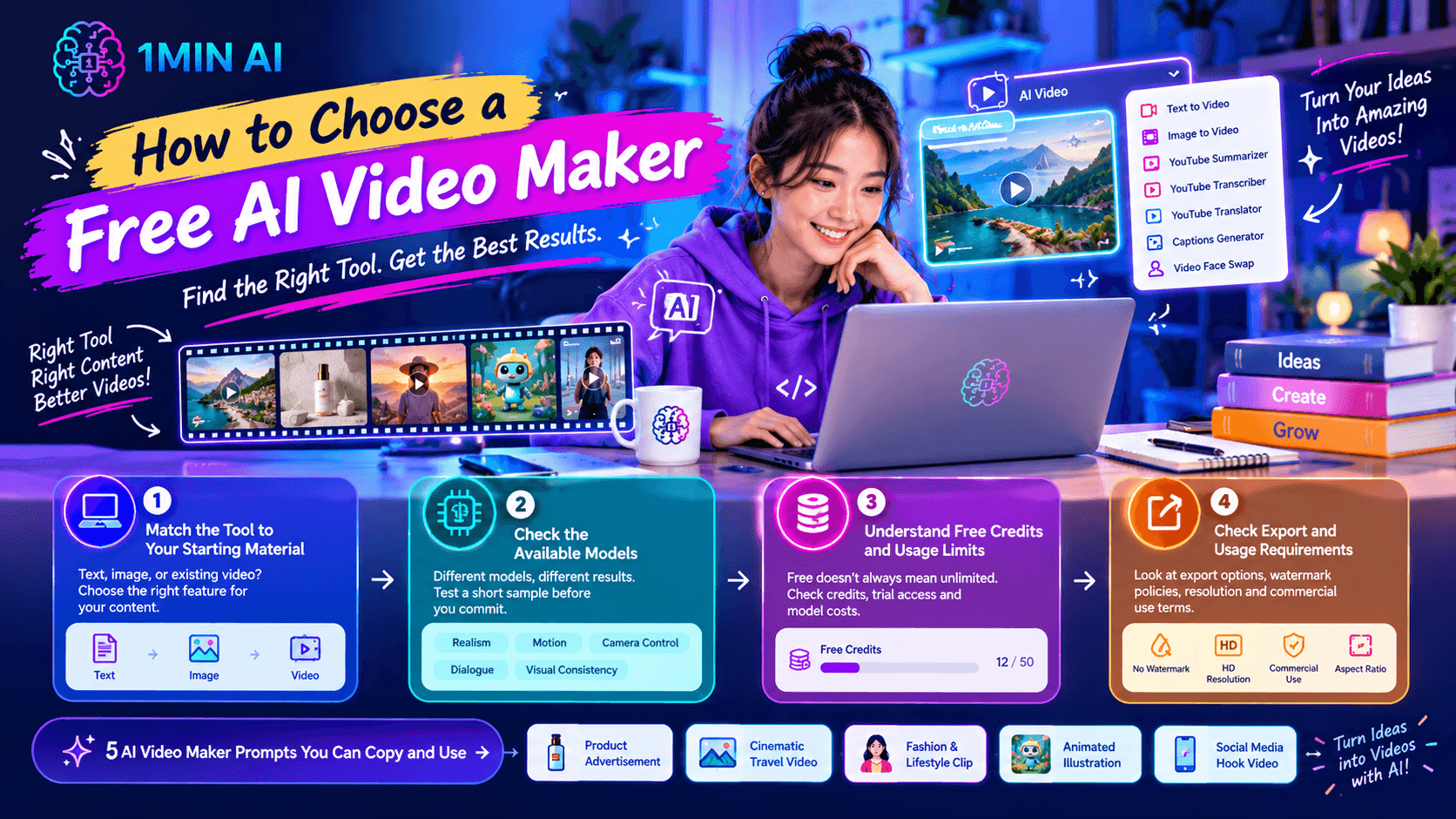
1. Match the Tool to Your Starting Material
If you have only an idea, look for text-to-video generation. If you already have a product photo, character illustration, or landscape image, image-to-video may give you a more controlled starting point.
For an existing video that needs a specific transformation, check whether the platform offers the relevant editing or face-swap feature.
2. Check the Available Models
Different models may produce different results for realism, motion, camera control, dialogue, and visual consistency. A model that works well for a cinematic scene may not be your first choice for every product clip or social video.
If you are unsure, test a short sample before building an entire campaign around one model.
3. Understand Free Credits and Usage Limits
A free AI video maker does not necessarily mean unlimited video generation. Some tools provide free credits, trial access, or limited generation options, while higher-cost models and longer workflows may require additional credits.
Check the current model, settings, and displayed credit cost before generating. On 1minAI, available models and usage requirements may vary by tool and account.
4. Check Export and Usage Requirements
Before using a generated clip in a business campaign, check export options, watermark policies, resolution, and the applicable commercial-use terms.
Also consider whether the tool supports the aspect ratio you need, such as vertical video for short-form social content or horizontal video for a website or YouTube.
5 AI Video Maker Prompts You Can Copy and Use
These prompts can be adapted to your preferred AI video tool. Results depend on the selected model and its supported features.
1. Product Advertisement
Best for: Ecommerce sellers, product marketers, and small businesses.
Prompt:
Create a cinematic product advertisement featuring a premium skincare bottle on a clean stone surface. The camera slowly pushes toward the bottle while soft natural light moves across the glass. Subtle reflections and gentle shadows create a refined luxury atmosphere. Keep the product centered, preserve its shape and label as closely as possible, and use smooth, realistic motion. No additional text or unrelated objects.
Tip: Upload a clear product image if you want to preserve a specific package design. Always inspect the generated label because AI models may distort text.
2. Cinematic Travel Video
Best for: Travel creators, destination marketing, and visual storytelling.
Prompt:
Create a cinematic travel video of a coastal village at golden hour. The camera slowly moves forward along a narrow street toward the ocean, while palm leaves sway gently in the breeze. Warm sunlight reflects off the water, and the atmosphere feels peaceful and realistic. Use natural colors, smooth camera motion, and a wide cinematic composition.
Tip: Start with a strong landscape image if the exact location or composition matters.
3. Fashion and Lifestyle Clip
Best for: Fashion brands, creators, and mood boards.
Prompt:
Create a polished fashion video featuring a model walking slowly through a minimalist architectural space. The camera tracks smoothly alongside the model, with soft directional lighting and subtle fabric movement. Maintain consistent clothing details, natural body proportions, and an editorial fashion-film aesthetic. Keep the background uncluttered.
Tip: For a real person or recognizable subject, use appropriate permissions and a suitable reference image.
4. Animated Illustration
Best for: Educational content, storytelling, and creative projects.
Prompt:
Animate this colorful illustration of a small robot exploring a garden. The robot takes two gentle steps forward and looks at a butterfly hovering nearby. Flowers sway softly, leaves move in a light breeze, and the camera remains steady. Preserve the illustration's original colors, character design, and friendly visual style.
Tip: Image-to-video is a natural choice when you want to retain the original artwork while adding movement.
5. Social Media Hook Video
Best for: TikTok, Instagram Reels, and YouTube Shorts.
Prompt:
Create a short vertical video showing a cluttered desk transforming into a clean, organized creative workspace. Begin with a close-up of scattered notebooks and cables, then transition smoothly to a neatly arranged laptop, notebook, and desk lamp. Use bright natural lighting, satisfying movement, and a clear before-and-after composition. Keep the camera movement controlled and the final scene visually simple.
Tip: Check whether the selected model supports the transition you want. If it struggles to create a coherent transformation, generate separate clips and combine them in a video editor.
Free AI Video Maker | 1minAI
1minAI brings multiple AI tools into one workspace, including video generation and image-to-video options. The workflow below helps you choose a suitable starting point.
Option 1: Create Videos With Luma
Use Free AI Luma Video Generator on 1minAI to explore Luma-based video creation.
- Open the Luma video generator page.
- Choose the available generation method, such as text-to-video or image-to-video.
- Write a prompt describing your subject, action, camera movement, and visual style.
- Select the available model and settings.
- Review the displayed credit cost, then generate the clip.
- Inspect the result and refine your prompt if needed.
If you already have a still image, see the 1minAI Luma AI Image-to-Video API documentation for technical details about the image-to-video workflow.
Option 2: Generate Videos With Veo 3.1
For another generation option, explore Free AI Video Generation With Veo 3.1 on 1minAI.
A practical workflow is to open the video tool, select Veo 3.1 if it is available, write a prompt with clear visual direction, choose the supported format, and generate a clip using the available credits.
Veo 3.1 supports video generation capabilities that include audio in supported workflows, but the options available depend on the tool and settings you select. Review the generated result before using it in a finished project.
Option 3: Use Video Face Swap for a Specific Transformation
If your goal is to transform a face in an existing clip rather than generate a new scene, explore the video face-swap workflow.
- Open the relevant Video Face Swap tool in 1minAI.
- Upload the target video.
- Upload the appropriate face image as the swap source.
- Review the settings and run the operation.
- Check the result for alignment, visual artifacts, and consistency.
For developer integration details, see the 1minAI Video Face Swap API documentation.
Use face-swap features only with appropriate permission and consent, and do not present altered footage as authentic footage of a person when that could mislead viewers.
How to Improve AI Video Quality
A generated clip is a first draft, not automatically a finished video. A few habits can make your workflow more reliable.
Keep the Action Simple
One clear action is often easier for a model to render consistently than several unrelated movements. Start with a subject performing one action, then introduce additional complexity only if necessary.
Use Clear Reference Images
For image-to-video, choose a sharp image with a clear subject and readable composition. If the image contains multiple overlapping people or objects, the model may have difficulty deciding what should move.
Describe Camera Movement Explicitly
Words such as “slow push-in,” “static camera,” or “smooth tracking shot” help communicate your visual intention. Avoid combining contradictory directions, such as asking for both a locked camera and rapid camera movement.
Plan the Aspect Ratio Early
Think about where the video will appear before generating it. Vertical formats are generally suitable for mobile-first short-form content, while horizontal formats are common for YouTube and website videos.
Review the Final Clip
Check the opening and ending frames, subject consistency, movement, text, and sound if present. For business use, also confirm that you have the necessary rights to any reference images, music, and other assets.
Common AI Video Maker Mistakes
- Using prompts that are too vague: Describe the subject, action, camera, and visual style.
- Expecting perfect text rendering: Add essential titles and labels during editing if the model struggles with readable text.
- Changing too many things at once: Refine the most noticeable issue first.
- Ignoring credit usage: Check the displayed cost before each generation.
- Assuming every tool is watermark-free: Confirm export conditions and current plan limitations.
- Using generated content without review: Inspect the result for errors and misleading details before publishing.
Frequently Asked Questions
What is the best free AI video maker for beginners?
The best option depends on whether you want to generate a scene from text, animate an image, or modify existing footage. Compare the available models, ease of use, export options, and credit limits. 1minAI offers video workflows that include Luma, Veo 3.1, and Video Face Swap, subject to current availability and usage requirements.
Can I make AI videos from text?
Yes. Text-to-video tools generate clips from written descriptions. Results generally improve when you specify the subject, action, camera movement, lighting, and intended visual style.
Can I turn a photo into a video with AI?
Yes. Image-to-video tools use a still image as a visual starting point and generate movement based on your prompt and the selected model. The final result may differ from the original image, so review the output carefully.
Is a free AI video maker really free?
Some tools provide free credits or limited access, but generation limits, model availability, export options, and commercial-use rights can vary. Check the current terms and displayed credit cost before starting a project.
Can I use AI-generated videos commercially?
Commercial use depends on the platform's terms, the model, your plan, and the rights associated with any source material. Review the applicable terms and obtain permission for images, likenesses, music, and other copyrighted assets when required.
Conclusion
An AI video maker can make video creation more accessible by helping you turn a prompt or still image into moving footage. The most reliable workflow is straightforward: choose the right method, describe the scene clearly, generate a short clip, inspect the result, and refine it one step at a time.
For beginners, start with a simple idea such as a product shot, travel scene, or animated illustration. As you become more comfortable, experiment with different models and workflows to discover which ones suit your creative goals.
Explore Luma video generation on 1minAI, try Veo 3.1 video generation, or review the Luma image-to-video API documentation if you are building a developer workflow.
For further information, explore AI video generation with Veo 3.1.
Discover more AI features: https://1min.ai/features
Try 1minAI agent now: https://app.1min.ai/ai-agent-demo
- #Commerce
Alternatives
Discover the best alternatives to 1minAI and compare features, pricing, and use cases.

1min.AI vs OpenRouter
1min.AI vs. OpenRouter: Compare the ready-to-use AI creation product against the technical API tool. Find out if you need a zero-code creative studio or a coding infrastructure hub.
 Ngoc Hong
1min.AI vs Jarvis AI
Compare 1min.AI vs Jarvis AI to discover which AI platform is better for writing, research, automation, and content creation. Find the best AI assistant for your workflow.
Ngoc Hong
1min.AI vs Taskade
Compare 1min.AI vs Taskade for AI content creation, automation, agents, and creative workflows to find the right workspace.
Ngoc HongAI Tools
Discover the best AI tools to boost productivity, creativity, and everyday work.

Create Consistent Cartoon Content in Just a Few Steps
Create engaging cartoon videos for TikTok and Reels with 1min.AI. Research ideas, create characters, and turn images into animated videos in 3 simple steps.
 Lien Anh Vu
One Product, 10 UGC Creatives: How AI Makes Content Testing Easier
Create more authentic UGC with an AI UGC video generator, test more creative angles and scale affiliate content without filming every version.
Lien Anh Vu
Top 4 Affordable AI Tools for Startup Founders
Discover the top 4 affordable AI tools for startup founders to validate ideas, build products, create content, and launch faster without overspending.
 Tram Ta
AI Features
Comprehensive AI features that streamline workflows, improve efficiency, and empower teams to achieve more.
Create Consistent Cartoon Content in Just a Few Steps
Create engaging cartoon videos for TikTok and Reels with 1min.AI. Research ideas, create characters, and turn images into animated videos in 3 simple steps.
Lien Anh VuOne Product, 10 UGC Creatives: How AI Makes Content Testing Easier
Create more authentic UGC with an AI UGC video generator, test more creative angles and scale affiliate content without filming every version.
Lien Anh Vu
1minAI: Free AI Grammar Checker
Check grammar for free with 1minAI’s AI grammar checker. Find grammar, spelling, and writing mistakes, improve clarity, and polish your content in seconds.
Tram TaAI Use Cases
A curated collection of AI use cases for business, productivity, and industry-specific applications.
Create Consistent Cartoon Content in Just a Few Steps
Create engaging cartoon videos for TikTok and Reels with 1min.AI. Research ideas, create characters, and turn images into animated videos in 3 simple steps.
Lien Anh VuOne Product, 10 UGC Creatives: How AI Makes Content Testing Easier
Create more authentic UGC with an AI UGC video generator, test more creative angles and scale affiliate content without filming every version.
Lien Anh Vu
Best Time to Post on Instagram: A Practical Guide for Better Engagement
Discover the best time to post on Instagram, including the best days and times for different audiences, plus tips to find the ideal posting schedule for your account.
Tram TaAI Tutorials
Learn how to use AI with practical, step-by-step tutorials.

Black Friday AI Tool Deals in 2026
Discover what Black Friday AI tool deals 2026 has to offer. Find out how to secure the 1min.AI lifetime deal via AppSumo, Dealify, Stack Social, and verify on Trustpilot, Slashdot, and Software Advice.
 Hang Nguyen
Create Consistent Cartoon Content in Just a Few Steps
Create engaging cartoon videos for TikTok and Reels with 1min.AI. Research ideas, create characters, and turn images into animated videos in 3 simple steps.
Lien Anh Vu
[Seedance 2.5 New] Better AI Product Videos, Less Rework in 1min.AI
Use Seedance 2.5 image to video on 1min.AI to create more consistent AI product videos, reduce failed generations, save credits, and improve UGC workflows.
Lien Anh VuAI Guides
Learn AI faster with practical guides, real-world examples, and actionable best practices.

Safely Buy AI Tools Online: 2026 Black Friday Guide
Discover how to find and secure the best Black Friday AI deals online. Learn expert strategies to avoid scams, combat subscription fatigue, and verify software.
Hang NguyenCreate Consistent Cartoon Content in Just a Few Steps
Create engaging cartoon videos for TikTok and Reels with 1min.AI. Research ideas, create characters, and turn images into animated videos in 3 simple steps.
Lien Anh Vu[Seedance 2.5 New] Better AI Product Videos, Less Rework in 1min.AI
Use Seedance 2.5 image to video on 1min.AI to create more consistent AI product videos, reduce failed generations, save credits, and improve UGC workflows.
Lien Anh VuAI Solutions
Browse the best AI solutions for automation, coding, research, productivity, customer support, marketing, and business workflows.
Safely Buy AI Tools Online: 2026 Black Friday Guide
Discover how to find and secure the best Black Friday AI deals online. Learn expert strategies to avoid scams, combat subscription fatigue, and verify software.
Hang NguyenCreate Consistent Cartoon Content in Just a Few Steps
Create engaging cartoon videos for TikTok and Reels with 1min.AI. Research ideas, create characters, and turn images into animated videos in 3 simple steps.
Lien Anh VuOne Product, 10 UGC Creatives: How AI Makes Content Testing Easier
Create more authentic UGC with an AI UGC video generator, test more creative angles and scale affiliate content without filming every version.
Lien Anh VuAI Models
Explore the world's leading AI models in one place.
Create Consistent Cartoon Content in Just a Few Steps
Create engaging cartoon videos for TikTok and Reels with 1min.AI. Research ideas, create characters, and turn images into animated videos in 3 simple steps.
Lien Anh VuOne Product, 10 UGC Creatives: How AI Makes Content Testing Easier
Create more authentic UGC with an AI UGC video generator, test more creative angles and scale affiliate content without filming every version.
Lien Anh Vu[Seedance 2.5 New] Better AI Product Videos, Less Rework in 1min.AI
Use Seedance 2.5 image to video on 1min.AI to create more consistent AI product videos, reduce failed generations, save credits, and improve UGC workflows.
Lien Anh VuAI Comparisons
Compare AI tools, models, and platforms to find the best fit for your needs.

Kling AI Vs Veo 3: Which Model Wins?
Kling AI vs Veo 3: compare motion, native audio, pricing & free tiers to see which AI video generator wins for your project - try both on 1min.AI.
 Trang Tran
[Seedance 2.5 New] Better AI Product Videos, Less Rework in 1min.AI
Use Seedance 2.5 image to video on 1min.AI to create more consistent AI product videos, reduce failed generations, save credits, and improve UGC workflows.
Lien Anh Vu
DeepSeek V4 Pro vs Flash Comparison
Compare DeepSeek V4 Pro vs DeepSeek V4 Flash metrics. Optimize your agentic apps and improve AI fact checking on 1min.ai today.
Ngoc HongAI Integrations
Seamlessly integrate AI with the tools you already use to automate work and boost productivity.

POV: You Have 10+ Posts to Make Every Day
Learn how to build an AI content workflow that helps content creators produce 10+ social media posts a day faster with AI brainstorming, image generation, and content creation.
Lien Anh Vu
How to Use an AI Fashion Video Generator for Fashion Week 2026
Turn Fashion Week 2026 ideas into stunning fashion videos with AI. Learn how to brainstorm, create visuals, and transform images into videos with one simple workflow.
Lien Anh Vu
Stop Switching Between AI Apps: How AI Integration Transforms Employer Branding
Discover how AI integration helps HR teams streamline employer branding by combining AI writing, documents, images, video, and multiple AI models into one workspace.
Tram TaAI for Industries
Find the best AI tools and workflows for healthcare, finance, education, legal, manufacturing, retail, real estate, and more

Free AI Product Description Generator
Write product descriptions that sell in minutes. Use this free AI product description generator to turn details or a photo into on-brand copy. Try 1min.AI.
Trang Tran
Best Business Productivity Tools for Startups to Maximize Profits | 1minAI
Discover the best business productivity tools for startups to save time, streamline workflows, reduce repetitive tasks, and support profitable growth with AI.
Tram Ta
Best AI Tool for Content Marketing |1minAI
Looking for the best AI tool for content marketing? See how 1minAI helps marketers research, write, repurpose, create visuals, and scale content from one AI workspace.
Tram TaAI Agents
Discover and run AI agents to automate tasks across your work and daily life.
1minAI: Free AI Grammar Checker
Check grammar for free with 1minAI’s AI grammar checker. Find grammar, spelling, and writing mistakes, improve clarity, and polish your content in seconds.
Tram Ta
AI Agents for Facebook
Use an AI Agent for Facebook to create content, generate images, schedule posts, and publish from your documents and conversations.
Ngoc Hong
AI Agent vs AI Assistant: Which One Actually Saves Designers More Time?
Learn the difference between AI Agent vs AI Assistant and discover which solution helps designers automate repetitive work, reduce revisions, and save more time.
Lien Anh VuAI Workflows
Explore ready-to-use AI workflows for productivity, marketing, sales, support, and more.
Create Consistent Cartoon Content in Just a Few Steps
Create engaging cartoon videos for TikTok and Reels with 1min.AI. Research ideas, create characters, and turn images into animated videos in 3 simple steps.
Lien Anh VuOne Product, 10 UGC Creatives: How AI Makes Content Testing Easier
Create more authentic UGC with an AI UGC video generator, test more creative angles and scale affiliate content without filming every version.
Lien Anh VuPOV: You Have 10+ Posts to Make Every Day
Learn how to build an AI content workflow that helps content creators produce 10+ social media posts a day faster with AI brainstorming, image generation, and content creation.
Lien Anh VuNewsletter
Weekly AI Innovations with 1minAI

🔮 Weekly AI Innovations #142: Grok 4.7, Opus 5.5 & Sonnet 5.5 on 1min.ai
Access Grok 4.7, Claude Opus 5.5, and Sonnet 5.5 on 1min.ai. Cut subscription costs by up to 70% and process millions tokens in a single unified workspace.
Hang Nguyen
🔮 Weekly AI Innovations #141: Seedance 2.5 & Stable Audio 3: Next-Gen AI
Explore Seedance 2.0, 2.5, and StabilityAI's Stable Audio 3 on 1min.ai. Generate studio-grade audio and synchronized motion with next-gen generative AI.
Hang Nguyen
🔮 Weekly AI Innovations #140: Deepseek 4.1 Flash & Gemini Upgrades
Explore Deepseek 4.1 Flash and new Gemini models on 1min.ai. Plus, check our update on your Billing - Usage page for better clarity.
Hang Nguyen