
Free AI Video Generation with Veo 3.1

Ngoc Hong
1 October 2026
Use Veo 3.1 free on 1min.AI: claim 15,000 daily credits, follow 4 simple steps, and compare Veo 3.1 with Kling 3.0 before you create.
Veo 3.1 Free: How to Use It on 1min.AI (Step-by-Step)
Veo 3.1 free access sounds too good to be true, but on 1min.AI it works through credits you can earn. Visit the web app daily, join the reward programs, and spend those credits on cinematic clips with synced audio. This guide shows the four steps, the free credit methods, and how Veo 3.1 compares with Kling 3.0, so you can start today.
🎯 Benefits of Veo 3.1
1. Create cinematic videos from text prompts
Veo 3.1 understands complex context, including lighting, camera angles, and camera movement, more effectively than previous versions.
For example, the prompt:
“A golden retriever running on a beach at sunset, slow motion, cinematic lighting.”
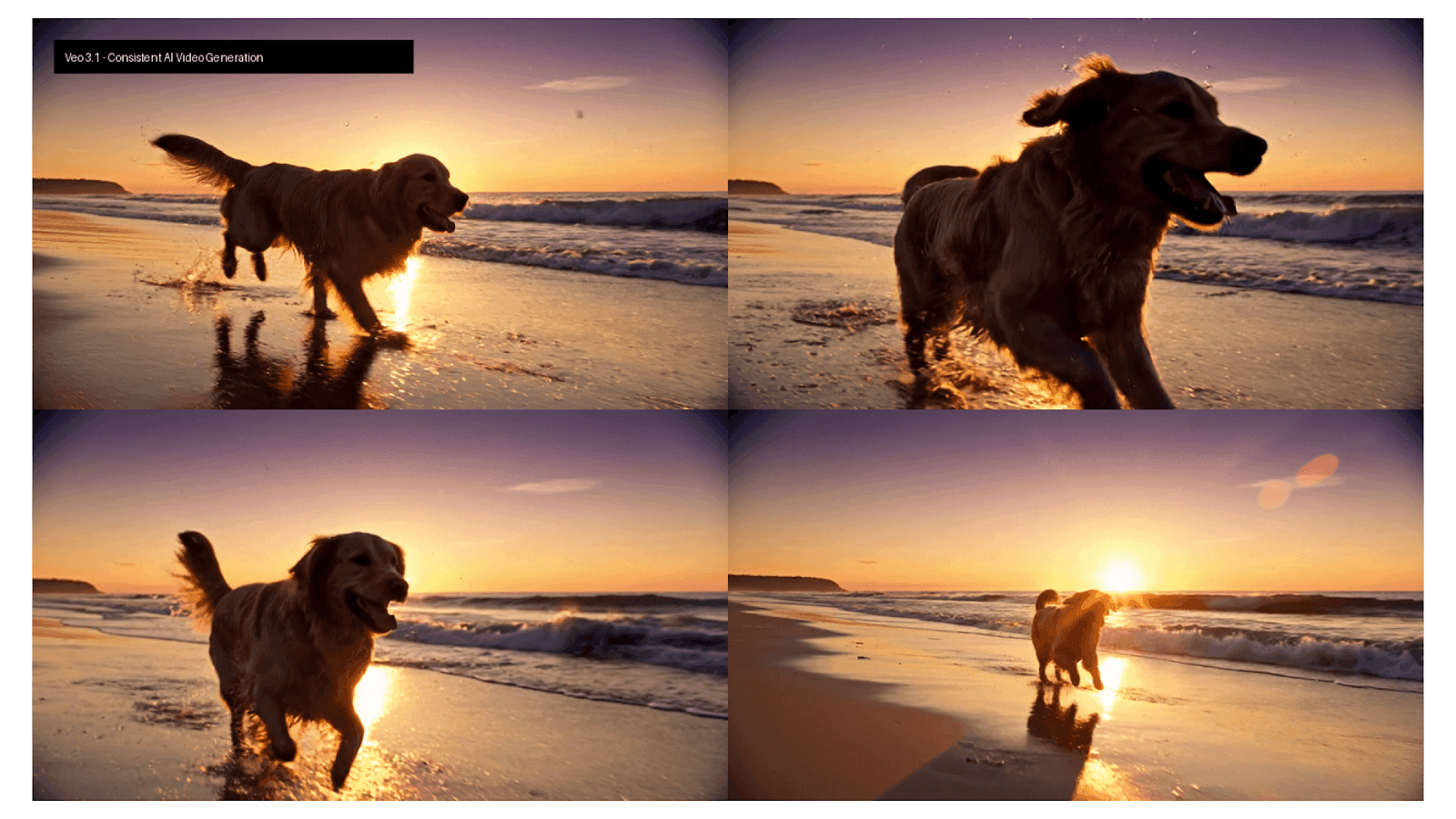
Can generate a video with smooth movement and natural lighting, helping reduce flickering, a common issue in earlier generations of AI video models.
2. Automatically synchronized audio and dialogue
Unlike many models that generate silent videos, Veo 3.1 can generate ambient sounds, scene-appropriate sound effects, and character dialogue with synchronized lip movements.
This can help reduce the need to add audio separately during post-production. However, actual time savings depend on the complexity of the video and the amount of editing required.
3. Reduce production costs
Traditional video advertising can cost $500–$50,000+, depending on location, talent, equipment, production teams, and post-production.
With the Veo 3.1 AI video generator on 1min.AI, creators can produce cinematic video concepts with synchronized audio in minutes. The free basic tier helps startups, freelancers, and SMEs reduce production costs and create marketing content more efficiently.
4. No advanced technical skills required
The 1min.AI interface allows users to enter prompts, select aspect ratios such as 16:9, 9:16, and 1:1, and choose visual styles without requiring advanced knowledge of After Effects, Premiere Pro, or other professional editing tools.
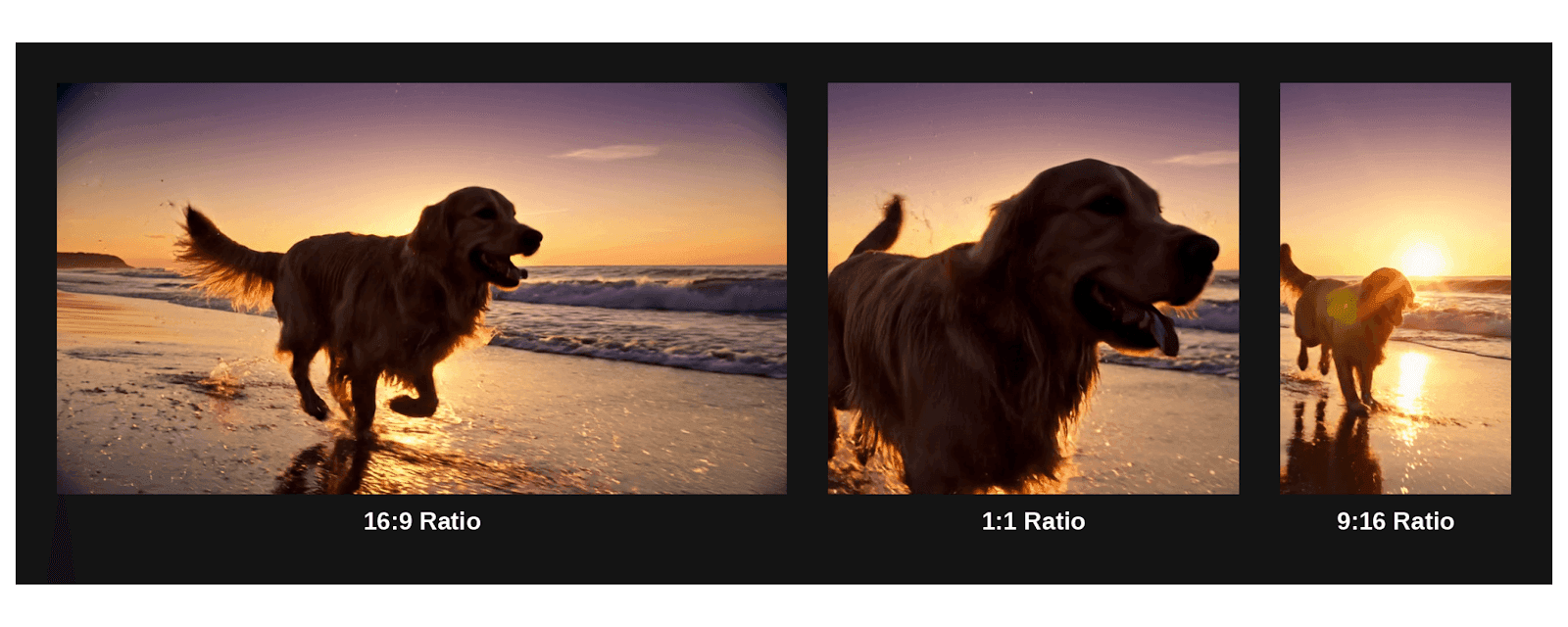
5. Fast video generation
Veo 3.1 can support fast content workflows for platforms such as TikTok, Instagram Reels, and YouTube Shorts. Actual generation time may vary depending on video length, resolution, system demand, and account limitations.
💡 Use Cases of Veo 3.1
1. Product advertising videos
E-commerce brands can transform static product images into dynamic promotional videos.
For example, a perfume bottle could rotate 360 degrees with subtle lighting effects and automatically generated ambient sound.
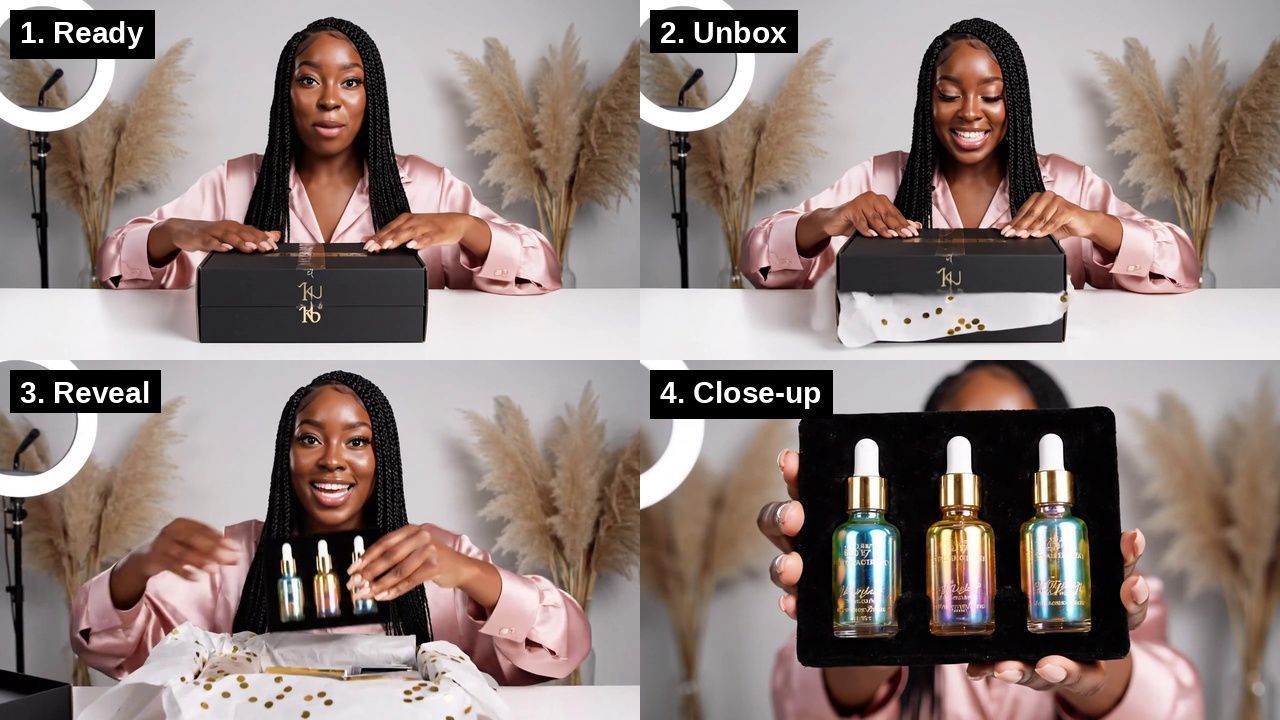
A cosmetics brand could use 1min.AI to create an unboxing-style video from a product image and a detailed prompt, reducing the time required for initial content production.
2. Simulated UGC content
Affiliate marketers and brands often need to test different creative concepts for the same product.
Veo 3.1 can help generate multiple video variations without requiring a separate filming session for every concept. These variations can support creative testing and experimentation, although AI-generated UGC should be clearly represented and used in accordance with applicable advertising guidelines.
3. Storytelling and short films
Content creators can produce short cinematic scenes with characters, dialogue, and visual direction for YouTube storytelling, short films, or social media series.
Veo 3.1 can help creators experiment with different scenes and narrative concepts before investing in more extensive production.
4. Educational and explainer videos
Creators can visualize abstract concepts, such as how lithium-ion batteries work, through animated or realistic simulations.
This can reduce the need for complex motion design during the early stages of educational content development.
5. Vertical social media videos
With support for vertical formats such as 9:16, Veo 3.1 can be used to create content for TikTok, Instagram Reels, and YouTube Shorts.
Its dialogue and lip-sync capabilities may also support faceless content formats, fictional characters, and short-form storytelling.
🔮 Features of Veo 3.1
| Feature | Details |
|---|---|
| Resolution | Up to 4K (3840 × 2160) |
| Synchronized audio | Generates ambient sound, sound effects, and dialogue with lip synchronization |
| Text-to-video | Creates videos directly from text prompts |
| Image-to-video | Transforms static images into videos with motion |
| Clip duration | 5-10 seconds per clip, with the possibility of combining multiple clips |
| Aspect ratios | 16:9, 9:16, and 1:1 |
| Consistency engine | Helps maintain character and object consistency across scenes |
| Context-aware prompting | Understands camera instructions such as pan, zoom, and tracking shots, as well as lighting and time of day |
Technical differences from Veo 3
Veo 3.1 is designed to improve motion consistency and reduce object warping during camera movement compared with earlier versions. The extent of these improvements should be validated through practical testing and official technical documentation.
How to Use Veo 3.1 Free on 1min.AI in 4 Steps
Follow these four steps to go from prompt to finished clip in a few minutes. You only need a free 1min.AI account.
- Open the tool: Sign in and open Text-to-Video. To animate a photo instead, start with image-to-video.
- Select Veo 3.1: Choose it from the model list.
- Write a clear prompt: Combine subject, action, camera move, lighting, and sound. Example: "A golden retriever running on a beach at sunset, slow motion, cinematic lighting, waves in the background."
- Pick a format and generate: Choose 16:9, 9:16, or 1:1, run the clip, then refine the prompt and try again.
Prompt Formula for Better Veo 3.1 Clips
A structured prompt makes your Veo 3.1 free credits go further. Include these five parts, in this order, and keep it to one or two sentences.
- Subject: who or what is on screen.
- Action: what moves, and how fast.
- Camera: push-in, pan, tracking shot, or static.
- Light and style: golden hour, studio, cinematic.
- Sound: waves, city noise, or a short line of dialogue.
Free Credit Methods That Fund Your Clips
Daily visits cover casual use, while the bigger programs cover heavy testing. Claim whichever fits your routine. Each one adds credits you can spend on Veo 3.1.
| Method | Reward |
|---|---|
| Daily Visit | 15,000 credits every day you open the web app |
| AI Social | 15,000 credits a day for reacting to 10+ posts, plus 30,000 at a 7-day streak and 1,000,000 at 30 days |
| AI Agent Survey | 1,000,000 credits on the Free plan, one submission per user |
| Referrals | 5,000 credits when a friend joins and 35,000 when they first run an AI feature |
| Reviews | 7,000,000 to 12,000,000 credits after you publish an honest review and submit a ticket |
At 15,000 credits a day, a 30-day month gives you 450,000 free credits. See the full list on the Free Credits page, since programs can change.
Why Use Veo 3.1 on 1min.AI?
1min.AI lets you test Veo 3.1 beside other video models in one workspace and one credit wallet. That matters because no single model wins every job. Veo 3.1 can also generate sound effects and dialogue with lip-sync.
| Use case | How Veo 3.1 helps |
|---|---|
| Product ads | Turn a product photo into a rotating, lit promo clip |
| Simulated UGC | Test several creative angles without filming each one |
| Storytelling | Draft short scenes with characters and dialogue |
| Explainers | Visualize abstract ideas before full production |
| Vertical social | Make 9:16 clips for TikTok, Reels, and Shorts |
Veo 3.1 vs Kling 3.0 on 1min.AI
Veo 3.1 suits dialogue and cinematic shots, while Kling 3.0 suits recurring characters and volume. Watch the video below, then use the table to choose.
| Criteria | Veo 3.1 | Kling 3.0 |
|---|---|---|
| Best for | Dialogue, cinematic scenes, product clips | Recurring characters, image-to-video fidelity, and high-volume work |
| Native audio | Dialogue, foley, and ambient sound in one pass | Strong lip-sync when you supply audio |
| Clip length | 5-10s | 5-10s |
| Available on 1min.AI | Yes | Yes |
FAQ
Can I use Veo 3.1 free on 1min.AI?
Yes, you can use Veo 3.1 free as long as you spend free credits. Claim 15,000 credits by visiting the web app each day, then add survey, AI Social, referral, and review rewards. Paid plans add higher limits, so check the pricing page.
Can I use Veo 3.1 videos commercially?
It depends on your plan and the content you generate. Review the current terms before you use clips in ads or client work.
Conclusion
You can use Veo 3.1 free on 1min.AI by claiming daily credits and stacking the reward programs. Start with one clip, note the credits it uses, and scale from there. Try Veo 3.1 free today. Need help? Email support@1min.ai or visit the Help Center.
Alternatives
Discover the best alternatives to 1minAI and compare features, pricing, and use cases.

1min.AI vs OpenRouter
1min.AI vs. OpenRouter: Compare the ready-to-use AI creation product against the technical API tool. Find out if you need a zero-code creative studio or a coding infrastructure hub.
 Ngoc Hong
1min.AI vs Easy Peasy AI
Looking for an Easy Peasy AI alternative? Compare pricing, free plan, features and reviews of Easy-Peasy.AI vs 1min.AI before you choose.
Ngoc Hong
1min.AI vs Lovart
Compare 1min.AI vs Lovart across features, pricing, credits, brand tools, and use cases to find the right AI platform for your workflow.
Ngoc HongAI Tools
Discover the best AI tools to boost productivity, creativity, and everyday work.

Create Consistent Cartoon Content in Just a Few Steps
Create engaging cartoon videos for TikTok and Reels with 1min.AI. Research ideas, create characters, and turn images into animated videos in 3 simple steps.
 Lien Anh Vu
One Product, 10 UGC Creatives: How AI Makes Content Testing Easier
Create more authentic UGC with an AI UGC video generator, test more creative angles and scale affiliate content without filming every version.
Lien Anh Vu
Top 4 Affordable AI Tools for Startup Founders
Discover the top 4 affordable AI tools for startup founders to validate ideas, build products, create content, and launch faster without overspending.
 Tram Ta
AI Features
Comprehensive AI features that streamline workflows, improve efficiency, and empower teams to achieve more.
Create Consistent Cartoon Content in Just a Few Steps
Create engaging cartoon videos for TikTok and Reels with 1min.AI. Research ideas, create characters, and turn images into animated videos in 3 simple steps.
Lien Anh VuOne Product, 10 UGC Creatives: How AI Makes Content Testing Easier
Create more authentic UGC with an AI UGC video generator, test more creative angles and scale affiliate content without filming every version.
Lien Anh Vu
1minAI: Free AI Grammar Checker
Check grammar for free with 1minAI’s AI grammar checker. Find grammar, spelling, and writing mistakes, improve clarity, and polish your content in seconds.
Tram TaAI Use Cases
A curated collection of AI use cases for business, productivity, and industry-specific applications.
Create Consistent Cartoon Content in Just a Few Steps
Create engaging cartoon videos for TikTok and Reels with 1min.AI. Research ideas, create characters, and turn images into animated videos in 3 simple steps.
Lien Anh VuOne Product, 10 UGC Creatives: How AI Makes Content Testing Easier
Create more authentic UGC with an AI UGC video generator, test more creative angles and scale affiliate content without filming every version.
Lien Anh Vu
Best Time to Post on Instagram: A Practical Guide for Better Engagement
Discover the best time to post on Instagram, including the best days and times for different audiences, plus tips to find the ideal posting schedule for your account.
Tram TaAI Tutorials
Learn how to use AI with practical, step-by-step tutorials.

Black Friday AI Tool Deals in 2026
Discover what Black Friday AI tool deals 2026 has to offer. Find out how to secure the 1min.AI lifetime deal via AppSumo, Dealify, Stack Social, and verify on Trustpilot, Slashdot, and Software Advice.
 Hang Nguyen
Create Consistent Cartoon Content in Just a Few Steps
Create engaging cartoon videos for TikTok and Reels with 1min.AI. Research ideas, create characters, and turn images into animated videos in 3 simple steps.
Lien Anh Vu
[Seedance 2.5 New] Better AI Product Videos, Less Rework in 1min.AI
Use Seedance 2.5 image to video on 1min.AI to create more consistent AI product videos, reduce failed generations, save credits, and improve UGC workflows.
Lien Anh VuAI Guides
Learn AI faster with practical guides, real-world examples, and actionable best practices.

Safely Buy AI Tools Online: 2026 Black Friday Guide
Discover how to find and secure the best Black Friday AI deals online. Learn expert strategies to avoid scams, combat subscription fatigue, and verify software.
Hang NguyenCreate Consistent Cartoon Content in Just a Few Steps
Create engaging cartoon videos for TikTok and Reels with 1min.AI. Research ideas, create characters, and turn images into animated videos in 3 simple steps.
Lien Anh Vu[Seedance 2.5 New] Better AI Product Videos, Less Rework in 1min.AI
Use Seedance 2.5 image to video on 1min.AI to create more consistent AI product videos, reduce failed generations, save credits, and improve UGC workflows.
Lien Anh VuAI Solutions
Browse the best AI solutions for automation, coding, research, productivity, customer support, marketing, and business workflows.
Safely Buy AI Tools Online: 2026 Black Friday Guide
Discover how to find and secure the best Black Friday AI deals online. Learn expert strategies to avoid scams, combat subscription fatigue, and verify software.
Hang NguyenCreate Consistent Cartoon Content in Just a Few Steps
Create engaging cartoon videos for TikTok and Reels with 1min.AI. Research ideas, create characters, and turn images into animated videos in 3 simple steps.
Lien Anh VuOne Product, 10 UGC Creatives: How AI Makes Content Testing Easier
Create more authentic UGC with an AI UGC video generator, test more creative angles and scale affiliate content without filming every version.
Lien Anh VuAI Models
Explore the world's leading AI models in one place.
Create Consistent Cartoon Content in Just a Few Steps
Create engaging cartoon videos for TikTok and Reels with 1min.AI. Research ideas, create characters, and turn images into animated videos in 3 simple steps.
Lien Anh VuOne Product, 10 UGC Creatives: How AI Makes Content Testing Easier
Create more authentic UGC with an AI UGC video generator, test more creative angles and scale affiliate content without filming every version.
Lien Anh Vu[Seedance 2.5 New] Better AI Product Videos, Less Rework in 1min.AI
Use Seedance 2.5 image to video on 1min.AI to create more consistent AI product videos, reduce failed generations, save credits, and improve UGC workflows.
Lien Anh VuAI Comparisons
Compare AI tools, models, and platforms to find the best fit for your needs.

Kling AI Vs Veo 3: Which Model Wins?
Kling AI vs Veo 3: compare motion, native audio, pricing & free tiers to see which AI video generator wins for your project - try both on 1min.AI.
 Trang Tran
[Seedance 2.5 New] Better AI Product Videos, Less Rework in 1min.AI
Use Seedance 2.5 image to video on 1min.AI to create more consistent AI product videos, reduce failed generations, save credits, and improve UGC workflows.
Lien Anh Vu
DeepSeek V4 Pro vs Flash Comparison
Compare DeepSeek V4 Pro vs DeepSeek V4 Flash metrics. Optimize your agentic apps and improve AI fact checking on 1min.ai today.
Ngoc HongAI Integrations
Seamlessly integrate AI with the tools you already use to automate work and boost productivity.

POV: You Have 10+ Posts to Make Every Day
Learn how to build an AI content workflow that helps content creators produce 10+ social media posts a day faster with AI brainstorming, image generation, and content creation.
Lien Anh Vu
How to Use an AI Fashion Video Generator for Fashion Week 2026
Turn Fashion Week 2026 ideas into stunning fashion videos with AI. Learn how to brainstorm, create visuals, and transform images into videos with one simple workflow.
Lien Anh Vu
Stop Switching Between AI Apps: How AI Integration Transforms Employer Branding
Discover how AI integration helps HR teams streamline employer branding by combining AI writing, documents, images, video, and multiple AI models into one workspace.
Tram TaAI for Industries
Find the best AI tools and workflows for healthcare, finance, education, legal, manufacturing, retail, real estate, and more

Best AI Tool for Content Marketing |1minAI
Looking for the best AI tool for content marketing? See how 1minAI helps marketers research, write, repurpose, create visuals, and scale content from one AI workspace.
Tram Ta
7 Low-Cost AI Business Ideas for Your Startup
Explore 7 low-cost AI business ideas you can start with a small budget, from content and video services to AI consulting, reselling, and automation.
Tram Ta
How to Start a One-Person AI Business: 7 Models You Can Run Solo
Learn how to start a one-person AI business with 7 practical models, from AI consulting and content services to automation and software reselling.
Tram TaAI Agents
Discover and run AI agents to automate tasks across your work and daily life.
1minAI: Free AI Grammar Checker
Check grammar for free with 1minAI’s AI grammar checker. Find grammar, spelling, and writing mistakes, improve clarity, and polish your content in seconds.
Tram Ta
AI Agents for Facebook
Use an AI Agent for Facebook to create content, generate images, schedule posts, and publish from your documents and conversations.
Ngoc Hong
AI Agent vs AI Assistant: Which One Actually Saves Designers More Time?
Learn the difference between AI Agent vs AI Assistant and discover which solution helps designers automate repetitive work, reduce revisions, and save more time.
Lien Anh VuAI Workflows
Explore ready-to-use AI workflows for productivity, marketing, sales, support, and more.
Create Consistent Cartoon Content in Just a Few Steps
Create engaging cartoon videos for TikTok and Reels with 1min.AI. Research ideas, create characters, and turn images into animated videos in 3 simple steps.
Lien Anh VuOne Product, 10 UGC Creatives: How AI Makes Content Testing Easier
Create more authentic UGC with an AI UGC video generator, test more creative angles and scale affiliate content without filming every version.
Lien Anh VuPOV: You Have 10+ Posts to Make Every Day
Learn how to build an AI content workflow that helps content creators produce 10+ social media posts a day faster with AI brainstorming, image generation, and content creation.
Lien Anh VuNewsletter
Weekly AI Innovations with 1minAI

🔮 Weekly AI Innovations #140: Deepseek 4.1 Flash & Gemini Upgrades
Explore Deepseek 4.1 Flash and new Gemini models on 1min.ai. Plus, check our update on your Billing - Usage page for better clarity.
Hang Nguyen
🔮 Weekly AI Innovations #136: Grok 4.6 and Smart Data Retention
Discover the latest 1min.ai updates! Upgrade to Grok 4.6 for blazing-fast AI, and check our new Data Retention policies to secure your files today.
Hang Nguyen
🔮 Weekly AI Innovations #139: Dawn of the next-gen AI
Discover the immense power of GPT-6 Astra and Claude Fable 5.1. Unlock next-generation AI models on 1min.ai to solve complex tasks effortlessly.
Hang Nguyen