
YouTube Audience Retention: What's Good and How to Improve

Ngoc Hong
22 October 2026
Learn how to judge YouTube audience retention, read drop-offs, and improve hooks and scripts with a practical, creator-led AI workflow.
YouTube audience retention: What’s good and how to improve
Good YouTube audience retention is best judged against comparable videos, rather than a universal percentage. YouTube’s retention guide recommends comparisons with videos of similar length; it does not supply a platform-wide “good” rate.
For solo creators and small teams, the practical question is where attention weakened and what to change in the next script.
What is good audience retention on YouTube?
Start with YouTube Studio’s typical retention comparison against your ten latest videos of similar length. You can also use “See more” to compare with YouTube videos of similar length.
Then build a more useful editorial comparison: choose videos with similar topics, formats, and audience needs. Compare tutorials with tutorials before comparing them with interviews. Record the same period after publication, such as each video’s first seven days.
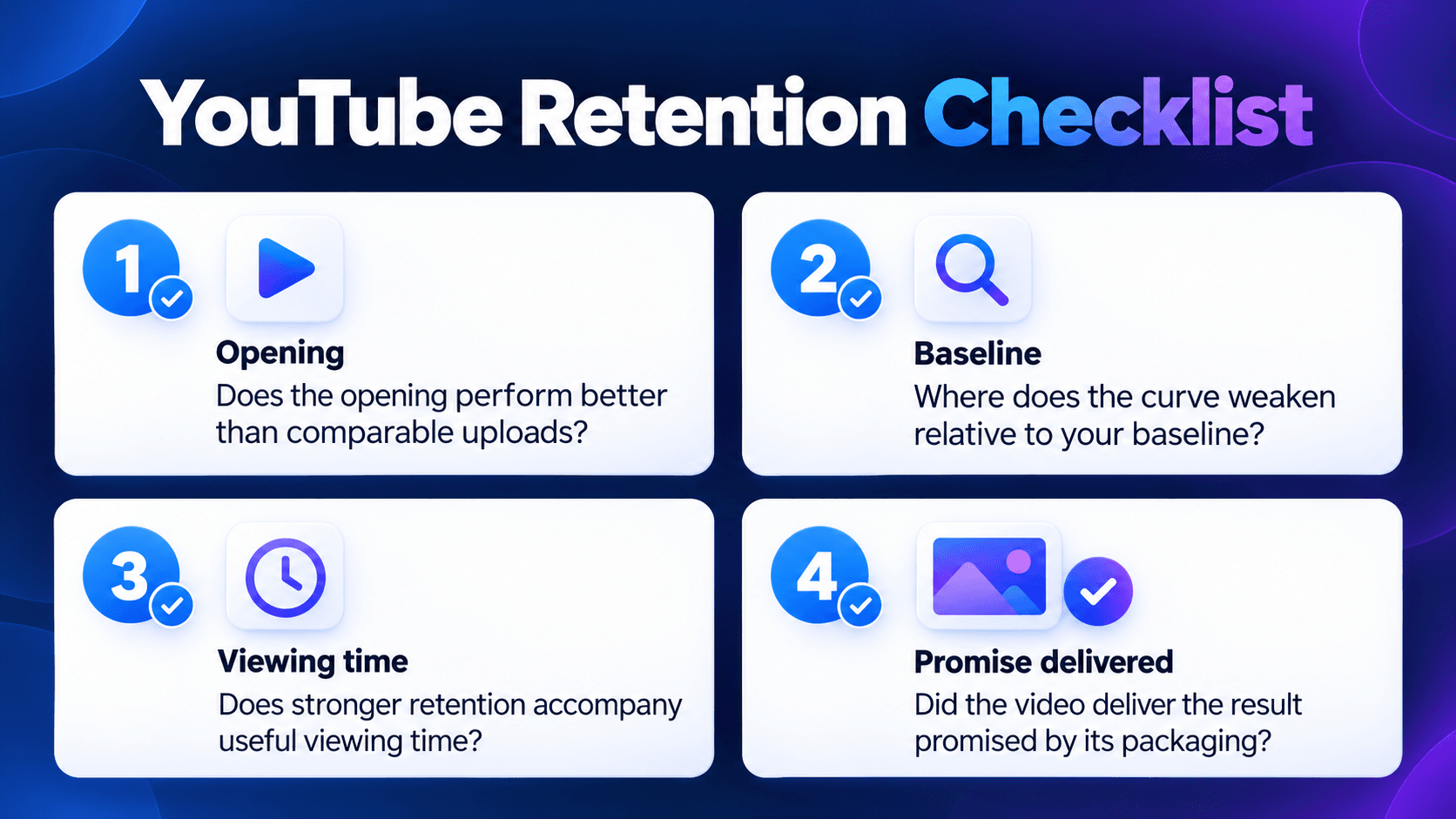
Use this checklist:
- Does the opening perform better than comparable uploads?
- Where does the curve weaken relative to your baseline?
- Does stronger retention accompany useful viewing time?
- Did the video deliver the result promised by its packaging?
Treat an improvement as a signal worth investigating. Changes in audience composition, topic, or distribution can also affect results; a comparison does not prove your rewrite caused the difference.
What is YouTube audience retention?
YouTube audience retention shows how different moments hold attention. It helps you investigate viewer retention at specific points in a video. Keep three measurements separate when reviewing your video. YouTube Help
| Measurement | What it tells you |
|---|---|
| Retention curve | How attention changes throughout the video |
| Average view duration | Average time watched among viewers who stayed to watch |
| Average percentage viewed | Average share watched among those who stayed to watch |
When someone asks about their “YouTube retention rate,” clarify which measurement they mean before recommending changes.
How to improve YouTube audience retention with a script review
Open YouTube Studio → Content → select a video → Analytics → Overview or Engagement → Audience retention. Data usually needs one to two days to process.
Choose one important moment to investigate before rewriting the entire video.
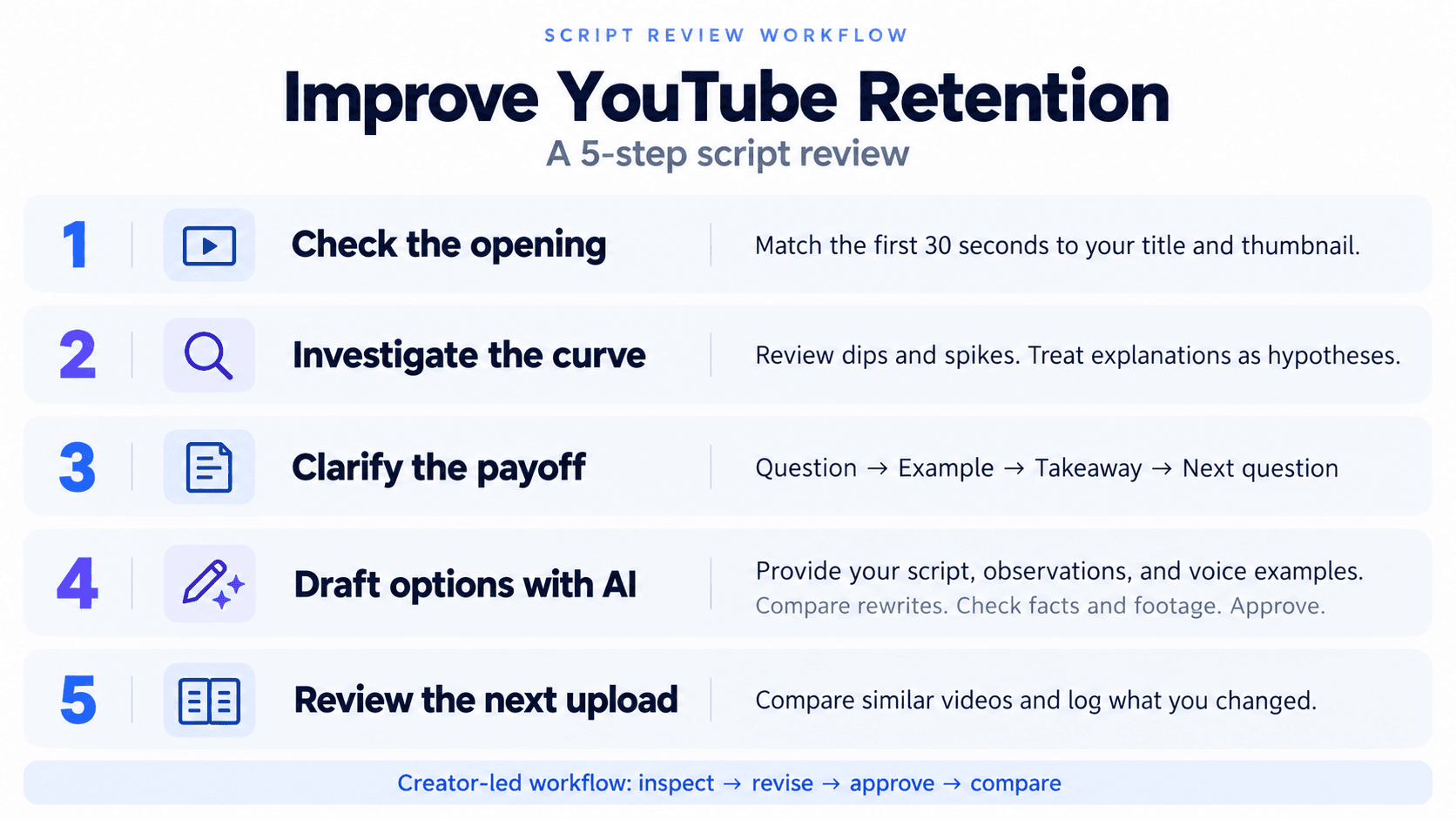
1. Check the opening against the promise
The intro metric shows the percentage still watching after 30 seconds. Review those seconds beside the title and thumbnail.
Ask whether viewers immediately encounter the promised subject. Consider this hypothetical camera-buying video:
Before: “Welcome back! Today we’re talking about cameras. First, a quick update about my channel.”
Revision to test: “Before buying your first camera, check these three mistakes. Here’s what happens when autofocus misses during a simple walking shot.”
Only use the revised opening if your footage includes the promised demonstration.
2. Turn curve patterns into editing hypotheses
Dips indicate skipping or exits. Spikes can reflect rewatching or sharing; rewatching may also signal confusion. Watch the corresponding footage before deciding what either pattern means.
The following are editorial hypotheses to test, not diagnoses supplied by Analytics:
| What you observe | Question to investigate | Possible revision |
|---|---|---|
| Drop during background explanation | Is this context necessary here? | Move essential context beside the relevant example |
| Dip during a demonstration | Is the action difficult to follow? | Add a clearer close-up and concise instruction |
| Spike around a comparison | Is it useful or confusing? | Simplify labels, then test an earlier preview |
| Repeated weakening before section changes | Does the next section have a clear purpose? | Replace repeated summaries with a specific transition |
Each editing change should help viewers understand or anticipate something useful.
3. Give each section a clear payoff
Outline the next script as question → example → takeaway → next question.
For the camera video, one section could ask, “Will this camera keep you in focus?” Show the walking test, explain what to inspect, then transition to audio quality.
Read the script aloud. Remove repetition and unsupported claims. For a wordy passage, try the AI Content Shortener, then check that the shorter version preserves essential context.
4. Use AI to produce revision options
Use Multi AI Chat in 1min.AI to request script alternatives, or the AI Rewriter to rephrase an existing passage. Manually supply your script, observations, and channel voice examples.
Try this prompt:
Act as a script editor for an established YouTube channel.
Inputs: [title], [thumbnail promise], [timestamped script], [retention observations], and [two approved voice examples].
Separate observations from possible explanations. Suggest three opening options and revisions for the flagged sections.
Return: original passage, proposed rewrite, reason, and footage needed. Preserve verified facts and my tone. Do not invent analytics, claim causation, or promise retention gains.
Review the output against your footage and sources. Select a version, revise it in your own voice, and transfer the approved script into production.
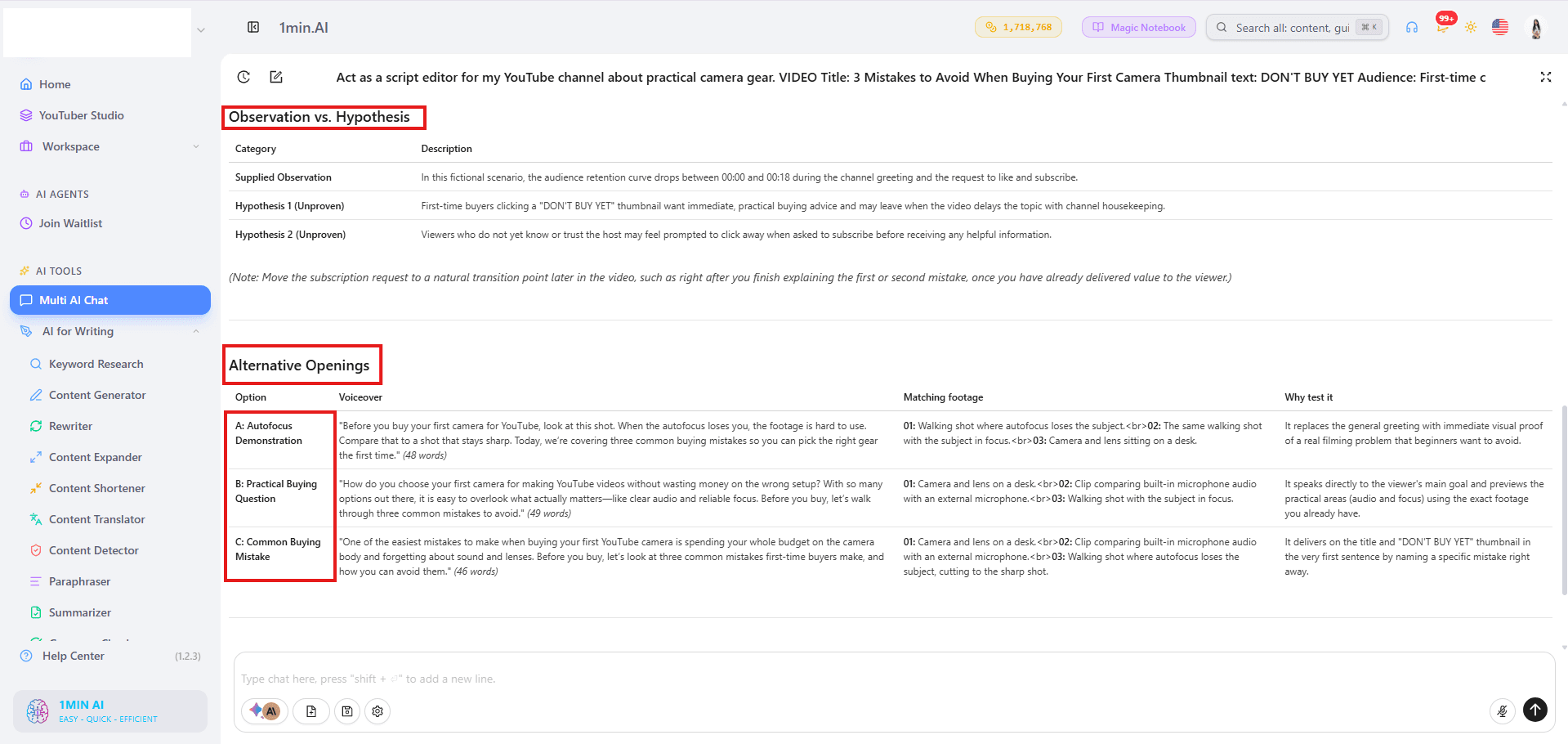
In this example, 1min.AI separates a fictional retention observation from two unproven explanations, then generates three alternative openings: a demonstration, a buying question, and a common mistake. Each option includes voiceover, matching footage, and a reason to test it. The creator can compare these suggestions and refine the opening that best fits the video.
This is a semi-manual workflow: you inspect Analytics, provide inputs, approve revisions, and complete editing and publishing.
5. Review the next comparable upload
Record the revision, expected effect, and metric you will inspect before publishing. For example: “Replace the channel update with the demonstration; review opening retention against comparable tutorials.”
Keep a short learning log across uploads. Change one major script element when practical, and investigate whether the same pattern repeats.
FAQ
Use these distinctions when reviewing long-form videos and Shorts.
Is 50% audience retention good?
It needs context. Identify whether 50% means average percentage viewed or retention at a particular timestamp, then compare relevant videos.
Should Shorts use the same benchmark?
Evaluate Shorts separately. YouTube defines “stayed to watch” as staying beyond the initial seconds; average percentage viewed describes viewing among those who stayed. YouTube Help
For your next upload, choose one retention issue and test one script revision. Open 1min.AI to draft alternatives from your own script and observations.
- #Information
Alternatives
Discover the best alternatives to 1minAI and compare features, pricing, and use cases.

1min.AI vs OpenRouter
1min.AI vs. OpenRouter: Compare the ready-to-use AI creation product against the technical API tool. Find out if you need a zero-code creative studio or a coding infrastructure hub.
 Ngoc Hong
1min.AI vs Jarvis AI
Compare 1min.AI vs Jarvis AI to discover which AI platform is better for writing, research, automation, and content creation. Find the best AI assistant for your workflow.
Ngoc Hong
1min.AI vs Taskade
Compare 1min.AI vs Taskade for AI content creation, automation, agents, and creative workflows to find the right workspace.
Ngoc HongAI Tools
Discover the best AI tools to boost productivity, creativity, and everyday work.

Create Consistent Cartoon Content in Just a Few Steps
Create engaging cartoon videos for TikTok and Reels with 1min.AI. Research ideas, create characters, and turn images into animated videos in 3 simple steps.
 Lien Anh Vu
One Product, 10 UGC Creatives: How AI Makes Content Testing Easier
Create more authentic UGC with an AI UGC video generator, test more creative angles and scale affiliate content without filming every version.
Lien Anh Vu
Top 4 Affordable AI Tools for Startup Founders
Discover the top 4 affordable AI tools for startup founders to validate ideas, build products, create content, and launch faster without overspending.
 Tram Ta
AI Features
Comprehensive AI features that streamline workflows, improve efficiency, and empower teams to achieve more.
Create Consistent Cartoon Content in Just a Few Steps
Create engaging cartoon videos for TikTok and Reels with 1min.AI. Research ideas, create characters, and turn images into animated videos in 3 simple steps.
Lien Anh VuOne Product, 10 UGC Creatives: How AI Makes Content Testing Easier
Create more authentic UGC with an AI UGC video generator, test more creative angles and scale affiliate content without filming every version.
Lien Anh Vu
1minAI: Free AI Grammar Checker
Check grammar for free with 1minAI’s AI grammar checker. Find grammar, spelling, and writing mistakes, improve clarity, and polish your content in seconds.
Tram TaAI Use Cases
A curated collection of AI use cases for business, productivity, and industry-specific applications.
Create Consistent Cartoon Content in Just a Few Steps
Create engaging cartoon videos for TikTok and Reels with 1min.AI. Research ideas, create characters, and turn images into animated videos in 3 simple steps.
Lien Anh VuOne Product, 10 UGC Creatives: How AI Makes Content Testing Easier
Create more authentic UGC with an AI UGC video generator, test more creative angles and scale affiliate content without filming every version.
Lien Anh Vu
Best Time to Post on Instagram: A Practical Guide for Better Engagement
Discover the best time to post on Instagram, including the best days and times for different audiences, plus tips to find the ideal posting schedule for your account.
Tram TaAI Tutorials
Learn how to use AI with practical, step-by-step tutorials.

Black Friday AI Tool Deals in 2026
Discover what Black Friday AI tool deals 2026 has to offer. Find out how to secure the 1min.AI lifetime deal via AppSumo, Dealify, Stack Social, and verify on Trustpilot, Slashdot, and Software Advice.
 Hang Nguyen
Create Consistent Cartoon Content in Just a Few Steps
Create engaging cartoon videos for TikTok and Reels with 1min.AI. Research ideas, create characters, and turn images into animated videos in 3 simple steps.
Lien Anh Vu
[Seedance 2.5 New] Better AI Product Videos, Less Rework in 1min.AI
Use Seedance 2.5 image to video on 1min.AI to create more consistent AI product videos, reduce failed generations, save credits, and improve UGC workflows.
Lien Anh VuAI Guides
Learn AI faster with practical guides, real-world examples, and actionable best practices.

Safely Buy AI Tools Online: 2026 Black Friday Guide
Discover how to find and secure the best Black Friday AI deals online. Learn expert strategies to avoid scams, combat subscription fatigue, and verify software.
Hang NguyenCreate Consistent Cartoon Content in Just a Few Steps
Create engaging cartoon videos for TikTok and Reels with 1min.AI. Research ideas, create characters, and turn images into animated videos in 3 simple steps.
Lien Anh Vu[Seedance 2.5 New] Better AI Product Videos, Less Rework in 1min.AI
Use Seedance 2.5 image to video on 1min.AI to create more consistent AI product videos, reduce failed generations, save credits, and improve UGC workflows.
Lien Anh VuAI Solutions
Browse the best AI solutions for automation, coding, research, productivity, customer support, marketing, and business workflows.
Safely Buy AI Tools Online: 2026 Black Friday Guide
Discover how to find and secure the best Black Friday AI deals online. Learn expert strategies to avoid scams, combat subscription fatigue, and verify software.
Hang NguyenCreate Consistent Cartoon Content in Just a Few Steps
Create engaging cartoon videos for TikTok and Reels with 1min.AI. Research ideas, create characters, and turn images into animated videos in 3 simple steps.
Lien Anh VuOne Product, 10 UGC Creatives: How AI Makes Content Testing Easier
Create more authentic UGC with an AI UGC video generator, test more creative angles and scale affiliate content without filming every version.
Lien Anh VuAI Models
Explore the world's leading AI models in one place.
Create Consistent Cartoon Content in Just a Few Steps
Create engaging cartoon videos for TikTok and Reels with 1min.AI. Research ideas, create characters, and turn images into animated videos in 3 simple steps.
Lien Anh VuOne Product, 10 UGC Creatives: How AI Makes Content Testing Easier
Create more authentic UGC with an AI UGC video generator, test more creative angles and scale affiliate content without filming every version.
Lien Anh Vu[Seedance 2.5 New] Better AI Product Videos, Less Rework in 1min.AI
Use Seedance 2.5 image to video on 1min.AI to create more consistent AI product videos, reduce failed generations, save credits, and improve UGC workflows.
Lien Anh VuAI Comparisons
Compare AI tools, models, and platforms to find the best fit for your needs.

Kling AI Vs Veo 3: Which Model Wins?
Kling AI vs Veo 3: compare motion, native audio, pricing & free tiers to see which AI video generator wins for your project - try both on 1min.AI.
 Trang Tran
[Seedance 2.5 New] Better AI Product Videos, Less Rework in 1min.AI
Use Seedance 2.5 image to video on 1min.AI to create more consistent AI product videos, reduce failed generations, save credits, and improve UGC workflows.
Lien Anh Vu
DeepSeek V4 Pro vs Flash Comparison
Compare DeepSeek V4 Pro vs DeepSeek V4 Flash metrics. Optimize your agentic apps and improve AI fact checking on 1min.ai today.
Ngoc HongAI Integrations
Seamlessly integrate AI with the tools you already use to automate work and boost productivity.

POV: You Have 10+ Posts to Make Every Day
Learn how to build an AI content workflow that helps content creators produce 10+ social media posts a day faster with AI brainstorming, image generation, and content creation.
Lien Anh Vu
How to Use an AI Fashion Video Generator for Fashion Week 2026
Turn Fashion Week 2026 ideas into stunning fashion videos with AI. Learn how to brainstorm, create visuals, and transform images into videos with one simple workflow.
Lien Anh Vu
Stop Switching Between AI Apps: How AI Integration Transforms Employer Branding
Discover how AI integration helps HR teams streamline employer branding by combining AI writing, documents, images, video, and multiple AI models into one workspace.
Tram TaAI for Industries
Find the best AI tools and workflows for healthcare, finance, education, legal, manufacturing, retail, real estate, and more

Free AI Product Description Generator
Write product descriptions that sell in minutes. Use this free AI product description generator to turn details or a photo into on-brand copy. Try 1min.AI.
Trang Tran
Best Business Productivity Tools for Startups to Maximize Profits | 1minAI
Discover the best business productivity tools for startups to save time, streamline workflows, reduce repetitive tasks, and support profitable growth with AI.
Tram Ta
Best AI Tool for Content Marketing |1minAI
Looking for the best AI tool for content marketing? See how 1minAI helps marketers research, write, repurpose, create visuals, and scale content from one AI workspace.
Tram TaAI Agents
Discover and run AI agents to automate tasks across your work and daily life.
1minAI: Free AI Grammar Checker
Check grammar for free with 1minAI’s AI grammar checker. Find grammar, spelling, and writing mistakes, improve clarity, and polish your content in seconds.
Tram Ta
AI Agents for Facebook
Use an AI Agent for Facebook to create content, generate images, schedule posts, and publish from your documents and conversations.
Ngoc Hong
AI Agent vs AI Assistant: Which One Actually Saves Designers More Time?
Learn the difference between AI Agent vs AI Assistant and discover which solution helps designers automate repetitive work, reduce revisions, and save more time.
Lien Anh VuAI Workflows
Explore ready-to-use AI workflows for productivity, marketing, sales, support, and more.
Create Consistent Cartoon Content in Just a Few Steps
Create engaging cartoon videos for TikTok and Reels with 1min.AI. Research ideas, create characters, and turn images into animated videos in 3 simple steps.
Lien Anh VuOne Product, 10 UGC Creatives: How AI Makes Content Testing Easier
Create more authentic UGC with an AI UGC video generator, test more creative angles and scale affiliate content without filming every version.
Lien Anh VuPOV: You Have 10+ Posts to Make Every Day
Learn how to build an AI content workflow that helps content creators produce 10+ social media posts a day faster with AI brainstorming, image generation, and content creation.
Lien Anh VuNewsletter
Weekly AI Innovations with 1minAI

🔮 Weekly AI Innovations #142: Grok 4.7, Opus 5.5 & Sonnet 5.5 on 1min.ai
Access Grok 4.7, Claude Opus 5.5, and Sonnet 5.5 on 1min.ai. Cut subscription costs by up to 70% and process millions tokens in a single unified workspace.
Hang Nguyen
🔮 Weekly AI Innovations #141: Seedance 2.5 & Stable Audio 3: Next-Gen AI
Explore Seedance 2.0, 2.5, and StabilityAI's Stable Audio 3 on 1min.ai. Generate studio-grade audio and synchronized motion with next-gen generative AI.
Hang Nguyen
🔮 Weekly AI Innovations #140: Deepseek 4.1 Flash & Gemini Upgrades
Explore Deepseek 4.1 Flash and new Gemini models on 1min.ai. Plus, check our update on your Billing - Usage page for better clarity.
Hang Nguyen