
Claude Personal Finance Setup and Safety Guide

Trang Tran
2026 m. lapkričio 20 d.

Claude personal finance explained: how Personal Finance in Claude works and what Claude finance can see. Plus a safe CSV method for non-US users.
Claude personal finance (officially “Personal Finance in Claude”) is an Anthropic beta feature. It links your bank and card accounts through Plaid so you can ask Claude about balances, spending, and bills in plain language. Access is read-only. It is available only to US users on Pro, Max, and Ultra plans. Outside the US, you can get similar results by uploading a redacted CSV statement to a Claude model in 1min.AI.
It is the end of the month and payday is still ten days away. You do not need a spreadsheet to answer “Where did my money go?” You need a clear answer you can trust. This guide covers what the feature does, how to set it up, how safe it is, and how to get similar value if you live outside the US.
What Is Claude Personal Finance?
Personal Finance in Claude is a section of the Claude app where you connect financial accounts and ask questions about your own money. It works on Claude web, Claude Desktop, iOS, and Android. Anthropic states that it has no ads or sponsored recommendations and that it does not offer credit cards, loans, or savings accounts of its own.
Watch the official walkthrough:
What Claude Finance Can Do
Claude finance covers four main jobs:
- Spending summaries: Ask “Where did my money go this month?” and get totals grouped by category such as rent, food, and shopping.
- Problem spotting: Claude can flag duplicate charges, unexpected fees, and bills that crept up over the year.
- Concept explanations: Ask “What is an APR?” and Claude explains the term, then adds up the interest you were charged.
- Dashboard building: Ask for a weekly spending chart, a calendar of what is due, or a custom set of numbers.
Who Can Use Personal Finance in Claude
| Requirement | Details |
|---|---|
| Plans | Pro, Max, and Ultra (not Free, Team, or Enterprise) |
| Region | US banks and US users only |
| Status | Beta with gradual rollout |
| Data access | Read-only: balances, credit limits, up to 24 months of transactions |
| Bank limit | Up to 16 linked banks |
How to Use Personal Finance in Claude
Link Your Bank Through Plaid
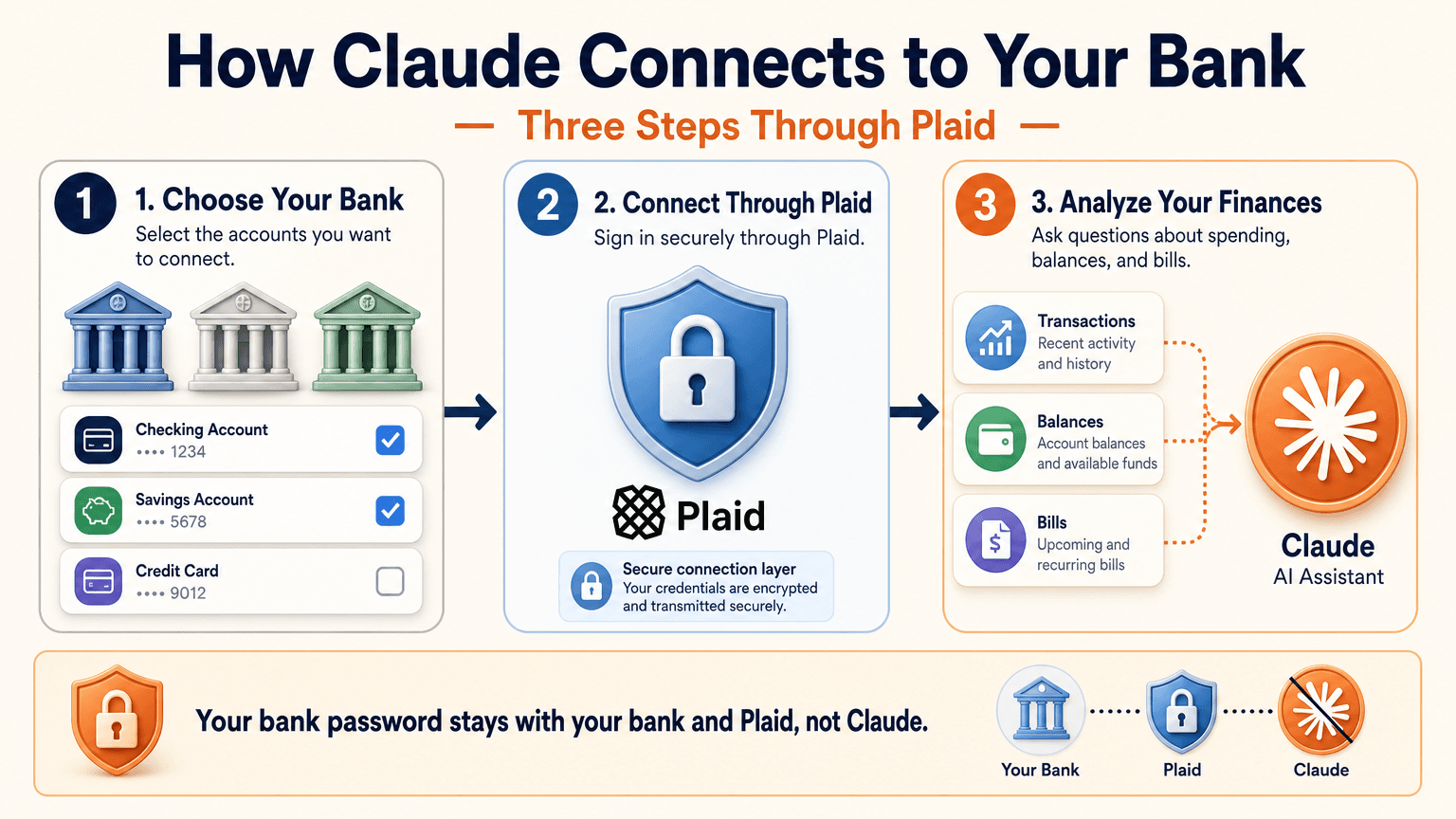
- Open Claude and select Personal Finance in the side menu. If you do not see it, check More.
- Select Get started and choose your goals or skip them.
- Select Link accounts with Plaid and review what Claude will be able to access.
- Sign in to your bank inside Plaid and choose the accounts to share.
- Return to Claude within 10 minutes and wait for your accounts to appear.
You sign in through Plaid, so Claude does not ask for or see your bank password. New transactions can take a few minutes to sync.
Use the Claude Personal Finance Dashboard
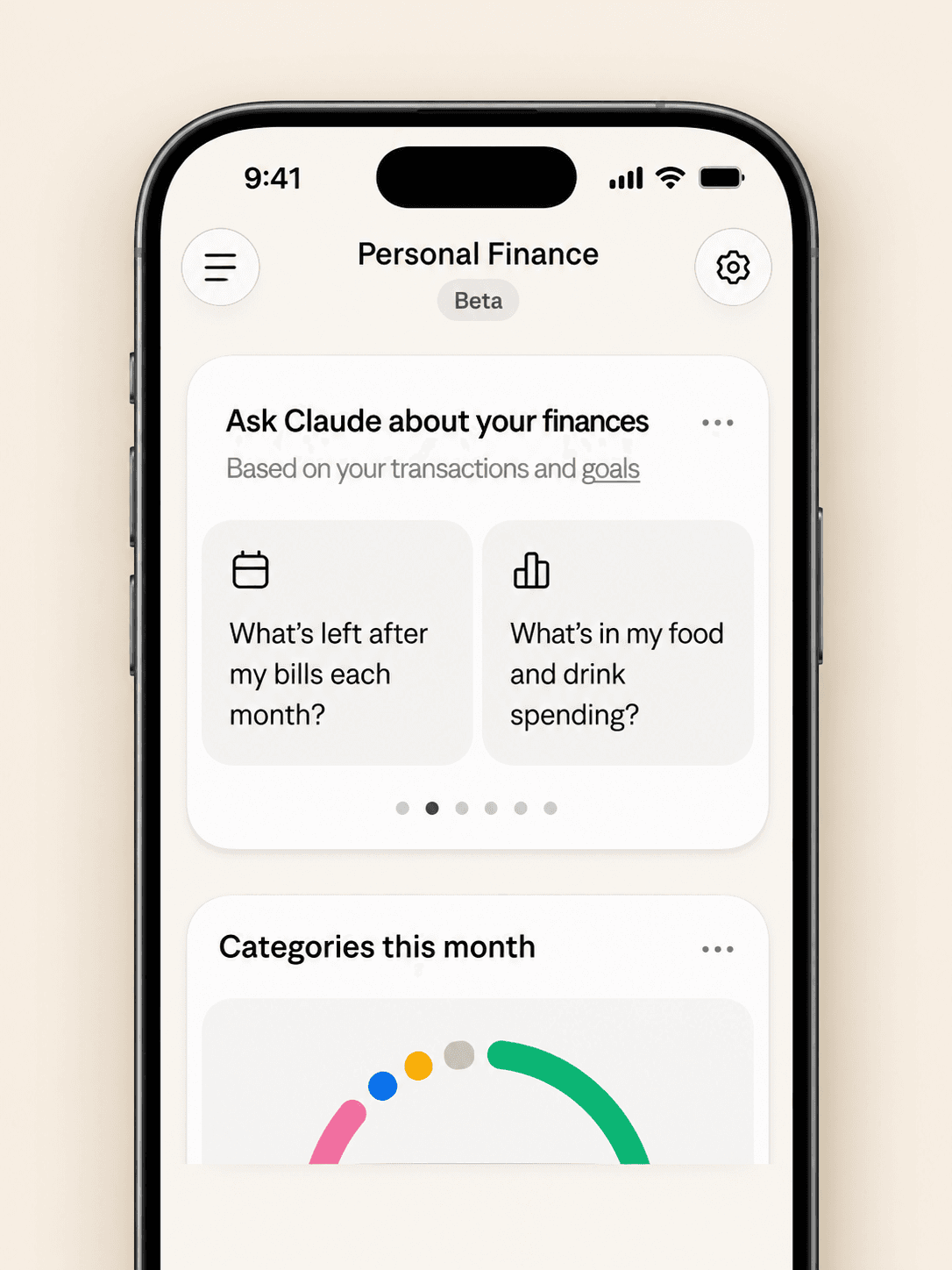
The dashboard puts spending, cash flow, accounts, subscriptions, and upcoming bills on one page. Widgets can be added, edited, removed, and reordered. Start with one account and one question, such as “Can I afford a trip this spring?”
Claude Personal Finance Prompts to Try
Spending and Bills
- “Where did my money go last month, grouped by category?”
- “Which subscriptions am I paying for, and which ones went up in price?”
- “What payments will leave my checking account before payday?”
Smarter Follow-Ups
- “Is that more than usual? Compare the last three months.”
- “Which transactions are behind this number?”
- “Do any charges look duplicated or unexpected?”
The second follow-up matters most. Anthropic itself advises asking which transactions sit behind a figure and checking important numbers with your bank.
Is Claude Personal Finance Safe?
Read-Only Access Through Plaid
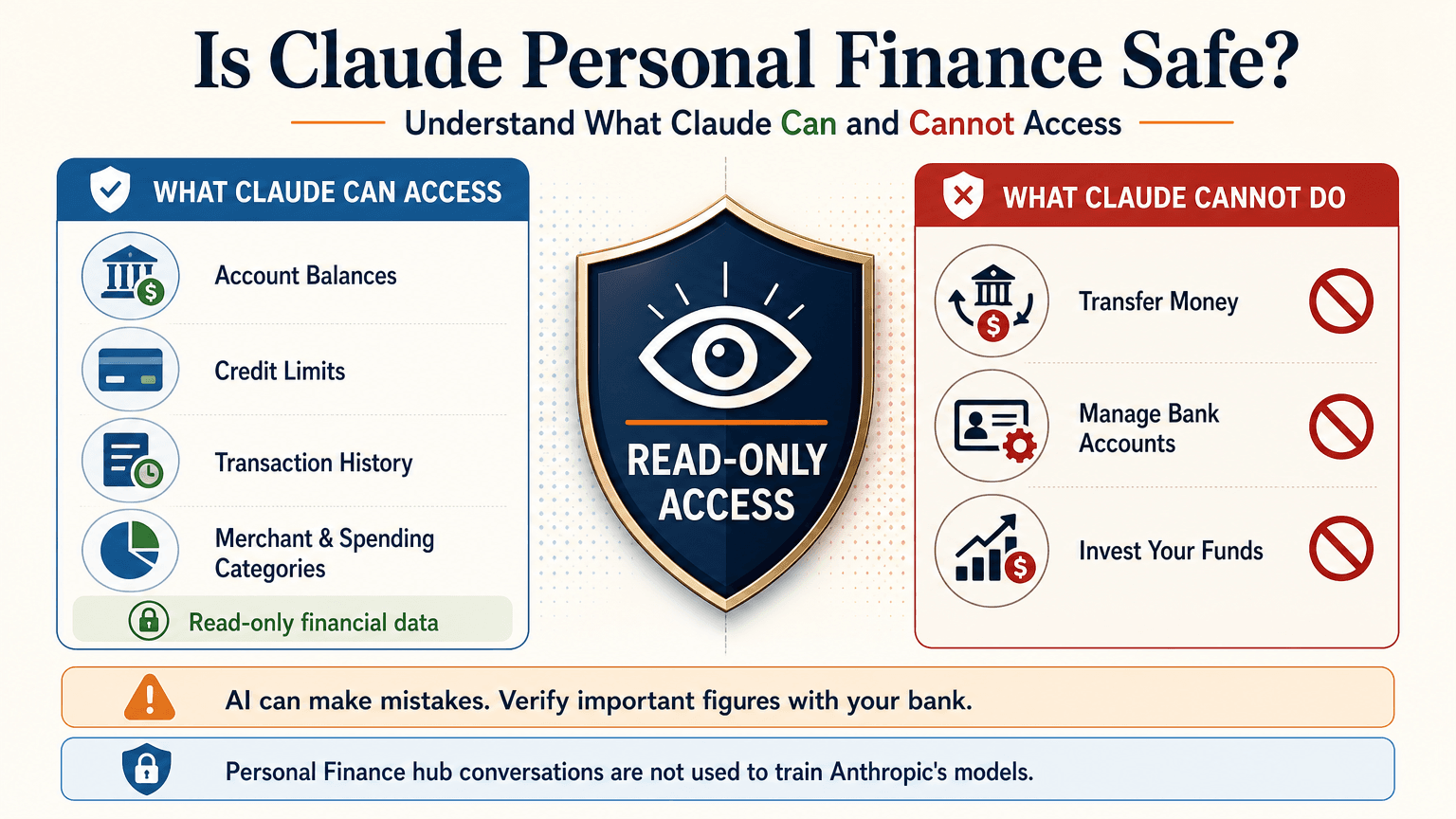
Claude cannot move, manage, or invest your money. Plaid handles the bank sign-in, so your password stays between you and your bank. You can unlink a bank at any time, and Claude can no longer see its data.
What Claude Can See
For the accounts you choose, Claude can read:
- Bank names, account names, types, and last four digits
- Balances and credit limits
- Up to 24 months of transactions with amount, date, merchant, category, and bank description
For investment accounts, loans, and cards, Claude reads balances and credit limits, not holdings, trades, or rates. Conversations in the Personal Finance hub are not used to train Anthropic’s models. For anything you share outside the hub, your normal privacy settings apply.
Accuracy Limits
Claude is AI and can make mistakes. Balances can be a day or two old. An account linked through two logins may be counted twice. Anthropic also says the feature is not designed to give investment advice. Treat Claude as an analyst that organizes and explains your data rather than the final decision maker.
Current Limitations
- US banks only
- No use of linked accounts in scheduled tasks, Cowork tasks, or Claude Code
- Not available on Free, Team, or Enterprise plans
- Saved dashboards are not yet included in data exports
Claude Personal Finance on Reddit: What People Did Before Launch
Personal Finance in Claude only just started rolling out, so real-world reviews of the official feature are still limited. For context, earlier discussions on r/ClaudeAI show how people were managing money with Claude before this feature existed. These are community workflows, not feedback on the new feature.
- Retirement planning: Running Monte Carlo simulations to estimate safe spending rates.
- Custom dashboards: Replacing spreadsheets with net worth and budget views.
- Fee hunting: Comparing bank statements with a fee schedule PDF to dispute wrong charges.
- Bank connections: A few users automated budget emails through Plaid or SimpleFIN, while many preferred uploading redacted CSV files to protect privacy.
That privacy split is useful to know. It is the same trade-off between convenience and control that the official feature and a CSV workflow now represent.
Use Claude Finance Outside the US With a CSV
You do not need account linking to get useful answers. A bank statement export contains the same raw material: dates, merchants, and amounts.
Build a Claude Personal Finance Tracker With 1min.AI
- Export one to three months of transactions from your bank as a CSV.
- Redact account numbers, full names, and addresses before sharing.
- Open Multi AI Chat in 1min.AI and select a Claude model.
- Paste or upload the cleaned data and run your prompt.
- Save the prompt in Prompt List so you can reuse it every month.
A starter prompt: “Categorize these transactions and total each category. List recurring subscriptions and flag duplicates or unusual fees. Show a table and mark any rows you are unsure about.”
1min.AI is not the official Personal Finance in Claude feature and does not connect to your bank. It gives you access to Claude models in one workspace, so this workflow works from any country. For model details, see the page for Claude Opus 5.5 and the guide to Claude Fable 5.1.
Which Claude Model Fits Which Money Task
| Task | Suggested model | Why |
|---|---|---|
| Categorizing many transactions | Claude 5.5 Haiku | Fast and low cost |
| Monthly budget and subscription audit | Claude 5.5 Sonnet | Balanced quality and cost |
| Retirement scenarios and multi-step analysis | Claude 5.5 Opus or 5.1 Fable | Stronger reasoning on complex questions |
Curious how the top models compare? Watch this test:
Claude Personal Finance Plugin Options
Community plugins can extend Claude for finance work. The Claude Cowork guide lists a Finance Tracker plugin for expense tracking and budget analysis. Review any plugin’s permissions before installing it, and never give a tool more financial data than the task needs.
Official Feature vs a CSV Workflow on 1min.AI
| Personal Finance in Claude | CSV workflow on 1min.AI | |
|---|---|---|
| Availability | US beta on paid plans | Global |
| Data source | Live accounts via Plaid | Redacted CSV or pasted rows |
| Dashboard | Built-in widgets | Tables and charts you request |
| Reusable prompts | Suggested questions | Prompt List |
| Model choice | Claude | Haiku, Sonnet, Opus, Fable, and more |
| Best for | Hands-off tracking | Privacy control and non-US users |
Teams that share finance prompts can use Shared Zone. Writers who turn results into reports can try Claude 4.6 for writing. 1min.AI is rated Excellent on Trustpilot and recognized on SourceForge, Slashdot, Capterra, Software Advice, and GetApp. If you want to see how an earlier flagship handles long analysis, try Claude 5 Fable.
Claude Personal Finance FAQ
What is Claude personal finance?
It is Anthropic’s beta feature, officially called Personal Finance in Claude. It links bank and card accounts through Plaid so you can ask about spending, balances, and bills.
Is Personal Finance in Claude free?
No. It is available on Pro, Max, and Ultra plans in the US. It is not available on Free, Team, or Enterprise.
Can Claude move my money?
No. Access is read-only. Claude cannot move, manage, or invest funds.
Can I use Claude finance features outside the US?
The official feature supports US banks only. Outside the US, you can upload a redacted CSV statement to a Claude model and prompt it for categories, subscriptions, and budgets.
Is Claude accurate with financial data?
It can make mistakes. Ask which transactions support each figure and verify key numbers with your bank.
Is this financial advice?
No. This article is educational and is not financial, tax, or investment advice. Consult a licensed professional for major decisions.
Final Thoughts
Claude personal finance turns scattered statements into clear answers. It is still a beta with strict regional limits and normal AI error risk. Use it to organize, categorize, and explain, and verify important figures yourself. If you live outside the US or prefer to keep bank access closed, a redacted CSV with the right Claude model delivers much of the same insight.
- #Information
Alternatyvos
Atraskite geriausias 1minAI alternatyvas ir palyginkite funkcijas, kainodarą bei naudojimo atvejus.

1min.AI prieš OpenRouter
1min.AI prieš OpenRouter: palyginkite paruoštą naudoti DI kūrimo produktą su techniniu API įrankiu. Sužinokite, ar jums reikia be kodo kūrybinės studijos, ar kodavimo infrastruktūros centro.
 Ngoc Hong

1min AI vs Buffer
Compare 1min.AI vs Buffer for Facebook content creation, AI writing, image generation, scheduling, pricing, and everyday marketing workflows.
Ngoc Hong
1min.AI vs. Hootsuite: Which Social Media Tool Fits Your Workflow?
Compare 1min.AI vs. Hootsuite to explore their AI content creation, social media publishing, analytics, pricing, and collaboration features. Find the right tool for your workflow.
DI įrankiai
Atraskite geriausius DI įrankius, skirtus padidinti produktyvumą, kūrybiškumą ir kasdienį darbą.

Top 4 įperkami AI įrankiai startupų įkūrėjams
Sužinokite 4 geriausius įperkamus AI įrankius startupų įkūrėjams, padedančius patikrinti idėjas, kurti produktus, rengti turinį ir startuoti greičiau neviršijant biudžeto.
 Tram Ta

POV: Turi sukurti daugiau nei 10 įrašų per dieną
Sužinok, kaip susikurti AI turinio darbo eigą, kuri padeda turinio kūrėjams greičiau kurti daugiau nei 10 socialinių tinklų įrašų per dieną pasitelkiant AI idėjų generavimą, vaizdų kūrimą ir turinio kūrimą.
 Lien Anh Vu

Paverskite „Padarykite geriau“ į geresnį turinį su AI
Naudokite AI, kad miglotą kliento grįžtamąjį ryšį paverstumėte aiškiais pataisymais, sumažintumėte nereikalingų redagavimų skaičių ir greičiau pateiktumėte geresnį turinį.
Lien Anh VuDirbtinio intelekto funkcijos
Visapusiškos dirbtinio intelekto funkcijos, kurios supaprastina darbo procesus, didina efektyvumą ir įgalina komandas pasiekti daugiau.

1minAI: Nemokamas dirbtinio intelekto gramatikos tikrintuvas
Tikrinkite gramatiką nemokamai su 1minAI dirbtinio intelekto gramatikos tikrintuvu. Raskite gramatikos, rašybos ir rašymo klaidas, pagerinkite aiškumą ir per kelias sekundes nušlifuokite savo turinį.
Tram Ta
Sukurkite portfolio svetainę greičiau su 1min.AI
Sužinokite, kaip laisvai samdomi kūrėjai gali naudoti 1min.AI planuoti, rašyti, kurti dizainą ir sugeneruoti profesionalią portfolio svetainę greičiau, net jei neturi tvirtų programavimo įgūdžių.
Lien Anh Vu
Nemokamas AI X Komentaras
Kurkite juokingus, sąmojingus ar įžvalgius komentarus X platformoje su mūsų AI valdomu X Komentarų Generatoriumi. Padidinkite savo įsitraukimą ir išsiskirkite iš minios!
 Trang Tran
DI panaudojimo atvejai
Atrinkta DI panaudojimų kolekcija verslui, produktyvumui ir pramonės šakų sprendimams.

Geriausias laikas skelbti Instagram: praktinis gidas geresniam įsitraukimui
Sužinokite geriausią laiką skelbti Instagram, įskaitant geriausias dienas ir valandas skirtingoms auditorijoms, bei patarimus, kaip rasti idealų publikavimo grafiką savo paskyrai.
Tram TaSukurkite portfolio svetainę greičiau su 1min.AI
Sužinokite, kaip laisvai samdomi kūrėjai gali naudoti 1min.AI planuoti, rašyti, kurti dizainą ir sugeneruoti profesionalią portfolio svetainę greičiau, net jei neturi tvirtų programavimo įgūdžių.
Lien Anh VuPaverskite „Padarykite geriau“ į geresnį turinį su AI
Naudokite AI, kad miglotą kliento grįžtamąjį ryšį paverstumėte aiškiais pataisymais, sumažintumėte nereikalingų redagavimų skaičių ir greičiau pateiktumėte geresnį turinį.
Lien Anh VuAI pamokos
Mokykitės naudotis dirbtiniu intelektu su praktinėmis, žingsnis po žingsnio pamokomis.

Juodojo penktadienio AI įrankių pasiūlymai 2026 m.
Sužinokite, ką siūlo 2026 m. Juodojo penktadienio AI įrankių pasiūlymai. Sužinokite, kaip įsigyti 1min.AI viso gyvenimo pasiūlymą per AppSumo, Dealify, Stack Social ir patvirtinti informaciją Trustpilot, Slashdot bei Software Advice.
 Hang Nguyen

Patirkite „Fashion Week“ už 0 USD su „1minAI Face Swap“
Patirkite „Fashion Week“ už 0 USD su „1minAI Face Swap“. Įkelkite savo nuotrauką, pasirinkite „Fashion Week“ vaizdo įrašą ir sukurkite savo dirbtinio intelekto mados akimirką.
Ngoc Hong
Viralūs Reels per minutes: kaip naudoti 1minAI teksto į kalbą įrankį satyriniams įgarsinimams
Sužinokite, kaip satyrinių puslapių administratoriai naudoja 1minAI teksto į kalbą funkciją, kad akimirksniu sugeneruotų naujienų vedėjo ir dramatiškus įgarsinimus TikTok, Shorts ir Instagram Reels įrašams.
DI vadovai
Greičiau išmokite DI su praktiniais vadovais, realaus pasaulio pavyzdžiais ir veiksmingomis geriausiomis praktikomis.

Saugiai pirkti AI įrankius internetu: 2026 m. Juodojo penktadienio gidas
Sužinokite, kaip rasti ir užsitikrinti geriausius Juodojo penktadienio AI pasiūlymus internetu. Išmokite ekspertų strategijas, kaip išvengti sukčių, kovoti su prenumeratų nuovargiu ir patikrinti programinę įrangą.
Hang Nguyen
Kaip pradėti AI verslą nebekuriant visko nuo nulio
Sužinokite, kaip pradėti AI verslą, patikrinti savo idėją ir greičiau paleisti produktą nekuriant brangios AI infrastruktūros nuo nulio.
Ngoc Hong
AI Fashion Video Generator With Seedance 2.5 and HeyGen
Learn how to create AI fashion videos with Seedance 2.5 and HeyGen. Turn outfit photos into cinematic videos featuring your own face with 1min.AI.
Lien Anh VuAI Sprendimai
Naršykite geriausius AI sprendimus automatizavimui, kodavimui, tyrimams, produktyvumui, klientų palaikymui, rinkodarai ir verslo darbo eigoms.

Nemokamas AI tatuiruočių generatorius: individualūs dizainai
Paverskite bet kokią idėją individualiu tatuiruotės dizainu su nemokamu 1min.AI AI tatuiruočių generatoriumi. Aprašykite idėją, pasirinkite stilių ir atsisiųskite per kelias sekundes.
Trang TranSaugiai pirkti AI įrankius internetu: 2026 m. Juodojo penktadienio gidas
Sužinokite, kaip rasti ir užsitikrinti geriausius Juodojo penktadienio AI pasiūlymus internetu. Išmokite ekspertų strategijas, kaip išvengti sukčių, kovoti su prenumeratų nuovargiu ir patikrinti programinę įrangą.
Hang NguyenPatirkite „Fashion Week“ už 0 USD su „1minAI Face Swap“
Patirkite „Fashion Week“ už 0 USD su „1minAI Face Swap“. Įkelkite savo nuotrauką, pasirinkite „Fashion Week“ vaizdo įrašą ir sukurkite savo dirbtinio intelekto mados akimirką.
Ngoc HongAI modeliai
Tyrinėkite pasaulio pirmaujančius AI modelius vienoje vietoje.

Free AI Chat With Claude Fable 5.2 On 1min.AI
Free AI chat with Claude Fable 5.2 on 1min.AI. Compare Fable 5.2 vs Opus 5.5, see Fable 5.2 benchmarks, and start chatting in minutes.
Trang Tran
GPT-6.2 Sol: Specs, Pricing & Free Access
Explore GPT-6.2 Sol specs, pricing, and how it compares with GPT-6.1 Sol and Claude Opus 5.5, then try it free in 1min.AI Multi AI Chat.
Trang Tran
GPT 6.2 Astra: Pricing, Benchmarks & Free Access
GPT 6.2 Astra release date, pricing, Reddit feedback and Opus 5.5 comparison. See what it does best and chat with it on 1min.AI for free.
Trang TranAI Palyginimai
Palyginkite AI įrankius, modelius ir platformas, kad rastumėte geriausią atitiktį jūsų poreikiams.

Gemini 4 Neon vs Hydrogen: Specs, Price & Picks
Gemini 4 Neon vs Hydrogen, Carbon and Argon: compare price, benchmarks and use cases to pick the right model, then test them side by side on 1min.AI.
Trang Tran
Kling AI vs Veo 3: kuris modelis laimi?
Kling AI vs Veo 3: palyginkite judesį, natyvų garsą, kainas ir nemokamus planus, kad pamatytumėte, kuris DI vaizdo generatorius laimi jūsų projektui – išbandykite abu 1min.AI.
Trang Tran
DeepSeek V4 Pro ir Flash palyginimas
Palyginkite DeepSeek V4 Pro ir DeepSeek V4 Flash metrikas. Optimizuokite savo agentines programėles ir pagerinkite DI faktų tikrinimą 1min.ai jau šiandien.
Ngoc HongDirbtinio intelekto integracijos
Sklandžiai integruokite dirbtinį intelektą su jau naudojamais įrankiais, kad automatizuotumėte darbus ir padidintumėte produktyvumą.
POV: Turi sukurti daugiau nei 10 įrašų per dieną
Sužinok, kaip susikurti AI turinio darbo eigą, kuri padeda turinio kūrėjams greičiau kurti daugiau nei 10 socialinių tinklų įrašų per dieną pasitelkiant AI idėjų generavimą, vaizdų kūrimą ir turinio kūrimą.
Lien Anh Vu
Nebeperjunkite tarp AI programėlių: kaip AI integracija keičia darbdavio įvaizdį
Sužinokite, kaip AI integracija padeda personalo komandoms supaprastinti darbdavio įvaizdžio kūrimą, sujungiant AI tekstus, dokumentus, vaizdus, vaizdo įrašus ir kelis AI modelius į vieną darbo erdvę.
Tram Ta
AI API agregatorius paaiškintas kūrėjams
AI API agregatorius suteikia kūrėjams vieną suvienodintą API keliems AI modeliams kviesti, taip sutrumpindamas integracijos laiką ir mažindamas priklausomybę nuo tiekėjo.
Trang TranDI pramonei
Raskite geriausius DI įrankius ir darbo eigas sveikatos priežiūrai, finansams, švietimui, teisei, gamybai, mažmeninei prekybai, nekilnojamajam turtui ir kt.

Voice Cloning AI Free: How to Clone Any Voice Online in Minutes
Try voice cloning AI free with 1min.AI. Upload a 5-second clip, pick an ElevenLabs model, choose from 32 languages, and turn text to speech in your own voice.
Trang TranClaude Personal Finance Setup and Safety Guide
Claude personal finance explained: how Personal Finance in Claude works and what Claude finance can see. Plus a safe CSV method for non-US users.
Trang Tran
Free AI Image Editor With Prompt No Restrictions
Looking for a free AI image editor with prompt no restrictions? Edit backgrounds, objects and text by typing, no watermark. Try 1min.AI’s flexible editor now.
Trang TranAI agentai
Atraskite ir naudokite AI agentus, kad automatizuotumėte užduotis savo darbe ir kasdieniame gyvenime.
1minAI: Nemokamas dirbtinio intelekto gramatikos tikrintuvas
Tikrinkite gramatiką nemokamai su 1minAI dirbtinio intelekto gramatikos tikrintuvu. Raskite gramatikos, rašybos ir rašymo klaidas, pagerinkite aiškumą ir per kelias sekundes nušlifuokite savo turinį.
Tram Ta
AI agentai „Facebook“
Naudokite AI agentą „Facebook“ turiniui kurti, vaizdams generuoti, įrašams planuoti ir publikuoti iš savo dokumentų bei pokalbių.
Ngoc Hong
AI agentas vs AI asistentas: kuris iš tikrųjų sutaupo dizaineriams daugiau laiko?
Sužinokite skirtumą tarp AI agento ir AI asistento ir atraskite, kuris sprendimas padeda dizaineriams automatizuoti pasikartojančius darbus, sumažinti pataisymų skaičių ir sutaupyti daugiau laiko.
Lien Anh VuAI darbo eigų sistemos
Išbandykite paruoštas AI darbo eigų sistemas produktyvumui, rinkodarai, pardavimams, palaikymui ir kt.
POV: Turi sukurti daugiau nei 10 įrašų per dieną
Sužinok, kaip susikurti AI turinio darbo eigą, kuri padeda turinio kūrėjams greičiau kurti daugiau nei 10 socialinių tinklų įrašų per dieną pasitelkiant AI idėjų generavimą, vaizdų kūrimą ir turinio kūrimą.
Lien Anh VuAI Fashion Video Generator With Seedance 2.5 and HeyGen
Learn how to create AI fashion videos with Seedance 2.5 and HeyGen. Turn outfit photos into cinematic videos featuring your own face with 1min.AI.
Lien Anh Vu
Is Seedance 2.5 the Best AI Video Generator of 2026?
Is Seedance 2.5 the best AI video generator in 2026? Explore its features, compare it with Kling and Veo, and learn how to create AI videos on 1min.AI.
Lien Anh VuNaujienlaiškis
Savaitinės AI naujovės su 1minAI

🔮 Weekly AI Innovations #145: X Content Agent & GPT 6.1 Terra on 1min.ai
Scale viral reach with the X Content Agent on 1min.ai. Discover an end-to-end 4-stage pipeline with zero token burn, plus the launch of GPT 6.1 Terra.
Hang Nguyen
🔮 Weekly AI Innovations #144: LinkedIn Content Agent: Complete B2B Publishing Pipeline
Scale B2B influence with the LinkedIn Content Agent on 1min.ai. Discover an end-to-end 4-stage pipeline with zero redundant token burn and 1-click publishing.
Hang Nguyen
🔮 Weekly AI Innovations #146: Mistral 3.5, Qwen Image & Cohere A+ are ready on 1min.ai
Deploy Mistral Large 3, Qwen Image 3.0, and Cohere Command A+ on 1min.ai. Boost RAG accuracy and cut visual generation latency in one unified AI workspace.
Hang Nguyen