
Free AI Image Editor With Prompt No Restrictions

Trang Tran
2026 m. lapkričio 20 d.

Looking for a free AI image editor with prompt no restrictions? Edit backgrounds, objects and text by typing, no watermark. Try 1min.AI’s flexible editor now.
You have a photo and a clear idea of how it should look. What you do not have is time for layers, masks and menus that only accept five preset commands. A free AI image editor with prompt no restrictions solves that. You type the change in plain English and the edit appears in seconds: a new background, a different jacket color, a stray object gone, sale text rewritten.
1min.AI puts these prompt-based tools in one workspace. Open an image, describe the edit and download the result with no watermark.
Quick answer: An AI image editor with prompt no restrictions lets you describe any edit in your own words instead of choosing from a locked list of actions. With 1min.AI you can replace backgrounds, swap objects, edit text inside images, repaint masked areas, expand and upscale, all from one place. Legal rules and each AI model’s safety policies still apply.
What Does “No Restrictions” Mean in an AI Image Editor?
Most people searching for an unrestricted AI image editor are not trying to break rules. They are tired of tools that get in the way. In practice, “no restrictions” usually means four things:
| What you run into | What “no restrictions” should mean |
|---|---|
| A short list of approved commands | Full-sentence prompts: object, position, result |
| One action available, the rest locked | Many edit types on the same image |
| Watermarked downloads | Clean results you can use right away |
| Registration before you can test anything | Open the tool and start editing |
A modern AI image editor reads your picture and your sentence together, works out which pixels need to change and leaves the rest alone. That is why one plain-language prompt can replace hours of manual selection.
Where the Limits Still Are
“No restrictions” describes freedom of workflow, not freedom from the law. Illegal content, content involving minors, and non-consensual or deceptive images of real people are off limits with any responsible provider. 1min.AI follows the usage policies of the AI models it offers. Inside those boundaries, you decide what to change and how to say it.
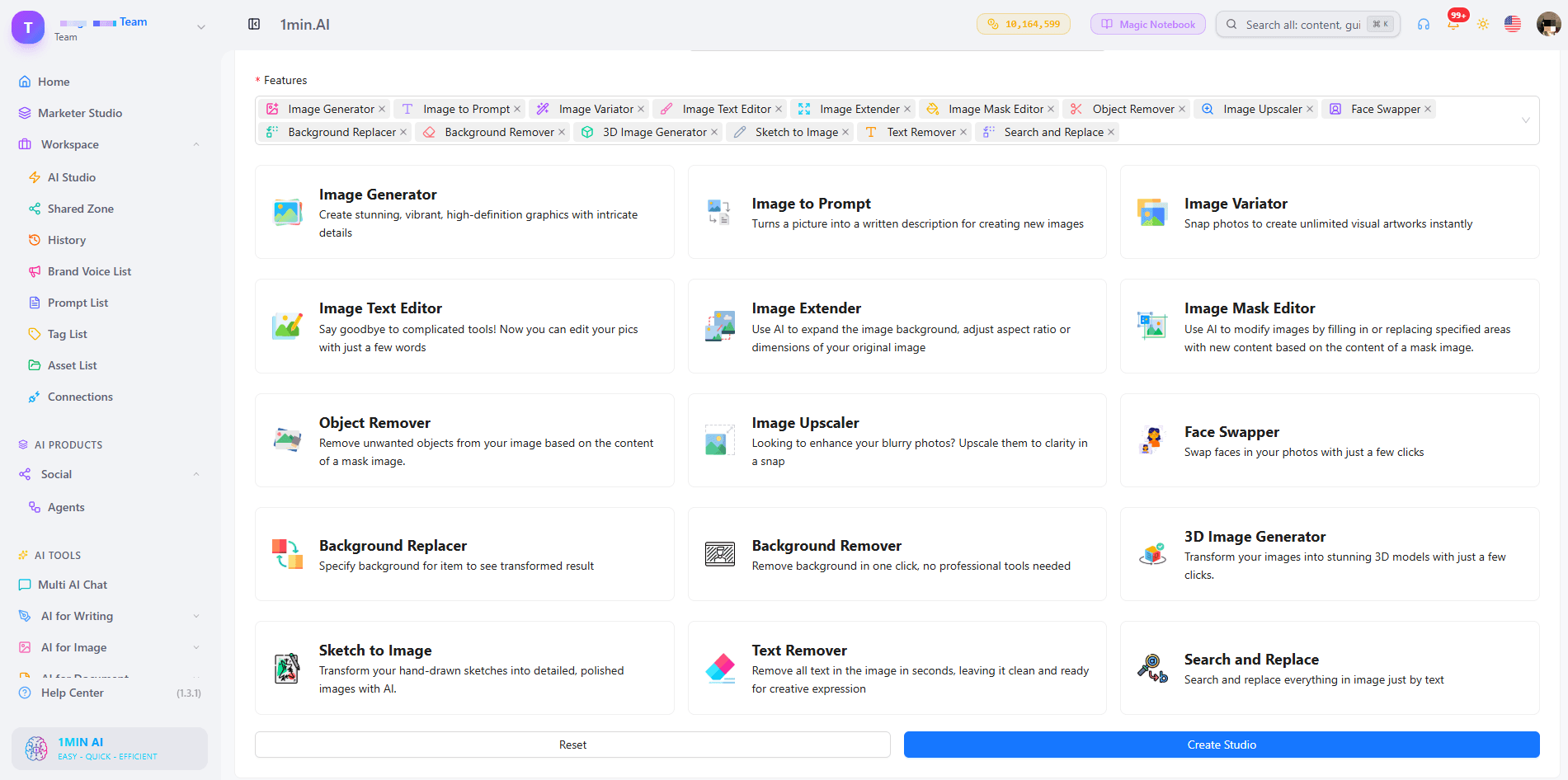
What Can You Edit With a Prompt in 1min.AI?
| Edit goal | Example prompt | 1min.AI tool |
|---|---|---|
| Swap an object or outfit | “Replace the blue jacket with a red leather jacket” | Search and Replace |
| Build a new scene | “Place the sneaker on a wet city street at dusk” | Background Replacer |
| Fix one precise area | Paint the area, then “Add a small window with a plant” | Image Mask Editor |
| Change wording in a design | “Change 20% OFF to 30% OFF” | Image Text Editor |
| Clean up clutter | “Remove the person behind the table” | Object Remover |
| Resize or sharpen | Widen the canvas, then upscale | Image Extender, Image Upscaler |
Replace Objects and Outfits With Search and Replace
Name what you want to find and what should replace it. The tool handles the selection, so you can run object search and replace edits, such as changing a sofa’s fabric or a product’s packaging color, without drawing an outline. Add “keep everything else unchanged” to protect the rest of the scene. For a deeper walkthrough, see this guide to object search and replace.
Swap Backgrounds Without Cutting Anything Out
Background Replacer removes the old scene and builds a new one from your description. Mention the place, time of day and mood, for example “sunlit studio with a soft white backdrop”. Here is a quick walkthrough:
Repaint Only the Area You Choose
The Image Mask Editor is for edits that need precision. Paint over a region, then describe what belongs there. This kind of mask-based editing keeps faces, logos and everything outside the mask untouched.
Edit Text Inside an Image
Image Text Editor lets you rewrite text that already sits inside a banner, label or screenshot. Type the new wording and the tool works to match the surrounding style. It is a fast way to update prices, dates and captions without rebuilding the design.
Start From Scratch, Then Edit
No source photo yet? Generate a base image first, then refine it with the editing tools. Creating and editing in one workspace means you never export, re-upload and start over.
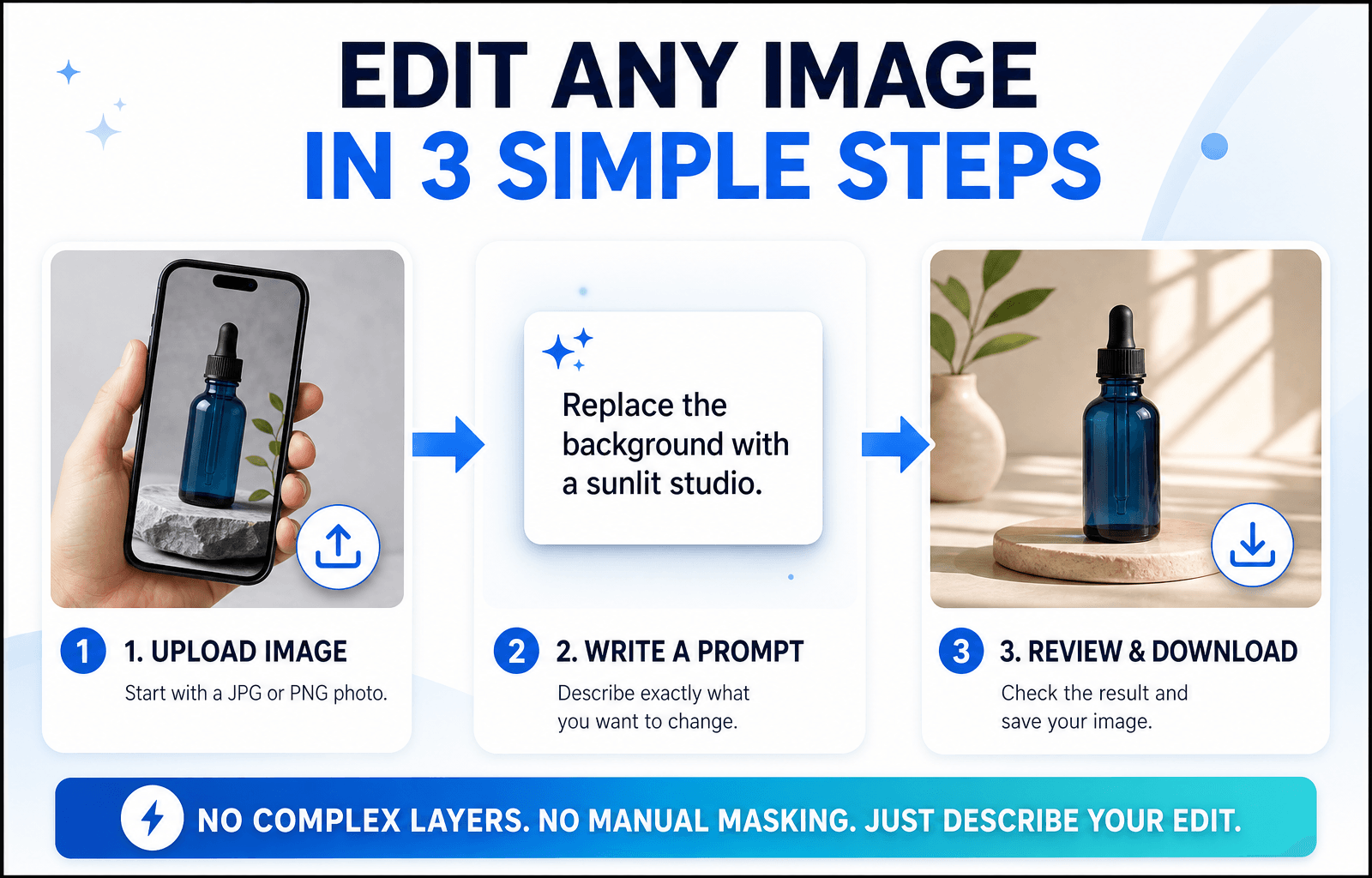
How to Edit an Image With a Prompt in 3 Steps
Step 1: Open the Editor and Upload Your Image
Choose the tool that matches your goal and upload a JPG or PNG. A sharp, well-lit photo with a clear subject gives the AI more to work with, so your edit looks more accurate.
Step 2: Write a Specific Prompt
Specific beats clever. Say what should change and what should stay the same.
The Prompt Formula
Object + Action + Style or Lighting + What stays unchanged
Three Prompts You Can Copy
- “Change the red jacket on the left to dark green denim. Keep the face and background unchanged.”
- “Replace the background with a sunlit studio and a soft white backdrop. Keep natural shadows under the product.”
- “Remove the cables on the desk and fill the area with the same wood texture.”
Edits usually miss because the prompt is too broad. This short video covers the most common mistakes:
Step 3: Review, Refine and Download
Zoom in and check edges, hands, text and shadows. If one detail is off, run a second prompt on that detail instead of stacking several requests in one line. Then download your image, which has no watermark. Save prompts that worked to your Prompt List so you can reuse them.
Editing People, Products or Landscapes: Which Setup Fits?
Photos of People
Describe clothing, hair color or background changes and add “keep the face unchanged”. For small fixes, use the mask tool so only the chosen area changes.
Product Photos
Swap backgrounds, remove reflections and recolor packaging while keeping labels sharp. Consistent backgrounds help a whole catalog look uniform.
Landscapes and Travel Shots
Remove crowds, adjust the sky or extend the frame to a wider format. Mention light and weather (“golden hour, clear sky”) so the edit blends naturally.
Browser Editor or Local Open-Source Model?
Open-source models run on your own computer. They offer deep control, but you manage installation, hardware and updates. A browser-based editor like 1min.AI needs none of that: open a tab, choose a tool and edit. If you want to start quickly or work across devices, the browser route is simpler. If you enjoy tuning models yourself, a local setup may suit you better.
What to Look for in the Best Free AI Image Editor With No Restrictions Online
Use this checklist for any tool you test:
- Full-sentence prompts rather than a fixed command menu
- Several edit types on the same image
- Precise control, such as masks for local changes
- Clean exports without a watermark
- Reusable prompts and assets so repeat work gets faster
- Clear policies about what the models can and cannot do
1min.AI covers each point in one workspace, with tools for text editing, object swapping, backgrounds, masks, extending and upscaling. AI Studio, Prompt List and Asset List are ready to use, and you can add a Shared Zone and History when you create an account.
You can also check how others rate the platform. 1min.AI holds SourceForge and Slashdot Top Business Software badges, is rated Excellent on Trustpilot and is listed on Capterra, Software Advice and GetApp.


FAQ
What is an AI image editor with prompt no restrictions?
It is an editor where you describe any change in your own words instead of picking from a locked list of actions. It still follows legal and model safety rules.
Is there a free AI image editor with prompt no restrictions?
Yes. You can try 1min.AI’s image editing tools free and download results without a watermark.
Does “no restrictions” mean anything goes?
No. Illegal content, content involving minors and deceptive or non-consensual images of real people are not allowed. Everything else is up to your creativity.
Which 1min.AI tool should I use to change text in an image?
Use Image Text Editor. Type the new wording and it updates the text inside the picture.
Do I need design skills?
No. If you can describe the change the way you would to a designer, you can edit with a prompt.
How do I write better edit prompts?
Name the object, state the action and add what should stay unchanged. Make one change per pass for the cleanest result.
Ready to Edit Your First Image?
Your next edit is one sentence away. Upload an image, type what you want to change and see the result in seconds.
- #Transaction
Alternatyvos
Atraskite geriausias 1minAI alternatyvas ir palyginkite funkcijas, kainodarą bei naudojimo atvejus.

1min.AI prieš OpenRouter
1min.AI prieš OpenRouter: palyginkite paruoštą naudoti DI kūrimo produktą su techniniu API įrankiu. Sužinokite, ar jums reikia be kodo kūrybinės studijos, ar kodavimo infrastruktūros centro.
 Ngoc Hong

1min AI vs Buffer
Compare 1min.AI vs Buffer for Facebook content creation, AI writing, image generation, scheduling, pricing, and everyday marketing workflows.
Ngoc Hong
1min.AI vs. Hootsuite: Which Social Media Tool Fits Your Workflow?
Compare 1min.AI vs. Hootsuite to explore their AI content creation, social media publishing, analytics, pricing, and collaboration features. Find the right tool for your workflow.
DI įrankiai
Atraskite geriausius DI įrankius, skirtus padidinti produktyvumą, kūrybiškumą ir kasdienį darbą.

Top 4 įperkami AI įrankiai startupų įkūrėjams
Sužinokite 4 geriausius įperkamus AI įrankius startupų įkūrėjams, padedančius patikrinti idėjas, kurti produktus, rengti turinį ir startuoti greičiau neviršijant biudžeto.
 Tram Ta

POV: Turi sukurti daugiau nei 10 įrašų per dieną
Sužinok, kaip susikurti AI turinio darbo eigą, kuri padeda turinio kūrėjams greičiau kurti daugiau nei 10 socialinių tinklų įrašų per dieną pasitelkiant AI idėjų generavimą, vaizdų kūrimą ir turinio kūrimą.
 Lien Anh Vu

Paverskite „Padarykite geriau“ į geresnį turinį su AI
Naudokite AI, kad miglotą kliento grįžtamąjį ryšį paverstumėte aiškiais pataisymais, sumažintumėte nereikalingų redagavimų skaičių ir greičiau pateiktumėte geresnį turinį.
Lien Anh VuDirbtinio intelekto funkcijos
Visapusiškos dirbtinio intelekto funkcijos, kurios supaprastina darbo procesus, didina efektyvumą ir įgalina komandas pasiekti daugiau.

1minAI: Nemokamas dirbtinio intelekto gramatikos tikrintuvas
Tikrinkite gramatiką nemokamai su 1minAI dirbtinio intelekto gramatikos tikrintuvu. Raskite gramatikos, rašybos ir rašymo klaidas, pagerinkite aiškumą ir per kelias sekundes nušlifuokite savo turinį.
Tram Ta
Sukurkite portfolio svetainę greičiau su 1min.AI
Sužinokite, kaip laisvai samdomi kūrėjai gali naudoti 1min.AI planuoti, rašyti, kurti dizainą ir sugeneruoti profesionalią portfolio svetainę greičiau, net jei neturi tvirtų programavimo įgūdžių.
Lien Anh Vu
Nemokamas AI X Komentaras
Kurkite juokingus, sąmojingus ar įžvalgius komentarus X platformoje su mūsų AI valdomu X Komentarų Generatoriumi. Padidinkite savo įsitraukimą ir išsiskirkite iš minios!
 Trang Tran
DI panaudojimo atvejai
Atrinkta DI panaudojimų kolekcija verslui, produktyvumui ir pramonės šakų sprendimams.

Geriausias laikas skelbti Instagram: praktinis gidas geresniam įsitraukimui
Sužinokite geriausią laiką skelbti Instagram, įskaitant geriausias dienas ir valandas skirtingoms auditorijoms, bei patarimus, kaip rasti idealų publikavimo grafiką savo paskyrai.
Tram TaSukurkite portfolio svetainę greičiau su 1min.AI
Sužinokite, kaip laisvai samdomi kūrėjai gali naudoti 1min.AI planuoti, rašyti, kurti dizainą ir sugeneruoti profesionalią portfolio svetainę greičiau, net jei neturi tvirtų programavimo įgūdžių.
Lien Anh VuPaverskite „Padarykite geriau“ į geresnį turinį su AI
Naudokite AI, kad miglotą kliento grįžtamąjį ryšį paverstumėte aiškiais pataisymais, sumažintumėte nereikalingų redagavimų skaičių ir greičiau pateiktumėte geresnį turinį.
Lien Anh VuAI pamokos
Mokykitės naudotis dirbtiniu intelektu su praktinėmis, žingsnis po žingsnio pamokomis.

Juodojo penktadienio AI įrankių pasiūlymai 2026 m.
Sužinokite, ką siūlo 2026 m. Juodojo penktadienio AI įrankių pasiūlymai. Sužinokite, kaip įsigyti 1min.AI viso gyvenimo pasiūlymą per AppSumo, Dealify, Stack Social ir patvirtinti informaciją Trustpilot, Slashdot bei Software Advice.
 Hang Nguyen

Patirkite „Fashion Week“ už 0 USD su „1minAI Face Swap“
Patirkite „Fashion Week“ už 0 USD su „1minAI Face Swap“. Įkelkite savo nuotrauką, pasirinkite „Fashion Week“ vaizdo įrašą ir sukurkite savo dirbtinio intelekto mados akimirką.
Ngoc Hong
Viralūs Reels per minutes: kaip naudoti 1minAI teksto į kalbą įrankį satyriniams įgarsinimams
Sužinokite, kaip satyrinių puslapių administratoriai naudoja 1minAI teksto į kalbą funkciją, kad akimirksniu sugeneruotų naujienų vedėjo ir dramatiškus įgarsinimus TikTok, Shorts ir Instagram Reels įrašams.
DI vadovai
Greičiau išmokite DI su praktiniais vadovais, realaus pasaulio pavyzdžiais ir veiksmingomis geriausiomis praktikomis.

Saugiai pirkti AI įrankius internetu: 2026 m. Juodojo penktadienio gidas
Sužinokite, kaip rasti ir užsitikrinti geriausius Juodojo penktadienio AI pasiūlymus internetu. Išmokite ekspertų strategijas, kaip išvengti sukčių, kovoti su prenumeratų nuovargiu ir patikrinti programinę įrangą.
Hang Nguyen
Kaip pradėti AI verslą nebekuriant visko nuo nulio
Sužinokite, kaip pradėti AI verslą, patikrinti savo idėją ir greičiau paleisti produktą nekuriant brangios AI infrastruktūros nuo nulio.
Ngoc Hong
AI Fashion Video Generator With Seedance 2.5 and HeyGen
Learn how to create AI fashion videos with Seedance 2.5 and HeyGen. Turn outfit photos into cinematic videos featuring your own face with 1min.AI.
Lien Anh VuAI Sprendimai
Naršykite geriausius AI sprendimus automatizavimui, kodavimui, tyrimams, produktyvumui, klientų palaikymui, rinkodarai ir verslo darbo eigoms.

Nemokamas AI tatuiruočių generatorius: individualūs dizainai
Paverskite bet kokią idėją individualiu tatuiruotės dizainu su nemokamu 1min.AI AI tatuiruočių generatoriumi. Aprašykite idėją, pasirinkite stilių ir atsisiųskite per kelias sekundes.
Trang TranSaugiai pirkti AI įrankius internetu: 2026 m. Juodojo penktadienio gidas
Sužinokite, kaip rasti ir užsitikrinti geriausius Juodojo penktadienio AI pasiūlymus internetu. Išmokite ekspertų strategijas, kaip išvengti sukčių, kovoti su prenumeratų nuovargiu ir patikrinti programinę įrangą.
Hang NguyenPatirkite „Fashion Week“ už 0 USD su „1minAI Face Swap“
Patirkite „Fashion Week“ už 0 USD su „1minAI Face Swap“. Įkelkite savo nuotrauką, pasirinkite „Fashion Week“ vaizdo įrašą ir sukurkite savo dirbtinio intelekto mados akimirką.
Ngoc HongAI modeliai
Tyrinėkite pasaulio pirmaujančius AI modelius vienoje vietoje.

Free AI Chat With Claude Fable 5.2 On 1min.AI
Free AI chat with Claude Fable 5.2 on 1min.AI. Compare Fable 5.2 vs Opus 5.5, see Fable 5.2 benchmarks, and start chatting in minutes.
Trang Tran
GPT-6.2 Sol: Specs, Pricing & Free Access
Explore GPT-6.2 Sol specs, pricing, and how it compares with GPT-6.1 Sol and Claude Opus 5.5, then try it free in 1min.AI Multi AI Chat.
Trang Tran
GPT 6.2 Astra: Pricing, Benchmarks & Free Access
GPT 6.2 Astra release date, pricing, Reddit feedback and Opus 5.5 comparison. See what it does best and chat with it on 1min.AI for free.
Trang TranAI Palyginimai
Palyginkite AI įrankius, modelius ir platformas, kad rastumėte geriausią atitiktį jūsų poreikiams.

Gemini 4 Neon vs Hydrogen: Specs, Price & Picks
Gemini 4 Neon vs Hydrogen, Carbon and Argon: compare price, benchmarks and use cases to pick the right model, then test them side by side on 1min.AI.
Trang Tran
Kling AI vs Veo 3: kuris modelis laimi?
Kling AI vs Veo 3: palyginkite judesį, natyvų garsą, kainas ir nemokamus planus, kad pamatytumėte, kuris DI vaizdo generatorius laimi jūsų projektui – išbandykite abu 1min.AI.
Trang Tran
DeepSeek V4 Pro ir Flash palyginimas
Palyginkite DeepSeek V4 Pro ir DeepSeek V4 Flash metrikas. Optimizuokite savo agentines programėles ir pagerinkite DI faktų tikrinimą 1min.ai jau šiandien.
Ngoc HongDirbtinio intelekto integracijos
Sklandžiai integruokite dirbtinį intelektą su jau naudojamais įrankiais, kad automatizuotumėte darbus ir padidintumėte produktyvumą.
POV: Turi sukurti daugiau nei 10 įrašų per dieną
Sužinok, kaip susikurti AI turinio darbo eigą, kuri padeda turinio kūrėjams greičiau kurti daugiau nei 10 socialinių tinklų įrašų per dieną pasitelkiant AI idėjų generavimą, vaizdų kūrimą ir turinio kūrimą.
Lien Anh Vu
Nebeperjunkite tarp AI programėlių: kaip AI integracija keičia darbdavio įvaizdį
Sužinokite, kaip AI integracija padeda personalo komandoms supaprastinti darbdavio įvaizdžio kūrimą, sujungiant AI tekstus, dokumentus, vaizdus, vaizdo įrašus ir kelis AI modelius į vieną darbo erdvę.
Tram Ta
AI API agregatorius paaiškintas kūrėjams
AI API agregatorius suteikia kūrėjams vieną suvienodintą API keliems AI modeliams kviesti, taip sutrumpindamas integracijos laiką ir mažindamas priklausomybę nuo tiekėjo.
Trang TranDI pramonei
Raskite geriausius DI įrankius ir darbo eigas sveikatos priežiūrai, finansams, švietimui, teisei, gamybai, mažmeninei prekybai, nekilnojamajam turtui ir kt.

Voice Cloning AI Free: How to Clone Any Voice Online in Minutes
Try voice cloning AI free with 1min.AI. Upload a 5-second clip, pick an ElevenLabs model, choose from 32 languages, and turn text to speech in your own voice.
Trang Tran
Claude Personal Finance Setup and Safety Guide
Claude personal finance explained: how Personal Finance in Claude works and what Claude finance can see. Plus a safe CSV method for non-US users.
Trang TranFree AI Image Editor With Prompt No Restrictions
Looking for a free AI image editor with prompt no restrictions? Edit backgrounds, objects and text by typing, no watermark. Try 1min.AI’s flexible editor now.
Trang TranAI agentai
Atraskite ir naudokite AI agentus, kad automatizuotumėte užduotis savo darbe ir kasdieniame gyvenime.
1minAI: Nemokamas dirbtinio intelekto gramatikos tikrintuvas
Tikrinkite gramatiką nemokamai su 1minAI dirbtinio intelekto gramatikos tikrintuvu. Raskite gramatikos, rašybos ir rašymo klaidas, pagerinkite aiškumą ir per kelias sekundes nušlifuokite savo turinį.
Tram Ta
AI agentai „Facebook“
Naudokite AI agentą „Facebook“ turiniui kurti, vaizdams generuoti, įrašams planuoti ir publikuoti iš savo dokumentų bei pokalbių.
Ngoc Hong
AI agentas vs AI asistentas: kuris iš tikrųjų sutaupo dizaineriams daugiau laiko?
Sužinokite skirtumą tarp AI agento ir AI asistento ir atraskite, kuris sprendimas padeda dizaineriams automatizuoti pasikartojančius darbus, sumažinti pataisymų skaičių ir sutaupyti daugiau laiko.
Lien Anh VuAI darbo eigų sistemos
Išbandykite paruoštas AI darbo eigų sistemas produktyvumui, rinkodarai, pardavimams, palaikymui ir kt.
POV: Turi sukurti daugiau nei 10 įrašų per dieną
Sužinok, kaip susikurti AI turinio darbo eigą, kuri padeda turinio kūrėjams greičiau kurti daugiau nei 10 socialinių tinklų įrašų per dieną pasitelkiant AI idėjų generavimą, vaizdų kūrimą ir turinio kūrimą.
Lien Anh VuAI Fashion Video Generator With Seedance 2.5 and HeyGen
Learn how to create AI fashion videos with Seedance 2.5 and HeyGen. Turn outfit photos into cinematic videos featuring your own face with 1min.AI.
Lien Anh Vu
Is Seedance 2.5 the Best AI Video Generator of 2026?
Is Seedance 2.5 the best AI video generator in 2026? Explore its features, compare it with Kling and Veo, and learn how to create AI videos on 1min.AI.
Lien Anh VuNaujienlaiškis
Savaitinės AI naujovės su 1minAI

🔮 Weekly AI Innovations #145: X Content Agent & GPT 6.1 Terra on 1min.ai
Scale viral reach with the X Content Agent on 1min.ai. Discover an end-to-end 4-stage pipeline with zero token burn, plus the launch of GPT 6.1 Terra.
Hang Nguyen
🔮 Weekly AI Innovations #144: LinkedIn Content Agent: Complete B2B Publishing Pipeline
Scale B2B influence with the LinkedIn Content Agent on 1min.ai. Discover an end-to-end 4-stage pipeline with zero redundant token burn and 1-click publishing.
Hang Nguyen
🔮 Weekly AI Innovations #146: Mistral 3.5, Qwen Image & Cohere A+ are ready on 1min.ai
Deploy Mistral Large 3, Qwen Image 3.0, and Cohere Command A+ on 1min.ai. Boost RAG accuracy and cut visual generation latency in one unified AI workspace.
Hang Nguyen