
Free AI Video Generator From Image No Restrictions

Trang Tran
2026년 11월 20일
Try a free AI video generator from image with no watermark. Turn photos into videos with audio using Kling, Veo 3.1 and Seedance in 1min.AI. Start now.
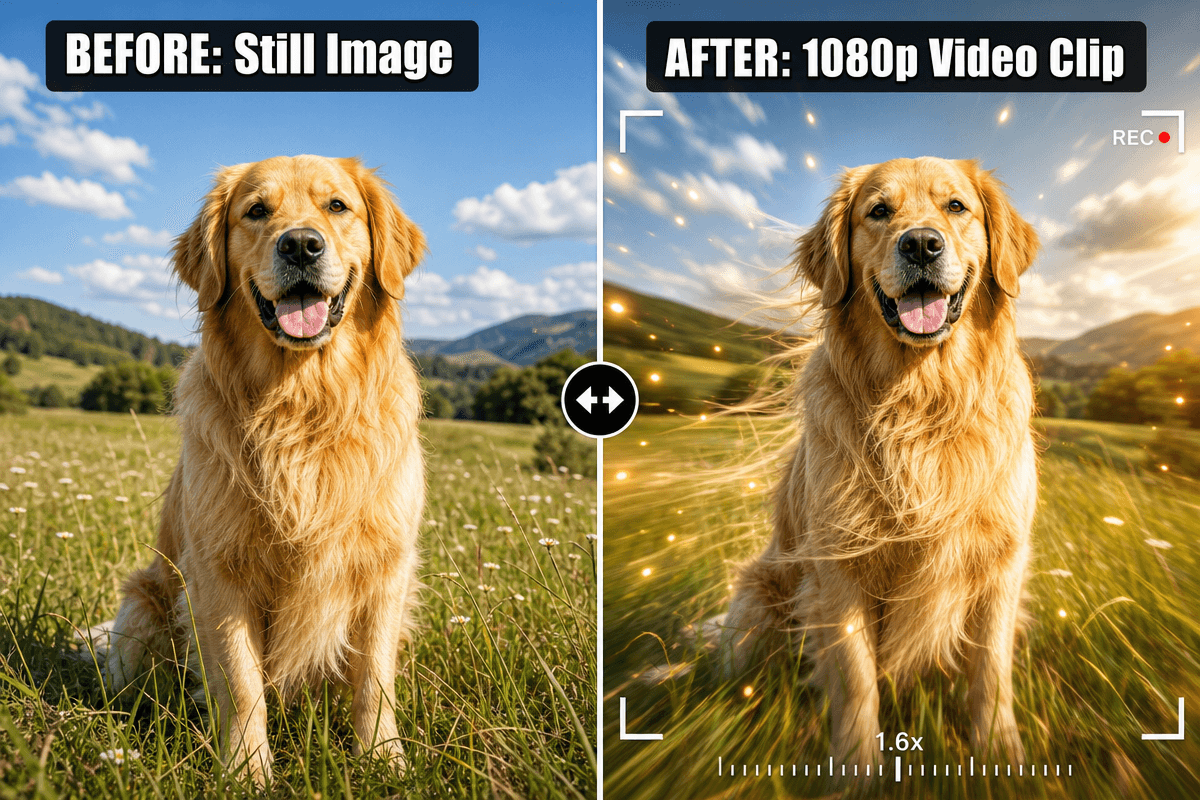
A free AI video generator from image turns a still photo into a short animated clip. You upload the image, describe the motion, and the AI builds the movement frame by frame. With 1min.AI, you can do this with leading video models such as Kling, Veo 3.1, Seedance and Wan, and your finished clip has no watermark.
Most people searching for the best free AI video generator hit the same walls: tiny 3-second clips, silent output, watermarks, and no idea which model suits their photo. This guide fixes that. You will find the exact settings, a prompt formula, and a model chooser, so your first video looks right.
Key takeaways
- Upload one image, or a start and end frame, then describe the motion.
- Pick the model by image type: portrait, product, or illustration.
- Choose audio on or off before you generate.
- Keep prompts short and specific: subject, action, camera, light.
What Is a Free AI Video Generator From Image?
How Image to Video AI Works
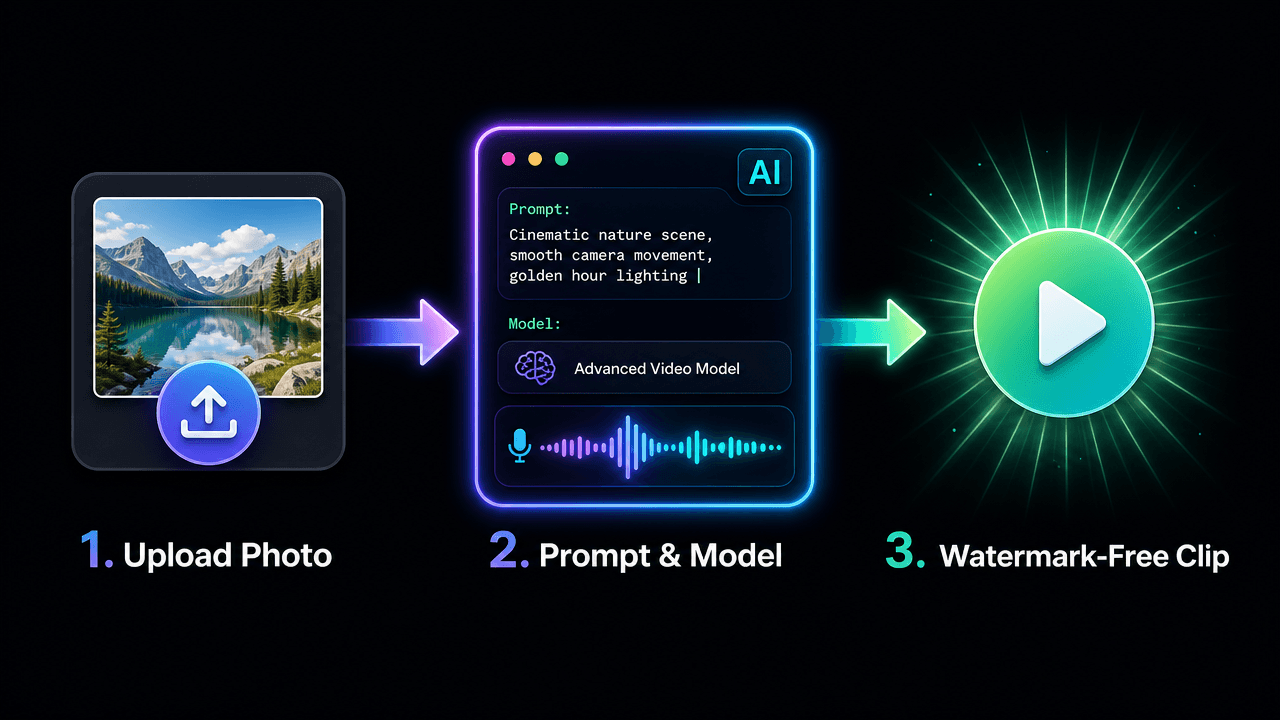
The model reads your photo’s subject, depth and lighting, then predicts how things would move. Your prompt steers the result: a slow zoom, drifting mist, hair in the wind. The better your prompt describes motion, the more natural the clip.
What “No Restrictions” Really Means Here
For creators, it means freedom to choose your own style, aspect ratio, models and start and end frames, without watermarks or rigid templates. It does not mean anything goes. Use images you own or have rights to, and keep content lawful and respectful.
Why Create Your Image Videos in 1min.AI
- Many models, one workspace: Switch between Kling, Veo, Seedance and Wan without juggling tools.
- Frame control: Several models accept a start and end image, so you decide how the shot begins and ends.
- Audio options: Generate sound with the video or add your own track.
- Clean exports: Your clip has no watermark, ready for social posts, ads and websites.
You can open AI Studio and start creating straight away, with no account setup. Create an account later only if you want History and Shared Zone. Our image to video generator is built for exactly this workflow.
Which Model Should You Choose?
Start with what you are animating and whether you need sound.
| Your goal | Best-fit model | Length | Audio |
|---|---|---|---|
| Portrait or character with natural motion | Kling 2.5 or Kling 3.0 | 5 or 10 sec (2.5), 3 to 15 sec (3.0) | Kling 3.0 |
| Cinematic shot with sound | Veo 3.1 | 8 sec fixed | Yes |
| Product video with rich detail | Seedance 2.0 / 2.5 | 4 to 15 sec (2.5 up to 30) | Yes |
| Illustration, cartoon, lip sync | Wan 2.7 | 2 to 15 sec | Yes, plus custom audio |
Portraits and Characters
Kling handles faces and body motion smoothly. Use Kling 2.5 when you want a start and end frame, or Kling 3.0 for longer clips and multi-shot storytelling.
Product Photos
Seedance suits clean product movement. See it in action:
Cartoons and Illustrations
Wan 2.7 supports first-frame, first-and-last-frame and video continuation modes, which is handy for stylized art.
How to Turn an Image Into a Video: Step by Step
Prefer to watch first? Here is a quick walkthrough:
Step 1: Prepare Your Image
Use a sharp image with a clear subject. No photo yet? Create one with the AI image generator and animate it right after.
Step 2: Open Image to Video and Select a Model
Go to Image to Video in 1min.AI, choose your model, and upload your image.
Step 3: Apply the Recommended Settings
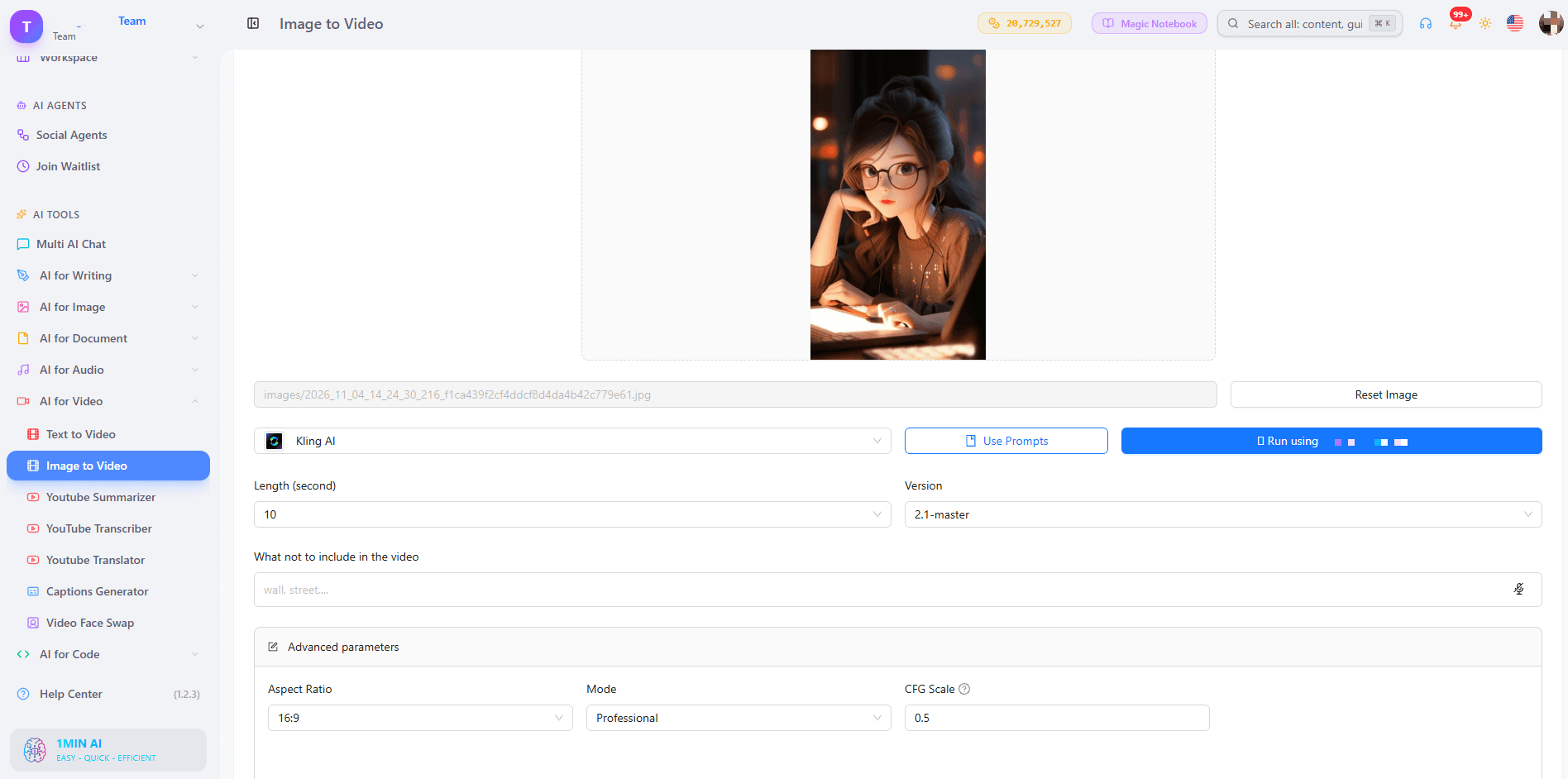
Kling 1.6 to 2.5
- Mode: Standard for quick drafts, Professional for your final version.
- CFG Scale: Keep 0.5. Raise it slightly only if the AI ignores your prompt.
- Length: 5 seconds for one simple motion, 10 seconds for a small story.
- Negative prompt: blurry, distorted face, extra fingers, warped hands, flickering, jitter, text, low resolution
- Frames: Versions before 2.5 take one image. Kling 2.5 takes a start and end frame. Use two photos of the same subject with different poses or camera positions.
Kling 3.0 and 3.0 Omni
- Length: 3 to 15 seconds.
- Generate audio: On when the scene has ambient sound or speech.
- Multi-shot: Up to 6 shots, each with its own prompt and 3 to 14 second duration. Total must stay within 15 seconds.
- Resolution (Omni): 720p to test, 1080p to finalize.
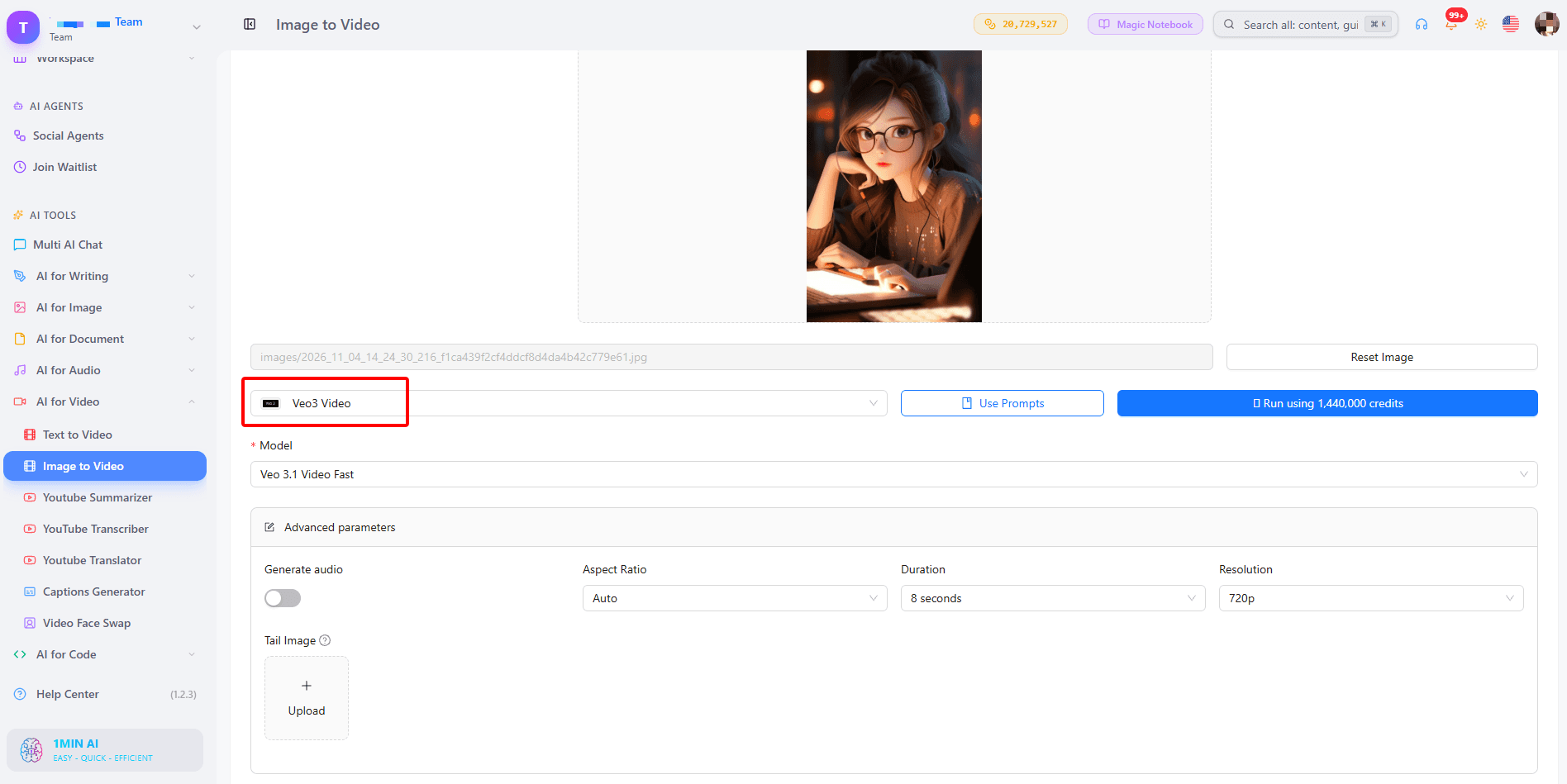
Veo 3.1 and Veo 3
- Duration: Fixed at 8 seconds.
- Resolution: 720p for tests, 1080p for the final clip.
- Aspect ratio: 9:16 for Reels and Shorts, 16:9 for YouTube, Auto to follow your image.
- Generate audio: Turn it on for scenes with sound such as waves, city noise or footsteps.
- Tail image (3.1 only): Upload the same subject and background in the pose you want at the end. Veo 3 has no tail image field. Learn more in our guide to Veo 3.1 video generation.
Seedance 2.0 and 2.5
- Frames: First frame only, or first and last frame.
- Duration: 4 to 15 seconds (up to 30 on 2.5).
- Seed: Leave empty for variety. Enter a number only when you want to reproduce a result you liked.
- Dialogue and sound effects: Turn on for videos that need voices or ambience.
Wan 2.7
- Mode: First-frame, first and last frame, or video continuation.
- Duration: 2 to 15 seconds.
- Custom audio: WAV or MP3, 2 to 30 seconds, up to 15MB. With audio, the model uses it for lip sync and timing. Without it, the model creates matching sound.
Step 4: Generate, Review and Download
Preview the result, adjust one thing at a time (prompt, mode or seed), and download your favorite version.
Do You Need Audio in Your Video?
Built-in Sound
Veo 3.1, Kling 3.0, Seedance and Wan 3.0 can generate sound together with the picture, so a stormy beach actually sounds stormy.
Your Own Audio
Wan 2.7 lets you upload a voice or music file to drive lip sync and timing. If your audio is shorter than the video, the rest stays silent, so match the lengths.
A Simple Prompt Formula That Works
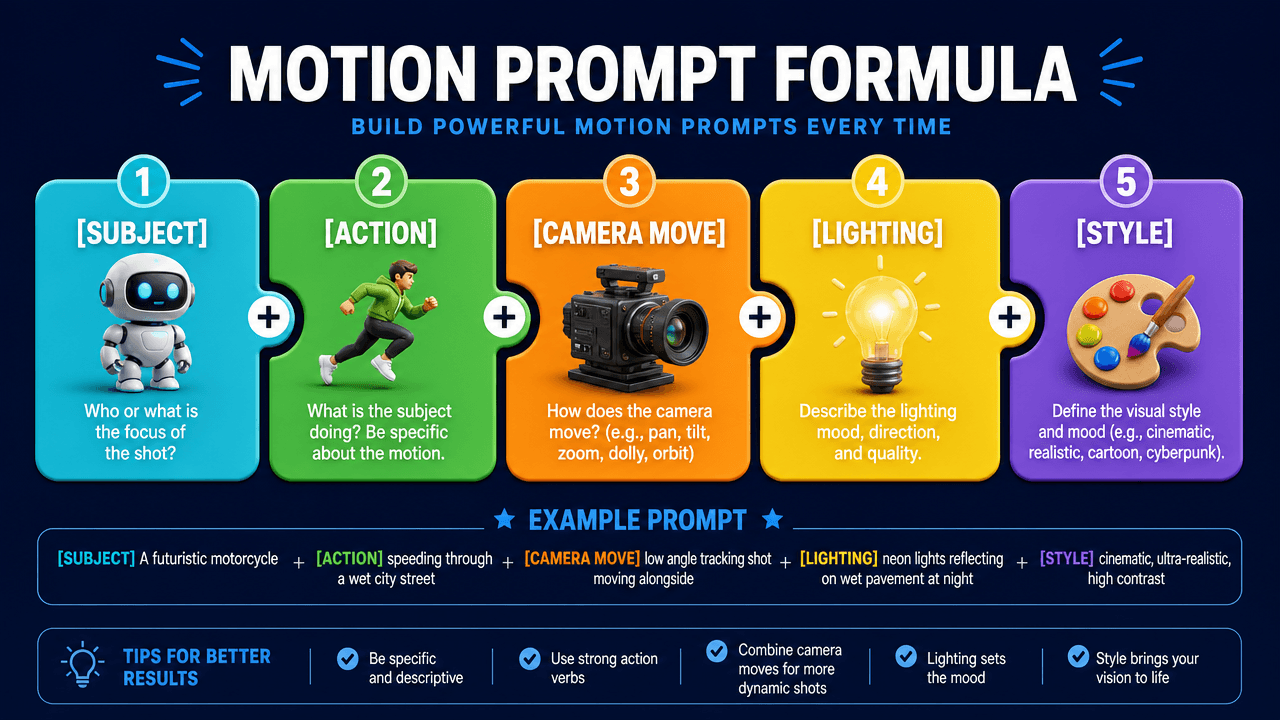
Use: Subject + action + camera move + lighting + style.
- Portrait: “A woman turns toward the camera and smiles, slow push-in, soft golden hour light, cinematic.”
- Product: “A perfume bottle rotates slowly on a marble table, light sweeps across the glass, macro shot.”
- Landscape: “Mist drifts across a calm lake at sunrise, camera stays still, gentle ripples.”
- Illustration: “The hero’s cape flutters as clouds roll past, slow pan right, painterly style.”
Avoid stacking many actions. One clear movement gives the cleanest result.
What Can You Make With It?
- Social media creators: Turn selfies and posts into Reels, Shorts and TikTok clips.
- Marketers and small businesses: Animate product photos for ads and landing pages.
- Storytellers: Bring characters and scenes to life. Create them first with the AI text to video tool when you have an idea but no image yet.
- Real estate agents: Convert listing photos into cinematic walk-through teasers.
Trusted by Creators Worldwide
1min.AI is recognized on SourceForge, Slashdot, Capterra, Software Advice and GetApp, and holds an Excellent rating on Trustpilot.
FAQs
Is there a free AI video generator from image with no watermark?
Yes. In 1min.AI you can try image to video free and download your clip without a watermark.
Can I use it without login or sign up?
You can open AI Studio and start creating without registering. History and Shared Zone need an account.
Can I generate unlimited videos?
Each model and duration uses a different amount of credits, so shorter 5 second tests let you try more ideas before you commit to a longer final clip.
Which model is best for image to video with audio?
Veo 3.1 is a strong all-round pick for cinematic scenes with sound. Kling 3.0 and Seedance also generate audio, and Wan 2.7 supports your own audio file.
How long can the video be?
It depends on the model: 5 or 10 seconds on Kling 2.5, 8 seconds on Veo 3.1, 4 to 15 seconds on Seedance 2.0, and up to 30 seconds on Seedance 2.5.
What is the best image type for good results?
Sharp, well-lit images with one clear subject animate best. Busy backgrounds and blurry faces can cause flicker.
Ready to Bring Your Image to Life?
Pick a photo, write one clear motion prompt, and let 1min.AI do the rest.
- #Transaction
대안
1minAI의 최고의 대안을 찾아보고 기능, 가격 및 사용 사례를 비교하세요.

1min.AI 대 OpenRouter
1min.AI 대 OpenRouter: 즉시 사용 가능한 AI 생성 제품과 기술적인 API 도구를 비교합니다. 코드 없는 크리에이티브 스튜디오가 필요한지, 아니면 코딩 인프라 허브가 필요한지 알아보세요.
 Ngoc Hong

1min AI vs Buffer
Compare 1min.AI vs Buffer for Facebook content creation, AI writing, image generation, scheduling, pricing, and everyday marketing workflows.
Ngoc Hong
1min.AI vs. Hootsuite: Which Social Media Tool Fits Your Workflow?
Compare 1min.AI vs. Hootsuite to explore their AI content creation, social media publishing, analytics, pricing, and collaboration features. Find the right tool for your workflow.
AI 도구
생산성, 창의성 및 일상 업무를 향상시키는 최고의 AI 도구를 찾아보세요.

하나의 제품, 10개의 UGC 크리에이티브: AI가 콘텐츠 테스트를 더 쉽게 만드는 방법
AI UGC 비디오 생성기로 더 진정성 있는 UGC를 만들고, 더 다양한 크리에이티브 각도를 테스트하며, 모든 버전을 직접 촬영하지 않고도 제휴 콘텐츠를 확장하세요.
 Lien Anh Vu

단 몇 단계로 일관된 만화 콘텐츠 만들기
1min.AI로 아이디어 조사부터 캐릭터와 애니메이션 영상까지, 3단계로 TikTok과 Reels용 만화 영상을 만들어보세요.
Lien Anh Vu
스타트업 창업자를 위한 합리적인 AI 도구 4가지
스타트업 창업자가 아이디어를 검증하고, 제품을 만들고, 콘텐츠를 제작하고, 과도한 지출 없이 더 빠르게 출시할 수 있도록 돕는 합리적인 AI 도구 4가지를 소개합니다.
 Tram Ta
AI 기능
워크플로우를 간소화하고 효율성을 개선하며 팀이 더 많은 것을 달성할 수 있도록 지원하는 포괄적인 AI 기능.
하나의 제품, 10개의 UGC 크리에이티브: AI가 콘텐츠 테스트를 더 쉽게 만드는 방법
AI UGC 비디오 생성기로 더 진정성 있는 UGC를 만들고, 더 다양한 크리에이티브 각도를 테스트하며, 모든 버전을 직접 촬영하지 않고도 제휴 콘텐츠를 확장하세요.
Lien Anh Vu단 몇 단계로 일관된 만화 콘텐츠 만들기
1min.AI로 아이디어 조사부터 캐릭터와 애니메이션 영상까지, 3단계로 TikTok과 Reels용 만화 영상을 만들어보세요.
Lien Anh Vu
1minAI: 무료 AI 문법 검사기
1minAI의 AI 문법 검사기로 무료로 문법을 확인하세요. 문법, 맞춤법, 글쓰기 오류를 찾고, 명확성을 높이며, 몇 초 만에 콘텐츠를 다듬을 수 있습니다.
Tram TaAI 활용 사례
비즈니스, 생산성 및 산업별 응용 프로그램을 위한 AI 활용 사례 모음.
하나의 제품, 10개의 UGC 크리에이티브: AI가 콘텐츠 테스트를 더 쉽게 만드는 방법
AI UGC 비디오 생성기로 더 진정성 있는 UGC를 만들고, 더 다양한 크리에이티브 각도를 테스트하며, 모든 버전을 직접 촬영하지 않고도 제휴 콘텐츠를 확장하세요.
Lien Anh Vu단 몇 단계로 일관된 만화 콘텐츠 만들기
1min.AI로 아이디어 조사부터 캐릭터와 애니메이션 영상까지, 3단계로 TikTok과 Reels용 만화 영상을 만들어보세요.
Lien Anh Vu
인스타그램에 게시하기 가장 좋은 시간: 더 나은 참여를 위한 실용 가이드
인스타그램에 게시하기 가장 좋은 시간을 알아보세요. 다양한 аудитория를 위한 최적의 요일과 시간, 그리고 계정에 맞는 이상적인 게시 일정을 찾는 팁까지 담았습니다.
Tram TaAI 튜토리얼
실용적인 단계별 튜토리얼을 통해 AI 사용법을 배우세요.
단 몇 단계로 일관된 만화 콘텐츠 만들기
1min.AI로 아이디어 조사부터 캐릭터와 애니메이션 영상까지, 3단계로 TikTok과 Reels용 만화 영상을 만들어보세요.
Lien Anh Vu
2026 블랙프라이데이 AI 도구 특가
2026 블랙프라이데이 AI 도구 특가에서 어떤 혜택을 만날 수 있는지 알아보세요. AppSumo, Dealify, Stack Social을 통해 1min.AI 평생 이용권을 확보하는 방법과 Trustpilot, Slashdot, Software Advice에서 검증하는 방법까지 확인하세요.
 Hang Nguyen

Seedance로 제품 일관성을 유지하는 AI 이미지-to-비디오로 왜곡을 막고 제품 리뷰를 масштаб화
AI 이미지-to-비디오 제품 일관성으로 로고 왜곡을 막고, 오늘 1min.AI에서 스튜디오급 리뷰 영상을 생성하세요.
Lien Anh VuAI 가이드
실용적인 가이드, 실제 사례, 실행 가능한 모범 사례를 통해 AI를 더 빠르게 배우세요.
단 몇 단계로 일관된 만화 콘텐츠 만들기
1min.AI로 아이디어 조사부터 캐릭터와 애니메이션 영상까지, 3단계로 TikTok과 Reels용 만화 영상을 만들어보세요.
Lien Anh Vu
AI 도구를 안전하게 온라인에서 구매하는 방법: 2026 블랙 프라이데이 가이드
온라인에서 최고의 블랙 프라이데이 AI 딜을 찾고 확보하는 방법을 알아보세요. 사기를 피하고, 구독 피로를 줄이며, 소프트웨어를 검증하는 전문가 전략을 배워보세요.
Hang Nguyen스타트업 창업자를 위한 합리적인 AI 도구 4가지
스타트업 창업자가 아이디어를 검증하고, 제품을 만들고, 콘텐츠를 제작하고, 과도한 지출 없이 더 빠르게 출시할 수 있도록 돕는 합리적인 AI 도구 4가지를 소개합니다.
Tram TaAI 솔루션
자동화, 코딩, 연구, 생산성, 고객 지원, 마케팅 및 비즈니스 워크플로우를 위한 최고의 AI 솔루션을 찾아보세요.
하나의 제품, 10개의 UGC 크리에이티브: AI가 콘텐츠 테스트를 더 쉽게 만드는 방법
AI UGC 비디오 생성기로 더 진정성 있는 UGC를 만들고, 더 다양한 크리에이티브 각도를 테스트하며, 모든 버전을 직접 촬영하지 않고도 제휴 콘텐츠를 확장하세요.
Lien Anh Vu단 몇 단계로 일관된 만화 콘텐츠 만들기
1min.AI로 아이디어 조사부터 캐릭터와 애니메이션 영상까지, 3단계로 TikTok과 Reels용 만화 영상을 만들어보세요.
Lien Anh Vu
무료 AI 타투 생성기: 맞춤 디자인
1min.AI의 무료 AI 타투 생성기로 어떤 아이디어든 맞춤 타투 디자인으로 바꿔보세요. 아이디어를 설명하고 스타일을 고른 뒤 몇 초 만에 다운로드하세요.
 Trang Tran
AI 모델
세계 최고의 AI 모델을 한 곳에서 탐색하세요.
하나의 제품, 10개의 UGC 크리에이티브: AI가 콘텐츠 테스트를 더 쉽게 만드는 방법
AI UGC 비디오 생성기로 더 진정성 있는 UGC를 만들고, 더 다양한 크리에이티브 각도를 테스트하며, 모든 버전을 직접 촬영하지 않고도 제휴 콘텐츠를 확장하세요.
Lien Anh Vu단 몇 단계로 일관된 만화 콘텐츠 만들기
1min.AI로 아이디어 조사부터 캐릭터와 애니메이션 영상까지, 3단계로 TikTok과 Reels용 만화 영상을 만들어보세요.
Lien Anh VuSeedance로 제품 일관성을 유지하는 AI 이미지-to-비디오로 왜곡을 막고 제품 리뷰를 масштаб화
AI 이미지-to-비디오 제품 일관성으로 로고 왜곡을 막고, 오늘 1min.AI에서 스튜디오급 리뷰 영상을 생성하세요.
Lien Anh VuAI 비교
필요에 가장 적합한 AI 도구, 모델 및 플랫폼을 비교해보세요.

Kling AI vs Veo 3: 어떤 모델이 승자일까?
Kling AI와 Veo 3를 모션, 네이티브 오디오, 가격, 무료 요금제로 비교해 어떤 AI 비디오 생성기가 프로젝트에 더 적합한지 확인하고, 1min.AI에서 둘 다 체험해보세요.
Trang TranSeedance로 제품 일관성을 유지하는 AI 이미지-to-비디오로 왜곡을 막고 제품 리뷰를 масштаб화
AI 이미지-to-비디오 제품 일관성으로 로고 왜곡을 막고, 오늘 1min.AI에서 스튜디오급 리뷰 영상을 생성하세요.
Lien Anh Vu
DeepSeek V4 Pro vs Flash 비교
DeepSeek V4 Pro와 DeepSeek V4 Flash의 메트릭을 비교해보세요. 1min.ai에서 오늘 에이전트 앱을 최적화하고 AI 사실 확인을 개선하세요.
AI 통합
이미 사용하는 도구에 AI를 원활하게 통합하여 작업을 자동화하고 생산성을 높이세요.

패션 위크 2026을 위한 AI 패션 비디오 생성기 사용법
AI로 패션 위크 2026 아이디어를 멋진 패션 비디오로 만들어 보세요. 하나의 간단한 워크플로로 브레인스토밍하고, 비주얼을 만들고, 이미지를 영상으로 전환하는 방법을 알아보세요.
Lien Anh Vu
관점: 매일 10개 이상의 게시물을 만들어야 한다면
콘텐츠 크리에이터가 AI 브레인스토밍, 이미지 생성, 콘텐츠 제작을 활용해 하루 10개 이상의 소셜 미디어 게시물을 더 빠르게 만드는 AI 콘텐츠 워크플로를 구축하는 방법을 알아보세요.
Lien Anh Vu
AI 앱 간 전환 중단: AI 통합이 고용주 브랜딩을 혁신하는 방법
AI 통합이 AI 글쓰기, 문서, 이미지, 비디오 및 여러 AI 모델을 하나의 작업 공간으로 결합하여 HR 팀이 고용주 브랜딩을 간소화하는 방법을 알아보세요.
Tram Ta산업용 AI
의료, 금융, 교육, 법률, 제조, 소매, 부동산 등 다양한 산업을 위한 최고의 AI 도구와 워크플로를 찾아보세요.

Voice Cloning AI Free: How to Clone Any Voice Online in Minutes
Try voice cloning AI free with 1min.AI. Upload a 5-second clip, pick an ElevenLabs model, choose from 32 languages, and turn text to speech in your own voice.
Trang Tran
Claude Personal Finance Setup and Safety Guide
Claude personal finance explained: how Personal Finance in Claude works and what Claude finance can see. Plus a safe CSV method for non-US users.
Trang Tran
Free AI Image Editor With Prompt No Restrictions
Looking for a free AI image editor with prompt no restrictions? Edit backgrounds, objects and text by typing, no watermark. Try 1min.AI’s flexible editor now.
Trang TranAI 에이전트
AI 에이전트를 발견하고 실행하여 업무와 일상 생활의 작업을 자동화하세요.
1minAI: 무료 AI 문법 검사기
1minAI의 AI 문법 검사기로 무료로 문법을 확인하세요. 문법, 맞춤법, 글쓰기 오류를 찾고, 명확성을 높이며, 몇 초 만에 콘텐츠를 다듬을 수 있습니다.
Tram Ta
Facebook용 AI 에이전트
Facebook용 AI 에이전트를 사용해 문서와 대화에서 콘텐츠를 만들고, 이미지를 생성하고, 게시물을 예약하고, 게시하세요.
Ngoc Hong
AI 에이전트 vs AI 어시스턴트: 디자이너의 시간을 더 많이 아껴주는 건 무엇일까?
AI 에이전트와 AI 어시스턴트의 차이를 알아보고, 디자이너가 반복 작업을 자동화하고 수정 횟수를 줄이며 더 많은 시간을 절약하는 데 어떤 솔루션이 도움이 되는지 확인해 보세요.
Lien Anh VuAI 워크플로우
생산성, 마케팅, 영업, 지원 등을 위한 즉시 사용 가능한 AI 워크플로우를 탐색하세요.
하나의 제품, 10개의 UGC 크리에이티브: AI가 콘텐츠 테스트를 더 쉽게 만드는 방법
AI UGC 비디오 생성기로 더 진정성 있는 UGC를 만들고, 더 다양한 크리에이티브 각도를 테스트하며, 모든 버전을 직접 촬영하지 않고도 제휴 콘텐츠를 확장하세요.
Lien Anh Vu단 몇 단계로 일관된 만화 콘텐츠 만들기
1min.AI로 아이디어 조사부터 캐릭터와 애니메이션 영상까지, 3단계로 TikTok과 Reels용 만화 영상을 만들어보세요.
Lien Anh Vu패션 위크 2026을 위한 AI 패션 비디오 생성기 사용법
AI로 패션 위크 2026 아이디어를 멋진 패션 비디오로 만들어 보세요. 하나의 간단한 워크플로로 브레인스토밍하고, 비주얼을 만들고, 이미지를 영상으로 전환하는 방법을 알아보세요.
Lien Anh Vu뉴스레터
1minAI와 함께하는 주간 AI 혁신

🔮 Weekly AI Innovations #145: X Content Agent & GPT 6.1 Terra on 1min.ai
Scale viral reach with the X Content Agent on 1min.ai. Discover an end-to-end 4-stage pipeline with zero token burn, plus the launch of GPT 6.1 Terra.
Hang Nguyen
🔮 Weekly AI Innovations #144: LinkedIn Content Agent: Complete B2B Publishing Pipeline
Scale B2B influence with the LinkedIn Content Agent on 1min.ai. Discover an end-to-end 4-stage pipeline with zero redundant token burn and 1-click publishing.
Hang Nguyen
🔮 Weekly AI Innovations #146: Mistral 3.5, Qwen Image & Cohere A+ are ready on 1min.ai
Deploy Mistral Large 3, Qwen Image 3.0, and Cohere Command A+ on 1min.ai. Boost RAG accuracy and cut visual generation latency in one unified AI workspace.
Hang Nguyen