
Claude Personal Finance Setup and Safety Guide

Trang Tran
2026년 11월 20일

Claude personal finance explained: how Personal Finance in Claude works and what Claude finance can see. Plus a safe CSV method for non-US users.
Claude personal finance (officially “Personal Finance in Claude”) is an Anthropic beta feature. It links your bank and card accounts through Plaid so you can ask Claude about balances, spending, and bills in plain language. Access is read-only. It is available only to US users on Pro, Max, and Ultra plans. Outside the US, you can get similar results by uploading a redacted CSV statement to a Claude model in 1min.AI.
It is the end of the month and payday is still ten days away. You do not need a spreadsheet to answer “Where did my money go?” You need a clear answer you can trust. This guide covers what the feature does, how to set it up, how safe it is, and how to get similar value if you live outside the US.
What Is Claude Personal Finance?
Personal Finance in Claude is a section of the Claude app where you connect financial accounts and ask questions about your own money. It works on Claude web, Claude Desktop, iOS, and Android. Anthropic states that it has no ads or sponsored recommendations and that it does not offer credit cards, loans, or savings accounts of its own.
Watch the official walkthrough:
What Claude Finance Can Do
Claude finance covers four main jobs:
- Spending summaries: Ask “Where did my money go this month?” and get totals grouped by category such as rent, food, and shopping.
- Problem spotting: Claude can flag duplicate charges, unexpected fees, and bills that crept up over the year.
- Concept explanations: Ask “What is an APR?” and Claude explains the term, then adds up the interest you were charged.
- Dashboard building: Ask for a weekly spending chart, a calendar of what is due, or a custom set of numbers.
Who Can Use Personal Finance in Claude
| Requirement | Details |
|---|---|
| Plans | Pro, Max, and Ultra (not Free, Team, or Enterprise) |
| Region | US banks and US users only |
| Status | Beta with gradual rollout |
| Data access | Read-only: balances, credit limits, up to 24 months of transactions |
| Bank limit | Up to 16 linked banks |
How to Use Personal Finance in Claude
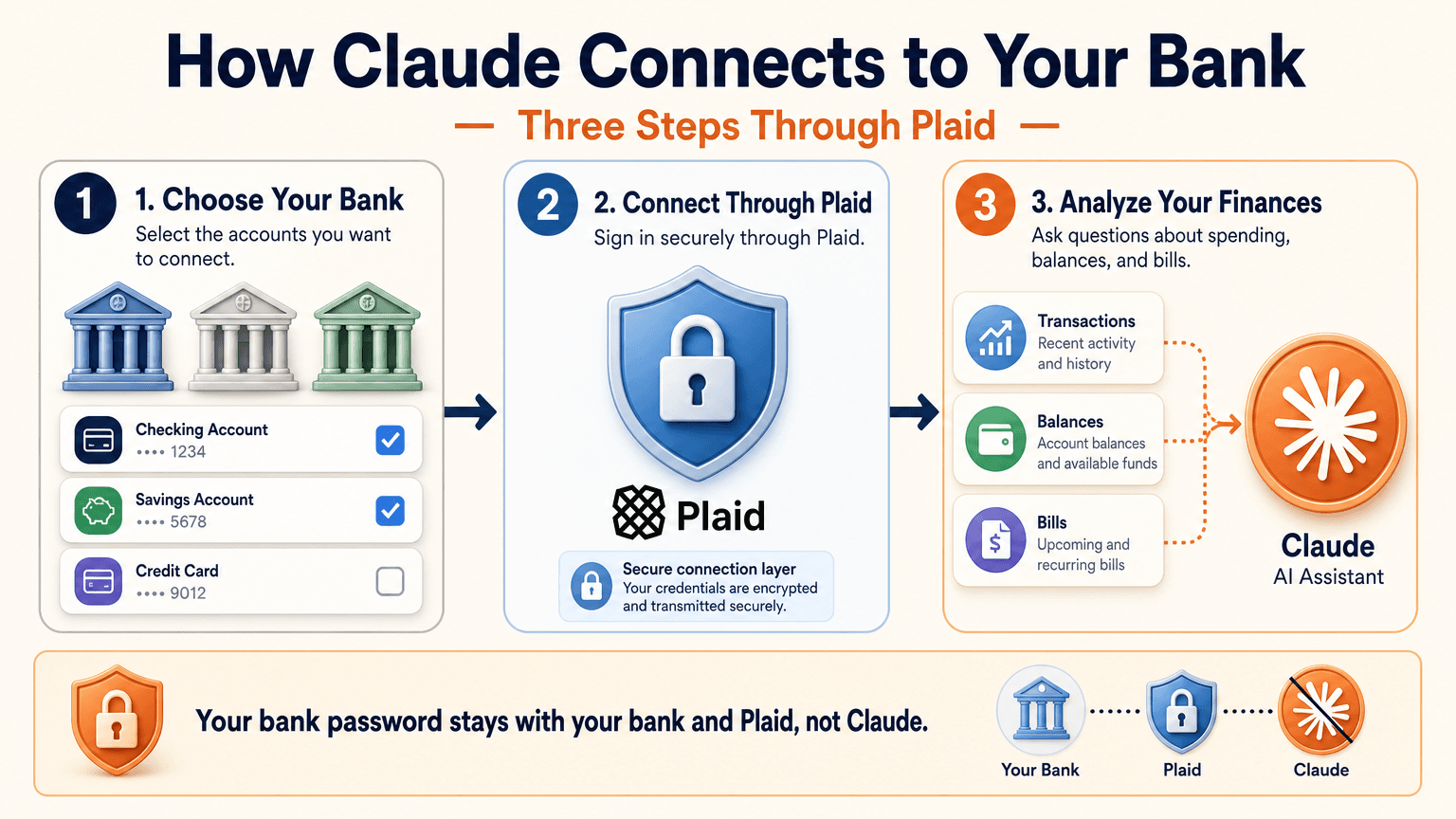
Link Your Bank Through Plaid
- Open Claude and select Personal Finance in the side menu. If you do not see it, check More.
- Select Get started and choose your goals or skip them.
- Select Link accounts with Plaid and review what Claude will be able to access.
- Sign in to your bank inside Plaid and choose the accounts to share.
- Return to Claude within 10 minutes and wait for your accounts to appear.
You sign in through Plaid, so Claude does not ask for or see your bank password. New transactions can take a few minutes to sync.
Use the Claude Personal Finance Dashboard
The dashboard puts spending, cash flow, accounts, subscriptions, and upcoming bills on one page. Widgets can be added, edited, removed, and reordered. Start with one account and one question, such as “Can I afford a trip this spring?”
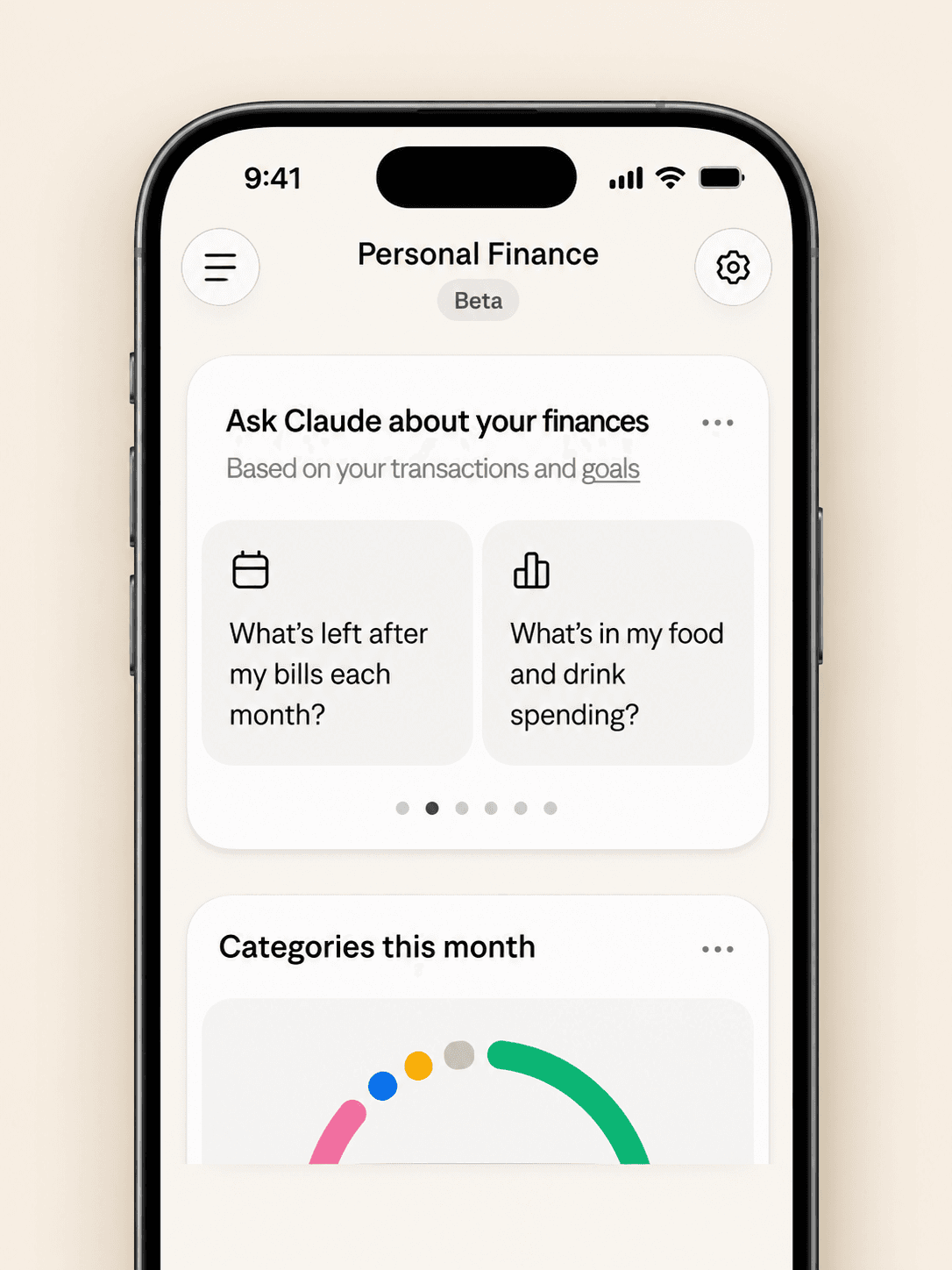
Claude Personal Finance Prompts to Try
Spending and Bills
- “Where did my money go last month, grouped by category?”
- “Which subscriptions am I paying for, and which ones went up in price?”
- “What payments will leave my checking account before payday?”
Smarter Follow-Ups
- “Is that more than usual? Compare the last three months.”
- “Which transactions are behind this number?”
- “Do any charges look duplicated or unexpected?”
The second follow-up matters most. Anthropic itself advises asking which transactions sit behind a figure and checking important numbers with your bank.
Is Claude Personal Finance Safe?
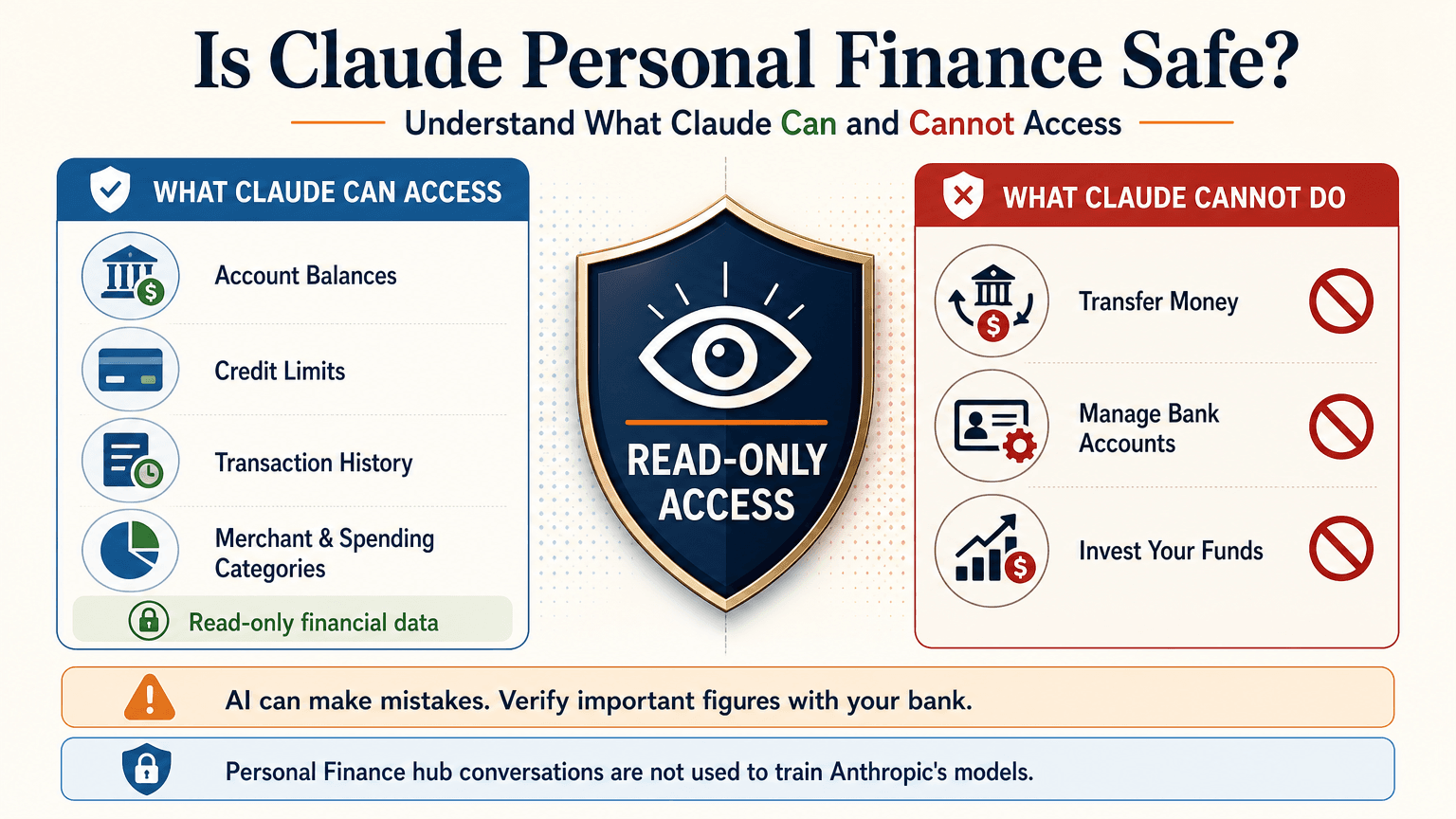
Read-Only Access Through Plaid
Claude cannot move, manage, or invest your money. Plaid handles the bank sign-in, so your password stays between you and your bank. You can unlink a bank at any time, and Claude can no longer see its data.
What Claude Can See
For the accounts you choose, Claude can read:
- Bank names, account names, types, and last four digits
- Balances and credit limits
- Up to 24 months of transactions with amount, date, merchant, category, and bank description
For investment accounts, loans, and cards, Claude reads balances and credit limits, not holdings, trades, or rates. Conversations in the Personal Finance hub are not used to train Anthropic’s models. For anything you share outside the hub, your normal privacy settings apply.
Accuracy Limits
Claude is AI and can make mistakes. Balances can be a day or two old. An account linked through two logins may be counted twice. Anthropic also says the feature is not designed to give investment advice. Treat Claude as an analyst that organizes and explains your data rather than the final decision maker.
Current Limitations
- US banks only
- No use of linked accounts in scheduled tasks, Cowork tasks, or Claude Code
- Not available on Free, Team, or Enterprise plans
- Saved dashboards are not yet included in data exports
Claude Personal Finance on Reddit: What People Did Before Launch
Personal Finance in Claude only just started rolling out, so real-world reviews of the official feature are still limited. For context, earlier discussions on r/ClaudeAI show how people were managing money with Claude before this feature existed. These are community workflows, not feedback on the new feature.
- Retirement planning: Running Monte Carlo simulations to estimate safe spending rates.
- Custom dashboards: Replacing spreadsheets with net worth and budget views.
- Fee hunting: Comparing bank statements with a fee schedule PDF to dispute wrong charges.
- Bank connections: A few users automated budget emails through Plaid or SimpleFIN, while many preferred uploading redacted CSV files to protect privacy.
That privacy split is useful to know. It is the same trade-off between convenience and control that the official feature and a CSV workflow now represent.
Use Claude Finance Outside the US With a CSV
You do not need account linking to get useful answers. A bank statement export contains the same raw material: dates, merchants, and amounts.
Build a Claude Personal Finance Tracker With 1min.AI
- Export one to three months of transactions from your bank as a CSV.
- Redact account numbers, full names, and addresses before sharing.
- Open Multi AI Chat in 1min.AI and select a Claude model.
- Paste or upload the cleaned data and run your prompt.
- Save the prompt in Prompt List so you can reuse it every month.
A starter prompt: “Categorize these transactions and total each category. List recurring subscriptions and flag duplicates or unusual fees. Show a table and mark any rows you are unsure about.”
1min.AI is not the official Personal Finance in Claude feature and does not connect to your bank. It gives you access to Claude models in one workspace, so this workflow works from any country. For model details, see the page for Claude Opus 5.5 and the guide to Claude Fable 5.1.
Which Claude Model Fits Which Money Task
| Task | Suggested model | Why |
|---|---|---|
| Categorizing many transactions | Claude 5.5 Haiku | Fast and low cost |
| Monthly budget and subscription audit | Claude 5.5 Sonnet | Balanced quality and cost |
| Retirement scenarios and multi-step analysis | Claude 5.5 Opus or 5.1 Fable | Stronger reasoning on complex questions |
Curious how the top models compare? Watch this test:
Claude Personal Finance Plugin Options
Community plugins can extend Claude for finance work. The Claude Cowork guide lists a Finance Tracker plugin for expense tracking and budget analysis. Review any plugin’s permissions before installing it, and never give a tool more financial data than the task needs.
Official Feature vs a CSV Workflow on 1min.AI
| Personal Finance in Claude | CSV workflow on 1min.AI | |
|---|---|---|
| Availability | US beta on paid plans | Global |
| Data source | Live accounts via Plaid | Redacted CSV or pasted rows |
| Dashboard | Built-in widgets | Tables and charts you request |
| Reusable prompts | Suggested questions | Prompt List |
| Model choice | Claude | Haiku, Sonnet, Opus, Fable, and more |
| Best for | Hands-off tracking | Privacy control and non-US users |
Teams that share finance prompts can use Shared Zone. Writers who turn results into reports can try Claude 4.6 for writing. 1min.AI is rated Excellent on Trustpilot and recognized on SourceForge, Slashdot, Capterra, Software Advice, and GetApp. If you want to see how an earlier flagship handles long analysis, try Claude 5 Fable.
Claude Personal Finance FAQ
What is Claude personal finance?
It is Anthropic’s beta feature, officially called Personal Finance in Claude. It links bank and card accounts through Plaid so you can ask about spending, balances, and bills.
Is Personal Finance in Claude free?
No. It is available on Pro, Max, and Ultra plans in the US. It is not available on Free, Team, or Enterprise.
Can Claude move my money?
No. Access is read-only. Claude cannot move, manage, or invest funds.
Can I use Claude finance features outside the US?
The official feature supports US banks only. Outside the US, you can upload a redacted CSV statement to a Claude model and prompt it for categories, subscriptions, and budgets.
Is Claude accurate with financial data?
It can make mistakes. Ask which transactions support each figure and verify key numbers with your bank.
Is this financial advice?
No. This article is educational and is not financial, tax, or investment advice. Consult a licensed professional for major decisions.
Final Thoughts
Claude personal finance turns scattered statements into clear answers. It is still a beta with strict regional limits and normal AI error risk. Use it to organize, categorize, and explain, and verify important figures yourself. If you live outside the US or prefer to keep bank access closed, a redacted CSV with the right Claude model delivers much of the same insight.
- #Information
대안
1minAI의 최고의 대안을 찾아보고 기능, 가격 및 사용 사례를 비교하세요.

1min.AI 대 OpenRouter
1min.AI 대 OpenRouter: 즉시 사용 가능한 AI 생성 제품과 기술적인 API 도구를 비교합니다. 코드 없는 크리에이티브 스튜디오가 필요한지, 아니면 코딩 인프라 허브가 필요한지 알아보세요.
 Ngoc Hong

1min AI vs Buffer
Compare 1min.AI vs Buffer for Facebook content creation, AI writing, image generation, scheduling, pricing, and everyday marketing workflows.
Ngoc Hong
1min.AI vs. Hootsuite: Which Social Media Tool Fits Your Workflow?
Compare 1min.AI vs. Hootsuite to explore their AI content creation, social media publishing, analytics, pricing, and collaboration features. Find the right tool for your workflow.
AI 도구
생산성, 창의성 및 일상 업무를 향상시키는 최고의 AI 도구를 찾아보세요.

하나의 제품, 10개의 UGC 크리에이티브: AI가 콘텐츠 테스트를 더 쉽게 만드는 방법
AI UGC 비디오 생성기로 더 진정성 있는 UGC를 만들고, 더 다양한 크리에이티브 각도를 테스트하며, 모든 버전을 직접 촬영하지 않고도 제휴 콘텐츠를 확장하세요.
 Lien Anh Vu

단 몇 단계로 일관된 만화 콘텐츠 만들기
1min.AI로 아이디어 조사부터 캐릭터와 애니메이션 영상까지, 3단계로 TikTok과 Reels용 만화 영상을 만들어보세요.
Lien Anh Vu
스타트업 창업자를 위한 합리적인 AI 도구 4가지
스타트업 창업자가 아이디어를 검증하고, 제품을 만들고, 콘텐츠를 제작하고, 과도한 지출 없이 더 빠르게 출시할 수 있도록 돕는 합리적인 AI 도구 4가지를 소개합니다.
 Tram Ta
AI 기능
워크플로우를 간소화하고 효율성을 개선하며 팀이 더 많은 것을 달성할 수 있도록 지원하는 포괄적인 AI 기능.
하나의 제품, 10개의 UGC 크리에이티브: AI가 콘텐츠 테스트를 더 쉽게 만드는 방법
AI UGC 비디오 생성기로 더 진정성 있는 UGC를 만들고, 더 다양한 크리에이티브 각도를 테스트하며, 모든 버전을 직접 촬영하지 않고도 제휴 콘텐츠를 확장하세요.
Lien Anh Vu단 몇 단계로 일관된 만화 콘텐츠 만들기
1min.AI로 아이디어 조사부터 캐릭터와 애니메이션 영상까지, 3단계로 TikTok과 Reels용 만화 영상을 만들어보세요.
Lien Anh Vu
1minAI: 무료 AI 문법 검사기
1minAI의 AI 문법 검사기로 무료로 문법을 확인하세요. 문법, 맞춤법, 글쓰기 오류를 찾고, 명확성을 높이며, 몇 초 만에 콘텐츠를 다듬을 수 있습니다.
Tram TaAI 활용 사례
비즈니스, 생산성 및 산업별 응용 프로그램을 위한 AI 활용 사례 모음.
하나의 제품, 10개의 UGC 크리에이티브: AI가 콘텐츠 테스트를 더 쉽게 만드는 방법
AI UGC 비디오 생성기로 더 진정성 있는 UGC를 만들고, 더 다양한 크리에이티브 각도를 테스트하며, 모든 버전을 직접 촬영하지 않고도 제휴 콘텐츠를 확장하세요.
Lien Anh Vu단 몇 단계로 일관된 만화 콘텐츠 만들기
1min.AI로 아이디어 조사부터 캐릭터와 애니메이션 영상까지, 3단계로 TikTok과 Reels용 만화 영상을 만들어보세요.
Lien Anh Vu
인스타그램에 게시하기 가장 좋은 시간: 더 나은 참여를 위한 실용 가이드
인스타그램에 게시하기 가장 좋은 시간을 알아보세요. 다양한 аудитория를 위한 최적의 요일과 시간, 그리고 계정에 맞는 이상적인 게시 일정을 찾는 팁까지 담았습니다.
Tram TaAI 튜토리얼
실용적인 단계별 튜토리얼을 통해 AI 사용법을 배우세요.
단 몇 단계로 일관된 만화 콘텐츠 만들기
1min.AI로 아이디어 조사부터 캐릭터와 애니메이션 영상까지, 3단계로 TikTok과 Reels용 만화 영상을 만들어보세요.
Lien Anh Vu
2026 블랙프라이데이 AI 도구 특가
2026 블랙프라이데이 AI 도구 특가에서 어떤 혜택을 만날 수 있는지 알아보세요. AppSumo, Dealify, Stack Social을 통해 1min.AI 평생 이용권을 확보하는 방법과 Trustpilot, Slashdot, Software Advice에서 검증하는 방법까지 확인하세요.
 Hang Nguyen

Seedance로 제품 일관성을 유지하는 AI 이미지-to-비디오로 왜곡을 막고 제품 리뷰를 масштаб화
AI 이미지-to-비디오 제품 일관성으로 로고 왜곡을 막고, 오늘 1min.AI에서 스튜디오급 리뷰 영상을 생성하세요.
Lien Anh VuAI 가이드
실용적인 가이드, 실제 사례, 실행 가능한 모범 사례를 통해 AI를 더 빠르게 배우세요.
단 몇 단계로 일관된 만화 콘텐츠 만들기
1min.AI로 아이디어 조사부터 캐릭터와 애니메이션 영상까지, 3단계로 TikTok과 Reels용 만화 영상을 만들어보세요.
Lien Anh Vu
AI 도구를 안전하게 온라인에서 구매하는 방법: 2026 블랙 프라이데이 가이드
온라인에서 최고의 블랙 프라이데이 AI 딜을 찾고 확보하는 방법을 알아보세요. 사기를 피하고, 구독 피로를 줄이며, 소프트웨어를 검증하는 전문가 전략을 배워보세요.
Hang Nguyen스타트업 창업자를 위한 합리적인 AI 도구 4가지
스타트업 창업자가 아이디어를 검증하고, 제품을 만들고, 콘텐츠를 제작하고, 과도한 지출 없이 더 빠르게 출시할 수 있도록 돕는 합리적인 AI 도구 4가지를 소개합니다.
Tram TaAI 솔루션
자동화, 코딩, 연구, 생산성, 고객 지원, 마케팅 및 비즈니스 워크플로우를 위한 최고의 AI 솔루션을 찾아보세요.
하나의 제품, 10개의 UGC 크리에이티브: AI가 콘텐츠 테스트를 더 쉽게 만드는 방법
AI UGC 비디오 생성기로 더 진정성 있는 UGC를 만들고, 더 다양한 크리에이티브 각도를 테스트하며, 모든 버전을 직접 촬영하지 않고도 제휴 콘텐츠를 확장하세요.
Lien Anh Vu단 몇 단계로 일관된 만화 콘텐츠 만들기
1min.AI로 아이디어 조사부터 캐릭터와 애니메이션 영상까지, 3단계로 TikTok과 Reels용 만화 영상을 만들어보세요.
Lien Anh Vu
무료 AI 타투 생성기: 맞춤 디자인
1min.AI의 무료 AI 타투 생성기로 어떤 아이디어든 맞춤 타투 디자인으로 바꿔보세요. 아이디어를 설명하고 스타일을 고른 뒤 몇 초 만에 다운로드하세요.
 Trang Tran
AI 모델
세계 최고의 AI 모델을 한 곳에서 탐색하세요.
하나의 제품, 10개의 UGC 크리에이티브: AI가 콘텐츠 테스트를 더 쉽게 만드는 방법
AI UGC 비디오 생성기로 더 진정성 있는 UGC를 만들고, 더 다양한 크리에이티브 각도를 테스트하며, 모든 버전을 직접 촬영하지 않고도 제휴 콘텐츠를 확장하세요.
Lien Anh Vu단 몇 단계로 일관된 만화 콘텐츠 만들기
1min.AI로 아이디어 조사부터 캐릭터와 애니메이션 영상까지, 3단계로 TikTok과 Reels용 만화 영상을 만들어보세요.
Lien Anh VuSeedance로 제품 일관성을 유지하는 AI 이미지-to-비디오로 왜곡을 막고 제품 리뷰를 масштаб화
AI 이미지-to-비디오 제품 일관성으로 로고 왜곡을 막고, 오늘 1min.AI에서 스튜디오급 리뷰 영상을 생성하세요.
Lien Anh VuAI 비교
필요에 가장 적합한 AI 도구, 모델 및 플랫폼을 비교해보세요.

Kling AI vs Veo 3: 어떤 모델이 승자일까?
Kling AI와 Veo 3를 모션, 네이티브 오디오, 가격, 무료 요금제로 비교해 어떤 AI 비디오 생성기가 프로젝트에 더 적합한지 확인하고, 1min.AI에서 둘 다 체험해보세요.
Trang TranSeedance로 제품 일관성을 유지하는 AI 이미지-to-비디오로 왜곡을 막고 제품 리뷰를 масштаб화
AI 이미지-to-비디오 제품 일관성으로 로고 왜곡을 막고, 오늘 1min.AI에서 스튜디오급 리뷰 영상을 생성하세요.
Lien Anh Vu
DeepSeek V4 Pro vs Flash 비교
DeepSeek V4 Pro와 DeepSeek V4 Flash의 메트릭을 비교해보세요. 1min.ai에서 오늘 에이전트 앱을 최적화하고 AI 사실 확인을 개선하세요.
AI 통합
이미 사용하는 도구에 AI를 원활하게 통합하여 작업을 자동화하고 생산성을 높이세요.

패션 위크 2026을 위한 AI 패션 비디오 생성기 사용법
AI로 패션 위크 2026 아이디어를 멋진 패션 비디오로 만들어 보세요. 하나의 간단한 워크플로로 브레인스토밍하고, 비주얼을 만들고, 이미지를 영상으로 전환하는 방법을 알아보세요.
Lien Anh Vu
관점: 매일 10개 이상의 게시물을 만들어야 한다면
콘텐츠 크리에이터가 AI 브레인스토밍, 이미지 생성, 콘텐츠 제작을 활용해 하루 10개 이상의 소셜 미디어 게시물을 더 빠르게 만드는 AI 콘텐츠 워크플로를 구축하는 방법을 알아보세요.
Lien Anh Vu
AI 앱 간 전환 중단: AI 통합이 고용주 브랜딩을 혁신하는 방법
AI 통합이 AI 글쓰기, 문서, 이미지, 비디오 및 여러 AI 모델을 하나의 작업 공간으로 결합하여 HR 팀이 고용주 브랜딩을 간소화하는 방법을 알아보세요.
Tram Ta산업용 AI
의료, 금융, 교육, 법률, 제조, 소매, 부동산 등 다양한 산업을 위한 최고의 AI 도구와 워크플로를 찾아보세요.

Voice Cloning AI Free: How to Clone Any Voice Online in Minutes
Try voice cloning AI free with 1min.AI. Upload a 5-second clip, pick an ElevenLabs model, choose from 32 languages, and turn text to speech in your own voice.
Trang TranClaude Personal Finance Setup and Safety Guide
Claude personal finance explained: how Personal Finance in Claude works and what Claude finance can see. Plus a safe CSV method for non-US users.
Trang Tran
Free AI Image Editor With Prompt No Restrictions
Looking for a free AI image editor with prompt no restrictions? Edit backgrounds, objects and text by typing, no watermark. Try 1min.AI’s flexible editor now.
Trang TranAI 에이전트
AI 에이전트를 발견하고 실행하여 업무와 일상 생활의 작업을 자동화하세요.
1minAI: 무료 AI 문법 검사기
1minAI의 AI 문법 검사기로 무료로 문법을 확인하세요. 문법, 맞춤법, 글쓰기 오류를 찾고, 명확성을 높이며, 몇 초 만에 콘텐츠를 다듬을 수 있습니다.
Tram Ta
Facebook용 AI 에이전트
Facebook용 AI 에이전트를 사용해 문서와 대화에서 콘텐츠를 만들고, 이미지를 생성하고, 게시물을 예약하고, 게시하세요.
Ngoc Hong
AI 에이전트 vs AI 어시스턴트: 디자이너의 시간을 더 많이 아껴주는 건 무엇일까?
AI 에이전트와 AI 어시스턴트의 차이를 알아보고, 디자이너가 반복 작업을 자동화하고 수정 횟수를 줄이며 더 많은 시간을 절약하는 데 어떤 솔루션이 도움이 되는지 확인해 보세요.
Lien Anh VuAI 워크플로우
생산성, 마케팅, 영업, 지원 등을 위한 즉시 사용 가능한 AI 워크플로우를 탐색하세요.
하나의 제품, 10개의 UGC 크리에이티브: AI가 콘텐츠 테스트를 더 쉽게 만드는 방법
AI UGC 비디오 생성기로 더 진정성 있는 UGC를 만들고, 더 다양한 크리에이티브 각도를 테스트하며, 모든 버전을 직접 촬영하지 않고도 제휴 콘텐츠를 확장하세요.
Lien Anh Vu단 몇 단계로 일관된 만화 콘텐츠 만들기
1min.AI로 아이디어 조사부터 캐릭터와 애니메이션 영상까지, 3단계로 TikTok과 Reels용 만화 영상을 만들어보세요.
Lien Anh Vu패션 위크 2026을 위한 AI 패션 비디오 생성기 사용법
AI로 패션 위크 2026 아이디어를 멋진 패션 비디오로 만들어 보세요. 하나의 간단한 워크플로로 브레인스토밍하고, 비주얼을 만들고, 이미지를 영상으로 전환하는 방법을 알아보세요.
Lien Anh Vu뉴스레터
1minAI와 함께하는 주간 AI 혁신

🔮 Weekly AI Innovations #145: X Content Agent & GPT 6.1 Terra on 1min.ai
Scale viral reach with the X Content Agent on 1min.ai. Discover an end-to-end 4-stage pipeline with zero token burn, plus the launch of GPT 6.1 Terra.
Hang Nguyen
🔮 Weekly AI Innovations #144: LinkedIn Content Agent: Complete B2B Publishing Pipeline
Scale B2B influence with the LinkedIn Content Agent on 1min.ai. Discover an end-to-end 4-stage pipeline with zero redundant token burn and 1-click publishing.
Hang Nguyen
🔮 Weekly AI Innovations #146: Mistral 3.5, Qwen Image & Cohere A+ are ready on 1min.ai
Deploy Mistral Large 3, Qwen Image 3.0, and Cohere Command A+ on 1min.ai. Boost RAG accuracy and cut visual generation latency in one unified AI workspace.
Hang Nguyen