
No Photoshoot? Create AI Fashion Videos With Seedance 2.5

Lien Anh Vu
12 November 2026
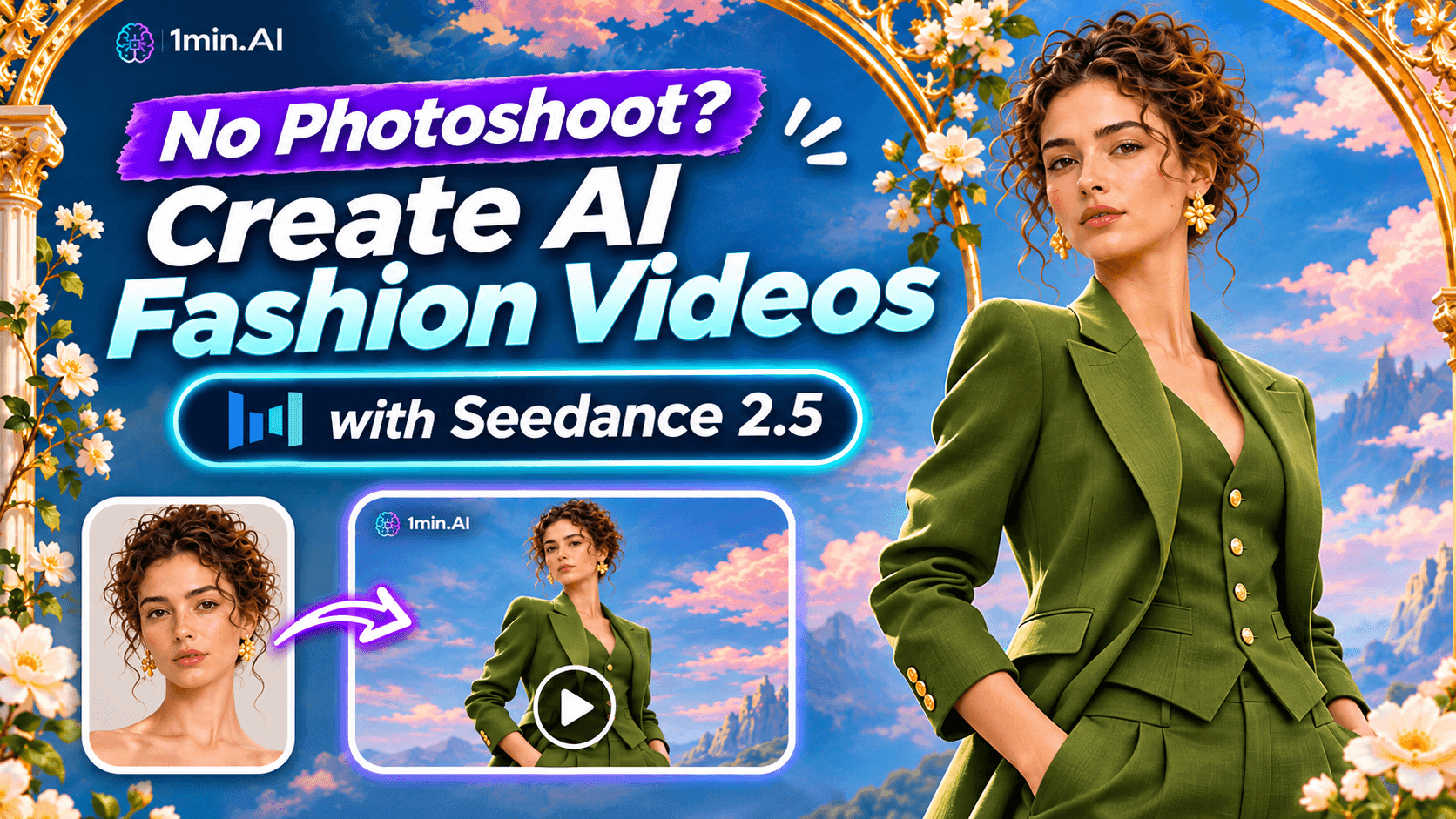
No photoshoot needed! Create stunning AI fashion videos with Seedance 2.5 on 1min.AI using outfit references, cinematic prompts, and surreal scenes.
What if you could create a high-fashion campaign without hiring a model, booking a studio, or even picking up a camera?
Imagine turning a simple outfit photo into a cinematic fashion video, complete with artistic backgrounds, elegant movement, and editorial lighting.
That's what an AI fashion video generator makes possible.
With Seedance 2.5 on 1min.AI, creators can experiment with fashion videos using clothing references and text prompts. From surreal fashion editorials to luxury-inspired campaigns, you can explore creative concepts without organizing a traditional photoshoot.
Here's how we turned an olive-green outfit into a dreamlike fashion video using Seedance 2.5.
Why Creators Are Using AI Fashion Video Generators
Creating fashion content takes more than finding a beautiful outfit.
You need a location, lighting, a model, a camera, and enough footage to create something engaging for Instagram Reels or TikTok.
For independent creators and small fashion brands, organizing a new shoot for every idea isn't always practical.
An AI fashion video generator offers another approach.
Instead of filming an entire scene, you can start with a clothing reference, describe your creative direction, and let AI generate a video concept.
This is especially useful when you want to experiment with different styles before investing in a full campaign.
For example, one outfit could inspire a minimalist studio commercial, a cinematic runway scene, or a surreal fashion editorial.
The creative possibilities are much wider than a traditional product photo.
Why Seedance 2.5?
Developed by ByteDance, Seedance 2.5 supports text-to-video generation alongside image, video, and audio references.
That means you can use a clothing image to guide the outfit while describing the environment and movement separately.
For fashion creators, this opens up a useful workflow: start with the outfit, then build the world around it.
How to Create AI Fashion Videos With Seedance 2.5
Let's walk through the process using a real creative concept.
Our goal was to transform an olive-green tailored suit into a surreal fashion editorial that looked like a living painting.
Step 1. Prepare Your Outfit Reference
Start with a clear image of the clothing you want to feature.
For our experiment, we used an olive-green tailored suit with dramatic puff sleeves, a structured waist, and flowing wide-leg trousers.
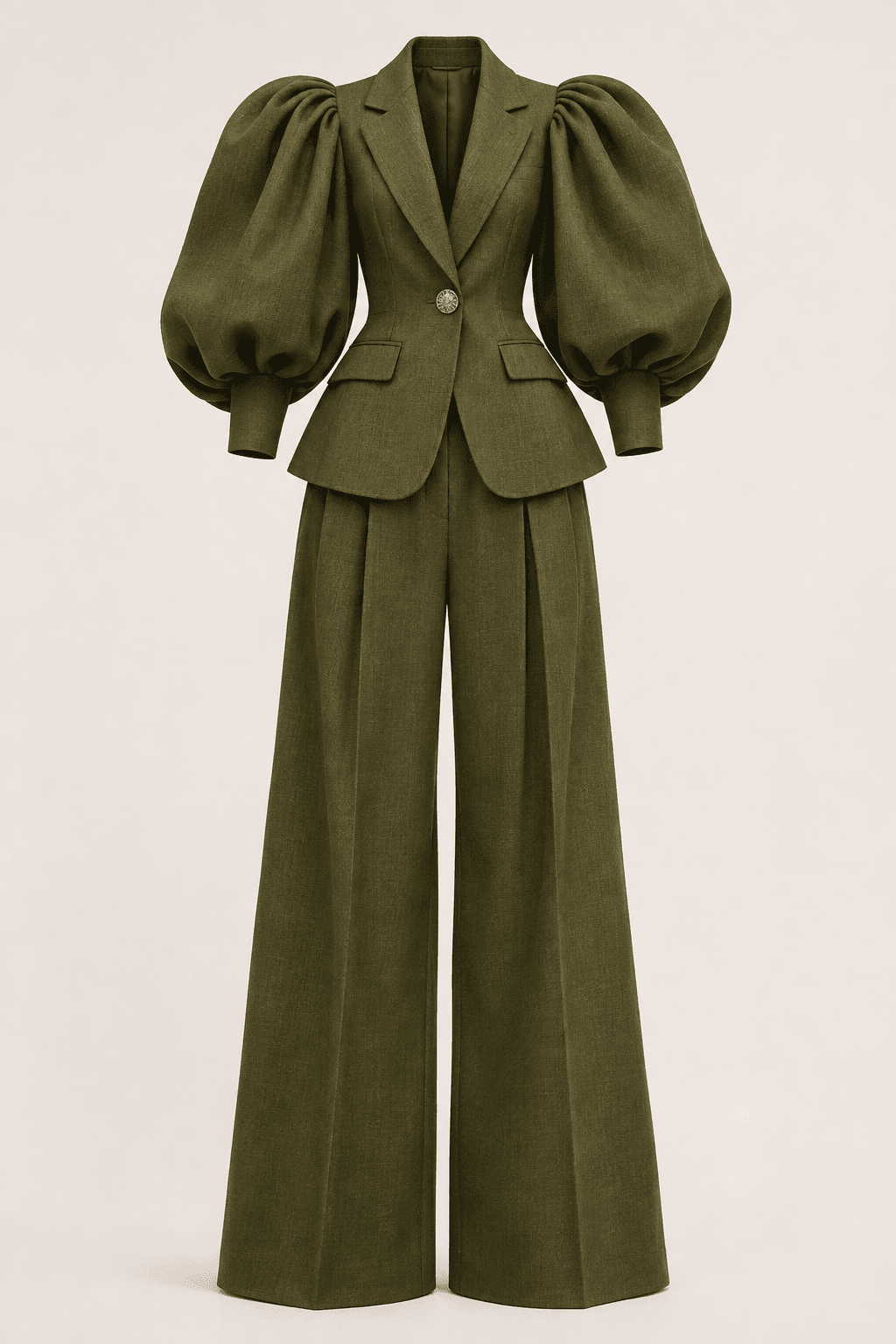
A clean product-only image works well because it allows you to focus on the garment without introducing an existing model's face or pose.
Make sure the clothing is fully visible, the background is simple, and distinctive design details are easy to recognize.
Step 2. Open Seedance 2.5 on 1min.AI
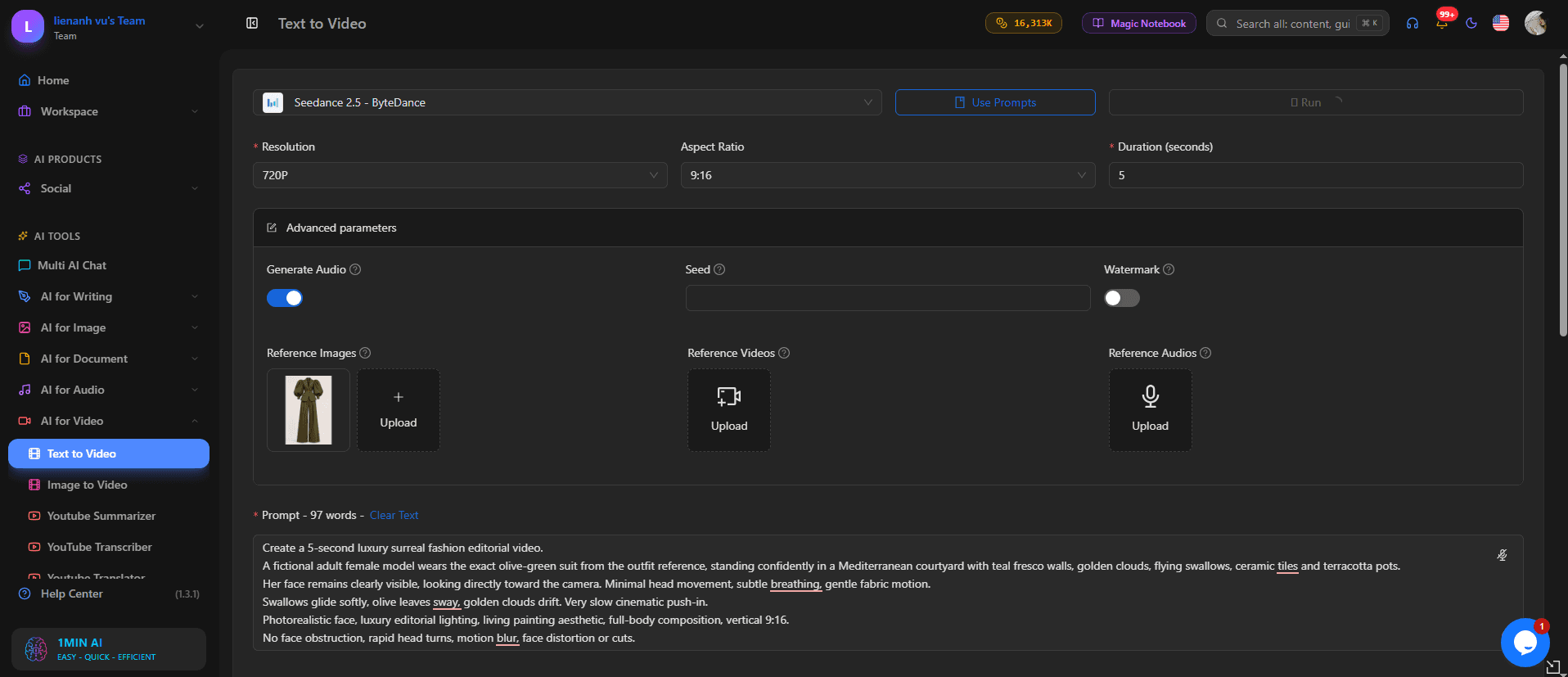
Go to 1min.AI and open AI for Video → Text to Video.
Select Seedance 2.5 from the available AI models.
Upload your outfit photo in the reference image section.
For Instagram Reels, TikTok, and YouTube Shorts, choose a vertical 9:16 format. Start with a short five-second video to test your creative direction before generating longer content.
Step 3. Describe Your Fashion Scene
Here's where your creativity comes in.
Instead of placing the model in a regular photography studio, we chose a surreal Mediterranean setting with painted clouds, flying swallows, antique lanterns, and decorative ceramic tiles.
The idea was to combine realistic fashion photography with the atmosphere of a classical painting.
You don't need to describe every tiny detail. Focus on the outfit, subject, environment, camera movement, and overall visual style.
Step 4. Generate and Review Your Video
Once your prompt is ready, generate the video and check whether the result matches your concept.
Pay attention to the garment's silhouette, fabric movement, lighting, and consistency between frames.
If the clothing changes shape or the camera movement feels unnatural, simplify the instructions and try again.
For fashion content, a beautiful background isn't enough. The outfit should remain recognizable throughout the video.
The Seedance 2.5 Prompt Behind Our Surreal Fashion Video
What if fashion photography could become a living painting?
That's the visual idea behind our Seedance 2.5 fashion experiment.
We wanted a model wearing a sculptural olive-green suit, surrounded by an artistic Mediterranean environment.
The model would remain almost motionless while the world around her came to life.
Copy This AI Fashion Video Prompt
Model: Seedance 2.5
Mode: Text to Video with Outfit Reference
Aspect Ratio: 9:16
Suggested Duration: 5 seconds
Suggested Resolution: 720p
Prompt:
Create a five-second cinematic surreal luxury fashion editorial video using the uploaded outfit reference.
An original fictional adult female fashion model stands confidently in a beautiful Mediterranean-inspired courtyard, wearing the exact olive-green tailored suit shown in the reference image. Preserve the outfit's dramatic puff sleeves, structured silhouette, fitted waist, gold button details, and flowing wide-leg trousers.
The environment features teal fresco walls, hand-painted golden clouds, elegant swallows, antique bronze lanterns, olive trees, terracotta pots, and decorative blue-and-white ceramic tiles.
The model stands in a sophisticated full-body editorial pose, facing the camera with a natural expression.
Swallows glide gracefully across the scene, golden clouds drift slowly, and olive leaves sway gently in the breeze. The model remains almost still, with subtle breathing and natural fabric movement.
The camera performs an extremely slow cinematic push-in.
Visual style: luxury fashion photography blended with Renaissance-inspired fresco art, surreal Mediterranean atmosphere, realistic skin texture, natural fabric details, warm cinematic lighting, elegant editorial composition.
Vertical 9:16, single continuous shot.
Avoid facial distortion, changing clothing details, unnatural body proportions, flickering, sudden camera movements, extra limbs, text, and watermarks.
What Worked and What Needed Improvement?
Our experiment showed how Seedance 2.5 could transform an outfit reference into a visually striking fashion concept.
The olive-green suit and artistic Mediterranean setting came together to create the intended editorial atmosphere.
However, not everything was perfect.
The character's facial appearance and hairstyle didn't consistently match the separate portrait reference we wanted to use. This highlighted an important limitation when working with AI video references.
For this workflow, we found it more practical to create the fashion scene first and handle personal appearance separately using a supported video personalization tool.
It also reinforced another creative lesson: subtle movement can be more effective than complex animation.
The floating clouds, gentle bird movement, and restrained camera direction helped communicate the living painting effect without requiring the model to perform complicated actions.
How to Make AI Fashion Videos Worth Posting
An impressive AI-generated clip is a good start. But content creators need videos they can actually publish.
Here are a few ways to make your fashion videos more useful for social media.
Keep the Outfit as the Main Character
Your environment should complement the clothing, not distract from it.
If you're creating a fashion video for a brand, preserve recognizable colors, textures, and design details wherever possible.
Avoid adding too many moving objects or camera transitions that make the garment difficult to see.
Create Different Looks From One Outfit
You don't need an entirely new wardrobe to experiment with multiple video concepts.
Try using the same outfit reference in different settings, such as a minimalist fashion studio, a cinematic city street, or a dreamlike Mediterranean courtyard.
This can help you explore different creative directions for Reels, Shorts, and social media campaigns.
If you want more ideas, check out our Seedance 2.5 AI product video guide.
Want to Put Yourself in the Video?
Creating the fashion video is only the beginning.
You may also want to personalize it using your own appearance.
One possible workflow is to create the original fashion video with Seedance 2.5, then explore HeyGen Video or a dedicated Video Face Swap tool for supported personalization.
Use only photos you have permission to process, and remember that facial replacement doesn't necessarily reproduce the original hairstyle.
For creators who want to appear in imaginative fashion settings, this creates another direction to explore without filming the entire scene.
Create More Without Constantly Switching Tools
The real benefit of AI fashion video creation isn't simply generating one beautiful clip.
It's having the flexibility to test concepts, experiment with visual styles, and build a repeatable creative workflow.
On 1min.AI, you can explore Seedance 2.5 alongside other AI creative tools in one workspace.
Instead of committing to a full photoshoot for every visual idea, you can begin with a clothing reference, test your concept, and develop the results that best fit your content.
For regular creators, it's also worth reviewing how many credits each usable video requires. Our AI video generation cost guide explains how to evaluate production costs and reduce unnecessary retries.
Your next fashion Reel could start with a single outfit photo.
🚀 Create your AI fashion video with Seedance 2.5 on 1min.AI
- #Commercial
Alternatives
Discover the best alternatives to 1minAI and compare features, pricing, and use cases.

1min.AI vs OpenRouter
1min.AI vs. OpenRouter: Compare the ready-to-use AI creation product against the technical API tool. Find out if you need a zero-code creative studio or a coding infrastructure hub.
 Ngoc Hong
1min.AI vs. Hootsuite: Which Social Media Tool Fits Your Workflow?
Compare 1min.AI vs. Hootsuite to explore their AI content creation, social media publishing, analytics, pricing, and collaboration features. Find the right tool for your workflow.
 Uyen Hoang

1min AI vs Buffer
Compare 1min.AI vs Buffer for Facebook content creation, AI writing, image generation, scheduling, pricing, and everyday marketing workflows.
Ngoc HongAI Tools
Discover the best AI tools to boost productivity, creativity, and everyday work.
Create Consistent Cartoon Content in Just a Few Steps
Create engaging cartoon videos for TikTok and Reels with 1min.AI. Research ideas, create characters, and turn images into animated videos in 3 simple steps.
 Lien Anh Vu
One Product, 10 UGC Creatives: How AI Makes Content Testing Easier
Create more authentic UGC with an AI UGC video generator, test more creative angles and scale affiliate content without filming every version.
Lien Anh Vu
Top 4 Affordable AI Tools for Startup Founders
Discover the top 4 affordable AI tools for startup founders to validate ideas, build products, create content, and launch faster without overspending.
 Tram Ta
AI Features
Comprehensive AI features that streamline workflows, improve efficiency, and empower teams to achieve more.
Create Consistent Cartoon Content in Just a Few Steps
Create engaging cartoon videos for TikTok and Reels with 1min.AI. Research ideas, create characters, and turn images into animated videos in 3 simple steps.
Lien Anh VuOne Product, 10 UGC Creatives: How AI Makes Content Testing Easier
Create more authentic UGC with an AI UGC video generator, test more creative angles and scale affiliate content without filming every version.
Lien Anh Vu
1minAI: Free AI Grammar Checker
Check grammar for free with 1minAI’s AI grammar checker. Find grammar, spelling, and writing mistakes, improve clarity, and polish your content in seconds.
Tram TaAI Use Cases
A curated collection of AI use cases for business, productivity, and industry-specific applications.
Create Consistent Cartoon Content in Just a Few Steps
Create engaging cartoon videos for TikTok and Reels with 1min.AI. Research ideas, create characters, and turn images into animated videos in 3 simple steps.
Lien Anh VuOne Product, 10 UGC Creatives: How AI Makes Content Testing Easier
Create more authentic UGC with an AI UGC video generator, test more creative angles and scale affiliate content without filming every version.
Lien Anh Vu
Best Time to Post on Instagram: A Practical Guide for Better Engagement
Discover the best time to post on Instagram, including the best days and times for different audiences, plus tips to find the ideal posting schedule for your account.
Tram TaAI Tutorials
Learn how to use AI with practical, step-by-step tutorials.

Black Friday AI Tool Deals in 2026
Discover what Black Friday AI tool deals 2026 has to offer. Find out how to secure the 1min.AI lifetime deal via AppSumo, Dealify, Stack Social, and verify on Trustpilot, Slashdot, and Software Advice.
 Hang Nguyen
Create Consistent Cartoon Content in Just a Few Steps
Create engaging cartoon videos for TikTok and Reels with 1min.AI. Research ideas, create characters, and turn images into animated videos in 3 simple steps.
Lien Anh Vu
[Seedance 2.5 New] Better AI Product Videos, Less Rework in 1min.AI
Use Seedance 2.5 image to video on 1min.AI to create more consistent AI product videos, reduce failed generations, save credits, and improve UGC workflows.
Lien Anh VuAI Guides
Learn AI faster with practical guides, real-world examples, and actionable best practices.

Safely Buy AI Tools Online: 2026 Black Friday Guide
Discover how to find and secure the best Black Friday AI deals online. Learn expert strategies to avoid scams, combat subscription fatigue, and verify software.
Hang NguyenCreate Consistent Cartoon Content in Just a Few Steps
Create engaging cartoon videos for TikTok and Reels with 1min.AI. Research ideas, create characters, and turn images into animated videos in 3 simple steps.
Lien Anh Vu[Seedance 2.5 New] Better AI Product Videos, Less Rework in 1min.AI
Use Seedance 2.5 image to video on 1min.AI to create more consistent AI product videos, reduce failed generations, save credits, and improve UGC workflows.
Lien Anh VuAI Solutions
Browse the best AI solutions for automation, coding, research, productivity, customer support, marketing, and business workflows.
Safely Buy AI Tools Online: 2026 Black Friday Guide
Discover how to find and secure the best Black Friday AI deals online. Learn expert strategies to avoid scams, combat subscription fatigue, and verify software.
Hang NguyenCreate Consistent Cartoon Content in Just a Few Steps
Create engaging cartoon videos for TikTok and Reels with 1min.AI. Research ideas, create characters, and turn images into animated videos in 3 simple steps.
Lien Anh VuOne Product, 10 UGC Creatives: How AI Makes Content Testing Easier
Create more authentic UGC with an AI UGC video generator, test more creative angles and scale affiliate content without filming every version.
Lien Anh VuAI Models
Explore the world's leading AI models in one place.
Create Consistent Cartoon Content in Just a Few Steps
Create engaging cartoon videos for TikTok and Reels with 1min.AI. Research ideas, create characters, and turn images into animated videos in 3 simple steps.
Lien Anh VuOne Product, 10 UGC Creatives: How AI Makes Content Testing Easier
Create more authentic UGC with an AI UGC video generator, test more creative angles and scale affiliate content without filming every version.
Lien Anh Vu[Seedance 2.5 New] Better AI Product Videos, Less Rework in 1min.AI
Use Seedance 2.5 image to video on 1min.AI to create more consistent AI product videos, reduce failed generations, save credits, and improve UGC workflows.
Lien Anh VuAI Comparisons
Compare AI tools, models, and platforms to find the best fit for your needs.
Kling AI Vs Veo 3: Which Model Wins?
Kling AI vs Veo 3: compare motion, native audio, pricing & free tiers to see which AI video generator wins for your project - try both on 1min.AI.
 Trang Tran
[Seedance 2.5 New] Better AI Product Videos, Less Rework in 1min.AI
Use Seedance 2.5 image to video on 1min.AI to create more consistent AI product videos, reduce failed generations, save credits, and improve UGC workflows.
Lien Anh Vu
DeepSeek V4 Pro vs Flash Comparison
Compare DeepSeek V4 Pro vs DeepSeek V4 Flash metrics. Optimize your agentic apps and improve AI fact checking on 1min.ai today.
Ngoc HongAI Integrations
Seamlessly integrate AI with the tools you already use to automate work and boost productivity.
POV: You Have 10+ Posts to Make Every Day
Learn how to build an AI content workflow that helps content creators produce 10+ social media posts a day faster with AI brainstorming, image generation, and content creation.
Lien Anh Vu
How to Use an AI Fashion Video Generator for Fashion Week 2026
Turn Fashion Week 2026 ideas into stunning fashion videos with AI. Learn how to brainstorm, create visuals, and transform images into videos with one simple workflow.
Lien Anh Vu
Stop Switching Between AI Apps: How AI Integration Transforms Employer Branding
Discover how AI integration helps HR teams streamline employer branding by combining AI writing, documents, images, video, and multiple AI models into one workspace.
Tram TaAI for Industries
Find the best AI tools and workflows for healthcare, finance, education, legal, manufacturing, retail, real estate, and more
No Photoshoot? Create AI Fashion Videos With Seedance 2.5
No photoshoot needed! Create stunning AI fashion videos with Seedance 2.5 on 1min.AI using outfit references, cinematic prompts, and surreal scenes.
Lien Anh Vu
Voice Cloning AI Free: How to Clone Any Voice Online in Minutes
Try voice cloning AI free with 1min.AI. Upload a 5-second clip, pick an ElevenLabs model, choose from 32 languages, and turn text to speech in your own voice.
Trang Tran
Text To Video AI Free Without Watermark Online
Create text to video AI free without watermark online with 1min.AI. Pick top models, turn prompts into HD clips, and download clean videos fast. Try it free.
Trang TranAI Agents
Discover and run AI agents to automate tasks across your work and daily life.
1minAI: Free AI Grammar Checker
Check grammar for free with 1minAI’s AI grammar checker. Find grammar, spelling, and writing mistakes, improve clarity, and polish your content in seconds.
Tram Ta
AI Agents for Facebook
Use an AI Agent for Facebook to create content, generate images, schedule posts, and publish from your documents and conversations.
Ngoc Hong
AI Agent vs AI Assistant: Which One Actually Saves Designers More Time?
Learn the difference between AI Agent vs AI Assistant and discover which solution helps designers automate repetitive work, reduce revisions, and save more time.
Lien Anh VuAI Workflows
Explore ready-to-use AI workflows for productivity, marketing, sales, support, and more.
Create Consistent Cartoon Content in Just a Few Steps
Create engaging cartoon videos for TikTok and Reels with 1min.AI. Research ideas, create characters, and turn images into animated videos in 3 simple steps.
Lien Anh VuOne Product, 10 UGC Creatives: How AI Makes Content Testing Easier
Create more authentic UGC with an AI UGC video generator, test more creative angles and scale affiliate content without filming every version.
Lien Anh VuPOV: You Have 10+ Posts to Make Every Day
Learn how to build an AI content workflow that helps content creators produce 10+ social media posts a day faster with AI brainstorming, image generation, and content creation.
Lien Anh VuNewsletter
Weekly AI Innovations with 1minAI

🔮 Weekly AI Innovations #145: X Content Agent & GPT 6.1 Terra on 1min.ai
Scale viral reach with the X Content Agent on 1min.ai. Discover an end-to-end 4-stage pipeline with zero token burn, plus the launch of GPT 6.1 Terra.
Hang Nguyen
🔮 Weekly AI Innovations #144: LinkedIn Content Agent: Complete B2B Publishing Pipeline
Scale B2B influence with the LinkedIn Content Agent on 1min.ai. Discover an end-to-end 4-stage pipeline with zero redundant token burn and 1-click publishing.
Hang Nguyen
🔮 Weekly AI Innovations #143: Update GPT-6, GPT-6.1 & Ideogram 4.0
Access GPT-6 Sol, Luna, GPT-6.1 Sol, and Ideogram 4.0 on 1min.ai. Boost typography accuracy to 98.4% and cut reasoning latency by 45% in one platform.
Hang Nguyen