
Free AI Content Repurposing Tool

Trang Tran
22 September 2026
Turn one piece of content into dozens of posts. See how 1min.AI's free AI content repurposing tool automates blogs, clips, and captions in minutes.
Creating one piece of content can take hours. Turning that same idea into a blog post, LinkedIn post, social caption, carousel, image, video, or audio usually takes even more time.
An AI content repurposing tool helps solve this problem by transforming one source of content into multiple formats while keeping the original message, ideas, and context intact.
With 1min.AI, you can use one piece of content as the starting point and create different content assets for different channels — without rebuilding the same idea from scratch every time.
What Is an AI Content Repurposing Tool?
An AI content repurposing tool uses artificial intelligence to transform existing content into new formats, channels, and content types.
Instead of creating every post individually, you start with one high-value source such as:
- A blog post
- YouTube video
- Podcast episode or transcript
- Webinar
- Interview
- Video script
- Newsletter
- Whitepaper or report
- Meeting notes
- Long-form social post
AI can then help turn that source into additional content such as:
- LinkedIn posts
- X posts or threads
- Social media captions
- Instagram carousel ideas
- Newsletter content
- Blog articles
- Short-form video scripts
- Video content
- Images and graphics
- Audio content
- Summaries and landing-page copy
The goal is not simply to rewrite the same paragraph several times.
Good content repurposing preserves the core idea while adapting the content to the format, audience, and context of each channel.
For example, a 2,000-word blog post could become a LinkedIn post, an X thread, an Instagram carousel outline, a short video script, a newsletter section, and several visual content ideas.
That means you spend more time creating the original idea and less time repeatedly formatting and rewriting it.
Why Use AI for Content Repurposing?
Content repurposing is traditionally a manual process.
A marketer may need one tool to write social posts, another to edit videos, another to create images, and another to turn content into audio. Moving information between those tools adds friction to the workflow.
AI can reduce that manual work.
Save Time Without Starting From Zero
The biggest advantage of AI content repurposing is that you can reuse content you have already created.
Instead of asking:
“What should I post today?”
you can start with:
“What else can I create from something I already published?”
AI can extract the important ideas from the original content and help transform them into new formats.
Reach More Channels
A valuable idea should not have to live on only one platform.
A single piece of content can be adapted for:
- X
- YouTube
- Websites
- Email newsletters
- Blogs
- Other content channels
Each version can be adapted to the way people consume content on that channel.
Keep Your Message Consistent
Repurposing also helps maintain consistency.
Instead of independently creating five different versions of the same topic, you can use one source as the foundation.
The result is multiple pieces of content that share the same core message while still being adapted for their individual formats.
Create More Content With the Same Resources
Content teams do not always have the time or people required to manually turn every idea into multiple assets.
AI content repurposing helps smaller teams and individual creators get more value from the content they already have.
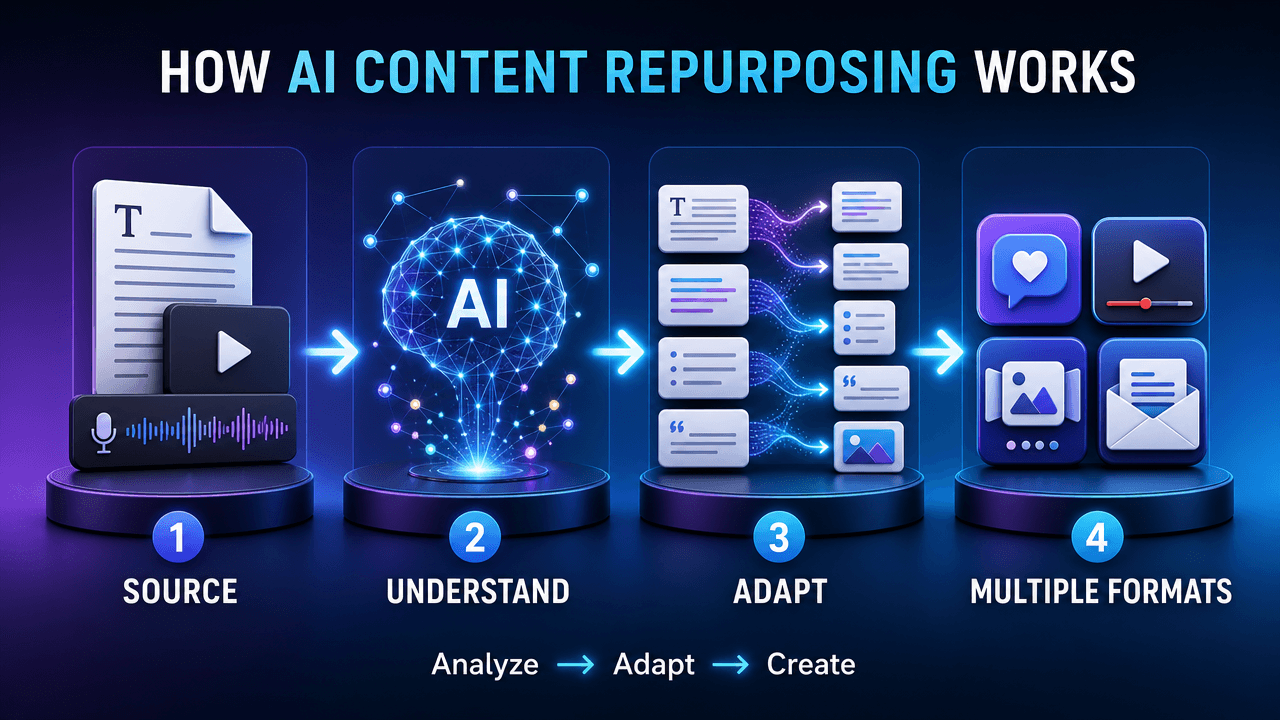
How Does AI Content Repurposing Work?
A typical AI content repurposing workflow has five stages.
Start With a Pillar Content Asset
Begin with content that contains enough information to generate additional ideas.
For example:
YouTube video → multiple social posts
Podcast → written content + social posts
Blog post → social content + visual ideas
Webinar → summaries + posts + follow-up content
The stronger the source content, the more useful the repurposed outputs can be.
Give the AI the Source Content
Depending on the workflow, the source can be text, a transcript, a script, notes, or other content.
The AI analyzes the source and identifies:
- Main ideas
- Supporting points
- Key messages
- Examples
- Important statements
- Potential content angles
Adapt the Idea to a New Format
The same message does not need to look identical everywhere.
For example:
Blog post
A detailed explanation with headings and supporting information.
LinkedIn post
A concise professional insight designed for feed consumption.
X thread
Several connected points presented as a sequence.
Instagram carousel
A visual sequence where each slide communicates one idea.
Short video
A focused script built around one strong point.
The content changes format while the underlying idea remains connected to the original source.
Create Supporting Assets
Content repurposing does not have to stop at text.
The same source can inspire:
- Images
- Graphics
- Video concepts
- Audio
- Captions
- Headlines
- Summaries
- Scripts
This is where an all-in-one AI workspace can reduce the need to move content between multiple applications.
Review Before Publishing
AI should accelerate the content workflow, not eliminate human judgment.
Before publishing, review the generated content for:
- Accuracy
- Brand voice
- Context
- Factual claims
- Platform requirements
- Tone
- Calls to action
A quick human review can turn an AI-generated draft into publication-ready content.
What Can You Repurpose With AI?
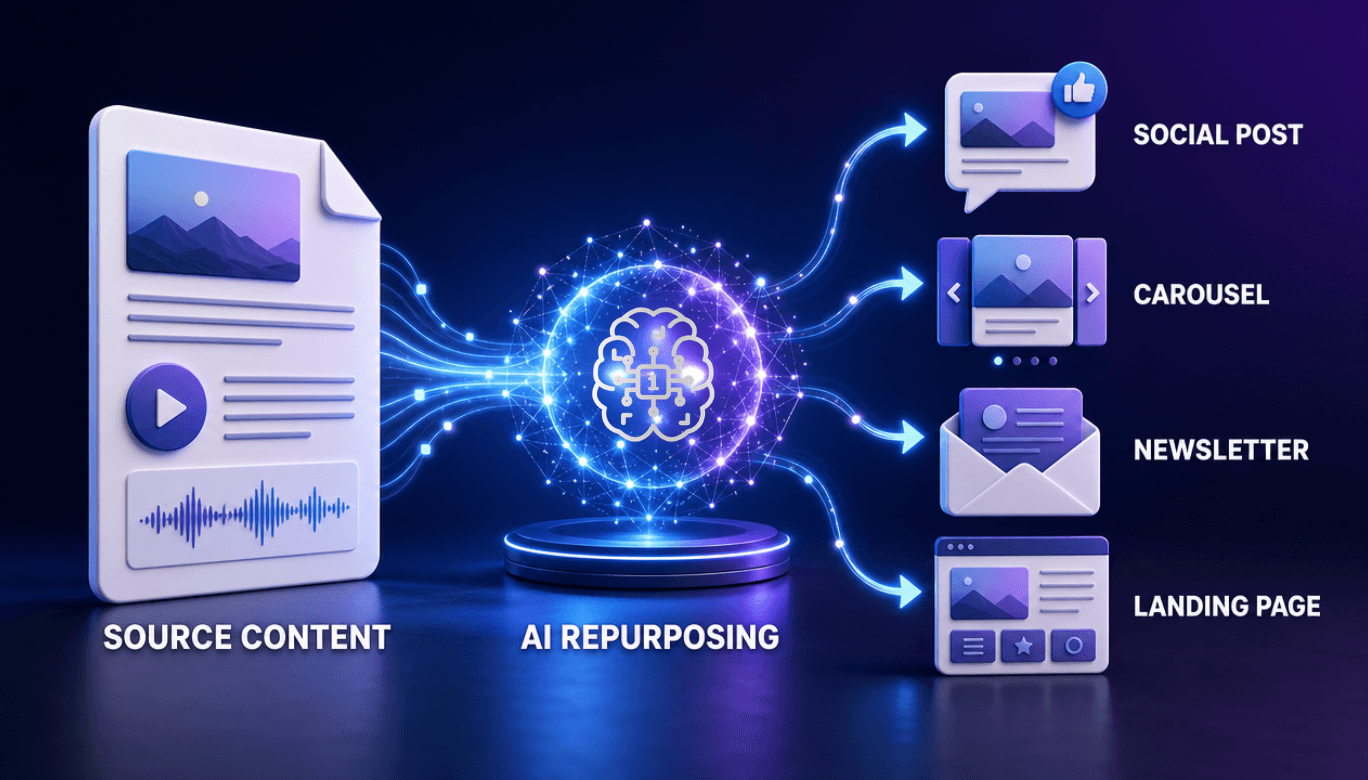
One of the most useful ways to think about AI content repurposing is to work backward from your existing content.
Blog Post → Social Media Content
A long-form article can provide multiple smaller content ideas.
For example, one article can become:
- LinkedIn posts
- X posts
- Social captions
- Carousel concepts
- Quote graphics
- Newsletter sections
- Short video scripts
YouTube Video → Multiple Content Assets
A long-form video can contain dozens of individual ideas.
AI can help identify the most useful points and transform them into:
- Short-form video concepts
- Social posts
- Captions
- Summaries
- Blog content
- Video scripts
- Promotional copy
Podcast → Written and Visual Content
A podcast episode can contain stories, opinions, explanations, and useful insights that can be reused in other formats.
For example:
Podcast episode → transcript → LinkedIn posts → X thread → newsletter → image concepts
Webinar → Content Series
A webinar can become the foundation for an entire content series.
From one webinar, you can create:
- Key takeaways
- Social posts
- Blog sections
- Newsletter content
- Short video scripts
- Quote graphics
- Educational posts
Whitepaper or Report → Educational Content
Long-form research can be difficult for audiences to consume in one sitting.
AI can help break the material into smaller pieces such as:
- Key statistics
- Executive summaries
- Social posts
- Blog sections
- Infographic concepts
- Presentation content
One Piece of Content, Multiple Formats
The real value of content repurposing is not simply producing more words.
It is extracting more value from the same original idea.
Here is a simple example:
| Original content | Possible repurposed content |
|---|---|
| Blog post | LinkedIn post |
| Blog post | X thread |
| Blog post | Instagram carousel |
| Blog post | Newsletter |
| Blog post | Short video script |
| YouTube video | Social posts |
| YouTube video | Short-form video ideas |
| Podcast | LinkedIn posts |
| Podcast | Newsletter |
| Webinar | Blog article |
| Webinar | Social content |
| Report | Educational posts |
| Report | Visual content |
The exact outputs depend on your source content, goals, audience, and the tools available in your AI workflow.
How to Repurpose Content With AI
You can use a simple repeatable workflow instead of creating every piece of content independently.
Step 1: Choose Your Best Existing Content
Start with content that already contains useful information.
Good candidates include:
- Your best-performing blog posts
- Long-form videos
- Podcasts
- Webinars
- Tutorials
- Product announcements
- Research
- Customer education content
Step 2: Identify the Core Message
Ask:
What is the one idea people should remember from this content?
Then identify the supporting ideas.
For example:
Core message: AI can reduce repetitive content production work.
Supporting ideas:
- It can summarize existing content.
- It can adapt content for different channels.
- It can generate new formats.
- It can reduce repetitive rewriting.
Those individual ideas can become separate content assets.
Step 3: Create Platform-Specific Versions
Do not simply copy and paste the same content everywhere.
Instead, adapt it.
A LinkedIn post may need context and a professional takeaway.
An X thread may need shorter, connected statements.
An Instagram carousel may need one clear idea per slide.
A short video may need a strong opening and a concise script.
Step 4: Add Visual Content
Some ideas work better visually.
Use AI to create:
- Images
- Graphics
- Illustrations
- Carousel concepts
- Video assets
- Audio content
This is especially useful when your original source was primarily text.
Step 5: Review and Publish
AI-generated content should still be reviewed before publication.
Check whether:
- The message is accurate.
- The content reflects your brand.
- The tone fits the platform.
- The examples are relevant.
- The call to action makes sense.
Then publish or schedule the finished content using your existing workflow.
How 1min.AI Helps With Content Repurposing
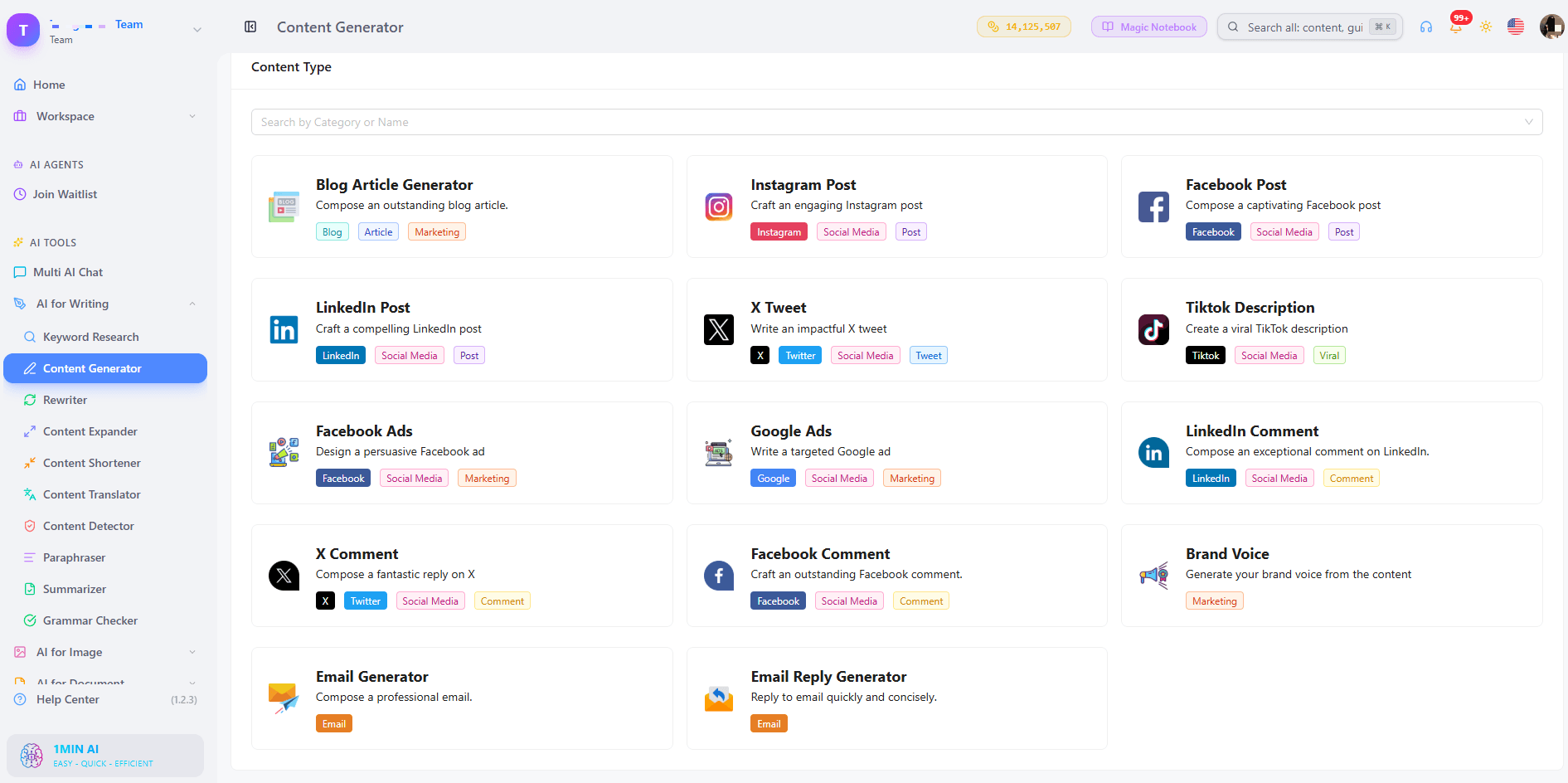
1min.AI is designed as an all-in-one AI workspace rather than a single-purpose content tool.
Instead of using separate applications for writing, images, audio, and video, you can access these AI capabilities from one workspace.
This makes 1min.AI useful when your repurposing workflow goes beyond simply turning a video into a short clip.
Turn Written Content Into New Content
Start with an existing article, transcript, script, or piece of written content.
You can then use AI to create new versions such as:
- Social posts
- Summaries
- Captions
- Scripts
- Marketing copy
- Other written formats
Create Visual Content From Your Ideas
A written idea does not have to remain text.
Use 1min.AI's image-generation capabilities to turn concepts, quotes, explanations, or campaign ideas into visual assets. You can then take those visuals further by turning images into engaging video content, giving the same idea another format for audiences who prefer visual and video content.
For example:
Blog insight → social caption → visual concept → AI-generated image → video
Turn Content Into Video
Video can give an existing idea another format and another distribution opportunity.
You can take a written concept or script and develop it into video content rather than creating the entire concept from scratch.
Add Audio to Your Content Workflow
Some content is better consumed through audio.
Depending on your use case, you can use AI audio capabilities to develop spoken versions of written content, scripts, or other ideas.
This allows the same underlying information to move beyond text and into additional media formats.
A Practical 1min.AI Content Repurposing Workflow
Here is an example of how a creator or marketer could turn one existing article into multiple content assets.
Source
Start with:
One long-form blog post
Output 1 — LinkedIn Post
Extract the main lesson and turn it into a concise professional insight.
Output 2 — X Thread
Break the supporting ideas into a sequence of short, connected posts.
Output 3 — Instagram Carousel
Turn the main points into a slide-by-slide educational structure.
Output 4 — Short Video Script
Choose one interesting idea and expand it into a short-form script.
Output 5 — Visual Asset
Create an image or graphic that communicates the main concept.
Output 6 — Newsletter Section
Turn the original insight into a concise explanation for an email audience.
The important point is that all six outputs originate from the same source.
You are not creating six unrelated ideas.
You are repackaging one valuable idea for different content experiences.
AI Content Repurposing vs. Creating Content From Scratch
Creating content from scratch and repurposing existing content solve different problems.
| Creating from scratch | AI content repurposing |
|---|---|
| Start with a blank page | Start with existing content |
| Develop the idea | Extract existing ideas |
| Write the first draft | Adapt the source |
| Create each format separately | Generate multiple formats |
| More repetitive work | More reusable content |
| Useful for new topics | Useful for extending existing topics |
The two approaches can also work together.
A strong content strategy can create a small number of high-value pillar assets and then repurpose those assets into additional content.
AI Content Repurposing vs. Using a General AI Chatbot
A general-purpose AI chatbot can certainly help repurpose content.
For example, you can paste a blog post and ask it to create a LinkedIn post.
Then you can ask again for an X thread.
Then again for a carousel.
Then again for a video script.
The challenge is the workflow.
You may need to repeatedly:
- Copy the original content.
- Write a new prompt.
- Explain the desired format.
- Copy the result.
- Move to another tool for images or video.
- Repeat the process.
An all-in-one AI workspace can make this workflow more centralized.
With 1min.AI, writing, image, audio, and video AI capabilities are available within the same ecosystem, making it possible to build a broader content workflow without relying on a separate application for every format.
Who Can Benefit From AI Content Repurposing?
AI content repurposing can be useful for almost anyone who regularly creates content.
Content Creators
Turn one recording, article, or idea into multiple pieces of content instead of creating every post independently.
Social Media Managers
Create platform-specific variations while maintaining a consistent campaign message.
Marketers
Extend the lifespan of existing marketing content and turn long-form assets into smaller campaign components.
Small Businesses
Get more content from limited resources without needing to create everything from scratch.
Agencies
Repurpose client content into multiple formats while keeping the original campaign message consistent.
Coaches and Consultants
Turn webinars, educational videos, presentations, and expertise-based content into an ongoing content library.
Founders and Entrepreneurs
Transform product updates, articles, interviews, and thought leadership into content for multiple channels.
How to Get Better Results From AI Content Repurposing
AI works best when the source content and instructions are clear.
Start With High-Quality Source Material
The AI can only work with the information available in the source.
Detailed articles, transcripts, tutorials, webinars, and videos usually provide more material to repurpose than a short sentence or vague idea.
Give the AI Context
Tell the AI:
- Who the audience is
- What the goal is
- Which platform you are targeting
- What tone you want
- What action the reader should take
Adapt, Don't Duplicate
A LinkedIn post should not simply be a copy of a blog paragraph.
A carousel should not look like a wall of text.
A short video should not contain the entire original article.
Repurposing works best when the idea stays consistent while the presentation changes.
Keep a Human Review Step
AI can accelerate the first draft, but your final review helps protect:
- Accuracy
- Brand voice
- Originality
- Context
- Platform fit
The goal is to make content production faster without making the content feel generic.
What Should You Look for in an AI Content Repurposing Tool?
If you are evaluating an AI content repurposing tool, look beyond the number of AI features.
Consider whether the tool supports your actual workflow.
1. Multiple Source Types
Can you start with a blog, transcript, video, podcast, notes, or another existing asset?
2. Multiple Output Formats
Can the tool create more than one type of content?
3. Platform-Specific Adaptation
Does it help adapt the same idea to the format and audience of different platforms?
4. Writing and Visual Capabilities
Can you create both written and visual assets without moving between multiple applications?
5. Video and Audio Support
If your content strategy includes multimedia, check whether the workflow can support those formats.
6. Editing and Customization
AI output is a starting point. Make sure you can review and customize the result.
7. Workflow Simplicity
The best workflow is not necessarily the one with the most features.
It is the one that reduces repetitive work between your source content and your finished assets.
Frequently Asked Questions
What is AI content repurposing?
AI content repurposing is the process of using artificial intelligence to transform existing content into multiple formats or versions for different channels.
For example, a blog post can become social posts, a carousel outline, a newsletter section, an image concept, or a video script.
The purpose is to reuse the ideas and information already contained in your original content instead of creating every asset from scratch.
What content can I repurpose with AI?
You can repurpose many types of existing content, including:
- Blog posts
- Articles
- YouTube videos
- Podcasts
- Transcripts
- Webinars
- Interviews
- Newsletters
- Reports
- Whitepapers
- Video scripts
- Meeting notes
The more useful information your source contains, the more opportunities there are to extract additional content.
Can AI turn a blog post into social media posts?
Yes.
AI can analyze a blog post, identify its main ideas, and adapt those ideas into platform-specific content such as LinkedIn posts, X threads, captions, carousel outlines, and other social formats.
The result should be adapted to each platform rather than copied word-for-word.
Can AI repurpose a YouTube video?
Yes.
A long-form video can provide material for summaries, social posts, captions, scripts, short-form content ideas, and other derivative assets.
A transcript can also give an AI system structured text to work from when creating written content.
Can I repurpose a podcast with AI?
Yes.
A podcast episode can be repurposed into:
- Social posts
- Quotes
- Summaries
- Newsletter content
- Blog content
- Short video concepts
- Visual content ideas
A transcript is particularly useful because it gives the AI the actual information and context from the episode.
How many pieces of content can I create from one source?
There is no universal number.
The number of useful outputs depends on the length and depth of the original content, the formats you need, and your content strategy.
A detailed webinar may contain dozens of individual ideas, while a short announcement may only support a few useful variations.
The goal should be useful content, not simply generating the largest possible number of posts.
Will AI-generated content sound repetitive?
It can if you use the same prompt and format repeatedly.
To reduce repetition, provide clear information about your audience, brand voice, platform, content objective, and desired format.
It is also useful to treat each repurposed asset as a new presentation of the idea rather than a shortened copy of the original.
Is AI content repurposing the same as rewriting?
Not exactly.
Rewriting usually means expressing the same piece of content differently.
Repurposing goes further by changing the format, structure, audience, or channel.
For example:
Blog post → rewritten blog post is rewriting.
Blog post → LinkedIn post → carousel → newsletter → video script is content repurposing.
Is AI content repurposing better than creating content manually?
AI and manual content creation serve different purposes.
Manual creation gives you complete control over every part of the process.
AI content repurposing can reduce repetitive work when you already have useful source material.
A practical workflow often combines both: AI creates and adapts the drafts, while a person reviews, edits, and adds the final perspective.
What is the difference between an AI content repurposing tool and a video clipping tool?
A video clipping tool primarily focuses on turning long-form video into shorter video clips.
An AI content repurposing workflow can be broader.
It may transform the same source into written posts, images, newsletters, scripts, audio, video, and other formats.
If your goal is to build content across multiple media types, an all-in-one workflow can be useful.
Can 1min.AI help with AI content repurposing?
Yes. 1min.AI provides an all-in-one AI workspace that brings writing, image, audio, and video generation capabilities together.
This allows you to start with existing content and use AI capabilities across different content formats instead of relying on a separate application for every stage of the workflow.
Do I need to create new content every day?
Not necessarily.
A content repurposing strategy starts with getting more value from content you have already created.
For example, one detailed article, webinar, podcast, or video can provide enough ideas for multiple additional content assets.
This does not mean publishing the exact same content everywhere. The source idea should be adapted for each format and audience.
Alternatives
Discover the best alternatives to 1minAI and compare features, pricing, and use cases.

1min.AI vs OpenRouter
1min.AI vs. OpenRouter: Compare the ready-to-use AI creation product against the technical API tool. Find out if you need a zero-code creative studio or a coding infrastructure hub.
 Ngoc Hong
1min.AI vs Easy Peasy AI
Looking for an Easy Peasy AI alternative? Compare pricing, free plan, features and reviews of Easy-Peasy.AI vs 1min.AI before you choose.
Ngoc Hong
1min.AI vs Lovart
Compare 1min.AI vs Lovart across features, pricing, credits, brand tools, and use cases to find the right AI platform for your workflow.
Ngoc HongAI Tools
Discover the best AI tools to boost productivity, creativity, and everyday work.

Create Consistent Cartoon Content in Just a Few Steps
Create engaging cartoon videos for TikTok and Reels with 1min.AI. Research ideas, create characters, and turn images into animated videos in 3 simple steps.
 Lien Anh Vu
One Product, 10 UGC Creatives: How AI Makes Content Testing Easier
Create more authentic UGC with an AI UGC video generator, test more creative angles and scale affiliate content without filming every version.
Lien Anh Vu
Top 4 Affordable AI Tools for Startup Founders
Discover the top 4 affordable AI tools for startup founders to validate ideas, build products, create content, and launch faster without overspending.
 Tram Ta
AI Features
Comprehensive AI features that streamline workflows, improve efficiency, and empower teams to achieve more.
Create Consistent Cartoon Content in Just a Few Steps
Create engaging cartoon videos for TikTok and Reels with 1min.AI. Research ideas, create characters, and turn images into animated videos in 3 simple steps.
Lien Anh VuOne Product, 10 UGC Creatives: How AI Makes Content Testing Easier
Create more authentic UGC with an AI UGC video generator, test more creative angles and scale affiliate content without filming every version.
Lien Anh Vu
1minAI: Free AI Grammar Checker
Check grammar for free with 1minAI’s AI grammar checker. Find grammar, spelling, and writing mistakes, improve clarity, and polish your content in seconds.
Tram TaAI Use Cases
A curated collection of AI use cases for business, productivity, and industry-specific applications.
Create Consistent Cartoon Content in Just a Few Steps
Create engaging cartoon videos for TikTok and Reels with 1min.AI. Research ideas, create characters, and turn images into animated videos in 3 simple steps.
Lien Anh VuOne Product, 10 UGC Creatives: How AI Makes Content Testing Easier
Create more authentic UGC with an AI UGC video generator, test more creative angles and scale affiliate content without filming every version.
Lien Anh Vu
Best Time to Post on Instagram: A Practical Guide for Better Engagement
Discover the best time to post on Instagram, including the best days and times for different audiences, plus tips to find the ideal posting schedule for your account.
Tram TaAI Tutorials
Learn how to use AI with practical, step-by-step tutorials.

Black Friday AI Tool Deals in 2026
Discover what Black Friday AI tool deals 2026 has to offer. Find out how to secure the 1min.AI lifetime deal via AppSumo, Dealify, Stack Social, and verify on Trustpilot, Slashdot, and Software Advice.
 Hang Nguyen
Create Consistent Cartoon Content in Just a Few Steps
Create engaging cartoon videos for TikTok and Reels with 1min.AI. Research ideas, create characters, and turn images into animated videos in 3 simple steps.
Lien Anh Vu
[Seedance 2.5 New] Better AI Product Videos, Less Rework in 1min.AI
Use Seedance 2.5 image to video on 1min.AI to create more consistent AI product videos, reduce failed generations, save credits, and improve UGC workflows.
Lien Anh VuAI Guides
Learn AI faster with practical guides, real-world examples, and actionable best practices.

Safely Buy AI Tools Online: 2026 Black Friday Guide
Discover how to find and secure the best Black Friday AI deals online. Learn expert strategies to avoid scams, combat subscription fatigue, and verify software.
Hang NguyenCreate Consistent Cartoon Content in Just a Few Steps
Create engaging cartoon videos for TikTok and Reels with 1min.AI. Research ideas, create characters, and turn images into animated videos in 3 simple steps.
Lien Anh Vu[Seedance 2.5 New] Better AI Product Videos, Less Rework in 1min.AI
Use Seedance 2.5 image to video on 1min.AI to create more consistent AI product videos, reduce failed generations, save credits, and improve UGC workflows.
Lien Anh VuAI Solutions
Browse the best AI solutions for automation, coding, research, productivity, customer support, marketing, and business workflows.
Safely Buy AI Tools Online: 2026 Black Friday Guide
Discover how to find and secure the best Black Friday AI deals online. Learn expert strategies to avoid scams, combat subscription fatigue, and verify software.
Hang NguyenCreate Consistent Cartoon Content in Just a Few Steps
Create engaging cartoon videos for TikTok and Reels with 1min.AI. Research ideas, create characters, and turn images into animated videos in 3 simple steps.
Lien Anh VuOne Product, 10 UGC Creatives: How AI Makes Content Testing Easier
Create more authentic UGC with an AI UGC video generator, test more creative angles and scale affiliate content without filming every version.
Lien Anh VuAI Models
Explore the world's leading AI models in one place.
Create Consistent Cartoon Content in Just a Few Steps
Create engaging cartoon videos for TikTok and Reels with 1min.AI. Research ideas, create characters, and turn images into animated videos in 3 simple steps.
Lien Anh VuOne Product, 10 UGC Creatives: How AI Makes Content Testing Easier
Create more authentic UGC with an AI UGC video generator, test more creative angles and scale affiliate content without filming every version.
Lien Anh Vu[Seedance 2.5 New] Better AI Product Videos, Less Rework in 1min.AI
Use Seedance 2.5 image to video on 1min.AI to create more consistent AI product videos, reduce failed generations, save credits, and improve UGC workflows.
Lien Anh VuAI Comparisons
Compare AI tools, models, and platforms to find the best fit for your needs.

Kling AI Vs Veo 3: Which Model Wins?
Kling AI vs Veo 3: compare motion, native audio, pricing & free tiers to see which AI video generator wins for your project - try both on 1min.AI.
 Trang Tran
[Seedance 2.5 New] Better AI Product Videos, Less Rework in 1min.AI
Use Seedance 2.5 image to video on 1min.AI to create more consistent AI product videos, reduce failed generations, save credits, and improve UGC workflows.
Lien Anh Vu
DeepSeek V4 Pro vs Flash Comparison
Compare DeepSeek V4 Pro vs DeepSeek V4 Flash metrics. Optimize your agentic apps and improve AI fact checking on 1min.ai today.
Ngoc HongAI Integrations
Seamlessly integrate AI with the tools you already use to automate work and boost productivity.

POV: You Have 10+ Posts to Make Every Day
Learn how to build an AI content workflow that helps content creators produce 10+ social media posts a day faster with AI brainstorming, image generation, and content creation.
Lien Anh Vu
How to Use an AI Fashion Video Generator for Fashion Week 2026
Turn Fashion Week 2026 ideas into stunning fashion videos with AI. Learn how to brainstorm, create visuals, and transform images into videos with one simple workflow.
Lien Anh Vu
Stop Switching Between AI Apps: How AI Integration Transforms Employer Branding
Discover how AI integration helps HR teams streamline employer branding by combining AI writing, documents, images, video, and multiple AI models into one workspace.
Tram TaAI for Industries
Find the best AI tools and workflows for healthcare, finance, education, legal, manufacturing, retail, real estate, and more

Best AI Tool for Content Marketing |1minAI
Looking for the best AI tool for content marketing? See how 1minAI helps marketers research, write, repurpose, create visuals, and scale content from one AI workspace.
Tram Ta
7 Low-Cost AI Business Ideas for Your Startup
Explore 7 low-cost AI business ideas you can start with a small budget, from content and video services to AI consulting, reselling, and automation.
Tram Ta
How to Start a One-Person AI Business: 7 Models You Can Run Solo
Learn how to start a one-person AI business with 7 practical models, from AI consulting and content services to automation and software reselling.
Tram TaAI Agents
Discover and run AI agents to automate tasks across your work and daily life.
1minAI: Free AI Grammar Checker
Check grammar for free with 1minAI’s AI grammar checker. Find grammar, spelling, and writing mistakes, improve clarity, and polish your content in seconds.
Tram Ta
AI Agents for Facebook
Use an AI Agent for Facebook to create content, generate images, schedule posts, and publish from your documents and conversations.
Ngoc Hong
AI Agent vs AI Assistant: Which One Actually Saves Designers More Time?
Learn the difference between AI Agent vs AI Assistant and discover which solution helps designers automate repetitive work, reduce revisions, and save more time.
Lien Anh VuAI Workflows
Explore ready-to-use AI workflows for productivity, marketing, sales, support, and more.
Create Consistent Cartoon Content in Just a Few Steps
Create engaging cartoon videos for TikTok and Reels with 1min.AI. Research ideas, create characters, and turn images into animated videos in 3 simple steps.
Lien Anh VuOne Product, 10 UGC Creatives: How AI Makes Content Testing Easier
Create more authentic UGC with an AI UGC video generator, test more creative angles and scale affiliate content without filming every version.
Lien Anh VuPOV: You Have 10+ Posts to Make Every Day
Learn how to build an AI content workflow that helps content creators produce 10+ social media posts a day faster with AI brainstorming, image generation, and content creation.
Lien Anh VuNewsletter
Weekly AI Innovations with 1minAI

🔮 Weekly AI Innovations #140: Deepseek 4.1 Flash & Gemini Upgrades
Explore Deepseek 4.1 Flash and new Gemini models on 1min.ai. Plus, check our update on your Billing - Usage page for better clarity.
Hang Nguyen
🔮 Weekly AI Innovations #136: Grok 4.6 and Smart Data Retention
Discover the latest 1min.ai updates! Upgrade to Grok 4.6 for blazing-fast AI, and check our new Data Retention policies to secure your files today.
Hang Nguyen
🔮 Weekly AI Innovations #139: Dawn of the next-gen AI
Discover the immense power of GPT-6 Astra and Claude Fable 5.1. Unlock next-generation AI models on 1min.ai to solve complex tasks effortlessly.
Hang Nguyen