
Voice Cloning AI Free: How to Clone Any Voice Online in Minutes

Trang Tran
20. november 2026

Try voice cloning AI free with 1min.AI. Upload a 5-second clip, pick an ElevenLabs model, choose from 32 languages, and turn text to speech in your own voice.
You have a script, a deadline, and a voice you wish you could reuse without booking another recording session. Voice cloning AI free options exist, and you can go from a short audio clip to a finished voiceover in a few minutes.
This guide compares the two main free routes (online tools and local apps), then walks you through the exact workflow in 1min.AI Voice Cloning, which runs on ElevenLabs models.
Quick answer: To clone a voice with AI for free, upload a clean audio sample of at least 5 seconds, type your script, and generate speech in the cloned voice. Online tools are fastest for one-off projects. Local open-source apps suit people who want offline use and don’t mind installing software. On 1min.AI, you can try Voice Cloning free in your browser. You don’t need to register.
Key takeaways
- Online tools need only a short sample and a browser. Local apps need installation and a capable computer.
- 1min.AI Voice Cloning uses ElevenLabs models (Eleven Flash v2.5 and Eleven Turbo v2.5) and supports 32 languages.
- Audio quality matters more than length. A clean 5-second clip beats a noisy 30-second one.
Voice Cloning AI Free: Online Tools vs Local Apps
Most people searching for free voice cloning want one of two things: a quick result in the browser, or a setup they can run on their own computer. Here is how the routes compare.
| Online voice cloning | Local open-source apps | |
|---|---|---|
| Best for | Quick projects, creators, marketers | Offline use, technical users |
| Setup | Open a browser, upload a clip | Download app and AI models |
| Hardware | Any device with a browser | A capable computer |
| Typical sample | 3 to 15 seconds | Varies by model |
| Languages | Often many, depending on the model | Depends on the model you install |
Online Voice Cloning for Quick Results
Online tools handle processing in the cloud. You upload a sample, type your text, and download the audio. That makes them the practical choice for social videos, podcasts, ads, and course narration.
Local Open-Source Apps for Offline Use
Local apps keep everything on your machine and can run offline after the models download. The trade-off is setup time and hardware requirements. If you want results this afternoon, online is simpler.
Where 1min.AI Fits
1min.AI is the online route. You open Voice Cloning, upload a clip, and run it. You don’t need to register for this tool. Voice Cloning also sits alongside the rest of the AI for Audio suite, including Text to Speech, Speech to Text, and Voice Changer.
How to Clone a Voice Free with 1min.AI
Here is the full workflow. It takes a few minutes the first time.
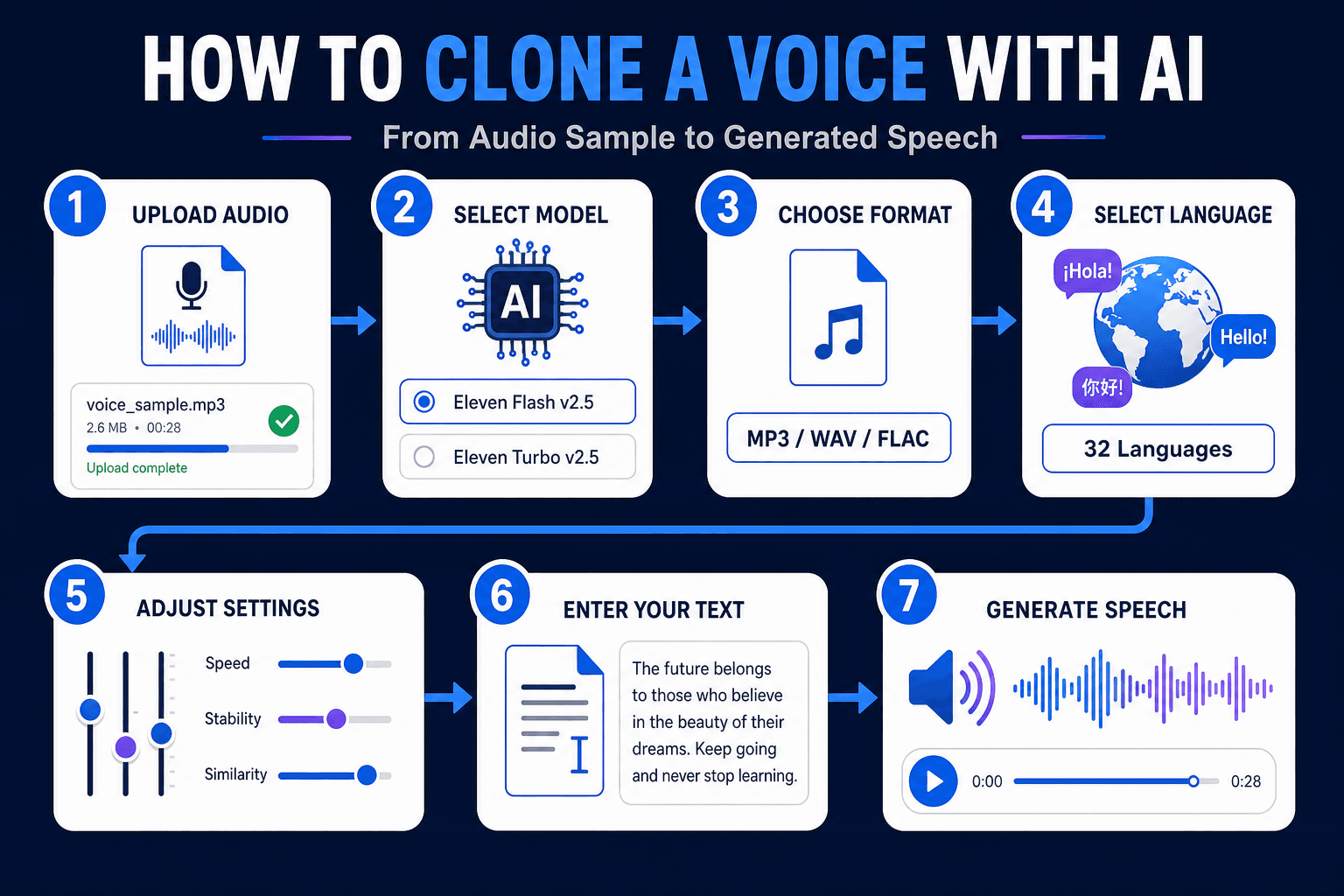
- Upload your audio: Drag and drop a single MP3, M4A, OGG, WAV, or FLAC file.
- Select Voice Cloning - ElevenLabs: This is the engine for the tool.
- Choose an output format: The default is mp3_44100_128. Options run from mp3_22050_32 (smallest file) to mp3_44100_192 (highest quality).
- Pick a model: Choose Eleven Flash v2.5 or Eleven Turbo v2.5.
- Select a language from 32 options.
- Adjust the voice settings (explained below).
- Type your text and click Run.
Want to see it in action first? Watch the walkthrough:
Clone Voice From an Audio File Free: Requirements
- Formats: MP3, M4A, OGG, WAV, FLAC
- File size: up to 11MB, one file at a time
- Minimum length: 5 seconds
What Each Voice Setting Does
| Setting | Range | What it changes |
|---|---|---|
| Remove Background Noise | Enable / Disable | Cleans the sample before cloning |
| Speed | 0.7 to 1.2 | Slows down or speeds up delivery |
| Stability | 0 to 1 | Lower is more expressive. Higher is more consistent |
| Similarity Boost | 0 to 1 | Higher stays closer to the original voice |
| Style | 0 to 1 | Increases or reduces the speaker’s stylistic exaggeration |
| Speaker Boost | Enable / Disable | Strengthens resemblance to the original speaker |
A good starting point is Remove Background Noise enabled, moderate Stability, and high Similarity Boost. Then generate a short test line and adjust one slider at a time.
ElevenLabs Voice Cloning Inside 1min.AI
Many people search for “elevenlabs voice cloning” because the technology has become a reference point for realistic synthetic speech. 1min.AI brings those models into one workspace, so you can use them without setting up separate tools. You can also explore the wider ElevenLabs voice changer, cloner, and text to speech tools on 1min.AI.
ElevenLabs Instant Voice Cloning Explained
Instant voice cloning means the system builds a voice from a short sample without a long training process. You upload a few seconds of speech, and the model captures timbre, pitch, and speaking rhythm. Then it applies them to new text. This is the approach behind the 5-second minimum in 1min.AI.
Eleven Flash v2.5 vs. Eleven Turbo v2.5
Both models are available in the tool, so you can match the model to the job.
- Eleven Flash v2.5: Built for speed. A good fit for quick drafts and short social clips.
- Eleven Turbo v2.5: A strong fit when you want to compare delivery quality across takes.
If you’re unsure, generate the same sentence with both and keep the one that sounds closer to your goal.
ElevenLabs Voice Cloning Text to Speech
Once your sample is uploaded, the text box works like a text to speech field. Type or paste your script, press Run, and the cloned voice reads it. Punctuation guides the rhythm, so use commas and full stops deliberately.
ElevenLabs Voice Cloning Review: What Stands Out
Users generally value three things in ElevenLabs-based cloning: natural intonation, short sample requirements, and fine-grained controls like Stability and Similarity Boost. Those are the same controls you get in 1min.AI.
ElevenLabs Voice Cloning API, Price, and Reddit Questions
- API: Developers who need to build voice cloning into their own app can review ElevenLabs’ official API documentation. 1min.AI is designed for no-code use in the browser.
- Price: Plan details change over time, so check the official pages for current figures. To see how the output sounds, you can try 1min.AI Voice Cloning first.
- Reddit: Discussion threads commonly focus on sample quality, consistency across long scripts, and consent. The tips below address the first two, and the responsible use section covers the third.
Tips for a Better Voice Clone
Start With a Clean Sample
Record in a quiet room, keep the microphone at a steady distance, and speak at a natural pace. Avoid music and other voices. If your recording has noise, run it through the AI Voice Isolator first, then upload the cleaned file.
Match the Sample to Your Goal
If you want a warm podcast tone, read your sample in that tone. The clone follows the energy of the source.
Test Short, Then Go Long
Generate one or two sentences, tune the sliders, and only then run your full script.
Languages and Use Cases
Hindi and 31 Other Languages
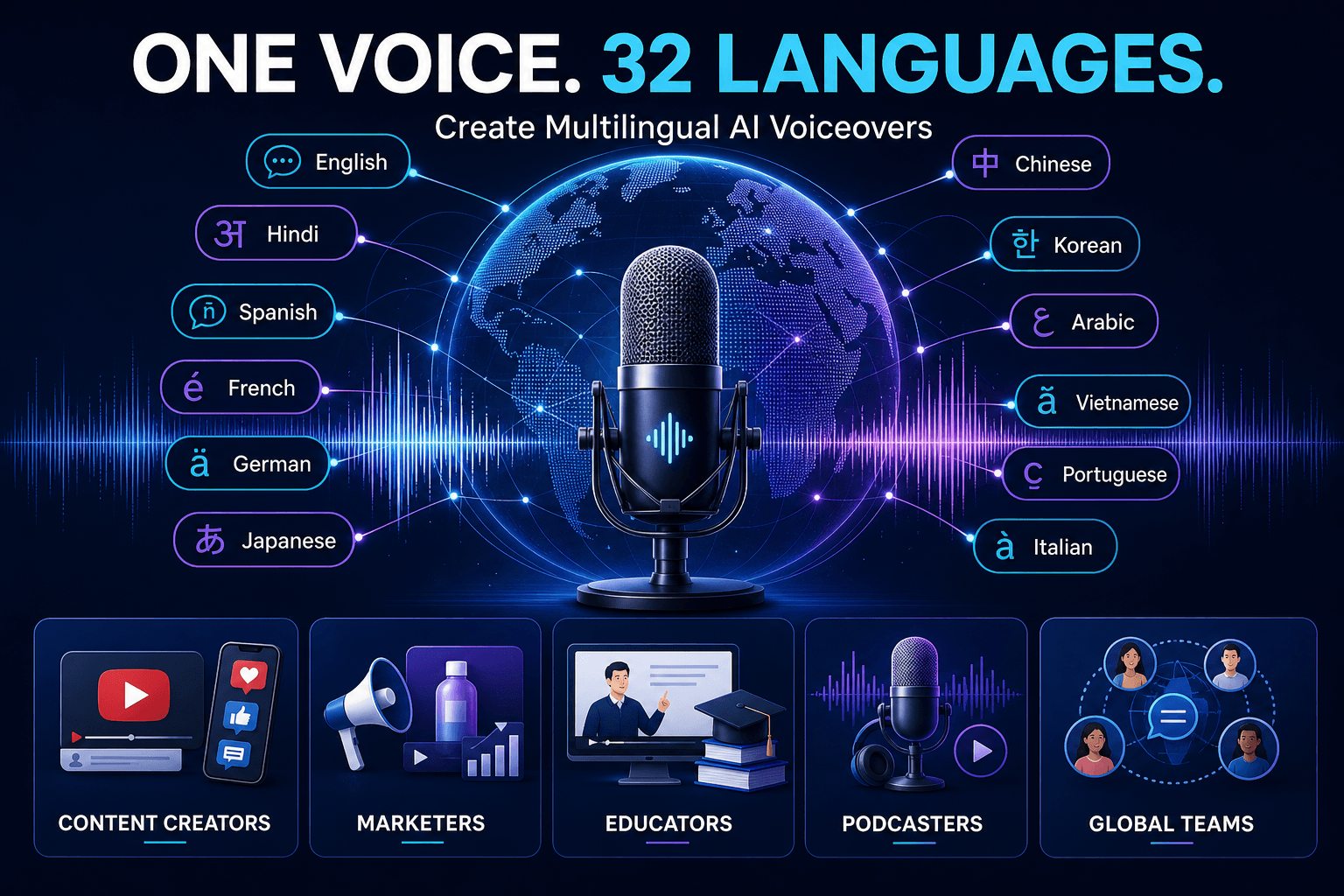
The tool supports English, Hindi, Spanish, French, German, Japanese, Chinese, Korean, Arabic, Vietnamese, Portuguese, Italian, Russian, Indonesian, Turkish, and many more, 32 in total. One voice sample can narrate in multiple languages, which helps with localization.
Who Uses Voice Cloning
- Content creators: Consistent voiceovers for YouTube, Shorts, and Reels
- Marketers: Ad narration and product explainers without studio time
- Educators: Course lessons in the instructor’s own voice
- Podcasters: Fix a line or add an intro without re-recording
- Global teams: Multilingual updates in one recognizable voice
Need a voice that doesn’t belong to anyone? Create one from a text description with AI Voice Design. If your goal is transforming an existing recording rather than generating new speech, a voice changer is the better fit. This comparison explains the difference:
Responsible Use of Voice Cloning
Only clone your own voice or a voice you have clear permission to use. Don’t impersonate real people, mislead listeners, or bypass identity checks. For commercial projects, keep a record of consent and the source of your audio.
FAQ: Voice Cloning AI Free
Can I clone a voice with AI for free?
Yes. You can try 1min.AI Voice Cloning free in your browser. Upload a clip of at least 5 seconds, enter your text, and click Run.
How long should the audio sample be?
At least 5 seconds. Clean, clear speech matters more than extra length.
Can I clone a voice from an audio file?
Yes. Upload one MP3, M4A, OGG, WAV, or FLAC file up to 11MB.
Does it support text to speech in other languages?
Yes. You can choose from 32 languages, including Hindi, Spanish, Arabic, Japanese, and Vietnamese.
Is it the same as a voice changer?
No. Voice cloning generates new speech from text in a target voice. A voice changer transforms an existing recording.
Can I clone singing voices?
1min.AI Voice Cloning is built for speech from text. For music, explore the Music Generator in the AI for Audio suite.
Is my voice data handled responsibly?
Use only audio you have the rights to. Review the 1min.AI Terms of Service and Privacy Policy for details on data handling.
Start Cloning Your Voice
A short clip, a few settings, and one click are all it takes to hear your script in a cloned voice. Open the tool, upload a sample, and try it yourself.
- #Commerce
Alternative
Odkrijte najboljše alternative za 1minAI in primerjajte funkcije, cene in primere uporabe.

1min.AI proti OpenRouterju
1min.AI proti OpenRouterju: Primerjajte pripravljeno AI orodje za ustvarjanje z tehničnim API orodjem. Ugotovite, ali potrebujete ustvarjalni studio brez kode ali infrastrukturo za razvijalce.
 Ngoc Hong

1min AI vs Buffer
Compare 1min.AI vs Buffer for Facebook content creation, AI writing, image generation, scheduling, pricing, and everyday marketing workflows.
Ngoc Hong
1min.AI vs. Hootsuite: Which Social Media Tool Fits Your Workflow?
Compare 1min.AI vs. Hootsuite to explore their AI content creation, social media publishing, analytics, pricing, and collaboration features. Find the right tool for your workflow.
AI Orodja
Odkrijte najboljša AI orodja za povečanje produktivnosti, ustvarjalnosti in vsakodnevnega dela.

Top 4 cenovno dostopna orodja za umetno inteligenco za ustanovitelje startupov
Odkrijte top 4 cenovno dostopna orodja za umetno inteligenco za ustanovitelje startupov, s katerimi lahko preverjate ideje, razvijate produkte, ustvarjate vsebine in hitreje lansirate brez prevelikih stroškov.
 Tram Ta

POV: Imaš več kot 10 objav za vsak dan
Naučite se, kako zgraditi delovni tok vsebin z AI, ki ustvarjalcem vsebin pomaga hitreje ustvarjati več kot 10 objav na družbenih omrežjih na dan z možgansko nevihto z AI, generiranjem slik in ustvarjanjem vsebin.
 Lien Anh Vu

Spremenite »naredi ga boljše« v boljšo vsebino z AI
Uporabite AI, da nejasne povratne informacije strank spremenite v jasne popravke, zmanjšate nepotrebne spremembe in hitreje dostavite boljšo vsebino.
Lien Anh VuFunkcije AI
Celovite funkcije AI, ki poenostavljajo delovne procese, izboljšujejo učinkovitost in ekipam omogočajo več.

1minAI: Brezplačni AI preverjevalnik slovnice
Preverite slovnico brezplačno z AI preverjevalnikom slovnice 1minAI. Poiščite slovnične, pravopisne in pisne napake, izboljšajte jasnost in izpilite vsebino v nekaj sekundah.
Tram Ta
Zgradite portfeljsko spletno stran hitreje z 1min.AI
Izvedite, kako lahko samostojni ustvarjalci z 1min.AI hitreje načrtujejo, pišejo, oblikujejo in ustvarijo profesionalno portfeljsko spletno stran, tudi brez močnega znanja programiranja.
Lien Anh Vu
Brezplačen AI X komentar
Ustvarite zabavne, duhovite ali pronicljive komentarje za X z našim AI-pogonskim generatorjem X komentarjev. Povečajte svojo angažiranost in izstopajte iz množice!
 Trang Tran
Primeri uporabe umetne inteligence
Izbrana zbirka primerov uporabe umetne inteligence za podjetja, povečanje produktivnosti in panogno-specifične rešitve.

Najboljši čas za objavo na Instagramu: praktični vodnik za večjo vključenost
Odkrijte najboljši čas za objavo na Instagramu, vključno z najboljšimi dnevi in urami za različne skupine občinstva, ter nasvete za iskanje idealnega urnika objav za vaš račun.
Tram TaZgradite portfeljsko spletno stran hitreje z 1min.AI
Izvedite, kako lahko samostojni ustvarjalci z 1min.AI hitreje načrtujejo, pišejo, oblikujejo in ustvarijo profesionalno portfeljsko spletno stran, tudi brez močnega znanja programiranja.
Lien Anh VuSpremenite »naredi ga boljše« v boljšo vsebino z AI
Uporabite AI, da nejasne povratne informacije strank spremenite v jasne popravke, zmanjšate nepotrebne spremembe in hitreje dostavite boljšo vsebino.
Lien Anh VuVadnice za AI
Naučite se uporabljati umetno inteligenco s praktičnimi vadnicami po korakih.

Black Friday AI orodna ponudba v letu 2026
Odkrijte, kaj prinašajo Black Friday AI orodne ponudbe 2026. Izvedite, kako si zagotoviti dosmrtno ponudbo 1min.AI prek AppSumo, Dealify in Stack Social ter preveriti na Trustpilot, Slashdot in Software Advice.
 Hang Nguyen

Doživi Teden mode za 0 $ z 1minAI Face Swap
Doživi Teden mode za 0 $ z 1minAI Face Swap. Naloži svojo fotografijo, izberi videoposnetek Tedna mode in ustvari svoj modni AI trenutek.
Ngoc Hong
Virusni Reelsi v minutah: Kako uporabiti 1minAI-jevo pretvorbo besedila v govor za satirične glasovne posnetke
Oglejte si, kako upravitelji satiričnih strani uporabljajo 1minAI-jevo funkcijo pretvorbe besedila v govor za takojšnje ustvarjanje glasovnih posnetkov v slogu novičarskega voditelja in dramatičnih glasov za TikToke, Shortse in Instagram Reels.
Vodiči za AI
Hitreje se učite AI s praktičnimi vodiči, primeri iz resničnega sveta in uporabnimi najboljšimi praksami.

Varno kupujte AI orodja prek spleta: vodnik za Črni petek 2026
Odkrijte, kako poiskati in zagotoviti najboljše ponudbe AI za Črni petek na spletu. Spoznajte strokovne strategije za izogibanje prevaram, premagovanje utrujenosti od naročnin in preverjanje programske opreme.
Hang Nguyen
Kako začeti AI podjetje brez gradnje iz nič
Spoznajte, kako začeti AI podjetje, preveriti svojo idejo in hitreje zagnati rešitev brez dragocene AI infrastrukture, zgrajene iz nič.
Ngoc Hong
AI Fashion Video Generator With Seedance 2.5 and HeyGen
Learn how to create AI fashion videos with Seedance 2.5 and HeyGen. Turn outfit photos into cinematic videos featuring your own face with 1min.AI.
Lien Anh VuAI Rešitve
Prebrskajte najboljše rešitve umetne inteligence za avtomatizacijo, kodiranje, raziskave, produktivnost, podporo strankam, trženje in poslovne delovne procese.

Brezplačen AI generator tetovaž: dizajni po meri
Spremenite katerokoli idejo v dizajn tetovaže z brezplačnim AI generatorjem tetovaž 1min.AI. Opišite svojo idejo, izberite slog in prenesite v nekaj sekundah.
Trang TranVarno kupujte AI orodja prek spleta: vodnik za Črni petek 2026
Odkrijte, kako poiskati in zagotoviti najboljše ponudbe AI za Črni petek na spletu. Spoznajte strokovne strategije za izogibanje prevaram, premagovanje utrujenosti od naročnin in preverjanje programske opreme.
Hang NguyenDoživi Teden mode za 0 $ z 1minAI Face Swap
Doživi Teden mode za 0 $ z 1minAI Face Swap. Naloži svojo fotografijo, izberi videoposnetek Tedna mode in ustvari svoj modni AI trenutek.
Ngoc HongAI modeli
Raziščite vodilne modele AI na svetu na enem mestu.

Free AI Chat With Claude Fable 5.2 On 1min.AI
Free AI chat with Claude Fable 5.2 on 1min.AI. Compare Fable 5.2 vs Opus 5.5, see Fable 5.2 benchmarks, and start chatting in minutes.
Trang Tran
GPT-6.2 Sol: Specs, Pricing & Free Access
Explore GPT-6.2 Sol specs, pricing, and how it compares with GPT-6.1 Sol and Claude Opus 5.5, then try it free in 1min.AI Multi AI Chat.
Trang Tran
GPT 6.2 Astra: Pricing, Benchmarks & Free Access
GPT 6.2 Astra release date, pricing, Reddit feedback and Opus 5.5 comparison. See what it does best and chat with it on 1min.AI for free.
Trang TranPrimerjave AI
Primerjajte orodja, modele in platforme AI, da najdete najboljše za vaše potrebe.

Gemini 4 Neon vs Hydrogen: Specs, Price & Picks
Gemini 4 Neon vs Hydrogen, Carbon and Argon: compare price, benchmarks and use cases to pick the right model, then test them side by side on 1min.AI.
Trang Tran
Kling AI proti Veo 3: kateri model zmaga?
Kling AI proti Veo 3: primerjajte gibanje, izvorni zvok, cene in brezplačne pakete ter ugotovite, kateri generator videa z UI zmaga za vaš projekt - preizkusite oba na 1min.AI.
Trang Tran
Primerjava DeepSeek V4 Pro vs Flash
Primerjajte metrike DeepSeek V4 Pro in DeepSeek V4 Flash. Danes na 1min.ai optimizirajte svoje agentne aplikacije in izboljšajte preverjanje dejstev z umetno inteligenco.
Ngoc HongIntegracije z AI
Brezhibno integrirajte AI z orodji, ki jih že uporabljate, da avtomatizirate delo in povečate produktivnost.
POV: Imaš več kot 10 objav za vsak dan
Naučite se, kako zgraditi delovni tok vsebin z AI, ki ustvarjalcem vsebin pomaga hitreje ustvarjati več kot 10 objav na družbenih omrežjih na dan z možgansko nevihto z AI, generiranjem slik in ustvarjanjem vsebin.
Lien Anh Vu
Ne preklapljajte več med aplikacijami z umetno inteligenco: kako integracija AI preoblikuje employer branding
Odkrijte, kako integracija AI kadrovskim ekipam pomaga poenostaviti employer branding z združevanjem pisanja z AI, dokumentov, slik, videa in več modelov AI v en delovni prostor.
Tram Ta
AI API agregator razloženo za razvijalce
AI API agregator razvijalcem nudi enoten API za klicanje več AI modelov, s čimer skrajša čas integracije in zmanjša vezanost na ponudnika.
Trang TranAI za industrije
Poiščite najboljša orodja in delovne tokove AI za zdravstvo, finance, izobraževanje, pravo, proizvodnjo, maloprodajo, nepremičnine in več.
Voice Cloning AI Free: How to Clone Any Voice Online in Minutes
Try voice cloning AI free with 1min.AI. Upload a 5-second clip, pick an ElevenLabs model, choose from 32 languages, and turn text to speech in your own voice.
Trang Tran
Claude Personal Finance Setup and Safety Guide
Claude personal finance explained: how Personal Finance in Claude works and what Claude finance can see. Plus a safe CSV method for non-US users.
Trang Tran
Free AI Image Editor With Prompt No Restrictions
Looking for a free AI image editor with prompt no restrictions? Edit backgrounds, objects and text by typing, no watermark. Try 1min.AI’s flexible editor now.
Trang TranAI Agenti
Odkrijte in uporabite AI agente za avtomatizacijo opravil pri vašem delu in v vsakdanjem življenju.
1minAI: Brezplačni AI preverjevalnik slovnice
Preverite slovnico brezplačno z AI preverjevalnikom slovnice 1minAI. Poiščite slovnične, pravopisne in pisne napake, izboljšajte jasnost in izpilite vsebino v nekaj sekundah.
Tram Ta
AI agenti za Facebook
Uporabite AI agenta za Facebook za ustvarjanje vsebin, generiranje slik, načrtovanje objav in objavljanje iz vaših dokumentov in pogovorov.
Ngoc Hong
AI Agent proti AI Asistentu: kaj res prihrani oblikovalcem več časa?
Spoznajte razliko med AI Agentom in AI Asistentom ter odkrijte, katera rešitev pomaga oblikovalcem avtomatizirati ponavljajoče se delo, zmanjšati popravke in prihraniti več časa.
Lien Anh VuAI delovni tokovi
Raziščite gotove AI delovne tokove za produktivnost, trženje, prodajo, podporo in še več.
POV: Imaš več kot 10 objav za vsak dan
Naučite se, kako zgraditi delovni tok vsebin z AI, ki ustvarjalcem vsebin pomaga hitreje ustvarjati več kot 10 objav na družbenih omrežjih na dan z možgansko nevihto z AI, generiranjem slik in ustvarjanjem vsebin.
Lien Anh VuAI Fashion Video Generator With Seedance 2.5 and HeyGen
Learn how to create AI fashion videos with Seedance 2.5 and HeyGen. Turn outfit photos into cinematic videos featuring your own face with 1min.AI.
Lien Anh Vu
Is Seedance 2.5 the Best AI Video Generator of 2026?
Is Seedance 2.5 the best AI video generator in 2026? Explore its features, compare it with Kling and Veo, and learn how to create AI videos on 1min.AI.
Lien Anh VuNovičnik
Tedenske AI inovacije z 1minAI

🔮 Weekly AI Innovations #145: X Content Agent & GPT 6.1 Terra on 1min.ai
Scale viral reach with the X Content Agent on 1min.ai. Discover an end-to-end 4-stage pipeline with zero token burn, plus the launch of GPT 6.1 Terra.
Hang Nguyen
🔮 Weekly AI Innovations #144: LinkedIn Content Agent: Complete B2B Publishing Pipeline
Scale B2B influence with the LinkedIn Content Agent on 1min.ai. Discover an end-to-end 4-stage pipeline with zero redundant token burn and 1-click publishing.
Hang Nguyen
🔮 Weekly AI Innovations #146: Mistral 3.5, Qwen Image & Cohere A+ are ready on 1min.ai
Deploy Mistral Large 3, Qwen Image 3.0, and Cohere Command A+ on 1min.ai. Boost RAG accuracy and cut visual generation latency in one unified AI workspace.
Hang Nguyen