
1minAI vs Buffer for LinkedIn Content Creation

Tram Ta
20. november 2026
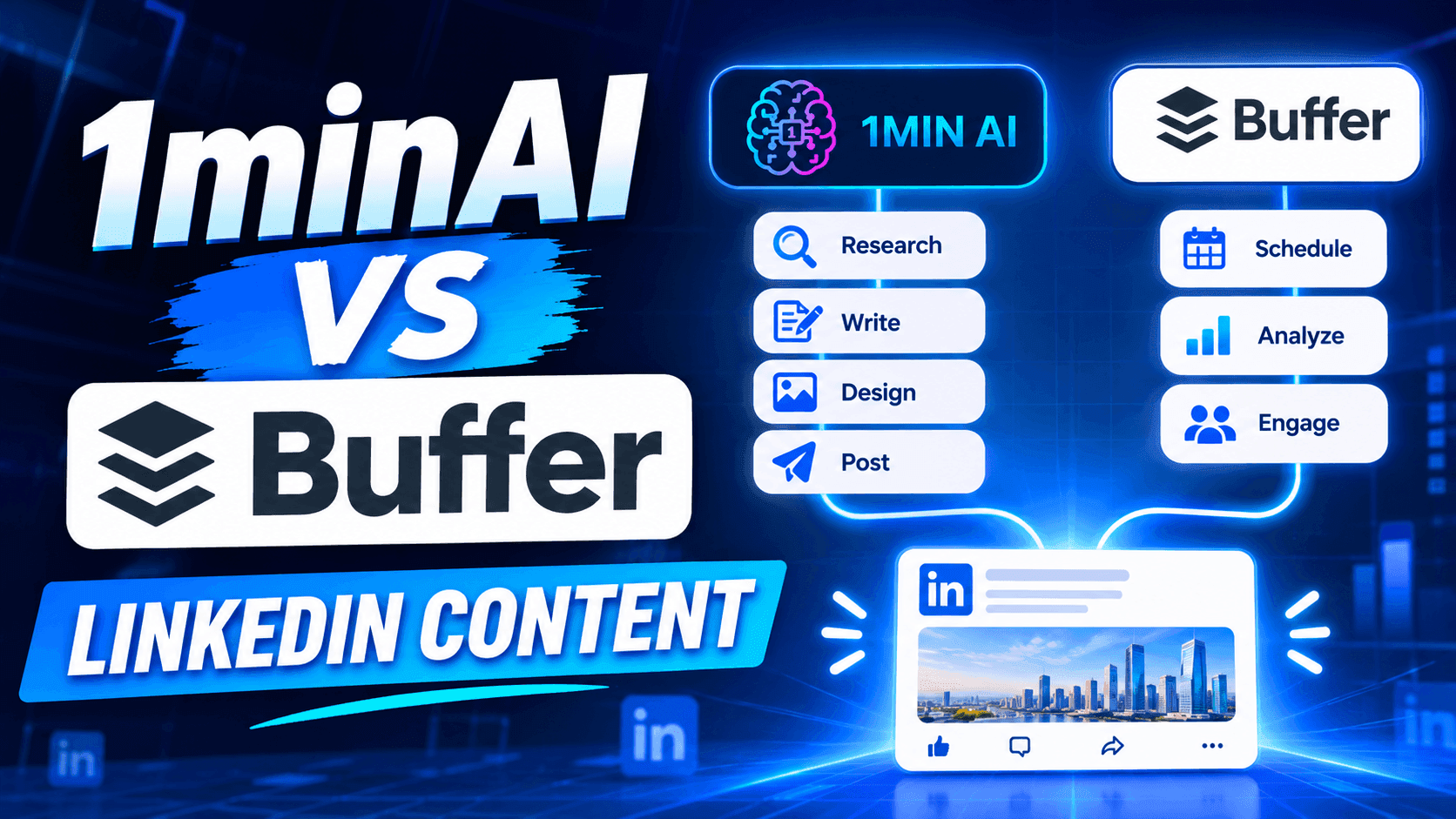
Looking for a Buffer alternative? Compare 1minAI vs Buffer for LinkedIn content creation, AI writing, image generation, scheduling, and automation.
If you're looking for a Buffer alternative, you're probably not searching for another complicated social media platform. You want a simpler way to create content, maintain a consistent posting schedule, and spend less time managing your social media presence.
Buffer is a popular choice for creators and businesses that want a clean content calendar, straightforward scheduling, and an AI Assistant built into the publishing workflow. Its free plan also makes it accessible to individuals who are just getting started. 1minAI takes a more AI-first approach to LinkedIn content. Its LinkedIn Content Agent connects information gathering, post writing, image generation, and publishing in one workflow. So, which platform should you choose?
This guide compares Buffer and 1minAI by features, pricing, workflow, and use cases to help you decide.
What Is Buffer?
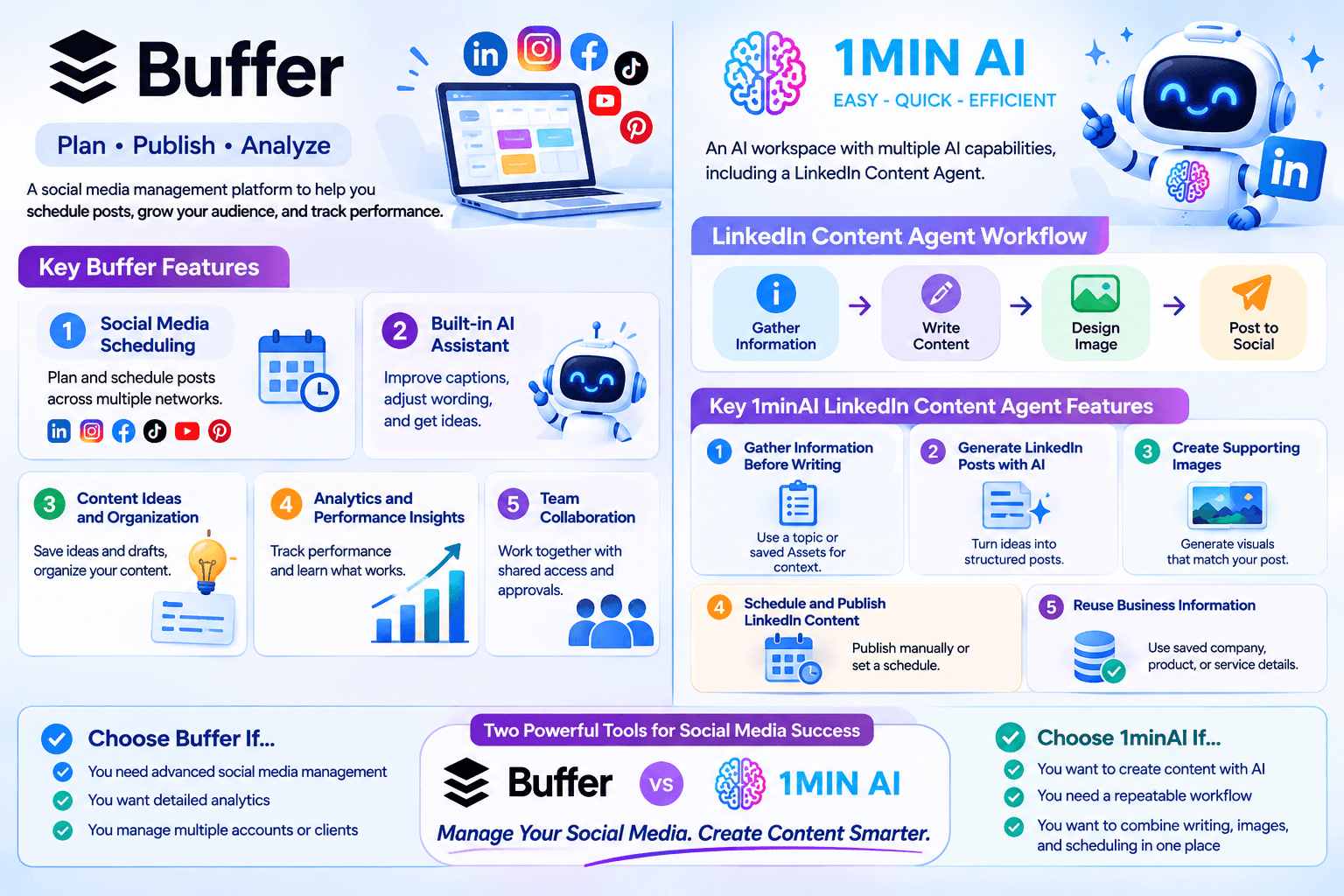
Buffer is a social media management platform designed to help creators, small businesses, and teams plan, publish, and analyze content across multiple social networks.
Rather than logging in to every social platform separately, users can connect their accounts to Buffer and manage their publishing activities from one dashboard.
Key Buffer Features
1. Social Media Scheduling
Buffer lets users plan and schedule posts across supported social networks, including LinkedIn, Instagram, Facebook, TikTok, YouTube, Pinterest, and more.
Its visual content calendar makes it easy to see upcoming posts and maintain a consistent publishing schedule.
2. Built-in AI Assistant
Buffer includes an AI Assistant that helps users refine and repurpose content. You can use it to improve captions, adjust wording, and generate ideas while working in the post composer.
This is convenient because you don't need to switch to a separate AI writing tool whenever you want to improve a caption.
3. Content Ideas and Organization
Buffer provides a space to save content ideas and drafts. Users can organize their ideas and move them toward scheduled posts when they're ready.
This is useful for creators who regularly collect inspiration but don't want to publish everything immediately.
4. Analytics and Performance Insights
Buffer offers analytics to help users understand how their social media content performs.
Depending on the plan and connected channel, users can review engagement and audience metrics, explore performance trends, and make decisions about future content.
5. Team Collaboration
Buffer also supports team collaboration through features such as shared access, notes, and approval workflows on its Team plan.
These features make it useful for businesses and marketing teams that need to coordinate publishing activities.
What Is 1minAI?
1minAI is an AI workspace that brings multiple AI capabilities together, including writing, image generation, document processing, video, audio, and AI Agents.
For LinkedIn creators and marketers, one of its relevant features is the LinkedIn Content Agent, available through 1minAI Social Agents.
Instead of using AI only to improve a caption, the Agent connects several content production stages:
Gather Information → Write Content → Design Image → Post to Social
This workflow is designed to help users turn business information, research topics, and ideas into LinkedIn-ready content.
Key 1minAI LinkedIn Content Agent Features
1. Gather Information Before Writing
A good LinkedIn post should have something useful to say.
The Agent can start with a topic or relevant business information. Users can also select saved Assets containing company, product, or service details.
This helps provide context before generating the post.
For example, a SaaS founder could use information about a new product feature, customer challenges, or industry trends as the starting point for a LinkedIn content workflow.
2. Generate LinkedIn Posts with AI
After gathering information, the Agent moves to the writing stage.
Users can configure the available writing settings and AI model options to generate content based on the selected information.
This is useful for turning a rough idea into a structured post without starting from a blank page.
3. Create Supporting Images
Text isn't the only part of a LinkedIn post.
The Agent also includes a Design Image stage, allowing users to generate a visual that supports the post's message.
This can help founders and marketers create more complete content without having to move between separate writing and image-generation tools.
4. Schedule and Publish LinkedIn Content
Once the content is ready, users can connect their LinkedIn account and configure the publishing workflow.
The Agent supports manual runs and scheduling options, including one-time and recurring schedules.
Users should still review generated content for factual accuracy, relevance, and brand consistency before relying on an automated publishing routine.
5. Reuse Business Information
Saved Assets can provide reusable context for future content.
Instead of repeatedly explaining what your company does, who your audience is, and what your product offers, you can select relevant information as the starting point for new posts.
This is particularly useful for businesses that need consistent messaging across multiple campaigns.
1minAI vs Buffer: Feature-by-Feature Comparison
Buffer and 1minAI support different parts of the social media content process.
Buffer focuses on planning, scheduling, publishing, and managing social media channels. 1minAI focuses on connecting AI-powered content production with LinkedIn publishing.
| Feature | Buffer | 1minAI |
|---|---|---|
| Main purpose | Social media management and scheduling | AI-powered content creation and publishing workflow |
| LinkedIn support | Yes | Yes |
| AI writing | Built-in AI Assistant | LinkedIn Content Agent |
| Topic and information gathering | Ideas and content planning tools | Gather Information workflow |
| Brand context | Content drafts and AI-assisted refinement | Reusable business information through saved Assets |
| AI image generation | Supports media uploads and integrations | Image generation within the Agent workflow |
| Content calendar | Yes | Agent scheduling workflow |
| Publishing | Multiple supported social channels | LinkedIn publishing through connected account |
| Free option | Yes, up to 3 channels | Free daily credits are available |
| Best for | Creators and teams managing multiple social channels | Users who want AI assistance across the LinkedIn content workflow |
The biggest difference is where each platform puts its emphasis.
Buffer helps you organize and publish content efficiently. 1minAI helps you create the content itself, including the research, writing, and visuals, before moving it toward publication.
Why Consider 1minAI as a Buffer Alternative?
You don't necessarily need to replace Buffer if it already handles your publishing workflow well.
However, 1minAI may be a better fit if you want to reduce the manual work involved in creating LinkedIn content.
Here are several reasons to consider it.
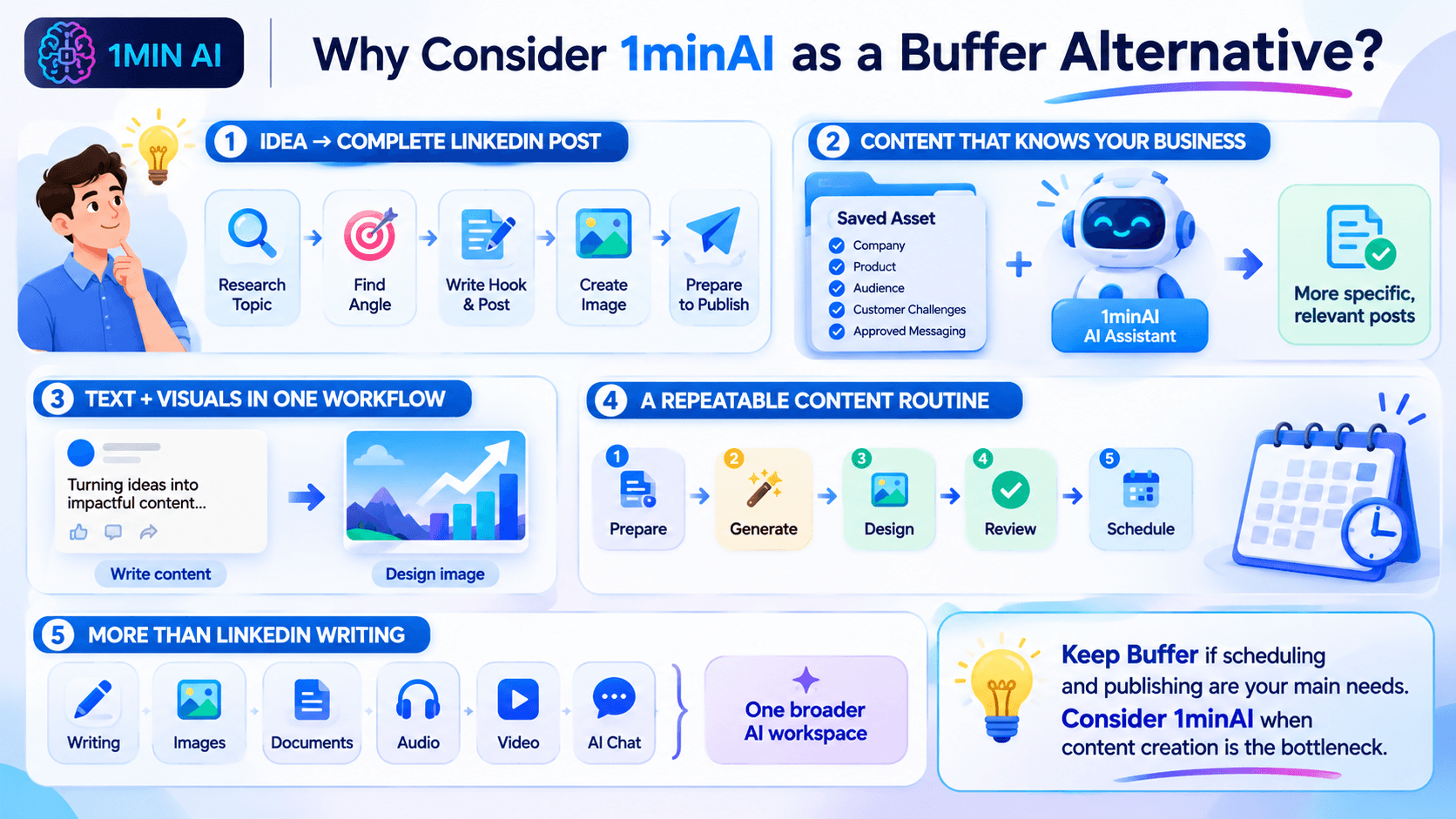
Move from an Idea to a Complete LinkedIn Post
Many creators don't struggle with scheduling. They struggle with the work that happens before scheduling.
You might have an idea for a post but still need to:
- Research the topic.
- Find a useful angle.
- Write an engaging introduction.
- Organize the main points.
- Create a supporting image.
- Prepare the content for publishing.
With 1minAI, these activities are connected through one Agent workflow.
Instead of treating AI writing as a separate task, you can use an AI-assisted process to move from information to a more complete post.
Create Content Based on Your Business Information
Generic AI prompts often produce generic social media content.
Using relevant business information can help make posts more specific and useful.
For example, a company can prepare an Asset containing:
- Company background and positioning.
- Product or service information.
- Target audience.
- Common customer challenges.
- Key product benefits.
- Approved messaging and terminology.
The LinkedIn Content Agent can use that information as context when generating content.
This is especially helpful for founders, consultants, and B2B marketers who want to communicate expertise rather than publish generic motivational posts.
Generate Text and Visuals in One Workflow
A LinkedIn post can become more engaging when its visual supports the message.
With 1minAI, you can generate the written content and move to the Design Image stage without switching to an entirely separate image-generation platform.
For example, if you're creating a post about five ways to improve customer retention, you can generate the post and a related visual as part of the same workflow.
You can then review the result and make adjustments before publishing.
Build a More Consistent Content Routine
Consistency is important for maintaining a professional presence on LinkedIn.
However, publishing every day can become difficult when content creation requires several disconnected tasks.
1minAI helps connect those tasks into a repeatable process:
- Prepare your topic or business information.
- Generate a LinkedIn post.
- Create a supporting visual.
- Review the content.
- Configure your publishing schedule.
You can start with a small number of posts and adjust the schedule based on your audience and available resources.
Use More Than a LinkedIn Writing Tool
1minAI is not limited to LinkedIn content creation.
Its broader AI workspace includes tools for writing, image generation, documents, audio, video, and other AI-powered tasks.
This can be useful when your marketing workflow extends beyond social media.
For example, you might use AI to summarize a report, turn its insights into a LinkedIn post, and create a visual to accompany the post.
How to Create and Schedule LinkedIn Content with 1minAI
If you want to try an AI-first LinkedIn workflow, here's a practical way to get started.
Step 1: Open 1minAI Social Agents
Visit 1minAI Social Agents and open the LinkedIn Content Agent.
Step 2: Prepare Your Information
Choose a topic or select a relevant saved Asset containing your company, product, or service information.
For example, a marketing agency could start with a topic such as:
"Why B2B companies should build a LinkedIn thought leadership strategy."
You can also provide relevant reports or other supporting information where the workflow allows.
Step 3: Configure the Writing Stage
Review the available writing settings and select an appropriate AI model.
Make sure the content reflects your intended audience and communication style.
You can use this prompt as a starting point for a LinkedIn post:
Write a LinkedIn post for B2B marketing professionals about why thought leadership matters for building trust.
Start with a compelling hook, explain three practical benefits, include an actionable takeaway, and end with a question that encourages meaningful discussion.
Use a professional but conversational tone. Avoid exaggerated claims, generic motivational language, and unnecessary jargon.
Step 4: Generate a Supporting Image
Move to the Design Image stage and configure the available image-generation settings.
Choose a visual direction that supports the main message of your post.
For example, a post about B2B thought leadership could use a clean infographic-style visual showing how expertise, useful insights, and consistency contribute to professional credibility.
Step 5: Review and Schedule
Check the generated text and image before publishing.
Verify that:
- The post communicates an accurate message.
- The opening is relevant to your audience.
- The visual supports the written content.
- The content reflects your brand.
- The publishing time fits your content strategy.
Then configure the available publishing and scheduling options.
You can start with a manual run or set a recurring schedule that matches your content capacity.
Frequently Asked Questions
Is 1minAI a good Buffer alternative?
1minAI is worth considering if your priority is AI-assisted LinkedIn content production, including information gathering, writing, image generation, and publishing.
Buffer is generally a stronger fit if you primarily need a social media management platform with multi-channel scheduling, analytics, and community tools.
Can 1minAI generate LinkedIn posts?
Yes. The 1minAI LinkedIn Content Agent includes a writing stage that helps users generate LinkedIn content using topics or relevant business information.
Can 1minAI schedule LinkedIn posts?
The LinkedIn Content Agent supports publishing workflows with manual, one-time, and recurring scheduling options. Available options depend on the connected account and current Agent configuration.
Which is better for solo founders: Buffer or 1minAI?
It depends on the main challenge.
Buffer is useful if you already have content and need a simple way to schedule it across social channels.
1minAI may be more useful if you need help researching topics, writing posts, generating visuals, and preparing LinkedIn content without managing each step separately.
Conclusion: Choose the Workflow That Saves You More Time
Buffer and 1minAI are both useful tools, but they solve different problems. If you mainly need a reliable social media calendar, Buffer may be all you need.
But if you want to spend less time moving between research, writing, design, and publishing tools, 1minAI is a Buffer alternative worth trying.
Ready to turn your ideas and business knowledge into LinkedIn content?
Explore 1minAI Social Agents and build an AI-assisted workflow for your next LinkedIn post.
You can also explore 1minAI's AI features to discover more ways to use AI in your daily workflow.
- #Commerce
- #Information
Alternative
Odkrijte najboljše alternative za 1minAI in primerjajte funkcije, cene in primere uporabe.

1min.AI proti OpenRouterju
1min.AI proti OpenRouterju: Primerjajte pripravljeno AI orodje za ustvarjanje z tehničnim API orodjem. Ugotovite, ali potrebujete ustvarjalni studio brez kode ali infrastrukturo za razvijalce.
 Ngoc Hong

1min AI vs Buffer
Compare 1min.AI vs Buffer for Facebook content creation, AI writing, image generation, scheduling, pricing, and everyday marketing workflows.
Ngoc Hong
1min.AI vs. Hootsuite: Which Social Media Tool Fits Your Workflow?
Compare 1min.AI vs. Hootsuite to explore their AI content creation, social media publishing, analytics, pricing, and collaboration features. Find the right tool for your workflow.
AI Orodja
Odkrijte najboljša AI orodja za povečanje produktivnosti, ustvarjalnosti in vsakodnevnega dela.

Top 4 cenovno dostopna orodja za umetno inteligenco za ustanovitelje startupov
Odkrijte top 4 cenovno dostopna orodja za umetno inteligenco za ustanovitelje startupov, s katerimi lahko preverjate ideje, razvijate produkte, ustvarjate vsebine in hitreje lansirate brez prevelikih stroškov.
 Tram Ta

POV: Imaš več kot 10 objav za vsak dan
Naučite se, kako zgraditi delovni tok vsebin z AI, ki ustvarjalcem vsebin pomaga hitreje ustvarjati več kot 10 objav na družbenih omrežjih na dan z možgansko nevihto z AI, generiranjem slik in ustvarjanjem vsebin.
 Lien Anh Vu

Spremenite »naredi ga boljše« v boljšo vsebino z AI
Uporabite AI, da nejasne povratne informacije strank spremenite v jasne popravke, zmanjšate nepotrebne spremembe in hitreje dostavite boljšo vsebino.
Lien Anh VuFunkcije AI
Celovite funkcije AI, ki poenostavljajo delovne procese, izboljšujejo učinkovitost in ekipam omogočajo več.

1minAI: Brezplačni AI preverjevalnik slovnice
Preverite slovnico brezplačno z AI preverjevalnikom slovnice 1minAI. Poiščite slovnične, pravopisne in pisne napake, izboljšajte jasnost in izpilite vsebino v nekaj sekundah.
Tram Ta
Zgradite portfeljsko spletno stran hitreje z 1min.AI
Izvedite, kako lahko samostojni ustvarjalci z 1min.AI hitreje načrtujejo, pišejo, oblikujejo in ustvarijo profesionalno portfeljsko spletno stran, tudi brez močnega znanja programiranja.
Lien Anh Vu
Brezplačen AI X komentar
Ustvarite zabavne, duhovite ali pronicljive komentarje za X z našim AI-pogonskim generatorjem X komentarjev. Povečajte svojo angažiranost in izstopajte iz množice!
 Trang Tran
Primeri uporabe umetne inteligence
Izbrana zbirka primerov uporabe umetne inteligence za podjetja, povečanje produktivnosti in panogno-specifične rešitve.

Najboljši čas za objavo na Instagramu: praktični vodnik za večjo vključenost
Odkrijte najboljši čas za objavo na Instagramu, vključno z najboljšimi dnevi in urami za različne skupine občinstva, ter nasvete za iskanje idealnega urnika objav za vaš račun.
Tram TaZgradite portfeljsko spletno stran hitreje z 1min.AI
Izvedite, kako lahko samostojni ustvarjalci z 1min.AI hitreje načrtujejo, pišejo, oblikujejo in ustvarijo profesionalno portfeljsko spletno stran, tudi brez močnega znanja programiranja.
Lien Anh VuSpremenite »naredi ga boljše« v boljšo vsebino z AI
Uporabite AI, da nejasne povratne informacije strank spremenite v jasne popravke, zmanjšate nepotrebne spremembe in hitreje dostavite boljšo vsebino.
Lien Anh VuVadnice za AI
Naučite se uporabljati umetno inteligenco s praktičnimi vadnicami po korakih.

Black Friday AI orodna ponudba v letu 2026
Odkrijte, kaj prinašajo Black Friday AI orodne ponudbe 2026. Izvedite, kako si zagotoviti dosmrtno ponudbo 1min.AI prek AppSumo, Dealify in Stack Social ter preveriti na Trustpilot, Slashdot in Software Advice.
 Hang Nguyen

Doživi Teden mode za 0 $ z 1minAI Face Swap
Doživi Teden mode za 0 $ z 1minAI Face Swap. Naloži svojo fotografijo, izberi videoposnetek Tedna mode in ustvari svoj modni AI trenutek.
Ngoc Hong
Virusni Reelsi v minutah: Kako uporabiti 1minAI-jevo pretvorbo besedila v govor za satirične glasovne posnetke
Oglejte si, kako upravitelji satiričnih strani uporabljajo 1minAI-jevo funkcijo pretvorbe besedila v govor za takojšnje ustvarjanje glasovnih posnetkov v slogu novičarskega voditelja in dramatičnih glasov za TikToke, Shortse in Instagram Reels.
Vodiči za AI
Hitreje se učite AI s praktičnimi vodiči, primeri iz resničnega sveta in uporabnimi najboljšimi praksami.

Varno kupujte AI orodja prek spleta: vodnik za Črni petek 2026
Odkrijte, kako poiskati in zagotoviti najboljše ponudbe AI za Črni petek na spletu. Spoznajte strokovne strategije za izogibanje prevaram, premagovanje utrujenosti od naročnin in preverjanje programske opreme.
Hang Nguyen
Kako začeti AI podjetje brez gradnje iz nič
Spoznajte, kako začeti AI podjetje, preveriti svojo idejo in hitreje zagnati rešitev brez dragocene AI infrastrukture, zgrajene iz nič.
Ngoc Hong
AI Fashion Video Generator With Seedance 2.5 and HeyGen
Learn how to create AI fashion videos with Seedance 2.5 and HeyGen. Turn outfit photos into cinematic videos featuring your own face with 1min.AI.
Lien Anh VuAI Rešitve
Prebrskajte najboljše rešitve umetne inteligence za avtomatizacijo, kodiranje, raziskave, produktivnost, podporo strankam, trženje in poslovne delovne procese.

Brezplačen AI generator tetovaž: dizajni po meri
Spremenite katerokoli idejo v dizajn tetovaže z brezplačnim AI generatorjem tetovaž 1min.AI. Opišite svojo idejo, izberite slog in prenesite v nekaj sekundah.
Trang TranVarno kupujte AI orodja prek spleta: vodnik za Črni petek 2026
Odkrijte, kako poiskati in zagotoviti najboljše ponudbe AI za Črni petek na spletu. Spoznajte strokovne strategije za izogibanje prevaram, premagovanje utrujenosti od naročnin in preverjanje programske opreme.
Hang NguyenDoživi Teden mode za 0 $ z 1minAI Face Swap
Doživi Teden mode za 0 $ z 1minAI Face Swap. Naloži svojo fotografijo, izberi videoposnetek Tedna mode in ustvari svoj modni AI trenutek.
Ngoc HongAI modeli
Raziščite vodilne modele AI na svetu na enem mestu.

Free AI Chat With Claude Fable 5.2 On 1min.AI
Free AI chat with Claude Fable 5.2 on 1min.AI. Compare Fable 5.2 vs Opus 5.5, see Fable 5.2 benchmarks, and start chatting in minutes.
Trang Tran
GPT-6.2 Sol: Specs, Pricing & Free Access
Explore GPT-6.2 Sol specs, pricing, and how it compares with GPT-6.1 Sol and Claude Opus 5.5, then try it free in 1min.AI Multi AI Chat.
Trang Tran
GPT 6.2 Astra: Pricing, Benchmarks & Free Access
GPT 6.2 Astra release date, pricing, Reddit feedback and Opus 5.5 comparison. See what it does best and chat with it on 1min.AI for free.
Trang TranPrimerjave AI
Primerjajte orodja, modele in platforme AI, da najdete najboljše za vaše potrebe.

Gemini 4 Neon vs Hydrogen: Specs, Price & Picks
Gemini 4 Neon vs Hydrogen, Carbon and Argon: compare price, benchmarks and use cases to pick the right model, then test them side by side on 1min.AI.
Trang Tran
Kling AI proti Veo 3: kateri model zmaga?
Kling AI proti Veo 3: primerjajte gibanje, izvorni zvok, cene in brezplačne pakete ter ugotovite, kateri generator videa z UI zmaga za vaš projekt - preizkusite oba na 1min.AI.
Trang Tran
Primerjava DeepSeek V4 Pro vs Flash
Primerjajte metrike DeepSeek V4 Pro in DeepSeek V4 Flash. Danes na 1min.ai optimizirajte svoje agentne aplikacije in izboljšajte preverjanje dejstev z umetno inteligenco.
Ngoc HongIntegracije z AI
Brezhibno integrirajte AI z orodji, ki jih že uporabljate, da avtomatizirate delo in povečate produktivnost.
POV: Imaš več kot 10 objav za vsak dan
Naučite se, kako zgraditi delovni tok vsebin z AI, ki ustvarjalcem vsebin pomaga hitreje ustvarjati več kot 10 objav na družbenih omrežjih na dan z možgansko nevihto z AI, generiranjem slik in ustvarjanjem vsebin.
Lien Anh Vu
Ne preklapljajte več med aplikacijami z umetno inteligenco: kako integracija AI preoblikuje employer branding
Odkrijte, kako integracija AI kadrovskim ekipam pomaga poenostaviti employer branding z združevanjem pisanja z AI, dokumentov, slik, videa in več modelov AI v en delovni prostor.
Tram Ta
AI API agregator razloženo za razvijalce
AI API agregator razvijalcem nudi enoten API za klicanje več AI modelov, s čimer skrajša čas integracije in zmanjša vezanost na ponudnika.
Trang TranAI za industrije
Poiščite najboljša orodja in delovne tokove AI za zdravstvo, finance, izobraževanje, pravo, proizvodnjo, maloprodajo, nepremičnine in več.

Voice Cloning AI Free: How to Clone Any Voice Online in Minutes
Try voice cloning AI free with 1min.AI. Upload a 5-second clip, pick an ElevenLabs model, choose from 32 languages, and turn text to speech in your own voice.
Trang Tran
Claude Personal Finance Setup and Safety Guide
Claude personal finance explained: how Personal Finance in Claude works and what Claude finance can see. Plus a safe CSV method for non-US users.
Trang Tran
Free AI Image Editor With Prompt No Restrictions
Looking for a free AI image editor with prompt no restrictions? Edit backgrounds, objects and text by typing, no watermark. Try 1min.AI’s flexible editor now.
Trang TranAI Agenti
Odkrijte in uporabite AI agente za avtomatizacijo opravil pri vašem delu in v vsakdanjem življenju.
1minAI: Brezplačni AI preverjevalnik slovnice
Preverite slovnico brezplačno z AI preverjevalnikom slovnice 1minAI. Poiščite slovnične, pravopisne in pisne napake, izboljšajte jasnost in izpilite vsebino v nekaj sekundah.
Tram Ta
AI agenti za Facebook
Uporabite AI agenta za Facebook za ustvarjanje vsebin, generiranje slik, načrtovanje objav in objavljanje iz vaših dokumentov in pogovorov.
Ngoc Hong
AI Agent proti AI Asistentu: kaj res prihrani oblikovalcem več časa?
Spoznajte razliko med AI Agentom in AI Asistentom ter odkrijte, katera rešitev pomaga oblikovalcem avtomatizirati ponavljajoče se delo, zmanjšati popravke in prihraniti več časa.
Lien Anh VuAI delovni tokovi
Raziščite gotove AI delovne tokove za produktivnost, trženje, prodajo, podporo in še več.
POV: Imaš več kot 10 objav za vsak dan
Naučite se, kako zgraditi delovni tok vsebin z AI, ki ustvarjalcem vsebin pomaga hitreje ustvarjati več kot 10 objav na družbenih omrežjih na dan z možgansko nevihto z AI, generiranjem slik in ustvarjanjem vsebin.
Lien Anh VuAI Fashion Video Generator With Seedance 2.5 and HeyGen
Learn how to create AI fashion videos with Seedance 2.5 and HeyGen. Turn outfit photos into cinematic videos featuring your own face with 1min.AI.
Lien Anh Vu
Is Seedance 2.5 the Best AI Video Generator of 2026?
Is Seedance 2.5 the best AI video generator in 2026? Explore its features, compare it with Kling and Veo, and learn how to create AI videos on 1min.AI.
Lien Anh VuNovičnik
Tedenske AI inovacije z 1minAI

🔮 Weekly AI Innovations #145: X Content Agent & GPT 6.1 Terra on 1min.ai
Scale viral reach with the X Content Agent on 1min.ai. Discover an end-to-end 4-stage pipeline with zero token burn, plus the launch of GPT 6.1 Terra.
Hang Nguyen
🔮 Weekly AI Innovations #144: LinkedIn Content Agent: Complete B2B Publishing Pipeline
Scale B2B influence with the LinkedIn Content Agent on 1min.ai. Discover an end-to-end 4-stage pipeline with zero redundant token burn and 1-click publishing.
Hang Nguyen
🔮 Weekly AI Innovations #146: Mistral 3.5, Qwen Image & Cohere A+ are ready on 1min.ai
Deploy Mistral Large 3, Qwen Image 3.0, and Cohere Command A+ on 1min.ai. Boost RAG accuracy and cut visual generation latency in one unified AI workspace.
Hang Nguyen