
DeepSeek API: A Complete Guide to Getting Started and Building AI Applications

Tram Ta
20. november 2026
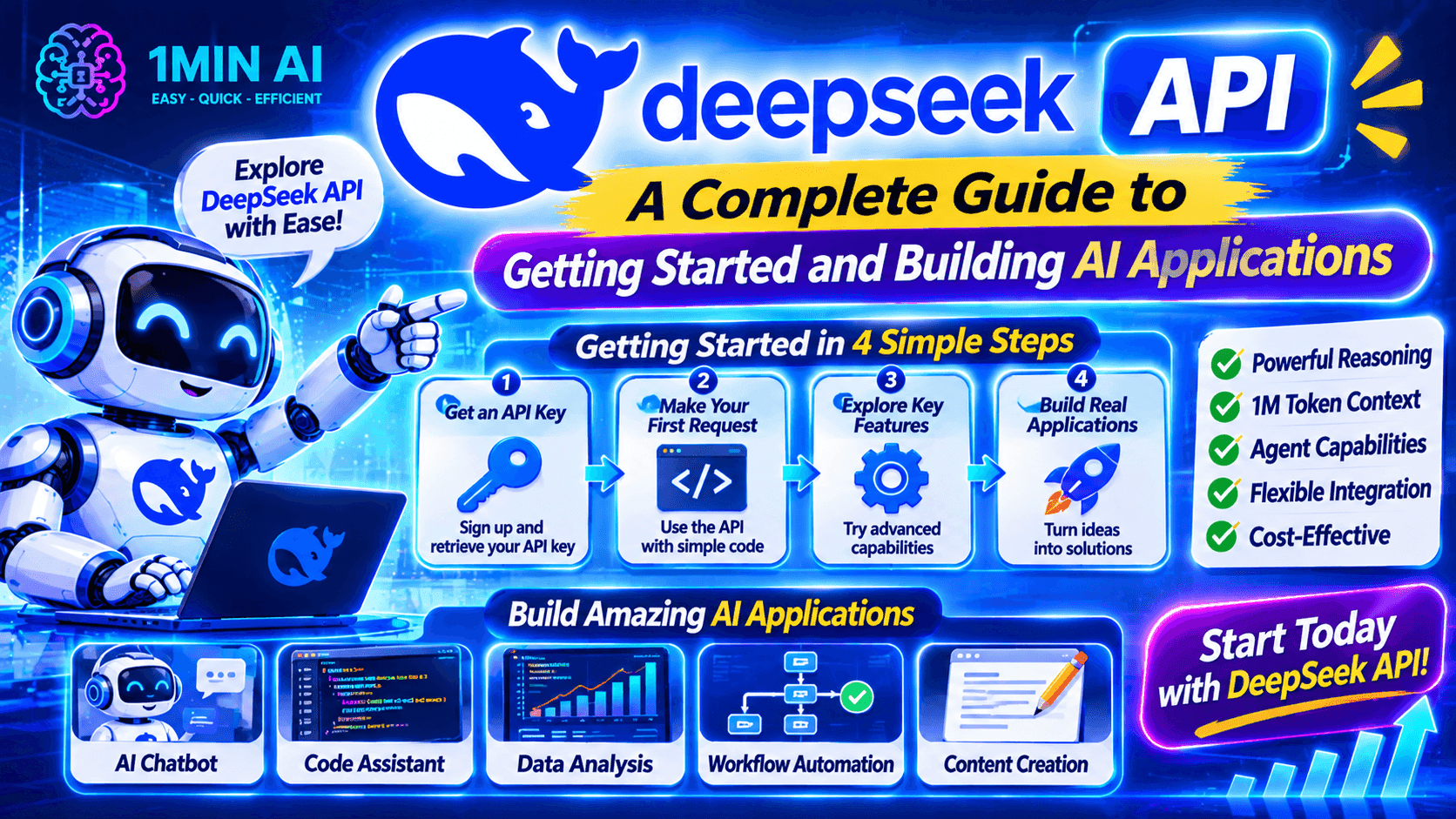
Learn how to use the DeepSeek API, get your API key, make your first request, and build AI applications. Explore DeepSeek models and developer tools with 1minAI.
AI APIs make it possible for developers to add powerful language models to their own applications without building an AI model from scratch.
One option worth exploring is the DeepSeek API. It gives developers programmatic access to DeepSeek models for tasks such as text generation, reasoning, coding assistance, structured output, and tool calling.
Whether you're building a chatbot, developing an AI coding assistant, or experimenting with autonomous agent workflows, the DeepSeek API provides a way to connect AI capabilities to your software.
But how do you get started? Which model should you choose? How do you create an API key and send your first request?
This guide walks through the essential steps, with practical examples and tips for developers. We'll also explore how 1minAI can help you discover AI APIs and build AI-powered workflows.
What Is the DeepSeek API?
The DeepSeek API is a developer interface that allows applications to communicate with DeepSeek AI models through programmatic requests.
Instead of opening a chatbot and manually entering prompts, developers can send requests from their own applications and receive model-generated responses.
For example, you could integrate the DeepSeek API into:
- A customer support chatbot.
- An AI writing assistant.
- A code-generation application.
- A document summarization tool.
- A research assistant.
- An AI agent that uses external tools.
The API supports an OpenAI-compatible format, making it easier for developers familiar with the OpenAI SDK to adapt their existing code.
DeepSeek also provides an Anthropic-compatible API format, giving developers additional integration options.
Key Features of the DeepSeek API
1. Access to DeepSeek models
Developers can access DeepSeek's supported models through API requests. The current model identifiers include:
deepseek-flash: Serves the latest DeepSeek Flash release.deepseek-v4-pro: Provides access to the current V4 Pro model.
These identifiers point to model versions documented by DeepSeek. Check the official model documentation before selecting one for a new project.
2. OpenAI-compatible API format
The DeepSeek API uses an OpenAI-compatible interface for common chat-completion requests.
This means developers can often reuse familiar SDKs and request structures by changing the API base URL and model identifier.
3. Thinking and non-thinking modes
Supported models provide thinking and non-thinking modes.
- Non-thinking mode is useful for straightforward tasks where you want a direct response.
- Thinking mode is useful for tasks that benefit from additional reasoning.
Developers can configure reasoning effort where supported.
4. Tool calling
The API supports function-based tool calling.
This allows a model to request an external function, such as searching a database or retrieving information from another service. Your application executes the function and sends the result back to the model.
5. Structured output
DeepSeek supports JSON output, which is useful when an application needs predictable data rather than free-form text.
For example, you can ask a model to return product information, task lists, or categorized results in JSON format.
6. Streaming responses
Streaming allows an application to receive generated content progressively rather than waiting for the entire response.
This can make chat interfaces feel more responsive, especially when generating longer answers.
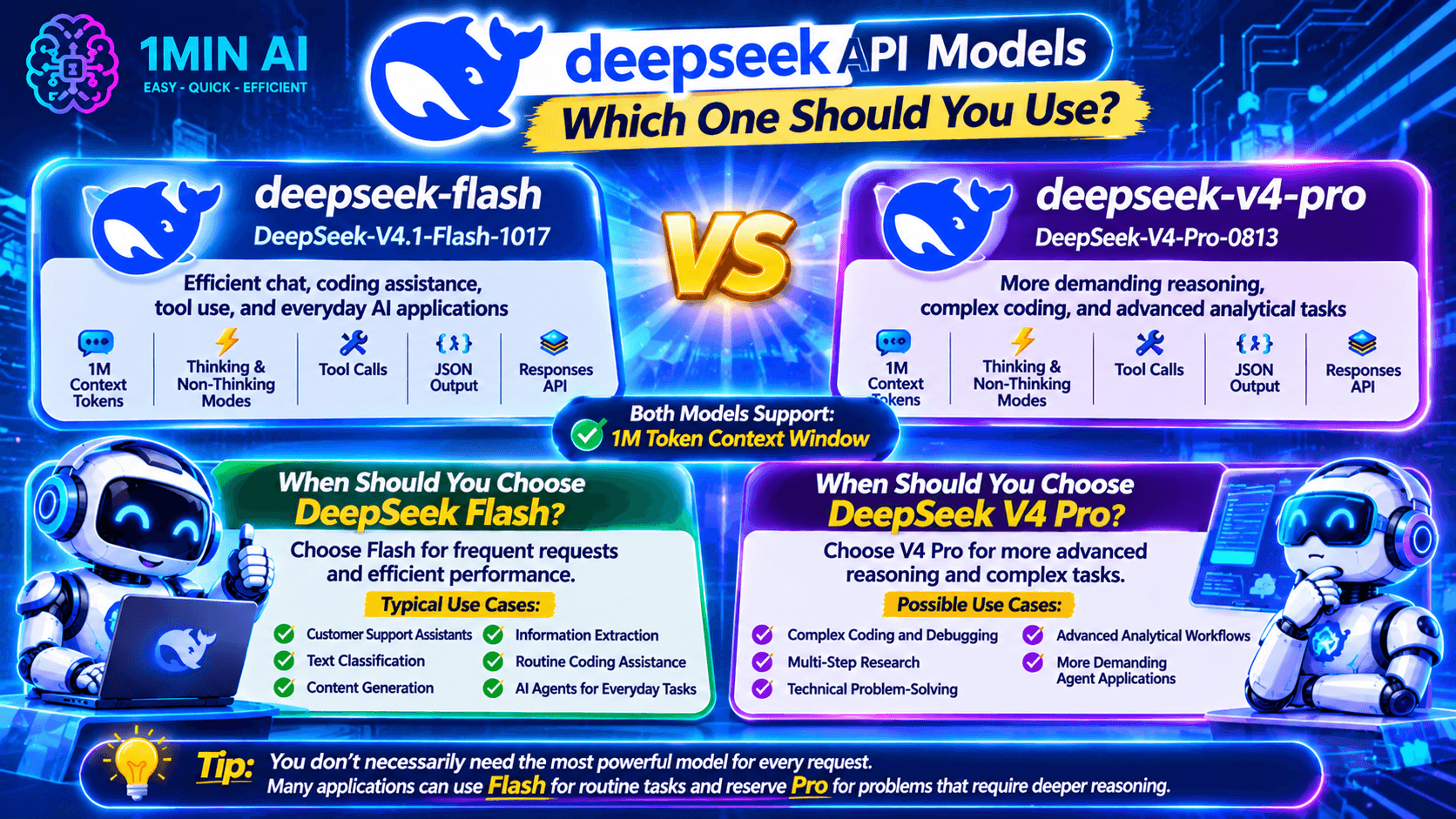
DeepSeek API Models: Which One Should You Use?
Choosing the right model is one of the first decisions when integrating an API.
DeepSeek's current API documentation lists two main model identifiers.
| Model identifier | Model version | Best suited for |
|---|---|---|
deepseek-flash | DeepSeek-V4.1-Flash-1017 | Efficient chat, coding assistance, tool use, and everyday AI applications |
deepseek-v4-pro | DeepSeek-V4-Pro-0813 | More demanding reasoning, complex coding, and advanced analytical tasks |
Both models support a 1-million-token context window, thinking and non-thinking modes, tool calls, JSON output, and the Responses API.
When Should You Choose DeepSeek Flash?
Choose Flash when your application needs frequent AI requests and efficient performance.
Typical use cases include:
- Customer support assistants.
- Text classification.
- Content generation.
- Information extraction.
- Routine coding assistance.
- AI agents handling everyday tasks.
When Should You Choose DeepSeek V4 Pro?
Choose V4 Pro when your application needs more advanced reasoning for difficult tasks.
It may be suitable for:
- Complex coding and debugging.
- Multi-step research.
- Technical problem-solving.
- Advanced analytical workflows.
- More demanding agent applications.
Tip: You don't necessarily need to use the most capable model for every request. Many applications can use Flash for routine tasks and reserve Pro for problems that require deeper reasoning.
How to Get a DeepSeek API Key
Before making API requests, you need an API key.
An API key is a credential that identifies and authorizes your application when communicating with the DeepSeek API.
Follow these steps to get started.
Step 1: Create a DeepSeek Platform Account
Visit the official DeepSeek platform and sign in or create an account.
Go to the API platform:
https://platform.deepseek.com/
Step 2: Open the API Keys Section
After signing in, navigate to the API key management section.
This is where you can create and manage the credentials used by your applications.
Step 3: Generate a New API Key
Select the option to create a new API key.
Give it a recognizable name so you can identify which project uses it.
Step 4: Copy and Secure Your API Key
Copy the generated key and store it securely.
Important security practices:
- Never publish your API key in public code repositories.
- Avoid placing secret keys directly in frontend JavaScript.
- Use environment variables or a secure secrets manager.
- Rotate keys if you suspect they have been exposed.
- Use separate keys for different applications when appropriate.
Once you have your key, you're ready to make your first API request.
How to Use DeepSeek API for AI Agent Development
One of the most interesting applications of the DeepSeek API is building AI agents.
An ordinary chatbot generates responses based on user input. An AI agent can use connected tools to perform additional steps, retrieve information, and work toward completing a task.
DeepSeek supports function-based tool calling, allowing developers to connect models to external functions.
DeepSeek API Pricing: How Much Does It Cost?
DeepSeek uses token-based API pricing. Your cost depends on the model, the number of input and output tokens, and whether input tokens are served from the cache.
The current published pricing for the main V4 API models is:
| Model | Input – cache miss | Input – cache hit | Output |
|---|---|---|---|
| DeepSeek V4.1 Flash | $0.15 / 1M tokens off-peak | $0.003 / 1M tokens off-peak | $0.60 / 1M tokens off-peak |
| DeepSeek V4 Pro | $0.66 / 1M tokens off-peak | $0.022 / 1M tokens off-peak | $1.98 / 1M tokens off-peak |
Peak-period rates are higher. DeepSeek publishes separate peak and off-peak pricing, so check its official pricing page before estimating your application budget.
What Is a Token?
A token is a unit of text processed by an AI model. It can represent a word, part of a word, a number, or punctuation.
API usage generally includes:
- Input tokens: Instructions, conversation history, and other information sent to the model.
- Output tokens: The text or structured response generated by the model.
- Cached input tokens: Previously processed input that can qualify for a reduced rate when caching applies.
For example, a chatbot that receives long conversation histories may consume more input tokens than a simple question-and-answer application.
How to Reduce DeepSeek API Costs
Here are several practical ways to manage your API spending:
- Choose the right model: Use Flash for routine tasks and reserve Pro for more demanding requests.
- Keep prompts focused: Remove unnecessary instructions and repeated context.
- Manage conversation history: Send only the relevant information needed for the current request.
- Use caching where appropriate: Take advantage of supported prompt caching for repeated prefixes.
- Set output limits: Configure maximum output tokens based on your application's needs.
- Monitor usage: Track token consumption and API spending as your application grows.
For current model identifiers and rates, refer to the official DeepSeek Models & Pricing documentation.
DeepSeek API vs. 1minAI API: What's the Difference?
If you're exploring AI development, you may come across both DeepSeek's API and 1minAI's developer API resources.
They serve related but different purposes.
| Comparison | DeepSeek API | 1minAI API |
|---|---|---|
| Provider | DeepSeek | 1minAI |
| Main purpose | Programmatic access to DeepSeek models | Access to AI capabilities available through the 1minAI ecosystem |
| Model access | DeepSeek-supported models | Models and tools supported by 1minAI |
| Integration | Direct API integration | Integration through 1minAI's developer services |
| Best for | Developers building directly with DeepSeek | Developers exploring multiple AI capabilities through one platform |
If you want to work directly with DeepSeek models, its official API is the natural starting point.
If you want to explore a broader set of AI capabilities, 1minAI also provides developer-focused resources.
For example, explore:
Check each service's current documentation for supported models, API access conditions, pricing, and usage limits.
Explore More AI Agent Workflows with 1minAI
The DeepSeek API gives developers a way to connect AI models to software. But building a complete agent workflow can require more than an API connection.
You may also need a model interface, connected tools, workflow instructions, and a way to organize tasks.
1minAI offers several AI agent-related experiences worth exploring.
1. Try 1minAI DeepSeek Super Agent
Visit 1minAI DeepSeek Super Agent to explore a DeepSeek-focused agent experience.
This is a useful starting point if you want to experiment with AI-powered task workflows without building an entire agent application from scratch.
Check the page for its current capabilities and usage conditions.
2. Explore Multi AI Chat and AI Agents
Visit 1minAI Multi AI Chat & AI Agent to discover broader AI assistant and agent workflows.
Comparing different models can help you evaluate their responses and find an approach that works for your task.
3. Automate Social Media Workflows
AI agents can also support recurring marketing activities.
Explore 1minAI AI Agent for Social Media Management to see how AI can assist with content planning and social media workflows.
This is particularly relevant for marketers, creators, and small business owners.
4. Discover More AI Agents
You can also explore the 1minAI AI Agents page to discover other agent-related applications.
Think about repetitive work in your daily routine. Research, writing, planning, and organizing information are all potential areas where AI assistance may help.
Frequently Asked Questions
1. What is the DeepSeek API used for?
The DeepSeek API allows developers to integrate DeepSeek AI models into their own applications. Common use cases include chatbots, coding assistants, content generators, document analysis tools, and AI agents.
2. Is the DeepSeek API free?
DeepSeek API access uses token-based pricing. It is not the same as using a free chat interface. Check DeepSeek's official pricing page for current rates and any available credits or promotions.
3. How do I get a DeepSeek API key?
Create an account on the official DeepSeek platform, navigate to API key management, generate a key, and store it securely. You can then use it to authenticate your API requests.
4. Is the DeepSeek API compatible with OpenAI?
Yes. DeepSeek provides an OpenAI-compatible API format. Developers can use familiar OpenAI SDKs by configuring the DeepSeek base URL and selecting a supported DeepSeek model.
5. Can I use DeepSeek API with Python?
Yes. You can use the OpenAI Python SDK with the DeepSeek API by configuring the API key and base URL. The example in this guide demonstrates a basic chat-completion request.
Final: Start Building with the DeepSeek API
The DeepSeek API gives developers a practical way to integrate advanced AI capabilities into their applications.
From chatbots and coding assistants to document analysis and tool-powered agents, it provides building blocks for a wide range of AI projects.
To get started, create your API key, choose a supported model, and make a simple request. Once the basic integration works, you can explore streaming, structured output, and tool calling to build more advanced workflows.
If you want to explore more AI development possibilities, check out the 1minAI AI API Aggregator for Developers, the Free AI API for Developers, and the available 1minAI AI Agents.
Start with one useful application, test it carefully, and build from there.
- #Commerce
Alternative
Odkrijte najboljše alternative za 1minAI in primerjajte funkcije, cene in primere uporabe.

1min.AI proti OpenRouterju
1min.AI proti OpenRouterju: Primerjajte pripravljeno AI orodje za ustvarjanje z tehničnim API orodjem. Ugotovite, ali potrebujete ustvarjalni studio brez kode ali infrastrukturo za razvijalce.
 Ngoc Hong

1min AI vs Buffer
Compare 1min.AI vs Buffer for Facebook content creation, AI writing, image generation, scheduling, pricing, and everyday marketing workflows.
Ngoc Hong
1min.AI vs. Hootsuite: Which Social Media Tool Fits Your Workflow?
Compare 1min.AI vs. Hootsuite to explore their AI content creation, social media publishing, analytics, pricing, and collaboration features. Find the right tool for your workflow.
AI Orodja
Odkrijte najboljša AI orodja za povečanje produktivnosti, ustvarjalnosti in vsakodnevnega dela.

Top 4 cenovno dostopna orodja za umetno inteligenco za ustanovitelje startupov
Odkrijte top 4 cenovno dostopna orodja za umetno inteligenco za ustanovitelje startupov, s katerimi lahko preverjate ideje, razvijate produkte, ustvarjate vsebine in hitreje lansirate brez prevelikih stroškov.
 Tram Ta

POV: Imaš več kot 10 objav za vsak dan
Naučite se, kako zgraditi delovni tok vsebin z AI, ki ustvarjalcem vsebin pomaga hitreje ustvarjati več kot 10 objav na družbenih omrežjih na dan z možgansko nevihto z AI, generiranjem slik in ustvarjanjem vsebin.
 Lien Anh Vu

Spremenite »naredi ga boljše« v boljšo vsebino z AI
Uporabite AI, da nejasne povratne informacije strank spremenite v jasne popravke, zmanjšate nepotrebne spremembe in hitreje dostavite boljšo vsebino.
Lien Anh VuFunkcije AI
Celovite funkcije AI, ki poenostavljajo delovne procese, izboljšujejo učinkovitost in ekipam omogočajo več.

1minAI: Brezplačni AI preverjevalnik slovnice
Preverite slovnico brezplačno z AI preverjevalnikom slovnice 1minAI. Poiščite slovnične, pravopisne in pisne napake, izboljšajte jasnost in izpilite vsebino v nekaj sekundah.
Tram Ta
Zgradite portfeljsko spletno stran hitreje z 1min.AI
Izvedite, kako lahko samostojni ustvarjalci z 1min.AI hitreje načrtujejo, pišejo, oblikujejo in ustvarijo profesionalno portfeljsko spletno stran, tudi brez močnega znanja programiranja.
Lien Anh Vu
Brezplačen AI X komentar
Ustvarite zabavne, duhovite ali pronicljive komentarje za X z našim AI-pogonskim generatorjem X komentarjev. Povečajte svojo angažiranost in izstopajte iz množice!
 Trang Tran
Primeri uporabe umetne inteligence
Izbrana zbirka primerov uporabe umetne inteligence za podjetja, povečanje produktivnosti in panogno-specifične rešitve.

Najboljši čas za objavo na Instagramu: praktični vodnik za večjo vključenost
Odkrijte najboljši čas za objavo na Instagramu, vključno z najboljšimi dnevi in urami za različne skupine občinstva, ter nasvete za iskanje idealnega urnika objav za vaš račun.
Tram TaZgradite portfeljsko spletno stran hitreje z 1min.AI
Izvedite, kako lahko samostojni ustvarjalci z 1min.AI hitreje načrtujejo, pišejo, oblikujejo in ustvarijo profesionalno portfeljsko spletno stran, tudi brez močnega znanja programiranja.
Lien Anh VuSpremenite »naredi ga boljše« v boljšo vsebino z AI
Uporabite AI, da nejasne povratne informacije strank spremenite v jasne popravke, zmanjšate nepotrebne spremembe in hitreje dostavite boljšo vsebino.
Lien Anh VuVadnice za AI
Naučite se uporabljati umetno inteligenco s praktičnimi vadnicami po korakih.

Black Friday AI orodna ponudba v letu 2026
Odkrijte, kaj prinašajo Black Friday AI orodne ponudbe 2026. Izvedite, kako si zagotoviti dosmrtno ponudbo 1min.AI prek AppSumo, Dealify in Stack Social ter preveriti na Trustpilot, Slashdot in Software Advice.
 Hang Nguyen

Doživi Teden mode za 0 $ z 1minAI Face Swap
Doživi Teden mode za 0 $ z 1minAI Face Swap. Naloži svojo fotografijo, izberi videoposnetek Tedna mode in ustvari svoj modni AI trenutek.
Ngoc Hong
Virusni Reelsi v minutah: Kako uporabiti 1minAI-jevo pretvorbo besedila v govor za satirične glasovne posnetke
Oglejte si, kako upravitelji satiričnih strani uporabljajo 1minAI-jevo funkcijo pretvorbe besedila v govor za takojšnje ustvarjanje glasovnih posnetkov v slogu novičarskega voditelja in dramatičnih glasov za TikToke, Shortse in Instagram Reels.
Vodiči za AI
Hitreje se učite AI s praktičnimi vodiči, primeri iz resničnega sveta in uporabnimi najboljšimi praksami.

Varno kupujte AI orodja prek spleta: vodnik za Črni petek 2026
Odkrijte, kako poiskati in zagotoviti najboljše ponudbe AI za Črni petek na spletu. Spoznajte strokovne strategije za izogibanje prevaram, premagovanje utrujenosti od naročnin in preverjanje programske opreme.
Hang Nguyen
Kako začeti AI podjetje brez gradnje iz nič
Spoznajte, kako začeti AI podjetje, preveriti svojo idejo in hitreje zagnati rešitev brez dragocene AI infrastrukture, zgrajene iz nič.
Ngoc Hong
AI Fashion Video Generator With Seedance 2.5 and HeyGen
Learn how to create AI fashion videos with Seedance 2.5 and HeyGen. Turn outfit photos into cinematic videos featuring your own face with 1min.AI.
Lien Anh VuAI Rešitve
Prebrskajte najboljše rešitve umetne inteligence za avtomatizacijo, kodiranje, raziskave, produktivnost, podporo strankam, trženje in poslovne delovne procese.

Brezplačen AI generator tetovaž: dizajni po meri
Spremenite katerokoli idejo v dizajn tetovaže z brezplačnim AI generatorjem tetovaž 1min.AI. Opišite svojo idejo, izberite slog in prenesite v nekaj sekundah.
Trang TranVarno kupujte AI orodja prek spleta: vodnik za Črni petek 2026
Odkrijte, kako poiskati in zagotoviti najboljše ponudbe AI za Črni petek na spletu. Spoznajte strokovne strategije za izogibanje prevaram, premagovanje utrujenosti od naročnin in preverjanje programske opreme.
Hang NguyenDoživi Teden mode za 0 $ z 1minAI Face Swap
Doživi Teden mode za 0 $ z 1minAI Face Swap. Naloži svojo fotografijo, izberi videoposnetek Tedna mode in ustvari svoj modni AI trenutek.
Ngoc HongAI modeli
Raziščite vodilne modele AI na svetu na enem mestu.

Free AI Chat With Claude Fable 5.2 On 1min.AI
Free AI chat with Claude Fable 5.2 on 1min.AI. Compare Fable 5.2 vs Opus 5.5, see Fable 5.2 benchmarks, and start chatting in minutes.
Trang Tran
GPT-6.2 Sol: Specs, Pricing & Free Access
Explore GPT-6.2 Sol specs, pricing, and how it compares with GPT-6.1 Sol and Claude Opus 5.5, then try it free in 1min.AI Multi AI Chat.
Trang Tran
GPT 6.2 Astra: Pricing, Benchmarks & Free Access
GPT 6.2 Astra release date, pricing, Reddit feedback and Opus 5.5 comparison. See what it does best and chat with it on 1min.AI for free.
Trang TranPrimerjave AI
Primerjajte orodja, modele in platforme AI, da najdete najboljše za vaše potrebe.

Gemini 4 Neon vs Hydrogen: Specs, Price & Picks
Gemini 4 Neon vs Hydrogen, Carbon and Argon: compare price, benchmarks and use cases to pick the right model, then test them side by side on 1min.AI.
Trang Tran
Kling AI proti Veo 3: kateri model zmaga?
Kling AI proti Veo 3: primerjajte gibanje, izvorni zvok, cene in brezplačne pakete ter ugotovite, kateri generator videa z UI zmaga za vaš projekt - preizkusite oba na 1min.AI.
Trang Tran
Primerjava DeepSeek V4 Pro vs Flash
Primerjajte metrike DeepSeek V4 Pro in DeepSeek V4 Flash. Danes na 1min.ai optimizirajte svoje agentne aplikacije in izboljšajte preverjanje dejstev z umetno inteligenco.
Ngoc HongIntegracije z AI
Brezhibno integrirajte AI z orodji, ki jih že uporabljate, da avtomatizirate delo in povečate produktivnost.
POV: Imaš več kot 10 objav za vsak dan
Naučite se, kako zgraditi delovni tok vsebin z AI, ki ustvarjalcem vsebin pomaga hitreje ustvarjati več kot 10 objav na družbenih omrežjih na dan z možgansko nevihto z AI, generiranjem slik in ustvarjanjem vsebin.
Lien Anh Vu
Ne preklapljajte več med aplikacijami z umetno inteligenco: kako integracija AI preoblikuje employer branding
Odkrijte, kako integracija AI kadrovskim ekipam pomaga poenostaviti employer branding z združevanjem pisanja z AI, dokumentov, slik, videa in več modelov AI v en delovni prostor.
Tram Ta
AI API agregator razloženo za razvijalce
AI API agregator razvijalcem nudi enoten API za klicanje več AI modelov, s čimer skrajša čas integracije in zmanjša vezanost na ponudnika.
Trang TranAI za industrije
Poiščite najboljša orodja in delovne tokove AI za zdravstvo, finance, izobraževanje, pravo, proizvodnjo, maloprodajo, nepremičnine in več.

Voice Cloning AI Free: How to Clone Any Voice Online in Minutes
Try voice cloning AI free with 1min.AI. Upload a 5-second clip, pick an ElevenLabs model, choose from 32 languages, and turn text to speech in your own voice.
Trang Tran
Claude Personal Finance Setup and Safety Guide
Claude personal finance explained: how Personal Finance in Claude works and what Claude finance can see. Plus a safe CSV method for non-US users.
Trang Tran
Free AI Image Editor With Prompt No Restrictions
Looking for a free AI image editor with prompt no restrictions? Edit backgrounds, objects and text by typing, no watermark. Try 1min.AI’s flexible editor now.
Trang TranAI Agenti
Odkrijte in uporabite AI agente za avtomatizacijo opravil pri vašem delu in v vsakdanjem življenju.
1minAI: Brezplačni AI preverjevalnik slovnice
Preverite slovnico brezplačno z AI preverjevalnikom slovnice 1minAI. Poiščite slovnične, pravopisne in pisne napake, izboljšajte jasnost in izpilite vsebino v nekaj sekundah.
Tram Ta
AI agenti za Facebook
Uporabite AI agenta za Facebook za ustvarjanje vsebin, generiranje slik, načrtovanje objav in objavljanje iz vaših dokumentov in pogovorov.
Ngoc Hong
AI Agent proti AI Asistentu: kaj res prihrani oblikovalcem več časa?
Spoznajte razliko med AI Agentom in AI Asistentom ter odkrijte, katera rešitev pomaga oblikovalcem avtomatizirati ponavljajoče se delo, zmanjšati popravke in prihraniti več časa.
Lien Anh VuAI delovni tokovi
Raziščite gotove AI delovne tokove za produktivnost, trženje, prodajo, podporo in še več.
POV: Imaš več kot 10 objav za vsak dan
Naučite se, kako zgraditi delovni tok vsebin z AI, ki ustvarjalcem vsebin pomaga hitreje ustvarjati več kot 10 objav na družbenih omrežjih na dan z možgansko nevihto z AI, generiranjem slik in ustvarjanjem vsebin.
Lien Anh VuAI Fashion Video Generator With Seedance 2.5 and HeyGen
Learn how to create AI fashion videos with Seedance 2.5 and HeyGen. Turn outfit photos into cinematic videos featuring your own face with 1min.AI.
Lien Anh Vu
Is Seedance 2.5 the Best AI Video Generator of 2026?
Is Seedance 2.5 the best AI video generator in 2026? Explore its features, compare it with Kling and Veo, and learn how to create AI videos on 1min.AI.
Lien Anh VuNovičnik
Tedenske AI inovacije z 1minAI

🔮 Weekly AI Innovations #145: X Content Agent & GPT 6.1 Terra on 1min.ai
Scale viral reach with the X Content Agent on 1min.ai. Discover an end-to-end 4-stage pipeline with zero token burn, plus the launch of GPT 6.1 Terra.
Hang Nguyen
🔮 Weekly AI Innovations #144: LinkedIn Content Agent: Complete B2B Publishing Pipeline
Scale B2B influence with the LinkedIn Content Agent on 1min.ai. Discover an end-to-end 4-stage pipeline with zero redundant token burn and 1-click publishing.
Hang Nguyen
🔮 Weekly AI Innovations #146: Mistral 3.5, Qwen Image & Cohere A+ are ready on 1min.ai
Deploy Mistral Large 3, Qwen Image 3.0, and Cohere Command A+ on 1min.ai. Boost RAG accuracy and cut visual generation latency in one unified AI workspace.
Hang Nguyen