
Free AI Video Generator From Image No Restrictions

Trang Tran
20 ਨਵੰਬਰ 2026
Try a free AI video generator from image with no watermark. Turn photos into videos with audio using Kling, Veo 3.1 and Seedance in 1min.AI. Start now.
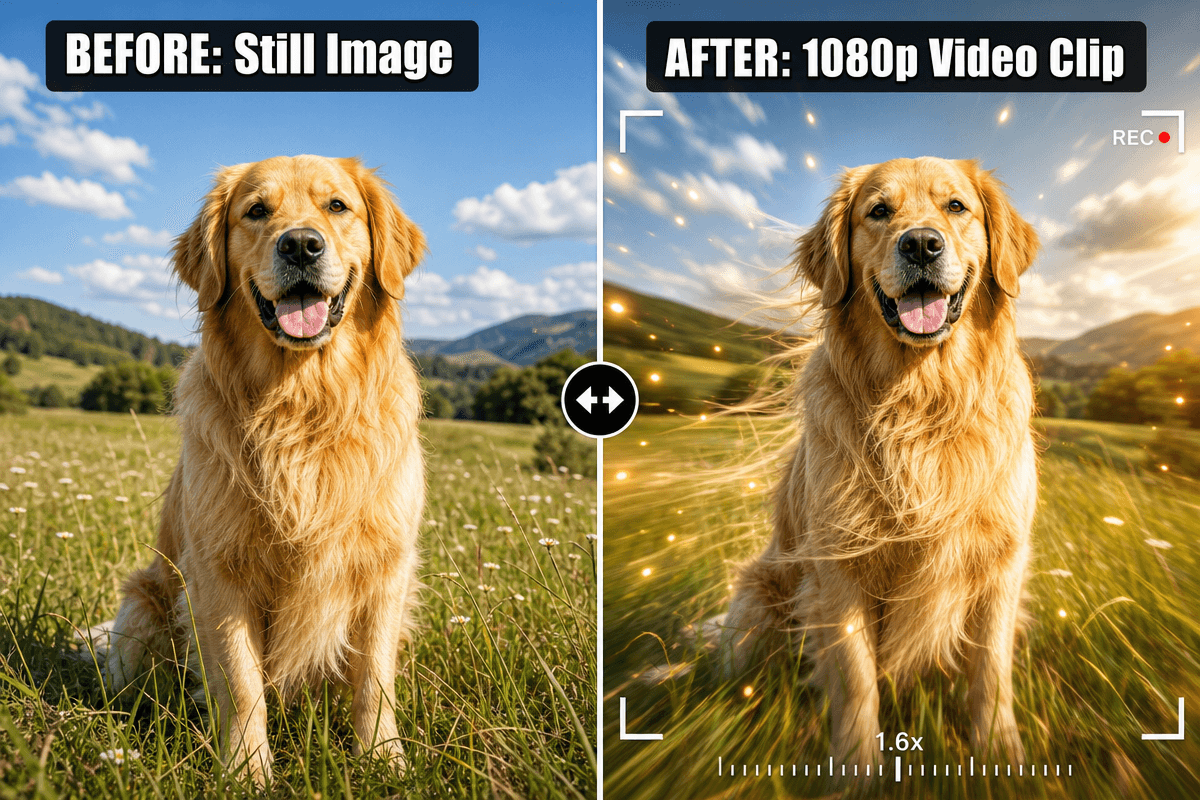
A free AI video generator from image turns a still photo into a short animated clip. You upload the image, describe the motion, and the AI builds the movement frame by frame. With 1min.AI, you can do this with leading video models such as Kling, Veo 3.1, Seedance and Wan, and your finished clip has no watermark.
Most people searching for the best free AI video generator hit the same walls: tiny 3-second clips, silent output, watermarks, and no idea which model suits their photo. This guide fixes that. You will find the exact settings, a prompt formula, and a model chooser, so your first video looks right.
Key takeaways
- Upload one image, or a start and end frame, then describe the motion.
- Pick the model by image type: portrait, product, or illustration.
- Choose audio on or off before you generate.
- Keep prompts short and specific: subject, action, camera, light.
What Is a Free AI Video Generator From Image?
How Image to Video AI Works
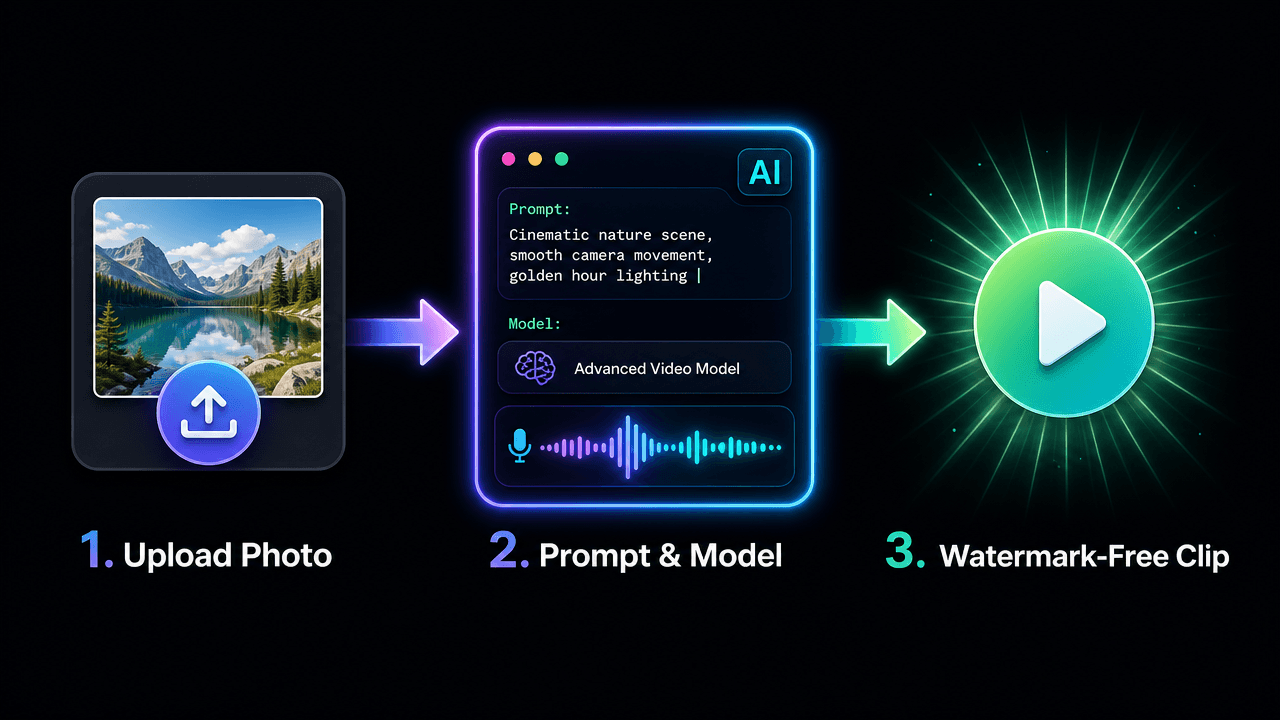
The model reads your photo’s subject, depth and lighting, then predicts how things would move. Your prompt steers the result: a slow zoom, drifting mist, hair in the wind. The better your prompt describes motion, the more natural the clip.
What “No Restrictions” Really Means Here
For creators, it means freedom to choose your own style, aspect ratio, models and start and end frames, without watermarks or rigid templates. It does not mean anything goes. Use images you own or have rights to, and keep content lawful and respectful.
Why Create Your Image Videos in 1min.AI
- Many models, one workspace: Switch between Kling, Veo, Seedance and Wan without juggling tools.
- Frame control: Several models accept a start and end image, so you decide how the shot begins and ends.
- Audio options: Generate sound with the video or add your own track.
- Clean exports: Your clip has no watermark, ready for social posts, ads and websites.
You can open AI Studio and start creating straight away, with no account setup. Create an account later only if you want History and Shared Zone. Our image to video generator is built for exactly this workflow.
Which Model Should You Choose?
Start with what you are animating and whether you need sound.
| Your goal | Best-fit model | Length | Audio |
|---|---|---|---|
| Portrait or character with natural motion | Kling 2.5 or Kling 3.0 | 5 or 10 sec (2.5), 3 to 15 sec (3.0) | Kling 3.0 |
| Cinematic shot with sound | Veo 3.1 | 8 sec fixed | Yes |
| Product video with rich detail | Seedance 2.0 / 2.5 | 4 to 15 sec (2.5 up to 30) | Yes |
| Illustration, cartoon, lip sync | Wan 2.7 | 2 to 15 sec | Yes, plus custom audio |
Portraits and Characters
Kling handles faces and body motion smoothly. Use Kling 2.5 when you want a start and end frame, or Kling 3.0 for longer clips and multi-shot storytelling.
Product Photos
Seedance suits clean product movement. See it in action:
Cartoons and Illustrations
Wan 2.7 supports first-frame, first-and-last-frame and video continuation modes, which is handy for stylized art.
How to Turn an Image Into a Video: Step by Step
Prefer to watch first? Here is a quick walkthrough:
Step 1: Prepare Your Image
Use a sharp image with a clear subject. No photo yet? Create one with the AI image generator and animate it right after.
Step 2: Open Image to Video and Select a Model
Go to Image to Video in 1min.AI, choose your model, and upload your image.
Step 3: Apply the Recommended Settings
Kling 1.6 to 2.5
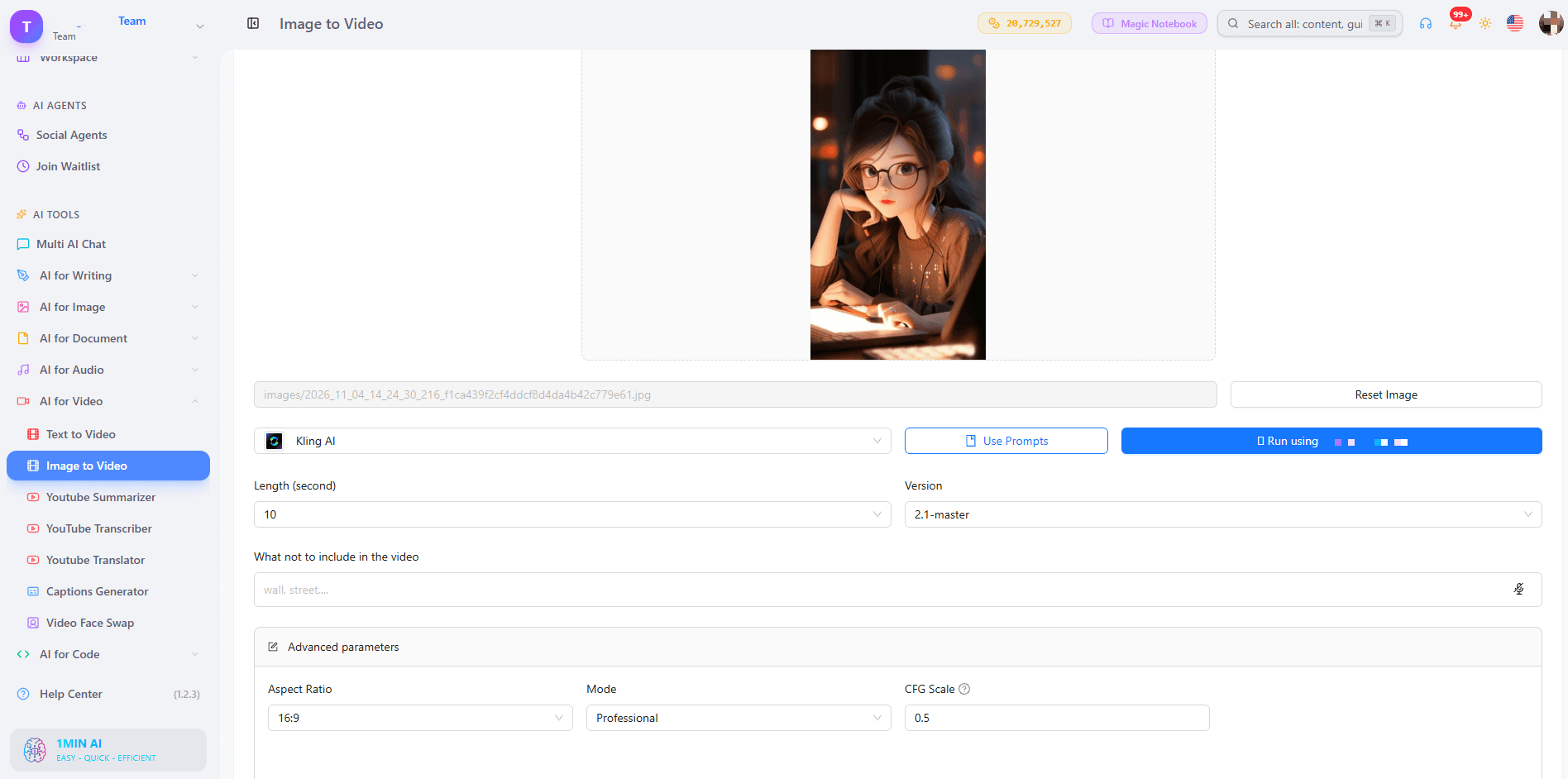
- Mode: Standard for quick drafts, Professional for your final version.
- CFG Scale: Keep 0.5. Raise it slightly only if the AI ignores your prompt.
- Length: 5 seconds for one simple motion, 10 seconds for a small story.
- Negative prompt: blurry, distorted face, extra fingers, warped hands, flickering, jitter, text, low resolution
- Frames: Versions before 2.5 take one image. Kling 2.5 takes a start and end frame. Use two photos of the same subject with different poses or camera positions.
Kling 3.0 and 3.0 Omni
- Length: 3 to 15 seconds.
- Generate audio: On when the scene has ambient sound or speech.
- Multi-shot: Up to 6 shots, each with its own prompt and 3 to 14 second duration. Total must stay within 15 seconds.
- Resolution (Omni): 720p to test, 1080p to finalize.
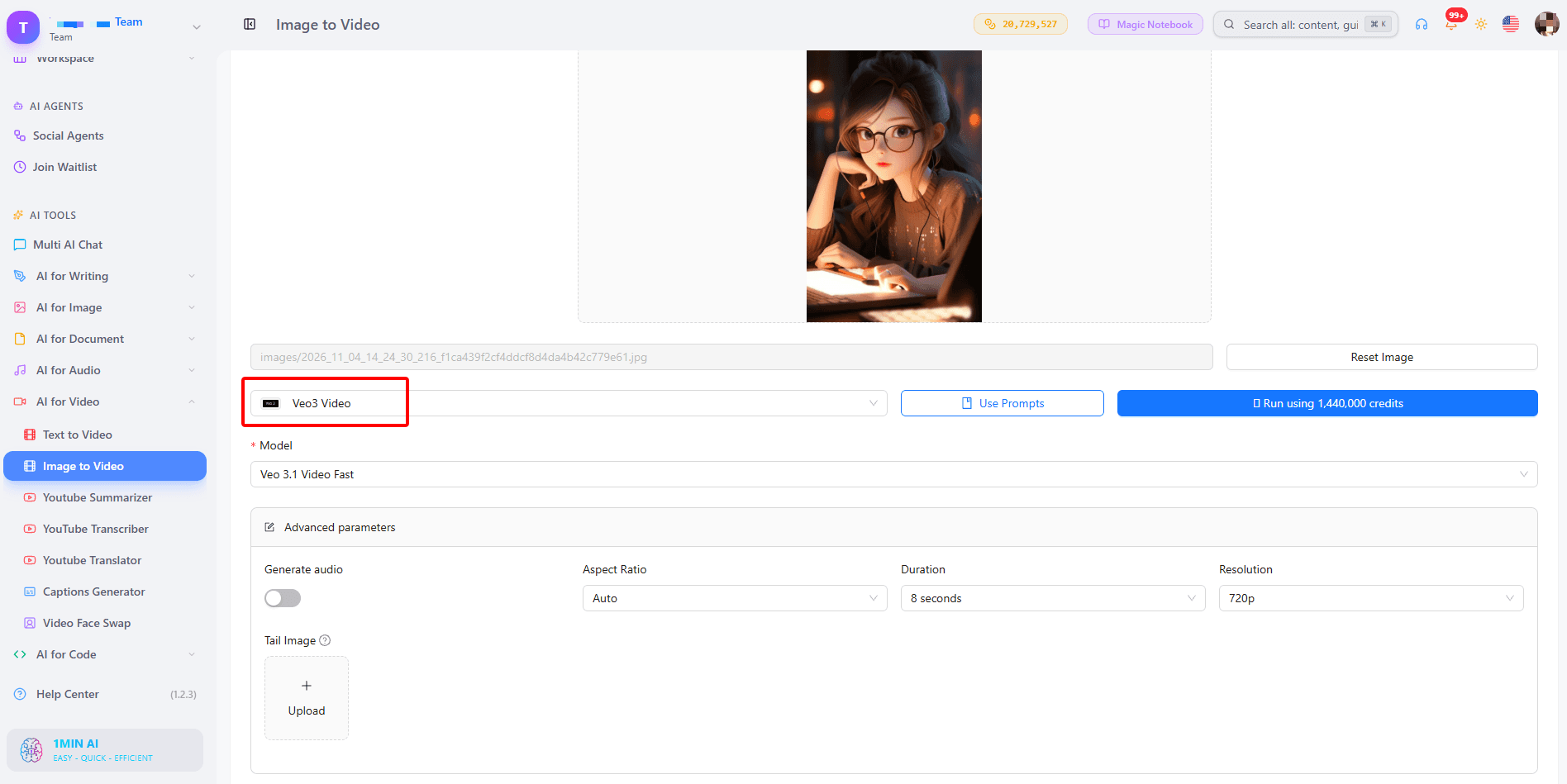
Veo 3.1 and Veo 3
- Duration: Fixed at 8 seconds.
- Resolution: 720p for tests, 1080p for the final clip.
- Aspect ratio: 9:16 for Reels and Shorts, 16:9 for YouTube, Auto to follow your image.
- Generate audio: Turn it on for scenes with sound such as waves, city noise or footsteps.
- Tail image (3.1 only): Upload the same subject and background in the pose you want at the end. Veo 3 has no tail image field. Learn more in our guide to Veo 3.1 video generation.
Seedance 2.0 and 2.5
- Frames: First frame only, or first and last frame.
- Duration: 4 to 15 seconds (up to 30 on 2.5).
- Seed: Leave empty for variety. Enter a number only when you want to reproduce a result you liked.
- Dialogue and sound effects: Turn on for videos that need voices or ambience.
Wan 2.7
- Mode: First-frame, first and last frame, or video continuation.
- Duration: 2 to 15 seconds.
- Custom audio: WAV or MP3, 2 to 30 seconds, up to 15MB. With audio, the model uses it for lip sync and timing. Without it, the model creates matching sound.
Step 4: Generate, Review and Download
Preview the result, adjust one thing at a time (prompt, mode or seed), and download your favorite version.
Do You Need Audio in Your Video?
Built-in Sound
Veo 3.1, Kling 3.0, Seedance and Wan 3.0 can generate sound together with the picture, so a stormy beach actually sounds stormy.
Your Own Audio
Wan 2.7 lets you upload a voice or music file to drive lip sync and timing. If your audio is shorter than the video, the rest stays silent, so match the lengths.
A Simple Prompt Formula That Works
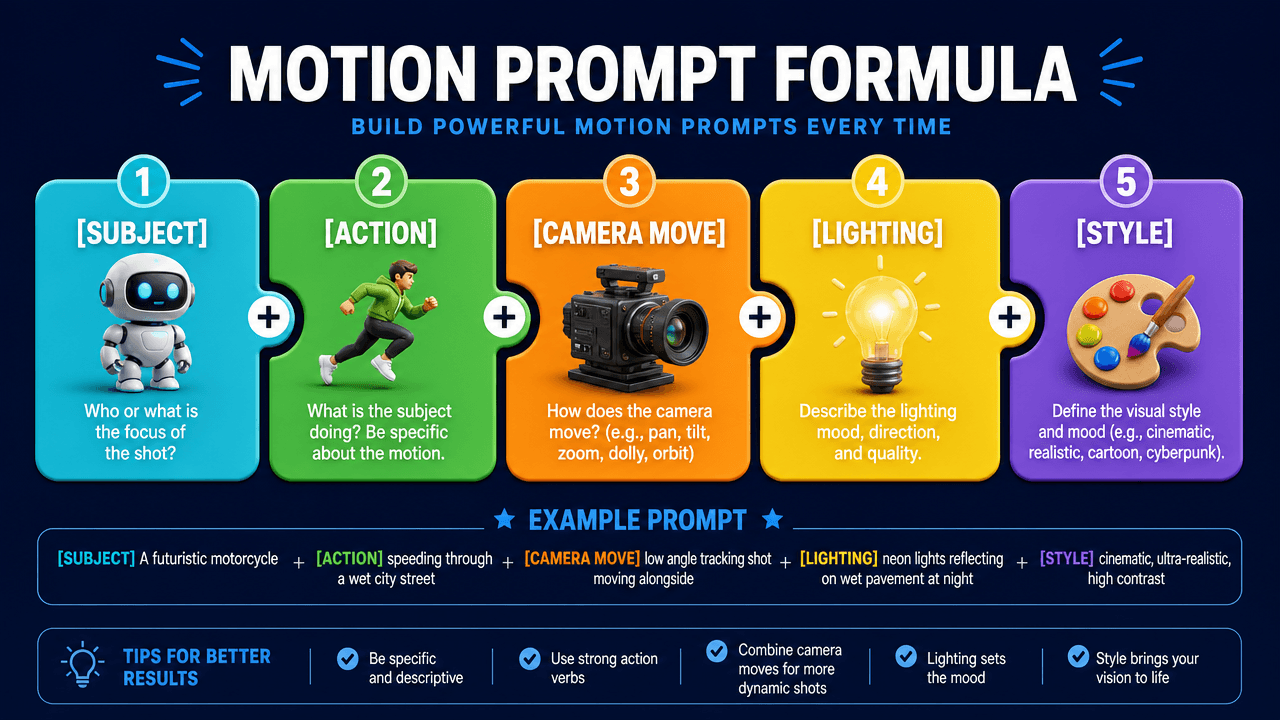
Use: Subject + action + camera move + lighting + style.
- Portrait: “A woman turns toward the camera and smiles, slow push-in, soft golden hour light, cinematic.”
- Product: “A perfume bottle rotates slowly on a marble table, light sweeps across the glass, macro shot.”
- Landscape: “Mist drifts across a calm lake at sunrise, camera stays still, gentle ripples.”
- Illustration: “The hero’s cape flutters as clouds roll past, slow pan right, painterly style.”
Avoid stacking many actions. One clear movement gives the cleanest result.
What Can You Make With It?
- Social media creators: Turn selfies and posts into Reels, Shorts and TikTok clips.
- Marketers and small businesses: Animate product photos for ads and landing pages.
- Storytellers: Bring characters and scenes to life. Create them first with the AI text to video tool when you have an idea but no image yet.
- Real estate agents: Convert listing photos into cinematic walk-through teasers.
Trusted by Creators Worldwide
1min.AI is recognized on SourceForge, Slashdot, Capterra, Software Advice and GetApp, and holds an Excellent rating on Trustpilot.
FAQs
Is there a free AI video generator from image with no watermark?
Yes. In 1min.AI you can try image to video free and download your clip without a watermark.
Can I use it without login or sign up?
You can open AI Studio and start creating without registering. History and Shared Zone need an account.
Can I generate unlimited videos?
Each model and duration uses a different amount of credits, so shorter 5 second tests let you try more ideas before you commit to a longer final clip.
Which model is best for image to video with audio?
Veo 3.1 is a strong all-round pick for cinematic scenes with sound. Kling 3.0 and Seedance also generate audio, and Wan 2.7 supports your own audio file.
How long can the video be?
It depends on the model: 5 or 10 seconds on Kling 2.5, 8 seconds on Veo 3.1, 4 to 15 seconds on Seedance 2.0, and up to 30 seconds on Seedance 2.5.
What is the best image type for good results?
Sharp, well-lit images with one clear subject animate best. Busy backgrounds and blurry faces can cause flicker.
Ready to Bring Your Image to Life?
Pick a photo, write one clear motion prompt, and let 1min.AI do the rest.
- #Transaction
ਬਦਲ
1minAI ਦੇ ਵਧੀਆ ਬਦਲ ਲੱਭੋ ਅਤੇ ਵਿਸ਼ੇਸ਼ਤਾਵਾਂ, ਕੀਮਤ ਅਤੇ ਵਰਤੋਂ ਦੇ ਮਾਮਲਿਆਂ ਦੀ ਤੁਲਨਾ ਕਰੋ।

1min.AI ਬਨਾਮ OpenRouter
1min.AI ਬਨਾਮ OpenRouter: ਤਿਆਰ-ਤੋਂ-ਵਰਤਣ ਯੋਗ AI ਕ੍ਰਿਏਸ਼ਨ ਪ੍ਰੋਡਕਟ ਦੀ ਤਕਨੀਕੀ API ਟੂਲ ਨਾਲ ਤੁਲਨਾ ਕਰੋ। ਜਾਣੋ ਕਿ ਤੁਹਾਨੂੰ ਜ਼ੀਰੋ-ਕੋਡ ਕ੍ਰਿਏਟਿਵ ਸਟੂਡੀਓ ਦੀ ਲੋੜ ਹੈ ਜਾਂ ਕੋਡਿੰਗ ਇਨਫ੍ਰਾਸਟ੍ਰਕਚਰ ਹਬ ਦੀ।
 Ngoc Hong

1min AI vs Buffer
Compare 1min.AI vs Buffer for Facebook content creation, AI writing, image generation, scheduling, pricing, and everyday marketing workflows.
Ngoc Hong
1min.AI vs. Hootsuite: Which Social Media Tool Fits Your Workflow?
Compare 1min.AI vs. Hootsuite to explore their AI content creation, social media publishing, analytics, pricing, and collaboration features. Find the right tool for your workflow.
AI ਟੂਲਜ਼
ਉਤਪਾਦਕਤਾ, ਰਚਨਾਤਮਕਤਾ ਅਤੇ ਰੋਜ਼ਾਨਾ ਦੇ ਕੰਮ ਨੂੰ ਵਧਾਉਣ ਲਈ ਵਧੀਆ AI ਟੂਲਜ਼ ਖੋਜੋ।

ਸਟਾਰਟਅੱਪ ਫਾਊਂਡਰਾਂ ਲਈ 4 ਸਭ ਤੋਂ ਕਿਫਾਇਤੀ AI ਟੂਲ
ਸਟਾਰਟਅੱਪ ਫਾਊਂਡਰਾਂ ਲਈ ਵਿਚਾਰਾਂ ਦੀ ਪੁਸ਼ਟੀ ਕਰਨ, ਉਤਪਾਦ ਬਣਾਉਣ, ਸਮੱਗਰੀ ਬਣਾਉਣ ਅਤੇ ਤੇਜ਼ੀ ਨਾਲ ਲਾਂਚ ਕਰਨ ਲਈ 4 ਸਭ ਤੋਂ ਕਿਫਾਇਤੀ AI ਟੂਲਾਂ ਬਾਰੇ ਜਾਣੋ, ਉਹ ਵੀ ਬਜਟ ਤੋਂ ਵੱਧ ਖਰਚ ਕੀਤੇ ਬਿਨਾਂ।
 Tram Ta

POV: ਤੁਹਾਨੂੰ ਹਰ ਰੋਜ਼ 10+ ਪੋਸਟਾਂ ਬਣਾਉਣੀਆਂ ਹਨ
ਸਿੱਖੋ ਕਿ AI ਬ੍ਰੇਨਸਟਾਰਮਿੰਗ, ਇਮੇਜ ਜਨਰੇਸ਼ਨ, ਅਤੇ ਕਨਟੈਂਟ ਬਣਾਉਣ ਦੀ ਮਦਦ ਨਾਲ ਕਨਟੈਂਟ ਕ੍ਰੀਏਟਰਾਂ ਲਈ ਹਰ ਰੋਜ਼ 10+ ਸੋਸ਼ਲ ਮੀਡੀਆ ਪੋਸਟਾਂ ਤੇਜ਼ੀ ਨਾਲ ਬਣਾਉਣ ਵਾਲਾ AI ਕਨਟੈਂਟ ਵਰਕਫ਼ਲੋ ਕਿਵੇਂ ਬਣਾਇਆ ਜਾਵੇ।
 Lien Anh Vu

“ਇਸਨੂੰ ਹੋਰ ਵਧੀਆ ਬਣਾਓ” ਨੂੰ AI ਨਾਲ ਹੋਰ ਵਧੀਆ ਕੰਟੈਂਟ ਵਿੱਚ ਬਦਲੋ
AI ਦੀ ਵਰਤੋਂ ਕਰਕੇ ਧੁੰਦਲੇ ਕਲਾਇੰਟ ਫੀਡਬੈਕ ਨੂੰ ਸਪਸ਼ਟ ਰੀਵਿਜ਼ਨ ਵਿੱਚ ਬਦਲੋ, ਬੇਲੋੜੀਆਂ ਐਡੀਟਾਂ ਘਟਾਓ, ਅਤੇ ਬਿਹਤਰ ਕੰਟੈਂਟ ਤੇਜ਼ੀ ਨਾਲ ਡਿਲੀਵਰ ਕਰੋ।
Lien Anh VuAI ਫੀਚਰ
ਵਿਆਪਕ AI ਫੀਚਰ ਜੋ ਕੰਮ ਦੀਆਂ ਪ੍ਰਕਿਰਿਆਵਾਂ ਨੂੰ ਸਧਾਰਨ ਬਣਾਉਂਦੇ, ਕਾਰਗੁਜ਼ਾਰੀ ਸੁਧਾਰਦੇ ਅਤੇ ਟੀਮਾਂ ਨੂੰ ਹੋਰ ਉਪਲਬਧੀਆਂ ਹਾਸਲ ਕਰਨ ਲਈ ਸਮਰੱਥ ਬਣਾਉਂਦੇ ਹਨ।

1minAI: ਮੁਫ਼ਤ AI ਗ੍ਰੈਮਰ ਚੈੱਕਰ
1minAI ਦੇ AI ਗ੍ਰੈਮਰ ਚੈੱਕਰ ਨਾਲ ਮੁਫ਼ਤ ਗ੍ਰੈਮਰ ਚੈੱਕ ਕਰੋ। ਗ੍ਰੈਮਰ, ਸਪੈਲਿੰਗ ਅਤੇ ਲਿਖਤ ਦੀਆਂ ਗਲਤੀਆਂ ਲੱਭੋ, ਸਪਸ਼ਟਤਾ ਸੁਧਾਰੋ, ਅਤੇ ਆਪਣੀ ਸਮੱਗਰੀ ਨੂੰ ਸਕਿੰਟਾਂ ਵਿੱਚ ਪਾਲਿਸ਼ ਕਰੋ।
Tram Ta
1min.AI ਨਾਲ ਪੋਰਟਫੋਲਿਓ ਵੈੱਬਸਾਈਟ ਹੋਰ ਤੇਜ਼ੀ ਨਾਲ ਬਣਾਓ
ਸਿੱਖੋ ਕਿ ਫ੍ਰੀਲਾਂਸ ਕ੍ਰੀਏਟਿਵ ਲੋਕ 1min.AI ਦੀ ਵਰਤੋਂ ਕਰਕੇ ਕਿਵੇਂ ਯੋਜਨਾ ਬਣਾਉਣ, ਲਿਖਣ, ਡਿਜ਼ਾਈਨ ਕਰਨ ਅਤੇ ਪੇਸ਼ੇਵਰ ਪੋਰਟਫੋਲਿਓ ਵੈੱਬਸਾਈਟ ਤੇਜ਼ੀ ਨਾਲ ਤਿਆਰ ਕਰਨ, ਭਾਵੇਂ ਉਹਨਾਂ ਕੋਲ ਮਜ਼ਬੂਤ ਕੋਡਿੰਗ ਹੁਨਰ ਨਾ ਵੀ ਹੋਣ।
Lien Anh Vu
ਮੁਫਤ AI X ਟਿੱਪਣੀ
ਸਾਡੇ AI-ਪਾਵਰਡ ਟਵਿੱਟਰ ਟਿੱਪਣੀ ਜਨਰੇਟਰ ਨਾਲ ਟਵਿੱਟਰ ਲਈ ਮਜ਼ਾਕੀਆ, ਸਮਝਦਾਰ ਜਾਂ ਡੂੰਘੀਆਂ ਟਿੱਪਣੀਆਂ ਬਣਾਓ। ਆਪਣੀ ਰੁਝੇਵੇਂ ਨੂੰ ਵਧਾਓ ਅਤੇ ਭੀੜ ਵਿੱਚ ਵੱਖਰੇ ਨਜ਼ਰ ਆਓ!
 Trang Tran
ਏਆਈ ਉਪਯੋਗ ਮਾਮਲੇ
ਵਪਾਰ, ਉਤਪਾਦਕਤਾ ਅਤੇ ਉਦਯੋਗ-ਖਾਸ ਐਪਲੀਕੇਸ਼ਨਾਂ ਲਈ ਚੁਣੀ ਹੋਈ ਏਆਈ ਉਪਯੋਗ ਮਾਮਲਿਆਂ ਦੀ ਸੰਗ੍ਰਹਿ

ਇੰਸਟਾਗ੍ਰਾਮ 'ਤੇ ਪੋਸਟ ਕਰਨ ਦਾ ਸਭ ਤੋਂ ਵਧੀਆ ਸਮਾਂ: ਵਧੀਆ ਐਨਗੇਜਮੈਂਟ ਲਈ ਇੱਕ ਪ੍ਰਯੋਗਿਕ ਗਾਈਡ
ਇੰਸਟਾਗ੍ਰਾਮ 'ਤੇ ਪੋਸਟ ਕਰਨ ਦਾ ਸਭ ਤੋਂ ਵਧੀਆ ਸਮਾਂ ਜਾਣੋ, ਵੱਖ-ਵੱਖ ਦਰਸ਼ਕਾਂ ਲਈ ਸਭ ਤੋਂ ਵਧੀਆ ਦਿਨ ਤੇ ਸਮੇਂ ਸਮੇਤ, ਨਾਲ ਹੀ ਆਪਣੇ ਅਕਾਊਂਟ ਲਈ ਆਦਰਸ਼ ਪੋਸਟਿੰਗ ਸ਼ਡਿਊਲ ਲੱਭਣ ਦੇ ਟਿੱਪਸ।
Tram Ta1min.AI ਨਾਲ ਪੋਰਟਫੋਲਿਓ ਵੈੱਬਸਾਈਟ ਹੋਰ ਤੇਜ਼ੀ ਨਾਲ ਬਣਾਓ
ਸਿੱਖੋ ਕਿ ਫ੍ਰੀਲਾਂਸ ਕ੍ਰੀਏਟਿਵ ਲੋਕ 1min.AI ਦੀ ਵਰਤੋਂ ਕਰਕੇ ਕਿਵੇਂ ਯੋਜਨਾ ਬਣਾਉਣ, ਲਿਖਣ, ਡਿਜ਼ਾਈਨ ਕਰਨ ਅਤੇ ਪੇਸ਼ੇਵਰ ਪੋਰਟਫੋਲਿਓ ਵੈੱਬਸਾਈਟ ਤੇਜ਼ੀ ਨਾਲ ਤਿਆਰ ਕਰਨ, ਭਾਵੇਂ ਉਹਨਾਂ ਕੋਲ ਮਜ਼ਬੂਤ ਕੋਡਿੰਗ ਹੁਨਰ ਨਾ ਵੀ ਹੋਣ।
Lien Anh Vu“ਇਸਨੂੰ ਹੋਰ ਵਧੀਆ ਬਣਾਓ” ਨੂੰ AI ਨਾਲ ਹੋਰ ਵਧੀਆ ਕੰਟੈਂਟ ਵਿੱਚ ਬਦਲੋ
AI ਦੀ ਵਰਤੋਂ ਕਰਕੇ ਧੁੰਦਲੇ ਕਲਾਇੰਟ ਫੀਡਬੈਕ ਨੂੰ ਸਪਸ਼ਟ ਰੀਵਿਜ਼ਨ ਵਿੱਚ ਬਦਲੋ, ਬੇਲੋੜੀਆਂ ਐਡੀਟਾਂ ਘਟਾਓ, ਅਤੇ ਬਿਹਤਰ ਕੰਟੈਂਟ ਤੇਜ਼ੀ ਨਾਲ ਡਿਲੀਵਰ ਕਰੋ।
Lien Anh VuAI ਟਿਊਟੋਰਿਅਲਸ
ਪ੍ਰੈਕਟੀਕਲ, ਕਦਮ-ਦਰ-ਕਦਮ ਟਿਊਟੋਰਿਅਲਸ ਨਾਲ AI ਦੀ ਵਰਤੋਂ ਕਿਵੇਂ ਕਰਨੀ ਹੈ ਸਿੱਖੋ।

2026 ਵਿੱਚ ਬਲੈਕ ਫ੍ਰਾਈਡੇ AI ਟੂਲ ਡੀਲਾਂ
ਪਤਾ ਕਰੋ ਕਿ 2026 ਦੀਆਂ ਬਲੈਕ ਫ੍ਰਾਈਡੇ AI ਟੂਲ ਡੀਲਾਂ ਵਿੱਚ ਕੀ ਕੁਝ ਹੈ। ਜਾਣੋ ਕਿ AppSumo, Dealify, Stack Social ਰਾਹੀਂ 1min.AI ਲਾਈਫਟਾਈਮ ਡੀਲ ਕਿਵੇਂ ਲੈਣੀ ਹੈ, ਅਤੇ Trustpilot, Slashdot, ਤੇ Software Advice 'ਤੇ ਕਿਵੇਂ ਤਸਦੀਕ ਕਰਨੀ ਹੈ。
 Hang Nguyen

1minAI Face Swap ਨਾਲ $0 ਵਿੱਚ ਫੈਸ਼ਨ ਵੀਕ ਦਾ ਅਨੁਭਵ ਕਰੋ
1minAI Face Swap ਨਾਲ $0 ਵਿੱਚ ਫੈਸ਼ਨ ਵੀਕ ਦਾ ਅਨੁਭਵ ਕਰੋ। ਆਪਣੀ ਫੋਟੋ ਅੱਪਲੋਡ ਕਰੋ, ਫੈਸ਼ਨ ਵੀਕ ਦਾ ਵੀਡੀਓ ਚੁਣੋ, ਅਤੇ ਆਪਣਾ AI ਫੈਸ਼ਨ ਮੋਮੈਂਟ ਬਣਾਓ।
Ngoc Hong
ਮਿੰਟਾਂ ਵਿੱਚ ਵਾਇਰਲ ਰੀਲਜ਼: ਵਿਅੰਗਾਤਮਕ ਵੋਇਸਓਵਰ ਲਈ 1minAI ਦੇ ਟੈਕਸਟ-ਟੂ-ਸਪੀਚ ਦੀ ਵਰਤੋਂ ਕਿਵੇਂ ਕਰੀਏ
ਸਿੱਖੋ ਕਿ ਵਿਅੰਗ ਪੇਜ ਐਡਮਿਨ TikToks, Shorts, ਅਤੇ Instagram Reels ਲਈ ਤੁਰੰਤ ਨਿਊਜ਼ ਐਂਕਰ ਅਤੇ ਡਰਾਮੇਟਿਕ ਵੋਇਸਓਵਰ ਬਣਾਉਣ ਲਈ 1minAI ਦੀ ਟੈਕਸਟ-ਟੂ-ਸਪੀਚ ਫੀਚਰ ਦੀ ਵਰਤੋਂ ਕਿਵੇਂ ਕਰਦੇ ਹਨ।
AI ਗਾਈਡਾਂ
ਵਿਹਾਰਕ ਗਾਈਡਾਂ, ਅਸਲ-ਸੰਸਾਰ ਦੀਆਂ ਉਦਾਹਰਣਾਂ, ਅਤੇ ਕਾਰਜਸ਼ੀਲ ਵਧੀਆ ਅਭਿਆਸਾਂ ਨਾਲ AI ਨੂੰ ਤੇਜ਼ੀ ਨਾਲ ਸਿੱਖੋ।

AI ਟੂਲ ਆਨਲਾਈਨ ਸੁਰੱਖਿਅਤ ਢੰਗ ਨਾਲ ਖਰੀਦੋ: 2026 ਬਲੈਕ ਫ੍ਰਾਈਡੇ ਗਾਈਡ
ਜਾਣੋ ਕਿ ਸਭ ਤੋਂ ਵਧੀਆ ਬਲੈਕ ਫ੍ਰਾਈਡੇ AI ਡੀਲਾਂ ਆਨਲਾਈਨ ਕਿਵੇਂ ਲੱਭਣੀਆਂ ਤੇ ਸੁਰੱਖਿਅਤ ਕਰਣੀਆਂ ਹਨ। ਸਕੈਮਾਂ ਤੋਂ ਬਚਣ, ਸਬਸਕ੍ਰਿਪਸ਼ਨ ਥਕਾਵਟ ਨਾਲ ਨਜਿੱਠਣ, ਅਤੇ ਸਾਫਟਵੇਅਰ ਦੀ ਪੁਸ਼ਟੀ ਕਰਨ ਲਈ ਮਾਹਰ ਰਣਨੀਤੀਆਂ ਸਿੱਖੋ।
Hang Nguyen
ਸ਼ੁਰੂ ਤੋਂ ਬਣਾਏ ਬਿਨਾਂ AI ਕਾਰੋਬਾਰ ਕਿਵੇਂ ਸ਼ੁਰੂ ਕਰੀਏ
AI ਕਾਰੋਬਾਰ ਸ਼ੁਰੂ ਕਰਨਾ, ਆਪਣੇ ਵਿਚਾਰ ਦੀ ਪੁਸ਼ਟੀ ਕਰਨਾ, ਅਤੇ ਸ਼ੁਰੂ ਤੋਂ ਮਹਿੰਗੀ AI ਇਨਫ੍ਰਾਸਟਰੱਕਚਰ ਬਣਾਏ ਬਿਨਾਂ ਤੇਜ਼ੀ ਨਾਲ ਲਾਂਚ ਕਰਨਾ ਸਿੱਖੋ।
Ngoc Hong
AI Fashion Video Generator With Seedance 2.5 and HeyGen
Learn how to create AI fashion videos with Seedance 2.5 and HeyGen. Turn outfit photos into cinematic videos featuring your own face with 1min.AI.
Lien Anh VuAI ਹੱਲ
ਆਟੋਮੇਸ਼ਨ, ਕੋਡਿੰਗ, ਖੋਜ, ਉਤਪਾਦਕਤਾ, ਗਾਹਕ ਸਹਾਇਤਾ, ਮਾਰਕੀਟਿੰਗ, ਅਤੇ ਵਪਾਰਕ ਵਰਕਫਲੋ ਲਈ ਸਭ ਤੋਂ ਵਧੀਆ AI ਹੱਲ ਵੇਖੋ।

ਮੁਫ਼ਤ ਏਆਈ ਟੈਟੂ ਜਨਰੇਟਰ: ਕਸਟਮ ਡਿਜ਼ਾਈਨ
1min.AI ਦੇ ਮੁਫ਼ਤ ਏਆਈ ਟੈਟੂ ਜਨਰੇਟਰ ਨਾਲ ਕਿਸੇ ਵੀ ਵਿਚਾਰ ਨੂੰ ਕਸਟਮ ਟੈਟੂ ਡਿਜ਼ਾਈਨ ਵਿੱਚ ਬਦਲੋ। ਆਪਣਾ ਵਿਚਾਰ ਵਰਣਨ ਕਰੋ, ਇਕ ਸਟਾਈਲ ਚੁਣੋ, ਅਤੇ ਸਕਿੰਟਾਂ ਵਿੱਚ ਡਾਊਨਲੋਡ ਕਰੋ।
Trang TranAI ਟੂਲ ਆਨਲਾਈਨ ਸੁਰੱਖਿਅਤ ਢੰਗ ਨਾਲ ਖਰੀਦੋ: 2026 ਬਲੈਕ ਫ੍ਰਾਈਡੇ ਗਾਈਡ
ਜਾਣੋ ਕਿ ਸਭ ਤੋਂ ਵਧੀਆ ਬਲੈਕ ਫ੍ਰਾਈਡੇ AI ਡੀਲਾਂ ਆਨਲਾਈਨ ਕਿਵੇਂ ਲੱਭਣੀਆਂ ਤੇ ਸੁਰੱਖਿਅਤ ਕਰਣੀਆਂ ਹਨ। ਸਕੈਮਾਂ ਤੋਂ ਬਚਣ, ਸਬਸਕ੍ਰਿਪਸ਼ਨ ਥਕਾਵਟ ਨਾਲ ਨਜਿੱਠਣ, ਅਤੇ ਸਾਫਟਵੇਅਰ ਦੀ ਪੁਸ਼ਟੀ ਕਰਨ ਲਈ ਮਾਹਰ ਰਣਨੀਤੀਆਂ ਸਿੱਖੋ।
Hang Nguyen1minAI Face Swap ਨਾਲ $0 ਵਿੱਚ ਫੈਸ਼ਨ ਵੀਕ ਦਾ ਅਨੁਭਵ ਕਰੋ
1minAI Face Swap ਨਾਲ $0 ਵਿੱਚ ਫੈਸ਼ਨ ਵੀਕ ਦਾ ਅਨੁਭਵ ਕਰੋ। ਆਪਣੀ ਫੋਟੋ ਅੱਪਲੋਡ ਕਰੋ, ਫੈਸ਼ਨ ਵੀਕ ਦਾ ਵੀਡੀਓ ਚੁਣੋ, ਅਤੇ ਆਪਣਾ AI ਫੈਸ਼ਨ ਮੋਮੈਂਟ ਬਣਾਓ।
Ngoc HongAI ਮਾਡਲ
ਦੁਨੀਆ ਦੇ ਪ੍ਰਮੁੱਖ AI ਮਾਡਲਾਂ ਨੂੰ ਇੱਕ ਥਾਂ 'ਤੇ ਖੋਜੋ।

Free AI Chat With Claude Fable 5.2 On 1min.AI
Free AI chat with Claude Fable 5.2 on 1min.AI. Compare Fable 5.2 vs Opus 5.5, see Fable 5.2 benchmarks, and start chatting in minutes.
Trang Tran
GPT-6.2 Sol: Specs, Pricing & Free Access
Explore GPT-6.2 Sol specs, pricing, and how it compares with GPT-6.1 Sol and Claude Opus 5.5, then try it free in 1min.AI Multi AI Chat.
Trang Tran
GPT 6.2 Astra: Pricing, Benchmarks & Free Access
GPT 6.2 Astra release date, pricing, Reddit feedback and Opus 5.5 comparison. See what it does best and chat with it on 1min.AI for free.
Trang TranAI ਤੁਲਨਾਵਾਂ
ਆਪਣੀਆਂ ਲੋੜਾਂ ਲਈ ਸਭ ਤੋਂ ਵਧੀਆ AI ਸਾਧਨਾਂ, ਮਾਡਲਾਂ ਅਤੇ ਪਲੇਟਫਾਰਮਾਂ ਨੂੰ ਲੱਭਣ ਲਈ ਤੁਲਨਾ ਕਰੋ।

Gemini 4 Neon vs Hydrogen: Specs, Price & Picks
Gemini 4 Neon vs Hydrogen, Carbon and Argon: compare price, benchmarks and use cases to pick the right model, then test them side by side on 1min.AI.
Trang Tran
Kling AI ਬਨਾਮ Veo 3: ਕਿਹੜਾ ਮਾਡਲ ਜਿੱਤਦਾ ਹੈ?
Kling AI ਬਨਾਮ Veo 3: ਮੋਸ਼ਨ, ਨੇਟਿਵ ਆਡੀਓ, ਕੀਮਤਾਂ ਅਤੇ ਮੁਫ਼ਤ ਟੀਅਰਾਂ ਦੀ ਤੁਲਨਾ ਕਰੋ ਤਾਂ ਜੋ ਪਤਾ ਲੱਗੇ ਕਿ ਤੁਹਾਡੇ ਪ੍ਰੋਜੈਕਟ ਲਈ ਕਿਹੜਾ AI ਵੀਡੀਓ ਜੈਨਰੇਟਰ ਵਧੀਆ ਹੈ - 1min.AI 'ਤੇ ਦੋਵੇਂ ਅਜ਼ਮਾਓ।
Trang Tran
DeepSeek V4 Pro ਵਿ. Flash ਤੁਲਨਾ
DeepSeek V4 Pro ਵਿ. DeepSeek V4 Flash ਮੈਟ੍ਰਿਕਸ ਦੀ ਤੁਲਨਾ ਕਰੋ। ਆਪਣੇ agentic apps ਨੂੰ optimize ਕਰੋ ਅਤੇ ਅੱਜ ਹੀ 1min.ai 'ਤੇ AI fact checking ਸੁਧਾਰੋ।
Ngoc Hongਏਆਈ ਏਕੀਕਰਨ
ਸੁਗਮ ਤਰੀਕੇ ਨਾਲ ਆਪਣੀਆਂ ਮੌਜੂਦਾ ਟੂਲਾਂ ਨਾਲ ਏਆਈ ਨੂੰ ਇਕੀਕ੍ਰਿਤ ਕਰੋ ਤਾਂ ਕਿ ਕੰਮ ਆਟੋਮੇਟ ਹੋਵੇ ਅਤੇ ਉਤਪਾਦਕਤਾ ਵਧੇ।
POV: ਤੁਹਾਨੂੰ ਹਰ ਰੋਜ਼ 10+ ਪੋਸਟਾਂ ਬਣਾਉਣੀਆਂ ਹਨ
ਸਿੱਖੋ ਕਿ AI ਬ੍ਰੇਨਸਟਾਰਮਿੰਗ, ਇਮੇਜ ਜਨਰੇਸ਼ਨ, ਅਤੇ ਕਨਟੈਂਟ ਬਣਾਉਣ ਦੀ ਮਦਦ ਨਾਲ ਕਨਟੈਂਟ ਕ੍ਰੀਏਟਰਾਂ ਲਈ ਹਰ ਰੋਜ਼ 10+ ਸੋਸ਼ਲ ਮੀਡੀਆ ਪੋਸਟਾਂ ਤੇਜ਼ੀ ਨਾਲ ਬਣਾਉਣ ਵਾਲਾ AI ਕਨਟੈਂਟ ਵਰਕਫ਼ਲੋ ਕਿਵੇਂ ਬਣਾਇਆ ਜਾਵੇ।
Lien Anh Vu
AI ਐਪਾਂ ਵਿਚਕਾਰ ਬਦਲਣਾ ਬੰਦ ਕਰੋ: AI ਇੰਟੀਗ੍ਰੇਸ਼ਨ ਨਿਯੋਗਤਾ ਬ੍ਰਾਂਡਿੰਗ ਨੂੰ ਕਿਵੇਂ ਬਦਲਦਾ ਹੈ
ਜਾਣੋ ਕਿ AI ਇੰਟੀਗ੍ਰੇਸ਼ਨ HR ਟੀਮਾਂ ਨੂੰ AI ਲਿਖਤ, ਦਸਤਾਵੇਜ਼, ਤਸਵੀਰਾਂ, ਵੀਡੀਓ ਅਤੇ ਕਈ AI ਮਾਡਲਾਂ ਨੂੰ ਇੱਕ ਹੀ ਵਰਕਸਪੇਸ ਵਿੱਚ ਜੋੜ ਕੇ ਨਿਯੋਗਤਾ ਬ੍ਰਾਂਡਿੰਗ ਨੂੰ ਸੁਚੱਜਾ ਬਣਾਉਣ ਵਿੱਚ ਕਿਵੇਂ ਮਦਦ ਕਰਦਾ ਹੈ।
Tram Ta
ਡਿਵੈਲਪਰਾਂ ਲਈ AI API ਐਗ੍ਰੀਗੇਟਰ ਦੀ ਵਿਆਖਿਆ
ਇੱਕ AI API ਐਗ੍ਰੀਗੇਟਰ ਡਿਵੈਲਪਰਾਂ ਨੂੰ ਕਈ AI ਮਾਡਲਾਂ ਨੂੰ ਕਾਲ ਕਰਨ ਲਈ ਇਕੋ ਇਕ ਸੰਯੁਕਤ API ਦਿੰਦਾ ਹੈ, ਜਿਸ ਨਾਲ ਇੰਟੀਗ੍ਰੇਸ਼ਨ ਸਮਾਂ ਅਤੇ ਵੇਂਡਰ ਲੌਕ-ਇਨ ਘੱਟ ਹੁੰਦੇ ਹਨ।
Trang Tranਉਦਯੋਗਾਂ ਲਈ AI
ਸਿਹਤ ਸੰਭਾਲ, ਵਿੱਤ, ਸਿੱਖਿਆ, ਕਾਨੂੰਨੀ, ਨਿਰਮਾਣ, ਪ੍ਰਚੂਨ, ਰੀਅਲ ਅਸਟੇਟ, ਅਤੇ ਹੋਰ ਬਹੁਤ ਕੁਝ ਲਈ ਵਧੀਆ AI ਸਾਧਨ ਅਤੇ ਕਾਰਜ ਪ੍ਰਵਾਹ ਲੱਭੋ।

Voice Cloning AI Free: How to Clone Any Voice Online in Minutes
Try voice cloning AI free with 1min.AI. Upload a 5-second clip, pick an ElevenLabs model, choose from 32 languages, and turn text to speech in your own voice.
Trang Tran
Free AI Image Editor With Prompt No Restrictions
Looking for a free AI image editor with prompt no restrictions? Edit backgrounds, objects and text by typing, no watermark. Try 1min.AI’s flexible editor now.
Trang Tran
Claude Personal Finance Setup and Safety Guide
Claude personal finance explained: how Personal Finance in Claude works and what Claude finance can see. Plus a safe CSV method for non-US users.
Trang TranAI ਏਜੰਟ
ਆਪਣੇ ਕੰਮ ਅਤੇ ਰੋਜ਼ਾਨਾ ਜੀਵਨ ਵਿੱਚ ਕਾਰਜਾਂ ਨੂੰ ਸਵੈਚਾਲਤ ਕਰਨ ਲਈ AI ਏਜੰਟਾਂ ਦੀ ਖੋਜ ਕਰੋ ਅਤੇ ਉਹਨਾਂ ਨੂੰ ਚਲਾਓ।
1minAI: ਮੁਫ਼ਤ AI ਗ੍ਰੈਮਰ ਚੈੱਕਰ
1minAI ਦੇ AI ਗ੍ਰੈਮਰ ਚੈੱਕਰ ਨਾਲ ਮੁਫ਼ਤ ਗ੍ਰੈਮਰ ਚੈੱਕ ਕਰੋ। ਗ੍ਰੈਮਰ, ਸਪੈਲਿੰਗ ਅਤੇ ਲਿਖਤ ਦੀਆਂ ਗਲਤੀਆਂ ਲੱਭੋ, ਸਪਸ਼ਟਤਾ ਸੁਧਾਰੋ, ਅਤੇ ਆਪਣੀ ਸਮੱਗਰੀ ਨੂੰ ਸਕਿੰਟਾਂ ਵਿੱਚ ਪਾਲਿਸ਼ ਕਰੋ।
Tram Ta
Facebook ਲਈ AI ਏਜੰਟ
Facebook ਲਈ ਇੱਕ AI ਏਜੰਟ ਦੀ ਵਰਤੋਂ ਕਰਕੇ ਸਮੱਗਰੀ ਬਣਾਓ, ਤਸਵੀਰਾਂ ਤਿਆਰ ਕਰੋ, ਪੋਸਟਾਂ ਸ਼ਡਿਊਲ ਕਰੋ, ਅਤੇ ਆਪਣੇ ਦਸਤਾਵੇਜ਼ਾਂ ਅਤੇ ਗੱਲਬਾਤਾਂ ਤੋਂ ਪ੍ਰਕਾਸ਼ਿਤ ਕਰੋ।
Ngoc Hong
AI ਏਜੰਟ ਵਿਰੁੱਧ AI ਅਸਿਸਟੈਂਟ: ਕਿਹੜਾ ਡਿਜ਼ਾਈਨਰਾਂ ਦਾ ਵਾਕਈ ਵਧੇਰੇ ਸਮਾਂ ਬਚਾਉਂਦਾ ਹੈ?
AI ਏਜੰਟ ਅਤੇ AI ਅਸਿਸਟੈਂਟ ਵਿਚਕਾਰ ਫਰਕ ਜਾਣੋ ਅਤੇ ਸਮਝੋ ਕਿ ਕਿਹੜਾ ਹਲ ਡਿਜ਼ਾਈਨਰਾਂ ਨੂੰ ਦੁਹਰਾਏ ਕੰਮ ਆਪਣੇ-ਆਪ ਕਰਨ, ਰਿਵਿਜ਼ਨ ਘਟਾਉਣ, ਅਤੇ ਹੋਰ ਸਮਾਂ ਬਚਾਉਣ ਵਿੱਚ ਮਦਦ ਕਰਦਾ ਹੈ।
Lien Anh VuAI ਵਰਕਫਲੋਜ਼
ਉਤਪਾਦਕਤਾ, ਮਾਰਕੀਟਿੰਗ, ਵਿਕਰੀ, ਸਹਾਇਤਾ, ਅਤੇ ਹੋਰ ਬਹੁਤ ਕੁਝ ਲਈ ਤਿਆਰ-ਵਰਤੋਂ AI ਵਰਕਫਲੋਜ਼ ਦੀ ਪੜਚੋਲ ਕਰੋ।
POV: ਤੁਹਾਨੂੰ ਹਰ ਰੋਜ਼ 10+ ਪੋਸਟਾਂ ਬਣਾਉਣੀਆਂ ਹਨ
ਸਿੱਖੋ ਕਿ AI ਬ੍ਰੇਨਸਟਾਰਮਿੰਗ, ਇਮੇਜ ਜਨਰੇਸ਼ਨ, ਅਤੇ ਕਨਟੈਂਟ ਬਣਾਉਣ ਦੀ ਮਦਦ ਨਾਲ ਕਨਟੈਂਟ ਕ੍ਰੀਏਟਰਾਂ ਲਈ ਹਰ ਰੋਜ਼ 10+ ਸੋਸ਼ਲ ਮੀਡੀਆ ਪੋਸਟਾਂ ਤੇਜ਼ੀ ਨਾਲ ਬਣਾਉਣ ਵਾਲਾ AI ਕਨਟੈਂਟ ਵਰਕਫ਼ਲੋ ਕਿਵੇਂ ਬਣਾਇਆ ਜਾਵੇ।
Lien Anh VuAI Fashion Video Generator With Seedance 2.5 and HeyGen
Learn how to create AI fashion videos with Seedance 2.5 and HeyGen. Turn outfit photos into cinematic videos featuring your own face with 1min.AI.
Lien Anh Vu
Is Seedance 2.5 the Best AI Video Generator of 2026?
Is Seedance 2.5 the best AI video generator in 2026? Explore its features, compare it with Kling and Veo, and learn how to create AI videos on 1min.AI.
Lien Anh Vuਨਿਊਜ਼ਲੈਟਰ
1minAI ਨਾਲ ਹਫਤਾਵਾਰੀ ਏਆਈ ਨਵੀਨਤਾਵਾਂ

🔮 Weekly AI Innovations #145: X Content Agent & GPT 6.1 Terra on 1min.ai
Scale viral reach with the X Content Agent on 1min.ai. Discover an end-to-end 4-stage pipeline with zero token burn, plus the launch of GPT 6.1 Terra.
Hang Nguyen
🔮 Weekly AI Innovations #144: LinkedIn Content Agent: Complete B2B Publishing Pipeline
Scale B2B influence with the LinkedIn Content Agent on 1min.ai. Discover an end-to-end 4-stage pipeline with zero redundant token burn and 1-click publishing.
Hang Nguyen
🔮 Weekly AI Innovations #146: Mistral 3.5, Qwen Image & Cohere A+ are ready on 1min.ai
Deploy Mistral Large 3, Qwen Image 3.0, and Cohere Command A+ on 1min.ai. Boost RAG accuracy and cut visual generation latency in one unified AI workspace.
Hang Nguyen