
1minAI vs Buffer for LinkedIn Content Creation

Tram Ta
20 ਨਵੰਬਰ 2026
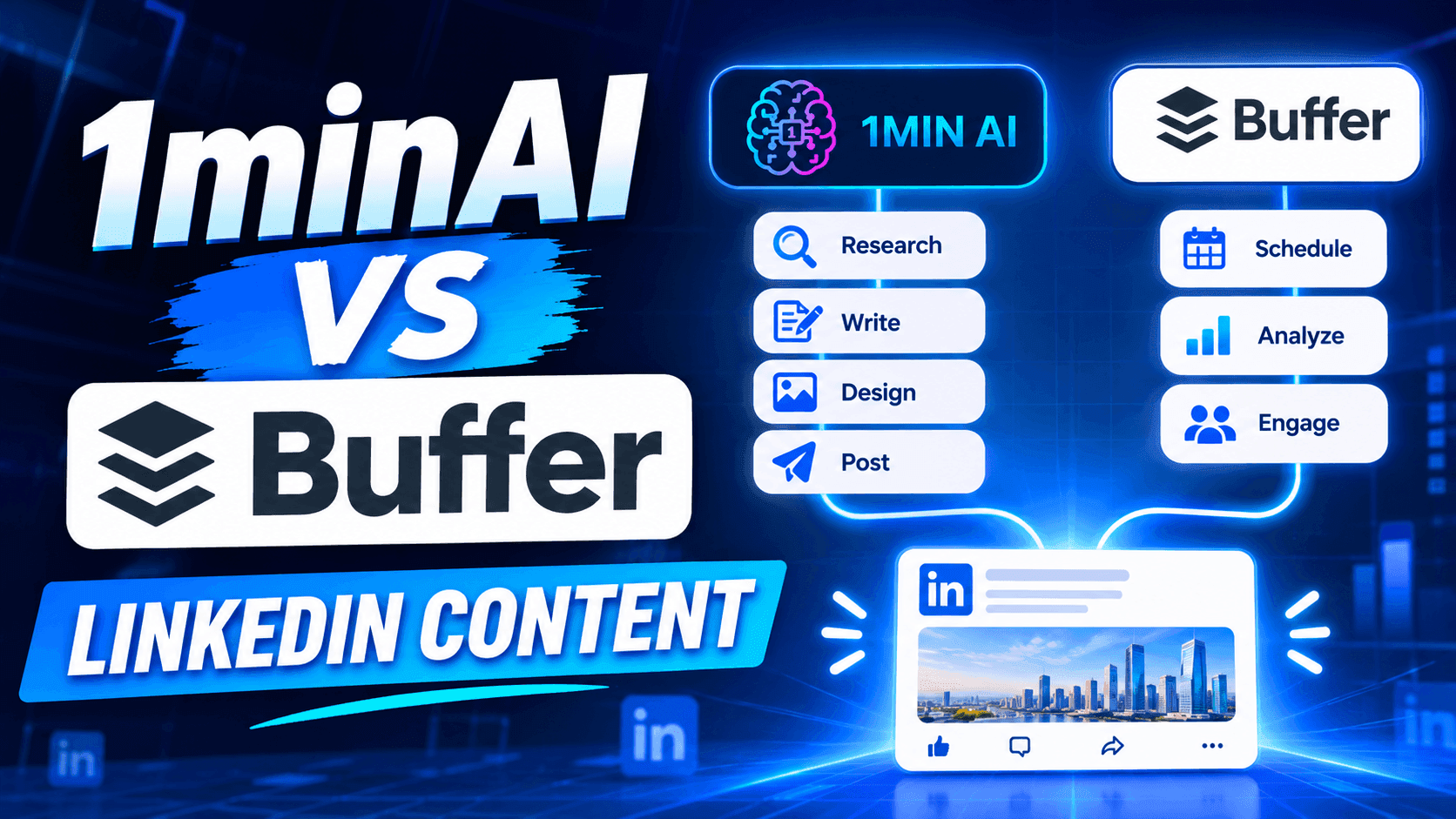
Looking for a Buffer alternative? Compare 1minAI vs Buffer for LinkedIn content creation, AI writing, image generation, scheduling, and automation.
If you're looking for a Buffer alternative, you're probably not searching for another complicated social media platform. You want a simpler way to create content, maintain a consistent posting schedule, and spend less time managing your social media presence.
Buffer is a popular choice for creators and businesses that want a clean content calendar, straightforward scheduling, and an AI Assistant built into the publishing workflow. Its free plan also makes it accessible to individuals who are just getting started. 1minAI takes a more AI-first approach to LinkedIn content. Its LinkedIn Content Agent connects information gathering, post writing, image generation, and publishing in one workflow. So, which platform should you choose?
This guide compares Buffer and 1minAI by features, pricing, workflow, and use cases to help you decide.
What Is Buffer?
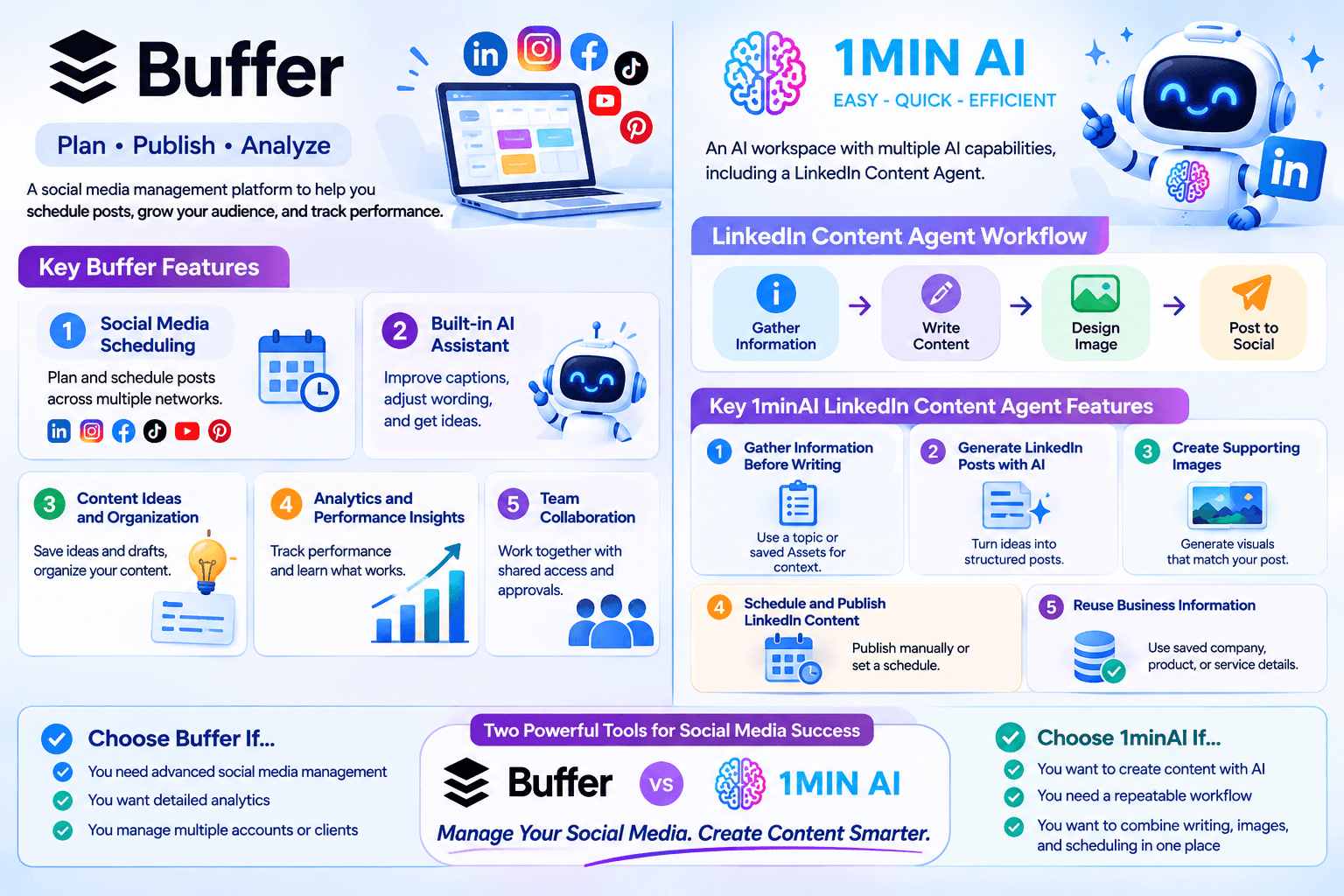
Buffer is a social media management platform designed to help creators, small businesses, and teams plan, publish, and analyze content across multiple social networks.
Rather than logging in to every social platform separately, users can connect their accounts to Buffer and manage their publishing activities from one dashboard.
Key Buffer Features
1. Social Media Scheduling
Buffer lets users plan and schedule posts across supported social networks, including LinkedIn, Instagram, Facebook, TikTok, YouTube, Pinterest, and more.
Its visual content calendar makes it easy to see upcoming posts and maintain a consistent publishing schedule.
2. Built-in AI Assistant
Buffer includes an AI Assistant that helps users refine and repurpose content. You can use it to improve captions, adjust wording, and generate ideas while working in the post composer.
This is convenient because you don't need to switch to a separate AI writing tool whenever you want to improve a caption.
3. Content Ideas and Organization
Buffer provides a space to save content ideas and drafts. Users can organize their ideas and move them toward scheduled posts when they're ready.
This is useful for creators who regularly collect inspiration but don't want to publish everything immediately.
4. Analytics and Performance Insights
Buffer offers analytics to help users understand how their social media content performs.
Depending on the plan and connected channel, users can review engagement and audience metrics, explore performance trends, and make decisions about future content.
5. Team Collaboration
Buffer also supports team collaboration through features such as shared access, notes, and approval workflows on its Team plan.
These features make it useful for businesses and marketing teams that need to coordinate publishing activities.
What Is 1minAI?
1minAI is an AI workspace that brings multiple AI capabilities together, including writing, image generation, document processing, video, audio, and AI Agents.
For LinkedIn creators and marketers, one of its relevant features is the LinkedIn Content Agent, available through 1minAI Social Agents.
Instead of using AI only to improve a caption, the Agent connects several content production stages:
Gather Information → Write Content → Design Image → Post to Social
This workflow is designed to help users turn business information, research topics, and ideas into LinkedIn-ready content.
Key 1minAI LinkedIn Content Agent Features
1. Gather Information Before Writing
A good LinkedIn post should have something useful to say.
The Agent can start with a topic or relevant business information. Users can also select saved Assets containing company, product, or service details.
This helps provide context before generating the post.
For example, a SaaS founder could use information about a new product feature, customer challenges, or industry trends as the starting point for a LinkedIn content workflow.
2. Generate LinkedIn Posts with AI
After gathering information, the Agent moves to the writing stage.
Users can configure the available writing settings and AI model options to generate content based on the selected information.
This is useful for turning a rough idea into a structured post without starting from a blank page.
3. Create Supporting Images
Text isn't the only part of a LinkedIn post.
The Agent also includes a Design Image stage, allowing users to generate a visual that supports the post's message.
This can help founders and marketers create more complete content without having to move between separate writing and image-generation tools.
4. Schedule and Publish LinkedIn Content
Once the content is ready, users can connect their LinkedIn account and configure the publishing workflow.
The Agent supports manual runs and scheduling options, including one-time and recurring schedules.
Users should still review generated content for factual accuracy, relevance, and brand consistency before relying on an automated publishing routine.
5. Reuse Business Information
Saved Assets can provide reusable context for future content.
Instead of repeatedly explaining what your company does, who your audience is, and what your product offers, you can select relevant information as the starting point for new posts.
This is particularly useful for businesses that need consistent messaging across multiple campaigns.
1minAI vs Buffer: Feature-by-Feature Comparison
Buffer and 1minAI support different parts of the social media content process.
Buffer focuses on planning, scheduling, publishing, and managing social media channels. 1minAI focuses on connecting AI-powered content production with LinkedIn publishing.
| Feature | Buffer | 1minAI |
|---|---|---|
| Main purpose | Social media management and scheduling | AI-powered content creation and publishing workflow |
| LinkedIn support | Yes | Yes |
| AI writing | Built-in AI Assistant | LinkedIn Content Agent |
| Topic and information gathering | Ideas and content planning tools | Gather Information workflow |
| Brand context | Content drafts and AI-assisted refinement | Reusable business information through saved Assets |
| AI image generation | Supports media uploads and integrations | Image generation within the Agent workflow |
| Content calendar | Yes | Agent scheduling workflow |
| Publishing | Multiple supported social channels | LinkedIn publishing through connected account |
| Free option | Yes, up to 3 channels | Free daily credits are available |
| Best for | Creators and teams managing multiple social channels | Users who want AI assistance across the LinkedIn content workflow |
The biggest difference is where each platform puts its emphasis.
Buffer helps you organize and publish content efficiently. 1minAI helps you create the content itself, including the research, writing, and visuals, before moving it toward publication.
Why Consider 1minAI as a Buffer Alternative?
You don't necessarily need to replace Buffer if it already handles your publishing workflow well.
However, 1minAI may be a better fit if you want to reduce the manual work involved in creating LinkedIn content.
Here are several reasons to consider it.
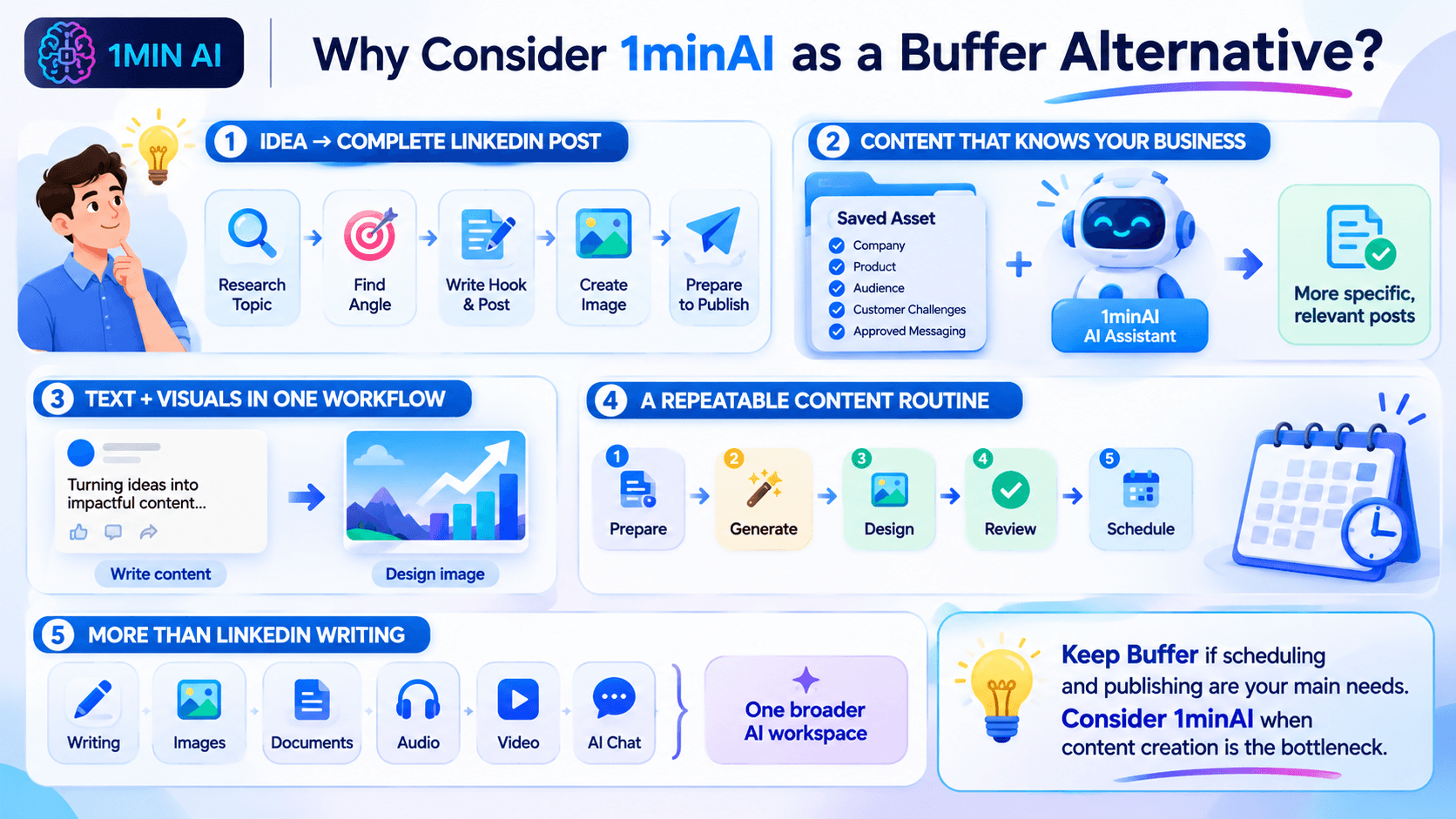
Move from an Idea to a Complete LinkedIn Post
Many creators don't struggle with scheduling. They struggle with the work that happens before scheduling.
You might have an idea for a post but still need to:
- Research the topic.
- Find a useful angle.
- Write an engaging introduction.
- Organize the main points.
- Create a supporting image.
- Prepare the content for publishing.
With 1minAI, these activities are connected through one Agent workflow.
Instead of treating AI writing as a separate task, you can use an AI-assisted process to move from information to a more complete post.
Create Content Based on Your Business Information
Generic AI prompts often produce generic social media content.
Using relevant business information can help make posts more specific and useful.
For example, a company can prepare an Asset containing:
- Company background and positioning.
- Product or service information.
- Target audience.
- Common customer challenges.
- Key product benefits.
- Approved messaging and terminology.
The LinkedIn Content Agent can use that information as context when generating content.
This is especially helpful for founders, consultants, and B2B marketers who want to communicate expertise rather than publish generic motivational posts.
Generate Text and Visuals in One Workflow
A LinkedIn post can become more engaging when its visual supports the message.
With 1minAI, you can generate the written content and move to the Design Image stage without switching to an entirely separate image-generation platform.
For example, if you're creating a post about five ways to improve customer retention, you can generate the post and a related visual as part of the same workflow.
You can then review the result and make adjustments before publishing.
Build a More Consistent Content Routine
Consistency is important for maintaining a professional presence on LinkedIn.
However, publishing every day can become difficult when content creation requires several disconnected tasks.
1minAI helps connect those tasks into a repeatable process:
- Prepare your topic or business information.
- Generate a LinkedIn post.
- Create a supporting visual.
- Review the content.
- Configure your publishing schedule.
You can start with a small number of posts and adjust the schedule based on your audience and available resources.
Use More Than a LinkedIn Writing Tool
1minAI is not limited to LinkedIn content creation.
Its broader AI workspace includes tools for writing, image generation, documents, audio, video, and other AI-powered tasks.
This can be useful when your marketing workflow extends beyond social media.
For example, you might use AI to summarize a report, turn its insights into a LinkedIn post, and create a visual to accompany the post.
How to Create and Schedule LinkedIn Content with 1minAI
If you want to try an AI-first LinkedIn workflow, here's a practical way to get started.
Step 1: Open 1minAI Social Agents
Visit 1minAI Social Agents and open the LinkedIn Content Agent.
Step 2: Prepare Your Information
Choose a topic or select a relevant saved Asset containing your company, product, or service information.
For example, a marketing agency could start with a topic such as:
"Why B2B companies should build a LinkedIn thought leadership strategy."
You can also provide relevant reports or other supporting information where the workflow allows.
Step 3: Configure the Writing Stage
Review the available writing settings and select an appropriate AI model.
Make sure the content reflects your intended audience and communication style.
You can use this prompt as a starting point for a LinkedIn post:
Write a LinkedIn post for B2B marketing professionals about why thought leadership matters for building trust.
Start with a compelling hook, explain three practical benefits, include an actionable takeaway, and end with a question that encourages meaningful discussion.
Use a professional but conversational tone. Avoid exaggerated claims, generic motivational language, and unnecessary jargon.
Step 4: Generate a Supporting Image
Move to the Design Image stage and configure the available image-generation settings.
Choose a visual direction that supports the main message of your post.
For example, a post about B2B thought leadership could use a clean infographic-style visual showing how expertise, useful insights, and consistency contribute to professional credibility.
Step 5: Review and Schedule
Check the generated text and image before publishing.
Verify that:
- The post communicates an accurate message.
- The opening is relevant to your audience.
- The visual supports the written content.
- The content reflects your brand.
- The publishing time fits your content strategy.
Then configure the available publishing and scheduling options.
You can start with a manual run or set a recurring schedule that matches your content capacity.
Frequently Asked Questions
Is 1minAI a good Buffer alternative?
1minAI is worth considering if your priority is AI-assisted LinkedIn content production, including information gathering, writing, image generation, and publishing.
Buffer is generally a stronger fit if you primarily need a social media management platform with multi-channel scheduling, analytics, and community tools.
Can 1minAI generate LinkedIn posts?
Yes. The 1minAI LinkedIn Content Agent includes a writing stage that helps users generate LinkedIn content using topics or relevant business information.
Can 1minAI schedule LinkedIn posts?
The LinkedIn Content Agent supports publishing workflows with manual, one-time, and recurring scheduling options. Available options depend on the connected account and current Agent configuration.
Which is better for solo founders: Buffer or 1minAI?
It depends on the main challenge.
Buffer is useful if you already have content and need a simple way to schedule it across social channels.
1minAI may be more useful if you need help researching topics, writing posts, generating visuals, and preparing LinkedIn content without managing each step separately.
Conclusion: Choose the Workflow That Saves You More Time
Buffer and 1minAI are both useful tools, but they solve different problems. If you mainly need a reliable social media calendar, Buffer may be all you need.
But if you want to spend less time moving between research, writing, design, and publishing tools, 1minAI is a Buffer alternative worth trying.
Ready to turn your ideas and business knowledge into LinkedIn content?
Explore 1minAI Social Agents and build an AI-assisted workflow for your next LinkedIn post.
You can also explore 1minAI's AI features to discover more ways to use AI in your daily workflow.
- #Commerce
- #Information
ਬਦਲ
1minAI ਦੇ ਵਧੀਆ ਬਦਲ ਲੱਭੋ ਅਤੇ ਵਿਸ਼ੇਸ਼ਤਾਵਾਂ, ਕੀਮਤ ਅਤੇ ਵਰਤੋਂ ਦੇ ਮਾਮਲਿਆਂ ਦੀ ਤੁਲਨਾ ਕਰੋ।

1min.AI ਬਨਾਮ OpenRouter
1min.AI ਬਨਾਮ OpenRouter: ਤਿਆਰ-ਤੋਂ-ਵਰਤਣ ਯੋਗ AI ਕ੍ਰਿਏਸ਼ਨ ਪ੍ਰੋਡਕਟ ਦੀ ਤਕਨੀਕੀ API ਟੂਲ ਨਾਲ ਤੁਲਨਾ ਕਰੋ। ਜਾਣੋ ਕਿ ਤੁਹਾਨੂੰ ਜ਼ੀਰੋ-ਕੋਡ ਕ੍ਰਿਏਟਿਵ ਸਟੂਡੀਓ ਦੀ ਲੋੜ ਹੈ ਜਾਂ ਕੋਡਿੰਗ ਇਨਫ੍ਰਾਸਟ੍ਰਕਚਰ ਹਬ ਦੀ।
 Ngoc Hong

1min AI vs Buffer
Compare 1min.AI vs Buffer for Facebook content creation, AI writing, image generation, scheduling, pricing, and everyday marketing workflows.
Ngoc Hong
1min.AI vs. Hootsuite: Which Social Media Tool Fits Your Workflow?
Compare 1min.AI vs. Hootsuite to explore their AI content creation, social media publishing, analytics, pricing, and collaboration features. Find the right tool for your workflow.
AI ਟੂਲਜ਼
ਉਤਪਾਦਕਤਾ, ਰਚਨਾਤਮਕਤਾ ਅਤੇ ਰੋਜ਼ਾਨਾ ਦੇ ਕੰਮ ਨੂੰ ਵਧਾਉਣ ਲਈ ਵਧੀਆ AI ਟੂਲਜ਼ ਖੋਜੋ।

ਸਟਾਰਟਅੱਪ ਫਾਊਂਡਰਾਂ ਲਈ 4 ਸਭ ਤੋਂ ਕਿਫਾਇਤੀ AI ਟੂਲ
ਸਟਾਰਟਅੱਪ ਫਾਊਂਡਰਾਂ ਲਈ ਵਿਚਾਰਾਂ ਦੀ ਪੁਸ਼ਟੀ ਕਰਨ, ਉਤਪਾਦ ਬਣਾਉਣ, ਸਮੱਗਰੀ ਬਣਾਉਣ ਅਤੇ ਤੇਜ਼ੀ ਨਾਲ ਲਾਂਚ ਕਰਨ ਲਈ 4 ਸਭ ਤੋਂ ਕਿਫਾਇਤੀ AI ਟੂਲਾਂ ਬਾਰੇ ਜਾਣੋ, ਉਹ ਵੀ ਬਜਟ ਤੋਂ ਵੱਧ ਖਰਚ ਕੀਤੇ ਬਿਨਾਂ।
 Tram Ta

POV: ਤੁਹਾਨੂੰ ਹਰ ਰੋਜ਼ 10+ ਪੋਸਟਾਂ ਬਣਾਉਣੀਆਂ ਹਨ
ਸਿੱਖੋ ਕਿ AI ਬ੍ਰੇਨਸਟਾਰਮਿੰਗ, ਇਮੇਜ ਜਨਰੇਸ਼ਨ, ਅਤੇ ਕਨਟੈਂਟ ਬਣਾਉਣ ਦੀ ਮਦਦ ਨਾਲ ਕਨਟੈਂਟ ਕ੍ਰੀਏਟਰਾਂ ਲਈ ਹਰ ਰੋਜ਼ 10+ ਸੋਸ਼ਲ ਮੀਡੀਆ ਪੋਸਟਾਂ ਤੇਜ਼ੀ ਨਾਲ ਬਣਾਉਣ ਵਾਲਾ AI ਕਨਟੈਂਟ ਵਰਕਫ਼ਲੋ ਕਿਵੇਂ ਬਣਾਇਆ ਜਾਵੇ।
 Lien Anh Vu

“ਇਸਨੂੰ ਹੋਰ ਵਧੀਆ ਬਣਾਓ” ਨੂੰ AI ਨਾਲ ਹੋਰ ਵਧੀਆ ਕੰਟੈਂਟ ਵਿੱਚ ਬਦਲੋ
AI ਦੀ ਵਰਤੋਂ ਕਰਕੇ ਧੁੰਦਲੇ ਕਲਾਇੰਟ ਫੀਡਬੈਕ ਨੂੰ ਸਪਸ਼ਟ ਰੀਵਿਜ਼ਨ ਵਿੱਚ ਬਦਲੋ, ਬੇਲੋੜੀਆਂ ਐਡੀਟਾਂ ਘਟਾਓ, ਅਤੇ ਬਿਹਤਰ ਕੰਟੈਂਟ ਤੇਜ਼ੀ ਨਾਲ ਡਿਲੀਵਰ ਕਰੋ।
Lien Anh VuAI ਫੀਚਰ
ਵਿਆਪਕ AI ਫੀਚਰ ਜੋ ਕੰਮ ਦੀਆਂ ਪ੍ਰਕਿਰਿਆਵਾਂ ਨੂੰ ਸਧਾਰਨ ਬਣਾਉਂਦੇ, ਕਾਰਗੁਜ਼ਾਰੀ ਸੁਧਾਰਦੇ ਅਤੇ ਟੀਮਾਂ ਨੂੰ ਹੋਰ ਉਪਲਬਧੀਆਂ ਹਾਸਲ ਕਰਨ ਲਈ ਸਮਰੱਥ ਬਣਾਉਂਦੇ ਹਨ।

1minAI: ਮੁਫ਼ਤ AI ਗ੍ਰੈਮਰ ਚੈੱਕਰ
1minAI ਦੇ AI ਗ੍ਰੈਮਰ ਚੈੱਕਰ ਨਾਲ ਮੁਫ਼ਤ ਗ੍ਰੈਮਰ ਚੈੱਕ ਕਰੋ। ਗ੍ਰੈਮਰ, ਸਪੈਲਿੰਗ ਅਤੇ ਲਿਖਤ ਦੀਆਂ ਗਲਤੀਆਂ ਲੱਭੋ, ਸਪਸ਼ਟਤਾ ਸੁਧਾਰੋ, ਅਤੇ ਆਪਣੀ ਸਮੱਗਰੀ ਨੂੰ ਸਕਿੰਟਾਂ ਵਿੱਚ ਪਾਲਿਸ਼ ਕਰੋ।
Tram Ta
1min.AI ਨਾਲ ਪੋਰਟਫੋਲਿਓ ਵੈੱਬਸਾਈਟ ਹੋਰ ਤੇਜ਼ੀ ਨਾਲ ਬਣਾਓ
ਸਿੱਖੋ ਕਿ ਫ੍ਰੀਲਾਂਸ ਕ੍ਰੀਏਟਿਵ ਲੋਕ 1min.AI ਦੀ ਵਰਤੋਂ ਕਰਕੇ ਕਿਵੇਂ ਯੋਜਨਾ ਬਣਾਉਣ, ਲਿਖਣ, ਡਿਜ਼ਾਈਨ ਕਰਨ ਅਤੇ ਪੇਸ਼ੇਵਰ ਪੋਰਟਫੋਲਿਓ ਵੈੱਬਸਾਈਟ ਤੇਜ਼ੀ ਨਾਲ ਤਿਆਰ ਕਰਨ, ਭਾਵੇਂ ਉਹਨਾਂ ਕੋਲ ਮਜ਼ਬੂਤ ਕੋਡਿੰਗ ਹੁਨਰ ਨਾ ਵੀ ਹੋਣ।
Lien Anh Vu
ਮੁਫਤ AI X ਟਿੱਪਣੀ
ਸਾਡੇ AI-ਪਾਵਰਡ ਟਵਿੱਟਰ ਟਿੱਪਣੀ ਜਨਰੇਟਰ ਨਾਲ ਟਵਿੱਟਰ ਲਈ ਮਜ਼ਾਕੀਆ, ਸਮਝਦਾਰ ਜਾਂ ਡੂੰਘੀਆਂ ਟਿੱਪਣੀਆਂ ਬਣਾਓ। ਆਪਣੀ ਰੁਝੇਵੇਂ ਨੂੰ ਵਧਾਓ ਅਤੇ ਭੀੜ ਵਿੱਚ ਵੱਖਰੇ ਨਜ਼ਰ ਆਓ!
 Trang Tran
ਏਆਈ ਉਪਯੋਗ ਮਾਮਲੇ
ਵਪਾਰ, ਉਤਪਾਦਕਤਾ ਅਤੇ ਉਦਯੋਗ-ਖਾਸ ਐਪਲੀਕੇਸ਼ਨਾਂ ਲਈ ਚੁਣੀ ਹੋਈ ਏਆਈ ਉਪਯੋਗ ਮਾਮਲਿਆਂ ਦੀ ਸੰਗ੍ਰਹਿ

ਇੰਸਟਾਗ੍ਰਾਮ 'ਤੇ ਪੋਸਟ ਕਰਨ ਦਾ ਸਭ ਤੋਂ ਵਧੀਆ ਸਮਾਂ: ਵਧੀਆ ਐਨਗੇਜਮੈਂਟ ਲਈ ਇੱਕ ਪ੍ਰਯੋਗਿਕ ਗਾਈਡ
ਇੰਸਟਾਗ੍ਰਾਮ 'ਤੇ ਪੋਸਟ ਕਰਨ ਦਾ ਸਭ ਤੋਂ ਵਧੀਆ ਸਮਾਂ ਜਾਣੋ, ਵੱਖ-ਵੱਖ ਦਰਸ਼ਕਾਂ ਲਈ ਸਭ ਤੋਂ ਵਧੀਆ ਦਿਨ ਤੇ ਸਮੇਂ ਸਮੇਤ, ਨਾਲ ਹੀ ਆਪਣੇ ਅਕਾਊਂਟ ਲਈ ਆਦਰਸ਼ ਪੋਸਟਿੰਗ ਸ਼ਡਿਊਲ ਲੱਭਣ ਦੇ ਟਿੱਪਸ।
Tram Ta1min.AI ਨਾਲ ਪੋਰਟਫੋਲਿਓ ਵੈੱਬਸਾਈਟ ਹੋਰ ਤੇਜ਼ੀ ਨਾਲ ਬਣਾਓ
ਸਿੱਖੋ ਕਿ ਫ੍ਰੀਲਾਂਸ ਕ੍ਰੀਏਟਿਵ ਲੋਕ 1min.AI ਦੀ ਵਰਤੋਂ ਕਰਕੇ ਕਿਵੇਂ ਯੋਜਨਾ ਬਣਾਉਣ, ਲਿਖਣ, ਡਿਜ਼ਾਈਨ ਕਰਨ ਅਤੇ ਪੇਸ਼ੇਵਰ ਪੋਰਟਫੋਲਿਓ ਵੈੱਬਸਾਈਟ ਤੇਜ਼ੀ ਨਾਲ ਤਿਆਰ ਕਰਨ, ਭਾਵੇਂ ਉਹਨਾਂ ਕੋਲ ਮਜ਼ਬੂਤ ਕੋਡਿੰਗ ਹੁਨਰ ਨਾ ਵੀ ਹੋਣ।
Lien Anh Vu“ਇਸਨੂੰ ਹੋਰ ਵਧੀਆ ਬਣਾਓ” ਨੂੰ AI ਨਾਲ ਹੋਰ ਵਧੀਆ ਕੰਟੈਂਟ ਵਿੱਚ ਬਦਲੋ
AI ਦੀ ਵਰਤੋਂ ਕਰਕੇ ਧੁੰਦਲੇ ਕਲਾਇੰਟ ਫੀਡਬੈਕ ਨੂੰ ਸਪਸ਼ਟ ਰੀਵਿਜ਼ਨ ਵਿੱਚ ਬਦਲੋ, ਬੇਲੋੜੀਆਂ ਐਡੀਟਾਂ ਘਟਾਓ, ਅਤੇ ਬਿਹਤਰ ਕੰਟੈਂਟ ਤੇਜ਼ੀ ਨਾਲ ਡਿਲੀਵਰ ਕਰੋ।
Lien Anh VuAI ਟਿਊਟੋਰਿਅਲਸ
ਪ੍ਰੈਕਟੀਕਲ, ਕਦਮ-ਦਰ-ਕਦਮ ਟਿਊਟੋਰਿਅਲਸ ਨਾਲ AI ਦੀ ਵਰਤੋਂ ਕਿਵੇਂ ਕਰਨੀ ਹੈ ਸਿੱਖੋ।

2026 ਵਿੱਚ ਬਲੈਕ ਫ੍ਰਾਈਡੇ AI ਟੂਲ ਡੀਲਾਂ
ਪਤਾ ਕਰੋ ਕਿ 2026 ਦੀਆਂ ਬਲੈਕ ਫ੍ਰਾਈਡੇ AI ਟੂਲ ਡੀਲਾਂ ਵਿੱਚ ਕੀ ਕੁਝ ਹੈ। ਜਾਣੋ ਕਿ AppSumo, Dealify, Stack Social ਰਾਹੀਂ 1min.AI ਲਾਈਫਟਾਈਮ ਡੀਲ ਕਿਵੇਂ ਲੈਣੀ ਹੈ, ਅਤੇ Trustpilot, Slashdot, ਤੇ Software Advice 'ਤੇ ਕਿਵੇਂ ਤਸਦੀਕ ਕਰਨੀ ਹੈ。
 Hang Nguyen

1minAI Face Swap ਨਾਲ $0 ਵਿੱਚ ਫੈਸ਼ਨ ਵੀਕ ਦਾ ਅਨੁਭਵ ਕਰੋ
1minAI Face Swap ਨਾਲ $0 ਵਿੱਚ ਫੈਸ਼ਨ ਵੀਕ ਦਾ ਅਨੁਭਵ ਕਰੋ। ਆਪਣੀ ਫੋਟੋ ਅੱਪਲੋਡ ਕਰੋ, ਫੈਸ਼ਨ ਵੀਕ ਦਾ ਵੀਡੀਓ ਚੁਣੋ, ਅਤੇ ਆਪਣਾ AI ਫੈਸ਼ਨ ਮੋਮੈਂਟ ਬਣਾਓ।
Ngoc Hong
ਮਿੰਟਾਂ ਵਿੱਚ ਵਾਇਰਲ ਰੀਲਜ਼: ਵਿਅੰਗਾਤਮਕ ਵੋਇਸਓਵਰ ਲਈ 1minAI ਦੇ ਟੈਕਸਟ-ਟੂ-ਸਪੀਚ ਦੀ ਵਰਤੋਂ ਕਿਵੇਂ ਕਰੀਏ
ਸਿੱਖੋ ਕਿ ਵਿਅੰਗ ਪੇਜ ਐਡਮਿਨ TikToks, Shorts, ਅਤੇ Instagram Reels ਲਈ ਤੁਰੰਤ ਨਿਊਜ਼ ਐਂਕਰ ਅਤੇ ਡਰਾਮੇਟਿਕ ਵੋਇਸਓਵਰ ਬਣਾਉਣ ਲਈ 1minAI ਦੀ ਟੈਕਸਟ-ਟੂ-ਸਪੀਚ ਫੀਚਰ ਦੀ ਵਰਤੋਂ ਕਿਵੇਂ ਕਰਦੇ ਹਨ।
AI ਗਾਈਡਾਂ
ਵਿਹਾਰਕ ਗਾਈਡਾਂ, ਅਸਲ-ਸੰਸਾਰ ਦੀਆਂ ਉਦਾਹਰਣਾਂ, ਅਤੇ ਕਾਰਜਸ਼ੀਲ ਵਧੀਆ ਅਭਿਆਸਾਂ ਨਾਲ AI ਨੂੰ ਤੇਜ਼ੀ ਨਾਲ ਸਿੱਖੋ।

AI ਟੂਲ ਆਨਲਾਈਨ ਸੁਰੱਖਿਅਤ ਢੰਗ ਨਾਲ ਖਰੀਦੋ: 2026 ਬਲੈਕ ਫ੍ਰਾਈਡੇ ਗਾਈਡ
ਜਾਣੋ ਕਿ ਸਭ ਤੋਂ ਵਧੀਆ ਬਲੈਕ ਫ੍ਰਾਈਡੇ AI ਡੀਲਾਂ ਆਨਲਾਈਨ ਕਿਵੇਂ ਲੱਭਣੀਆਂ ਤੇ ਸੁਰੱਖਿਅਤ ਕਰਣੀਆਂ ਹਨ। ਸਕੈਮਾਂ ਤੋਂ ਬਚਣ, ਸਬਸਕ੍ਰਿਪਸ਼ਨ ਥਕਾਵਟ ਨਾਲ ਨਜਿੱਠਣ, ਅਤੇ ਸਾਫਟਵੇਅਰ ਦੀ ਪੁਸ਼ਟੀ ਕਰਨ ਲਈ ਮਾਹਰ ਰਣਨੀਤੀਆਂ ਸਿੱਖੋ।
Hang Nguyen
ਸ਼ੁਰੂ ਤੋਂ ਬਣਾਏ ਬਿਨਾਂ AI ਕਾਰੋਬਾਰ ਕਿਵੇਂ ਸ਼ੁਰੂ ਕਰੀਏ
AI ਕਾਰੋਬਾਰ ਸ਼ੁਰੂ ਕਰਨਾ, ਆਪਣੇ ਵਿਚਾਰ ਦੀ ਪੁਸ਼ਟੀ ਕਰਨਾ, ਅਤੇ ਸ਼ੁਰੂ ਤੋਂ ਮਹਿੰਗੀ AI ਇਨਫ੍ਰਾਸਟਰੱਕਚਰ ਬਣਾਏ ਬਿਨਾਂ ਤੇਜ਼ੀ ਨਾਲ ਲਾਂਚ ਕਰਨਾ ਸਿੱਖੋ।
Ngoc Hong
AI Fashion Video Generator With Seedance 2.5 and HeyGen
Learn how to create AI fashion videos with Seedance 2.5 and HeyGen. Turn outfit photos into cinematic videos featuring your own face with 1min.AI.
Lien Anh VuAI ਹੱਲ
ਆਟੋਮੇਸ਼ਨ, ਕੋਡਿੰਗ, ਖੋਜ, ਉਤਪਾਦਕਤਾ, ਗਾਹਕ ਸਹਾਇਤਾ, ਮਾਰਕੀਟਿੰਗ, ਅਤੇ ਵਪਾਰਕ ਵਰਕਫਲੋ ਲਈ ਸਭ ਤੋਂ ਵਧੀਆ AI ਹੱਲ ਵੇਖੋ।

ਮੁਫ਼ਤ ਏਆਈ ਟੈਟੂ ਜਨਰੇਟਰ: ਕਸਟਮ ਡਿਜ਼ਾਈਨ
1min.AI ਦੇ ਮੁਫ਼ਤ ਏਆਈ ਟੈਟੂ ਜਨਰੇਟਰ ਨਾਲ ਕਿਸੇ ਵੀ ਵਿਚਾਰ ਨੂੰ ਕਸਟਮ ਟੈਟੂ ਡਿਜ਼ਾਈਨ ਵਿੱਚ ਬਦਲੋ। ਆਪਣਾ ਵਿਚਾਰ ਵਰਣਨ ਕਰੋ, ਇਕ ਸਟਾਈਲ ਚੁਣੋ, ਅਤੇ ਸਕਿੰਟਾਂ ਵਿੱਚ ਡਾਊਨਲੋਡ ਕਰੋ।
Trang TranAI ਟੂਲ ਆਨਲਾਈਨ ਸੁਰੱਖਿਅਤ ਢੰਗ ਨਾਲ ਖਰੀਦੋ: 2026 ਬਲੈਕ ਫ੍ਰਾਈਡੇ ਗਾਈਡ
ਜਾਣੋ ਕਿ ਸਭ ਤੋਂ ਵਧੀਆ ਬਲੈਕ ਫ੍ਰਾਈਡੇ AI ਡੀਲਾਂ ਆਨਲਾਈਨ ਕਿਵੇਂ ਲੱਭਣੀਆਂ ਤੇ ਸੁਰੱਖਿਅਤ ਕਰਣੀਆਂ ਹਨ। ਸਕੈਮਾਂ ਤੋਂ ਬਚਣ, ਸਬਸਕ੍ਰਿਪਸ਼ਨ ਥਕਾਵਟ ਨਾਲ ਨਜਿੱਠਣ, ਅਤੇ ਸਾਫਟਵੇਅਰ ਦੀ ਪੁਸ਼ਟੀ ਕਰਨ ਲਈ ਮਾਹਰ ਰਣਨੀਤੀਆਂ ਸਿੱਖੋ।
Hang Nguyen1minAI Face Swap ਨਾਲ $0 ਵਿੱਚ ਫੈਸ਼ਨ ਵੀਕ ਦਾ ਅਨੁਭਵ ਕਰੋ
1minAI Face Swap ਨਾਲ $0 ਵਿੱਚ ਫੈਸ਼ਨ ਵੀਕ ਦਾ ਅਨੁਭਵ ਕਰੋ। ਆਪਣੀ ਫੋਟੋ ਅੱਪਲੋਡ ਕਰੋ, ਫੈਸ਼ਨ ਵੀਕ ਦਾ ਵੀਡੀਓ ਚੁਣੋ, ਅਤੇ ਆਪਣਾ AI ਫੈਸ਼ਨ ਮੋਮੈਂਟ ਬਣਾਓ।
Ngoc HongAI ਮਾਡਲ
ਦੁਨੀਆ ਦੇ ਪ੍ਰਮੁੱਖ AI ਮਾਡਲਾਂ ਨੂੰ ਇੱਕ ਥਾਂ 'ਤੇ ਖੋਜੋ।

Free AI Chat With Claude Fable 5.2 On 1min.AI
Free AI chat with Claude Fable 5.2 on 1min.AI. Compare Fable 5.2 vs Opus 5.5, see Fable 5.2 benchmarks, and start chatting in minutes.
Trang Tran
GPT-6.2 Sol: Specs, Pricing & Free Access
Explore GPT-6.2 Sol specs, pricing, and how it compares with GPT-6.1 Sol and Claude Opus 5.5, then try it free in 1min.AI Multi AI Chat.
Trang Tran
GPT 6.2 Astra: Pricing, Benchmarks & Free Access
GPT 6.2 Astra release date, pricing, Reddit feedback and Opus 5.5 comparison. See what it does best and chat with it on 1min.AI for free.
Trang TranAI ਤੁਲਨਾਵਾਂ
ਆਪਣੀਆਂ ਲੋੜਾਂ ਲਈ ਸਭ ਤੋਂ ਵਧੀਆ AI ਸਾਧਨਾਂ, ਮਾਡਲਾਂ ਅਤੇ ਪਲੇਟਫਾਰਮਾਂ ਨੂੰ ਲੱਭਣ ਲਈ ਤੁਲਨਾ ਕਰੋ।

Gemini 4 Neon vs Hydrogen: Specs, Price & Picks
Gemini 4 Neon vs Hydrogen, Carbon and Argon: compare price, benchmarks and use cases to pick the right model, then test them side by side on 1min.AI.
Trang Tran
Kling AI ਬਨਾਮ Veo 3: ਕਿਹੜਾ ਮਾਡਲ ਜਿੱਤਦਾ ਹੈ?
Kling AI ਬਨਾਮ Veo 3: ਮੋਸ਼ਨ, ਨੇਟਿਵ ਆਡੀਓ, ਕੀਮਤਾਂ ਅਤੇ ਮੁਫ਼ਤ ਟੀਅਰਾਂ ਦੀ ਤੁਲਨਾ ਕਰੋ ਤਾਂ ਜੋ ਪਤਾ ਲੱਗੇ ਕਿ ਤੁਹਾਡੇ ਪ੍ਰੋਜੈਕਟ ਲਈ ਕਿਹੜਾ AI ਵੀਡੀਓ ਜੈਨਰੇਟਰ ਵਧੀਆ ਹੈ - 1min.AI 'ਤੇ ਦੋਵੇਂ ਅਜ਼ਮਾਓ।
Trang Tran
DeepSeek V4 Pro ਵਿ. Flash ਤੁਲਨਾ
DeepSeek V4 Pro ਵਿ. DeepSeek V4 Flash ਮੈਟ੍ਰਿਕਸ ਦੀ ਤੁਲਨਾ ਕਰੋ। ਆਪਣੇ agentic apps ਨੂੰ optimize ਕਰੋ ਅਤੇ ਅੱਜ ਹੀ 1min.ai 'ਤੇ AI fact checking ਸੁਧਾਰੋ।
Ngoc Hongਏਆਈ ਏਕੀਕਰਨ
ਸੁਗਮ ਤਰੀਕੇ ਨਾਲ ਆਪਣੀਆਂ ਮੌਜੂਦਾ ਟੂਲਾਂ ਨਾਲ ਏਆਈ ਨੂੰ ਇਕੀਕ੍ਰਿਤ ਕਰੋ ਤਾਂ ਕਿ ਕੰਮ ਆਟੋਮੇਟ ਹੋਵੇ ਅਤੇ ਉਤਪਾਦਕਤਾ ਵਧੇ।
POV: ਤੁਹਾਨੂੰ ਹਰ ਰੋਜ਼ 10+ ਪੋਸਟਾਂ ਬਣਾਉਣੀਆਂ ਹਨ
ਸਿੱਖੋ ਕਿ AI ਬ੍ਰੇਨਸਟਾਰਮਿੰਗ, ਇਮੇਜ ਜਨਰੇਸ਼ਨ, ਅਤੇ ਕਨਟੈਂਟ ਬਣਾਉਣ ਦੀ ਮਦਦ ਨਾਲ ਕਨਟੈਂਟ ਕ੍ਰੀਏਟਰਾਂ ਲਈ ਹਰ ਰੋਜ਼ 10+ ਸੋਸ਼ਲ ਮੀਡੀਆ ਪੋਸਟਾਂ ਤੇਜ਼ੀ ਨਾਲ ਬਣਾਉਣ ਵਾਲਾ AI ਕਨਟੈਂਟ ਵਰਕਫ਼ਲੋ ਕਿਵੇਂ ਬਣਾਇਆ ਜਾਵੇ।
Lien Anh Vu
AI ਐਪਾਂ ਵਿਚਕਾਰ ਬਦਲਣਾ ਬੰਦ ਕਰੋ: AI ਇੰਟੀਗ੍ਰੇਸ਼ਨ ਨਿਯੋਗਤਾ ਬ੍ਰਾਂਡਿੰਗ ਨੂੰ ਕਿਵੇਂ ਬਦਲਦਾ ਹੈ
ਜਾਣੋ ਕਿ AI ਇੰਟੀਗ੍ਰੇਸ਼ਨ HR ਟੀਮਾਂ ਨੂੰ AI ਲਿਖਤ, ਦਸਤਾਵੇਜ਼, ਤਸਵੀਰਾਂ, ਵੀਡੀਓ ਅਤੇ ਕਈ AI ਮਾਡਲਾਂ ਨੂੰ ਇੱਕ ਹੀ ਵਰਕਸਪੇਸ ਵਿੱਚ ਜੋੜ ਕੇ ਨਿਯੋਗਤਾ ਬ੍ਰਾਂਡਿੰਗ ਨੂੰ ਸੁਚੱਜਾ ਬਣਾਉਣ ਵਿੱਚ ਕਿਵੇਂ ਮਦਦ ਕਰਦਾ ਹੈ।
Tram Ta
ਡਿਵੈਲਪਰਾਂ ਲਈ AI API ਐਗ੍ਰੀਗੇਟਰ ਦੀ ਵਿਆਖਿਆ
ਇੱਕ AI API ਐਗ੍ਰੀਗੇਟਰ ਡਿਵੈਲਪਰਾਂ ਨੂੰ ਕਈ AI ਮਾਡਲਾਂ ਨੂੰ ਕਾਲ ਕਰਨ ਲਈ ਇਕੋ ਇਕ ਸੰਯੁਕਤ API ਦਿੰਦਾ ਹੈ, ਜਿਸ ਨਾਲ ਇੰਟੀਗ੍ਰੇਸ਼ਨ ਸਮਾਂ ਅਤੇ ਵੇਂਡਰ ਲੌਕ-ਇਨ ਘੱਟ ਹੁੰਦੇ ਹਨ।
Trang Tranਉਦਯੋਗਾਂ ਲਈ AI
ਸਿਹਤ ਸੰਭਾਲ, ਵਿੱਤ, ਸਿੱਖਿਆ, ਕਾਨੂੰਨੀ, ਨਿਰਮਾਣ, ਪ੍ਰਚੂਨ, ਰੀਅਲ ਅਸਟੇਟ, ਅਤੇ ਹੋਰ ਬਹੁਤ ਕੁਝ ਲਈ ਵਧੀਆ AI ਸਾਧਨ ਅਤੇ ਕਾਰਜ ਪ੍ਰਵਾਹ ਲੱਭੋ।

Voice Cloning AI Free: How to Clone Any Voice Online in Minutes
Try voice cloning AI free with 1min.AI. Upload a 5-second clip, pick an ElevenLabs model, choose from 32 languages, and turn text to speech in your own voice.
Trang Tran
Free AI Image Editor With Prompt No Restrictions
Looking for a free AI image editor with prompt no restrictions? Edit backgrounds, objects and text by typing, no watermark. Try 1min.AI’s flexible editor now.
Trang Tran
Claude Personal Finance Setup and Safety Guide
Claude personal finance explained: how Personal Finance in Claude works and what Claude finance can see. Plus a safe CSV method for non-US users.
Trang TranAI ਏਜੰਟ
ਆਪਣੇ ਕੰਮ ਅਤੇ ਰੋਜ਼ਾਨਾ ਜੀਵਨ ਵਿੱਚ ਕਾਰਜਾਂ ਨੂੰ ਸਵੈਚਾਲਤ ਕਰਨ ਲਈ AI ਏਜੰਟਾਂ ਦੀ ਖੋਜ ਕਰੋ ਅਤੇ ਉਹਨਾਂ ਨੂੰ ਚਲਾਓ।
1minAI: ਮੁਫ਼ਤ AI ਗ੍ਰੈਮਰ ਚੈੱਕਰ
1minAI ਦੇ AI ਗ੍ਰੈਮਰ ਚੈੱਕਰ ਨਾਲ ਮੁਫ਼ਤ ਗ੍ਰੈਮਰ ਚੈੱਕ ਕਰੋ। ਗ੍ਰੈਮਰ, ਸਪੈਲਿੰਗ ਅਤੇ ਲਿਖਤ ਦੀਆਂ ਗਲਤੀਆਂ ਲੱਭੋ, ਸਪਸ਼ਟਤਾ ਸੁਧਾਰੋ, ਅਤੇ ਆਪਣੀ ਸਮੱਗਰੀ ਨੂੰ ਸਕਿੰਟਾਂ ਵਿੱਚ ਪਾਲਿਸ਼ ਕਰੋ।
Tram Ta
Facebook ਲਈ AI ਏਜੰਟ
Facebook ਲਈ ਇੱਕ AI ਏਜੰਟ ਦੀ ਵਰਤੋਂ ਕਰਕੇ ਸਮੱਗਰੀ ਬਣਾਓ, ਤਸਵੀਰਾਂ ਤਿਆਰ ਕਰੋ, ਪੋਸਟਾਂ ਸ਼ਡਿਊਲ ਕਰੋ, ਅਤੇ ਆਪਣੇ ਦਸਤਾਵੇਜ਼ਾਂ ਅਤੇ ਗੱਲਬਾਤਾਂ ਤੋਂ ਪ੍ਰਕਾਸ਼ਿਤ ਕਰੋ।
Ngoc Hong
AI ਏਜੰਟ ਵਿਰੁੱਧ AI ਅਸਿਸਟੈਂਟ: ਕਿਹੜਾ ਡਿਜ਼ਾਈਨਰਾਂ ਦਾ ਵਾਕਈ ਵਧੇਰੇ ਸਮਾਂ ਬਚਾਉਂਦਾ ਹੈ?
AI ਏਜੰਟ ਅਤੇ AI ਅਸਿਸਟੈਂਟ ਵਿਚਕਾਰ ਫਰਕ ਜਾਣੋ ਅਤੇ ਸਮਝੋ ਕਿ ਕਿਹੜਾ ਹਲ ਡਿਜ਼ਾਈਨਰਾਂ ਨੂੰ ਦੁਹਰਾਏ ਕੰਮ ਆਪਣੇ-ਆਪ ਕਰਨ, ਰਿਵਿਜ਼ਨ ਘਟਾਉਣ, ਅਤੇ ਹੋਰ ਸਮਾਂ ਬਚਾਉਣ ਵਿੱਚ ਮਦਦ ਕਰਦਾ ਹੈ।
Lien Anh VuAI ਵਰਕਫਲੋਜ਼
ਉਤਪਾਦਕਤਾ, ਮਾਰਕੀਟਿੰਗ, ਵਿਕਰੀ, ਸਹਾਇਤਾ, ਅਤੇ ਹੋਰ ਬਹੁਤ ਕੁਝ ਲਈ ਤਿਆਰ-ਵਰਤੋਂ AI ਵਰਕਫਲੋਜ਼ ਦੀ ਪੜਚੋਲ ਕਰੋ।
POV: ਤੁਹਾਨੂੰ ਹਰ ਰੋਜ਼ 10+ ਪੋਸਟਾਂ ਬਣਾਉਣੀਆਂ ਹਨ
ਸਿੱਖੋ ਕਿ AI ਬ੍ਰੇਨਸਟਾਰਮਿੰਗ, ਇਮੇਜ ਜਨਰੇਸ਼ਨ, ਅਤੇ ਕਨਟੈਂਟ ਬਣਾਉਣ ਦੀ ਮਦਦ ਨਾਲ ਕਨਟੈਂਟ ਕ੍ਰੀਏਟਰਾਂ ਲਈ ਹਰ ਰੋਜ਼ 10+ ਸੋਸ਼ਲ ਮੀਡੀਆ ਪੋਸਟਾਂ ਤੇਜ਼ੀ ਨਾਲ ਬਣਾਉਣ ਵਾਲਾ AI ਕਨਟੈਂਟ ਵਰਕਫ਼ਲੋ ਕਿਵੇਂ ਬਣਾਇਆ ਜਾਵੇ।
Lien Anh VuAI Fashion Video Generator With Seedance 2.5 and HeyGen
Learn how to create AI fashion videos with Seedance 2.5 and HeyGen. Turn outfit photos into cinematic videos featuring your own face with 1min.AI.
Lien Anh Vu
Is Seedance 2.5 the Best AI Video Generator of 2026?
Is Seedance 2.5 the best AI video generator in 2026? Explore its features, compare it with Kling and Veo, and learn how to create AI videos on 1min.AI.
Lien Anh Vuਨਿਊਜ਼ਲੈਟਰ
1minAI ਨਾਲ ਹਫਤਾਵਾਰੀ ਏਆਈ ਨਵੀਨਤਾਵਾਂ

🔮 Weekly AI Innovations #145: X Content Agent & GPT 6.1 Terra on 1min.ai
Scale viral reach with the X Content Agent on 1min.ai. Discover an end-to-end 4-stage pipeline with zero token burn, plus the launch of GPT 6.1 Terra.
Hang Nguyen
🔮 Weekly AI Innovations #144: LinkedIn Content Agent: Complete B2B Publishing Pipeline
Scale B2B influence with the LinkedIn Content Agent on 1min.ai. Discover an end-to-end 4-stage pipeline with zero redundant token burn and 1-click publishing.
Hang Nguyen
🔮 Weekly AI Innovations #146: Mistral 3.5, Qwen Image & Cohere A+ are ready on 1min.ai
Deploy Mistral Large 3, Qwen Image 3.0, and Cohere Command A+ on 1min.ai. Boost RAG accuracy and cut visual generation latency in one unified AI workspace.
Hang Nguyen