
Voice Cloning AI Free: How to Clone Any Voice Online in Minutes

Trang Tran
20. november 2026

Try voice cloning AI free with 1min.AI. Upload a 5-second clip, pick an ElevenLabs model, choose from 32 languages, and turn text to speech in your own voice.
You have a script, a deadline, and a voice you wish you could reuse without booking another recording session. Voice cloning AI free options exist, and you can go from a short audio clip to a finished voiceover in a few minutes.
This guide compares the two main free routes (online tools and local apps), then walks you through the exact workflow in 1min.AI Voice Cloning, which runs on ElevenLabs models.
Quick answer: To clone a voice with AI for free, upload a clean audio sample of at least 5 seconds, type your script, and generate speech in the cloned voice. Online tools are fastest for one-off projects. Local open-source apps suit people who want offline use and don’t mind installing software. On 1min.AI, you can try Voice Cloning free in your browser. You don’t need to register.
Key takeaways
- Online tools need only a short sample and a browser. Local apps need installation and a capable computer.
- 1min.AI Voice Cloning uses ElevenLabs models (Eleven Flash v2.5 and Eleven Turbo v2.5) and supports 32 languages.
- Audio quality matters more than length. A clean 5-second clip beats a noisy 30-second one.
Voice Cloning AI Free: Online Tools vs Local Apps
Most people searching for free voice cloning want one of two things: a quick result in the browser, or a setup they can run on their own computer. Here is how the routes compare.
| Online voice cloning | Local open-source apps | |
|---|---|---|
| Best for | Quick projects, creators, marketers | Offline use, technical users |
| Setup | Open a browser, upload a clip | Download app and AI models |
| Hardware | Any device with a browser | A capable computer |
| Typical sample | 3 to 15 seconds | Varies by model |
| Languages | Often many, depending on the model | Depends on the model you install |
Online Voice Cloning for Quick Results
Online tools handle processing in the cloud. You upload a sample, type your text, and download the audio. That makes them the practical choice for social videos, podcasts, ads, and course narration.
Local Open-Source Apps for Offline Use
Local apps keep everything on your machine and can run offline after the models download. The trade-off is setup time and hardware requirements. If you want results this afternoon, online is simpler.
Where 1min.AI Fits
1min.AI is the online route. You open Voice Cloning, upload a clip, and run it. You don’t need to register for this tool. Voice Cloning also sits alongside the rest of the AI for Audio suite, including Text to Speech, Speech to Text, and Voice Changer.
How to Clone a Voice Free with 1min.AI
Here is the full workflow. It takes a few minutes the first time.
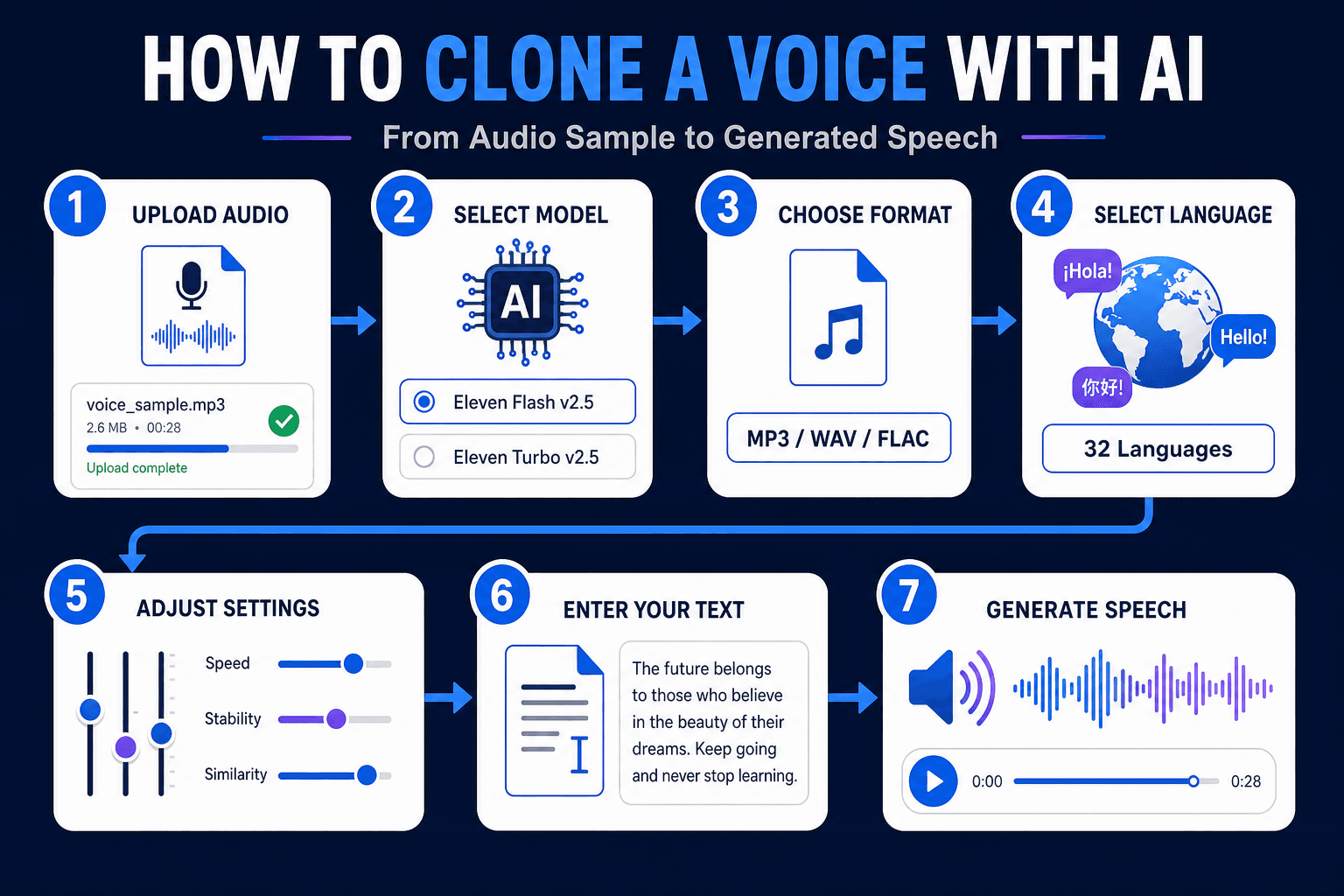
- Upload your audio: Drag and drop a single MP3, M4A, OGG, WAV, or FLAC file.
- Select Voice Cloning - ElevenLabs: This is the engine for the tool.
- Choose an output format: The default is mp3_44100_128. Options run from mp3_22050_32 (smallest file) to mp3_44100_192 (highest quality).
- Pick a model: Choose Eleven Flash v2.5 or Eleven Turbo v2.5.
- Select a language from 32 options.
- Adjust the voice settings (explained below).
- Type your text and click Run.
Want to see it in action first? Watch the walkthrough:
Clone Voice From an Audio File Free: Requirements
- Formats: MP3, M4A, OGG, WAV, FLAC
- File size: up to 11MB, one file at a time
- Minimum length: 5 seconds
What Each Voice Setting Does
| Setting | Range | What it changes |
|---|---|---|
| Remove Background Noise | Enable / Disable | Cleans the sample before cloning |
| Speed | 0.7 to 1.2 | Slows down or speeds up delivery |
| Stability | 0 to 1 | Lower is more expressive. Higher is more consistent |
| Similarity Boost | 0 to 1 | Higher stays closer to the original voice |
| Style | 0 to 1 | Increases or reduces the speaker’s stylistic exaggeration |
| Speaker Boost | Enable / Disable | Strengthens resemblance to the original speaker |
A good starting point is Remove Background Noise enabled, moderate Stability, and high Similarity Boost. Then generate a short test line and adjust one slider at a time.
ElevenLabs Voice Cloning Inside 1min.AI
Many people search for “elevenlabs voice cloning” because the technology has become a reference point for realistic synthetic speech. 1min.AI brings those models into one workspace, so you can use them without setting up separate tools. You can also explore the wider ElevenLabs voice changer, cloner, and text to speech tools on 1min.AI.
ElevenLabs Instant Voice Cloning Explained
Instant voice cloning means the system builds a voice from a short sample without a long training process. You upload a few seconds of speech, and the model captures timbre, pitch, and speaking rhythm. Then it applies them to new text. This is the approach behind the 5-second minimum in 1min.AI.
Eleven Flash v2.5 vs. Eleven Turbo v2.5
Both models are available in the tool, so you can match the model to the job.
- Eleven Flash v2.5: Built for speed. A good fit for quick drafts and short social clips.
- Eleven Turbo v2.5: A strong fit when you want to compare delivery quality across takes.
If you’re unsure, generate the same sentence with both and keep the one that sounds closer to your goal.
ElevenLabs Voice Cloning Text to Speech
Once your sample is uploaded, the text box works like a text to speech field. Type or paste your script, press Run, and the cloned voice reads it. Punctuation guides the rhythm, so use commas and full stops deliberately.
ElevenLabs Voice Cloning Review: What Stands Out
Users generally value three things in ElevenLabs-based cloning: natural intonation, short sample requirements, and fine-grained controls like Stability and Similarity Boost. Those are the same controls you get in 1min.AI.
ElevenLabs Voice Cloning API, Price, and Reddit Questions
- API: Developers who need to build voice cloning into their own app can review ElevenLabs’ official API documentation. 1min.AI is designed for no-code use in the browser.
- Price: Plan details change over time, so check the official pages for current figures. To see how the output sounds, you can try 1min.AI Voice Cloning first.
- Reddit: Discussion threads commonly focus on sample quality, consistency across long scripts, and consent. The tips below address the first two, and the responsible use section covers the third.
Tips for a Better Voice Clone
Start With a Clean Sample
Record in a quiet room, keep the microphone at a steady distance, and speak at a natural pace. Avoid music and other voices. If your recording has noise, run it through the AI Voice Isolator first, then upload the cleaned file.
Match the Sample to Your Goal
If you want a warm podcast tone, read your sample in that tone. The clone follows the energy of the source.
Test Short, Then Go Long
Generate one or two sentences, tune the sliders, and only then run your full script.
Languages and Use Cases
Hindi and 31 Other Languages
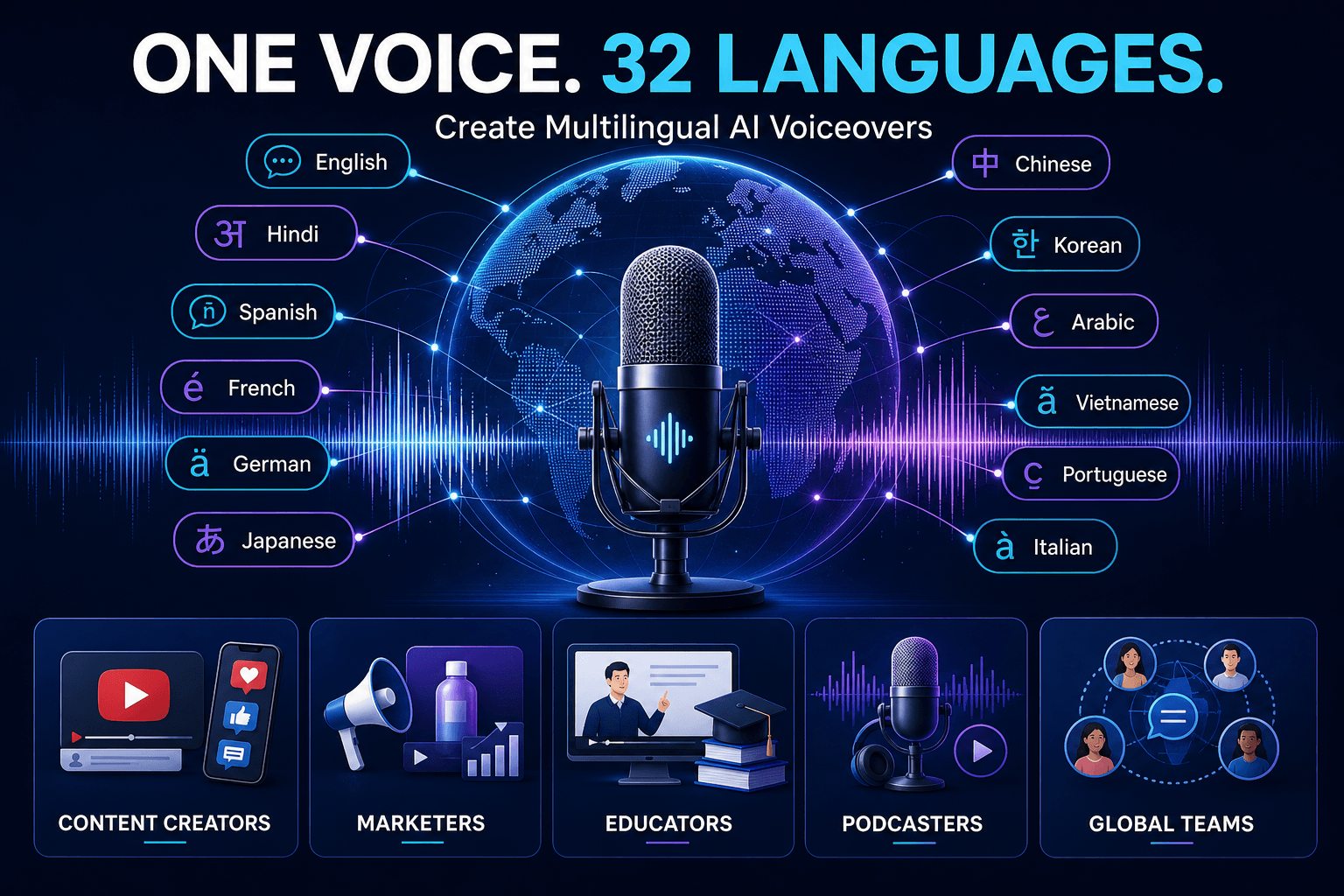
The tool supports English, Hindi, Spanish, French, German, Japanese, Chinese, Korean, Arabic, Vietnamese, Portuguese, Italian, Russian, Indonesian, Turkish, and many more, 32 in total. One voice sample can narrate in multiple languages, which helps with localization.
Who Uses Voice Cloning
- Content creators: Consistent voiceovers for YouTube, Shorts, and Reels
- Marketers: Ad narration and product explainers without studio time
- Educators: Course lessons in the instructor’s own voice
- Podcasters: Fix a line or add an intro without re-recording
- Global teams: Multilingual updates in one recognizable voice
Need a voice that doesn’t belong to anyone? Create one from a text description with AI Voice Design. If your goal is transforming an existing recording rather than generating new speech, a voice changer is the better fit. This comparison explains the difference:
Responsible Use of Voice Cloning
Only clone your own voice or a voice you have clear permission to use. Don’t impersonate real people, mislead listeners, or bypass identity checks. For commercial projects, keep a record of consent and the source of your audio.
FAQ: Voice Cloning AI Free
Can I clone a voice with AI for free?
Yes. You can try 1min.AI Voice Cloning free in your browser. Upload a clip of at least 5 seconds, enter your text, and click Run.
How long should the audio sample be?
At least 5 seconds. Clean, clear speech matters more than extra length.
Can I clone a voice from an audio file?
Yes. Upload one MP3, M4A, OGG, WAV, or FLAC file up to 11MB.
Does it support text to speech in other languages?
Yes. You can choose from 32 languages, including Hindi, Spanish, Arabic, Japanese, and Vietnamese.
Is it the same as a voice changer?
No. Voice cloning generates new speech from text in a target voice. A voice changer transforms an existing recording.
Can I clone singing voices?
1min.AI Voice Cloning is built for speech from text. For music, explore the Music Generator in the AI for Audio suite.
Is my voice data handled responsibly?
Use only audio you have the rights to. Review the 1min.AI Terms of Service and Privacy Policy for details on data handling.
Start Cloning Your Voice
A short clip, a few settings, and one click are all it takes to hear your script in a cloned voice. Open the tool, upload a sample, and try it yourself.
- #Commerce
Alternativer
Oppdag de beste alternativene til 1minAI og sammenlign funksjoner, priser og bruksområder.

1min.AI vs OpenRouter
1min.AI vs. OpenRouter: Sammenlign det ferdige AI-verktøyet for innholdsskaping med det tekniske API-verktøyet. Finn ut om du trenger et kreativt studio uten koding eller et infrastrukturknutepunkt for utvikling.
 Ngoc Hong

1min AI vs Buffer
Compare 1min.AI vs Buffer for Facebook content creation, AI writing, image generation, scheduling, pricing, and everyday marketing workflows.
Ngoc Hong
1min.AI vs. Hootsuite: Which Social Media Tool Fits Your Workflow?
Compare 1min.AI vs. Hootsuite to explore their AI content creation, social media publishing, analytics, pricing, and collaboration features. Find the right tool for your workflow.
AI-verktøy
Oppdag de beste AI-verktøyene for å øke produktiviteten, kreativiteten og det daglige arbeidet.

Topp 4 rimelige AI-verktøy for oppstartsgründere
Oppdag de 4 beste rimelige AI-verktøyene for oppstartsgründere for å validere ideer, bygge produkter, lage innhold og lansere raskere uten å overskride budsjettet.
 Tram Ta

POV: Du har 10+ innlegg å lage hver dag
Lær hvordan du bygger en AI-innholdsarbeidsflyt som hjelper innholdsskapere å produsere 10+ innlegg i sosiale medier om dagen raskere med AI-brainstorming, bildegenerering og innholdsproduksjon.
 Lien Anh Vu

Gjør “Gjør det bedre” om til bedre innhold med AI
Bruk AI til å gjøre vag tilbakemelding fra kunder om til klare revisjoner, redusere unødvendige endringer og levere bedre innhold raskere.
Lien Anh VuAI-funksjoner
Omfattende AI-funksjoner som effektiviserer arbeidsflyter, øker produktiviteten og gjør det mulig for team å oppnå mer.

1minAI: Gratis AI-grammatikkontroll
Sjekk grammatikk gratis med 1minAIs AI-grammatikkontroll. Finn grammatikk-, stave- og skrivefeil, forbedre klarheten og finslip innholdet ditt på sekunder.
Tram Ta
Bygg en portefølje-nettside raskere med 1min.AI
Lær hvordan frilansere og kreative kan bruke 1min.AI til å planlegge, skrive, designe og generere en profesjonell portefølje-nettside raskere, selv uten sterke kodeferdigheter.
Lien Anh Vu
Gratis AI X-kommentar
Lag morsomme, vittige eller innsiktsfulle kommentarer for Twitter med vår AI-drevne Twitter-kommentargenerator. Øk engasjementet ditt og skil deg ut i mengden!
 Trang Tran
AI-bruksområder
En kuratert samling av AI-bruksområder for bedrifter, produktivitet og bransjespesifikke anvendelser.

Beste tidspunkt å poste på Instagram: En praktisk guide for bedre engasjement
Oppdag det beste tidspunktet å poste på Instagram, inkludert de beste dagene og tidene for ulike målgrupper, pluss tips for å finne den ideelle publiseringsplanen for kontoen din.
Tram TaBygg en portefølje-nettside raskere med 1min.AI
Lær hvordan frilansere og kreative kan bruke 1min.AI til å planlegge, skrive, designe og generere en profesjonell portefølje-nettside raskere, selv uten sterke kodeferdigheter.
Lien Anh VuGjør “Gjør det bedre” om til bedre innhold med AI
Bruk AI til å gjøre vag tilbakemelding fra kunder om til klare revisjoner, redusere unødvendige endringer og levere bedre innhold raskere.
Lien Anh VuAI-veiledninger
Lær hvordan du bruker AI med praktiske, trinnvise veiledninger.

Black Friday AI-verktøytilbud i 2026
Oppdag hva Black Friday AI-verktøytilbudene i 2026 har å by på. Finn ut hvordan du sikrer deg 1min.AI lifetime deal via AppSumo, Dealify og Stack Social, og verifiser på Trustpilot, Slashdot og Software Advice.
 Hang Nguyen

Opplev Fashion Week for $0 med 1minAI Face Swap
Opplev Fashion Week for $0 med 1minAI Face Swap. Last opp bildet ditt, velg en Fashion Week-video, og lag ditt eget AI-motemoment.
Ngoc Hong
Viral Reels på minutter: Slik bruker du 1minAI sin tekst-til-tale for satiriske voiceovers
Lær hvordan administratorer av satiriske sider bruker 1minAI sin tekst-til-tale-funksjon til å lage umiddelbare nyhetsanker- og dramatiske voiceovers for TikTok, Shorts og Instagram Reels.
AI-guider
Lær AI raskere med praktiske guider, eksempler fra den virkelige verden og handlingsrettede beste praksiser.

Kjøp AI-verktøy trygt på nett: Black Friday-guiden 2026
Oppdag hvordan du finner og sikrer de beste AI-tilbudene på Black Friday på nett. Lær ekspertstrategier for å unngå svindel, bekjempe abonnementstretthet og verifisere programvare.
Hang Nguyen
Hvordan starte en AI-bedrift uten å bygge fra bunnen av
Lær hvordan du starter en AI-bedrift, validerer ideen din og lanserer raskere uten å bygge kostbar AI-infrastruktur fra bunnen av.
Ngoc Hong
AI Fashion Video Generator With Seedance 2.5 and HeyGen
Learn how to create AI fashion videos with Seedance 2.5 and HeyGen. Turn outfit photos into cinematic videos featuring your own face with 1min.AI.
Lien Anh VuAI-løsninger
Utforsk de beste AI-løsningene for automatisering, koding, forskning, produktivitet, kundestøtte, markedsføring og arbeidsflyter i bedriften.

Gratis AI tatoveringsgenerator: Tilpassede design
Gjør enhver idé om til et tilpasset tatoveringsdesign med 1min.AI sin gratis AI tatoveringsgenerator. Beskriv ideen din, velg en stil, og last ned på sekunder.
Trang TranKjøp AI-verktøy trygt på nett: Black Friday-guiden 2026
Oppdag hvordan du finner og sikrer de beste AI-tilbudene på Black Friday på nett. Lær ekspertstrategier for å unngå svindel, bekjempe abonnementstretthet og verifisere programvare.
Hang NguyenOpplev Fashion Week for $0 med 1minAI Face Swap
Opplev Fashion Week for $0 med 1minAI Face Swap. Last opp bildet ditt, velg en Fashion Week-video, og lag ditt eget AI-motemoment.
Ngoc HongAI-modeller
Utforsk verdens ledende AI-modeller på ett sted.

Free AI Chat With Claude Fable 5.2 On 1min.AI
Free AI chat with Claude Fable 5.2 on 1min.AI. Compare Fable 5.2 vs Opus 5.5, see Fable 5.2 benchmarks, and start chatting in minutes.
Trang Tran
GPT-6.2 Sol: Specs, Pricing & Free Access
Explore GPT-6.2 Sol specs, pricing, and how it compares with GPT-6.1 Sol and Claude Opus 5.5, then try it free in 1min.AI Multi AI Chat.
Trang Tran
GPT 6.2 Astra: Pricing, Benchmarks & Free Access
GPT 6.2 Astra release date, pricing, Reddit feedback and Opus 5.5 comparison. See what it does best and chat with it on 1min.AI for free.
Trang TranAI-sammenligninger
Sammenlign AI-verktøy, modeller og plattformer for å finne det som passer best for dine behov.

Gemini 4 Neon vs Hydrogen: Specs, Price & Picks
Gemini 4 Neon vs Hydrogen, Carbon and Argon: compare price, benchmarks and use cases to pick the right model, then test them side by side on 1min.AI.
Trang Tran
Kling AI vs Veo 3: Hvilken modell vinner?
Kling AI vs Veo 3: sammenlign bevegelse, native lyd, pris og gratisnivåer for å se hvilken AI-videogenerator som passer best for prosjektet ditt - prøv begge på 1min.AI.
Trang Tran
Sammenligning av DeepSeek V4 Pro vs Flash
Sammenlign beregningene for DeepSeek V4 Pro vs DeepSeek V4 Flash. Optimaliser agentiske apper og forbedre AI-faktasjekking på 1min.ai i dag.
Ngoc HongAI-integrasjoner
Integrer AI sømløst med verktøyene du allerede bruker for å automatisere arbeid og øke produktiviteten.
POV: Du har 10+ innlegg å lage hver dag
Lær hvordan du bygger en AI-innholdsarbeidsflyt som hjelper innholdsskapere å produsere 10+ innlegg i sosiale medier om dagen raskere med AI-brainstorming, bildegenerering og innholdsproduksjon.
Lien Anh Vu
Slutt å bytte mellom AI-apper: Slik forvandler AI-integrasjon employer branding
Oppdag hvordan AI-integrasjon hjelper HR-team med å effektivisere employer branding ved å samle AI-skriving, dokumenter, bilder, видео og flere AI-modeller i ett arbeidsområde.
Tram Ta
AI API-aggregator forklart for utviklere
En AI API-aggregator gir utviklere én samlet API for å kalle flere AI-modeller, noe som kutter integrasjonstid og leverandørlåsing.
Trang TranAI for industrier
Finn de beste AI-verktøyene og arbeidsflytene for helsevesen, finans, utdanning, juss, produksjon, detaljhandel, eiendom og mer.
Voice Cloning AI Free: How to Clone Any Voice Online in Minutes
Try voice cloning AI free with 1min.AI. Upload a 5-second clip, pick an ElevenLabs model, choose from 32 languages, and turn text to speech in your own voice.
Trang Tran
Free AI Image Editor With Prompt No Restrictions
Looking for a free AI image editor with prompt no restrictions? Edit backgrounds, objects and text by typing, no watermark. Try 1min.AI’s flexible editor now.
Trang Tran
Claude Personal Finance Setup and Safety Guide
Claude personal finance explained: how Personal Finance in Claude works and what Claude finance can see. Plus a safe CSV method for non-US users.
Trang TranAI-agenter
Oppdag og kjør AI-agenter for å automatisere oppgaver i ditt arbeid og daglige liv.
1minAI: Gratis AI-grammatikkontroll
Sjekk grammatikk gratis med 1minAIs AI-grammatikkontroll. Finn grammatikk-, stave- og skrivefeil, forbedre klarheten og finslip innholdet ditt på sekunder.
Tram Ta
AI-agenter for Facebook
Bruk en AI-agent for Facebook til å lage innhold, generere bilder, planlegge innlegg og publisere fra dokumentene og samtalene dine.
Ngoc Hong
AI Agent vs AI Assistant: Hvilken sparer egentlig designere mest tid?
Lær forskjellen mellom AI Agent og AI Assistant, og oppdag hvilken løsning som hjelper designere med å automatisere repetitive oppgaver, redusere revisjoner og spare mer tid.
Lien Anh VuAI-arbeidsflyter
Utforsk ferdige AI-arbeidsflyter for produktivitet, markedsføring, salg, support og mer.
POV: Du har 10+ innlegg å lage hver dag
Lær hvordan du bygger en AI-innholdsarbeidsflyt som hjelper innholdsskapere å produsere 10+ innlegg i sosiale medier om dagen raskere med AI-brainstorming, bildegenerering og innholdsproduksjon.
Lien Anh VuAI Fashion Video Generator With Seedance 2.5 and HeyGen
Learn how to create AI fashion videos with Seedance 2.5 and HeyGen. Turn outfit photos into cinematic videos featuring your own face with 1min.AI.
Lien Anh Vu
Is Seedance 2.5 the Best AI Video Generator of 2026?
Is Seedance 2.5 the best AI video generator in 2026? Explore its features, compare it with Kling and Veo, and learn how to create AI videos on 1min.AI.
Lien Anh VuNyhetsbrev
Ukentlige AI-nyvinninger med 1minAI

🔮 Weekly AI Innovations #145: X Content Agent & GPT 6.1 Terra on 1min.ai
Scale viral reach with the X Content Agent on 1min.ai. Discover an end-to-end 4-stage pipeline with zero token burn, plus the launch of GPT 6.1 Terra.
Hang Nguyen
🔮 Weekly AI Innovations #144: LinkedIn Content Agent: Complete B2B Publishing Pipeline
Scale B2B influence with the LinkedIn Content Agent on 1min.ai. Discover an end-to-end 4-stage pipeline with zero redundant token burn and 1-click publishing.
Hang Nguyen
🔮 Weekly AI Innovations #146: Mistral 3.5, Qwen Image & Cohere A+ are ready on 1min.ai
Deploy Mistral Large 3, Qwen Image 3.0, and Cohere Command A+ on 1min.ai. Boost RAG accuracy and cut visual generation latency in one unified AI workspace.
Hang Nguyen