
Free AI Image Editor With Prompt No Restrictions

Trang Tran
20. november 2026

Looking for a free AI image editor with prompt no restrictions? Edit backgrounds, objects and text by typing, no watermark. Try 1min.AI’s flexible editor now.
You have a photo and a clear idea of how it should look. What you do not have is time for layers, masks and menus that only accept five preset commands. A free AI image editor with prompt no restrictions solves that. You type the change in plain English and the edit appears in seconds: a new background, a different jacket color, a stray object gone, sale text rewritten.
1min.AI puts these prompt-based tools in one workspace. Open an image, describe the edit and download the result with no watermark.
Quick answer: An AI image editor with prompt no restrictions lets you describe any edit in your own words instead of choosing from a locked list of actions. With 1min.AI you can replace backgrounds, swap objects, edit text inside images, repaint masked areas, expand and upscale, all from one place. Legal rules and each AI model’s safety policies still apply.
What Does “No Restrictions” Mean in an AI Image Editor?
Most people searching for an unrestricted AI image editor are not trying to break rules. They are tired of tools that get in the way. In practice, “no restrictions” usually means four things:
| What you run into | What “no restrictions” should mean |
|---|---|
| A short list of approved commands | Full-sentence prompts: object, position, result |
| One action available, the rest locked | Many edit types on the same image |
| Watermarked downloads | Clean results you can use right away |
| Registration before you can test anything | Open the tool and start editing |
A modern AI image editor reads your picture and your sentence together, works out which pixels need to change and leaves the rest alone. That is why one plain-language prompt can replace hours of manual selection.
Where the Limits Still Are
“No restrictions” describes freedom of workflow, not freedom from the law. Illegal content, content involving minors, and non-consensual or deceptive images of real people are off limits with any responsible provider. 1min.AI follows the usage policies of the AI models it offers. Inside those boundaries, you decide what to change and how to say it.
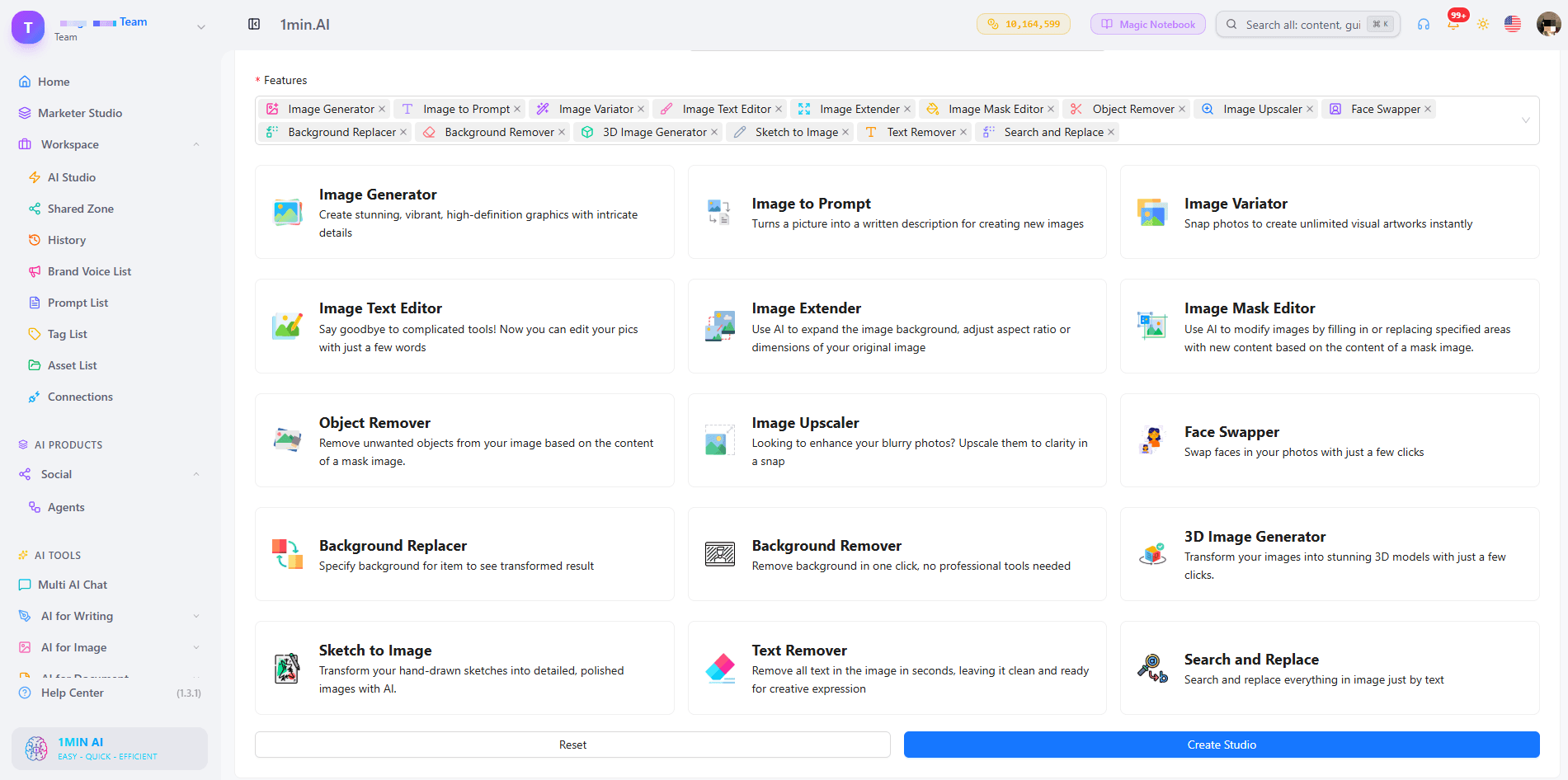
What Can You Edit With a Prompt in 1min.AI?
| Edit goal | Example prompt | 1min.AI tool |
|---|---|---|
| Swap an object or outfit | “Replace the blue jacket with a red leather jacket” | Search and Replace |
| Build a new scene | “Place the sneaker on a wet city street at dusk” | Background Replacer |
| Fix one precise area | Paint the area, then “Add a small window with a plant” | Image Mask Editor |
| Change wording in a design | “Change 20% OFF to 30% OFF” | Image Text Editor |
| Clean up clutter | “Remove the person behind the table” | Object Remover |
| Resize or sharpen | Widen the canvas, then upscale | Image Extender, Image Upscaler |
Replace Objects and Outfits With Search and Replace
Name what you want to find and what should replace it. The tool handles the selection, so you can run object search and replace edits, such as changing a sofa’s fabric or a product’s packaging color, without drawing an outline. Add “keep everything else unchanged” to protect the rest of the scene. For a deeper walkthrough, see this guide to object search and replace.
Swap Backgrounds Without Cutting Anything Out
Background Replacer removes the old scene and builds a new one from your description. Mention the place, time of day and mood, for example “sunlit studio with a soft white backdrop”. Here is a quick walkthrough:
Repaint Only the Area You Choose
The Image Mask Editor is for edits that need precision. Paint over a region, then describe what belongs there. This kind of mask-based editing keeps faces, logos and everything outside the mask untouched.
Edit Text Inside an Image
Image Text Editor lets you rewrite text that already sits inside a banner, label or screenshot. Type the new wording and the tool works to match the surrounding style. It is a fast way to update prices, dates and captions without rebuilding the design.
Start From Scratch, Then Edit
No source photo yet? Generate a base image first, then refine it with the editing tools. Creating and editing in one workspace means you never export, re-upload and start over.
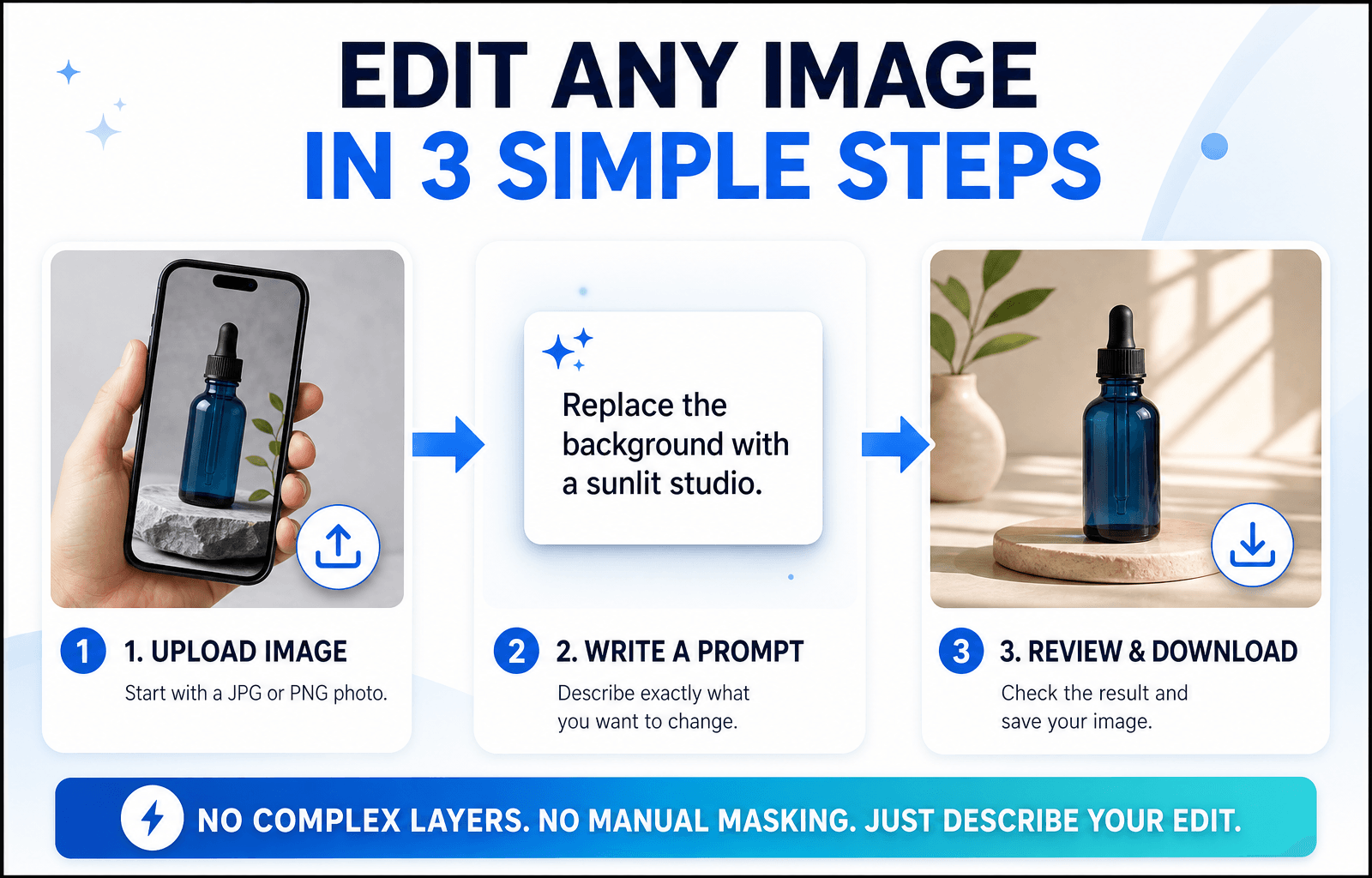
How to Edit an Image With a Prompt in 3 Steps
Step 1: Open the Editor and Upload Your Image
Choose the tool that matches your goal and upload a JPG or PNG. A sharp, well-lit photo with a clear subject gives the AI more to work with, so your edit looks more accurate.
Step 2: Write a Specific Prompt
Specific beats clever. Say what should change and what should stay the same.
The Prompt Formula
Object + Action + Style or Lighting + What stays unchanged
Three Prompts You Can Copy
- “Change the red jacket on the left to dark green denim. Keep the face and background unchanged.”
- “Replace the background with a sunlit studio and a soft white backdrop. Keep natural shadows under the product.”
- “Remove the cables on the desk and fill the area with the same wood texture.”
Edits usually miss because the prompt is too broad. This short video covers the most common mistakes:
Step 3: Review, Refine and Download
Zoom in and check edges, hands, text and shadows. If one detail is off, run a second prompt on that detail instead of stacking several requests in one line. Then download your image, which has no watermark. Save prompts that worked to your Prompt List so you can reuse them.
Editing People, Products or Landscapes: Which Setup Fits?
Photos of People
Describe clothing, hair color or background changes and add “keep the face unchanged”. For small fixes, use the mask tool so only the chosen area changes.
Product Photos
Swap backgrounds, remove reflections and recolor packaging while keeping labels sharp. Consistent backgrounds help a whole catalog look uniform.
Landscapes and Travel Shots
Remove crowds, adjust the sky or extend the frame to a wider format. Mention light and weather (“golden hour, clear sky”) so the edit blends naturally.
Browser Editor or Local Open-Source Model?
Open-source models run on your own computer. They offer deep control, but you manage installation, hardware and updates. A browser-based editor like 1min.AI needs none of that: open a tab, choose a tool and edit. If you want to start quickly or work across devices, the browser route is simpler. If you enjoy tuning models yourself, a local setup may suit you better.
What to Look for in the Best Free AI Image Editor With No Restrictions Online
Use this checklist for any tool you test:
- Full-sentence prompts rather than a fixed command menu
- Several edit types on the same image
- Precise control, such as masks for local changes
- Clean exports without a watermark
- Reusable prompts and assets so repeat work gets faster
- Clear policies about what the models can and cannot do
1min.AI covers each point in one workspace, with tools for text editing, object swapping, backgrounds, masks, extending and upscaling. AI Studio, Prompt List and Asset List are ready to use, and you can add a Shared Zone and History when you create an account.
You can also check how others rate the platform. 1min.AI holds SourceForge and Slashdot Top Business Software badges, is rated Excellent on Trustpilot and is listed on Capterra, Software Advice and GetApp.

FAQ
What is an AI image editor with prompt no restrictions?
It is an editor where you describe any change in your own words instead of picking from a locked list of actions. It still follows legal and model safety rules.
Is there a free AI image editor with prompt no restrictions?
Yes. You can try 1min.AI’s image editing tools free and download results without a watermark.
Does “no restrictions” mean anything goes?
No. Illegal content, content involving minors and deceptive or non-consensual images of real people are not allowed. Everything else is up to your creativity.
Which 1min.AI tool should I use to change text in an image?
Use Image Text Editor. Type the new wording and it updates the text inside the picture.
Do I need design skills?
No. If you can describe the change the way you would to a designer, you can edit with a prompt.
How do I write better edit prompts?
Name the object, state the action and add what should stay unchanged. Make one change per pass for the cleanest result.
Ready to Edit Your First Image?
Your next edit is one sentence away. Upload an image, type what you want to change and see the result in seconds.
- #Transaction
Alternativer
Oppdag de beste alternativene til 1minAI og sammenlign funksjoner, priser og bruksområder.

1min.AI vs OpenRouter
1min.AI vs. OpenRouter: Sammenlign det ferdige AI-verktøyet for innholdsskaping med det tekniske API-verktøyet. Finn ut om du trenger et kreativt studio uten koding eller et infrastrukturknutepunkt for utvikling.
 Ngoc Hong

1min AI vs Buffer
Compare 1min.AI vs Buffer for Facebook content creation, AI writing, image generation, scheduling, pricing, and everyday marketing workflows.
Ngoc Hong
1min.AI vs. Hootsuite: Which Social Media Tool Fits Your Workflow?
Compare 1min.AI vs. Hootsuite to explore their AI content creation, social media publishing, analytics, pricing, and collaboration features. Find the right tool for your workflow.
AI-verktøy
Oppdag de beste AI-verktøyene for å øke produktiviteten, kreativiteten og det daglige arbeidet.

Topp 4 rimelige AI-verktøy for oppstartsgründere
Oppdag de 4 beste rimelige AI-verktøyene for oppstartsgründere for å validere ideer, bygge produkter, lage innhold og lansere raskere uten å overskride budsjettet.
 Tram Ta

POV: Du har 10+ innlegg å lage hver dag
Lær hvordan du bygger en AI-innholdsarbeidsflyt som hjelper innholdsskapere å produsere 10+ innlegg i sosiale medier om dagen raskere med AI-brainstorming, bildegenerering og innholdsproduksjon.
 Lien Anh Vu

Gjør “Gjør det bedre” om til bedre innhold med AI
Bruk AI til å gjøre vag tilbakemelding fra kunder om til klare revisjoner, redusere unødvendige endringer og levere bedre innhold raskere.
Lien Anh VuAI-funksjoner
Omfattende AI-funksjoner som effektiviserer arbeidsflyter, øker produktiviteten og gjør det mulig for team å oppnå mer.

1minAI: Gratis AI-grammatikkontroll
Sjekk grammatikk gratis med 1minAIs AI-grammatikkontroll. Finn grammatikk-, stave- og skrivefeil, forbedre klarheten og finslip innholdet ditt på sekunder.
Tram Ta
Bygg en portefølje-nettside raskere med 1min.AI
Lær hvordan frilansere og kreative kan bruke 1min.AI til å planlegge, skrive, designe og generere en profesjonell portefølje-nettside raskere, selv uten sterke kodeferdigheter.
Lien Anh Vu
Gratis AI X-kommentar
Lag morsomme, vittige eller innsiktsfulle kommentarer for Twitter med vår AI-drevne Twitter-kommentargenerator. Øk engasjementet ditt og skil deg ut i mengden!
 Trang Tran
AI-bruksområder
En kuratert samling av AI-bruksområder for bedrifter, produktivitet og bransjespesifikke anvendelser.

Beste tidspunkt å poste på Instagram: En praktisk guide for bedre engasjement
Oppdag det beste tidspunktet å poste på Instagram, inkludert de beste dagene og tidene for ulike målgrupper, pluss tips for å finne den ideelle publiseringsplanen for kontoen din.
Tram TaBygg en portefølje-nettside raskere med 1min.AI
Lær hvordan frilansere og kreative kan bruke 1min.AI til å planlegge, skrive, designe og generere en profesjonell portefølje-nettside raskere, selv uten sterke kodeferdigheter.
Lien Anh VuGjør “Gjør det bedre” om til bedre innhold med AI
Bruk AI til å gjøre vag tilbakemelding fra kunder om til klare revisjoner, redusere unødvendige endringer og levere bedre innhold raskere.
Lien Anh VuAI-veiledninger
Lær hvordan du bruker AI med praktiske, trinnvise veiledninger.

Black Friday AI-verktøytilbud i 2026
Oppdag hva Black Friday AI-verktøytilbudene i 2026 har å by på. Finn ut hvordan du sikrer deg 1min.AI lifetime deal via AppSumo, Dealify og Stack Social, og verifiser på Trustpilot, Slashdot og Software Advice.
 Hang Nguyen

Opplev Fashion Week for $0 med 1minAI Face Swap
Opplev Fashion Week for $0 med 1minAI Face Swap. Last opp bildet ditt, velg en Fashion Week-video, og lag ditt eget AI-motemoment.
Ngoc Hong
Viral Reels på minutter: Slik bruker du 1minAI sin tekst-til-tale for satiriske voiceovers
Lær hvordan administratorer av satiriske sider bruker 1minAI sin tekst-til-tale-funksjon til å lage umiddelbare nyhetsanker- og dramatiske voiceovers for TikTok, Shorts og Instagram Reels.
AI-guider
Lær AI raskere med praktiske guider, eksempler fra den virkelige verden og handlingsrettede beste praksiser.

Kjøp AI-verktøy trygt på nett: Black Friday-guiden 2026
Oppdag hvordan du finner og sikrer de beste AI-tilbudene på Black Friday på nett. Lær ekspertstrategier for å unngå svindel, bekjempe abonnementstretthet og verifisere programvare.
Hang Nguyen
Hvordan starte en AI-bedrift uten å bygge fra bunnen av
Lær hvordan du starter en AI-bedrift, validerer ideen din og lanserer raskere uten å bygge kostbar AI-infrastruktur fra bunnen av.
Ngoc Hong
AI Fashion Video Generator With Seedance 2.5 and HeyGen
Learn how to create AI fashion videos with Seedance 2.5 and HeyGen. Turn outfit photos into cinematic videos featuring your own face with 1min.AI.
Lien Anh VuAI-løsninger
Utforsk de beste AI-løsningene for automatisering, koding, forskning, produktivitet, kundestøtte, markedsføring og arbeidsflyter i bedriften.

Gratis AI tatoveringsgenerator: Tilpassede design
Gjør enhver idé om til et tilpasset tatoveringsdesign med 1min.AI sin gratis AI tatoveringsgenerator. Beskriv ideen din, velg en stil, og last ned på sekunder.
Trang TranKjøp AI-verktøy trygt på nett: Black Friday-guiden 2026
Oppdag hvordan du finner og sikrer de beste AI-tilbudene på Black Friday på nett. Lær ekspertstrategier for å unngå svindel, bekjempe abonnementstretthet og verifisere programvare.
Hang NguyenOpplev Fashion Week for $0 med 1minAI Face Swap
Opplev Fashion Week for $0 med 1minAI Face Swap. Last opp bildet ditt, velg en Fashion Week-video, og lag ditt eget AI-motemoment.
Ngoc HongAI-modeller
Utforsk verdens ledende AI-modeller på ett sted.

Free AI Chat With Claude Fable 5.2 On 1min.AI
Free AI chat with Claude Fable 5.2 on 1min.AI. Compare Fable 5.2 vs Opus 5.5, see Fable 5.2 benchmarks, and start chatting in minutes.
Trang Tran
GPT-6.2 Sol: Specs, Pricing & Free Access
Explore GPT-6.2 Sol specs, pricing, and how it compares with GPT-6.1 Sol and Claude Opus 5.5, then try it free in 1min.AI Multi AI Chat.
Trang Tran
GPT 6.2 Astra: Pricing, Benchmarks & Free Access
GPT 6.2 Astra release date, pricing, Reddit feedback and Opus 5.5 comparison. See what it does best and chat with it on 1min.AI for free.
Trang TranAI-sammenligninger
Sammenlign AI-verktøy, modeller og plattformer for å finne det som passer best for dine behov.

Gemini 4 Neon vs Hydrogen: Specs, Price & Picks
Gemini 4 Neon vs Hydrogen, Carbon and Argon: compare price, benchmarks and use cases to pick the right model, then test them side by side on 1min.AI.
Trang Tran
Kling AI vs Veo 3: Hvilken modell vinner?
Kling AI vs Veo 3: sammenlign bevegelse, native lyd, pris og gratisnivåer for å se hvilken AI-videogenerator som passer best for prosjektet ditt - prøv begge på 1min.AI.
Trang Tran
Sammenligning av DeepSeek V4 Pro vs Flash
Sammenlign beregningene for DeepSeek V4 Pro vs DeepSeek V4 Flash. Optimaliser agentiske apper og forbedre AI-faktasjekking på 1min.ai i dag.
Ngoc HongAI-integrasjoner
Integrer AI sømløst med verktøyene du allerede bruker for å automatisere arbeid og øke produktiviteten.
POV: Du har 10+ innlegg å lage hver dag
Lær hvordan du bygger en AI-innholdsarbeidsflyt som hjelper innholdsskapere å produsere 10+ innlegg i sosiale medier om dagen raskere med AI-brainstorming, bildegenerering og innholdsproduksjon.
Lien Anh Vu
Slutt å bytte mellom AI-apper: Slik forvandler AI-integrasjon employer branding
Oppdag hvordan AI-integrasjon hjelper HR-team med å effektivisere employer branding ved å samle AI-skriving, dokumenter, bilder, видео og flere AI-modeller i ett arbeidsområde.
Tram Ta
AI API-aggregator forklart for utviklere
En AI API-aggregator gir utviklere én samlet API for å kalle flere AI-modeller, noe som kutter integrasjonstid og leverandørlåsing.
Trang TranAI for industrier
Finn de beste AI-verktøyene og arbeidsflytene for helsevesen, finans, utdanning, juss, produksjon, detaljhandel, eiendom og mer.

Voice Cloning AI Free: How to Clone Any Voice Online in Minutes
Try voice cloning AI free with 1min.AI. Upload a 5-second clip, pick an ElevenLabs model, choose from 32 languages, and turn text to speech in your own voice.
Trang TranFree AI Image Editor With Prompt No Restrictions
Looking for a free AI image editor with prompt no restrictions? Edit backgrounds, objects and text by typing, no watermark. Try 1min.AI’s flexible editor now.
Trang Tran
Claude Personal Finance Setup and Safety Guide
Claude personal finance explained: how Personal Finance in Claude works and what Claude finance can see. Plus a safe CSV method for non-US users.
Trang TranAI-agenter
Oppdag og kjør AI-agenter for å automatisere oppgaver i ditt arbeid og daglige liv.
1minAI: Gratis AI-grammatikkontroll
Sjekk grammatikk gratis med 1minAIs AI-grammatikkontroll. Finn grammatikk-, stave- og skrivefeil, forbedre klarheten og finslip innholdet ditt på sekunder.
Tram Ta
AI-agenter for Facebook
Bruk en AI-agent for Facebook til å lage innhold, generere bilder, planlegge innlegg og publisere fra dokumentene og samtalene dine.
Ngoc Hong
AI Agent vs AI Assistant: Hvilken sparer egentlig designere mest tid?
Lær forskjellen mellom AI Agent og AI Assistant, og oppdag hvilken løsning som hjelper designere med å automatisere repetitive oppgaver, redusere revisjoner og spare mer tid.
Lien Anh VuAI-arbeidsflyter
Utforsk ferdige AI-arbeidsflyter for produktivitet, markedsføring, salg, support og mer.
POV: Du har 10+ innlegg å lage hver dag
Lær hvordan du bygger en AI-innholdsarbeidsflyt som hjelper innholdsskapere å produsere 10+ innlegg i sosiale medier om dagen raskere med AI-brainstorming, bildegenerering og innholdsproduksjon.
Lien Anh VuAI Fashion Video Generator With Seedance 2.5 and HeyGen
Learn how to create AI fashion videos with Seedance 2.5 and HeyGen. Turn outfit photos into cinematic videos featuring your own face with 1min.AI.
Lien Anh Vu
Is Seedance 2.5 the Best AI Video Generator of 2026?
Is Seedance 2.5 the best AI video generator in 2026? Explore its features, compare it with Kling and Veo, and learn how to create AI videos on 1min.AI.
Lien Anh VuNyhetsbrev
Ukentlige AI-nyvinninger med 1minAI

🔮 Weekly AI Innovations #145: X Content Agent & GPT 6.1 Terra on 1min.ai
Scale viral reach with the X Content Agent on 1min.ai. Discover an end-to-end 4-stage pipeline with zero token burn, plus the launch of GPT 6.1 Terra.
Hang Nguyen
🔮 Weekly AI Innovations #144: LinkedIn Content Agent: Complete B2B Publishing Pipeline
Scale B2B influence with the LinkedIn Content Agent on 1min.ai. Discover an end-to-end 4-stage pipeline with zero redundant token burn and 1-click publishing.
Hang Nguyen
🔮 Weekly AI Innovations #146: Mistral 3.5, Qwen Image & Cohere A+ are ready on 1min.ai
Deploy Mistral Large 3, Qwen Image 3.0, and Cohere Command A+ on 1min.ai. Boost RAG accuracy and cut visual generation latency in one unified AI workspace.
Hang Nguyen