
AI Fashion Video Generator With Seedance 2.5 and HeyGen

Lien Anh Vu
20 November 2026

Learn how to create AI fashion videos with Seedance 2.5 and HeyGen. Turn outfit photos into cinematic videos featuring your own face with 1min.AI.
Want to create a cinematic fashion video featuring your own face without a photoshoot? With Seedance 2.5 and HeyGen on 1min.AI, you can transform outfit photos into AI fashion videos and personalize them using a face reference.
Here's how to create your own AI fashion video in three simple steps.
1. Why Use Seedance 2.5 and HeyGen for AI Fashion Videos?
An AI fashion video generator lets you create fashion content from images and text prompts without traditional filming.
Combining Seedance 2.5 and HeyGen gives you two complementary capabilities:
- Seedance 2.5: Generates cinematic fashion videos from outfit references, with realistic movements, lighting, and camera effects.
- HeyGen: Creates personalized AI videos using a reference image of your face.
This workflow is useful for fashion influencers, UGC creators, and marketers who want to explore new fashion concepts without organizing a full production.
2. How to Create AI Fashion Videos With Your Own Face
Step 1 Generate a Fashion Video With Seedance 2.5
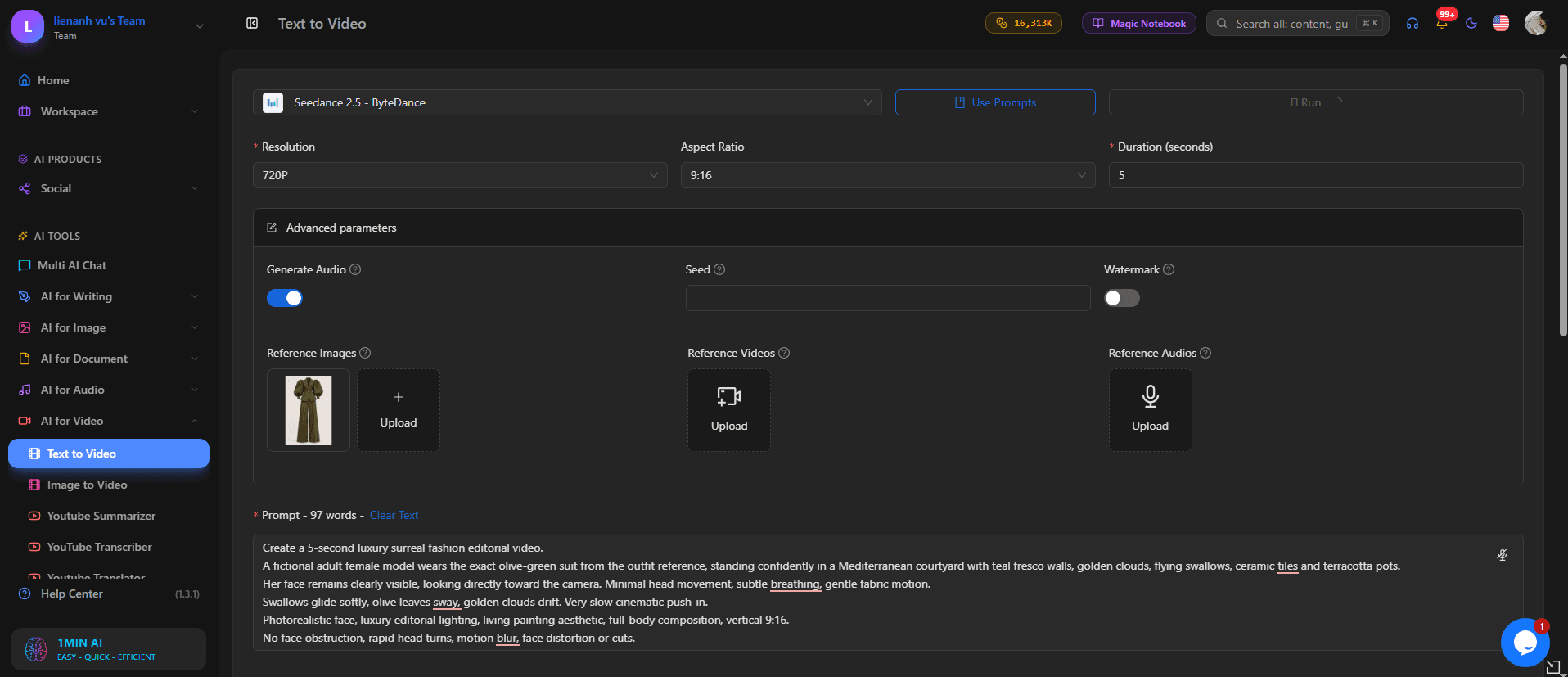
Visit 1min.AI and select Text to Video → Seedance 2.5.
- Select the 9:16 aspect ratio for vertical content.
- Upload your outfit reference image.
- Enter a prompt describing the fashion scene.
- Click Run to generate your video.
Example prompt:
Create a realistic cinematic fashion video featuring an adult female model wearing the exact outfit from the reference image. She walks confidently along a beautiful European street. Smooth camera tracking, natural fabric movement, soft golden-hour lighting, realistic skin texture, and professional fashion editorial style. Preserve the outfit's original colors and details.
Result: A cinematic AI fashion video based on your clothing reference.
Step 2 Personalize Your Fashion Video With HeyGen
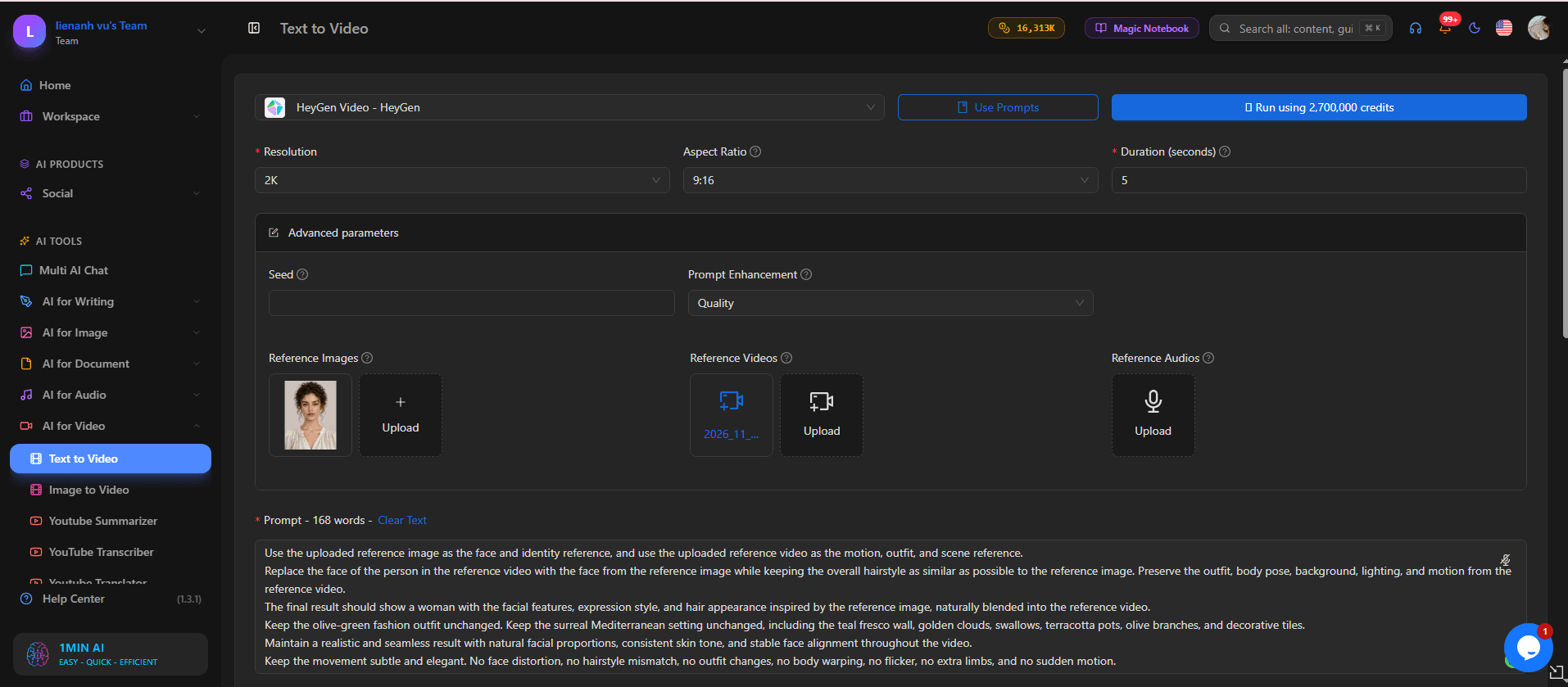
Next, choose HeyGen in 1min.AI.
- Upload a clear reference photo of your face.
- Select your preferred video settings.
- Enter a prompt describing your personalized fashion scene.
- Click Run to generate the video.
Example prompt:
Create a photorealistic fashion video featuring the woman from the uploaded face reference. Preserve her recognizable facial features, natural skin texture, and face shape. She walks confidently toward the camera wearing an elegant outfit, with cinematic lighting, realistic expressions, and smooth camera movements.
Result: A personalized fashion video featuring your likeness.
Note: Face-reference generation creates a new video. To replace a face directly in an existing clip, use a dedicated video face swap tool.
Step 3 Review and Download Your AI Fashion Video
Before exporting, check three details:
- Facial consistency: Does the face remain recognizable?
- Outfit accuracy: Are the clothing colors and details preserved?
- Natural movement: Do the walking motion and expressions look realistic?
If necessary, adjust your prompt and generate another version.
3. Tips for Creating Realistic AI Fashion Videos
To improve your results, focus on these four factors:
- Use clear references: Choose sharp outfit images and well-lit face photos.
- Write specific prompts: Describe the outfit, background, lighting, and camera movement.
- Keep movements simple: Natural walking and smooth tracking shots help maintain visual consistency.
- Review before publishing: Check for facial distortions, unnatural movements, and changing clothing details.
For more reference-based video techniques, read Better AI Product Videos With Seedance 2.5.
4. Create Your Own AI Fashion Videos With 1min.AI
With Seedance 2.5 and HeyGen, fashion creators can explore cinematic video concepts and personalized content without traditional filming.
Whether you're creating outfit inspiration, UGC content, or fashion campaign concepts, you can start with a reference image and a clear prompt.
Ready to try it? Create your first AI fashion video on 1min.AI today.
- #Informational
Alternatif
Temukan alternatif terbaik untuk 1minAI dan bandingkan fitur, harga, serta kasus penggunaannya.

1min.AI vs OpenRouter
1min.AI vs. OpenRouter: Bandingkan produk kreasi AI siap pakai dengan alat API teknis. Cari tahu apakah Anda membutuhkan studio kreatif tanpa kode atau pusat infrastruktur pengodean.
 Ngoc Hong

1min AI vs Buffer
Compare 1min.AI vs Buffer for Facebook content creation, AI writing, image generation, scheduling, pricing, and everyday marketing workflows.
Ngoc Hong
1min.AI vs. Hootsuite: Which Social Media Tool Fits Your Workflow?
Compare 1min.AI vs. Hootsuite to explore their AI content creation, social media publishing, analytics, pricing, and collaboration features. Find the right tool for your workflow.
Alat AI
Temukan alat AI terbaik untuk meningkatkan produktivitas, kreativitas, dan pekerjaan sehari-hari.

4 Alat AI Terjangkau Teratas untuk Pendiri Startup
Temukan 4 alat AI terjangkau teratas untuk pendiri startup guna memvalidasi ide, membangun produk, membuat konten, dan meluncurkan lebih cepat tanpa pengeluaran berlebihan.
 Tram Ta

POV: Anda Punya 10+ Post untuk Dibuat Setiap Hari
Pelajari cara membangun alur kerja konten AI yang membantu kreator konten menghasilkan 10+ postingan media sosial per hari lebih cepat dengan brainstorming AI, pembuatan gambar, dan pembuatan konten.
 Lien Anh Vu

Ubah “Make It Better” Menjadi Konten yang Lebih Baik dengan AI
Gunakan AI untuk mengubah masukan klien yang samar menjadi revisi yang jelas, mengurangi edit yang tidak perlu, dan mengirimkan konten yang lebih baik lebih cepat.
Lien Anh VuFitur AI
Fitur AI komprehensif yang merampingkan alur kerja, meningkatkan efisiensi, dan memberdayakan tim untuk mencapai lebih banyak.

1minAI: Pemeriksa Tata Bahasa AI Gratis
Periksa tata bahasa gratis dengan pemeriksa tata bahasa AI 1minAI. Temukan kesalahan tata bahasa, ejaan, dan penulisan, tingkatkan kejelasan, dan poles konten Anda dalam hitungan detik.
Tram Ta
Bangun Situs Web Portofolio Lebih Cepat dengan 1min.AI
Pelajari bagaimana pekerja kreatif lepas dapat menggunakan 1min.AI untuk merencanakan, menulis, mendesain, dan menghasilkan situs web portofolio profesional lebih cepat, bahkan tanpa keterampilan coding yang kuat.
Lien Anh Vu
Komentar AI X Gratis
Buat komentar lucu, cerdas, atau berwawasan untuk Twitter dengan Generator Komentar Twitter bertenaga AI kami. Tingkatkan engagement Anda dan menonjol di keramaian!
Kasus Penggunaan AI
Kumpulan kasus penggunaan AI yang dikurasi untuk bisnis, produktivitas, dan aplikasi spesifik industri.

Waktu Terbaik Posting di Instagram: Panduan Praktis untuk Engagement yang Lebih Baik
Temukan waktu terbaik posting di Instagram, termasuk hari dan jam terbaik untuk berbagai audiens, plus tips untuk menemukan jadwal posting ideal untuk akun Anda.
Tram TaBangun Situs Web Portofolio Lebih Cepat dengan 1min.AI
Pelajari bagaimana pekerja kreatif lepas dapat menggunakan 1min.AI untuk merencanakan, menulis, mendesain, dan menghasilkan situs web portofolio profesional lebih cepat, bahkan tanpa keterampilan coding yang kuat.
Lien Anh VuUbah “Make It Better” Menjadi Konten yang Lebih Baik dengan AI
Gunakan AI untuk mengubah masukan klien yang samar menjadi revisi yang jelas, mengurangi edit yang tidak perlu, dan mengirimkan konten yang lebih baik lebih cepat.
Lien Anh VuTutorial AI
Pelajari cara menggunakan AI dengan tutorial praktis langkah demi langkah.

Penawaran Alat AI Black Friday di 2026
Temukan apa saja yang ditawarkan oleh penawaran alat AI Black Friday 2026. Cari tahu cara mendapatkan penawaran seumur hidup 1min.AI lewat AppSumo, Dealify, Stack Social, dan verifikasi di Trustpilot, Slashdot, dan Software Advice.
 Hang Nguyen

Rasakan Fashion Week seharga $0 dengan 1minAI Face Swap
Rasakan Fashion Week seharga $0 dengan 1minAI Face Swap. Unggah foto Anda, pilih video Fashion Week, dan buat momen fashion AI Anda sendiri.
Ngoc Hong
Reels Viral dalam Hitungan Menit: Cara Menggunakan Text-to-Speech 1minAI untuk Voiceover Satir
Pelajari cara admin halaman satir menggunakan fitur Text-to-Speech 1minAI untuk membuat voiceover ala pembawa berita dan dramatis secara instan untuk TikTok, Shorts, dan Instagram Reels.
Panduan AI
Pelajari AI lebih cepat dengan panduan praktis, contoh dunia nyata, dan praktik terbaik yang dapat ditindaklanjuti.

Beli Alat AI Secara Aman Online: Panduan Black Friday 2026
Temukan cara menemukan dan mengamankan penawaran Black Friday AI terbaik secara online. Pelajari strategi ahli untuk menghindari penipuan, mengatasi kelelahan langganan, dan memverifikasi perangkat lunak.
Hang Nguyen4 Alat AI Terjangkau Teratas untuk Pendiri Startup
Temukan 4 alat AI terjangkau teratas untuk pendiri startup guna memvalidasi ide, membangun produk, membuat konten, dan meluncurkan lebih cepat tanpa pengeluaran berlebihan.
Tram Ta
Cara memulai bisnis AI tanpa membangunnya dari nol
Pelajari cara memulai bisnis AI, memvalidasi ide Anda, dan meluncur lebih cepat tanpa membangun infrastruktur AI yang mahal dari nol.
Ngoc HongSolusi AI
Jelajahi solusi AI terbaik untuk otomatisasi, coding, penelitian, produktivitas, dukungan pelanggan, pemasaran, dan alur kerja bisnis.

Generator Tato AI Gratis: Desain Kustom
Ubah ide apa pun menjadi desain tato kustom dengan generator tato AI gratis 1min.AI. Jelaskan ide Anda, pilih gaya, dan unduh dalam hitungan detik.
 Trang Tran
Beli Alat AI Secara Aman Online: Panduan Black Friday 2026
Temukan cara menemukan dan mengamankan penawaran Black Friday AI terbaik secara online. Pelajari strategi ahli untuk menghindari penipuan, mengatasi kelelahan langganan, dan memverifikasi perangkat lunak.
Hang Nguyen4 Alat AI Terjangkau Teratas untuk Pendiri Startup
Temukan 4 alat AI terjangkau teratas untuk pendiri startup guna memvalidasi ide, membangun produk, membuat konten, dan meluncurkan lebih cepat tanpa pengeluaran berlebihan.
Tram TaModel AI
Jelajahi model AI terkemuka di dunia di satu tempat.

Free AI Chat With Claude Fable 5.2 On 1min.AI
Free AI chat with Claude Fable 5.2 on 1min.AI. Compare Fable 5.2 vs Opus 5.5, see Fable 5.2 benchmarks, and start chatting in minutes.
Trang Tran
GPT-6.2 Sol: Specs, Pricing & Free Access
Explore GPT-6.2 Sol specs, pricing, and how it compares with GPT-6.1 Sol and Claude Opus 5.5, then try it free in 1min.AI Multi AI Chat.
Trang Tran
GPT 6.2 Astra: Pricing, Benchmarks & Free Access
GPT 6.2 Astra release date, pricing, Reddit feedback and Opus 5.5 comparison. See what it does best and chat with it on 1min.AI for free.
Trang TranPerbandingan AI
Bandingkan alat, model, dan platform AI untuk menemukan yang paling sesuai dengan kebutuhan Anda.

Gemini 4 Neon vs Hydrogen: Specs, Price & Picks
Gemini 4 Neon vs Hydrogen, Carbon and Argon: compare price, benchmarks and use cases to pick the right model, then test them side by side on 1min.AI.
Trang Tran
Kling AI Vs Veo 3: Model Mana yang Menang?
Kling AI vs Veo 3: bandingkan gerakan, audio native, harga, dan tier gratis untuk melihat generator video AI mana yang unggul untuk proyek Anda - coba keduanya di 1min.AI.
Trang Tran
Perbandingan DeepSeek V4 Pro vs Flash
Bandingkan metrik DeepSeek V4 Pro vs DeepSeek V4 Flash. Optimalkan aplikasi agen Anda dan tingkatkan pemeriksaan fakta AI di 1min.ai hari ini.
Integrasi AI
Integrasikan AI dengan mulus ke dalam alat yang sudah Anda gunakan untuk mengotomatiskan pekerjaan dan meningkatkan produktivitas.
POV: Anda Punya 10+ Post untuk Dibuat Setiap Hari
Pelajari cara membangun alur kerja konten AI yang membantu kreator konten menghasilkan 10+ postingan media sosial per hari lebih cepat dengan brainstorming AI, pembuatan gambar, dan pembuatan konten.
Lien Anh Vu
Berhenti Berganti Aplikasi AI: Bagaimana Integrasi AI Mengubah Employer Branding
Temukan bagaimana integrasi AI membantu tim HR merampingkan employer branding dengan menggabungkan penulisan AI, dokumen, gambar, video, dan berbagai model AI ke dalam satu ruang kerja.
Tram Ta
Penjelasan AI API Aggregator untuk Developer
Agregator API AI memberikan developer satu API terpadu untuk memanggil berbagai model AI, memangkas waktu integrasi dan keterikatan vendor.
Trang TranAI untuk Industri
Temukan alat dan alur kerja AI terbaik untuk layanan kesehatan, keuangan, pendidikan, hukum, manufaktur, ritel, real estat, dan lainnya.

Voice Cloning AI Free: How to Clone Any Voice Online in Minutes
Try voice cloning AI free with 1min.AI. Upload a 5-second clip, pick an ElevenLabs model, choose from 32 languages, and turn text to speech in your own voice.
Trang Tran
Claude Personal Finance Setup and Safety Guide
Claude personal finance explained: how Personal Finance in Claude works and what Claude finance can see. Plus a safe CSV method for non-US users.
Trang Tran
Free AI Image Editor With Prompt No Restrictions
Looking for a free AI image editor with prompt no restrictions? Edit backgrounds, objects and text by typing, no watermark. Try 1min.AI’s flexible editor now.
Trang TranAgen AI
Temukan dan jalankan agen AI untuk mengotomatiskan tugas di seluruh pekerjaan dan kehidupan sehari-hari Anda.
1minAI: Pemeriksa Tata Bahasa AI Gratis
Periksa tata bahasa gratis dengan pemeriksa tata bahasa AI 1minAI. Temukan kesalahan tata bahasa, ejaan, dan penulisan, tingkatkan kejelasan, dan poles konten Anda dalam hitungan detik.
Tram Ta
AI Agent untuk Facebook
Gunakan AI Agent untuk Facebook untuk membuat konten, menghasilkan gambar, menjadwalkan posting, dan menerbitkan dari dokumen dan percakapan Anda.
Ngoc Hong
AI Agent vs AI Assistant: Mana yang Benar-Benar Menghemat Waktu Designer Lebih Banyak?
Pelajari perbedaan antara AI Agent vs AI Assistant dan temukan solusi mana yang membantu designer mengotomatiskan pekerjaan berulang, mengurangi revisi, dan menghemat lebih banyak waktu.
Lien Anh VuAlur Kerja AI
Jelajahi alur kerja AI siap pakai untuk produktivitas, pemasaran, penjualan, dukungan, dan lainnya.
POV: Anda Punya 10+ Post untuk Dibuat Setiap Hari
Pelajari cara membangun alur kerja konten AI yang membantu kreator konten menghasilkan 10+ postingan media sosial per hari lebih cepat dengan brainstorming AI, pembuatan gambar, dan pembuatan konten.
Lien Anh VuAI Fashion Video Generator With Seedance 2.5 and HeyGen
Learn how to create AI fashion videos with Seedance 2.5 and HeyGen. Turn outfit photos into cinematic videos featuring your own face with 1min.AI.
Lien Anh Vu
Is Seedance 2.5 the Best AI Video Generator of 2026?
Is Seedance 2.5 the best AI video generator in 2026? Explore its features, compare it with Kling and Veo, and learn how to create AI videos on 1min.AI.
Lien Anh VuBuletin
Inovasi AI Mingguan dengan 1minAI

🔮 Weekly AI Innovations #145: X Content Agent & GPT 6.1 Terra on 1min.ai
Scale viral reach with the X Content Agent on 1min.ai. Discover an end-to-end 4-stage pipeline with zero token burn, plus the launch of GPT 6.1 Terra.
Hang Nguyen
🔮 Weekly AI Innovations #144: LinkedIn Content Agent: Complete B2B Publishing Pipeline
Scale B2B influence with the LinkedIn Content Agent on 1min.ai. Discover an end-to-end 4-stage pipeline with zero redundant token burn and 1-click publishing.
Hang Nguyen
🔮 Weekly AI Innovations #146: Mistral 3.5, Qwen Image & Cohere A+ are ready on 1min.ai
Deploy Mistral Large 3, Qwen Image 3.0, and Cohere Command A+ on 1min.ai. Boost RAG accuracy and cut visual generation latency in one unified AI workspace.
Hang Nguyen