
Free AI Image Editor No Restrictions with 1minAI

Tram Ta
Nobyembre 20, 2026
Looking for a free AI image editor with no restrictions? Edit photos with prompts, replace objects, remove text, change backgrounds, and transform images with 1minAI.
You have a photo that is almost perfect, but something needs to change. Maybe the background does not match your campaign, an unwanted object distracts from the subject, or the image needs a different size for social media.
Traditional photo editing can require multiple tools, complicated selections, and time-consuming manual adjustments. A free AI image editor offers a simpler approach: upload an image, describe the change you want, and let AI help transform it.
But what does "no restrictions" really mean? Does it mean unlimited editing, no watermarks, or the freedom to create any image?
With 1minAI, the focus is on giving creators more flexibility over how they edit. You can use natural-language prompts to replace objects, change backgrounds, modify selected areas, remove text, extend images, and explore creative variations in one workspace.
This guide explains how to use a free AI image editor, which tools to choose for different editing tasks, and how to write better prompts to get the results you want.
What Can You Do With 1minAI's Free AI Image Editor?
1minAI brings multiple AI image capabilities into one workspace. Instead of relying on one editor for every task, you can choose a tool based on the specific change you want to make.
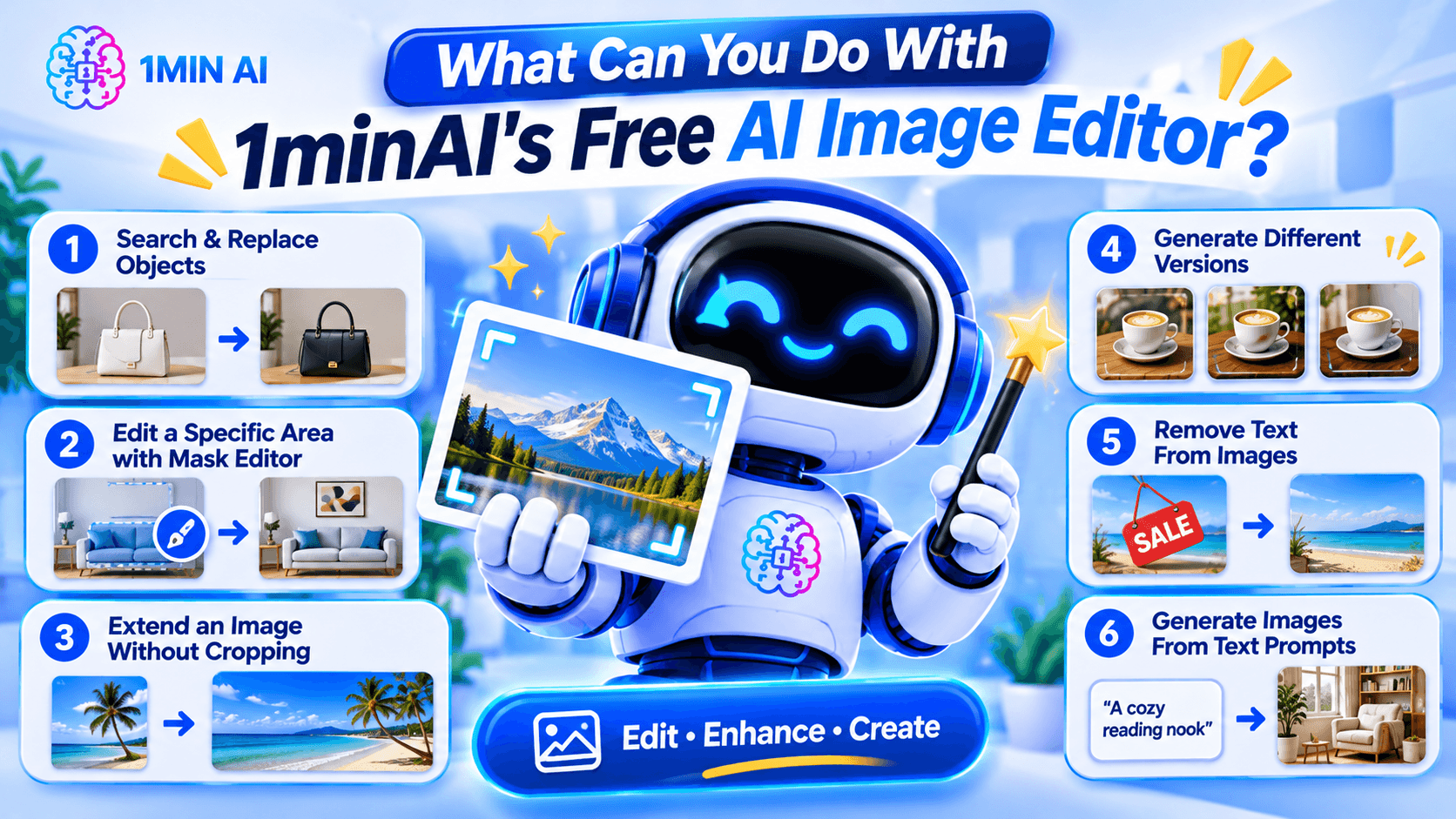
Here are some of the main editing workflows.
1. Search and Replace Objects in an Image
AI photo editing before after product image object replacement example replacing handbag color or furniture with new object realistic seamless edit" aspectRatio="16:9" width="100%" />
Sometimes an image is good except for one object.
For example, you may like a product photo but want to change the packaging color, replace a piece of furniture, or swap an accessory.
1minAI's AI Image Object Search and Replace lets you identify an object and describe what should replace it.
Example prompt:
"Replace the white ceramic vase on the table with a matte black vase. Keep the flowers, table, wall, and lighting unchanged."
This can be useful for:
- E-commerce product photography.
- Marketing and advertising creatives.
- Interior design concepts.
- Social media content.
- Creative experimentation.
The main advantage is that you can focus on the object you want to change instead of manually rebuilding the whole image.
2. Edit a Specific Area With the Image Mask Editor
Sometimes you want to modify only one part of an image while preserving everything else.
The 1minAI Image Mask Editor lets you select the area you want to edit, then describe what should appear in that region.
For example, you could:
- Change an object in the background.
- Add a decorative element.
- Fix an unwanted detail.
- Change the color of a selected item.
- Refresh part of an older image.
Example prompt:
"Replace the selected empty wall area with a framed abstract painting in warm neutral colors. Keep the furniture and room lighting unchanged."
This is especially useful when a full-image transformation would change details you want to preserve.
3. Extend an Image Without Cropping the Original Subject
Have you ever created a square image but later needed a wide banner?
Cropping may remove important details, while stretching can distort the subject.
The 1minAI Image Extender expands the canvas by generating additional background around the original image.
You can use it to:
- Turn square images into landscape banners.
- Adapt product photos for website headers.
- Create more space for advertising text.
- Reformat social media visuals.
- Expand portraits or landscapes.
Example instruction:
"Extend this image to a wide landscape composition. Continue the existing studio background naturally and keep the product centered at its original size."
This helps you adapt existing visuals to different layouts without starting over.
4. Generate Different Versions With AI Image Variator
If you like the original image but want to explore alternative styles, use the 1minAI AI Image Variator.
It creates alternative versions of an existing image while maintaining its core subject.
You can experiment with:
- Different color palettes.
- New backgrounds.
- Alternative lighting.
- Different artistic styles.
- Fresh compositions.
- Different visual moods.
Example prompt:
"Create three visual variations of this coffee product photo. Version one should have a warm minimalist kitchen background, version two should use a modern dark studio, and version three should feature a bright outdoor café setting. Keep the product design recognizable."
This can help marketers and creators explore different creative directions before choosing a final visual.
5. Remove Text From Images
Sometimes an image contains text that you no longer need.
For example, you may have an old promotional graphic with an expired discount, an outdated date, or a caption that no longer fits your campaign.
1minAI provides a Stable Diffusion XL Text Remover API for removing text elements from images through an API workflow.
The documented endpoint uses the TEXT_REMOVER feature type and stable-diffusion-xl model identifier. It accepts an image path and supports PNG, JPEG, and WebP output formats.
This is particularly useful for developers who want to integrate text removal into an image-processing application.
Example use case:
A marketing team has an old promotional image with a previous campaign date. They can use text removal to clear the outdated text and prepare the image for a new design.
Always review the result carefully, especially when text overlaps detailed textures, logos, or important visual elements.
6. Generate Images From Text Prompts
You do not always need an existing photo to start editing.
With the 1minAI AI Image Generator, you can create a new visual from a written description.
Describe:
- The main subject.
- The environment.
- The visual style.
- The lighting.
- The composition.
- The mood and color palette.
Example prompt:
"A premium skincare serum bottle on a natural stone surface, surrounded by soft green leaves, bright morning sunlight, minimalist luxury product photography, neutral beige background, realistic texture, professional commercial advertising style."
Once you have a base image, you can continue refining it with the other editing tools.
How to Edit an Image With AI in 1minAI
You do not need to master complicated editing software to get started. A simple workflow can take you from an existing photo to a refined visual.
Step 1: Open the Image Editing Workspace
Visit 1minAI's Create, Edit, and Transform Images page to explore the available image tools.
Choose the tool that matches your goal:
- Object replacement.
- Mask-based editing.
- Image extension.
- Image variation.
- Text removal.
- Image generation.
If you already have a photo, upload it to the relevant editing tool.
Step 2: Describe the Change You Want
Write a prompt explaining what should change.
A useful prompt should be specific enough for the AI to understand the subject, action, and desired result.
Try this formula:
Object + Action + Style or Setting + Details to Preserve
For example:
"Replace the wooden chair with a modern cream-colored armchair, use a Scandinavian interior style, and keep the original room layout, lighting, and camera angle unchanged."
The more clearly you describe the desired edit, the easier it is to evaluate the result.
Step 3: Generate and Review the Result
Run the edit and inspect the generated image.
Pay attention to:
- Object shapes and proportions.
- Lighting and shadows.
- Edges around edited areas.
- Text and logos.
- Background consistency.
- Unwanted changes to the original subject.
AI editing may not produce a perfect result on the first attempt. If something looks wrong, refine the prompt or make a smaller edit.
Step 4: Download and Use Your Image
Once the result looks right, download it and prepare it for your intended project.
Before using an image commercially, check the applicable tool terms, model licenses, and rights associated with any source images, logos, or people shown in the visual.
How to Choose the Right AI Image Editing Tool
Not every editing task needs the same tool.
Choosing the right workflow can save time and reduce unnecessary edits.
| Your goal | Recommended 1minAI tool |
|---|---|
| Create an image from a text description | AI Image Generator |
| Find and replace an object | AI Image Object Search and Replace |
| Change one specific area | Image Mask Editor |
| Expand the image canvas | Image Extender |
| Generate alternative versions | AI Image Variator |
| Remove text through an API | Stable Diffusion XL Text Remover |
| Explore several image tools in one place | Create, Edit, and Transform Images |
What If You Do Not Know How to Write an Image Prompt?
You can use 1minAI Image to Prompt to analyze an existing image and turn its visual details into a written prompt.
This can help you understand how to describe:
- Main subjects.
- Colors and lighting.
- Composition.
- Camera perspective.
- Artistic style.
- Background details.
For example, if you find a product image with a style you like, you can use Image to Prompt to generate a description that helps you create a similar visual direction.
Remember to use reference images you have the right to use, and avoid copying protected designs or branding without permission.
Who Can Benefit From a Free AI Image Editor?
AI image editing is useful for more than professional designers. Different types of users can apply it to everyday creative work.
E-commerce Sellers
Online sellers need product visuals for listings, advertisements, and social media.
An AI image editor can help them:
- Change product backgrounds.
- Create lifestyle product scenes.
- Explore packaging variations.
- Remove distracting objects.
- Adapt photos for different platforms.
For example, a seller could start with one product photo and create several campaign concepts for seasonal promotions.
Digital Marketers
Marketing teams often need multiple creative assets for different campaigns.
They can use AI editing to test different backgrounds, colors, product placements, and visual styles without rebuilding every design from scratch.
Content Creators
Creators may need images for blog posts, thumbnails, social media, and presentations.
AI tools can help them turn a basic photo into a more polished visual, extend the canvas, or create alternative styles.
Small Business Owners
Small businesses may not have an in-house designer.
A prompt-based editor gives owners a way to make straightforward visual adjustments, prepare promotional materials, and explore design ideas without mastering professional editing software.
Designers and Creative Professionals
AI does not replace professional creative judgment. However, it can help designers explore concepts, generate alternatives, and handle repetitive editing tasks.
Professionals can use it as an additional tool in their creative process while retaining control over the final design.
Conclusion
A free AI image editor can make visual editing easier by turning written instructions into practical image transformations.
Whether you want to replace an object, remove text, extend a photo, create alternative versions, or generate a new visual, the right AI tool can reduce repetitive manual work and help you explore more creative ideas.
With 1minAI, you can move between image generation and editing tools in one workspace. Start with an existing photo or a text prompt, describe the change you want, review the result, and refine it until it fits your project.
More creative control starts with a clearer prompt. Try 1minAI's AI image tools and turn your next image-editing idea into reality.
- #Commerce
- #Information
Mga Alternatibo
Tuklasin ang pinakamahusay na mga alternatibo sa 1minAI at ihambing ang mga feature, pagpepresyo, at mga kaso ng paggamit.

1min.AI vs OpenRouter
1min.AI vs. OpenRouter: Ikumpara ang ready-to-use na AI creation product laban sa technical API tool. Alamin kung kailangan mo ng zero-code creative studio o coding infrastructure hub.
 Ngoc Hong

1min AI vs Buffer
Compare 1min.AI vs Buffer for Facebook content creation, AI writing, image generation, scheduling, pricing, and everyday marketing workflows.
Ngoc Hong
1min.AI vs. Hootsuite: Which Social Media Tool Fits Your Workflow?
Compare 1min.AI vs. Hootsuite to explore their AI content creation, social media publishing, analytics, pricing, and collaboration features. Find the right tool for your workflow.
Mga Tool ng AI
Tuklasin ang pinakamahusay na mga tool ng AI upang mapalakas ang pagiging produktibo, pagkamalikhain, at pang-araw-araw na gawain.

Nangungunang 4 Abot-kayang AI Tool para sa mga Startup Founder
Tuklasin ang nangungunang 4 abot-kayang AI tool para sa mga startup founder para ma-validate ang mga ideya, bumuo ng produkto, gumawa ng content, at maglunsad nang mas mabilis nang hindi sosobra sa gastos.
 Tram Ta

POV: May 10+ Post Ka na Kailangang Gawin Araw-araw
Alamin kung paano bumuo ng AI content workflow na tumutulong sa mga content creator na makagawa ng 10+ social media post bawat araw nang mas mabilis gamit ang AI brainstorming, image generation, at content creation.
 Lien Anh Vu

Gawing Mas Mahusay na Content ang “Make It Better” Gamit ang AI
Gamitin ang AI para gawing malinaw na revisions ang malabong feedback ng kliyente, bawasan ang hindi kailangang edits, at maghatid ng mas mahusay na content nang mas mabilis.
Lien Anh VuMga Tampok ng AI
Komprehensibong tampok ng AI na nagpapadali ng daloy ng trabaho, nagpapahusay ng kahusayan, at nagpapalakas sa mga koponan na makamit ang higit pa.

1minAI: Libreng AI Grammar Checker
Suriin ang grammar nang libre gamit ang AI grammar checker ng 1minAI. Hanapin ang mga mali sa grammar, spelling, at pagsusulat, pagandahin ang linaw, at pulihin ang content mo sa loob ng ilang segundo.
Tram Ta
Bumuo ng Portfolio Website nang Mas Mabilis gamit ang 1min.AI
Alamin kung paano magagamit ng mga freelance creative ang 1min.AI para planuhin, magsulat, magdisenyo, at bumuo ng propesyonal na portfolio website nang mas mabilis, kahit hindi ka magaling mag-code.
Lien Anh Vu
Libreng AI X Comment
Gumawa ng nakakatawa, matalino, o insightful na mga komento para sa Twitter gamit ang aming AI-powered Twitter Comment Generator. Palakasin ang iyong engagement at maging kakaiba sa karamihan!
 Trang Tran
Mga Paggamit ng AI
Isang piniling koleksyon ng mga paggamit ng AI para sa negosyo, produktibidad, at mga aplikasyon na partikular sa industriya.

Pinakamagandang Oras para Mag-post sa Instagram: Praktikal na Gabay para sa Mas Mahusay na Engagement
Alamin ang pinakamagandang oras para mag-post sa Instagram, kabilang ang pinakamagagandang araw at oras para sa iba't ibang audience, plus mga tip para mahanap ang ideal na iskedyul ng pagpo-post para sa iyong account.
Tram TaBumuo ng Portfolio Website nang Mas Mabilis gamit ang 1min.AI
Alamin kung paano magagamit ng mga freelance creative ang 1min.AI para planuhin, magsulat, magdisenyo, at bumuo ng propesyonal na portfolio website nang mas mabilis, kahit hindi ka magaling mag-code.
Lien Anh VuGawing Mas Mahusay na Content ang “Make It Better” Gamit ang AI
Gamitin ang AI para gawing malinaw na revisions ang malabong feedback ng kliyente, bawasan ang hindi kailangang edits, at maghatid ng mas mahusay na content nang mas mabilis.
Lien Anh VuMga Tutorial sa AI
Matutunan kung paano gamitin ang AI gamit ang praktikal, sunud-sunod na mga tutorial.

Mga Deal sa AI Tool tuwing Black Friday sa 2026
Tuklasin kung ano ang iniaalok ng mga deal sa AI tool tuwing Black Friday 2026. Alamin kung paano makuha ang 1min.AI lifetime deal sa pamamagitan ng AppSumo, Dealify, Stack Social, at mag-verify sa Trustpilot, Slashdot, at Software Advice.
 Hang Nguyen

Maranasan ang Fashion Week nang $0 gamit ang 1minAI Face Swap
Maranasan ang Fashion Week nang $0 gamit ang 1minAI Face Swap. I-upload ang iyong larawan, pumili ng video ng Fashion Week, at gumawa ng sarili mong AI fashion moment.
Ngoc Hong
Viral na Reels sa Ilang Minuto: Paano Gamitin ang Text-to-Speech ng 1minAI para sa Mga Satirical na Voiceover
Alamin kung paano ginagamit ng mga admin ng satirical page ang Text-to-Speech feature ng 1minAI para gumawa agad ng news anchor at dramatic na voiceover para sa TikToks, Shorts, at Instagram Reels.
Mga Gabay sa AI
Matuto ng AI nang mas mabilis gamit ang mga praktikal na gabay, mga halimbawa sa totoong mundo, at mga pinakamahusay na kasanayan na magagamit.

Ligtas na Bumili ng AI Tools Online: Gabay sa Black Friday 2026
Tuklasin kung paano hanapin at makuha ang pinakamagagandang AI deal ngayong Black Friday online. Alamin ang mga estratehiya ng eksperto para iwas-scam, labanan ang subscription fatigue, at beripikahin ang software.
Hang Nguyen
Paano magsimula ng isang AI na negosyo nang hindi nagsisimula sa wala
Alamin kung paano magsimula ng isang AI na negosyo, i-validate ang iyong ideya, at maglunsad nang mas mabilis nang hindi bumubuo ng mamahaling AI infrastructure mula sa simula.
Ngoc Hong
AI Fashion Video Generator With Seedance 2.5 and HeyGen
Learn how to create AI fashion videos with Seedance 2.5 and HeyGen. Turn outfit photos into cinematic videos featuring your own face with 1min.AI.
Lien Anh VuMga Solusyon sa AI
I-browse ang pinakamahusay na solusyon sa AI para sa automation, coding, pananaliksik, pagiging produktibo, suporta sa customer, marketing, at mga daloy ng trabaho sa negosyo.

Libreng AI Tattoo Generator: Mga Custom na Disenyo
Gawing custom na disenyo ng tattoo ang anumang ideya gamit ang libreng AI tattoo generator ng 1min.AI. Ilarawan ang ideya mo, pumili ng style, at i-download sa ilang segundo.
Trang TranLigtas na Bumili ng AI Tools Online: Gabay sa Black Friday 2026
Tuklasin kung paano hanapin at makuha ang pinakamagagandang AI deal ngayong Black Friday online. Alamin ang mga estratehiya ng eksperto para iwas-scam, labanan ang subscription fatigue, at beripikahin ang software.
Hang NguyenMaranasan ang Fashion Week nang $0 gamit ang 1minAI Face Swap
Maranasan ang Fashion Week nang $0 gamit ang 1minAI Face Swap. I-upload ang iyong larawan, pumili ng video ng Fashion Week, at gumawa ng sarili mong AI fashion moment.
Ngoc HongMga Modelo ng AI
Galugarin ang mga nangungunang modelo ng AI sa mundo sa isang lugar.

Free AI Chat With Claude Fable 5.2 On 1min.AI
Free AI chat with Claude Fable 5.2 on 1min.AI. Compare Fable 5.2 vs Opus 5.5, see Fable 5.2 benchmarks, and start chatting in minutes.
Trang Tran
GPT-6.2 Sol: Specs, Pricing & Free Access
Explore GPT-6.2 Sol specs, pricing, and how it compares with GPT-6.1 Sol and Claude Opus 5.5, then try it free in 1min.AI Multi AI Chat.
Trang Tran
GPT 6.2 Astra: Pricing, Benchmarks & Free Access
GPT 6.2 Astra release date, pricing, Reddit feedback and Opus 5.5 comparison. See what it does best and chat with it on 1min.AI for free.
Trang TranMga Paghahambing ng AI
Paghambingin ang mga tool, modelo, at platform ng AI upang mahanap ang pinakaangkop para sa iyong mga pangangailangan.

Gemini 4 Neon vs Hydrogen: Specs, Price & Picks
Gemini 4 Neon vs Hydrogen, Carbon and Argon: compare price, benchmarks and use cases to pick the right model, then test them side by side on 1min.AI.
Trang Tran
Kling AI Vs Veo 3: Aling Modelo ang Panalo?
Kling AI vs Veo 3: ikumpara ang galaw, native audio, presyo, at free tiers para makita kung aling AI video generator ang mas babagay sa proyekto mo — subukan pareho sa 1min.AI.
Trang Tran
Paghahambing ng DeepSeek V4 Pro vs Flash
Ihambing ang mga metric ng DeepSeek V4 Pro vs DeepSeek V4 Flash. I-optimize ang iyong mga agentic app at pagandahin ang AI fact checking sa 1min.ai ngayon.
Ngoc HongIntegrasyon ng AI
Isama nang walang putol ang AI sa mga tool na ginagamit mo upang i-automate ang trabaho at pataasin ang produktibidad.
POV: May 10+ Post Ka na Kailangang Gawin Araw-araw
Alamin kung paano bumuo ng AI content workflow na tumutulong sa mga content creator na makagawa ng 10+ social media post bawat araw nang mas mabilis gamit ang AI brainstorming, image generation, at content creation.
Lien Anh Vu
Itigil ang Paglipat-lipat sa mga AI App: Paano Binabago ng AI Integration ang Employer Branding
Tuklasin kung paano tinutulungan ng AI integration ang mga HR team na pahusayin ang employer branding sa pamamagitan ng pagsasama ng AI writing, mga dokumento, mga larawan, video, at maraming AI model sa iisang workspace.
Tram Ta
Paliwanag sa AI API Aggregator Para sa mga Developer
Ang AI API aggregator ay nagbibigay sa mga developer ng iisang API para tawagan ang maraming AI model, kaya mas maiksi ang integration time at nababawasan ang vendor lock in.
Trang TranAI para sa mga Industriya
Hanapin ang pinakamahusay na AI tools at workflows para sa pangangalaga sa kalusugan, pananalapi, edukasyon, legal, pagmamanupaktura, tingi, real estate, at marami pa.

Voice Cloning AI Free: How to Clone Any Voice Online in Minutes
Try voice cloning AI free with 1min.AI. Upload a 5-second clip, pick an ElevenLabs model, choose from 32 languages, and turn text to speech in your own voice.
Trang Tran
Claude Personal Finance Setup and Safety Guide
Claude personal finance explained: how Personal Finance in Claude works and what Claude finance can see. Plus a safe CSV method for non-US users.
Trang Tran
Free AI Image Editor With Prompt No Restrictions
Looking for a free AI image editor with prompt no restrictions? Edit backgrounds, objects and text by typing, no watermark. Try 1min.AI’s flexible editor now.
Trang TranMga Ahente ng AI
Tuklasin at patakbuhin ang mga ahente ng AI upang awtomatiko ang mga gawain sa iyong trabaho at pang-araw-araw na buhay.
1minAI: Libreng AI Grammar Checker
Suriin ang grammar nang libre gamit ang AI grammar checker ng 1minAI. Hanapin ang mga mali sa grammar, spelling, at pagsusulat, pagandahin ang linaw, at pulihin ang content mo sa loob ng ilang segundo.
Tram Ta
Mga AI Agent para sa Facebook
Gumamit ng AI Agent para sa Facebook para gumawa ng content, bumuo ng mga image, mag-schedule ng mga post, at mag-publish mula sa iyong mga dokumento at usapan.
Ngoc Hong
AI Agent vs AI Assistant: Alin ang Talagang Nakakatipid ng Mas Maraming Oras para sa mga Designer?
Alamin ang pagkakaiba ng AI Agent vs AI Assistant at tuklasin kung aling solusyon ang tumutulong sa mga designer na i-automate ang paulit-ulit na gawain, bawasan ang revisions, at makatipid ng mas maraming oras.
Lien Anh VuMga Daloy ng Trabaho ng AI
Galugarin ang mga handa nang gamiting daloy ng trabaho ng AI para sa pagiging produktibo, marketing, benta, suporta, at marami pa.
POV: May 10+ Post Ka na Kailangang Gawin Araw-araw
Alamin kung paano bumuo ng AI content workflow na tumutulong sa mga content creator na makagawa ng 10+ social media post bawat araw nang mas mabilis gamit ang AI brainstorming, image generation, at content creation.
Lien Anh VuAI Fashion Video Generator With Seedance 2.5 and HeyGen
Learn how to create AI fashion videos with Seedance 2.5 and HeyGen. Turn outfit photos into cinematic videos featuring your own face with 1min.AI.
Lien Anh Vu
Is Seedance 2.5 the Best AI Video Generator of 2026?
Is Seedance 2.5 the best AI video generator in 2026? Explore its features, compare it with Kling and Veo, and learn how to create AI videos on 1min.AI.
Lien Anh VuLiham-balita
Lingguhang inobasyon sa AI kasama ang 1minAI

🔮 Weekly AI Innovations #145: X Content Agent & GPT 6.1 Terra on 1min.ai
Scale viral reach with the X Content Agent on 1min.ai. Discover an end-to-end 4-stage pipeline with zero token burn, plus the launch of GPT 6.1 Terra.
Hang Nguyen
🔮 Weekly AI Innovations #144: LinkedIn Content Agent: Complete B2B Publishing Pipeline
Scale B2B influence with the LinkedIn Content Agent on 1min.ai. Discover an end-to-end 4-stage pipeline with zero redundant token burn and 1-click publishing.
Hang Nguyen
🔮 Weekly AI Innovations #146: Mistral 3.5, Qwen Image & Cohere A+ are ready on 1min.ai
Deploy Mistral Large 3, Qwen Image 3.0, and Cohere Command A+ on 1min.ai. Boost RAG accuracy and cut visual generation latency in one unified AI workspace.
Hang Nguyen