
Claude Personal Finance Setup and Safety Guide

Trang Tran
Nobyembre 20, 2026

Claude personal finance explained: how Personal Finance in Claude works and what Claude finance can see. Plus a safe CSV method for non-US users.
Claude personal finance (officially “Personal Finance in Claude”) is an Anthropic beta feature. It links your bank and card accounts through Plaid so you can ask Claude about balances, spending, and bills in plain language. Access is read-only. It is available only to US users on Pro, Max, and Ultra plans. Outside the US, you can get similar results by uploading a redacted CSV statement to a Claude model in 1min.AI.
It is the end of the month and payday is still ten days away. You do not need a spreadsheet to answer “Where did my money go?” You need a clear answer you can trust. This guide covers what the feature does, how to set it up, how safe it is, and how to get similar value if you live outside the US.
What Is Claude Personal Finance?
Personal Finance in Claude is a section of the Claude app where you connect financial accounts and ask questions about your own money. It works on Claude web, Claude Desktop, iOS, and Android. Anthropic states that it has no ads or sponsored recommendations and that it does not offer credit cards, loans, or savings accounts of its own.
Watch the official walkthrough:
What Claude Finance Can Do
Claude finance covers four main jobs:
- Spending summaries: Ask “Where did my money go this month?” and get totals grouped by category such as rent, food, and shopping.
- Problem spotting: Claude can flag duplicate charges, unexpected fees, and bills that crept up over the year.
- Concept explanations: Ask “What is an APR?” and Claude explains the term, then adds up the interest you were charged.
- Dashboard building: Ask for a weekly spending chart, a calendar of what is due, or a custom set of numbers.
Who Can Use Personal Finance in Claude
| Requirement | Details |
|---|---|
| Plans | Pro, Max, and Ultra (not Free, Team, or Enterprise) |
| Region | US banks and US users only |
| Status | Beta with gradual rollout |
| Data access | Read-only: balances, credit limits, up to 24 months of transactions |
| Bank limit | Up to 16 linked banks |
How to Use Personal Finance in Claude
Link Your Bank Through Plaid
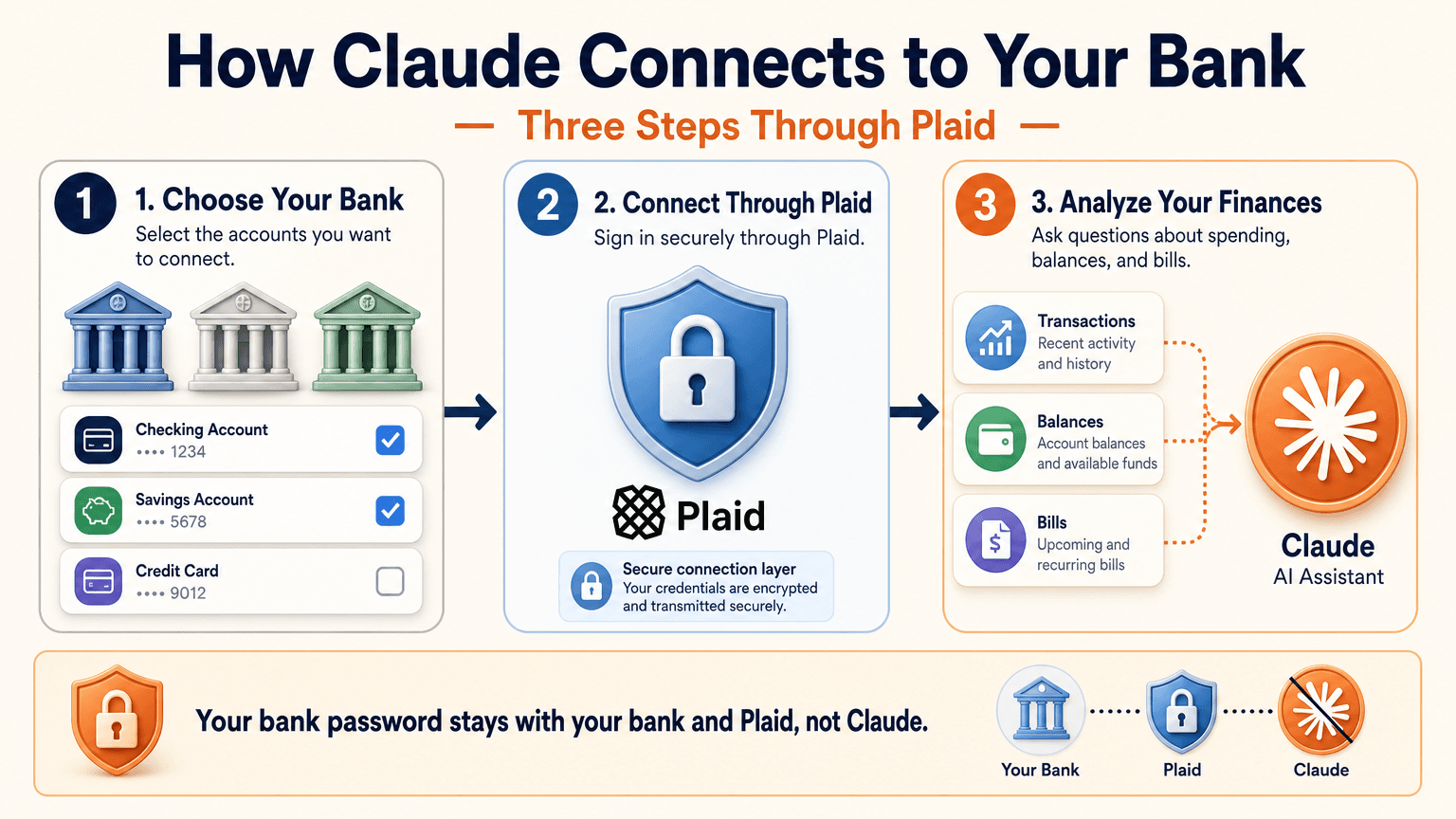
- Open Claude and select Personal Finance in the side menu. If you do not see it, check More.
- Select Get started and choose your goals or skip them.
- Select Link accounts with Plaid and review what Claude will be able to access.
- Sign in to your bank inside Plaid and choose the accounts to share.
- Return to Claude within 10 minutes and wait for your accounts to appear.
You sign in through Plaid, so Claude does not ask for or see your bank password. New transactions can take a few minutes to sync.
Use the Claude Personal Finance Dashboard
The dashboard puts spending, cash flow, accounts, subscriptions, and upcoming bills on one page. Widgets can be added, edited, removed, and reordered. Start with one account and one question, such as “Can I afford a trip this spring?”
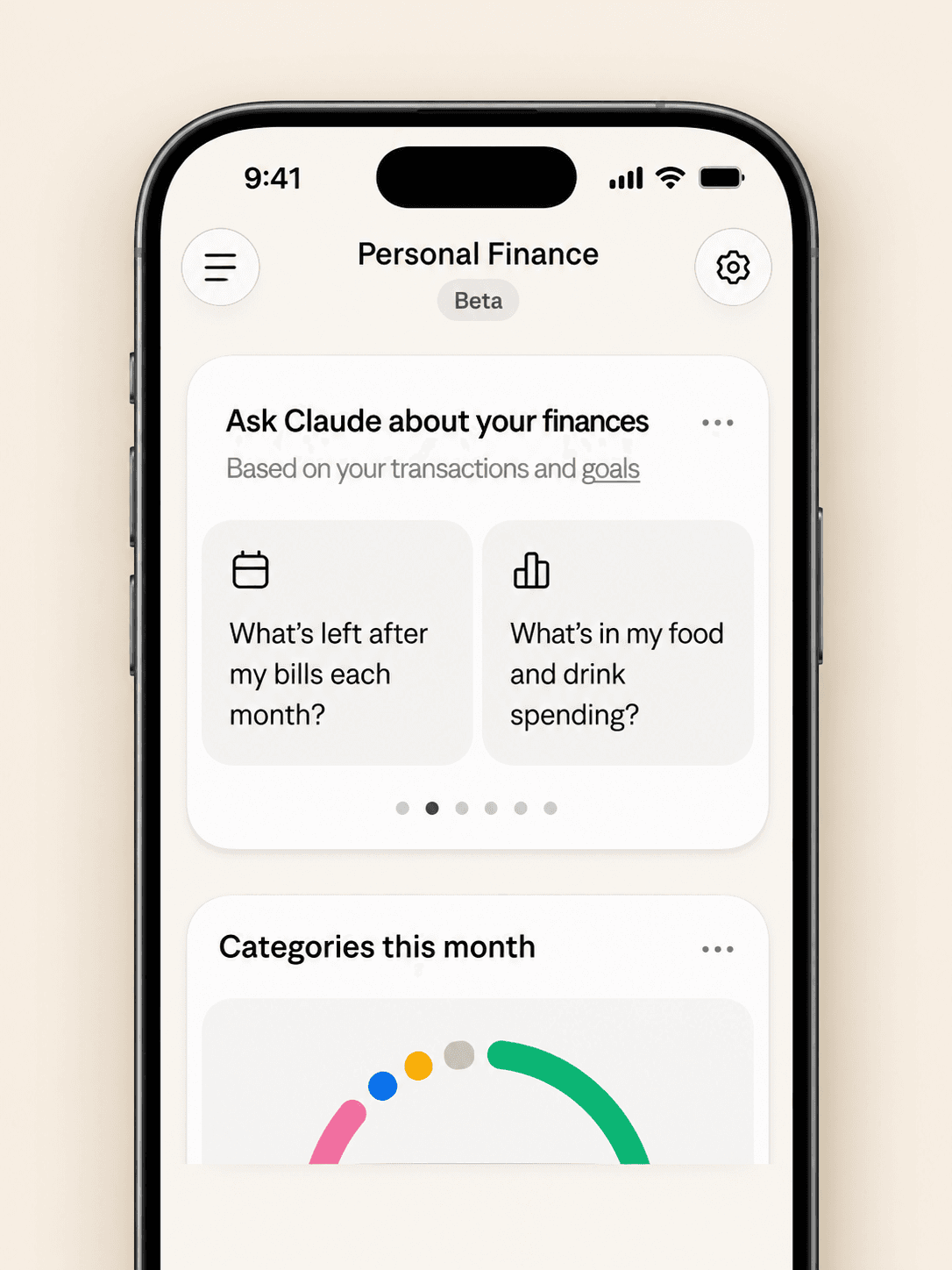
Claude Personal Finance Prompts to Try
Spending and Bills
- “Where did my money go last month, grouped by category?”
- “Which subscriptions am I paying for, and which ones went up in price?”
- “What payments will leave my checking account before payday?”
Smarter Follow-Ups
- “Is that more than usual? Compare the last three months.”
- “Which transactions are behind this number?”
- “Do any charges look duplicated or unexpected?”
The second follow-up matters most. Anthropic itself advises asking which transactions sit behind a figure and checking important numbers with your bank.
Is Claude Personal Finance Safe?
Read-Only Access Through Plaid
Claude cannot move, manage, or invest your money. Plaid handles the bank sign-in, so your password stays between you and your bank. You can unlink a bank at any time, and Claude can no longer see its data.
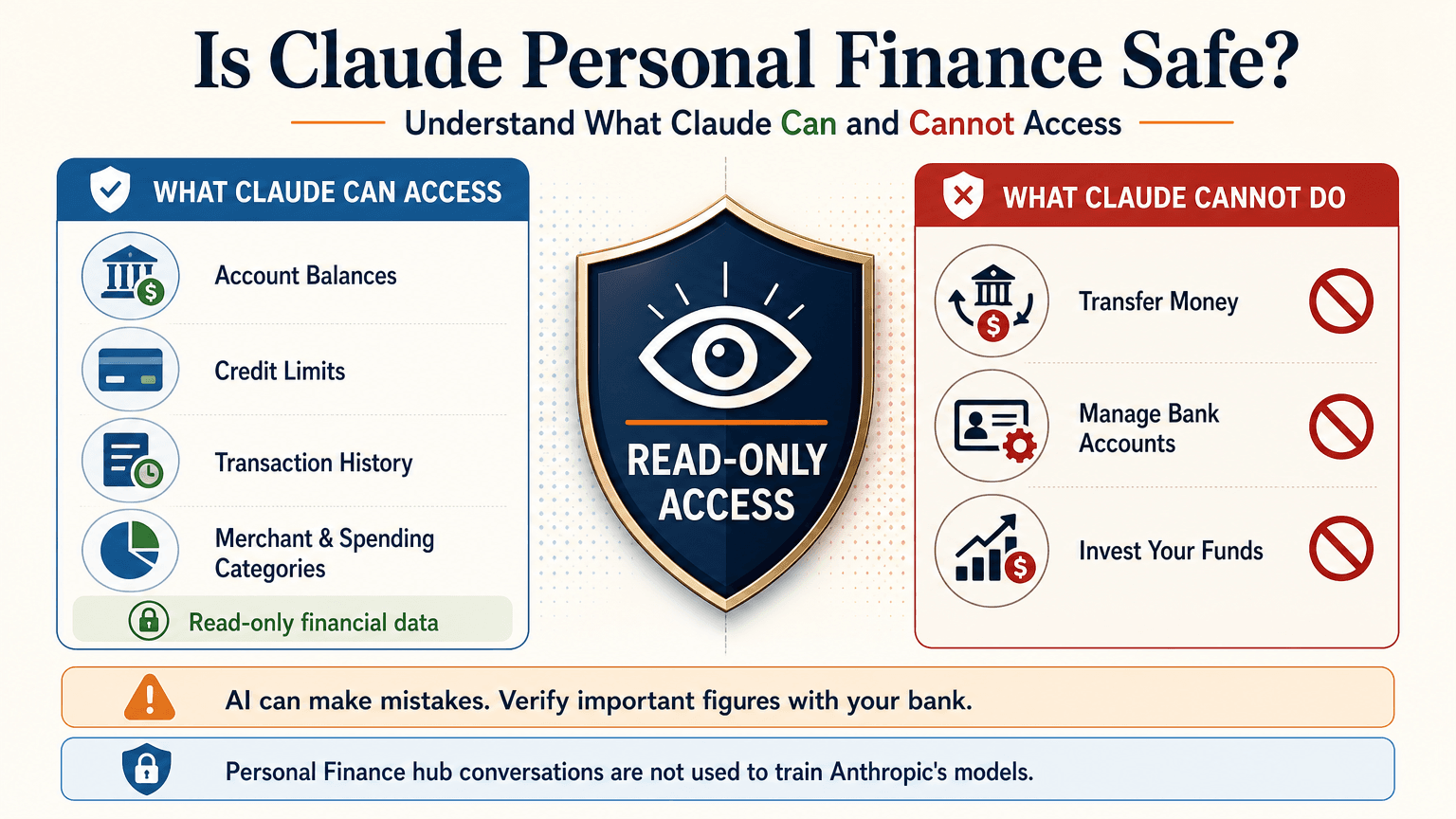
What Claude Can See
For the accounts you choose, Claude can read:
- Bank names, account names, types, and last four digits
- Balances and credit limits
- Up to 24 months of transactions with amount, date, merchant, category, and bank description
For investment accounts, loans, and cards, Claude reads balances and credit limits, not holdings, trades, or rates. Conversations in the Personal Finance hub are not used to train Anthropic’s models. For anything you share outside the hub, your normal privacy settings apply.
Accuracy Limits
Claude is AI and can make mistakes. Balances can be a day or two old. An account linked through two logins may be counted twice. Anthropic also says the feature is not designed to give investment advice. Treat Claude as an analyst that organizes and explains your data rather than the final decision maker.
Current Limitations
- US banks only
- No use of linked accounts in scheduled tasks, Cowork tasks, or Claude Code
- Not available on Free, Team, or Enterprise plans
- Saved dashboards are not yet included in data exports
Claude Personal Finance on Reddit: What People Did Before Launch
Personal Finance in Claude only just started rolling out, so real-world reviews of the official feature are still limited. For context, earlier discussions on r/ClaudeAI show how people were managing money with Claude before this feature existed. These are community workflows, not feedback on the new feature.
- Retirement planning: Running Monte Carlo simulations to estimate safe spending rates.
- Custom dashboards: Replacing spreadsheets with net worth and budget views.
- Fee hunting: Comparing bank statements with a fee schedule PDF to dispute wrong charges.
- Bank connections: A few users automated budget emails through Plaid or SimpleFIN, while many preferred uploading redacted CSV files to protect privacy.
That privacy split is useful to know. It is the same trade-off between convenience and control that the official feature and a CSV workflow now represent.
Use Claude Finance Outside the US With a CSV
You do not need account linking to get useful answers. A bank statement export contains the same raw material: dates, merchants, and amounts.
Build a Claude Personal Finance Tracker With 1min.AI
- Export one to three months of transactions from your bank as a CSV.
- Redact account numbers, full names, and addresses before sharing.
- Open Multi AI Chat in 1min.AI and select a Claude model.
- Paste or upload the cleaned data and run your prompt.
- Save the prompt in Prompt List so you can reuse it every month.
A starter prompt: “Categorize these transactions and total each category. List recurring subscriptions and flag duplicates or unusual fees. Show a table and mark any rows you are unsure about.”
1min.AI is not the official Personal Finance in Claude feature and does not connect to your bank. It gives you access to Claude models in one workspace, so this workflow works from any country. For model details, see the page for Claude Opus 5.5 and the guide to Claude Fable 5.1.
Which Claude Model Fits Which Money Task
| Task | Suggested model | Why |
|---|---|---|
| Categorizing many transactions | Claude 5.5 Haiku | Fast and low cost |
| Monthly budget and subscription audit | Claude 5.5 Sonnet | Balanced quality and cost |
| Retirement scenarios and multi-step analysis | Claude 5.5 Opus or 5.1 Fable | Stronger reasoning on complex questions |
Curious how the top models compare? Watch this test:
Claude Personal Finance Plugin Options
Community plugins can extend Claude for finance work. The Claude Cowork guide lists a Finance Tracker plugin for expense tracking and budget analysis. Review any plugin’s permissions before installing it, and never give a tool more financial data than the task needs.
Official Feature vs a CSV Workflow on 1min.AI
| Personal Finance in Claude | CSV workflow on 1min.AI | |
|---|---|---|
| Availability | US beta on paid plans | Global |
| Data source | Live accounts via Plaid | Redacted CSV or pasted rows |
| Dashboard | Built-in widgets | Tables and charts you request |
| Reusable prompts | Suggested questions | Prompt List |
| Model choice | Claude | Haiku, Sonnet, Opus, Fable, and more |
| Best for | Hands-off tracking | Privacy control and non-US users |
Teams that share finance prompts can use Shared Zone. Writers who turn results into reports can try Claude 4.6 for writing. 1min.AI is rated Excellent on Trustpilot and recognized on SourceForge, Slashdot, Capterra, Software Advice, and GetApp. If you want to see how an earlier flagship handles long analysis, try Claude 5 Fable.
Claude Personal Finance FAQ
What is Claude personal finance?
It is Anthropic’s beta feature, officially called Personal Finance in Claude. It links bank and card accounts through Plaid so you can ask about spending, balances, and bills.
Is Personal Finance in Claude free?
No. It is available on Pro, Max, and Ultra plans in the US. It is not available on Free, Team, or Enterprise.
Can Claude move my money?
No. Access is read-only. Claude cannot move, manage, or invest funds.
Can I use Claude finance features outside the US?
The official feature supports US banks only. Outside the US, you can upload a redacted CSV statement to a Claude model and prompt it for categories, subscriptions, and budgets.
Is Claude accurate with financial data?
It can make mistakes. Ask which transactions support each figure and verify key numbers with your bank.
Is this financial advice?
No. This article is educational and is not financial, tax, or investment advice. Consult a licensed professional for major decisions.
Final Thoughts
Claude personal finance turns scattered statements into clear answers. It is still a beta with strict regional limits and normal AI error risk. Use it to organize, categorize, and explain, and verify important figures yourself. If you live outside the US or prefer to keep bank access closed, a redacted CSV with the right Claude model delivers much of the same insight.
- #Information
Mga Alternatibo
Tuklasin ang pinakamahusay na mga alternatibo sa 1minAI at ihambing ang mga feature, pagpepresyo, at mga kaso ng paggamit.

1min.AI vs OpenRouter
1min.AI vs. OpenRouter: Ikumpara ang ready-to-use na AI creation product laban sa technical API tool. Alamin kung kailangan mo ng zero-code creative studio o coding infrastructure hub.
 Ngoc Hong

1min AI vs Buffer
Compare 1min.AI vs Buffer for Facebook content creation, AI writing, image generation, scheduling, pricing, and everyday marketing workflows.
Ngoc Hong
1min.AI vs. Hootsuite: Which Social Media Tool Fits Your Workflow?
Compare 1min.AI vs. Hootsuite to explore their AI content creation, social media publishing, analytics, pricing, and collaboration features. Find the right tool for your workflow.
Mga Tool ng AI
Tuklasin ang pinakamahusay na mga tool ng AI upang mapalakas ang pagiging produktibo, pagkamalikhain, at pang-araw-araw na gawain.

Nangungunang 4 Abot-kayang AI Tool para sa mga Startup Founder
Tuklasin ang nangungunang 4 abot-kayang AI tool para sa mga startup founder para ma-validate ang mga ideya, bumuo ng produkto, gumawa ng content, at maglunsad nang mas mabilis nang hindi sosobra sa gastos.
 Tram Ta

POV: May 10+ Post Ka na Kailangang Gawin Araw-araw
Alamin kung paano bumuo ng AI content workflow na tumutulong sa mga content creator na makagawa ng 10+ social media post bawat araw nang mas mabilis gamit ang AI brainstorming, image generation, at content creation.
 Lien Anh Vu

Gawing Mas Mahusay na Content ang “Make It Better” Gamit ang AI
Gamitin ang AI para gawing malinaw na revisions ang malabong feedback ng kliyente, bawasan ang hindi kailangang edits, at maghatid ng mas mahusay na content nang mas mabilis.
Lien Anh VuMga Tampok ng AI
Komprehensibong tampok ng AI na nagpapadali ng daloy ng trabaho, nagpapahusay ng kahusayan, at nagpapalakas sa mga koponan na makamit ang higit pa.

1minAI: Libreng AI Grammar Checker
Suriin ang grammar nang libre gamit ang AI grammar checker ng 1minAI. Hanapin ang mga mali sa grammar, spelling, at pagsusulat, pagandahin ang linaw, at pulihin ang content mo sa loob ng ilang segundo.
Tram Ta
Bumuo ng Portfolio Website nang Mas Mabilis gamit ang 1min.AI
Alamin kung paano magagamit ng mga freelance creative ang 1min.AI para planuhin, magsulat, magdisenyo, at bumuo ng propesyonal na portfolio website nang mas mabilis, kahit hindi ka magaling mag-code.
Lien Anh Vu
Libreng AI X Comment
Gumawa ng nakakatawa, matalino, o insightful na mga komento para sa Twitter gamit ang aming AI-powered Twitter Comment Generator. Palakasin ang iyong engagement at maging kakaiba sa karamihan!
 Trang Tran
Mga Paggamit ng AI
Isang piniling koleksyon ng mga paggamit ng AI para sa negosyo, produktibidad, at mga aplikasyon na partikular sa industriya.

Pinakamagandang Oras para Mag-post sa Instagram: Praktikal na Gabay para sa Mas Mahusay na Engagement
Alamin ang pinakamagandang oras para mag-post sa Instagram, kabilang ang pinakamagagandang araw at oras para sa iba't ibang audience, plus mga tip para mahanap ang ideal na iskedyul ng pagpo-post para sa iyong account.
Tram TaBumuo ng Portfolio Website nang Mas Mabilis gamit ang 1min.AI
Alamin kung paano magagamit ng mga freelance creative ang 1min.AI para planuhin, magsulat, magdisenyo, at bumuo ng propesyonal na portfolio website nang mas mabilis, kahit hindi ka magaling mag-code.
Lien Anh VuGawing Mas Mahusay na Content ang “Make It Better” Gamit ang AI
Gamitin ang AI para gawing malinaw na revisions ang malabong feedback ng kliyente, bawasan ang hindi kailangang edits, at maghatid ng mas mahusay na content nang mas mabilis.
Lien Anh VuMga Tutorial sa AI
Matutunan kung paano gamitin ang AI gamit ang praktikal, sunud-sunod na mga tutorial.

Mga Deal sa AI Tool tuwing Black Friday sa 2026
Tuklasin kung ano ang iniaalok ng mga deal sa AI tool tuwing Black Friday 2026. Alamin kung paano makuha ang 1min.AI lifetime deal sa pamamagitan ng AppSumo, Dealify, Stack Social, at mag-verify sa Trustpilot, Slashdot, at Software Advice.
 Hang Nguyen

Maranasan ang Fashion Week nang $0 gamit ang 1minAI Face Swap
Maranasan ang Fashion Week nang $0 gamit ang 1minAI Face Swap. I-upload ang iyong larawan, pumili ng video ng Fashion Week, at gumawa ng sarili mong AI fashion moment.
Ngoc Hong
Viral na Reels sa Ilang Minuto: Paano Gamitin ang Text-to-Speech ng 1minAI para sa Mga Satirical na Voiceover
Alamin kung paano ginagamit ng mga admin ng satirical page ang Text-to-Speech feature ng 1minAI para gumawa agad ng news anchor at dramatic na voiceover para sa TikToks, Shorts, at Instagram Reels.
Mga Gabay sa AI
Matuto ng AI nang mas mabilis gamit ang mga praktikal na gabay, mga halimbawa sa totoong mundo, at mga pinakamahusay na kasanayan na magagamit.

Ligtas na Bumili ng AI Tools Online: Gabay sa Black Friday 2026
Tuklasin kung paano hanapin at makuha ang pinakamagagandang AI deal ngayong Black Friday online. Alamin ang mga estratehiya ng eksperto para iwas-scam, labanan ang subscription fatigue, at beripikahin ang software.
Hang Nguyen
Paano magsimula ng isang AI na negosyo nang hindi nagsisimula sa wala
Alamin kung paano magsimula ng isang AI na negosyo, i-validate ang iyong ideya, at maglunsad nang mas mabilis nang hindi bumubuo ng mamahaling AI infrastructure mula sa simula.
Ngoc Hong
AI Fashion Video Generator With Seedance 2.5 and HeyGen
Learn how to create AI fashion videos with Seedance 2.5 and HeyGen. Turn outfit photos into cinematic videos featuring your own face with 1min.AI.
Lien Anh VuMga Solusyon sa AI
I-browse ang pinakamahusay na solusyon sa AI para sa automation, coding, pananaliksik, pagiging produktibo, suporta sa customer, marketing, at mga daloy ng trabaho sa negosyo.

Libreng AI Tattoo Generator: Mga Custom na Disenyo
Gawing custom na disenyo ng tattoo ang anumang ideya gamit ang libreng AI tattoo generator ng 1min.AI. Ilarawan ang ideya mo, pumili ng style, at i-download sa ilang segundo.
Trang TranLigtas na Bumili ng AI Tools Online: Gabay sa Black Friday 2026
Tuklasin kung paano hanapin at makuha ang pinakamagagandang AI deal ngayong Black Friday online. Alamin ang mga estratehiya ng eksperto para iwas-scam, labanan ang subscription fatigue, at beripikahin ang software.
Hang NguyenMaranasan ang Fashion Week nang $0 gamit ang 1minAI Face Swap
Maranasan ang Fashion Week nang $0 gamit ang 1minAI Face Swap. I-upload ang iyong larawan, pumili ng video ng Fashion Week, at gumawa ng sarili mong AI fashion moment.
Ngoc HongMga Modelo ng AI
Galugarin ang mga nangungunang modelo ng AI sa mundo sa isang lugar.

Free AI Chat With Claude Fable 5.2 On 1min.AI
Free AI chat with Claude Fable 5.2 on 1min.AI. Compare Fable 5.2 vs Opus 5.5, see Fable 5.2 benchmarks, and start chatting in minutes.
Trang Tran
GPT-6.2 Sol: Specs, Pricing & Free Access
Explore GPT-6.2 Sol specs, pricing, and how it compares with GPT-6.1 Sol and Claude Opus 5.5, then try it free in 1min.AI Multi AI Chat.
Trang Tran
GPT 6.2 Astra: Pricing, Benchmarks & Free Access
GPT 6.2 Astra release date, pricing, Reddit feedback and Opus 5.5 comparison. See what it does best and chat with it on 1min.AI for free.
Trang TranMga Paghahambing ng AI
Paghambingin ang mga tool, modelo, at platform ng AI upang mahanap ang pinakaangkop para sa iyong mga pangangailangan.

Gemini 4 Neon vs Hydrogen: Specs, Price & Picks
Gemini 4 Neon vs Hydrogen, Carbon and Argon: compare price, benchmarks and use cases to pick the right model, then test them side by side on 1min.AI.
Trang Tran
Kling AI Vs Veo 3: Aling Modelo ang Panalo?
Kling AI vs Veo 3: ikumpara ang galaw, native audio, presyo, at free tiers para makita kung aling AI video generator ang mas babagay sa proyekto mo — subukan pareho sa 1min.AI.
Trang Tran
Paghahambing ng DeepSeek V4 Pro vs Flash
Ihambing ang mga metric ng DeepSeek V4 Pro vs DeepSeek V4 Flash. I-optimize ang iyong mga agentic app at pagandahin ang AI fact checking sa 1min.ai ngayon.
Ngoc HongIntegrasyon ng AI
Isama nang walang putol ang AI sa mga tool na ginagamit mo upang i-automate ang trabaho at pataasin ang produktibidad.
POV: May 10+ Post Ka na Kailangang Gawin Araw-araw
Alamin kung paano bumuo ng AI content workflow na tumutulong sa mga content creator na makagawa ng 10+ social media post bawat araw nang mas mabilis gamit ang AI brainstorming, image generation, at content creation.
Lien Anh Vu
Itigil ang Paglipat-lipat sa mga AI App: Paano Binabago ng AI Integration ang Employer Branding
Tuklasin kung paano tinutulungan ng AI integration ang mga HR team na pahusayin ang employer branding sa pamamagitan ng pagsasama ng AI writing, mga dokumento, mga larawan, video, at maraming AI model sa iisang workspace.
Tram Ta
Paliwanag sa AI API Aggregator Para sa mga Developer
Ang AI API aggregator ay nagbibigay sa mga developer ng iisang API para tawagan ang maraming AI model, kaya mas maiksi ang integration time at nababawasan ang vendor lock in.
Trang TranAI para sa mga Industriya
Hanapin ang pinakamahusay na AI tools at workflows para sa pangangalaga sa kalusugan, pananalapi, edukasyon, legal, pagmamanupaktura, tingi, real estate, at marami pa.

Voice Cloning AI Free: How to Clone Any Voice Online in Minutes
Try voice cloning AI free with 1min.AI. Upload a 5-second clip, pick an ElevenLabs model, choose from 32 languages, and turn text to speech in your own voice.
Trang TranClaude Personal Finance Setup and Safety Guide
Claude personal finance explained: how Personal Finance in Claude works and what Claude finance can see. Plus a safe CSV method for non-US users.
Trang Tran
Free AI Image Editor With Prompt No Restrictions
Looking for a free AI image editor with prompt no restrictions? Edit backgrounds, objects and text by typing, no watermark. Try 1min.AI’s flexible editor now.
Trang TranMga Ahente ng AI
Tuklasin at patakbuhin ang mga ahente ng AI upang awtomatiko ang mga gawain sa iyong trabaho at pang-araw-araw na buhay.
1minAI: Libreng AI Grammar Checker
Suriin ang grammar nang libre gamit ang AI grammar checker ng 1minAI. Hanapin ang mga mali sa grammar, spelling, at pagsusulat, pagandahin ang linaw, at pulihin ang content mo sa loob ng ilang segundo.
Tram Ta
Mga AI Agent para sa Facebook
Gumamit ng AI Agent para sa Facebook para gumawa ng content, bumuo ng mga image, mag-schedule ng mga post, at mag-publish mula sa iyong mga dokumento at usapan.
Ngoc Hong
AI Agent vs AI Assistant: Alin ang Talagang Nakakatipid ng Mas Maraming Oras para sa mga Designer?
Alamin ang pagkakaiba ng AI Agent vs AI Assistant at tuklasin kung aling solusyon ang tumutulong sa mga designer na i-automate ang paulit-ulit na gawain, bawasan ang revisions, at makatipid ng mas maraming oras.
Lien Anh VuMga Daloy ng Trabaho ng AI
Galugarin ang mga handa nang gamiting daloy ng trabaho ng AI para sa pagiging produktibo, marketing, benta, suporta, at marami pa.
POV: May 10+ Post Ka na Kailangang Gawin Araw-araw
Alamin kung paano bumuo ng AI content workflow na tumutulong sa mga content creator na makagawa ng 10+ social media post bawat araw nang mas mabilis gamit ang AI brainstorming, image generation, at content creation.
Lien Anh VuAI Fashion Video Generator With Seedance 2.5 and HeyGen
Learn how to create AI fashion videos with Seedance 2.5 and HeyGen. Turn outfit photos into cinematic videos featuring your own face with 1min.AI.
Lien Anh Vu
Is Seedance 2.5 the Best AI Video Generator of 2026?
Is Seedance 2.5 the best AI video generator in 2026? Explore its features, compare it with Kling and Veo, and learn how to create AI videos on 1min.AI.
Lien Anh VuLiham-balita
Lingguhang inobasyon sa AI kasama ang 1minAI

🔮 Weekly AI Innovations #145: X Content Agent & GPT 6.1 Terra on 1min.ai
Scale viral reach with the X Content Agent on 1min.ai. Discover an end-to-end 4-stage pipeline with zero token burn, plus the launch of GPT 6.1 Terra.
Hang Nguyen
🔮 Weekly AI Innovations #144: LinkedIn Content Agent: Complete B2B Publishing Pipeline
Scale B2B influence with the LinkedIn Content Agent on 1min.ai. Discover an end-to-end 4-stage pipeline with zero redundant token burn and 1-click publishing.
Hang Nguyen
🔮 Weekly AI Innovations #146: Mistral 3.5, Qwen Image & Cohere A+ are ready on 1min.ai
Deploy Mistral Large 3, Qwen Image 3.0, and Cohere Command A+ on 1min.ai. Boost RAG accuracy and cut visual generation latency in one unified AI workspace.
Hang Nguyen