
OpenAI Decisions API vs Gemini: Key Differences

Ngoc Hong
18 November 2026

Compare OpenAI and Gemini Decisions API limits, supported inputs, decision types, latency, and pricing to choose the right API for your AI workflow.
OpenAI Decisions API vs Gemini: Key Differences
AI applications often need to make quick, structured decisions rather than generate long responses. They may need to classify a support ticket, select an AI agent, check whether content violates a policy, or score a document against specific criteria.
This is where a Decisions API can help. Both OpenAI and Google now offer dedicated APIs for evaluating multiple questions and returning structured answers. However, their capabilities differ in important ways, particularly in question limits, supported input formats, and multimodal processing.
In this guide, we compare OpenAI Decisions API vs Gemini Decisions API to help developers understand how they work, what each supports, and which option fits different AI workflows.
1. What Is a Decisions API?
A Decisions API is an interface designed to evaluate specific questions about an input and return structured decisions instead of generating a free-form response.
Unlike a traditional chatbot request, which may return paragraphs of text, a Decisions API focuses on bounded outputs such as:
- Yes or no: Does this message contain a policy violation?
- Choice: Which department should handle this customer request?
- Score: How urgent is this support ticket based on a defined scale?
These outputs are easier for applications to interpret and use in automated workflows.
For example, an e-commerce platform could submit a product description and ask an API to check whether it contains misleading claims, identify its category, and score the completeness of its product information.
Instead of generating a separate conversational response for every question, a Decisions API can evaluate multiple questions against shared input in one request.
How does a Decisions API work?
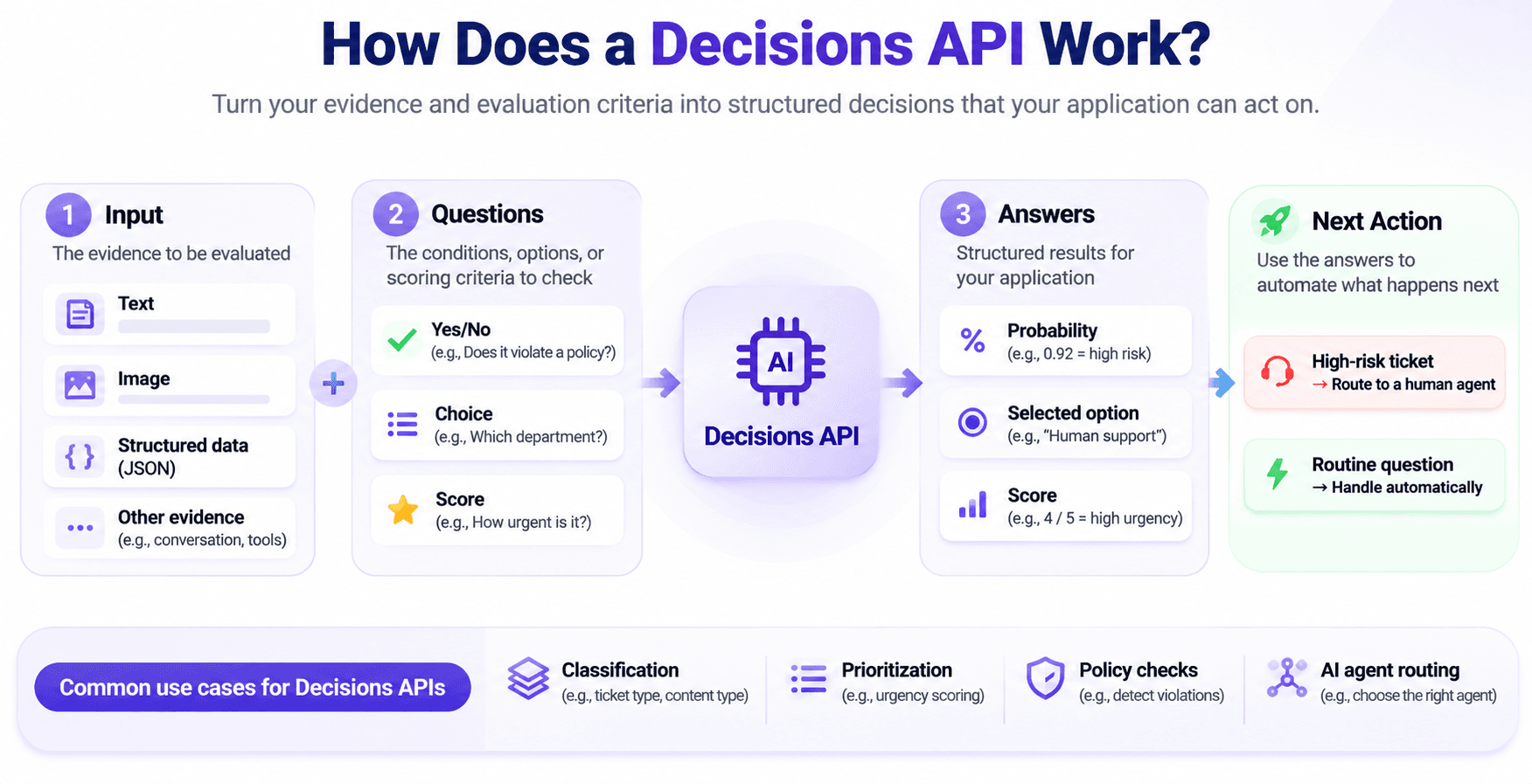
A typical request contains three elements:
- Input: The text, image, structured data, or other evidence that needs to be evaluated.
- Questions: The conditions, options, or scoring criteria the application wants to check.
- Answers: Structured results, such as probabilities, selected options, or scores.
The application then uses those answers to determine what happens next. For example, a high-risk support ticket could be routed to a human agent, while a routine question could be handled automatically.
This makes Decisions APIs particularly useful for classification, prioritization, policy checks, and AI agent routing.
2. OpenAI Decisions API vs Gemini Decisions API: Key Differences
OpenAI and Google both provide purpose-built decision endpoints, but they differ in the number of questions they can process in one request and the types of input they support.
Quick comparison
| Feature | OpenAI Decisions API | Gemini Decisions API |
|---|---|---|
| Provider | OpenAI | |
| Model | GPT-6 Luna (gpt-6-luna) | Gemini Decision 1 (gemini-decision-1) |
| Maximum questions per request | 400 | 1,000 |
| Decision types | Predicate, Choice, Score | Yes/No, Choice, Rubric scoring |
| Supported input | Text, images, JSON, conversation and tool context | Text, images, audio, video, PDFs |
| Context capacity | Depends on the model and request limits | Up to 256K tokens |
| Reported latency | Up to 10x faster than the Responses API, according to OpenAI | 150–250 ms end-to-end, according to Google |
| Input pricing | $0.10 per 1M uncached input tokens | $0.10 per 1M input tokens |
| Output token charges | No output tokens charged | Zero output tokens billed |
Specifications and pricing reflect the providers' published information available on November 18, 2026. Performance claims are provider-reported and should not be treated as results from a direct independent benchmark.
API question limits: 400 vs. 1,000 questions per request
One of the clearest differences between the two APIs is how many questions they can evaluate in a single request.
| API | Maximum questions | What it means |
|---|---|---|
| OpenAI Decisions API | 400 | Supports up to 400 questions about shared input |
| Gemini Decisions API | 1,000 | Supports up to 1,000 independent questions in one pass |
Gemini supports 2.5 times as many questions per request as OpenAI. This can be useful for applications that need to evaluate large numbers of independent conditions against the same input.
Consider an e-commerce platform reviewing a product description. It may need to check:
- Does the description contain prohibited claims?
- Does it mention a product warranty?
- Does it include delivery information?
- Does it match the correct product category?
- Does it contain potentially misleading pricing information?
With OpenAI Decisions API, developers can include up to 400 questions in one request. Gemini supports up to 1,000 questions, giving developers more room for large evaluation batches.
However, a higher question limit does not automatically mean better performance. It does not guarantee lower latency, lower total costs, or higher accuracy. Actual performance also depends on input size, question complexity, rate limits, and the application's workload.
Developer takeaway: Gemini has an advantage in maximum questions per request, while OpenAI's 400-question limit may already be sufficient for many classification and routing workflows. Test both with representative inputs before making a production decision.
Supported input formats and multimodal capabilities
Another important difference is the range of input formats each API can evaluate.
OpenAI Decisions API supports:
- Text
- Images
- JSON input
- Conversation history
- Function calls and tool outputs
This makes it useful for applications that need to evaluate structured application data alongside conversational context. For example, a customer support system could analyze a user's message together with order information supplied as JSON.
Gemini Decisions API supports:
- Text
- Images
- Audio
- Video
- PDF documents
Google also states that Gemini Decisions API supports inputs of up to 256K tokens. This broader multimodal support can be useful when an application needs to evaluate different types of media without converting everything into text first.
For example, a document-processing workflow could evaluate a PDF, while a media moderation system could assess video or audio content.
The distinction is important: OpenAI's published Decisions API documentation does not list audio, video, or PDF files as supported input types in the same way Google's announcement does. Developers should check the accepted input schema rather than assume that every modality supported by a provider's broader AI platform is available through its Decisions API.
Decision types and output formats
Both APIs are designed to return structured results, but they use slightly different terminology.
| Decision type | OpenAI | Gemini | Example |
|---|---|---|---|
| Predicate / Yes-No | Yes | Yes | Does this message contain spam? |
| Choice | Yes | Yes | Which category does this ticket belong to? |
| Score | Yes | Rubric scoring | How urgent is this request? |
OpenAI's predicate question returns an estimated probability that a condition is true. Its choice question selects from predefined options, while score evaluates input against ordered levels.
Gemini offers yes/no, choice, and rubric-scoring questions. Google states that its API returns probabilities and confidence scores.
These structured answers allow developers to define application logic without relying on a model-generated paragraph that must be interpreted afterward.
For example, a support system could use a choice result to assign a ticket to billing, technical support, or shipping. A score result could help prioritize the queue.
Latency and performance
Both providers position their Decisions APIs as faster alternatives to workflows that rely on generating full text responses.
OpenAI describes its Decisions API as up to 10 times faster than using the Responses API for comparable decision tasks. This is an OpenAI-reported comparison, not a direct benchmark against Gemini.
Google reports 150–250 ms end-to-end latency for Gemini Decisions API. Its approach uses a single forward pass to score candidate options instead of generating answer text token by token.
These figures should not be compared as if they came from the same benchmark. Differences in hardware, input size, question count, network conditions, and measurement methodology can affect actual latency.
For production applications, developers should measure end-to-end latency using their own data and request patterns.
Pricing and cost considerations
Both APIs publish an input price of $0.10 per 1 million tokens, with no output tokens billed for their Decisions API responses.
| Pricing detail | OpenAI Decisions API | Gemini Decisions API |
|---|---|---|
| Input price | $0.10 / 1M uncached tokens | $0.10 / 1M tokens |
| Output token charges | No | No |
| Prompt caching | Supported | Check current API documentation for applicable caching options |
OpenAI also supports prompt caching, which can reduce costs when requests reuse the same shared input. Its documentation explains that cached input receives discounted pricing, while cache writes are charged according to the applicable model rates.
Google's announcement states that shared input is billed once per call, regardless of how many questions are attached. This is useful for batch evaluations because developers can evaluate multiple questions against the same evidence without treating each question as a separate input submission.
Even with similar headline input prices, the actual cost of a workflow depends on token usage, caching, request volume, and the number of questions evaluated.
Developers should calculate costs using representative workloads rather than comparing only the price per million tokens.
3. Which Decisions API Should You Choose?
The right API depends on the type of information your application processes and how many decisions it needs to make.
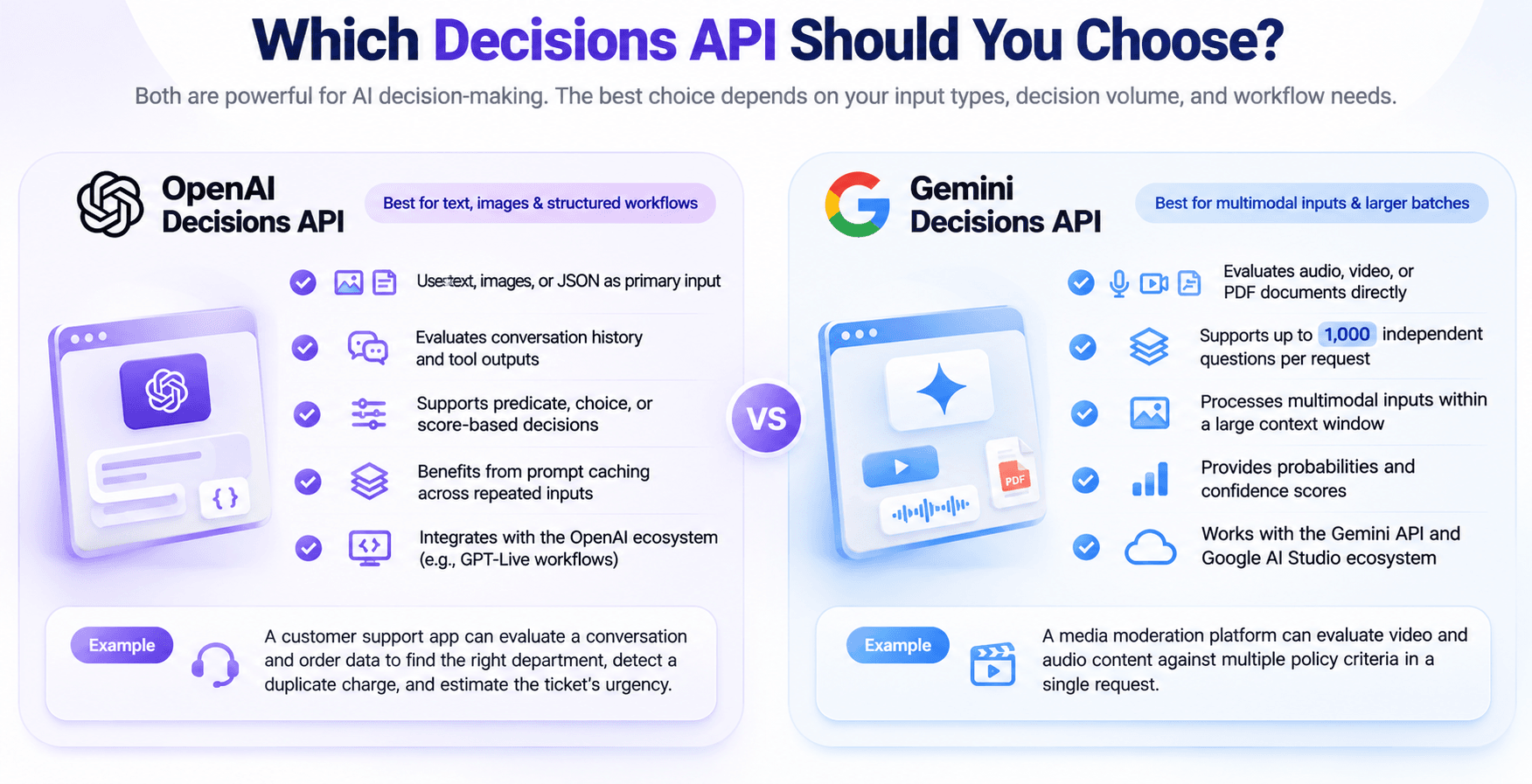
Choose OpenAI Decisions API if...
OpenAI may be a suitable option when your workflow:
- Uses text, images, or JSON as its primary input.
- Needs to evaluate conversation history and tool outputs.
- Requires predicate, choice, or score-based decisions.
- Benefits from prompt caching across repeated inputs.
- Needs integration with the OpenAI ecosystem, including GPT-Live workflows.
For example, a customer support application could evaluate a conversation and its related order data to identify the correct department, detect a duplicate-charge complaint, and estimate the urgency of the issue.
Choose Gemini Decisions API if...
Gemini may be a better fit when your workflow:
- Needs to evaluate audio, video, or PDF documents directly.
- Requires up to 1,000 independent questions per request.
- Processes multimodal inputs within a large context window.
- Needs probabilities and confidence scores for bounded decisions.
- Uses the Gemini API and Google AI Studio ecosystem.
For example, a media moderation platform could evaluate video and audio content against multiple policy criteria in a single request.
OpenAI vs. Gemini: Which is better for AI agent workflows?
Both APIs can support AI agent workflows, especially when an agent needs to make a structured decision before taking an action.
| Workflow | Potential fit | Why |
|---|---|---|
| Select an agent based on a support request | Both | Both support predefined choices |
| Check whether a request violates a policy | Both | Both support yes/no-style decisions |
| Evaluate many independent conditions | Gemini for larger batches | Supports up to 1,000 questions per request |
| Analyze video or audio evidence | Gemini | Supports audio and video inputs |
| Evaluate text with JSON application data | OpenAI | Explicitly supports JSON input |
| Score ticket urgency | Both | Both support scoring-based decisions |
There is no universal winner. The best option is the one that meets your input requirements, decision volume, latency target, and integration needs.
One important implementation detail: independent questions can be grouped into a request, but questions that depend on the result of an earlier decision may require a separate request. OpenAI explicitly documents this distinction. Developers should design their decision flow accordingly.
4. How to Work with Multiple AI Models Alongside Decisions APIs
A Decisions API is not a replacement for every general-purpose LLM. It is designed for bounded decisions, while traditional LLMs remain useful for generating explanations, drafting content, summarizing documents, and handling open-ended conversations.
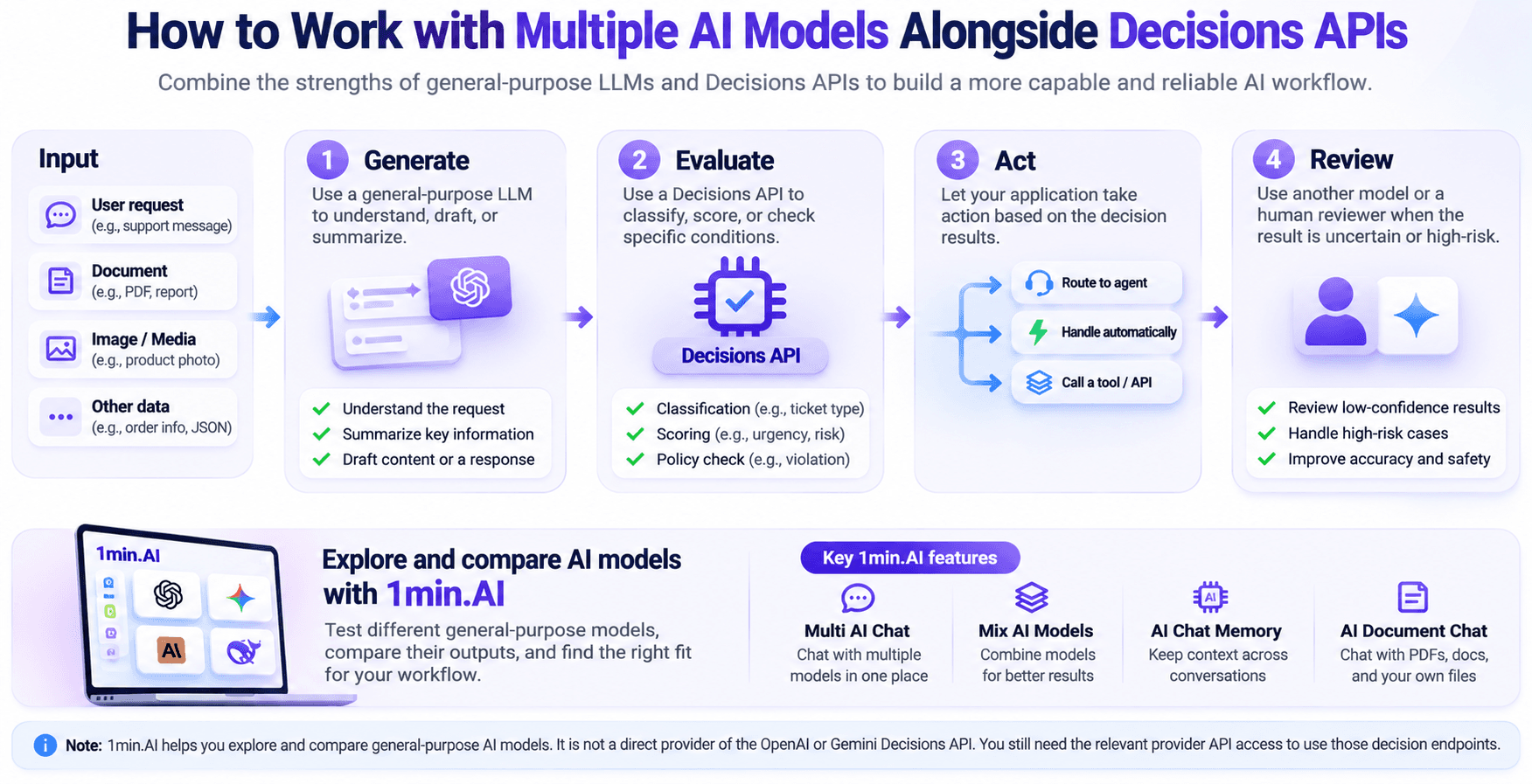
A practical AI workflow can combine both:
- Generate: Use a general-purpose model to draft content, summarize a document, or understand a user's request.
- Evaluate: Send relevant evidence to a Decisions API to classify, score, or check specific conditions.
- Act: Let application logic route the result to the right tool, agent, or human reviewer.
- Review: Use another model or human reviewer when the result is uncertain or high-risk.
For teams comparing general-purpose models, 1min.AI's AI model collection provides a place to explore different AI models. Its AI features include Multi AI Chat, Mix AI Models, AI Chat Memory, and AI Document Chat.
These features can help teams experiment with different models and compare their outputs in one workspace. However, 1min.AI's multi-model chat features should not be confused with direct access to the dedicated OpenAI or Gemini Decisions API endpoints. Developers still need the relevant provider API access to build applications using those decision endpoints.
Frequently Asked Questions
What is OpenAI Decisions API?
OpenAI Decisions API is a dedicated endpoint for evaluating text, images, JSON, and conversation context. It returns structured answers such as probabilities, choices, and scores instead of generating a conventional long-form response.
What is the difference between OpenAI Decisions API and Gemini Decisions API?
The main differences are question limits and supported input formats. OpenAI supports up to 400 questions per request and accepts text, images, and JSON. Gemini supports up to 1,000 questions per request and accepts text, images, audio, video, and PDFs.
Is Gemini Decisions API free?
Google's published announcement lists pricing at $0.10 per 1 million input tokens, with zero output tokens billed. Developers should check the current Gemini API pricing page for applicable usage tiers and billing conditions.
Can Decisions APIs process multiple questions in one request?
Yes. OpenAI supports up to 400 questions per request, while Gemini supports up to 1,000 independent questions in one pass. These questions can evaluate shared input.
What is the difference between a Decisions API and a traditional Chat API?
A traditional Chat API is designed to generate conversational or free-form responses. A Decisions API is designed to return structured results for specific questions, such as yes/no checks, predefined choices, and scores. This makes it easier for applications to use the result in automated logic.
Which Decisions API is better for AI agents?
It depends on the workflow. OpenAI may fit applications that rely on text, images, JSON, and tool context. Gemini may fit workflows that require audio, video, PDFs, or larger question batches. Developers should benchmark both using their own data.
Final Verdict
OpenAI Decisions API and Gemini Decisions API address the same core need: turning AI evaluation into structured decisions that applications can act on.
OpenAI offers up to 400 questions per request, JSON input, conversation context, and prompt caching. Gemini supports up to 1,000 questions per request and a broader range of multimodal inputs, including audio, video, and PDFs.
For developers, the decision should come down to input requirements, workload size, integration needs, and measured performance—not just the maximum number of questions.
To build a reliable AI workflow, combine decision-focused APIs with general-purpose models where each is most useful, and validate important decisions against real application data.
- #Informational
Alternatives
Discover the best alternatives to 1minAI and compare features, pricing, and use cases.

1min.AI vs OpenRouter
1min.AI vs. OpenRouter: Compare the ready-to-use AI creation product against the technical API tool. Find out if you need a zero-code creative studio or a coding infrastructure hub.
 Ngoc Hong
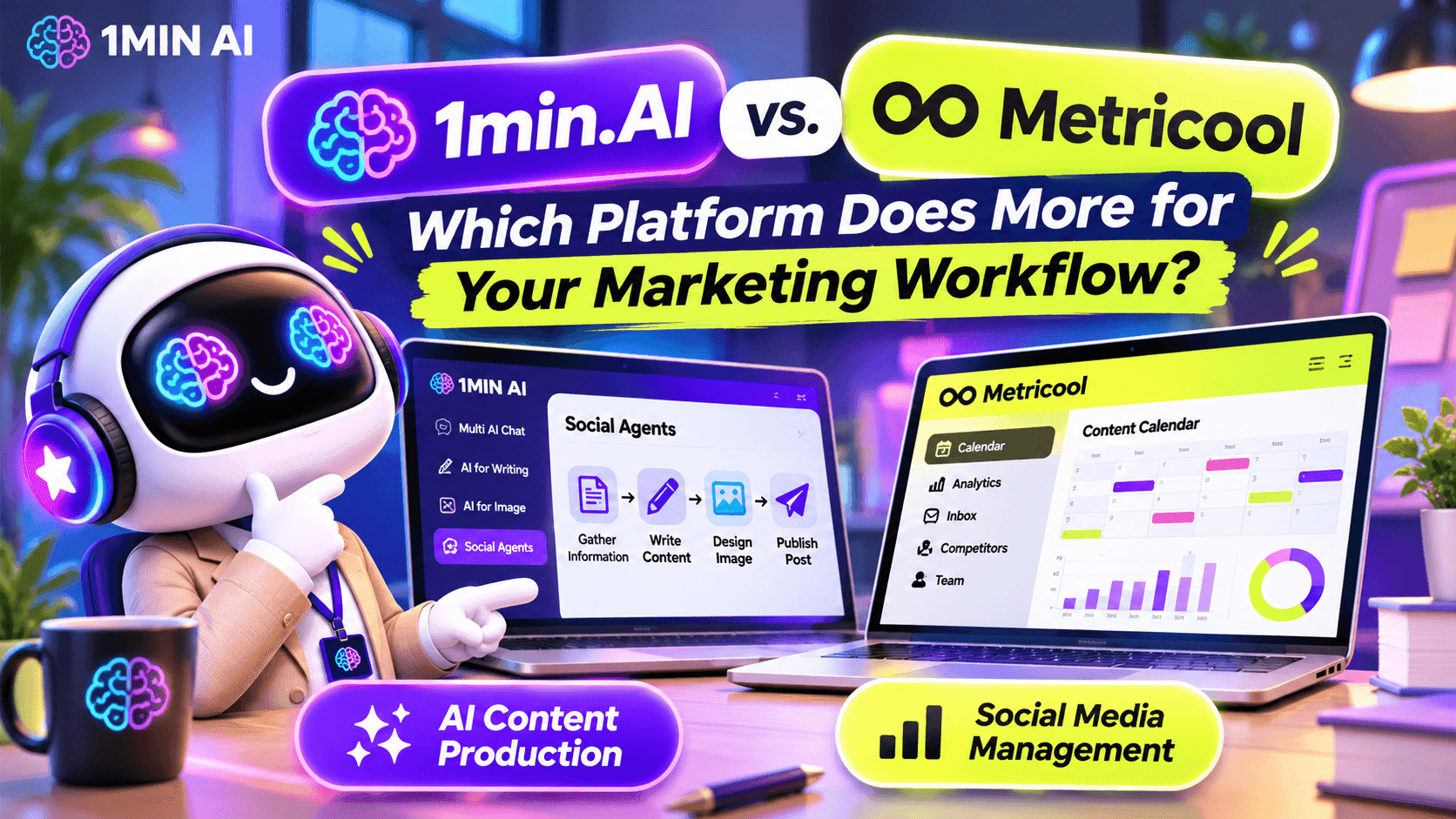
1min.AI vs. Metricool: Which Platform Does More for Your Marketing Workflow?
Compare 1min.AI vs. Metricool across content creation, visual production, scheduling, analytics, MCP, and pricing to find the right platform for your marketing workflow.
1min.AI vs. Hootsuite: Which Social Media Tool Fits Your Workflow?
Compare 1min.AI vs. Hootsuite to explore their AI content creation, social media publishing, analytics, pricing, and collaboration features. Find the right tool for your workflow.
AI Tools
Discover the best AI tools to boost productivity, creativity, and everyday work.
Top 4 Affordable AI Tools for Startup Founders
Discover the top 4 affordable AI tools for startup founders to validate ideas, build products, create content, and launch faster without overspending.
 Tram Ta
Turn “Make It Better” Into Better Content With AI
Use AI to turn vague client feedback into clear revisions, reduce unnecessary edits, and deliver better content faster.
 Lien Anh Vu
Free AI X Comment
Create funny, witty, or insightful comments for Twitter with our AI-powered Twitter Comment Generator. Boost your engagement and stand out in the crowd!
 Trang Tran
AI Features
Comprehensive AI features that streamline workflows, improve efficiency, and empower teams to achieve more.
1minAI: Free AI Grammar Checker
Check grammar for free with 1minAI’s AI grammar checker. Find grammar, spelling, and writing mistakes, improve clarity, and polish your content in seconds.
Tram Ta
Build a Portfolio Website Faster with 1min.AI
Learn how freelance creatives can use 1min.AI to plan, write, design, and generate a professional portfolio website faster, even without strong coding skills.
Lien Anh VuFree AI X Comment
Create funny, witty, or insightful comments for Twitter with our AI-powered Twitter Comment Generator. Boost your engagement and stand out in the crowd!
Trang TranAI Use Cases
A curated collection of AI use cases for business, productivity, and industry-specific applications.

Best Time to Post on Instagram: A Practical Guide for Better Engagement
Discover the best time to post on Instagram, including the best days and times for different audiences, plus tips to find the ideal posting schedule for your account.
Tram TaTurn “Make It Better” Into Better Content With AI
Use AI to turn vague client feedback into clear revisions, reduce unnecessary edits, and deliver better content faster.
Lien Anh VuBuild a Portfolio Website Faster with 1min.AI
Learn how freelance creatives can use 1min.AI to plan, write, design, and generate a professional portfolio website faster, even without strong coding skills.
Lien Anh VuAI Tutorials
Learn how to use AI with practical, step-by-step tutorials.

Black Friday AI Tool Deals in 2026
Discover what Black Friday AI tool deals 2026 has to offer. Find out how to secure the 1min.AI lifetime deal via AppSumo, Dealify, Stack Social, and verify on Trustpilot, Slashdot, and Software Advice.
 Hang Nguyen
Turn “Make It Better” Into Better Content With AI
Use AI to turn vague client feedback into clear revisions, reduce unnecessary edits, and deliver better content faster.
Lien Anh Vu
Viral Reels in Minutes: How to Use 1minAI’s Text-to-Speech for Satirical Voiceovers
Learn how satirical page admins use 1minAI’s Text-to-Speech feature to generate instant news anchor and dramatic voiceovers for TikToks, Shorts, and Instagram Reels.
AI Guides
Learn AI faster with practical guides, real-world examples, and actionable best practices.

Safely Buy AI Tools Online: 2026 Black Friday Guide
Discover how to find and secure the best Black Friday AI deals online. Learn expert strategies to avoid scams, combat subscription fatigue, and verify software.
Hang Nguyen
How to start an AI business without building from scratch
Learn how to start an AI business, validate your idea, and launch faster without building costly AI infrastructure from scratch.
Ngoc Hong
How to Use an AI Fashion Video Generator for Fashion Week 2026
Turn Fashion Week 2026 ideas into stunning fashion videos with AI. Learn how to brainstorm, create visuals, and transform images into videos with one simple workflow.
Lien Anh VuAI Solutions
Browse the best AI solutions for automation, coding, research, productivity, customer support, marketing, and business workflows.
Safely Buy AI Tools Online: 2026 Black Friday Guide
Discover how to find and secure the best Black Friday AI deals online. Learn expert strategies to avoid scams, combat subscription fatigue, and verify software.
Hang Nguyen
Free AI Tattoo Generator: Custom Designs
Turn any idea into a custom tattoo design with 1min.AI's free AI tattoo generator. Describe your idea, pick a style, and download in seconds.
Trang TranTurn “Make It Better” Into Better Content With AI
Use AI to turn vague client feedback into clear revisions, reduce unnecessary edits, and deliver better content faster.
Lien Anh VuAI Models
Explore the world's leading AI models in one place.

Free AI Chat With Claude Fable 5.2 On 1min.AI
Free AI chat with Claude Fable 5.2 on 1min.AI. Compare Fable 5.2 vs Opus 5.5, see Fable 5.2 benchmarks, and start chatting in minutes.
Trang Tran
GPT-6.2 Sol: Specs, Pricing & Free Access
Explore GPT-6.2 Sol specs, pricing, and how it compares with GPT-6.1 Sol and Claude Opus 5.5, then try it free in 1min.AI Multi AI Chat.
Trang Tran
GPT 6.2 Astra: Pricing, Benchmarks & Free Access
GPT 6.2 Astra release date, pricing, Reddit feedback and Opus 5.5 comparison. See what it does best and chat with it on 1min.AI for free.
Trang TranAI Comparisons
Compare AI tools, models, and platforms to find the best fit for your needs.
Gemini 4 Neon vs Hydrogen: Specs, Price & Picks
Gemini 4 Neon vs Hydrogen, Carbon and Argon: compare price, benchmarks and use cases to pick the right model, then test them side by side on 1min.AI.
Trang Tran
Kling AI Vs Veo 3: Which Model Wins?
Kling AI vs Veo 3: compare motion, native audio, pricing & free tiers to see which AI video generator wins for your project - try both on 1min.AI.
Trang Tran
DeepSeek V4 Pro vs Flash Comparison
Compare DeepSeek V4 Pro vs DeepSeek V4 Flash metrics. Optimize your agentic apps and improve AI fact checking on 1min.ai today.
Ngoc HongAI Integrations
Seamlessly integrate AI with the tools you already use to automate work and boost productivity.

POV: You Have 10+ Posts to Make Every Day
Learn how to build an AI content workflow that helps content creators produce 10+ social media posts a day faster with AI brainstorming, image generation, and content creation.
Lien Anh Vu
Stop Switching Between AI Apps: How AI Integration Transforms Employer Branding
Discover how AI integration helps HR teams streamline employer branding by combining AI writing, documents, images, video, and multiple AI models into one workspace.
Tram Ta
AI API Aggregator Explained For Developers
An AI API aggregator gives developers one unified API to call multiple AI models, cutting integration time and vendor lock in.
Trang TranAI for Industries
Find the best AI tools and workflows for healthcare, finance, education, legal, manufacturing, retail, real estate, and more

ChatGPT Trending Photo Prompts to Copy and Paste
Explore chatgpt trending photo prompt ideas you can copy and paste. Create viral AI portraits, collages, and aesthetic photos with ease.
Trang TranTry Image To Video AI With Prompt Online Free
Try image to video AI with prompt online free, no login and no watermark. Upload a photo, type the motion you want, and get a short video in minutes.
Trang Tran
No Photoshoot? Create AI Fashion Videos With Seedance 2.5
No photoshoot needed! Create stunning AI fashion videos with Seedance 2.5 on 1min.AI using outfit references, cinematic prompts, and surreal scenes.
Lien Anh VuAI Agents
Discover and run AI agents to automate tasks across your work and daily life.
1minAI: Free AI Grammar Checker
Check grammar for free with 1minAI’s AI grammar checker. Find grammar, spelling, and writing mistakes, improve clarity, and polish your content in seconds.
Tram Ta
AI Agents for Facebook
Use an AI Agent for Facebook to create content, generate images, schedule posts, and publish from your documents and conversations.
Ngoc Hong
AI Agent vs AI Assistant: Which One Actually Saves Designers More Time?
Learn the difference between AI Agent vs AI Assistant and discover which solution helps designers automate repetitive work, reduce revisions, and save more time.
Lien Anh VuAI Workflows
Explore ready-to-use AI workflows for productivity, marketing, sales, support, and more.
POV: You Have 10+ Posts to Make Every Day
Learn how to build an AI content workflow that helps content creators produce 10+ social media posts a day faster with AI brainstorming, image generation, and content creation.
Lien Anh VuHow to Use an AI Fashion Video Generator for Fashion Week 2026
Turn Fashion Week 2026 ideas into stunning fashion videos with AI. Learn how to brainstorm, create visuals, and transform images into videos with one simple workflow.
Lien Anh Vu
One Product, 10 UGC Creatives: How AI Makes Content Testing Easier
Create more authentic UGC with an AI UGC video generator, test more creative angles and scale affiliate content without filming every version.
Lien Anh VuNewsletter
Weekly AI Innovations with 1minAI

🔮 Weekly AI Innovations #146: Mistral 3.5, Qwen Image & Cohere A+ are ready on 1min.ai
Deploy Mistral Large 3, Qwen Image 3.0, and Cohere Command A+ on 1min.ai. Boost RAG accuracy and cut visual generation latency in one unified AI workspace.
Hang Nguyen
🔮 Weekly AI Innovations #145: X Content Agent & GPT 6.1 Terra on 1min.ai
Scale viral reach with the X Content Agent on 1min.ai. Discover an end-to-end 4-stage pipeline with zero token burn, plus the launch of GPT 6.1 Terra.
Hang Nguyen
🔮 Weekly AI Innovations #144: LinkedIn Content Agent: Complete B2B Publishing Pipeline
Scale B2B influence with the LinkedIn Content Agent on 1min.ai. Discover an end-to-end 4-stage pipeline with zero redundant token burn and 1-click publishing.
Hang Nguyen