
Free AI Image Editor With Prompt No Restrictions

Trang Tran
20 november 2026

Looking for a free AI image editor with prompt no restrictions? Edit backgrounds, objects and text by typing, no watermark. Try 1min.AI’s flexible editor now.
You have a photo and a clear idea of how it should look. What you do not have is time for layers, masks and menus that only accept five preset commands. A free AI image editor with prompt no restrictions solves that. You type the change in plain English and the edit appears in seconds: a new background, a different jacket color, a stray object gone, sale text rewritten.
1min.AI puts these prompt-based tools in one workspace. Open an image, describe the edit and download the result with no watermark.
Quick answer: An AI image editor with prompt no restrictions lets you describe any edit in your own words instead of choosing from a locked list of actions. With 1min.AI you can replace backgrounds, swap objects, edit text inside images, repaint masked areas, expand and upscale, all from one place. Legal rules and each AI model’s safety policies still apply.
What Does “No Restrictions” Mean in an AI Image Editor?
Most people searching for an unrestricted AI image editor are not trying to break rules. They are tired of tools that get in the way. In practice, “no restrictions” usually means four things:
| What you run into | What “no restrictions” should mean |
|---|---|
| A short list of approved commands | Full-sentence prompts: object, position, result |
| One action available, the rest locked | Many edit types on the same image |
| Watermarked downloads | Clean results you can use right away |
| Registration before you can test anything | Open the tool and start editing |
A modern AI image editor reads your picture and your sentence together, works out which pixels need to change and leaves the rest alone. That is why one plain-language prompt can replace hours of manual selection.
Where the Limits Still Are
“No restrictions” describes freedom of workflow, not freedom from the law. Illegal content, content involving minors, and non-consensual or deceptive images of real people are off limits with any responsible provider. 1min.AI follows the usage policies of the AI models it offers. Inside those boundaries, you decide what to change and how to say it.
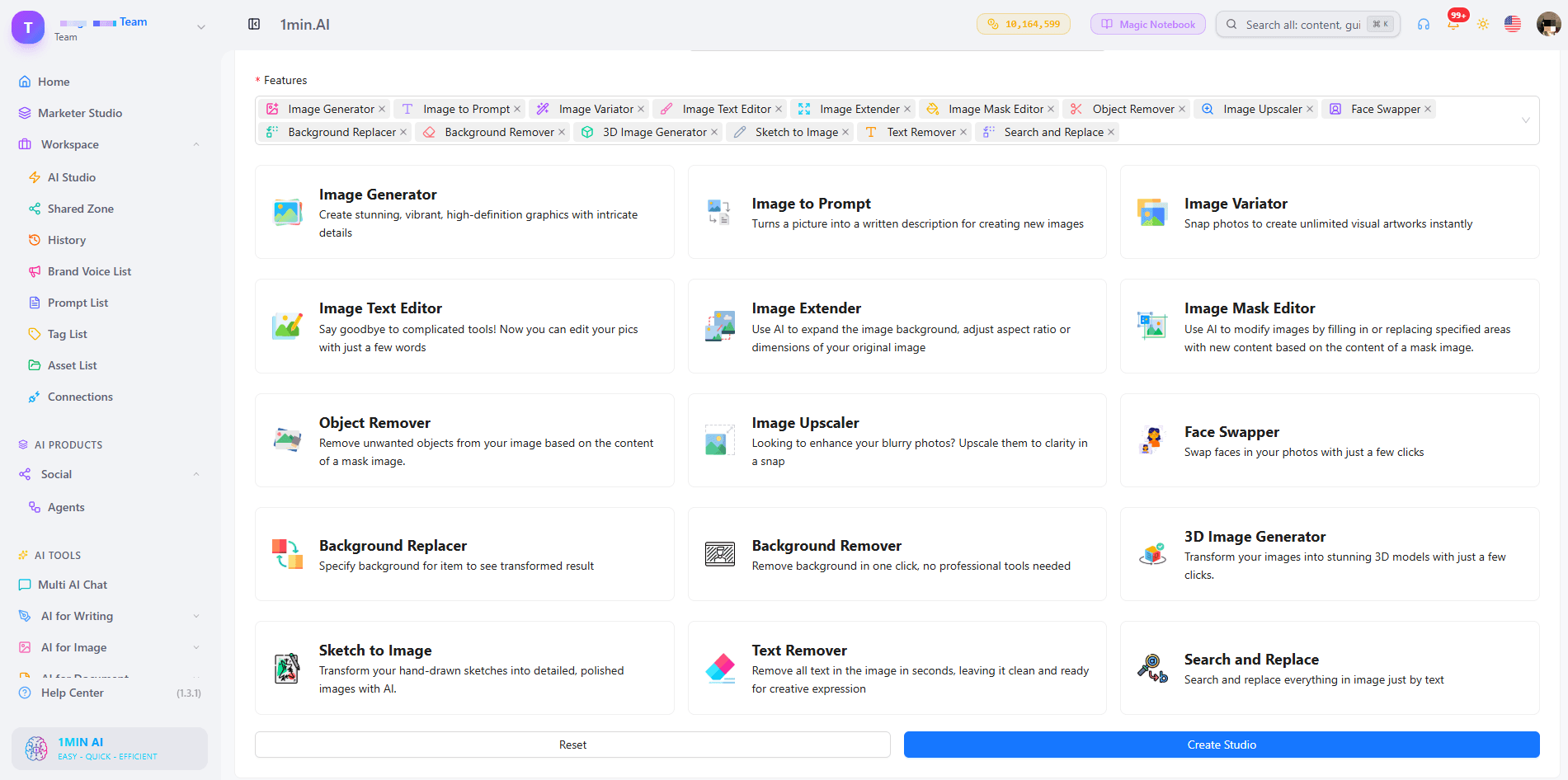
What Can You Edit With a Prompt in 1min.AI?
| Edit goal | Example prompt | 1min.AI tool |
|---|---|---|
| Swap an object or outfit | “Replace the blue jacket with a red leather jacket” | Search and Replace |
| Build a new scene | “Place the sneaker on a wet city street at dusk” | Background Replacer |
| Fix one precise area | Paint the area, then “Add a small window with a plant” | Image Mask Editor |
| Change wording in a design | “Change 20% OFF to 30% OFF” | Image Text Editor |
| Clean up clutter | “Remove the person behind the table” | Object Remover |
| Resize or sharpen | Widen the canvas, then upscale | Image Extender, Image Upscaler |
Replace Objects and Outfits With Search and Replace
Name what you want to find and what should replace it. The tool handles the selection, so you can run object search and replace edits, such as changing a sofa’s fabric or a product’s packaging color, without drawing an outline. Add “keep everything else unchanged” to protect the rest of the scene. For a deeper walkthrough, see this guide to object search and replace.
Swap Backgrounds Without Cutting Anything Out
Background Replacer removes the old scene and builds a new one from your description. Mention the place, time of day and mood, for example “sunlit studio with a soft white backdrop”. Here is a quick walkthrough:
Repaint Only the Area You Choose
The Image Mask Editor is for edits that need precision. Paint over a region, then describe what belongs there. This kind of mask-based editing keeps faces, logos and everything outside the mask untouched.
Edit Text Inside an Image
Image Text Editor lets you rewrite text that already sits inside a banner, label or screenshot. Type the new wording and the tool works to match the surrounding style. It is a fast way to update prices, dates and captions without rebuilding the design.
Start From Scratch, Then Edit
No source photo yet? Generate a base image first, then refine it with the editing tools. Creating and editing in one workspace means you never export, re-upload and start over.
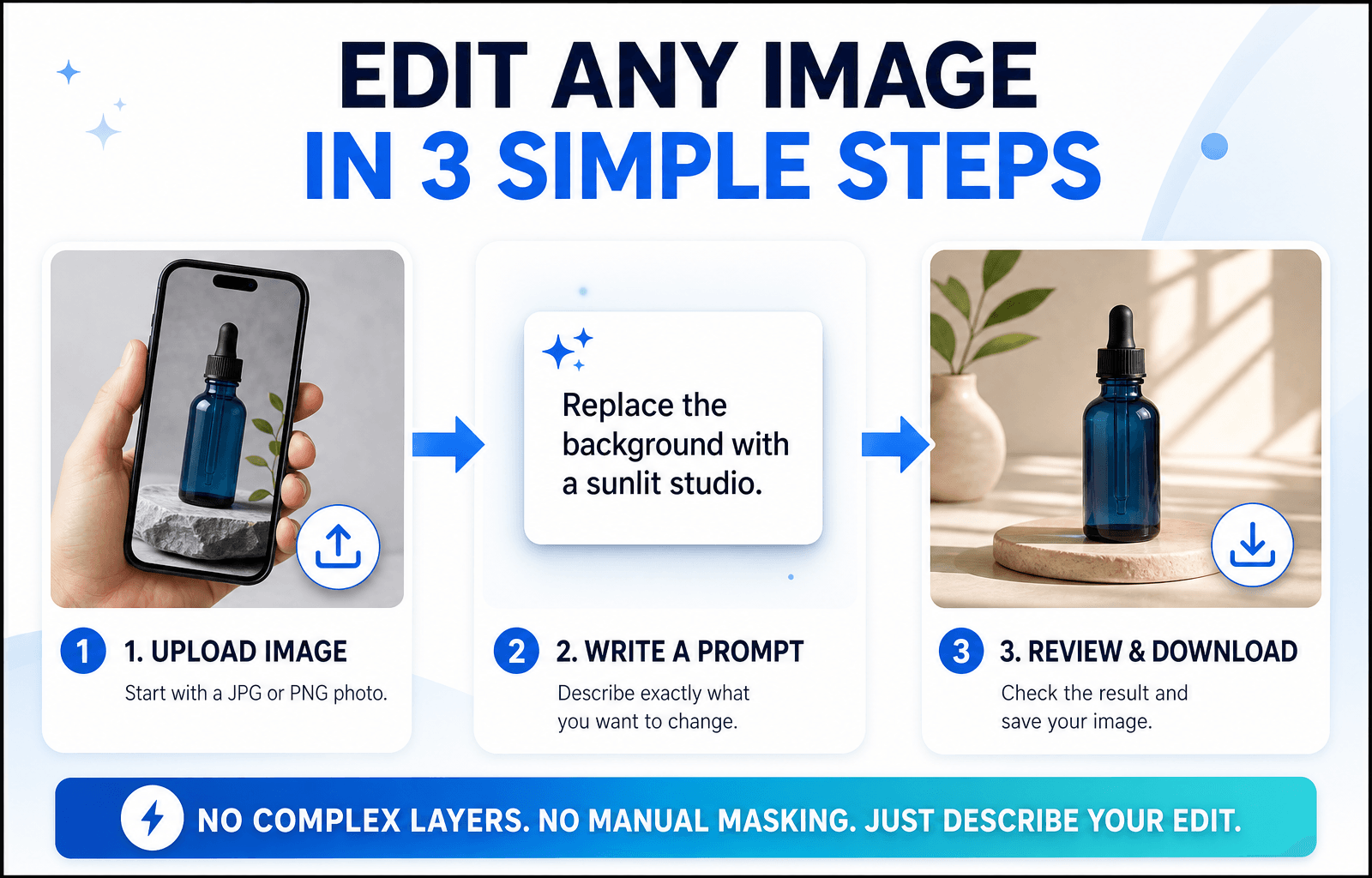
How to Edit an Image With a Prompt in 3 Steps
Step 1: Open the Editor and Upload Your Image
Choose the tool that matches your goal and upload a JPG or PNG. A sharp, well-lit photo with a clear subject gives the AI more to work with, so your edit looks more accurate.
Step 2: Write a Specific Prompt
Specific beats clever. Say what should change and what should stay the same.
The Prompt Formula
Object + Action + Style or Lighting + What stays unchanged
Three Prompts You Can Copy
- “Change the red jacket on the left to dark green denim. Keep the face and background unchanged.”
- “Replace the background with a sunlit studio and a soft white backdrop. Keep natural shadows under the product.”
- “Remove the cables on the desk and fill the area with the same wood texture.”
Edits usually miss because the prompt is too broad. This short video covers the most common mistakes:
Step 3: Review, Refine and Download
Zoom in and check edges, hands, text and shadows. If one detail is off, run a second prompt on that detail instead of stacking several requests in one line. Then download your image, which has no watermark. Save prompts that worked to your Prompt List so you can reuse them.
Editing People, Products or Landscapes: Which Setup Fits?
Photos of People
Describe clothing, hair color or background changes and add “keep the face unchanged”. For small fixes, use the mask tool so only the chosen area changes.
Product Photos
Swap backgrounds, remove reflections and recolor packaging while keeping labels sharp. Consistent backgrounds help a whole catalog look uniform.
Landscapes and Travel Shots
Remove crowds, adjust the sky or extend the frame to a wider format. Mention light and weather (“golden hour, clear sky”) so the edit blends naturally.
Browser Editor or Local Open-Source Model?
Open-source models run on your own computer. They offer deep control, but you manage installation, hardware and updates. A browser-based editor like 1min.AI needs none of that: open a tab, choose a tool and edit. If you want to start quickly or work across devices, the browser route is simpler. If you enjoy tuning models yourself, a local setup may suit you better.
What to Look for in the Best Free AI Image Editor With No Restrictions Online
Use this checklist for any tool you test:
- Full-sentence prompts rather than a fixed command menu
- Several edit types on the same image
- Precise control, such as masks for local changes
- Clean exports without a watermark
- Reusable prompts and assets so repeat work gets faster
- Clear policies about what the models can and cannot do
1min.AI covers each point in one workspace, with tools for text editing, object swapping, backgrounds, masks, extending and upscaling. AI Studio, Prompt List and Asset List are ready to use, and you can add a Shared Zone and History when you create an account.
You can also check how others rate the platform. 1min.AI holds SourceForge and Slashdot Top Business Software badges, is rated Excellent on Trustpilot and is listed on Capterra, Software Advice and GetApp.

FAQ
What is an AI image editor with prompt no restrictions?
It is an editor where you describe any change in your own words instead of picking from a locked list of actions. It still follows legal and model safety rules.
Is there a free AI image editor with prompt no restrictions?
Yes. You can try 1min.AI’s image editing tools free and download results without a watermark.
Does “no restrictions” mean anything goes?
No. Illegal content, content involving minors and deceptive or non-consensual images of real people are not allowed. Everything else is up to your creativity.
Which 1min.AI tool should I use to change text in an image?
Use Image Text Editor. Type the new wording and it updates the text inside the picture.
Do I need design skills?
No. If you can describe the change the way you would to a designer, you can edit with a prompt.
How do I write better edit prompts?
Name the object, state the action and add what should stay unchanged. Make one change per pass for the cleanest result.
Ready to Edit Your First Image?
Your next edit is one sentence away. Upload an image, type what you want to change and see the result in seconds.
- #Transaction
Alternativ
Upptäck de bästa alternativen till 1minAI och jämför funktioner, priser och användningsområden.

1min.AI vs OpenRouter
1min.AI vs. OpenRouter: Jämför den färdiga AI-skapandeprodukten med det tekniska API-verktyget. Ta reda på om du behöver en kodfri kreativ studio eller en kodinfrastrukturhubb.
 Ngoc Hong

1min AI vs Buffer
Compare 1min.AI vs Buffer for Facebook content creation, AI writing, image generation, scheduling, pricing, and everyday marketing workflows.
Ngoc Hong
1min.AI vs. Hootsuite: Which Social Media Tool Fits Your Workflow?
Compare 1min.AI vs. Hootsuite to explore their AI content creation, social media publishing, analytics, pricing, and collaboration features. Find the right tool for your workflow.
AI-verktyg
Upptäck de bästa AI-verktygen för att öka produktiviteten, kreativiteten och ditt dagliga arbete.

Topp 4 Prisvärda AI-verktyg för startup-grundare
Upptäck de 4 bästa prisvärda AI-verktygen för startup-grundare för att validera idéer, bygga produkter, skapa innehåll och lansera snabbare utan att överskrida budgeten.
 Tram Ta

POV: Du har 10+ inlägg att skapa varje dag
Lär dig hur du bygger ett AI-innehållsflöde som hjälper innehållsskapare att producera 10+ inlägg i sociala medier per dag snabbare med AI-brainstorming, bildgenerering och innehållsskapande.
 Lien Anh Vu

Förvandla “Gör det bättre” till bättre innehåll med AI
Använd AI för att omvandla vag kundfeedback till tydliga revideringar, minska onödiga ändringar och leverera bättre innehåll snabbare.
Lien Anh VuAI-funktioner
Omfattande AI-funktioner som effektiviserar arbetsflöden, förbättrar effektiviteten och ger team möjlighet att åstadkomma mer.

1minAI: Gratis AI-grammatikkontroll
Kontrollera grammatiken gratis med 1minAI:s AI-grammatikkontroll. Hitta grammatik-, stavnings- och skrivfel, förbättra tydligheten och finslipa ditt innehåll på några sekunder.
Tram Ta
Bygg en portföljwebbplats snabbare med 1min.AI
Lär dig hur frilansande kreatörer kan använda 1min.AI för att planera, skriva, designa och generera en professionell portföljwebbplats snabbare, även utan starka kodningskunskaper.
Lien Anh Vu
Gratis AI X-kommentar
Skapa roliga, fyndiga eller insiktsfulla kommentarer för Twitter med vår AI-drivna Twitter-kommentar-generator. Öka ditt engagemang och stick ut från mängden!
AI Användningsfall
En kurerad samling av AI-användningsfall för företag, produktivitet och branschspecifika applikationer.

Bästa tiden att posta på Instagram: En praktisk guide för bättre engagemang
Upptäck bästa tiden att posta på Instagram, inklusive bästa dagar och tider för olika målgrupper, plus tips för att hitta det perfekta publiceringsschemat för ditt konto.
Tram TaBygg en portföljwebbplats snabbare med 1min.AI
Lär dig hur frilansande kreatörer kan använda 1min.AI för att planera, skriva, designa och generera en professionell portföljwebbplats snabbare, även utan starka kodningskunskaper.
Lien Anh VuFörvandla “Gör det bättre” till bättre innehåll med AI
Använd AI för att omvandla vag kundfeedback till tydliga revideringar, minska onödiga ändringar och leverera bättre innehåll snabbare.
Lien Anh VuAI-handledningar
Lär dig hur du använder AI med praktiska, steg-för-steg-handledningar

Black Friday AI-verktygsdeals 2026
Upptäck vad Black Friday AI-verktygsdeals 2026 har att erbjuda. Ta reda på hur du säkrar 1min.AI:s lifetime deal via AppSumo, Dealify, Stack Social och verifiera på Trustpilot, Slashdot och Software Advice.
 Hang Nguyen

Upplev Fashion Week för $0 med 1minAI Face Swap
Upplev Fashion Week för $0 med 1minAI Face Swap. Ladda upp ditt foto, välj en Fashion Week-video och skapa ditt eget AI-modeögonblick.
Ngoc Hong
Virala Reels på minuter: Så använder du 1minAIs text-till-tal för satiriska voiceovers
Lär dig hur administratörer för satiriska sidor använder 1minAIs text-till-tal-funktion för att snabbt skapa nyhetsuppläsar- och dramatiska voiceovers för TikTok, Shorts och Instagram Reels.
AI-guider
Lär dig AI snabbare med praktiska guider, verkliga exempel och handlingsbara bästa praxis.

Köp AI-verktyg säkert online: Black Friday-guide 2026
Upptäck hur du hittar och säkrar de bästa Black Friday-erbjudandena på AI online. Lär dig experttips för att undvika bedrägerier, motverka prenumerationströtthet och verifiera programvara.
Hang NguyenTopp 4 Prisvärda AI-verktyg för startup-grundare
Upptäck de 4 bästa prisvärda AI-verktygen för startup-grundare för att validera idéer, bygga produkter, skapa innehåll och lansera snabbare utan att överskrida budgeten.
Tram Ta
Hur man startar ett AI-företag utan att bygga från grunden
Lär dig hur du startar ett AI-företag, validerar din idé och lanserar snabbare utan att bygga dyr AI-infrastruktur från grunden.
Ngoc HongAI-lösningar
Bläddra bland de bästa AI-lösningarna för automatisering, kodning, forskning, produktivitet, kundsupport, marknadsföring och affärsprocesser.

Gratis AI-tatueringsgenerator: Anpassade designer
Förvandla vilken idé som helst till en anpassad tatueringsdesign med 1min.AI:s gratis AI-tatueringsgenerator. Beskriv din idé, välj en stil och ladda ner på sekunder.
 Trang Tran
Köp AI-verktyg säkert online: Black Friday-guide 2026
Upptäck hur du hittar och säkrar de bästa Black Friday-erbjudandena på AI online. Lär dig experttips för att undvika bedrägerier, motverka prenumerationströtthet och verifiera programvara.
Hang NguyenTopp 4 Prisvärda AI-verktyg för startup-grundare
Upptäck de 4 bästa prisvärda AI-verktygen för startup-grundare för att validera idéer, bygga produkter, skapa innehåll och lansera snabbare utan att överskrida budgeten.
Tram TaAI-modeller
Utforska världens ledande AI-modeller på ett ställe.

Free AI Chat With Claude Fable 5.2 On 1min.AI
Free AI chat with Claude Fable 5.2 on 1min.AI. Compare Fable 5.2 vs Opus 5.5, see Fable 5.2 benchmarks, and start chatting in minutes.
Trang Tran
GPT-6.2 Sol: Specs, Pricing & Free Access
Explore GPT-6.2 Sol specs, pricing, and how it compares with GPT-6.1 Sol and Claude Opus 5.5, then try it free in 1min.AI Multi AI Chat.
Trang Tran
GPT 6.2 Astra: Pricing, Benchmarks & Free Access
GPT 6.2 Astra release date, pricing, Reddit feedback and Opus 5.5 comparison. See what it does best and chat with it on 1min.AI for free.
Trang TranAI-jämförelser
Jämför AI-verktyg, modeller och plattformar för att hitta det som passar dina behov bäst.

Gemini 4 Neon vs Hydrogen: Specs, Price & Picks
Gemini 4 Neon vs Hydrogen, Carbon and Argon: compare price, benchmarks and use cases to pick the right model, then test them side by side on 1min.AI.
Trang Tran
Kling AI Vs Veo 3: Vilken modell vinner?
Kling AI vs Veo 3: jämför rörelse, inbyggt ljud, priser och gratisnivåer för att se vilken AI-videogenerator som passar ditt projekt bäst - testa båda på 1min.AI.
Trang Tran
DeepSeek V4 Pro vs Flash Jämförelse
Jämför DeepSeek V4 Pro vs DeepSeek V4 Flash mätvärden. Optimera dina agentbaserade appar och förbättra AI-faktakontrollen på 1min.ai idag.
AI-integrationer
Integrera sömlöst AI med de verktyg du redan använder för att automatisera arbete och öka produktiviteten.
POV: Du har 10+ inlägg att skapa varje dag
Lär dig hur du bygger ett AI-innehållsflöde som hjälper innehållsskapare att producera 10+ inlägg i sociala medier per dag snabbare med AI-brainstorming, bildgenerering och innehållsskapande.
Lien Anh Vu
Sluta växla mellan AI-appar: Hur AI-integration transformerar arbetsgivarvarumärket
Upptäck hur AI-integration hjälper HR-team att effektivisera arbetsgivarvarumärket genom att kombinera AI-skrivning, dokument, bilder, video och flera AI-modeller i en och samma arbetsyta.
Tram Ta
AI API-aggregator förklarad för utvecklare
En AI API-aggregator ger utvecklare ett enhetligt API för att anropa flera AI-modeller, vilket minskar integrationstid och leverantörsberoende.
Trang TranAI för industrier
Hitta de bästa AI-verktygen och arbetsflödena för hälso- och sjukvård, finans, utbildning, juridik, tillverkning, detaljhandel, fastigheter och mer.

Voice Cloning AI Free: How to Clone Any Voice Online in Minutes
Try voice cloning AI free with 1min.AI. Upload a 5-second clip, pick an ElevenLabs model, choose from 32 languages, and turn text to speech in your own voice.
Trang Tran
Claude Personal Finance Setup and Safety Guide
Claude personal finance explained: how Personal Finance in Claude works and what Claude finance can see. Plus a safe CSV method for non-US users.
Trang TranFree AI Image Editor With Prompt No Restrictions
Looking for a free AI image editor with prompt no restrictions? Edit backgrounds, objects and text by typing, no watermark. Try 1min.AI’s flexible editor now.
Trang TranAI-agenter
Upptäck och kör AI-agenter för att automatisera uppgifter i ditt arbete och vardag.
1minAI: Gratis AI-grammatikkontroll
Kontrollera grammatiken gratis med 1minAI:s AI-grammatikkontroll. Hitta grammatik-, stavnings- och skrivfel, förbättra tydligheten och finslipa ditt innehåll på några sekunder.
Tram Ta
AI-agenter för Facebook
Använd en AI-agent för Facebook för att skapa innehåll, generera bilder, schemalägga inlägg och publicera från dina dokument och konversationer.
Ngoc Hong
AI-agent vs AI-assistent: Vilken sparar faktiskt designers mest tid?
Lär dig skillnaden mellan AI-agent och AI-assistent och upptäck vilken lösning som hjälper designers att automatisera repetitivt arbete, minska antalet revisioner och spara mer tid.
Lien Anh VuAI-arbetsflöden
Utforska färdiga AI-arbetsflöden för produktivitet, marknadsföring, försäljning, support och mer.
POV: Du har 10+ inlägg att skapa varje dag
Lär dig hur du bygger ett AI-innehållsflöde som hjälper innehållsskapare att producera 10+ inlägg i sociala medier per dag snabbare med AI-brainstorming, bildgenerering och innehållsskapande.
Lien Anh Vu
AI Fashion Video Generator With Seedance 2.5 and HeyGen
Learn how to create AI fashion videos with Seedance 2.5 and HeyGen. Turn outfit photos into cinematic videos featuring your own face with 1min.AI.
Lien Anh Vu
Is Seedance 2.5 the Best AI Video Generator of 2026?
Is Seedance 2.5 the best AI video generator in 2026? Explore its features, compare it with Kling and Veo, and learn how to create AI videos on 1min.AI.
Lien Anh VuNyhetsbrev
Veckovisa AI-innovationer med 1minAI

🔮 Weekly AI Innovations #145: X Content Agent & GPT 6.1 Terra on 1min.ai
Scale viral reach with the X Content Agent on 1min.ai. Discover an end-to-end 4-stage pipeline with zero token burn, plus the launch of GPT 6.1 Terra.
Hang Nguyen
🔮 Weekly AI Innovations #144: LinkedIn Content Agent: Complete B2B Publishing Pipeline
Scale B2B influence with the LinkedIn Content Agent on 1min.ai. Discover an end-to-end 4-stage pipeline with zero redundant token burn and 1-click publishing.
Hang Nguyen
🔮 Weekly AI Innovations #146: Mistral 3.5, Qwen Image & Cohere A+ are ready on 1min.ai
Deploy Mistral Large 3, Qwen Image 3.0, and Cohere Command A+ on 1min.ai. Boost RAG accuracy and cut visual generation latency in one unified AI workspace.
Hang Nguyen