
TikTok Creative Center Trends for Better Video Ideas
2026 ඉල් 20
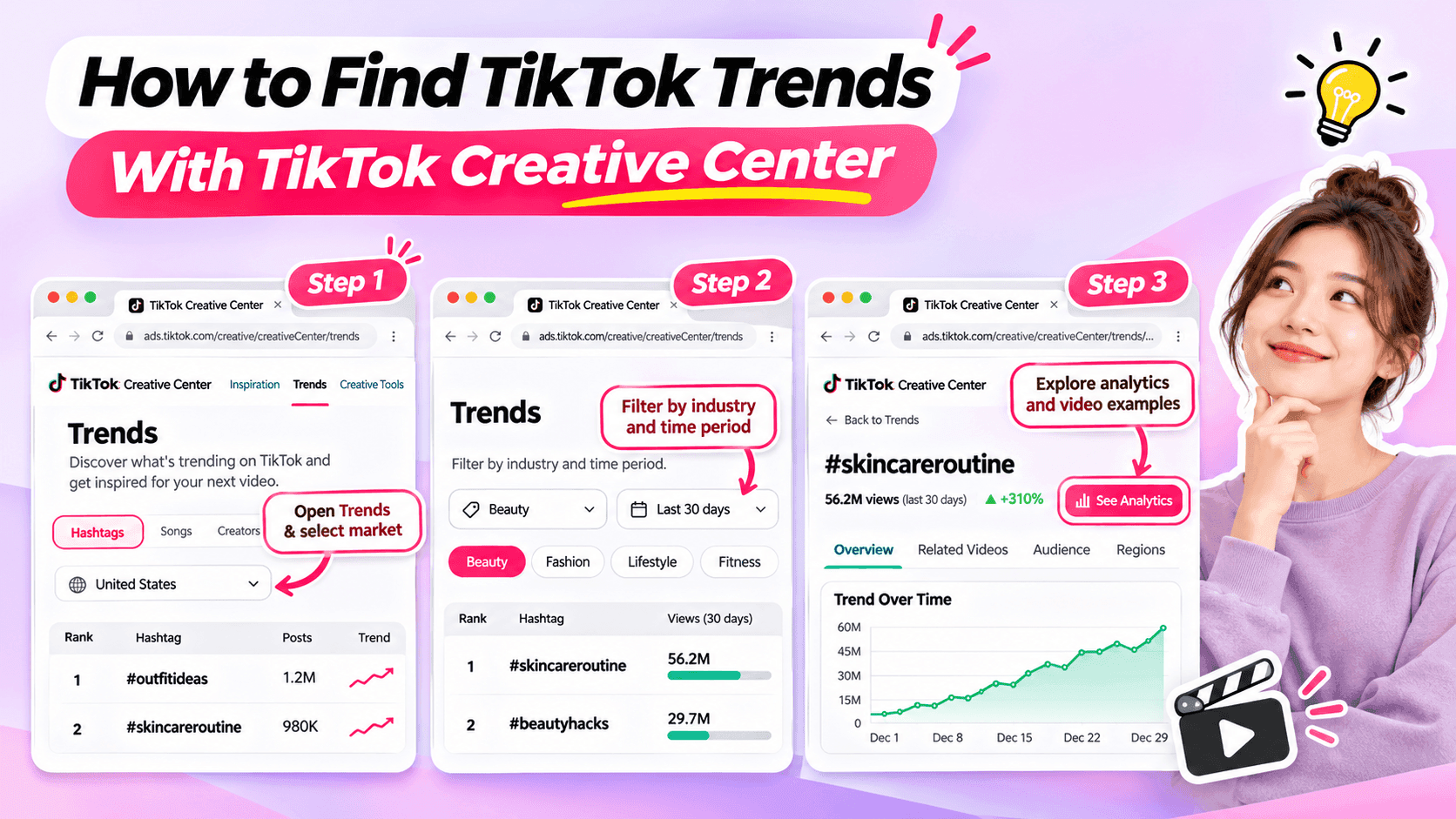
Learn how to use TikTok Creative Center to find trending hashtags and videos. Discover relevant trends and turn them into original ideas for your niche.
Looking for fresh TikTok video ideas but don't know where to start? TikTok Creative Center can help you discover trending hashtags, explore popular video formats, and find inspiration for your next post.
For influencers, the challenge isn't simply finding what's trending. It's choosing trends that match your niche, audience, and personal style.
In this beginner-friendly guide, you'll learn how to use TikTok Creative Center to find trends, understand what makes them interesting, and turn them into original video ideas. You'll also see how AI can help when you need extra inspiration.
What Is TikTok Creative Center?
TikTok Creative Center is a free creative research platform provided by TikTok for Business.
It helps users discover trends, explore creative examples, and learn about content formats on TikTok.
Although the platform includes advertising resources, influencers can also use its trend research features to find inspiration for organic content.
Here are the most useful features for beginners.
| Feature | What It Does | Why Influencers Might Use It |
|---|---|---|
| Trending Hashtags | Shows hashtags and trend information | Discover topics worth exploring |
| Hashtag Analytics | Provides available trend data and related content | Understand how a hashtag is being used |
| Trending Videos | Shows examples of popular TikTok videos where available | Explore creative approaches and formats |
| Top Ads | Provides examples of advertising creatives | Study creative techniques while recognizing that ad results differ from organic performance |
For example, a fashion influencer might use TikTok Creative Center to identify a popular styling theme and explore how people are presenting their outfits.
A fitness influencer might use it to find relevant workout-related discussions or formats.
The key is to use TikTok Creative Center as a source of inspiration, not a list of videos to copy.
How to Find TikTok Trends With Creative Center
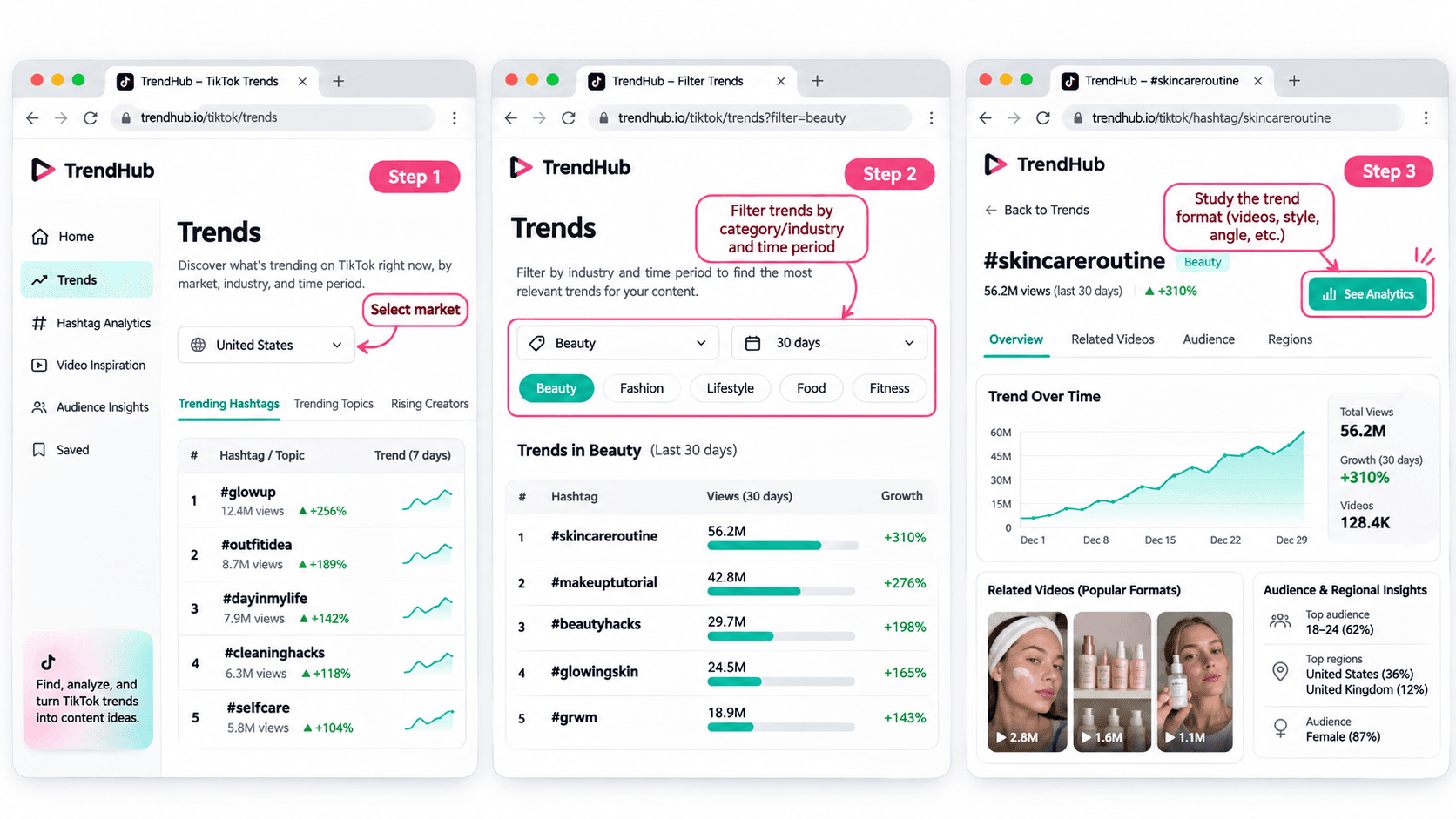
You don't need advanced marketing experience to get started.
Follow these five steps to discover and evaluate trends for your next TikTok video.
Step 1 Open TikTok Creative Center
Tool: TikTok Creative Center
Input: Your target market and influencer niche
Output: A list of trends to explore
Start by visiting the TikTok Creative Center Trends page.
On the platform:
- Open the Trends section.
- Select the Hashtag view if needed.
- Choose your target country or region when the option is available.
- Review the trending hashtags displayed.
You may be asked to log in to access additional rankings or analytics.
For example, if you're a beauty influencer targeting viewers in the United States, choose the United States when researching local trends.
This helps you explore content that may be more relevant to the audience you want to reach.
Beginner tip: Start with one market and one niche. You don't need to research every trend on TikTok.
Step 2 Filter Trends by Industry and Time Period
Input: Your niche and preferred research period
Output: A more focused selection of trends
TikTok Creative Center supports searching or filtering trending hashtags by industry and time frame.
Depending on the available interface, you can narrow your research using relevant categories.
For example:
| Influencer Niche | Research Direction |
|---|---|
| Beauty | Makeup techniques, beauty routines, skincare discussions |
| Fashion | Outfit styling, wardrobe inspiration, personal style |
| Fitness | Workout routines, training experiences, exercise discussions |
| Lifestyle | Everyday routines, organization, personal experiences |
| Technology | Device features, useful tools, technology discussions |
These are example research directions, not verified currently trending hashtags.
Once you have filtered the results, look for hashtags and topics that could make sense for your audience.
Avoid selecting a trend simply because it has the highest number of views.
A smaller, relevant trend may be more useful to your personal brand than a popular topic unrelated to your niche.
Step 3 Explore Hashtag Analytics
Input: A relevant hashtag
Output: More information about the trend and its related videos
When a hashtag catches your attention, select See Analytics if available.
TikTok's official Trends documentation describes several types of information that may appear, including:
- Trendlines showing how interest has changed.
- Related videos.
- Audience insights.
- Regional popularity.
- Related hashtags.
You don't have to analyze every metric.
For beginners, focus on three questions:
Is the topic relevant to my audience?
A popular hashtag is not automatically useful to your followers.
How are people using the hashtag?
Look at the related videos to understand the stories, formats, and approaches people are sharing.
Can I contribute something different?
Consider what personal experience, expertise, or perspective you could add.
For example, if you find a styling-related hashtag, review the videos to identify common approaches.
Some may show outfit combinations. Others may focus on accessories or personal styling tips.
Instead of copying those videos, use them to understand the topic and think about your own angle.
Step 4 Study the Video Format
Input: Related videos from your selected trend
Output: A creative structure you can adapt
Once you've found a relevant trend, watch a few videos and identify what makes the format recognizable.
Pay attention to:
- The opening scene.
- The main idea.
- The order of the shots.
- The visual changes.
- The ending.
For example, consider a before-and-after transformation format.
The structure is simple:
Before → Transformation → After
Different influencers could use that structure in different ways.
| Influencer Niche | Possible Video Idea |
|---|---|
| Fashion | Turn a casual outfit into an evening look |
| Beauty | Show a personal everyday makeup transformation |
| Fitness | Show a genuine change in a workout routine |
| Lifestyle | Transform a messy desk into an organized workspace |
These examples illustrate how a format can be adapted. They are not presented as verified current TikTok trends.
The format can stay similar while the content reflects each influencer's own experiences.
That's how you move from discovering a trend to developing an original idea.
Step 5 Save Your Trend Research
Input: Your selected trend and observations
Output: A short creative brief for your next video
Before leaving Creative Center, save the most useful information.
You can use this simple worksheet.
| Research Field | Example |
|---|---|
| Influencer niche | Everyday fashion |
| Target audience | Young adults who enjoy simple outfit inspiration |
| Trend format | Before-and-after transformation |
| What makes it interesting | A visible change between two looks |
| Personal angle | One jacket styled for different occasions |
| Possible video idea | Three ways to style one jacket |
| Next action | Write a short video concept |
This short brief helps you remember why the format interested you.
It also gives you useful information if you want to brainstorm additional ideas with AI.
How to Choose TikTok Trends That Fit Your Niche
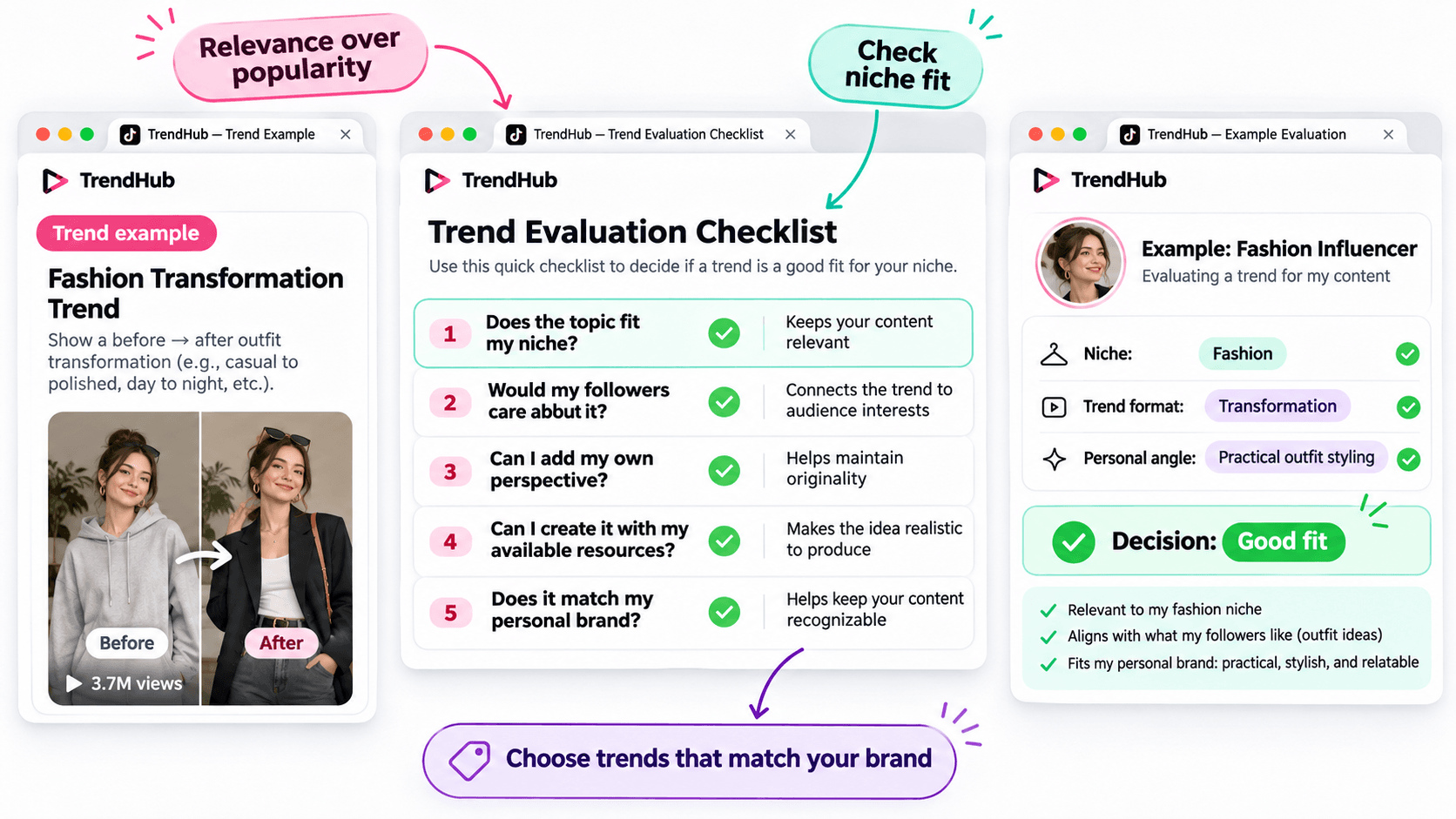
Not every popular trend deserves a place in your content plan.
Before adapting a trend, make sure it matches the kind of content your followers expect from you.
Use this simple checklist.
| Question | Why It Matters |
|---|---|
| Does the topic fit my niche? | Keeps your content relevant |
| Would my followers care about it? | Connects the trend to audience interests |
| Can I add my own perspective? | Helps maintain originality |
| Can I create it with my available resources? | Makes the idea realistic to produce |
| Does it match my personal brand? | Helps keep your content recognizable |
You don't need to answer yes to every question perfectly, but a trend should have a clear reason to belong in your content plan.
For example, imagine you're a fashion influencer who usually shares practical outfit ideas.
A transformation format could be useful if it allows you to demonstrate real styling advice.
However, an unrelated trend may not provide the same value to your audience.
Choose trends based on relevance and creative fit rather than popularity alone.
How to Turn a TikTok Trend Into an Original Video Idea
Finding a trend is only the beginning.
The next challenge is turning it into a video that feels like your own.
You can do this using three simple steps.
Step 1 Identify the Basic Creative Format
Look beyond the hashtag and focus on the structure.
For example:
Format: Before-and-after transformation.
Core idea: Show a visible change.
Possible applications: Outfit styling, makeup, workspace organization, or a genuine personal routine change.
This gives you a flexible creative direction.
Step 2 Add Your Personal Perspective
Ask yourself what you can contribute that another influencer hasn't already shown.
For example, a fashion influencer could use the transformation format to demonstrate how one favorite jacket works with different outfits.
The video could follow this structure:
Opening: Show the jacket and introduce the challenge.
Middle: Demonstrate three outfit combinations.
Ending: Ask followers which look they prefer.
This is a more personal concept than simply recreating a trending video.
Step 3 Develop a Simple Video Concept
Write down your idea before filming.
Example Video Concept
| Element | Example |
|---|---|
| Topic | Styling one jacket |
| Audience | Everyday fashion followers |
| Hook | "Can I style this jacket for three different occasions?" |
| Main Content | Show three outfit combinations |
| Ending | "Which look would you wear?" |
You now have a practical starting point for your next TikTok video.
You can develop the script yourself or use an AI assistant if you'd like to explore more creative approaches.
How to Brainstorm More TikTok Video Ideas With 1min.AI
Sometimes, you find an interesting trend but can't decide how to adapt it.
This is where 1min.AI Multi AI Chat can help.
You can use it to explore different content angles, develop hooks, and organize your ideas.
You don't need to use AI for every trend. It's an optional step when you want additional inspiration.
Step 1 Prepare Your Trend Information
Input: Your niche, audience, trend format, and personal style.
Let's continue with the fashion example.
| Input | Example |
|---|---|
| Niche | Everyday fashion |
| Audience | Young adults interested in practical outfits |
| Personal style | Friendly, natural, and relatable |
| Trend format | Before-and-after transformation |
| Content goal | Generate original outfit video ideas |
This gives AI enough context to generate suggestions that are more relevant than a general list of random TikTok ideas.
Step 2 Use Multi AI Chat to Explore Creative Angles
1min.AI Tool: Multi AI Chat
Output: Several video concepts with hooks and creative approaches.
Open 1min.AI and choose Multi AI Chat.
You can use one available AI model or compare suggestions from multiple models.
Copy the prompt below and replace the example information with your own.
Copyable TikTok Trend Adaptation Prompt
ROLE
Act as a TikTok content strategist who helps influencers create original short-form video ideas.
AUDIENCE
My influencer niche is [your niche].
My followers are [describe your audience].
PERSONAL BRAND
My communication style is [your tone and personality].
TREND INPUT
The TikTok trend or video format I found is [describe the verified format].
The main creative structure is [describe how the format works].
TASK
Suggest 5 original TikTok video ideas inspired by this format.
OUTPUT FORMAT
Create a table with:
- Video Idea
- Creative Angle
- Opening Hook
- Three-Part Video Outline
- Why It Fits My Audience
REQUIREMENTS
Keep the ideas easy to produce, authentic, and relevant to my niche. Do not copy another influencer's content, invent personal experiences, or claim that a trend guarantees viral results.
This format works for different influencer niches because you control the inputs.
For example, a beauty influencer can use the same prompt with a makeup-related trend, while a lifestyle influencer can use it with a home organization format.
Step 3 Review and Personalize the Suggestions
AI can help you explore options, but you should select the concept that genuinely fits your audience.
Here are three illustrative ideas for the fashion example.
| Video Idea | Creative Angle | Opening Hook |
|---|---|---|
| One Jacket Three Occasions | Show styling versatility | "Can one jacket work for three different plans?" |
| Casual to Evening Look | Show a simple outfit transformation | "Here's how I'd change this outfit for the evening." |
| Three Accessories One Outfit | Show how details change a look | "Watch how these accessories change the same outfit." |
These are examples of possible ideas, not documented outputs from a live 1min.AI session.
Choose one and adjust the details based on your own wardrobe and experience.
If you want a more detailed walkthrough of Multi AI Chat, read How Multiple AI Chat Helps Content Creators Create Better Content.
You can also watch the tutorial embedded in that guide to see how different AI models can help you compare content ideas.
For more ways to use AI throughout your creative process, explore Free AI Tools for Influencers to Create More Content.
Common Mistakes When Using TikTok Creative Center
Choosing Trends Only Because They Have High Views
A popular hashtag does not guarantee that your video will perform well.
Consider whether the trend fits your audience and whether you can contribute something useful or entertaining.
Copying Another Influencer's Video
Watching examples is useful for understanding a format.
However, repeating another person's creative work without adding your own contribution will not help you build a distinctive personal brand.
Use trends as inspiration, not finished scripts.
Ignoring Your Target Market
Trends can differ by location and audience.
When possible, choose the market that matches the people you're trying to reach.
Confusing Ad Performance With Organic Video Results
TikTok Creative Center includes advertising resources such as Top Ads.
These examples can provide creative inspiration, but advertising performance should not be treated as proof that a similar organic TikTok video will achieve the same results.
Assuming AI Knows Which Trends Are Currently Popular
AI can generate creative ideas based on the information you provide, but you should not assume it has verified the latest TikTok trends.
Research trends in TikTok Creative Center first, then provide those findings to AI.
Frequently Asked Questions
Is TikTok Creative Center Free?
Yes. TikTok describes Creative Center as a free public resource.
However, some detailed views or features may require logging in, and availability can vary.
How Do I Find Trending Hashtags on TikTok Creative Center?
Open the Trends section, select the available hashtag view, and use the search or filtering options.
When available, select See Analytics to explore more information about a hashtag.
Can Influencers Use TikTok Creative Center?
Yes. Although Creative Center is part of TikTok for Business, influencers can use its publicly available trend information to research topics, formats, and creative inspiration.
Does Using a Trending Hashtag Guarantee More Views?
No. A hashtag's popularity does not guarantee that your video will receive more views or engagement.
The relevance of the topic, the quality of your content, and your audience's response still matter.
What If I Cannot Access Some Creative Center Features?
Check whether you need to log in or whether the feature is available for your region or account.
TikTok's interface and feature availability can change. You can still research relevant videos directly on TikTok when a Creative Center feature is unavailable.
Can 1min.AI Find TikTok Trends Automatically?
This guide uses TikTok Creative Center to find and verify trends.
You can then enter the trend information into 1min.AI Multi AI Chat to brainstorm creative ideas. This workflow does not require automatic importing of TikTok trend data.
Final Thoughts
TikTok Creative Center is a useful starting point when you need fresh video inspiration.
Instead of scrolling through random videos, you can explore trending hashtags, study relevant formats, and evaluate whether an idea fits your personal brand.
Remember the simple workflow:
Find a Trend → Check Its Relevance → Study the Format → Add Your Perspective → Develop Your Video Idea.
You don't need to follow every trend or use complicated tools to get started.
Choose one relevant format, make it your own, and create something your audience can recognize as part of your personal brand.
When you want to explore more creative angles, AI can help you brainstorm without replacing your own ideas.
🚀 Turn TikTok Trends Into Original Video Ideas With 1min.AI Multi AI Chat
- #Navigational
විකල්ප
1minAI සඳහා හොඳම විකල්ප සොයාගෙන විශේෂාංග, මිල ගණන් සහ භාවිත අවස්ථා සසඳා බලන්න.

1min.AI එදිරිව OpenRouter
1min.AI එදිරිව OpenRouter: භාවිතයට සූදානම් AI නිර්මාණ නිෂ්පාදනය හා තාක්ෂණික API මෙවලම සංසන්දනය කරන්න. ඔබට කේතනයක් නැති නිර්මාණශීලී ස්ටුඩියෝවක් අවශ්යද, නැත්නම් කේතන යටිතල පහසුකම් හබ් එකක්ද කියලා හඳුනා ගන්න.
 Ngoc Hong

1min. AI vs Dola AI
Dola AI සඳහා විකල්පයක් සොයනවාද? වීඩියෝ ජනනය, නොමිලේ සැලසුම්, මිලගණන් සහ රහස්යතාවය අනුව 1min.AI vs Dola AI සසඳා ඔබට ගැළපෙන AI යෙදුම තෝරන්න.
Ngoc Hong
1minAI vs Hix AI
AI chat, පර්යේෂණය, ලිවීම, රූප, වීඩියෝ, මිලකරණය, සහ නම්යශීලී AI වැඩ ප්රවාහ සඳහා HIX AI විකල්ප 5ක් සසඳන්න.
Ngoc HongAI මෙවලම්
ඵලදායිතාවය, නිර්මාණශීලීත්වය සහ දෛනික වැඩ කටයුතු වැඩි දියුණු කිරීමට හොඳම AI මෙවලම් සොයා ගන්න.

එක නිෂ්පාදනයක්, UGC ක්රියේටිව් 10ක්: AI මඟින් අන්තර්ගත පරීක්ෂණය කොහොමද පහසු වෙන්නේ
AI UGC වීඩියෝ ජනකයක් භාවිතයෙන් වඩාත් සත්ය UGC සාදන්න, වැඩි ක්රියේටිව් කෝණ පරීක්ෂා කරන්න, සහ සෑම අනුවාදයක්ම රූගත නොකර affiliate අන්තර්ගතය පරිමාණය කරන්න.
 Lien Anh Vu

තත්පර කිහිපයකින් ස්ථාවර කාටූන් අන්තර්ගතය නිර්මාණය කරන්න
1min.AI සමඟ අදහස් පර්යේෂණයෙන් ආරම්භ කර චරිත සහ සජීවිකරණ වීඩියෝ දක්වා, සරල පියවර 3කින් TikTok සහ Reels සඳහා කාටූන් වීඩියෝ සාදන්න.
Lien Anh Vu
ආරම්භක ආයතනික නිර්මාතෘවරුන් සඳහා දැරිය හැකි AI මෙවලම් 4ක්
අදහස් සනාථ කිරීමට, නිෂ්පාදන ගොඩනැගීමට, අන්තර්ගත නිර්මාණය කිරීමට, සහ අධික වියදම් නොකර වේගයෙන් දියත් කිරීමට ආරම්භක ආයතනික නිර්මාතෘවරුන් සඳහා තිබෙන දැරිය හැකි AI මෙවලම් 4ක් සොයා ගන්න.
 Tram Ta
කෘත්රිම බුද්ධි විශේෂාංග
සම්පූර්ණ කෘත්රිම බුද්ධි විශේෂාංග — වැඩපිළිවෙළ සරල කර, කාර්යක්ෂමතාවය වැඩි කර, කණ්ඩායම්වලට වැඩි දියුණුවක් ලබාදෙයි.
එක නිෂ්පාදනයක්, UGC ක්රියේටිව් 10ක්: AI මඟින් අන්තර්ගත පරීක්ෂණය කොහොමද පහසු වෙන්නේ
AI UGC වීඩියෝ ජනකයක් භාවිතයෙන් වඩාත් සත්ය UGC සාදන්න, වැඩි ක්රියේටිව් කෝණ පරීක්ෂා කරන්න, සහ සෑම අනුවාදයක්ම රූගත නොකර affiliate අන්තර්ගතය පරිමාණය කරන්න.
Lien Anh Vuතත්පර කිහිපයකින් ස්ථාවර කාටූන් අන්තර්ගතය නිර්මාණය කරන්න
1min.AI සමඟ අදහස් පර්යේෂණයෙන් ආරම්භ කර චරිත සහ සජීවිකරණ වීඩියෝ දක්වා, සරල පියවර 3කින් TikTok සහ Reels සඳහා කාටූන් වීඩියෝ සාදන්න.
Lien Anh Vu
1minAI: නොමිලේ AI ව්යාකරණ පරීක්ෂකය
1minAI හි AI ව්යාකරණ පරීක්ෂකයෙන් නොමිලේ ව්යාකරණ පරීක්ෂා කරන්න. ව්යාකරණ, අක්ෂර වින්යාස සහ ලිවීමේ දෝෂ සොයාගෙන, පැහැදිලිකම වැඩි කර, තත්පර කිහිපයකින් ඔබේ අන්තර්ගතය පිරිපහදු කරන්න.
Tram Taකෘත්රිම බුද්ධිය භාවිත අවස්ථා
ව්යාපාර, ඵලදායීතාව සහ කර්මාන්ත-නිශ්චිත යෙදුම් සඳහා විශේෂයෙන් තෝරාගත් කෘත්රිම බුද්ධිය භාවිත අවස්ථා එකතුවක්.
එක නිෂ්පාදනයක්, UGC ක්රියේටිව් 10ක්: AI මඟින් අන්තර්ගත පරීක්ෂණය කොහොමද පහසු වෙන්නේ
AI UGC වීඩියෝ ජනකයක් භාවිතයෙන් වඩාත් සත්ය UGC සාදන්න, වැඩි ක්රියේටිව් කෝණ පරීක්ෂා කරන්න, සහ සෑම අනුවාදයක්ම රූගත නොකර affiliate අන්තර්ගතය පරිමාණය කරන්න.
Lien Anh Vuතත්පර කිහිපයකින් ස්ථාවර කාටූන් අන්තර්ගතය නිර්මාණය කරන්න
1min.AI සමඟ අදහස් පර්යේෂණයෙන් ආරම්භ කර චරිත සහ සජීවිකරණ වීඩියෝ දක්වා, සරල පියවර 3කින් TikTok සහ Reels සඳහා කාටූන් වීඩියෝ සාදන්න.
Lien Anh Vu
Instagram හි පළ කිරීමට හොඳම වේලාව: වඩා හොඳ නියැලීම සඳහා ප්රායෝගික මාර්ගෝපදේශයක්
Instagram හි පළ කිරීමට හොඳම වේලාව සොයා ගන්න. විවිධ ප්රේක්ෂකයන් සඳහා හොඳම දින සහ වේලාවන්, සහ ඔබේ ගිණුම සඳහා සුදුසු පළ කිරීමේ කාලසටහන සොයා ගැනීමට ඉඟි ද ඇතුළත් වේ.
Tram TaAI නිබන්ධන
ප්රායෝගික, පියවරෙන් පියවර නිබන්ධන සමඟ AI භාවිත කරන්නේ කෙසේදැයි ඉගෙන ගන්න.
තත්පර කිහිපයකින් ස්ථාවර කාටූන් අන්තර්ගතය නිර්මාණය කරන්න
1min.AI සමඟ අදහස් පර්යේෂණයෙන් ආරම්භ කර චරිත සහ සජීවිකරණ වීඩියෝ දක්වා, සරල පියවර 3කින් TikTok සහ Reels සඳහා කාටූන් වීඩියෝ සාදන්න.
Lien Anh Vu
2026 කළු සිකුරාදා AI මෙවලම් ගනුදෙනු
2026 කළු සිකුරාදා AI මෙවලම් ගනුදෙනු මඟින් ඔබට ලැබෙන දේ සොයාගන්න. AppSumo, Dealify, Stack Social හරහා 1min.AI ජීවිතකාලීන ගනුදෙනුව ලබාගන්නේ කෙසේදැයි දැනගෙන, Trustpilot, Slashdot, සහ Software Advice මඟින් සත්යාපනය කරන්න.
 Hang Nguyen

Seedance සමඟ AI රූපයෙන් වීඩියෝවට නිෂ්පාදන අනුකූලතාව ලබා ගනිමින් වක්රණය නවතා නිෂ්පාදන සමාලෝචන පරිමාණය කරන්න
AI රූපයෙන් වීඩියෝවට නිෂ්පාදන අනුකූලතාවයෙන් ලාංඡන වක්රණය නවතා අදම 1min.AI මත ස්ටුඩියෝ-මට්ටමේ සමාලෝචන වීඩියෝ ජනනය කරන්න.
Lien Anh VuAI මාර්ගෝපදේශ
ප්රායෝගික මාර්ගෝපදේශ, සත්ය ලෝක උදාහරණ සහ ක්රියාකාරී හොඳම භාවිතයන් සමඟින් AI වඩාත් වේගයෙන් ඉගෙන ගන්න.
තත්පර කිහිපයකින් ස්ථාවර කාටූන් අන්තර්ගතය නිර්මාණය කරන්න
1min.AI සමඟ අදහස් පර්යේෂණයෙන් ආරම්භ කර චරිත සහ සජීවිකරණ වීඩියෝ දක්වා, සරල පියවර 3කින් TikTok සහ Reels සඳහා කාටූන් වීඩියෝ සාදන්න.
Lien Anh Vu
AI මෙවලම් අන්තර්ජාලයෙන් ආරක්ෂිතව මිලදී ගන්න: 2026 Black Friday මාර්ගෝපදේශය
හොඳම Black Friday AI ගනුදෙනු අන්තර්ජාලයෙන් සොයාගෙන ආරක්ෂිතව ලබාගන්නේ කෙසේදැයි දැනගන්න. වංචා වළක්වා ගැනීමට, subscription fatigue සමඟ කටයුතු කිරීමට, සහ software තහවුරු කිරීමට විශේෂඥ උපාය මාර්ග ඉගෙන ගන්න.
Hang NguyenSeedance සමඟ AI රූපයෙන් වීඩියෝවට නිෂ්පාදන අනුකූලතාව ලබා ගනිමින් වක්රණය නවතා නිෂ්පාදන සමාලෝචන පරිමාණය කරන්න
AI රූපයෙන් වීඩියෝවට නිෂ්පාදන අනුකූලතාවයෙන් ලාංඡන වක්රණය නවතා අදම 1min.AI මත ස්ටුඩියෝ-මට්ටමේ සමාලෝචන වීඩියෝ ජනනය කරන්න.
Lien Anh VuAI විසඳුම්
ස්වයංක්රීයකරණය, කේතීකරණය, පර්යේෂණ, ඵලදායිතාව, පාරිභෝගික සහාය, අලෙවිකරණය සහ ව්යාපාරික වැඩ ප්රවාහයන් සඳහා හොඳම AI විසඳුම් සොයන්න.
එක නිෂ්පාදනයක්, UGC ක්රියේටිව් 10ක්: AI මඟින් අන්තර්ගත පරීක්ෂණය කොහොමද පහසු වෙන්නේ
AI UGC වීඩියෝ ජනකයක් භාවිතයෙන් වඩාත් සත්ය UGC සාදන්න, වැඩි ක්රියේටිව් කෝණ පරීක්ෂා කරන්න, සහ සෑම අනුවාදයක්ම රූගත නොකර affiliate අන්තර්ගතය පරිමාණය කරන්න.
Lien Anh Vuතත්පර කිහිපයකින් ස්ථාවර කාටූන් අන්තර්ගතය නිර්මාණය කරන්න
1min.AI සමඟ අදහස් පර්යේෂණයෙන් ආරම්භ කර චරිත සහ සජීවිකරණ වීඩියෝ දක්වා, සරල පියවර 3කින් TikTok සහ Reels සඳහා කාටූන් වීඩියෝ සාදන්න.
Lien Anh Vu
නොමිලේ AI ටැටූ ජනකය: අභිරුචි නිර්මාණ
1min.AI හි නොමිලේ AI ටැටූ ජනකය භාවිතයෙන් ඕනෑම අදහසක් අභිරුචි ටැටූ නිර්මාණයක් බවට පත් කරන්න. ඔබගේ අදහස විස්තර කරන්න, ශෛලියක් තෝරන්න, සහ තත්පර කිහිපයකින් බාගන්න.
 Trang Tran
AI මාදිලි
ලොව ප්රමුඛ පෙළේ AI මාදිලි එක් තැනකින් ගවේෂණය කරන්න.
එක නිෂ්පාදනයක්, UGC ක්රියේටිව් 10ක්: AI මඟින් අන්තර්ගත පරීක්ෂණය කොහොමද පහසු වෙන්නේ
AI UGC වීඩියෝ ජනකයක් භාවිතයෙන් වඩාත් සත්ය UGC සාදන්න, වැඩි ක්රියේටිව් කෝණ පරීක්ෂා කරන්න, සහ සෑම අනුවාදයක්ම රූගත නොකර affiliate අන්තර්ගතය පරිමාණය කරන්න.
Lien Anh Vuතත්පර කිහිපයකින් ස්ථාවර කාටූන් අන්තර්ගතය නිර්මාණය කරන්න
1min.AI සමඟ අදහස් පර්යේෂණයෙන් ආරම්භ කර චරිත සහ සජීවිකරණ වීඩියෝ දක්වා, සරල පියවර 3කින් TikTok සහ Reels සඳහා කාටූන් වීඩියෝ සාදන්න.
Lien Anh VuSeedance සමඟ AI රූපයෙන් වීඩියෝවට නිෂ්පාදන අනුකූලතාව ලබා ගනිමින් වක්රණය නවතා නිෂ්පාදන සමාලෝචන පරිමාණය කරන්න
AI රූපයෙන් වීඩියෝවට නිෂ්පාදන අනුකූලතාවයෙන් ලාංඡන වක්රණය නවතා අදම 1min.AI මත ස්ටුඩියෝ-මට්ටමේ සමාලෝචන වීඩියෝ ජනනය කරන්න.
Lien Anh VuAI සංසන්දන
ඔබගේ අවශ්යතාවලට ගැලපෙන හොඳම AI මෙවලම්, මාදිලි සහ වේදිකා සොයා ගැනීමට සංසන්දනය කරන්න.

Kling AI Vs Veo 3: කුමන මාදිලිය දිනනවාද?
Kling AI vs Veo 3: ඔබේ ව්යාපෘතිය සඳහා කුමන AI වීඩියෝ ජනකය ජයගනී දැයි බැලීමට චලනය, ස්වදේශීය ශ්රව්ය, මිලකරණය සහ නොමිලේ තට්ටු සසඳන්න — 1min.AI මත දෙකම උත්සාහ කරන්න.
Trang TranSeedance සමඟ AI රූපයෙන් වීඩියෝවට නිෂ්පාදන අනුකූලතාව ලබා ගනිමින් වක්රණය නවතා නිෂ්පාදන සමාලෝචන පරිමාණය කරන්න
AI රූපයෙන් වීඩියෝවට නිෂ්පාදන අනුකූලතාවයෙන් ලාංඡන වක්රණය නවතා අදම 1min.AI මත ස්ටුඩියෝ-මට්ටමේ සමාලෝචන වීඩියෝ ජනනය කරන්න.
Lien Anh Vu
DeepSeek V4 Pro vs Flash සංසන්දනය
DeepSeek V4 Pro හා DeepSeek V4 Flash මිනුම් සංසන්දනය කරන්න. අදම 1min.ai හි ඔබගේ agentic යෙදුම් ප්රශස්ත කර AI fact checking වැඩිදියුණු කරන්න.
Ngoc HongAI ඒකාබද්ධකරණ
ඔබ දැනට භාවිතා කරන මෙවලම් සමඟ AI කිසිදු බාධාවකින් තොරව ඒකාබද්ධ කර, කාර්ය ස්වයංක්රීය කර ඵලදායීත්වය ඉහළ නැංවන්න.

AI Fashion Video Generator එකක් භාවිත කරලා Fashion Week 2026 සඳහා වීඩියෝ හදන්නේ කොහොමද
AI සමඟ Fashion Week 2026 අදහස් විස්මිත fashion වීඩියෝවලට පරිවර්තනය කරන්න. සරල workflow එකකින් brainstorming, visuals නිර්මාණය, සහ images වීඩියෝවලට වෙනස් කරන ආකාරය ඉගෙන ගන්න.
Lien Anh Vu
දෘෂ්ටිකෝණය: ඔබට හැමදාම ලියන්න තියෙන්නේ 10+ පෝස්ට් නම්
AI brainstroming, image generation, සහ content creation සමඟ content creatorsට දිනකට 10+ social media posts වේගයෙන් නිර්මාණය කරන්න උදව් කරන AI content workflow එකක් ගොඩනගන්නේ කොහොමද කියලා ඉගෙන ගන්න.
Lien Anh Vu
AI යෙදුම් අතර මාරු වීම නවත්වන්න: AI ඒකාබද්ධ කිරීම සේව්ය පළකිරීමේ සන්නාමකරණය පරිවර්තනය කරන ආකාරය
AI ඒකාබද්ධ කිරීම AI ලිවීම, ලේඛන, රූප, වීඩියෝ සහ බහු AI මාදිලි එක වැඩබිමකට එක් කරමින් HR කණ්ඩායම්වලට සේව්ය පළකිරීමේ සන්නාමකරණය සරල කර ගැනීමට උපකාර කරන ආකාරය සොයා ගන්න.
Tram Taකර්මාන්ත සඳහා AI
සෞඛ්ය සේවා, මූල්ය, අධ්යාපනය, නීති, නිෂ්පාදන, සිල්ලර වෙළඳාම, දේපල වෙළඳාම් සහ තවත් බොහෝ දේ සඳහා හොඳම AI මෙවලම් සහ වැඩ ප්රවාහ සොයන්න.

නොමිලේ AI නිෂ්පාදන විස්තර ජනකය
මිනිත්තු කිහිපයකින් විකුණන නිෂ්පාදන විස්තර ලියන්න. මෙම නොමිලේ AI නිෂ්පාදන විස්තර ජනකය භාවිතයෙන් විස්තර හෝ ඡායාරූපයක් brand එකට ගැලපෙන copy එකක් බවට පරිවර්තනය කරන්න. 1min.AI උත්සාහ කරන්න.
Trang Tran
ආරම්භක ව්යාපාර සඳහා ලාභ උපරිම කිරීමට හොඳම ව්යාපාරික ඵලදායිතා මෙවලම් | 1minAI
AI සමඟ කාලය ඉතිරි කරමින්, වැඩපිළිවෙළ සරල කරමින්, නැවත නැවත කරන කාර්යයන් අඩු කරමින්, ලාභදායී වර්ධනයට සහාය වන ආරම්භක ව්යාපාර සඳහා හොඳම ව්යාපාරික ඵලදායිතා මෙවලම් සොයා ගන්න.
Tram Ta
අන්තර්ගත අලෙවිකරණය සඳහා හොඳම AI මෙවලම |1minAI
අන්තර්ගත අලෙවිකරණය සඳහා හොඳම AI මෙවලමක් සොයනවාද? 1minAI එකම AI workspace එකකින් පර්යේෂණ, ලිවීම, නැවත භාවිතය, නිර්මාණය, දෘශ්ය සෑදීම සහ පරිමාණය කිරීමට අලෙවිකරුවන්ට උදව් කරන ආකාරය බලන්න.
Tram TaAI නියෝජිතයන්
ඔබේ වැඩ සහ දෛනික ජීවිතය පුරා කාර්යයන් ස්වයංක්රීය කිරීමට AI නියෝජිතයන් සොයාගෙන ක්රියාත්මක කරන්න.
1minAI: නොමිලේ AI ව්යාකරණ පරීක්ෂකය
1minAI හි AI ව්යාකරණ පරීක්ෂකයෙන් නොමිලේ ව්යාකරණ පරීක්ෂා කරන්න. ව්යාකරණ, අක්ෂර වින්යාස සහ ලිවීමේ දෝෂ සොයාගෙන, පැහැදිලිකම වැඩි කර, තත්පර කිහිපයකින් ඔබේ අන්තර්ගතය පිරිපහදු කරන්න.
Tram Ta
Facebook සඳහා AI Agent
ඔබගේ ලේඛන සහ සංවාදවලින් Facebook සඳහා AI Agent එකක් භාවිතා කර අන්තර්ගත නිර්මාණය, රූප ජනනය, පෝස්ට් සැලසුම් කිරීම, සහ ප්රකාශනය කරන්න.
Ngoc Hong
AI Agent vs AI Assistant: නිර්මාණකරුවන්ට ඇත්තටම වැඩි කාලයක් ඉතිරි කරන්නේ කුමක්ද?
AI Agent vs AI Assistant අතර වෙනස ඉගෙන ගෙන, නැවත නැවත සිදුවන වැඩ ස්වයංක්රීය කර, සංශෝධන අඩු කර, වැඩි කාලයක් ඉතිරි කිරීමට කුමන විසඳුම නිර්මාණකරුවන්ට උපකාරීදැයි සොයා ගන්න.
Lien Anh VuAI කාර්ය ප්රවාහ
ඵලදායිතාව, අලෙවිකරණය, විකුණුම්, සහාය සහ තවත් දේ සඳහා සූදානම් AI කාර්ය ප්රවාහයන් ගවේෂණය කරන්න.
එක නිෂ්පාදනයක්, UGC ක්රියේටිව් 10ක්: AI මඟින් අන්තර්ගත පරීක්ෂණය කොහොමද පහසු වෙන්නේ
AI UGC වීඩියෝ ජනකයක් භාවිතයෙන් වඩාත් සත්ය UGC සාදන්න, වැඩි ක්රියේටිව් කෝණ පරීක්ෂා කරන්න, සහ සෑම අනුවාදයක්ම රූගත නොකර affiliate අන්තර්ගතය පරිමාණය කරන්න.
Lien Anh Vuතත්පර කිහිපයකින් ස්ථාවර කාටූන් අන්තර්ගතය නිර්මාණය කරන්න
1min.AI සමඟ අදහස් පර්යේෂණයෙන් ආරම්භ කර චරිත සහ සජීවිකරණ වීඩියෝ දක්වා, සරල පියවර 3කින් TikTok සහ Reels සඳහා කාටූන් වීඩියෝ සාදන්න.
Lien Anh VuAI Fashion Video Generator එකක් භාවිත කරලා Fashion Week 2026 සඳහා වීඩියෝ හදන්නේ කොහොමද
AI සමඟ Fashion Week 2026 අදහස් විස්මිත fashion වීඩියෝවලට පරිවර්තනය කරන්න. සරල workflow එකකින් brainstorming, visuals නිර්මාණය, සහ images වීඩියෝවලට වෙනස් කරන ආකාරය ඉගෙන ගන්න.
Lien Anh Vuනිව්ස්ලෙටර්
1minAI සමඟ සතිපතා AI නවෝත්පාදන

🔮 සතිපතා AI නවෝත්පාදන #143: GPT-6, GPT-6.1 සහ Ideogram 4.0 යාවත්කාලීන කිරීම
1min.ai මත GPT-6 Sol, Luna, GPT-6.1 Sol, සහ Ideogram 4.0 වෙත ප්රවේශ වන්න. එකම වේදිකාවකින් typography නිරවද්යතාව 98.4% දක්වා වැඩි කර reasoning latency 45% කින් අඩු කරන්න.
Hang Nguyen
🔮 සතිපතා AI නවෝත්පාදන #142: Grok 4.7, Opus 5.5 සහ Sonnet 5.5 on 1min.ai
1min.ai මත Grok 4.7, Claude Opus 5.5, සහ Sonnet 5.5 වෙත පිවිසෙන්න. දායකත්ව වියදම් 70% දක්වා අඩු කර, එක් ඒකාබද්ධ workspace එකක tokens මිලියන ගණනක් සැකසන්න.
Hang Nguyen
🔮 සතිපතා AI නවෝත්පාදන #141: Seedance 2.5 සහ Stable Audio 3: ඊළඟ පරම්පරාවේ AI
Seedance 2.0, 2.5, සහ StabilityAI හි Stable Audio 3 1min.ai මත ගවේෂණය කරන්න. ඊළඟ පරම්පරාවේ ජනන AI සමඟ studio-ගුණාත්මක ශ්රව්ය සහ සම්මුතික චලනය ජනනය කරන්න.
Hang Nguyen