
Text To Video AI Free Without Watermark Online

Trang Tran
2026 ඉල් 20
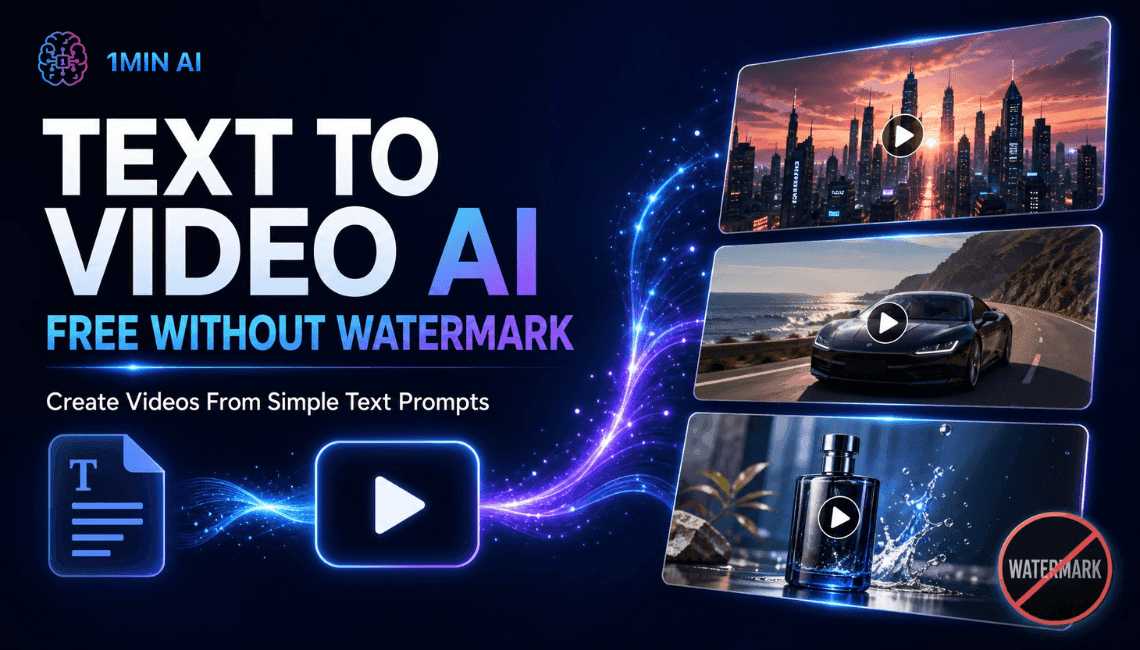
Create text to video AI free without watermark online with 1min.AI. Pick top models, turn prompts into HD clips, and download clean videos fast. Try it free.
You can create text to video AI free without watermark on 1min.AI. Open the text to video tool, choose a model such as Kling, Veo 3.1, Seedance, or Wan, type your prompt, and download a clean clip with no watermark. You can open 1min.AI and start right away without filling in a sign-up form. Turn one sentence into a short video in minutes, with no camera, no editing timeline, and no stock footage hunt.
Quick facts
- Best for: marketers, creators, small business owners, and beginners
- Output: short HD clips, vertical, horizontal, or square depending on the model
- Watermark: none on your downloads
- Works in: your browser, so no app or APK to install
- Reviewed by: the 1min.AI team, who test these models and settings inside our own workspace
Why Free Text to Video Often Ends in Frustration
You write a perfect prompt, wait for the render, and then find a logo across the corner of your clip. Or the tool asks for an account, a download, and a login before showing any result. Or you cannot tell how long the video can be, which style the model handles best, or what a setting does.
Those are the three problems this guide solves:
- Watermarks that make clips unusable for social posts and ads
- Unclear limits on length, resolution, and aspect ratio
- Too many choices, with no guidance on which model fits your idea
Text to Video AI Free Without Watermark on 1min.AI
1min.AI brings leading video models into one workspace, so you can switch models without switching tabs. Start from a text prompt, then adjust length, ratio, audio, and camera settings to match your platform.
Top Text to Video Models in One Place
| Model | Best for | Key settings |
|---|---|---|
| Kling 3.0 and 3.0 Omni | Cinematic motion and multi-scene stories | 3 to 15 seconds, audio toggle, up to 6 shots |
| Kling 2.5, 2.1 Master, 2.1, 2.0, 1.6 | Reliable short clips with camera control | 5 or 10 seconds, standard or professional mode, camera presets |
| Veo 3.1 and Veo 3 (Fast versions too) | Realistic detail and clips with sound | Fixed 8 seconds, 720p or 1080p, audio toggle |
| Seedance 2.5 | Reference-guided videos | 4 to 30 seconds, reference images, videos, and audio |
| Seedance 2.0, 2.0 Fast, 2.0 Mini | Quick, controlled clips | 4 to 15 seconds, same reference options |
| Wan 2.7 | Flexible ratios and your own audio track | 2 to 15 seconds, five aspect ratios, custom WAV or MP3 |
| Pika | Fast social clips | 5 or 10 seconds, seven aspect ratios, 720p or 1080p |
| Hailuo | Prompt-expanded short clips | v2 offers 6 or 10 seconds |
You will also find Hunyuan AI, Wanx AI, and Animate Diff for creative experiments.
Free Online, No App or APK Needed
1min.AI runs in your browser on desktop or mobile. There is nothing to install, which also means no unofficial APK files to worry about. Open the page, write your prompt, and generate.
Your Workspace Works Around Your Videos
Save reusable prompts in Prompt List, store images and clips in Asset List, and organize work with Tag List. These workspace tools in AI Studio are ready to use, while Shared Zone and History keep your work synced once you create an account.
How to Create Text to Video AI Free Without Watermark in 3 Steps
Step 1: Pick a Model and Write Your Prompt
Open the text to video tool, choose a model, and describe your scene. A strong prompt covers five things:
- Subject: who or what is on screen
- Action: what moves or changes
- Setting: where and when it happens
- Style: cinematic, anime, 3D, product shot, documentary
- Camera: slow pan, zoom in, aerial shot
Example prompt: “A barista pours latte art in a sunlit cafe, slow zoom in, warm tones, cinematic, shallow depth of field.”
Step 2: Adjust Your Settings
Settings differ by model, so here is what matters for each family.
Kling Settings
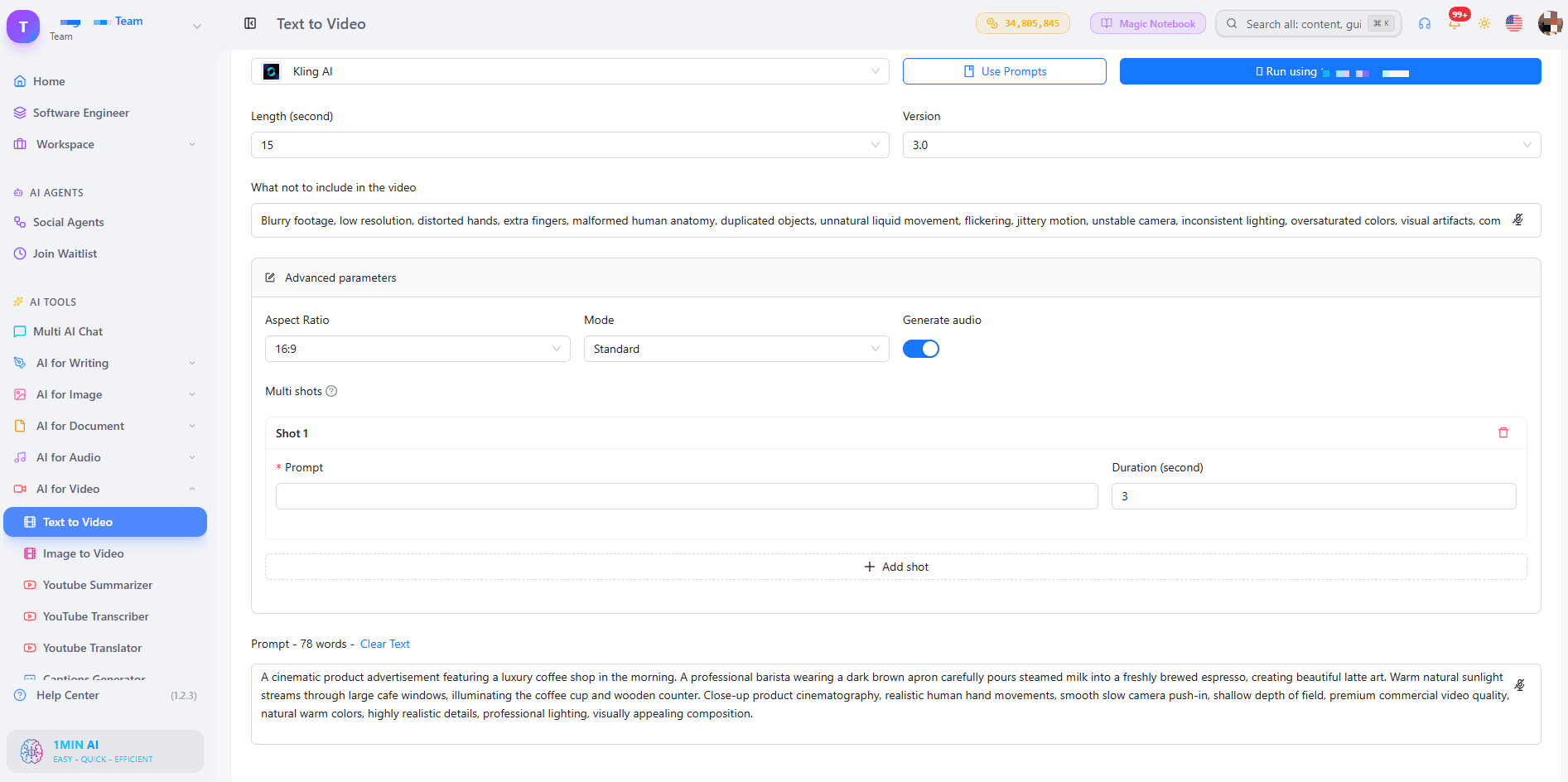
For Kling 1.6 to 2.5, choose a 5 or 10 second length and a camera control such as zoom, pan, tilt, or roll. Standard mode suits quick drafts, while professional mode suits your final version. The default CFG Scale of 0.5 is a good starting point, and raising it makes the clip follow your prompt more strictly. Use the “what not to include” field to remove unwanted elements. Kling 3.0 adds audio and lets you build a multi-shot video of up to 6 shots, each with its own prompt, within 15 seconds total.
Veo Settings
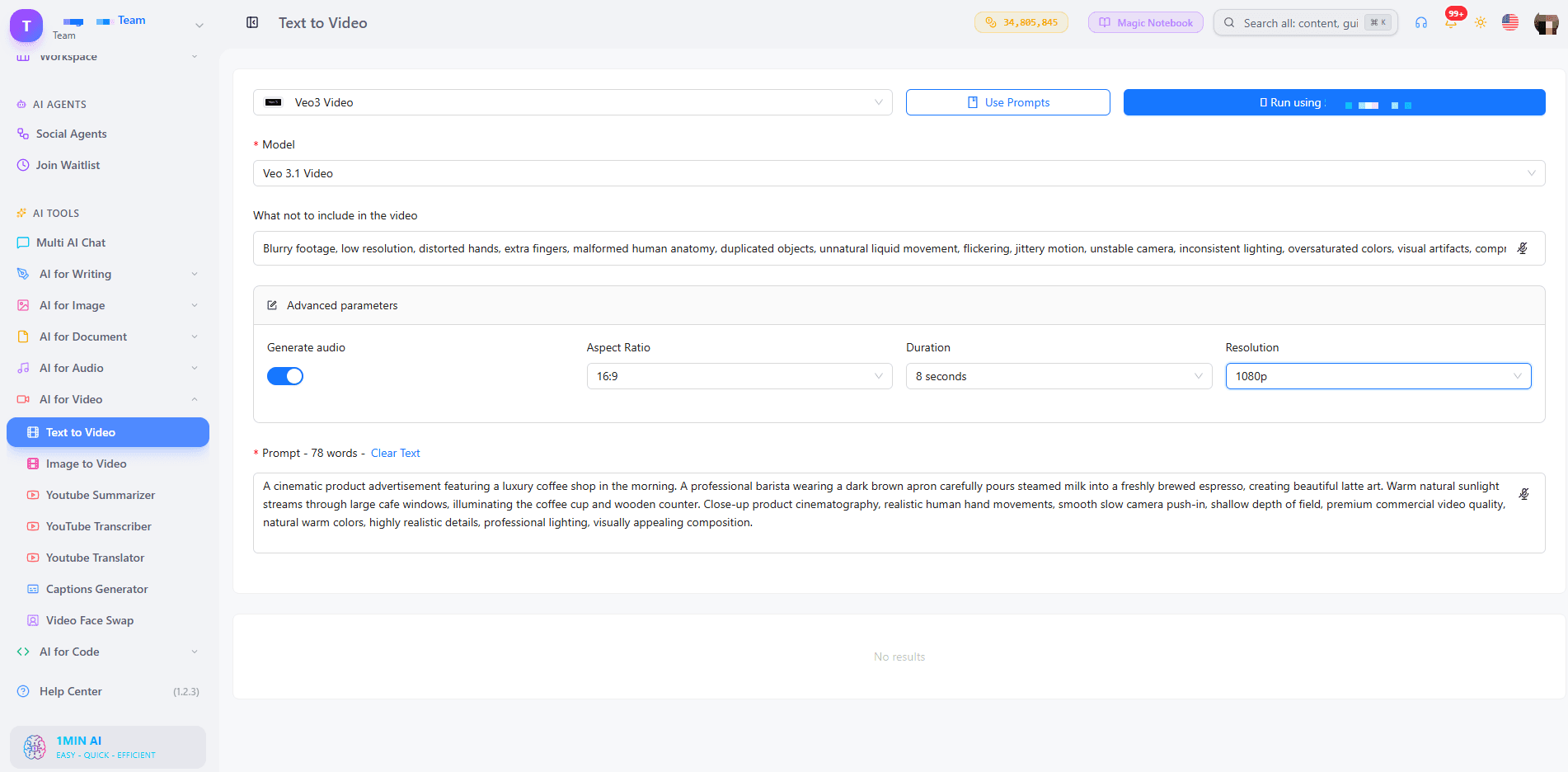
Choose Veo 3.1 when you want the strongest quality, or a Fast version when you are testing ideas. Turn on Generate Audio if you want sound with your picture. Duration is fixed at 8 seconds, with 9:16, 16:9, or auto aspect ratio and 720p or 1080p resolution. Our guide to free AI video generation with Veo 3.1 goes deeper on prompts for this model.
Seedance and Wan Settings
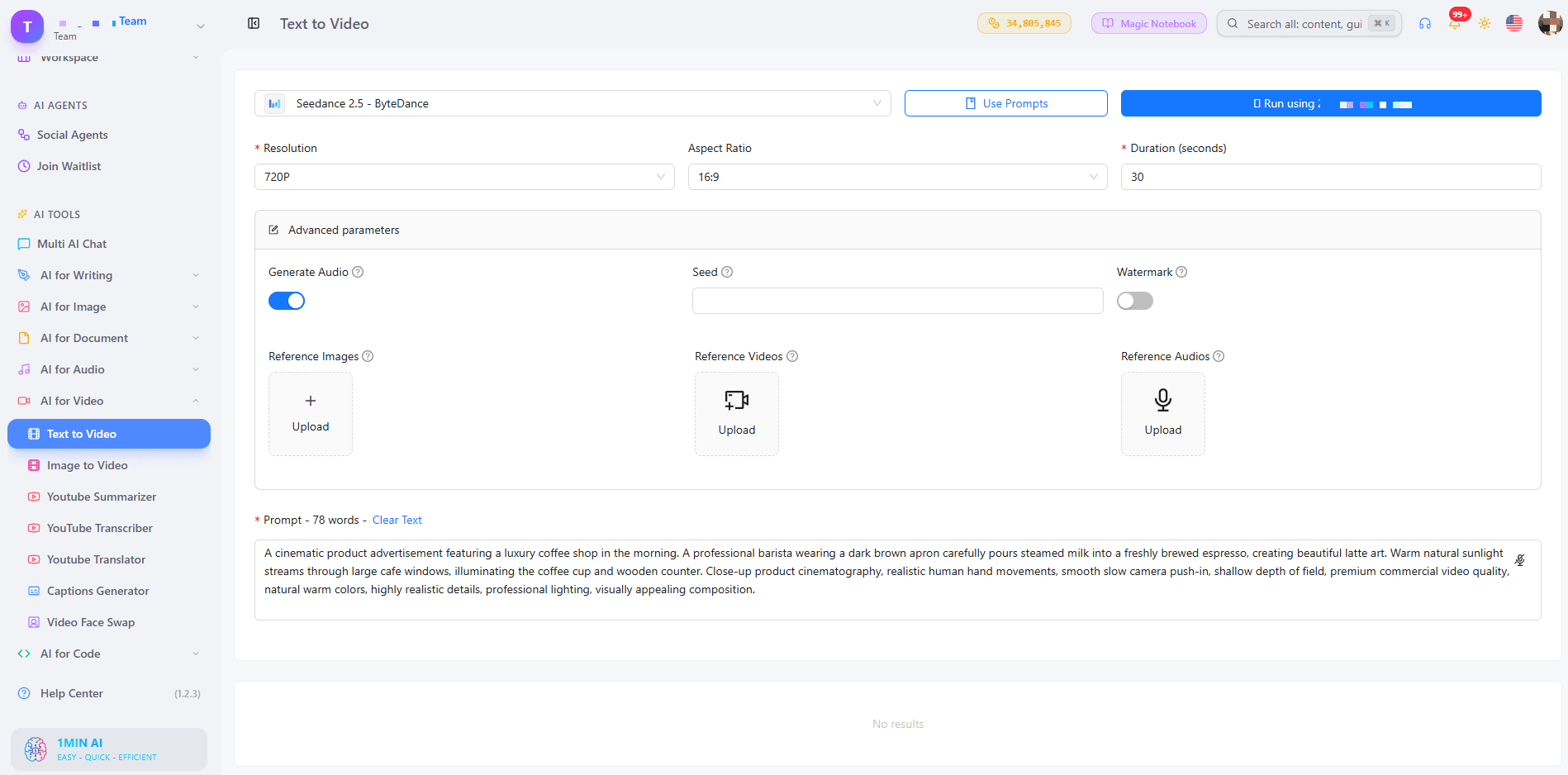
Seedance 2.5 accepts up to 30 reference images, 10 reference videos, and 10 reference audio clips, which helps keep characters and styles consistent. Wan 2.7 lets you upload your own audio (WAV or MP3), choose between 16:9, 9:16, 1:1, 4:3, and 3:4, and switch Enhance Prompt on for short prompts.
Step 3: Generate, Preview, and Download
Click generate, preview the clip, and download it with no watermark. If the result is close but not perfect, change one detail in the prompt and run it again. Small edits often improve a clip more than a full rewrite.
For a visual walkthrough, watch this tutorial:
Which Style and Length Do You Need?
Two questions decide the best setup for your video: what look do you want, and how long should it be?
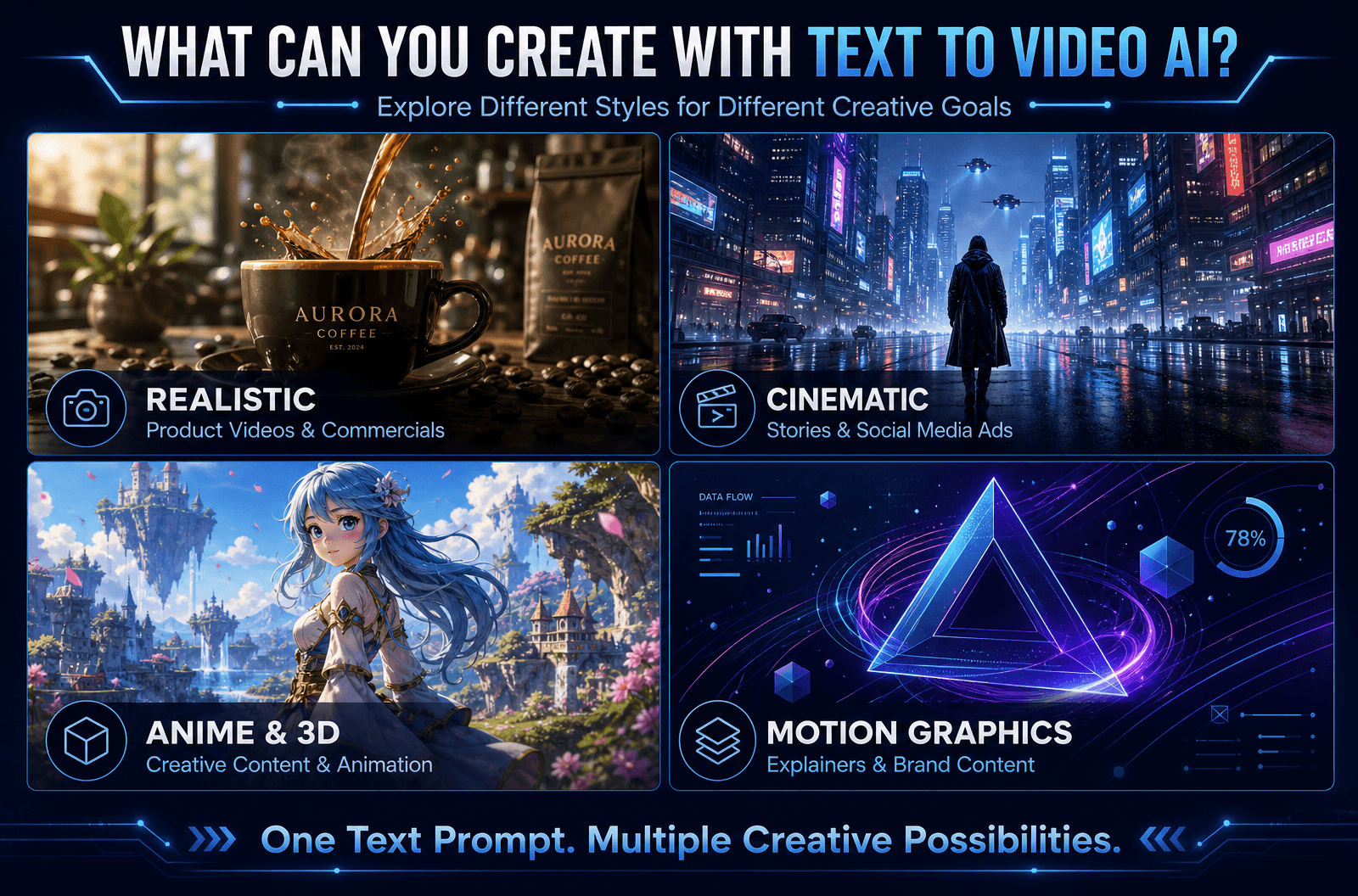
Choose by Style
- Realistic: Veo 3.1 for natural lighting, motion, and sound
- Cinematic and story-driven: Kling 3.0 with multi-shot scenes
- Brand or character consistency: Seedance 2.5 with reference images
- Anime, 3D, or motion graphics: add the style in your prompt, then test Kling, Wan 2.7, or Pika
Choose by Length
- 2 to 8 seconds: hooks, product teasers, looping social clips (Wan 2.7, Veo, Pika)
- 10 to 15 seconds: short ads and story beats (Kling 3.0, Seedance 2.0)
- Up to 30 seconds: longer scenes (Seedance 2.5)
Want to compare model outputs side by side? This video shows several of them at work:
Prompt Tips for Cleaner, More Accurate Videos
- Be specific: “a red sports car on a coastal road at sunset” beats “a car”
- Keep it short: one or two clear sentences
- Name the camera move: “drone shot,” “slow pan,” “close-up”
- Use the negative field: exclude text overlays, blur, or extra people
- Test one change at a time: it shows you what each edit does
Who Uses Text to Video AI Without Watermarks?
- Marketers: turn a campaign idea into ad variations without a shoot
- Content creators: produce hooks and B-roll for TikTok, Reels, and Shorts
- Small business owners: show a product in motion, with no production budget
- Educators: animate concepts that are hard to film
- Real estate and e-commerce teams: start from a still photo with AI image to video when you already have pictures
If you are building TikTok hooks, this walkthrough helps:
Can You Use the Videos Commercially? What About Copyright?
Videos generated from your own prompts do not rely on stock footage, so there is nothing to license from a library. Commercial-use conditions can vary by model, so check the terms of the model you choose before publishing client or ad work. For a broader overview, read our AI text to video guide.
FAQ
How do I convert text to video for free using AI?
Open 1min.AI’s text to video tool, choose a model, type your prompt, set the length and ratio, and generate. Preview the clip, then download it with no watermark.
Is there a text to video AI free without watermark and login?
Yes. You can open 1min.AI and start generating without creating an account, and your downloads carry no watermark. Our page on text to video AI free with no sign up explains the details.
Which video tool is 100% free with no watermark?
Look for a tool that clearly states no watermark on exports, shows its limits upfront, and runs in the browser. 1min.AI offers free credits to try text to video and exports clean videos.
Can I generate unlimited videos?
You can test as many prompt variations as your credits allow, so start with short clips and refine one detail at a time.
Can an AI chatbot do text to video?
Chatbots focus on text and images. A dedicated text to video tool such as 1min.AI connects you to video models built for motion, audio, and camera control.
Do I need an app or APK?
No. 1min.AI works in your browser on any device.
Is there a script to video option?
Yes. Paste your script or scene description as the prompt. With Kling 3.0 you can split it into up to 6 shots.
Make Your First Watermark-Free Video
Pick a model, write one clear prompt, and see your idea move. Your first clip can be ready in minutes.
- #Transaction
විකල්ප
1minAI සඳහා හොඳම විකල්ප සොයාගෙන විශේෂාංග, මිල ගණන් සහ භාවිත අවස්ථා සසඳා බලන්න.

1min.AI එදිරිව OpenRouter
1min.AI එදිරිව OpenRouter: භාවිතයට සූදානම් AI නිර්මාණ නිෂ්පාදනය හා තාක්ෂණික API මෙවලම සංසන්දනය කරන්න. ඔබට කේතනයක් නැති නිර්මාණශීලී ස්ටුඩියෝවක් අවශ්යද, නැත්නම් කේතන යටිතල පහසුකම් හබ් එකක්ද කියලා හඳුනා ගන්න.
 Ngoc Hong

1min. AI vs Dola AI
Dola AI සඳහා විකල්පයක් සොයනවාද? වීඩියෝ ජනනය, නොමිලේ සැලසුම්, මිලගණන් සහ රහස්යතාවය අනුව 1min.AI vs Dola AI සසඳා ඔබට ගැළපෙන AI යෙදුම තෝරන්න.
Ngoc Hong
1minAI vs Hix AI
AI chat, පර්යේෂණය, ලිවීම, රූප, වීඩියෝ, මිලකරණය, සහ නම්යශීලී AI වැඩ ප්රවාහ සඳහා HIX AI විකල්ප 5ක් සසඳන්න.
Ngoc HongAI මෙවලම්
ඵලදායිතාවය, නිර්මාණශීලීත්වය සහ දෛනික වැඩ කටයුතු වැඩි දියුණු කිරීමට හොඳම AI මෙවලම් සොයා ගන්න.

එක නිෂ්පාදනයක්, UGC ක්රියේටිව් 10ක්: AI මඟින් අන්තර්ගත පරීක්ෂණය කොහොමද පහසු වෙන්නේ
AI UGC වීඩියෝ ජනකයක් භාවිතයෙන් වඩාත් සත්ය UGC සාදන්න, වැඩි ක්රියේටිව් කෝණ පරීක්ෂා කරන්න, සහ සෑම අනුවාදයක්ම රූගත නොකර affiliate අන්තර්ගතය පරිමාණය කරන්න.
 Lien Anh Vu

තත්පර කිහිපයකින් ස්ථාවර කාටූන් අන්තර්ගතය නිර්මාණය කරන්න
1min.AI සමඟ අදහස් පර්යේෂණයෙන් ආරම්භ කර චරිත සහ සජීවිකරණ වීඩියෝ දක්වා, සරල පියවර 3කින් TikTok සහ Reels සඳහා කාටූන් වීඩියෝ සාදන්න.
Lien Anh Vu
ආරම්භක ආයතනික නිර්මාතෘවරුන් සඳහා දැරිය හැකි AI මෙවලම් 4ක්
අදහස් සනාථ කිරීමට, නිෂ්පාදන ගොඩනැගීමට, අන්තර්ගත නිර්මාණය කිරීමට, සහ අධික වියදම් නොකර වේගයෙන් දියත් කිරීමට ආරම්භක ආයතනික නිර්මාතෘවරුන් සඳහා තිබෙන දැරිය හැකි AI මෙවලම් 4ක් සොයා ගන්න.
 Tram Ta
කෘත්රිම බුද්ධි විශේෂාංග
සම්පූර්ණ කෘත්රිම බුද්ධි විශේෂාංග — වැඩපිළිවෙළ සරල කර, කාර්යක්ෂමතාවය වැඩි කර, කණ්ඩායම්වලට වැඩි දියුණුවක් ලබාදෙයි.
එක නිෂ්පාදනයක්, UGC ක්රියේටිව් 10ක්: AI මඟින් අන්තර්ගත පරීක්ෂණය කොහොමද පහසු වෙන්නේ
AI UGC වීඩියෝ ජනකයක් භාවිතයෙන් වඩාත් සත්ය UGC සාදන්න, වැඩි ක්රියේටිව් කෝණ පරීක්ෂා කරන්න, සහ සෑම අනුවාදයක්ම රූගත නොකර affiliate අන්තර්ගතය පරිමාණය කරන්න.
Lien Anh Vuතත්පර කිහිපයකින් ස්ථාවර කාටූන් අන්තර්ගතය නිර්මාණය කරන්න
1min.AI සමඟ අදහස් පර්යේෂණයෙන් ආරම්භ කර චරිත සහ සජීවිකරණ වීඩියෝ දක්වා, සරල පියවර 3කින් TikTok සහ Reels සඳහා කාටූන් වීඩියෝ සාදන්න.
Lien Anh Vu
1minAI: නොමිලේ AI ව්යාකරණ පරීක්ෂකය
1minAI හි AI ව්යාකරණ පරීක්ෂකයෙන් නොමිලේ ව්යාකරණ පරීක්ෂා කරන්න. ව්යාකරණ, අක්ෂර වින්යාස සහ ලිවීමේ දෝෂ සොයාගෙන, පැහැදිලිකම වැඩි කර, තත්පර කිහිපයකින් ඔබේ අන්තර්ගතය පිරිපහදු කරන්න.
Tram Taකෘත්රිම බුද්ධිය භාවිත අවස්ථා
ව්යාපාර, ඵලදායීතාව සහ කර්මාන්ත-නිශ්චිත යෙදුම් සඳහා විශේෂයෙන් තෝරාගත් කෘත්රිම බුද්ධිය භාවිත අවස්ථා එකතුවක්.
එක නිෂ්පාදනයක්, UGC ක්රියේටිව් 10ක්: AI මඟින් අන්තර්ගත පරීක්ෂණය කොහොමද පහසු වෙන්නේ
AI UGC වීඩියෝ ජනකයක් භාවිතයෙන් වඩාත් සත්ය UGC සාදන්න, වැඩි ක්රියේටිව් කෝණ පරීක්ෂා කරන්න, සහ සෑම අනුවාදයක්ම රූගත නොකර affiliate අන්තර්ගතය පරිමාණය කරන්න.
Lien Anh Vuතත්පර කිහිපයකින් ස්ථාවර කාටූන් අන්තර්ගතය නිර්මාණය කරන්න
1min.AI සමඟ අදහස් පර්යේෂණයෙන් ආරම්භ කර චරිත සහ සජීවිකරණ වීඩියෝ දක්වා, සරල පියවර 3කින් TikTok සහ Reels සඳහා කාටූන් වීඩියෝ සාදන්න.
Lien Anh Vu
Instagram හි පළ කිරීමට හොඳම වේලාව: වඩා හොඳ නියැලීම සඳහා ප්රායෝගික මාර්ගෝපදේශයක්
Instagram හි පළ කිරීමට හොඳම වේලාව සොයා ගන්න. විවිධ ප්රේක්ෂකයන් සඳහා හොඳම දින සහ වේලාවන්, සහ ඔබේ ගිණුම සඳහා සුදුසු පළ කිරීමේ කාලසටහන සොයා ගැනීමට ඉඟි ද ඇතුළත් වේ.
Tram TaAI නිබන්ධන
ප්රායෝගික, පියවරෙන් පියවර නිබන්ධන සමඟ AI භාවිත කරන්නේ කෙසේදැයි ඉගෙන ගන්න.
තත්පර කිහිපයකින් ස්ථාවර කාටූන් අන්තර්ගතය නිර්මාණය කරන්න
1min.AI සමඟ අදහස් පර්යේෂණයෙන් ආරම්භ කර චරිත සහ සජීවිකරණ වීඩියෝ දක්වා, සරල පියවර 3කින් TikTok සහ Reels සඳහා කාටූන් වීඩියෝ සාදන්න.
Lien Anh Vu
2026 කළු සිකුරාදා AI මෙවලම් ගනුදෙනු
2026 කළු සිකුරාදා AI මෙවලම් ගනුදෙනු මඟින් ඔබට ලැබෙන දේ සොයාගන්න. AppSumo, Dealify, Stack Social හරහා 1min.AI ජීවිතකාලීන ගනුදෙනුව ලබාගන්නේ කෙසේදැයි දැනගෙන, Trustpilot, Slashdot, සහ Software Advice මඟින් සත්යාපනය කරන්න.
 Hang Nguyen

Seedance සමඟ AI රූපයෙන් වීඩියෝවට නිෂ්පාදන අනුකූලතාව ලබා ගනිමින් වක්රණය නවතා නිෂ්පාදන සමාලෝචන පරිමාණය කරන්න
AI රූපයෙන් වීඩියෝවට නිෂ්පාදන අනුකූලතාවයෙන් ලාංඡන වක්රණය නවතා අදම 1min.AI මත ස්ටුඩියෝ-මට්ටමේ සමාලෝචන වීඩියෝ ජනනය කරන්න.
Lien Anh VuAI මාර්ගෝපදේශ
ප්රායෝගික මාර්ගෝපදේශ, සත්ය ලෝක උදාහරණ සහ ක්රියාකාරී හොඳම භාවිතයන් සමඟින් AI වඩාත් වේගයෙන් ඉගෙන ගන්න.
තත්පර කිහිපයකින් ස්ථාවර කාටූන් අන්තර්ගතය නිර්මාණය කරන්න
1min.AI සමඟ අදහස් පර්යේෂණයෙන් ආරම්භ කර චරිත සහ සජීවිකරණ වීඩියෝ දක්වා, සරල පියවර 3කින් TikTok සහ Reels සඳහා කාටූන් වීඩියෝ සාදන්න.
Lien Anh Vu
AI මෙවලම් අන්තර්ජාලයෙන් ආරක්ෂිතව මිලදී ගන්න: 2026 Black Friday මාර්ගෝපදේශය
හොඳම Black Friday AI ගනුදෙනු අන්තර්ජාලයෙන් සොයාගෙන ආරක්ෂිතව ලබාගන්නේ කෙසේදැයි දැනගන්න. වංචා වළක්වා ගැනීමට, subscription fatigue සමඟ කටයුතු කිරීමට, සහ software තහවුරු කිරීමට විශේෂඥ උපාය මාර්ග ඉගෙන ගන්න.
Hang NguyenSeedance සමඟ AI රූපයෙන් වීඩියෝවට නිෂ්පාදන අනුකූලතාව ලබා ගනිමින් වක්රණය නවතා නිෂ්පාදන සමාලෝචන පරිමාණය කරන්න
AI රූපයෙන් වීඩියෝවට නිෂ්පාදන අනුකූලතාවයෙන් ලාංඡන වක්රණය නවතා අදම 1min.AI මත ස්ටුඩියෝ-මට්ටමේ සමාලෝචන වීඩියෝ ජනනය කරන්න.
Lien Anh VuAI විසඳුම්
ස්වයංක්රීයකරණය, කේතීකරණය, පර්යේෂණ, ඵලදායිතාව, පාරිභෝගික සහාය, අලෙවිකරණය සහ ව්යාපාරික වැඩ ප්රවාහයන් සඳහා හොඳම AI විසඳුම් සොයන්න.
එක නිෂ්පාදනයක්, UGC ක්රියේටිව් 10ක්: AI මඟින් අන්තර්ගත පරීක්ෂණය කොහොමද පහසු වෙන්නේ
AI UGC වීඩියෝ ජනකයක් භාවිතයෙන් වඩාත් සත්ය UGC සාදන්න, වැඩි ක්රියේටිව් කෝණ පරීක්ෂා කරන්න, සහ සෑම අනුවාදයක්ම රූගත නොකර affiliate අන්තර්ගතය පරිමාණය කරන්න.
Lien Anh Vuතත්පර කිහිපයකින් ස්ථාවර කාටූන් අන්තර්ගතය නිර්මාණය කරන්න
1min.AI සමඟ අදහස් පර්යේෂණයෙන් ආරම්භ කර චරිත සහ සජීවිකරණ වීඩියෝ දක්වා, සරල පියවර 3කින් TikTok සහ Reels සඳහා කාටූන් වීඩියෝ සාදන්න.
Lien Anh Vu
නොමිලේ AI ටැටූ ජනකය: අභිරුචි නිර්මාණ
1min.AI හි නොමිලේ AI ටැටූ ජනකය භාවිතයෙන් ඕනෑම අදහසක් අභිරුචි ටැටූ නිර්මාණයක් බවට පත් කරන්න. ඔබගේ අදහස විස්තර කරන්න, ශෛලියක් තෝරන්න, සහ තත්පර කිහිපයකින් බාගන්න.
 Trang Tran
AI මාදිලි
ලොව ප්රමුඛ පෙළේ AI මාදිලි එක් තැනකින් ගවේෂණය කරන්න.
එක නිෂ්පාදනයක්, UGC ක්රියේටිව් 10ක්: AI මඟින් අන්තර්ගත පරීක්ෂණය කොහොමද පහසු වෙන්නේ
AI UGC වීඩියෝ ජනකයක් භාවිතයෙන් වඩාත් සත්ය UGC සාදන්න, වැඩි ක්රියේටිව් කෝණ පරීක්ෂා කරන්න, සහ සෑම අනුවාදයක්ම රූගත නොකර affiliate අන්තර්ගතය පරිමාණය කරන්න.
Lien Anh Vuතත්පර කිහිපයකින් ස්ථාවර කාටූන් අන්තර්ගතය නිර්මාණය කරන්න
1min.AI සමඟ අදහස් පර්යේෂණයෙන් ආරම්භ කර චරිත සහ සජීවිකරණ වීඩියෝ දක්වා, සරල පියවර 3කින් TikTok සහ Reels සඳහා කාටූන් වීඩියෝ සාදන්න.
Lien Anh VuSeedance සමඟ AI රූපයෙන් වීඩියෝවට නිෂ්පාදන අනුකූලතාව ලබා ගනිමින් වක්රණය නවතා නිෂ්පාදන සමාලෝචන පරිමාණය කරන්න
AI රූපයෙන් වීඩියෝවට නිෂ්පාදන අනුකූලතාවයෙන් ලාංඡන වක්රණය නවතා අදම 1min.AI මත ස්ටුඩියෝ-මට්ටමේ සමාලෝචන වීඩියෝ ජනනය කරන්න.
Lien Anh VuAI සංසන්දන
ඔබගේ අවශ්යතාවලට ගැලපෙන හොඳම AI මෙවලම්, මාදිලි සහ වේදිකා සොයා ගැනීමට සංසන්දනය කරන්න.

Kling AI Vs Veo 3: කුමන මාදිලිය දිනනවාද?
Kling AI vs Veo 3: ඔබේ ව්යාපෘතිය සඳහා කුමන AI වීඩියෝ ජනකය ජයගනී දැයි බැලීමට චලනය, ස්වදේශීය ශ්රව්ය, මිලකරණය සහ නොමිලේ තට්ටු සසඳන්න — 1min.AI මත දෙකම උත්සාහ කරන්න.
Trang TranSeedance සමඟ AI රූපයෙන් වීඩියෝවට නිෂ්පාදන අනුකූලතාව ලබා ගනිමින් වක්රණය නවතා නිෂ්පාදන සමාලෝචන පරිමාණය කරන්න
AI රූපයෙන් වීඩියෝවට නිෂ්පාදන අනුකූලතාවයෙන් ලාංඡන වක්රණය නවතා අදම 1min.AI මත ස්ටුඩියෝ-මට්ටමේ සමාලෝචන වීඩියෝ ජනනය කරන්න.
Lien Anh Vu
DeepSeek V4 Pro vs Flash සංසන්දනය
DeepSeek V4 Pro හා DeepSeek V4 Flash මිනුම් සංසන්දනය කරන්න. අදම 1min.ai හි ඔබගේ agentic යෙදුම් ප්රශස්ත කර AI fact checking වැඩිදියුණු කරන්න.
Ngoc HongAI ඒකාබද්ධකරණ
ඔබ දැනට භාවිතා කරන මෙවලම් සමඟ AI කිසිදු බාධාවකින් තොරව ඒකාබද්ධ කර, කාර්ය ස්වයංක්රීය කර ඵලදායීත්වය ඉහළ නැංවන්න.

AI Fashion Video Generator එකක් භාවිත කරලා Fashion Week 2026 සඳහා වීඩියෝ හදන්නේ කොහොමද
AI සමඟ Fashion Week 2026 අදහස් විස්මිත fashion වීඩියෝවලට පරිවර්තනය කරන්න. සරල workflow එකකින් brainstorming, visuals නිර්මාණය, සහ images වීඩියෝවලට වෙනස් කරන ආකාරය ඉගෙන ගන්න.
Lien Anh Vu
දෘෂ්ටිකෝණය: ඔබට හැමදාම ලියන්න තියෙන්නේ 10+ පෝස්ට් නම්
AI brainstroming, image generation, සහ content creation සමඟ content creatorsට දිනකට 10+ social media posts වේගයෙන් නිර්මාණය කරන්න උදව් කරන AI content workflow එකක් ගොඩනගන්නේ කොහොමද කියලා ඉගෙන ගන්න.
Lien Anh Vu
AI යෙදුම් අතර මාරු වීම නවත්වන්න: AI ඒකාබද්ධ කිරීම සේව්ය පළකිරීමේ සන්නාමකරණය පරිවර්තනය කරන ආකාරය
AI ඒකාබද්ධ කිරීම AI ලිවීම, ලේඛන, රූප, වීඩියෝ සහ බහු AI මාදිලි එක වැඩබිමකට එක් කරමින් HR කණ්ඩායම්වලට සේව්ය පළකිරීමේ සන්නාමකරණය සරල කර ගැනීමට උපකාර කරන ආකාරය සොයා ගන්න.
Tram Taකර්මාන්ත සඳහා AI
සෞඛ්ය සේවා, මූල්ය, අධ්යාපනය, නීති, නිෂ්පාදන, සිල්ලර වෙළඳාම, දේපල වෙළඳාම් සහ තවත් බොහෝ දේ සඳහා හොඳම AI මෙවලම් සහ වැඩ ප්රවාහ සොයන්න.

නොමිලේ AI නිෂ්පාදන විස්තර ජනකය
මිනිත්තු කිහිපයකින් විකුණන නිෂ්පාදන විස්තර ලියන්න. මෙම නොමිලේ AI නිෂ්පාදන විස්තර ජනකය භාවිතයෙන් විස්තර හෝ ඡායාරූපයක් brand එකට ගැලපෙන copy එකක් බවට පරිවර්තනය කරන්න. 1min.AI උත්සාහ කරන්න.
Trang Tran
ආරම්භක ව්යාපාර සඳහා ලාභ උපරිම කිරීමට හොඳම ව්යාපාරික ඵලදායිතා මෙවලම් | 1minAI
AI සමඟ කාලය ඉතිරි කරමින්, වැඩපිළිවෙළ සරල කරමින්, නැවත නැවත කරන කාර්යයන් අඩු කරමින්, ලාභදායී වර්ධනයට සහාය වන ආරම්භක ව්යාපාර සඳහා හොඳම ව්යාපාරික ඵලදායිතා මෙවලම් සොයා ගන්න.
Tram Ta
අන්තර්ගත අලෙවිකරණය සඳහා හොඳම AI මෙවලම |1minAI
අන්තර්ගත අලෙවිකරණය සඳහා හොඳම AI මෙවලමක් සොයනවාද? 1minAI එකම AI workspace එකකින් පර්යේෂණ, ලිවීම, නැවත භාවිතය, නිර්මාණය, දෘශ්ය සෑදීම සහ පරිමාණය කිරීමට අලෙවිකරුවන්ට උදව් කරන ආකාරය බලන්න.
Tram TaAI නියෝජිතයන්
ඔබේ වැඩ සහ දෛනික ජීවිතය පුරා කාර්යයන් ස්වයංක්රීය කිරීමට AI නියෝජිතයන් සොයාගෙන ක්රියාත්මක කරන්න.
1minAI: නොමිලේ AI ව්යාකරණ පරීක්ෂකය
1minAI හි AI ව්යාකරණ පරීක්ෂකයෙන් නොමිලේ ව්යාකරණ පරීක්ෂා කරන්න. ව්යාකරණ, අක්ෂර වින්යාස සහ ලිවීමේ දෝෂ සොයාගෙන, පැහැදිලිකම වැඩි කර, තත්පර කිහිපයකින් ඔබේ අන්තර්ගතය පිරිපහදු කරන්න.
Tram Ta
Facebook සඳහා AI Agent
ඔබගේ ලේඛන සහ සංවාදවලින් Facebook සඳහා AI Agent එකක් භාවිතා කර අන්තර්ගත නිර්මාණය, රූප ජනනය, පෝස්ට් සැලසුම් කිරීම, සහ ප්රකාශනය කරන්න.
Ngoc Hong
AI Agent vs AI Assistant: නිර්මාණකරුවන්ට ඇත්තටම වැඩි කාලයක් ඉතිරි කරන්නේ කුමක්ද?
AI Agent vs AI Assistant අතර වෙනස ඉගෙන ගෙන, නැවත නැවත සිදුවන වැඩ ස්වයංක්රීය කර, සංශෝධන අඩු කර, වැඩි කාලයක් ඉතිරි කිරීමට කුමන විසඳුම නිර්මාණකරුවන්ට උපකාරීදැයි සොයා ගන්න.
Lien Anh VuAI කාර්ය ප්රවාහ
ඵලදායිතාව, අලෙවිකරණය, විකුණුම්, සහාය සහ තවත් දේ සඳහා සූදානම් AI කාර්ය ප්රවාහයන් ගවේෂණය කරන්න.
එක නිෂ්පාදනයක්, UGC ක්රියේටිව් 10ක්: AI මඟින් අන්තර්ගත පරීක්ෂණය කොහොමද පහසු වෙන්නේ
AI UGC වීඩියෝ ජනකයක් භාවිතයෙන් වඩාත් සත්ය UGC සාදන්න, වැඩි ක්රියේටිව් කෝණ පරීක්ෂා කරන්න, සහ සෑම අනුවාදයක්ම රූගත නොකර affiliate අන්තර්ගතය පරිමාණය කරන්න.
Lien Anh Vuතත්පර කිහිපයකින් ස්ථාවර කාටූන් අන්තර්ගතය නිර්මාණය කරන්න
1min.AI සමඟ අදහස් පර්යේෂණයෙන් ආරම්භ කර චරිත සහ සජීවිකරණ වීඩියෝ දක්වා, සරල පියවර 3කින් TikTok සහ Reels සඳහා කාටූන් වීඩියෝ සාදන්න.
Lien Anh VuAI Fashion Video Generator එකක් භාවිත කරලා Fashion Week 2026 සඳහා වීඩියෝ හදන්නේ කොහොමද
AI සමඟ Fashion Week 2026 අදහස් විස්මිත fashion වීඩියෝවලට පරිවර්තනය කරන්න. සරල workflow එකකින් brainstorming, visuals නිර්මාණය, සහ images වීඩියෝවලට වෙනස් කරන ආකාරය ඉගෙන ගන්න.
Lien Anh Vuනිව්ස්ලෙටර්
1minAI සමඟ සතිපතා AI නවෝත්පාදන

🔮 සතිපතා AI නවෝත්පාදන #143: GPT-6, GPT-6.1 සහ Ideogram 4.0 යාවත්කාලීන කිරීම
1min.ai මත GPT-6 Sol, Luna, GPT-6.1 Sol, සහ Ideogram 4.0 වෙත ප්රවේශ වන්න. එකම වේදිකාවකින් typography නිරවද්යතාව 98.4% දක්වා වැඩි කර reasoning latency 45% කින් අඩු කරන්න.
Hang Nguyen
🔮 සතිපතා AI නවෝත්පාදන #142: Grok 4.7, Opus 5.5 සහ Sonnet 5.5 on 1min.ai
1min.ai මත Grok 4.7, Claude Opus 5.5, සහ Sonnet 5.5 වෙත පිවිසෙන්න. දායකත්ව වියදම් 70% දක්වා අඩු කර, එක් ඒකාබද්ධ workspace එකක tokens මිලියන ගණනක් සැකසන්න.
Hang Nguyen
🔮 සතිපතා AI නවෝත්පාදන #141: Seedance 2.5 සහ Stable Audio 3: ඊළඟ පරම්පරාවේ AI
Seedance 2.0, 2.5, සහ StabilityAI හි Stable Audio 3 1min.ai මත ගවේෂණය කරන්න. ඊළඟ පරම්පරාවේ ජනන AI සමඟ studio-ගුණාත්මක ශ්රව්ය සහ සම්මුතික චලනය ජනනය කරන්න.
Hang Nguyen