
Free AI Image Editor No Restrictions with 1minAI

Tram Ta
2026 ඉල් 20
Looking for a free AI image editor with no restrictions? Edit photos with prompts, replace objects, remove text, change backgrounds, and transform images with 1minAI.
You have a photo that is almost perfect, but something needs to change. Maybe the background does not match your campaign, an unwanted object distracts from the subject, or the image needs a different size for social media.
Traditional photo editing can require multiple tools, complicated selections, and time-consuming manual adjustments. A free AI image editor offers a simpler approach: upload an image, describe the change you want, and let AI help transform it.
But what does "no restrictions" really mean? Does it mean unlimited editing, no watermarks, or the freedom to create any image?
With 1minAI, the focus is on giving creators more flexibility over how they edit. You can use natural-language prompts to replace objects, change backgrounds, modify selected areas, remove text, extend images, and explore creative variations in one workspace.
This guide explains how to use a free AI image editor, which tools to choose for different editing tasks, and how to write better prompts to get the results you want.
What Can You Do With 1minAI's Free AI Image Editor?
1minAI brings multiple AI image capabilities into one workspace. Instead of relying on one editor for every task, you can choose a tool based on the specific change you want to make.
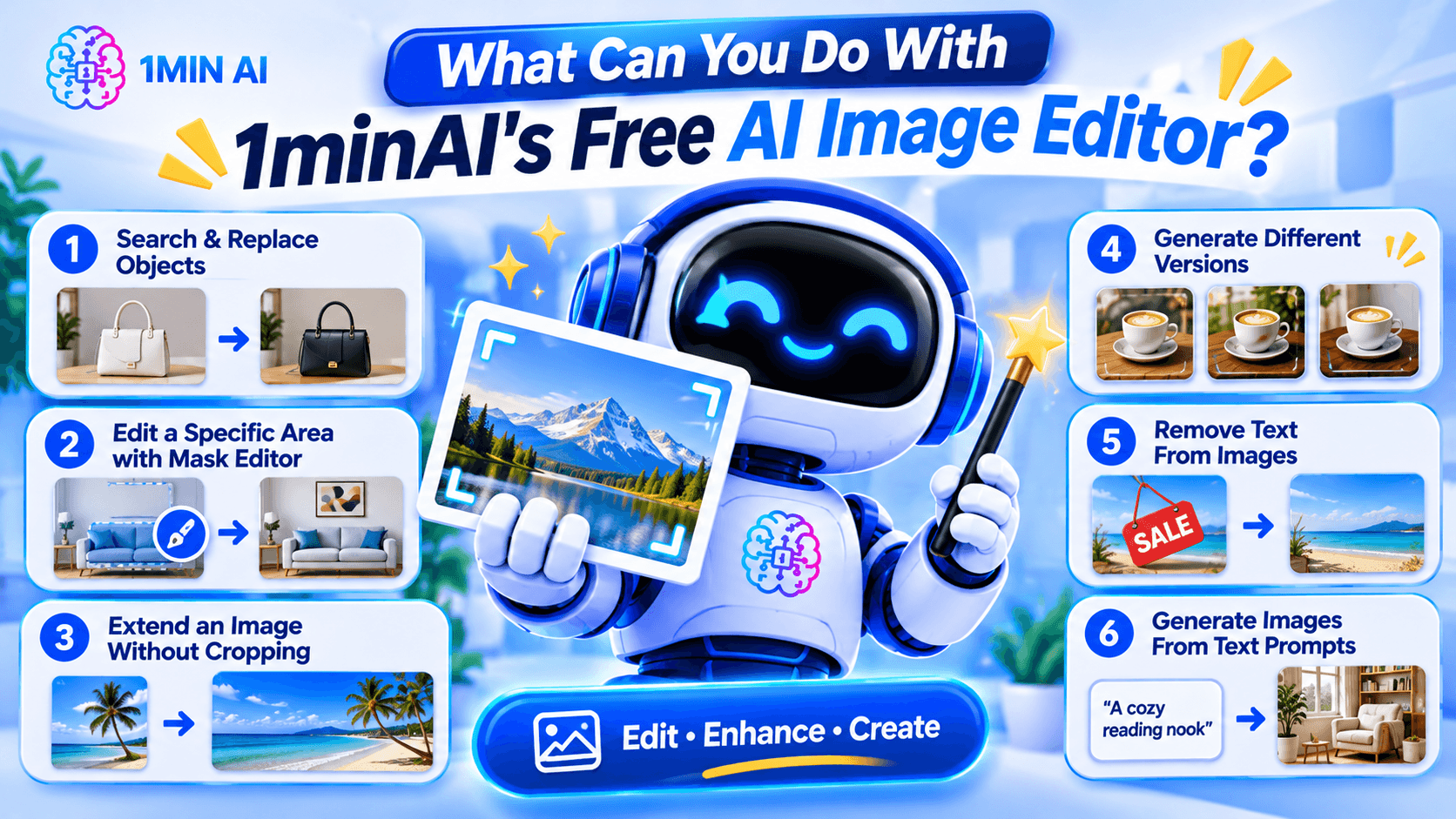
Here are some of the main editing workflows.
1. Search and Replace Objects in an Image
AI photo editing before after product image object replacement example replacing handbag color or furniture with new object realistic seamless edit" aspectRatio="16:9" width="100%" />
Sometimes an image is good except for one object.
For example, you may like a product photo but want to change the packaging color, replace a piece of furniture, or swap an accessory.
1minAI's AI Image Object Search and Replace lets you identify an object and describe what should replace it.
Example prompt:
"Replace the white ceramic vase on the table with a matte black vase. Keep the flowers, table, wall, and lighting unchanged."
This can be useful for:
- E-commerce product photography.
- Marketing and advertising creatives.
- Interior design concepts.
- Social media content.
- Creative experimentation.
The main advantage is that you can focus on the object you want to change instead of manually rebuilding the whole image.
2. Edit a Specific Area With the Image Mask Editor
Sometimes you want to modify only one part of an image while preserving everything else.
The 1minAI Image Mask Editor lets you select the area you want to edit, then describe what should appear in that region.
For example, you could:
- Change an object in the background.
- Add a decorative element.
- Fix an unwanted detail.
- Change the color of a selected item.
- Refresh part of an older image.
Example prompt:
"Replace the selected empty wall area with a framed abstract painting in warm neutral colors. Keep the furniture and room lighting unchanged."
This is especially useful when a full-image transformation would change details you want to preserve.
3. Extend an Image Without Cropping the Original Subject
Have you ever created a square image but later needed a wide banner?
Cropping may remove important details, while stretching can distort the subject.
The 1minAI Image Extender expands the canvas by generating additional background around the original image.
You can use it to:
- Turn square images into landscape banners.
- Adapt product photos for website headers.
- Create more space for advertising text.
- Reformat social media visuals.
- Expand portraits or landscapes.
Example instruction:
"Extend this image to a wide landscape composition. Continue the existing studio background naturally and keep the product centered at its original size."
This helps you adapt existing visuals to different layouts without starting over.
4. Generate Different Versions With AI Image Variator
If you like the original image but want to explore alternative styles, use the 1minAI AI Image Variator.
It creates alternative versions of an existing image while maintaining its core subject.
You can experiment with:
- Different color palettes.
- New backgrounds.
- Alternative lighting.
- Different artistic styles.
- Fresh compositions.
- Different visual moods.
Example prompt:
"Create three visual variations of this coffee product photo. Version one should have a warm minimalist kitchen background, version two should use a modern dark studio, and version three should feature a bright outdoor café setting. Keep the product design recognizable."
This can help marketers and creators explore different creative directions before choosing a final visual.
5. Remove Text From Images
Sometimes an image contains text that you no longer need.
For example, you may have an old promotional graphic with an expired discount, an outdated date, or a caption that no longer fits your campaign.
1minAI provides a Stable Diffusion XL Text Remover API for removing text elements from images through an API workflow.
The documented endpoint uses the TEXT_REMOVER feature type and stable-diffusion-xl model identifier. It accepts an image path and supports PNG, JPEG, and WebP output formats.
This is particularly useful for developers who want to integrate text removal into an image-processing application.
Example use case:
A marketing team has an old promotional image with a previous campaign date. They can use text removal to clear the outdated text and prepare the image for a new design.
Always review the result carefully, especially when text overlaps detailed textures, logos, or important visual elements.
6. Generate Images From Text Prompts
You do not always need an existing photo to start editing.
With the 1minAI AI Image Generator, you can create a new visual from a written description.
Describe:
- The main subject.
- The environment.
- The visual style.
- The lighting.
- The composition.
- The mood and color palette.
Example prompt:
"A premium skincare serum bottle on a natural stone surface, surrounded by soft green leaves, bright morning sunlight, minimalist luxury product photography, neutral beige background, realistic texture, professional commercial advertising style."
Once you have a base image, you can continue refining it with the other editing tools.
How to Edit an Image With AI in 1minAI
You do not need to master complicated editing software to get started. A simple workflow can take you from an existing photo to a refined visual.
Step 1: Open the Image Editing Workspace
Visit 1minAI's Create, Edit, and Transform Images page to explore the available image tools.
Choose the tool that matches your goal:
- Object replacement.
- Mask-based editing.
- Image extension.
- Image variation.
- Text removal.
- Image generation.
If you already have a photo, upload it to the relevant editing tool.
Step 2: Describe the Change You Want
Write a prompt explaining what should change.
A useful prompt should be specific enough for the AI to understand the subject, action, and desired result.
Try this formula:
Object + Action + Style or Setting + Details to Preserve
For example:
"Replace the wooden chair with a modern cream-colored armchair, use a Scandinavian interior style, and keep the original room layout, lighting, and camera angle unchanged."
The more clearly you describe the desired edit, the easier it is to evaluate the result.
Step 3: Generate and Review the Result
Run the edit and inspect the generated image.
Pay attention to:
- Object shapes and proportions.
- Lighting and shadows.
- Edges around edited areas.
- Text and logos.
- Background consistency.
- Unwanted changes to the original subject.
AI editing may not produce a perfect result on the first attempt. If something looks wrong, refine the prompt or make a smaller edit.
Step 4: Download and Use Your Image
Once the result looks right, download it and prepare it for your intended project.
Before using an image commercially, check the applicable tool terms, model licenses, and rights associated with any source images, logos, or people shown in the visual.
How to Choose the Right AI Image Editing Tool
Not every editing task needs the same tool.
Choosing the right workflow can save time and reduce unnecessary edits.
| Your goal | Recommended 1minAI tool |
|---|---|
| Create an image from a text description | AI Image Generator |
| Find and replace an object | AI Image Object Search and Replace |
| Change one specific area | Image Mask Editor |
| Expand the image canvas | Image Extender |
| Generate alternative versions | AI Image Variator |
| Remove text through an API | Stable Diffusion XL Text Remover |
| Explore several image tools in one place | Create, Edit, and Transform Images |
What If You Do Not Know How to Write an Image Prompt?
You can use 1minAI Image to Prompt to analyze an existing image and turn its visual details into a written prompt.
This can help you understand how to describe:
- Main subjects.
- Colors and lighting.
- Composition.
- Camera perspective.
- Artistic style.
- Background details.
For example, if you find a product image with a style you like, you can use Image to Prompt to generate a description that helps you create a similar visual direction.
Remember to use reference images you have the right to use, and avoid copying protected designs or branding without permission.
Who Can Benefit From a Free AI Image Editor?
AI image editing is useful for more than professional designers. Different types of users can apply it to everyday creative work.
E-commerce Sellers
Online sellers need product visuals for listings, advertisements, and social media.
An AI image editor can help them:
- Change product backgrounds.
- Create lifestyle product scenes.
- Explore packaging variations.
- Remove distracting objects.
- Adapt photos for different platforms.
For example, a seller could start with one product photo and create several campaign concepts for seasonal promotions.
Digital Marketers
Marketing teams often need multiple creative assets for different campaigns.
They can use AI editing to test different backgrounds, colors, product placements, and visual styles without rebuilding every design from scratch.
Content Creators
Creators may need images for blog posts, thumbnails, social media, and presentations.
AI tools can help them turn a basic photo into a more polished visual, extend the canvas, or create alternative styles.
Small Business Owners
Small businesses may not have an in-house designer.
A prompt-based editor gives owners a way to make straightforward visual adjustments, prepare promotional materials, and explore design ideas without mastering professional editing software.
Designers and Creative Professionals
AI does not replace professional creative judgment. However, it can help designers explore concepts, generate alternatives, and handle repetitive editing tasks.
Professionals can use it as an additional tool in their creative process while retaining control over the final design.
Conclusion
A free AI image editor can make visual editing easier by turning written instructions into practical image transformations.
Whether you want to replace an object, remove text, extend a photo, create alternative versions, or generate a new visual, the right AI tool can reduce repetitive manual work and help you explore more creative ideas.
With 1minAI, you can move between image generation and editing tools in one workspace. Start with an existing photo or a text prompt, describe the change you want, review the result, and refine it until it fits your project.
More creative control starts with a clearer prompt. Try 1minAI's AI image tools and turn your next image-editing idea into reality.
- #Commerce
- #Information
විකල්ප
1minAI සඳහා හොඳම විකල්ප සොයාගෙන විශේෂාංග, මිල ගණන් සහ භාවිත අවස්ථා සසඳා බලන්න.

1min.AI එදිරිව OpenRouter
1min.AI එදිරිව OpenRouter: භාවිතයට සූදානම් AI නිර්මාණ නිෂ්පාදනය හා තාක්ෂණික API මෙවලම සංසන්දනය කරන්න. ඔබට කේතනයක් නැති නිර්මාණශීලී ස්ටුඩියෝවක් අවශ්යද, නැත්නම් කේතන යටිතල පහසුකම් හබ් එකක්ද කියලා හඳුනා ගන්න.
 Ngoc Hong

1min. AI vs Dola AI
Dola AI සඳහා විකල්පයක් සොයනවාද? වීඩියෝ ජනනය, නොමිලේ සැලසුම්, මිලගණන් සහ රහස්යතාවය අනුව 1min.AI vs Dola AI සසඳා ඔබට ගැළපෙන AI යෙදුම තෝරන්න.
Ngoc Hong
1minAI vs Hix AI
AI chat, පර්යේෂණය, ලිවීම, රූප, වීඩියෝ, මිලකරණය, සහ නම්යශීලී AI වැඩ ප්රවාහ සඳහා HIX AI විකල්ප 5ක් සසඳන්න.
Ngoc HongAI මෙවලම්
ඵලදායිතාවය, නිර්මාණශීලීත්වය සහ දෛනික වැඩ කටයුතු වැඩි දියුණු කිරීමට හොඳම AI මෙවලම් සොයා ගන්න.

එක නිෂ්පාදනයක්, UGC ක්රියේටිව් 10ක්: AI මඟින් අන්තර්ගත පරීක්ෂණය කොහොමද පහසු වෙන්නේ
AI UGC වීඩියෝ ජනකයක් භාවිතයෙන් වඩාත් සත්ය UGC සාදන්න, වැඩි ක්රියේටිව් කෝණ පරීක්ෂා කරන්න, සහ සෑම අනුවාදයක්ම රූගත නොකර affiliate අන්තර්ගතය පරිමාණය කරන්න.
 Lien Anh Vu

තත්පර කිහිපයකින් ස්ථාවර කාටූන් අන්තර්ගතය නිර්මාණය කරන්න
1min.AI සමඟ අදහස් පර්යේෂණයෙන් ආරම්භ කර චරිත සහ සජීවිකරණ වීඩියෝ දක්වා, සරල පියවර 3කින් TikTok සහ Reels සඳහා කාටූන් වීඩියෝ සාදන්න.
Lien Anh Vu
ආරම්භක ආයතනික නිර්මාතෘවරුන් සඳහා දැරිය හැකි AI මෙවලම් 4ක්
අදහස් සනාථ කිරීමට, නිෂ්පාදන ගොඩනැගීමට, අන්තර්ගත නිර්මාණය කිරීමට, සහ අධික වියදම් නොකර වේගයෙන් දියත් කිරීමට ආරම්භක ආයතනික නිර්මාතෘවරුන් සඳහා තිබෙන දැරිය හැකි AI මෙවලම් 4ක් සොයා ගන්න.
 Tram Ta
කෘත්රිම බුද්ධි විශේෂාංග
සම්පූර්ණ කෘත්රිම බුද්ධි විශේෂාංග — වැඩපිළිවෙළ සරල කර, කාර්යක්ෂමතාවය වැඩි කර, කණ්ඩායම්වලට වැඩි දියුණුවක් ලබාදෙයි.
එක නිෂ්පාදනයක්, UGC ක්රියේටිව් 10ක්: AI මඟින් අන්තර්ගත පරීක්ෂණය කොහොමද පහසු වෙන්නේ
AI UGC වීඩියෝ ජනකයක් භාවිතයෙන් වඩාත් සත්ය UGC සාදන්න, වැඩි ක්රියේටිව් කෝණ පරීක්ෂා කරන්න, සහ සෑම අනුවාදයක්ම රූගත නොකර affiliate අන්තර්ගතය පරිමාණය කරන්න.
Lien Anh Vuතත්පර කිහිපයකින් ස්ථාවර කාටූන් අන්තර්ගතය නිර්මාණය කරන්න
1min.AI සමඟ අදහස් පර්යේෂණයෙන් ආරම්භ කර චරිත සහ සජීවිකරණ වීඩියෝ දක්වා, සරල පියවර 3කින් TikTok සහ Reels සඳහා කාටූන් වීඩියෝ සාදන්න.
Lien Anh Vu
1minAI: නොමිලේ AI ව්යාකරණ පරීක්ෂකය
1minAI හි AI ව්යාකරණ පරීක්ෂකයෙන් නොමිලේ ව්යාකරණ පරීක්ෂා කරන්න. ව්යාකරණ, අක්ෂර වින්යාස සහ ලිවීමේ දෝෂ සොයාගෙන, පැහැදිලිකම වැඩි කර, තත්පර කිහිපයකින් ඔබේ අන්තර්ගතය පිරිපහදු කරන්න.
Tram Taකෘත්රිම බුද්ධිය භාවිත අවස්ථා
ව්යාපාර, ඵලදායීතාව සහ කර්මාන්ත-නිශ්චිත යෙදුම් සඳහා විශේෂයෙන් තෝරාගත් කෘත්රිම බුද්ධිය භාවිත අවස්ථා එකතුවක්.
එක නිෂ්පාදනයක්, UGC ක්රියේටිව් 10ක්: AI මඟින් අන්තර්ගත පරීක්ෂණය කොහොමද පහසු වෙන්නේ
AI UGC වීඩියෝ ජනකයක් භාවිතයෙන් වඩාත් සත්ය UGC සාදන්න, වැඩි ක්රියේටිව් කෝණ පරීක්ෂා කරන්න, සහ සෑම අනුවාදයක්ම රූගත නොකර affiliate අන්තර්ගතය පරිමාණය කරන්න.
Lien Anh Vuතත්පර කිහිපයකින් ස්ථාවර කාටූන් අන්තර්ගතය නිර්මාණය කරන්න
1min.AI සමඟ අදහස් පර්යේෂණයෙන් ආරම්භ කර චරිත සහ සජීවිකරණ වීඩියෝ දක්වා, සරල පියවර 3කින් TikTok සහ Reels සඳහා කාටූන් වීඩියෝ සාදන්න.
Lien Anh Vu
Instagram හි පළ කිරීමට හොඳම වේලාව: වඩා හොඳ නියැලීම සඳහා ප්රායෝගික මාර්ගෝපදේශයක්
Instagram හි පළ කිරීමට හොඳම වේලාව සොයා ගන්න. විවිධ ප්රේක්ෂකයන් සඳහා හොඳම දින සහ වේලාවන්, සහ ඔබේ ගිණුම සඳහා සුදුසු පළ කිරීමේ කාලසටහන සොයා ගැනීමට ඉඟි ද ඇතුළත් වේ.
Tram TaAI නිබන්ධන
ප්රායෝගික, පියවරෙන් පියවර නිබන්ධන සමඟ AI භාවිත කරන්නේ කෙසේදැයි ඉගෙන ගන්න.
තත්පර කිහිපයකින් ස්ථාවර කාටූන් අන්තර්ගතය නිර්මාණය කරන්න
1min.AI සමඟ අදහස් පර්යේෂණයෙන් ආරම්භ කර චරිත සහ සජීවිකරණ වීඩියෝ දක්වා, සරල පියවර 3කින් TikTok සහ Reels සඳහා කාටූන් වීඩියෝ සාදන්න.
Lien Anh Vu
2026 කළු සිකුරාදා AI මෙවලම් ගනුදෙනු
2026 කළු සිකුරාදා AI මෙවලම් ගනුදෙනු මඟින් ඔබට ලැබෙන දේ සොයාගන්න. AppSumo, Dealify, Stack Social හරහා 1min.AI ජීවිතකාලීන ගනුදෙනුව ලබාගන්නේ කෙසේදැයි දැනගෙන, Trustpilot, Slashdot, සහ Software Advice මඟින් සත්යාපනය කරන්න.
 Hang Nguyen

Seedance සමඟ AI රූපයෙන් වීඩියෝවට නිෂ්පාදන අනුකූලතාව ලබා ගනිමින් වක්රණය නවතා නිෂ්පාදන සමාලෝචන පරිමාණය කරන්න
AI රූපයෙන් වීඩියෝවට නිෂ්පාදන අනුකූලතාවයෙන් ලාංඡන වක්රණය නවතා අදම 1min.AI මත ස්ටුඩියෝ-මට්ටමේ සමාලෝචන වීඩියෝ ජනනය කරන්න.
Lien Anh VuAI මාර්ගෝපදේශ
ප්රායෝගික මාර්ගෝපදේශ, සත්ය ලෝක උදාහරණ සහ ක්රියාකාරී හොඳම භාවිතයන් සමඟින් AI වඩාත් වේගයෙන් ඉගෙන ගන්න.
තත්පර කිහිපයකින් ස්ථාවර කාටූන් අන්තර්ගතය නිර්මාණය කරන්න
1min.AI සමඟ අදහස් පර්යේෂණයෙන් ආරම්භ කර චරිත සහ සජීවිකරණ වීඩියෝ දක්වා, සරල පියවර 3කින් TikTok සහ Reels සඳහා කාටූන් වීඩියෝ සාදන්න.
Lien Anh Vu
AI මෙවලම් අන්තර්ජාලයෙන් ආරක්ෂිතව මිලදී ගන්න: 2026 Black Friday මාර්ගෝපදේශය
හොඳම Black Friday AI ගනුදෙනු අන්තර්ජාලයෙන් සොයාගෙන ආරක්ෂිතව ලබාගන්නේ කෙසේදැයි දැනගන්න. වංචා වළක්වා ගැනීමට, subscription fatigue සමඟ කටයුතු කිරීමට, සහ software තහවුරු කිරීමට විශේෂඥ උපාය මාර්ග ඉගෙන ගන්න.
Hang NguyenSeedance සමඟ AI රූපයෙන් වීඩියෝවට නිෂ්පාදන අනුකූලතාව ලබා ගනිමින් වක්රණය නවතා නිෂ්පාදන සමාලෝචන පරිමාණය කරන්න
AI රූපයෙන් වීඩියෝවට නිෂ්පාදන අනුකූලතාවයෙන් ලාංඡන වක්රණය නවතා අදම 1min.AI මත ස්ටුඩියෝ-මට්ටමේ සමාලෝචන වීඩියෝ ජනනය කරන්න.
Lien Anh VuAI විසඳුම්
ස්වයංක්රීයකරණය, කේතීකරණය, පර්යේෂණ, ඵලදායිතාව, පාරිභෝගික සහාය, අලෙවිකරණය සහ ව්යාපාරික වැඩ ප්රවාහයන් සඳහා හොඳම AI විසඳුම් සොයන්න.
එක නිෂ්පාදනයක්, UGC ක්රියේටිව් 10ක්: AI මඟින් අන්තර්ගත පරීක්ෂණය කොහොමද පහසු වෙන්නේ
AI UGC වීඩියෝ ජනකයක් භාවිතයෙන් වඩාත් සත්ය UGC සාදන්න, වැඩි ක්රියේටිව් කෝණ පරීක්ෂා කරන්න, සහ සෑම අනුවාදයක්ම රූගත නොකර affiliate අන්තර්ගතය පරිමාණය කරන්න.
Lien Anh Vuතත්පර කිහිපයකින් ස්ථාවර කාටූන් අන්තර්ගතය නිර්මාණය කරන්න
1min.AI සමඟ අදහස් පර්යේෂණයෙන් ආරම්භ කර චරිත සහ සජීවිකරණ වීඩියෝ දක්වා, සරල පියවර 3කින් TikTok සහ Reels සඳහා කාටූන් වීඩියෝ සාදන්න.
Lien Anh Vu
නොමිලේ AI ටැටූ ජනකය: අභිරුචි නිර්මාණ
1min.AI හි නොමිලේ AI ටැටූ ජනකය භාවිතයෙන් ඕනෑම අදහසක් අභිරුචි ටැටූ නිර්මාණයක් බවට පත් කරන්න. ඔබගේ අදහස විස්තර කරන්න, ශෛලියක් තෝරන්න, සහ තත්පර කිහිපයකින් බාගන්න.
 Trang Tran
AI මාදිලි
ලොව ප්රමුඛ පෙළේ AI මාදිලි එක් තැනකින් ගවේෂණය කරන්න.
එක නිෂ්පාදනයක්, UGC ක්රියේටිව් 10ක්: AI මඟින් අන්තර්ගත පරීක්ෂණය කොහොමද පහසු වෙන්නේ
AI UGC වීඩියෝ ජනකයක් භාවිතයෙන් වඩාත් සත්ය UGC සාදන්න, වැඩි ක්රියේටිව් කෝණ පරීක්ෂා කරන්න, සහ සෑම අනුවාදයක්ම රූගත නොකර affiliate අන්තර්ගතය පරිමාණය කරන්න.
Lien Anh Vuතත්පර කිහිපයකින් ස්ථාවර කාටූන් අන්තර්ගතය නිර්මාණය කරන්න
1min.AI සමඟ අදහස් පර්යේෂණයෙන් ආරම්භ කර චරිත සහ සජීවිකරණ වීඩියෝ දක්වා, සරල පියවර 3කින් TikTok සහ Reels සඳහා කාටූන් වීඩියෝ සාදන්න.
Lien Anh VuSeedance සමඟ AI රූපයෙන් වීඩියෝවට නිෂ්පාදන අනුකූලතාව ලබා ගනිමින් වක්රණය නවතා නිෂ්පාදන සමාලෝචන පරිමාණය කරන්න
AI රූපයෙන් වීඩියෝවට නිෂ්පාදන අනුකූලතාවයෙන් ලාංඡන වක්රණය නවතා අදම 1min.AI මත ස්ටුඩියෝ-මට්ටමේ සමාලෝචන වීඩියෝ ජනනය කරන්න.
Lien Anh VuAI සංසන්දන
ඔබගේ අවශ්යතාවලට ගැලපෙන හොඳම AI මෙවලම්, මාදිලි සහ වේදිකා සොයා ගැනීමට සංසන්දනය කරන්න.

Kling AI Vs Veo 3: කුමන මාදිලිය දිනනවාද?
Kling AI vs Veo 3: ඔබේ ව්යාපෘතිය සඳහා කුමන AI වීඩියෝ ජනකය ජයගනී දැයි බැලීමට චලනය, ස්වදේශීය ශ්රව්ය, මිලකරණය සහ නොමිලේ තට්ටු සසඳන්න — 1min.AI මත දෙකම උත්සාහ කරන්න.
Trang TranSeedance සමඟ AI රූපයෙන් වීඩියෝවට නිෂ්පාදන අනුකූලතාව ලබා ගනිමින් වක්රණය නවතා නිෂ්පාදන සමාලෝචන පරිමාණය කරන්න
AI රූපයෙන් වීඩියෝවට නිෂ්පාදන අනුකූලතාවයෙන් ලාංඡන වක්රණය නවතා අදම 1min.AI මත ස්ටුඩියෝ-මට්ටමේ සමාලෝචන වීඩියෝ ජනනය කරන්න.
Lien Anh Vu
DeepSeek V4 Pro vs Flash සංසන්දනය
DeepSeek V4 Pro හා DeepSeek V4 Flash මිනුම් සංසන්දනය කරන්න. අදම 1min.ai හි ඔබගේ agentic යෙදුම් ප්රශස්ත කර AI fact checking වැඩිදියුණු කරන්න.
Ngoc HongAI ඒකාබද්ධකරණ
ඔබ දැනට භාවිතා කරන මෙවලම් සමඟ AI කිසිදු බාධාවකින් තොරව ඒකාබද්ධ කර, කාර්ය ස්වයංක්රීය කර ඵලදායීත්වය ඉහළ නැංවන්න.

AI Fashion Video Generator එකක් භාවිත කරලා Fashion Week 2026 සඳහා වීඩියෝ හදන්නේ කොහොමද
AI සමඟ Fashion Week 2026 අදහස් විස්මිත fashion වීඩියෝවලට පරිවර්තනය කරන්න. සරල workflow එකකින් brainstorming, visuals නිර්මාණය, සහ images වීඩියෝවලට වෙනස් කරන ආකාරය ඉගෙන ගන්න.
Lien Anh Vu
දෘෂ්ටිකෝණය: ඔබට හැමදාම ලියන්න තියෙන්නේ 10+ පෝස්ට් නම්
AI brainstroming, image generation, සහ content creation සමඟ content creatorsට දිනකට 10+ social media posts වේගයෙන් නිර්මාණය කරන්න උදව් කරන AI content workflow එකක් ගොඩනගන්නේ කොහොමද කියලා ඉගෙන ගන්න.
Lien Anh Vu
AI යෙදුම් අතර මාරු වීම නවත්වන්න: AI ඒකාබද්ධ කිරීම සේව්ය පළකිරීමේ සන්නාමකරණය පරිවර්තනය කරන ආකාරය
AI ඒකාබද්ධ කිරීම AI ලිවීම, ලේඛන, රූප, වීඩියෝ සහ බහු AI මාදිලි එක වැඩබිමකට එක් කරමින් HR කණ්ඩායම්වලට සේව්ය පළකිරීමේ සන්නාමකරණය සරල කර ගැනීමට උපකාර කරන ආකාරය සොයා ගන්න.
Tram Taකර්මාන්ත සඳහා AI
සෞඛ්ය සේවා, මූල්ය, අධ්යාපනය, නීති, නිෂ්පාදන, සිල්ලර වෙළඳාම, දේපල වෙළඳාම් සහ තවත් බොහෝ දේ සඳහා හොඳම AI මෙවලම් සහ වැඩ ප්රවාහ සොයන්න.

නොමිලේ AI නිෂ්පාදන විස්තර ජනකය
මිනිත්තු කිහිපයකින් විකුණන නිෂ්පාදන විස්තර ලියන්න. මෙම නොමිලේ AI නිෂ්පාදන විස්තර ජනකය භාවිතයෙන් විස්තර හෝ ඡායාරූපයක් brand එකට ගැලපෙන copy එකක් බවට පරිවර්තනය කරන්න. 1min.AI උත්සාහ කරන්න.
Trang Tran
ආරම්භක ව්යාපාර සඳහා ලාභ උපරිම කිරීමට හොඳම ව්යාපාරික ඵලදායිතා මෙවලම් | 1minAI
AI සමඟ කාලය ඉතිරි කරමින්, වැඩපිළිවෙළ සරල කරමින්, නැවත නැවත කරන කාර්යයන් අඩු කරමින්, ලාභදායී වර්ධනයට සහාය වන ආරම්භක ව්යාපාර සඳහා හොඳම ව්යාපාරික ඵලදායිතා මෙවලම් සොයා ගන්න.
Tram Ta
අන්තර්ගත අලෙවිකරණය සඳහා හොඳම AI මෙවලම |1minAI
අන්තර්ගත අලෙවිකරණය සඳහා හොඳම AI මෙවලමක් සොයනවාද? 1minAI එකම AI workspace එකකින් පර්යේෂණ, ලිවීම, නැවත භාවිතය, නිර්මාණය, දෘශ්ය සෑදීම සහ පරිමාණය කිරීමට අලෙවිකරුවන්ට උදව් කරන ආකාරය බලන්න.
Tram TaAI නියෝජිතයන්
ඔබේ වැඩ සහ දෛනික ජීවිතය පුරා කාර්යයන් ස්වයංක්රීය කිරීමට AI නියෝජිතයන් සොයාගෙන ක්රියාත්මක කරන්න.
1minAI: නොමිලේ AI ව්යාකරණ පරීක්ෂකය
1minAI හි AI ව්යාකරණ පරීක්ෂකයෙන් නොමිලේ ව්යාකරණ පරීක්ෂා කරන්න. ව්යාකරණ, අක්ෂර වින්යාස සහ ලිවීමේ දෝෂ සොයාගෙන, පැහැදිලිකම වැඩි කර, තත්පර කිහිපයකින් ඔබේ අන්තර්ගතය පිරිපහදු කරන්න.
Tram Ta
Facebook සඳහා AI Agent
ඔබගේ ලේඛන සහ සංවාදවලින් Facebook සඳහා AI Agent එකක් භාවිතා කර අන්තර්ගත නිර්මාණය, රූප ජනනය, පෝස්ට් සැලසුම් කිරීම, සහ ප්රකාශනය කරන්න.
Ngoc Hong
AI Agent vs AI Assistant: නිර්මාණකරුවන්ට ඇත්තටම වැඩි කාලයක් ඉතිරි කරන්නේ කුමක්ද?
AI Agent vs AI Assistant අතර වෙනස ඉගෙන ගෙන, නැවත නැවත සිදුවන වැඩ ස්වයංක්රීය කර, සංශෝධන අඩු කර, වැඩි කාලයක් ඉතිරි කිරීමට කුමන විසඳුම නිර්මාණකරුවන්ට උපකාරීදැයි සොයා ගන්න.
Lien Anh VuAI කාර්ය ප්රවාහ
ඵලදායිතාව, අලෙවිකරණය, විකුණුම්, සහාය සහ තවත් දේ සඳහා සූදානම් AI කාර්ය ප්රවාහයන් ගවේෂණය කරන්න.
එක නිෂ්පාදනයක්, UGC ක්රියේටිව් 10ක්: AI මඟින් අන්තර්ගත පරීක්ෂණය කොහොමද පහසු වෙන්නේ
AI UGC වීඩියෝ ජනකයක් භාවිතයෙන් වඩාත් සත්ය UGC සාදන්න, වැඩි ක්රියේටිව් කෝණ පරීක්ෂා කරන්න, සහ සෑම අනුවාදයක්ම රූගත නොකර affiliate අන්තර්ගතය පරිමාණය කරන්න.
Lien Anh Vuතත්පර කිහිපයකින් ස්ථාවර කාටූන් අන්තර්ගතය නිර්මාණය කරන්න
1min.AI සමඟ අදහස් පර්යේෂණයෙන් ආරම්භ කර චරිත සහ සජීවිකරණ වීඩියෝ දක්වා, සරල පියවර 3කින් TikTok සහ Reels සඳහා කාටූන් වීඩියෝ සාදන්න.
Lien Anh VuAI Fashion Video Generator එකක් භාවිත කරලා Fashion Week 2026 සඳහා වීඩියෝ හදන්නේ කොහොමද
AI සමඟ Fashion Week 2026 අදහස් විස්මිත fashion වීඩියෝවලට පරිවර්තනය කරන්න. සරල workflow එකකින් brainstorming, visuals නිර්මාණය, සහ images වීඩියෝවලට වෙනස් කරන ආකාරය ඉගෙන ගන්න.
Lien Anh Vuනිව්ස්ලෙටර්
1minAI සමඟ සතිපතා AI නවෝත්පාදන

🔮 සතිපතා AI නවෝත්පාදන #143: GPT-6, GPT-6.1 සහ Ideogram 4.0 යාවත්කාලීන කිරීම
1min.ai මත GPT-6 Sol, Luna, GPT-6.1 Sol, සහ Ideogram 4.0 වෙත ප්රවේශ වන්න. එකම වේදිකාවකින් typography නිරවද්යතාව 98.4% දක්වා වැඩි කර reasoning latency 45% කින් අඩු කරන්න.
Hang Nguyen
🔮 සතිපතා AI නවෝත්පාදන #142: Grok 4.7, Opus 5.5 සහ Sonnet 5.5 on 1min.ai
1min.ai මත Grok 4.7, Claude Opus 5.5, සහ Sonnet 5.5 වෙත පිවිසෙන්න. දායකත්ව වියදම් 70% දක්වා අඩු කර, එක් ඒකාබද්ධ workspace එකක tokens මිලියන ගණනක් සැකසන්න.
Hang Nguyen
🔮 සතිපතා AI නවෝත්පාදන #141: Seedance 2.5 සහ Stable Audio 3: ඊළඟ පරම්පරාවේ AI
Seedance 2.0, 2.5, සහ StabilityAI හි Stable Audio 3 1min.ai මත ගවේෂණය කරන්න. ඊළඟ පරම්පරාවේ ජනන AI සමඟ studio-ගුණාත්මක ශ්රව්ය සහ සම්මුතික චලනය ජනනය කරන්න.
Hang Nguyen