
Claude Personal Finance Setup and Safety Guide

Trang Tran
2026 ඉල් 20

Claude personal finance explained: how Personal Finance in Claude works and what Claude finance can see. Plus a safe CSV method for non-US users.
Claude personal finance (officially “Personal Finance in Claude”) is an Anthropic beta feature. It links your bank and card accounts through Plaid so you can ask Claude about balances, spending, and bills in plain language. Access is read-only. It is available only to US users on Pro, Max, and Ultra plans. Outside the US, you can get similar results by uploading a redacted CSV statement to a Claude model in 1min.AI.
It is the end of the month and payday is still ten days away. You do not need a spreadsheet to answer “Where did my money go?” You need a clear answer you can trust. This guide covers what the feature does, how to set it up, how safe it is, and how to get similar value if you live outside the US.
What Is Claude Personal Finance?
Personal Finance in Claude is a section of the Claude app where you connect financial accounts and ask questions about your own money. It works on Claude web, Claude Desktop, iOS, and Android. Anthropic states that it has no ads or sponsored recommendations and that it does not offer credit cards, loans, or savings accounts of its own.
Watch the official walkthrough:
What Claude Finance Can Do
Claude finance covers four main jobs:
- Spending summaries: Ask “Where did my money go this month?” and get totals grouped by category such as rent, food, and shopping.
- Problem spotting: Claude can flag duplicate charges, unexpected fees, and bills that crept up over the year.
- Concept explanations: Ask “What is an APR?” and Claude explains the term, then adds up the interest you were charged.
- Dashboard building: Ask for a weekly spending chart, a calendar of what is due, or a custom set of numbers.
Who Can Use Personal Finance in Claude
| Requirement | Details |
|---|---|
| Plans | Pro, Max, and Ultra (not Free, Team, or Enterprise) |
| Region | US banks and US users only |
| Status | Beta with gradual rollout |
| Data access | Read-only: balances, credit limits, up to 24 months of transactions |
| Bank limit | Up to 16 linked banks |
How to Use Personal Finance in Claude
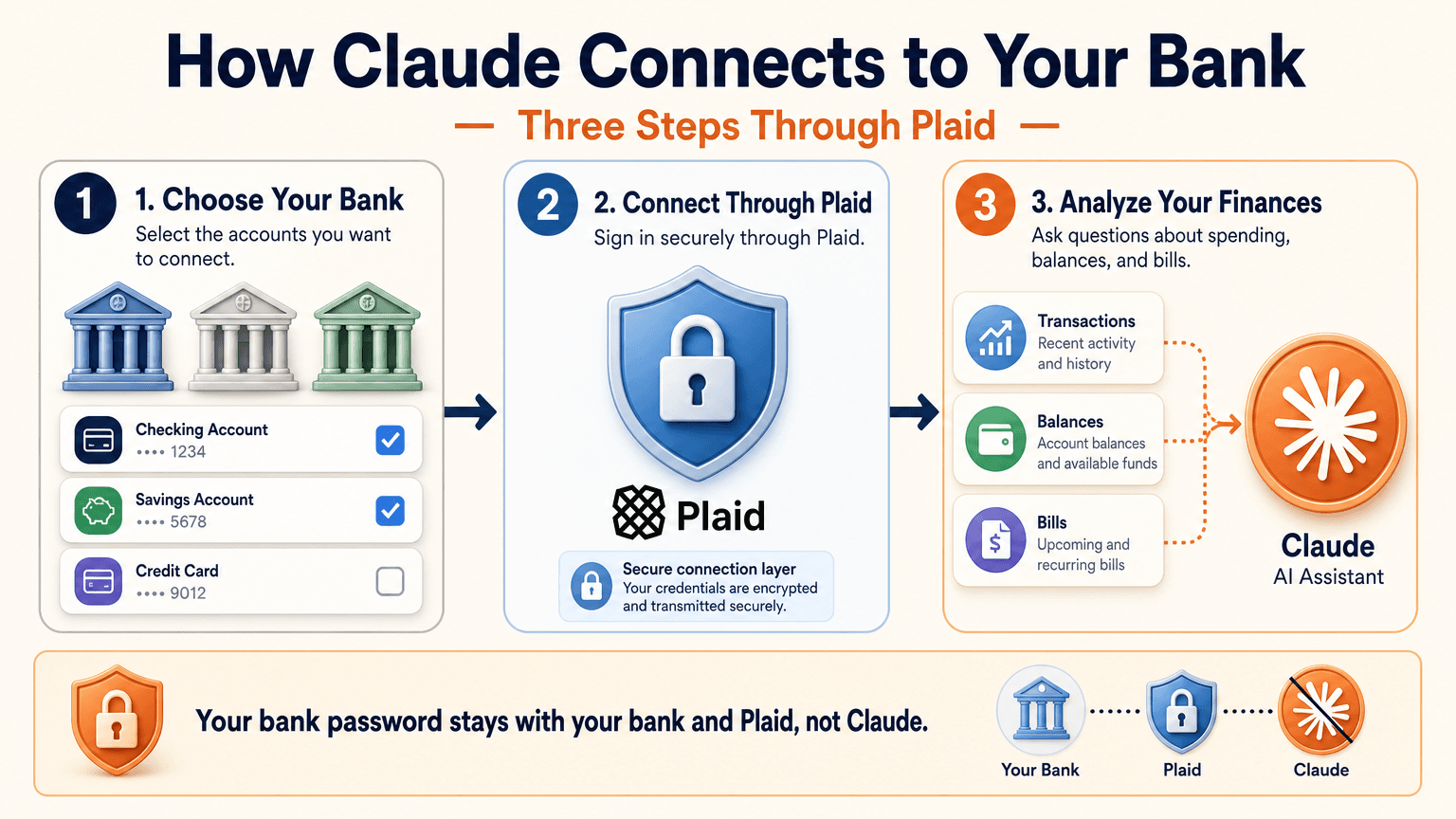
Link Your Bank Through Plaid
- Open Claude and select Personal Finance in the side menu. If you do not see it, check More.
- Select Get started and choose your goals or skip them.
- Select Link accounts with Plaid and review what Claude will be able to access.
- Sign in to your bank inside Plaid and choose the accounts to share.
- Return to Claude within 10 minutes and wait for your accounts to appear.
You sign in through Plaid, so Claude does not ask for or see your bank password. New transactions can take a few minutes to sync.
Use the Claude Personal Finance Dashboard
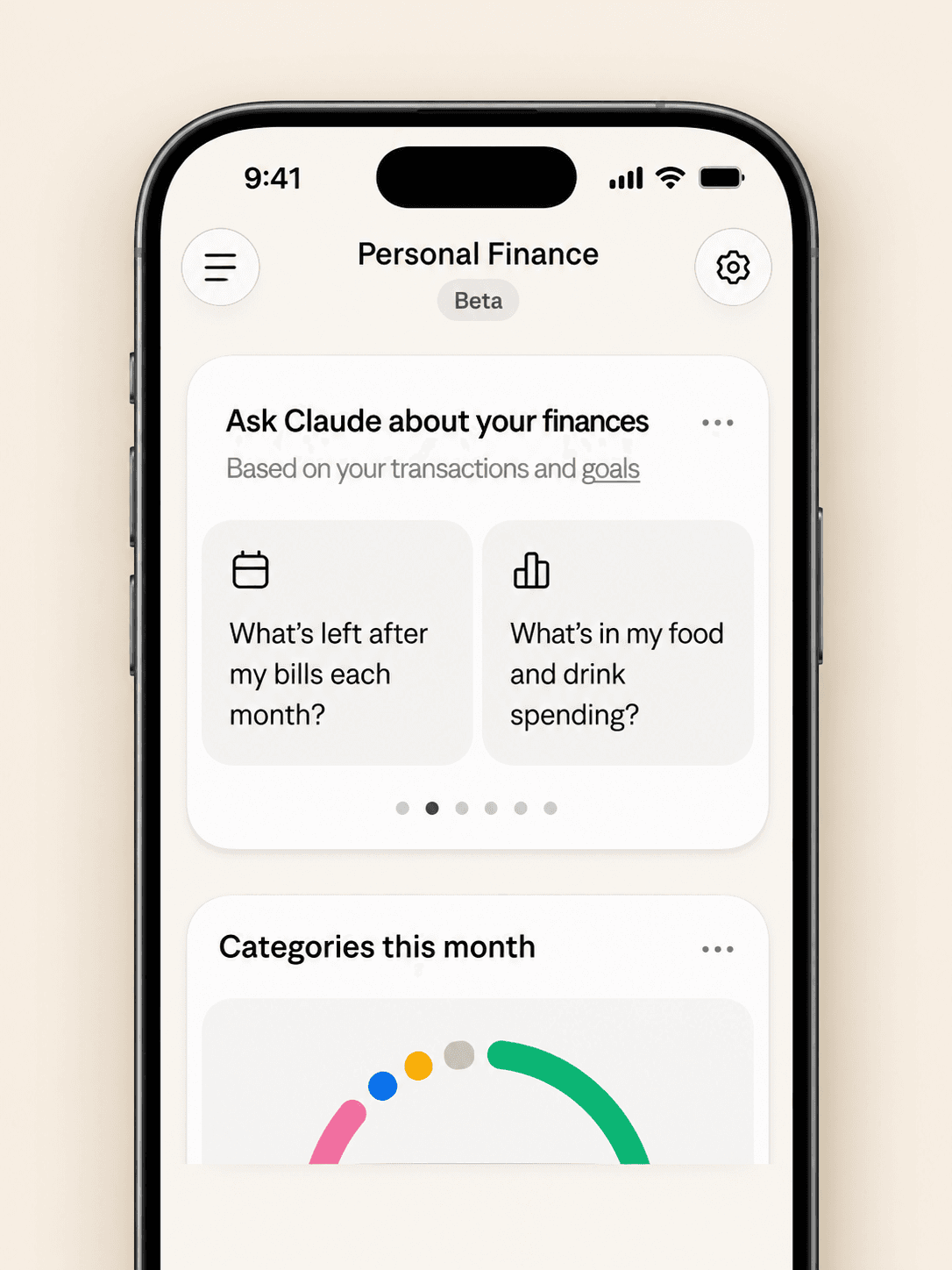
The dashboard puts spending, cash flow, accounts, subscriptions, and upcoming bills on one page. Widgets can be added, edited, removed, and reordered. Start with one account and one question, such as “Can I afford a trip this spring?”
Claude Personal Finance Prompts to Try
Spending and Bills
- “Where did my money go last month, grouped by category?”
- “Which subscriptions am I paying for, and which ones went up in price?”
- “What payments will leave my checking account before payday?”
Smarter Follow-Ups
- “Is that more than usual? Compare the last three months.”
- “Which transactions are behind this number?”
- “Do any charges look duplicated or unexpected?”
The second follow-up matters most. Anthropic itself advises asking which transactions sit behind a figure and checking important numbers with your bank.
Is Claude Personal Finance Safe?
Read-Only Access Through Plaid
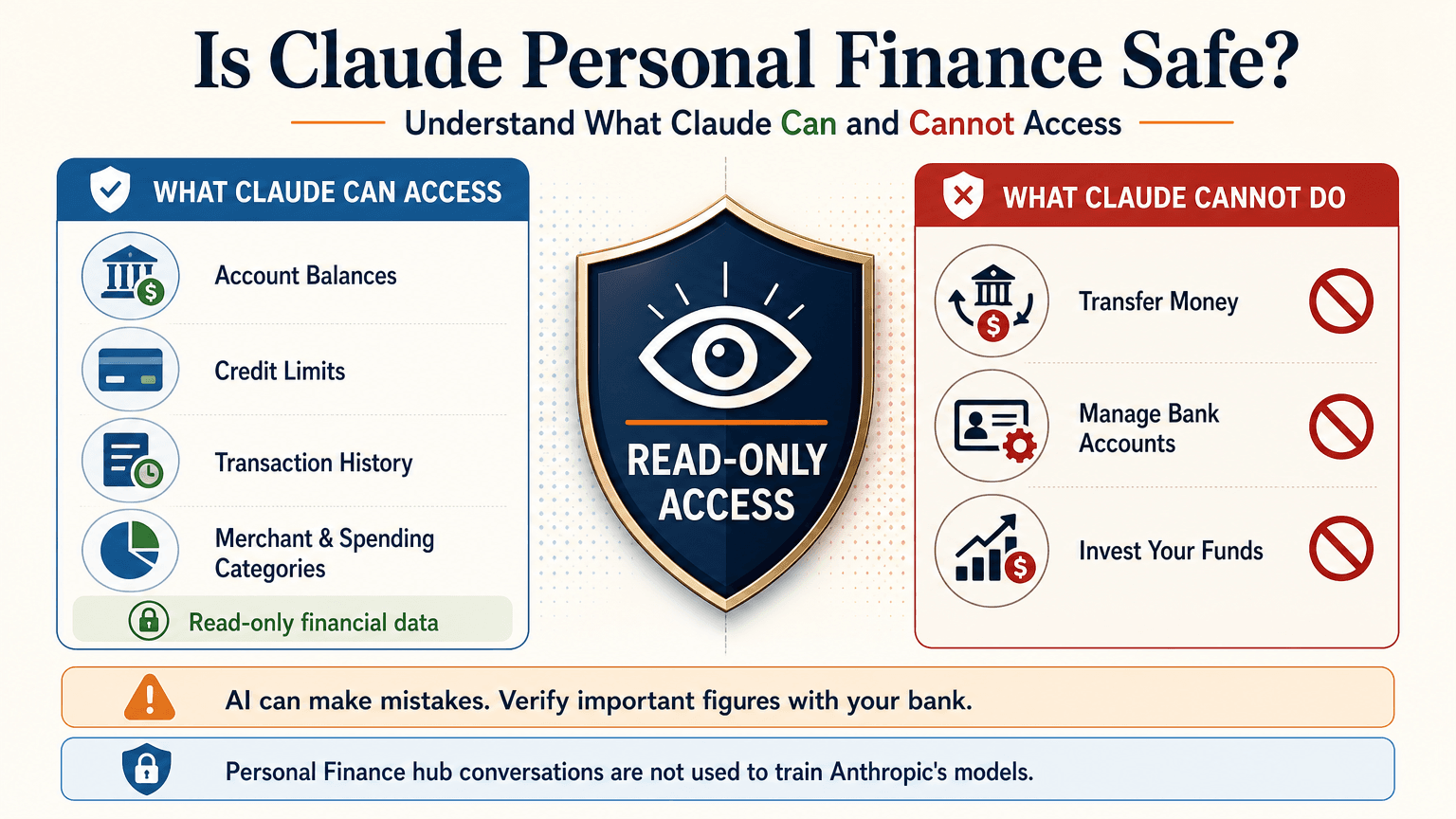
Claude cannot move, manage, or invest your money. Plaid handles the bank sign-in, so your password stays between you and your bank. You can unlink a bank at any time, and Claude can no longer see its data.
What Claude Can See
For the accounts you choose, Claude can read:
- Bank names, account names, types, and last four digits
- Balances and credit limits
- Up to 24 months of transactions with amount, date, merchant, category, and bank description
For investment accounts, loans, and cards, Claude reads balances and credit limits, not holdings, trades, or rates. Conversations in the Personal Finance hub are not used to train Anthropic’s models. For anything you share outside the hub, your normal privacy settings apply.
Accuracy Limits
Claude is AI and can make mistakes. Balances can be a day or two old. An account linked through two logins may be counted twice. Anthropic also says the feature is not designed to give investment advice. Treat Claude as an analyst that organizes and explains your data rather than the final decision maker.
Current Limitations
- US banks only
- No use of linked accounts in scheduled tasks, Cowork tasks, or Claude Code
- Not available on Free, Team, or Enterprise plans
- Saved dashboards are not yet included in data exports
Claude Personal Finance on Reddit: What People Did Before Launch
Personal Finance in Claude only just started rolling out, so real-world reviews of the official feature are still limited. For context, earlier discussions on r/ClaudeAI show how people were managing money with Claude before this feature existed. These are community workflows, not feedback on the new feature.
- Retirement planning: Running Monte Carlo simulations to estimate safe spending rates.
- Custom dashboards: Replacing spreadsheets with net worth and budget views.
- Fee hunting: Comparing bank statements with a fee schedule PDF to dispute wrong charges.
- Bank connections: A few users automated budget emails through Plaid or SimpleFIN, while many preferred uploading redacted CSV files to protect privacy.
That privacy split is useful to know. It is the same trade-off between convenience and control that the official feature and a CSV workflow now represent.
Use Claude Finance Outside the US With a CSV
You do not need account linking to get useful answers. A bank statement export contains the same raw material: dates, merchants, and amounts.
Build a Claude Personal Finance Tracker With 1min.AI
- Export one to three months of transactions from your bank as a CSV.
- Redact account numbers, full names, and addresses before sharing.
- Open Multi AI Chat in 1min.AI and select a Claude model.
- Paste or upload the cleaned data and run your prompt.
- Save the prompt in Prompt List so you can reuse it every month.
A starter prompt: “Categorize these transactions and total each category. List recurring subscriptions and flag duplicates or unusual fees. Show a table and mark any rows you are unsure about.”
1min.AI is not the official Personal Finance in Claude feature and does not connect to your bank. It gives you access to Claude models in one workspace, so this workflow works from any country. For model details, see the page for Claude Opus 5.5 and the guide to Claude Fable 5.1.
Which Claude Model Fits Which Money Task
| Task | Suggested model | Why |
|---|---|---|
| Categorizing many transactions | Claude 5.5 Haiku | Fast and low cost |
| Monthly budget and subscription audit | Claude 5.5 Sonnet | Balanced quality and cost |
| Retirement scenarios and multi-step analysis | Claude 5.5 Opus or 5.1 Fable | Stronger reasoning on complex questions |
Curious how the top models compare? Watch this test:
Claude Personal Finance Plugin Options
Community plugins can extend Claude for finance work. The Claude Cowork guide lists a Finance Tracker plugin for expense tracking and budget analysis. Review any plugin’s permissions before installing it, and never give a tool more financial data than the task needs.
Official Feature vs a CSV Workflow on 1min.AI
| Personal Finance in Claude | CSV workflow on 1min.AI | |
|---|---|---|
| Availability | US beta on paid plans | Global |
| Data source | Live accounts via Plaid | Redacted CSV or pasted rows |
| Dashboard | Built-in widgets | Tables and charts you request |
| Reusable prompts | Suggested questions | Prompt List |
| Model choice | Claude | Haiku, Sonnet, Opus, Fable, and more |
| Best for | Hands-off tracking | Privacy control and non-US users |
Teams that share finance prompts can use Shared Zone. Writers who turn results into reports can try Claude 4.6 for writing. 1min.AI is rated Excellent on Trustpilot and recognized on SourceForge, Slashdot, Capterra, Software Advice, and GetApp. If you want to see how an earlier flagship handles long analysis, try Claude 5 Fable.
Claude Personal Finance FAQ
What is Claude personal finance?
It is Anthropic’s beta feature, officially called Personal Finance in Claude. It links bank and card accounts through Plaid so you can ask about spending, balances, and bills.
Is Personal Finance in Claude free?
No. It is available on Pro, Max, and Ultra plans in the US. It is not available on Free, Team, or Enterprise.
Can Claude move my money?
No. Access is read-only. Claude cannot move, manage, or invest funds.
Can I use Claude finance features outside the US?
The official feature supports US banks only. Outside the US, you can upload a redacted CSV statement to a Claude model and prompt it for categories, subscriptions, and budgets.
Is Claude accurate with financial data?
It can make mistakes. Ask which transactions support each figure and verify key numbers with your bank.
Is this financial advice?
No. This article is educational and is not financial, tax, or investment advice. Consult a licensed professional for major decisions.
Final Thoughts
Claude personal finance turns scattered statements into clear answers. It is still a beta with strict regional limits and normal AI error risk. Use it to organize, categorize, and explain, and verify important figures yourself. If you live outside the US or prefer to keep bank access closed, a redacted CSV with the right Claude model delivers much of the same insight.
- #Information
විකල්ප
1minAI සඳහා හොඳම විකල්ප සොයාගෙන විශේෂාංග, මිල ගණන් සහ භාවිත අවස්ථා සසඳා බලන්න.

1min.AI එදිරිව OpenRouter
1min.AI එදිරිව OpenRouter: භාවිතයට සූදානම් AI නිර්මාණ නිෂ්පාදනය හා තාක්ෂණික API මෙවලම සංසන්දනය කරන්න. ඔබට කේතනයක් නැති නිර්මාණශීලී ස්ටුඩියෝවක් අවශ්යද, නැත්නම් කේතන යටිතල පහසුකම් හබ් එකක්ද කියලා හඳුනා ගන්න.
 Ngoc Hong

1min. AI vs Dola AI
Dola AI සඳහා විකල්පයක් සොයනවාද? වීඩියෝ ජනනය, නොමිලේ සැලසුම්, මිලගණන් සහ රහස්යතාවය අනුව 1min.AI vs Dola AI සසඳා ඔබට ගැළපෙන AI යෙදුම තෝරන්න.
Ngoc Hong
1minAI vs Hix AI
AI chat, පර්යේෂණය, ලිවීම, රූප, වීඩියෝ, මිලකරණය, සහ නම්යශීලී AI වැඩ ප්රවාහ සඳහා HIX AI විකල්ප 5ක් සසඳන්න.
Ngoc HongAI මෙවලම්
ඵලදායිතාවය, නිර්මාණශීලීත්වය සහ දෛනික වැඩ කටයුතු වැඩි දියුණු කිරීමට හොඳම AI මෙවලම් සොයා ගන්න.

එක නිෂ්පාදනයක්, UGC ක්රියේටිව් 10ක්: AI මඟින් අන්තර්ගත පරීක්ෂණය කොහොමද පහසු වෙන්නේ
AI UGC වීඩියෝ ජනකයක් භාවිතයෙන් වඩාත් සත්ය UGC සාදන්න, වැඩි ක්රියේටිව් කෝණ පරීක්ෂා කරන්න, සහ සෑම අනුවාදයක්ම රූගත නොකර affiliate අන්තර්ගතය පරිමාණය කරන්න.
 Lien Anh Vu

තත්පර කිහිපයකින් ස්ථාවර කාටූන් අන්තර්ගතය නිර්මාණය කරන්න
1min.AI සමඟ අදහස් පර්යේෂණයෙන් ආරම්භ කර චරිත සහ සජීවිකරණ වීඩියෝ දක්වා, සරල පියවර 3කින් TikTok සහ Reels සඳහා කාටූන් වීඩියෝ සාදන්න.
Lien Anh Vu
ආරම්භක ආයතනික නිර්මාතෘවරුන් සඳහා දැරිය හැකි AI මෙවලම් 4ක්
අදහස් සනාථ කිරීමට, නිෂ්පාදන ගොඩනැගීමට, අන්තර්ගත නිර්මාණය කිරීමට, සහ අධික වියදම් නොකර වේගයෙන් දියත් කිරීමට ආරම්භක ආයතනික නිර්මාතෘවරුන් සඳහා තිබෙන දැරිය හැකි AI මෙවලම් 4ක් සොයා ගන්න.
 Tram Ta
කෘත්රිම බුද්ධි විශේෂාංග
සම්පූර්ණ කෘත්රිම බුද්ධි විශේෂාංග — වැඩපිළිවෙළ සරල කර, කාර්යක්ෂමතාවය වැඩි කර, කණ්ඩායම්වලට වැඩි දියුණුවක් ලබාදෙයි.
එක නිෂ්පාදනයක්, UGC ක්රියේටිව් 10ක්: AI මඟින් අන්තර්ගත පරීක්ෂණය කොහොමද පහසු වෙන්නේ
AI UGC වීඩියෝ ජනකයක් භාවිතයෙන් වඩාත් සත්ය UGC සාදන්න, වැඩි ක්රියේටිව් කෝණ පරීක්ෂා කරන්න, සහ සෑම අනුවාදයක්ම රූගත නොකර affiliate අන්තර්ගතය පරිමාණය කරන්න.
Lien Anh Vuතත්පර කිහිපයකින් ස්ථාවර කාටූන් අන්තර්ගතය නිර්මාණය කරන්න
1min.AI සමඟ අදහස් පර්යේෂණයෙන් ආරම්භ කර චරිත සහ සජීවිකරණ වීඩියෝ දක්වා, සරල පියවර 3කින් TikTok සහ Reels සඳහා කාටූන් වීඩියෝ සාදන්න.
Lien Anh Vu
1minAI: නොමිලේ AI ව්යාකරණ පරීක්ෂකය
1minAI හි AI ව්යාකරණ පරීක්ෂකයෙන් නොමිලේ ව්යාකරණ පරීක්ෂා කරන්න. ව්යාකරණ, අක්ෂර වින්යාස සහ ලිවීමේ දෝෂ සොයාගෙන, පැහැදිලිකම වැඩි කර, තත්පර කිහිපයකින් ඔබේ අන්තර්ගතය පිරිපහදු කරන්න.
Tram Taකෘත්රිම බුද්ධිය භාවිත අවස්ථා
ව්යාපාර, ඵලදායීතාව සහ කර්මාන්ත-නිශ්චිත යෙදුම් සඳහා විශේෂයෙන් තෝරාගත් කෘත්රිම බුද්ධිය භාවිත අවස්ථා එකතුවක්.
එක නිෂ්පාදනයක්, UGC ක්රියේටිව් 10ක්: AI මඟින් අන්තර්ගත පරීක්ෂණය කොහොමද පහසු වෙන්නේ
AI UGC වීඩියෝ ජනකයක් භාවිතයෙන් වඩාත් සත්ය UGC සාදන්න, වැඩි ක්රියේටිව් කෝණ පරීක්ෂා කරන්න, සහ සෑම අනුවාදයක්ම රූගත නොකර affiliate අන්තර්ගතය පරිමාණය කරන්න.
Lien Anh Vuතත්පර කිහිපයකින් ස්ථාවර කාටූන් අන්තර්ගතය නිර්මාණය කරන්න
1min.AI සමඟ අදහස් පර්යේෂණයෙන් ආරම්භ කර චරිත සහ සජීවිකරණ වීඩියෝ දක්වා, සරල පියවර 3කින් TikTok සහ Reels සඳහා කාටූන් වීඩියෝ සාදන්න.
Lien Anh Vu
Instagram හි පළ කිරීමට හොඳම වේලාව: වඩා හොඳ නියැලීම සඳහා ප්රායෝගික මාර්ගෝපදේශයක්
Instagram හි පළ කිරීමට හොඳම වේලාව සොයා ගන්න. විවිධ ප්රේක්ෂකයන් සඳහා හොඳම දින සහ වේලාවන්, සහ ඔබේ ගිණුම සඳහා සුදුසු පළ කිරීමේ කාලසටහන සොයා ගැනීමට ඉඟි ද ඇතුළත් වේ.
Tram TaAI නිබන්ධන
ප්රායෝගික, පියවරෙන් පියවර නිබන්ධන සමඟ AI භාවිත කරන්නේ කෙසේදැයි ඉගෙන ගන්න.
තත්පර කිහිපයකින් ස්ථාවර කාටූන් අන්තර්ගතය නිර්මාණය කරන්න
1min.AI සමඟ අදහස් පර්යේෂණයෙන් ආරම්භ කර චරිත සහ සජීවිකරණ වීඩියෝ දක්වා, සරල පියවර 3කින් TikTok සහ Reels සඳහා කාටූන් වීඩියෝ සාදන්න.
Lien Anh Vu
2026 කළු සිකුරාදා AI මෙවලම් ගනුදෙනු
2026 කළු සිකුරාදා AI මෙවලම් ගනුදෙනු මඟින් ඔබට ලැබෙන දේ සොයාගන්න. AppSumo, Dealify, Stack Social හරහා 1min.AI ජීවිතකාලීන ගනුදෙනුව ලබාගන්නේ කෙසේදැයි දැනගෙන, Trustpilot, Slashdot, සහ Software Advice මඟින් සත්යාපනය කරන්න.
 Hang Nguyen

Seedance සමඟ AI රූපයෙන් වීඩියෝවට නිෂ්පාදන අනුකූලතාව ලබා ගනිමින් වක්රණය නවතා නිෂ්පාදන සමාලෝචන පරිමාණය කරන්න
AI රූපයෙන් වීඩියෝවට නිෂ්පාදන අනුකූලතාවයෙන් ලාංඡන වක්රණය නවතා අදම 1min.AI මත ස්ටුඩියෝ-මට්ටමේ සමාලෝචන වීඩියෝ ජනනය කරන්න.
Lien Anh VuAI මාර්ගෝපදේශ
ප්රායෝගික මාර්ගෝපදේශ, සත්ය ලෝක උදාහරණ සහ ක්රියාකාරී හොඳම භාවිතයන් සමඟින් AI වඩාත් වේගයෙන් ඉගෙන ගන්න.
තත්පර කිහිපයකින් ස්ථාවර කාටූන් අන්තර්ගතය නිර්මාණය කරන්න
1min.AI සමඟ අදහස් පර්යේෂණයෙන් ආරම්භ කර චරිත සහ සජීවිකරණ වීඩියෝ දක්වා, සරල පියවර 3කින් TikTok සහ Reels සඳහා කාටූන් වීඩියෝ සාදන්න.
Lien Anh Vu
AI මෙවලම් අන්තර්ජාලයෙන් ආරක්ෂිතව මිලදී ගන්න: 2026 Black Friday මාර්ගෝපදේශය
හොඳම Black Friday AI ගනුදෙනු අන්තර්ජාලයෙන් සොයාගෙන ආරක්ෂිතව ලබාගන්නේ කෙසේදැයි දැනගන්න. වංචා වළක්වා ගැනීමට, subscription fatigue සමඟ කටයුතු කිරීමට, සහ software තහවුරු කිරීමට විශේෂඥ උපාය මාර්ග ඉගෙන ගන්න.
Hang NguyenSeedance සමඟ AI රූපයෙන් වීඩියෝවට නිෂ්පාදන අනුකූලතාව ලබා ගනිමින් වක්රණය නවතා නිෂ්පාදන සමාලෝචන පරිමාණය කරන්න
AI රූපයෙන් වීඩියෝවට නිෂ්පාදන අනුකූලතාවයෙන් ලාංඡන වක්රණය නවතා අදම 1min.AI මත ස්ටුඩියෝ-මට්ටමේ සමාලෝචන වීඩියෝ ජනනය කරන්න.
Lien Anh VuAI විසඳුම්
ස්වයංක්රීයකරණය, කේතීකරණය, පර්යේෂණ, ඵලදායිතාව, පාරිභෝගික සහාය, අලෙවිකරණය සහ ව්යාපාරික වැඩ ප්රවාහයන් සඳහා හොඳම AI විසඳුම් සොයන්න.
එක නිෂ්පාදනයක්, UGC ක්රියේටිව් 10ක්: AI මඟින් අන්තර්ගත පරීක්ෂණය කොහොමද පහසු වෙන්නේ
AI UGC වීඩියෝ ජනකයක් භාවිතයෙන් වඩාත් සත්ය UGC සාදන්න, වැඩි ක්රියේටිව් කෝණ පරීක්ෂා කරන්න, සහ සෑම අනුවාදයක්ම රූගත නොකර affiliate අන්තර්ගතය පරිමාණය කරන්න.
Lien Anh Vuතත්පර කිහිපයකින් ස්ථාවර කාටූන් අන්තර්ගතය නිර්මාණය කරන්න
1min.AI සමඟ අදහස් පර්යේෂණයෙන් ආරම්භ කර චරිත සහ සජීවිකරණ වීඩියෝ දක්වා, සරල පියවර 3කින් TikTok සහ Reels සඳහා කාටූන් වීඩියෝ සාදන්න.
Lien Anh Vu
නොමිලේ AI ටැටූ ජනකය: අභිරුචි නිර්මාණ
1min.AI හි නොමිලේ AI ටැටූ ජනකය භාවිතයෙන් ඕනෑම අදහසක් අභිරුචි ටැටූ නිර්මාණයක් බවට පත් කරන්න. ඔබගේ අදහස විස්තර කරන්න, ශෛලියක් තෝරන්න, සහ තත්පර කිහිපයකින් බාගන්න.
 Trang Tran
AI මාදිලි
ලොව ප්රමුඛ පෙළේ AI මාදිලි එක් තැනකින් ගවේෂණය කරන්න.
එක නිෂ්පාදනයක්, UGC ක්රියේටිව් 10ක්: AI මඟින් අන්තර්ගත පරීක්ෂණය කොහොමද පහසු වෙන්නේ
AI UGC වීඩියෝ ජනකයක් භාවිතයෙන් වඩාත් සත්ය UGC සාදන්න, වැඩි ක්රියේටිව් කෝණ පරීක්ෂා කරන්න, සහ සෑම අනුවාදයක්ම රූගත නොකර affiliate අන්තර්ගතය පරිමාණය කරන්න.
Lien Anh Vuතත්පර කිහිපයකින් ස්ථාවර කාටූන් අන්තර්ගතය නිර්මාණය කරන්න
1min.AI සමඟ අදහස් පර්යේෂණයෙන් ආරම්භ කර චරිත සහ සජීවිකරණ වීඩියෝ දක්වා, සරල පියවර 3කින් TikTok සහ Reels සඳහා කාටූන් වීඩියෝ සාදන්න.
Lien Anh VuSeedance සමඟ AI රූපයෙන් වීඩියෝවට නිෂ්පාදන අනුකූලතාව ලබා ගනිමින් වක්රණය නවතා නිෂ්පාදන සමාලෝචන පරිමාණය කරන්න
AI රූපයෙන් වීඩියෝවට නිෂ්පාදන අනුකූලතාවයෙන් ලාංඡන වක්රණය නවතා අදම 1min.AI මත ස්ටුඩියෝ-මට්ටමේ සමාලෝචන වීඩියෝ ජනනය කරන්න.
Lien Anh VuAI සංසන්දන
ඔබගේ අවශ්යතාවලට ගැලපෙන හොඳම AI මෙවලම්, මාදිලි සහ වේදිකා සොයා ගැනීමට සංසන්දනය කරන්න.

Kling AI Vs Veo 3: කුමන මාදිලිය දිනනවාද?
Kling AI vs Veo 3: ඔබේ ව්යාපෘතිය සඳහා කුමන AI වීඩියෝ ජනකය ජයගනී දැයි බැලීමට චලනය, ස්වදේශීය ශ්රව්ය, මිලකරණය සහ නොමිලේ තට්ටු සසඳන්න — 1min.AI මත දෙකම උත්සාහ කරන්න.
Trang TranSeedance සමඟ AI රූපයෙන් වීඩියෝවට නිෂ්පාදන අනුකූලතාව ලබා ගනිමින් වක්රණය නවතා නිෂ්පාදන සමාලෝචන පරිමාණය කරන්න
AI රූපයෙන් වීඩියෝවට නිෂ්පාදන අනුකූලතාවයෙන් ලාංඡන වක්රණය නවතා අදම 1min.AI මත ස්ටුඩියෝ-මට්ටමේ සමාලෝචන වීඩියෝ ජනනය කරන්න.
Lien Anh Vu
DeepSeek V4 Pro vs Flash සංසන්දනය
DeepSeek V4 Pro හා DeepSeek V4 Flash මිනුම් සංසන්දනය කරන්න. අදම 1min.ai හි ඔබගේ agentic යෙදුම් ප්රශස්ත කර AI fact checking වැඩිදියුණු කරන්න.
Ngoc HongAI ඒකාබද්ධකරණ
ඔබ දැනට භාවිතා කරන මෙවලම් සමඟ AI කිසිදු බාධාවකින් තොරව ඒකාබද්ධ කර, කාර්ය ස්වයංක්රීය කර ඵලදායීත්වය ඉහළ නැංවන්න.

AI Fashion Video Generator එකක් භාවිත කරලා Fashion Week 2026 සඳහා වීඩියෝ හදන්නේ කොහොමද
AI සමඟ Fashion Week 2026 අදහස් විස්මිත fashion වීඩියෝවලට පරිවර්තනය කරන්න. සරල workflow එකකින් brainstorming, visuals නිර්මාණය, සහ images වීඩියෝවලට වෙනස් කරන ආකාරය ඉගෙන ගන්න.
Lien Anh Vu
දෘෂ්ටිකෝණය: ඔබට හැමදාම ලියන්න තියෙන්නේ 10+ පෝස්ට් නම්
AI brainstroming, image generation, සහ content creation සමඟ content creatorsට දිනකට 10+ social media posts වේගයෙන් නිර්මාණය කරන්න උදව් කරන AI content workflow එකක් ගොඩනගන්නේ කොහොමද කියලා ඉගෙන ගන්න.
Lien Anh Vu
AI යෙදුම් අතර මාරු වීම නවත්වන්න: AI ඒකාබද්ධ කිරීම සේව්ය පළකිරීමේ සන්නාමකරණය පරිවර්තනය කරන ආකාරය
AI ඒකාබද්ධ කිරීම AI ලිවීම, ලේඛන, රූප, වීඩියෝ සහ බහු AI මාදිලි එක වැඩබිමකට එක් කරමින් HR කණ්ඩායම්වලට සේව්ය පළකිරීමේ සන්නාමකරණය සරල කර ගැනීමට උපකාර කරන ආකාරය සොයා ගන්න.
Tram Taකර්මාන්ත සඳහා AI
සෞඛ්ය සේවා, මූල්ය, අධ්යාපනය, නීති, නිෂ්පාදන, සිල්ලර වෙළඳාම, දේපල වෙළඳාම් සහ තවත් බොහෝ දේ සඳහා හොඳම AI මෙවලම් සහ වැඩ ප්රවාහ සොයන්න.

නොමිලේ AI නිෂ්පාදන විස්තර ජනකය
මිනිත්තු කිහිපයකින් විකුණන නිෂ්පාදන විස්තර ලියන්න. මෙම නොමිලේ AI නිෂ්පාදන විස්තර ජනකය භාවිතයෙන් විස්තර හෝ ඡායාරූපයක් brand එකට ගැලපෙන copy එකක් බවට පරිවර්තනය කරන්න. 1min.AI උත්සාහ කරන්න.
Trang Tran
ආරම්භක ව්යාපාර සඳහා ලාභ උපරිම කිරීමට හොඳම ව්යාපාරික ඵලදායිතා මෙවලම් | 1minAI
AI සමඟ කාලය ඉතිරි කරමින්, වැඩපිළිවෙළ සරල කරමින්, නැවත නැවත කරන කාර්යයන් අඩු කරමින්, ලාභදායී වර්ධනයට සහාය වන ආරම්භක ව්යාපාර සඳහා හොඳම ව්යාපාරික ඵලදායිතා මෙවලම් සොයා ගන්න.
Tram Ta
අන්තර්ගත අලෙවිකරණය සඳහා හොඳම AI මෙවලම |1minAI
අන්තර්ගත අලෙවිකරණය සඳහා හොඳම AI මෙවලමක් සොයනවාද? 1minAI එකම AI workspace එකකින් පර්යේෂණ, ලිවීම, නැවත භාවිතය, නිර්මාණය, දෘශ්ය සෑදීම සහ පරිමාණය කිරීමට අලෙවිකරුවන්ට උදව් කරන ආකාරය බලන්න.
Tram TaAI නියෝජිතයන්
ඔබේ වැඩ සහ දෛනික ජීවිතය පුරා කාර්යයන් ස්වයංක්රීය කිරීමට AI නියෝජිතයන් සොයාගෙන ක්රියාත්මක කරන්න.
1minAI: නොමිලේ AI ව්යාකරණ පරීක්ෂකය
1minAI හි AI ව්යාකරණ පරීක්ෂකයෙන් නොමිලේ ව්යාකරණ පරීක්ෂා කරන්න. ව්යාකරණ, අක්ෂර වින්යාස සහ ලිවීමේ දෝෂ සොයාගෙන, පැහැදිලිකම වැඩි කර, තත්පර කිහිපයකින් ඔබේ අන්තර්ගතය පිරිපහදු කරන්න.
Tram Ta
Facebook සඳහා AI Agent
ඔබගේ ලේඛන සහ සංවාදවලින් Facebook සඳහා AI Agent එකක් භාවිතා කර අන්තර්ගත නිර්මාණය, රූප ජනනය, පෝස්ට් සැලසුම් කිරීම, සහ ප්රකාශනය කරන්න.
Ngoc Hong
AI Agent vs AI Assistant: නිර්මාණකරුවන්ට ඇත්තටම වැඩි කාලයක් ඉතිරි කරන්නේ කුමක්ද?
AI Agent vs AI Assistant අතර වෙනස ඉගෙන ගෙන, නැවත නැවත සිදුවන වැඩ ස්වයංක්රීය කර, සංශෝධන අඩු කර, වැඩි කාලයක් ඉතිරි කිරීමට කුමන විසඳුම නිර්මාණකරුවන්ට උපකාරීදැයි සොයා ගන්න.
Lien Anh VuAI කාර්ය ප්රවාහ
ඵලදායිතාව, අලෙවිකරණය, විකුණුම්, සහාය සහ තවත් දේ සඳහා සූදානම් AI කාර්ය ප්රවාහයන් ගවේෂණය කරන්න.
එක නිෂ්පාදනයක්, UGC ක්රියේටිව් 10ක්: AI මඟින් අන්තර්ගත පරීක්ෂණය කොහොමද පහසු වෙන්නේ
AI UGC වීඩියෝ ජනකයක් භාවිතයෙන් වඩාත් සත්ය UGC සාදන්න, වැඩි ක්රියේටිව් කෝණ පරීක්ෂා කරන්න, සහ සෑම අනුවාදයක්ම රූගත නොකර affiliate අන්තර්ගතය පරිමාණය කරන්න.
Lien Anh Vuතත්පර කිහිපයකින් ස්ථාවර කාටූන් අන්තර්ගතය නිර්මාණය කරන්න
1min.AI සමඟ අදහස් පර්යේෂණයෙන් ආරම්භ කර චරිත සහ සජීවිකරණ වීඩියෝ දක්වා, සරල පියවර 3කින් TikTok සහ Reels සඳහා කාටූන් වීඩියෝ සාදන්න.
Lien Anh VuAI Fashion Video Generator එකක් භාවිත කරලා Fashion Week 2026 සඳහා වීඩියෝ හදන්නේ කොහොමද
AI සමඟ Fashion Week 2026 අදහස් විස්මිත fashion වීඩියෝවලට පරිවර්තනය කරන්න. සරල workflow එකකින් brainstorming, visuals නිර්මාණය, සහ images වීඩියෝවලට වෙනස් කරන ආකාරය ඉගෙන ගන්න.
Lien Anh Vuනිව්ස්ලෙටර්
1minAI සමඟ සතිපතා AI නවෝත්පාදන

🔮 සතිපතා AI නවෝත්පාදන #143: GPT-6, GPT-6.1 සහ Ideogram 4.0 යාවත්කාලීන කිරීම
1min.ai මත GPT-6 Sol, Luna, GPT-6.1 Sol, සහ Ideogram 4.0 වෙත ප්රවේශ වන්න. එකම වේදිකාවකින් typography නිරවද්යතාව 98.4% දක්වා වැඩි කර reasoning latency 45% කින් අඩු කරන්න.
Hang Nguyen
🔮 සතිපතා AI නවෝත්පාදන #142: Grok 4.7, Opus 5.5 සහ Sonnet 5.5 on 1min.ai
1min.ai මත Grok 4.7, Claude Opus 5.5, සහ Sonnet 5.5 වෙත පිවිසෙන්න. දායකත්ව වියදම් 70% දක්වා අඩු කර, එක් ඒකාබද්ධ workspace එකක tokens මිලියන ගණනක් සැකසන්න.
Hang Nguyen
🔮 සතිපතා AI නවෝත්පාදන #141: Seedance 2.5 සහ Stable Audio 3: ඊළඟ පරම්පරාවේ AI
Seedance 2.0, 2.5, සහ StabilityAI හි Stable Audio 3 1min.ai මත ගවේෂණය කරන්න. ඊළඟ පරම්පරාවේ ජනන AI සමඟ studio-ගුණාත්මක ශ්රව්ය සහ සම්මුතික චලනය ජනනය කරන්න.
Hang Nguyen