
1minAI vs Buffer for LinkedIn Content Creation

Tram Ta
2026 ඉල් 20
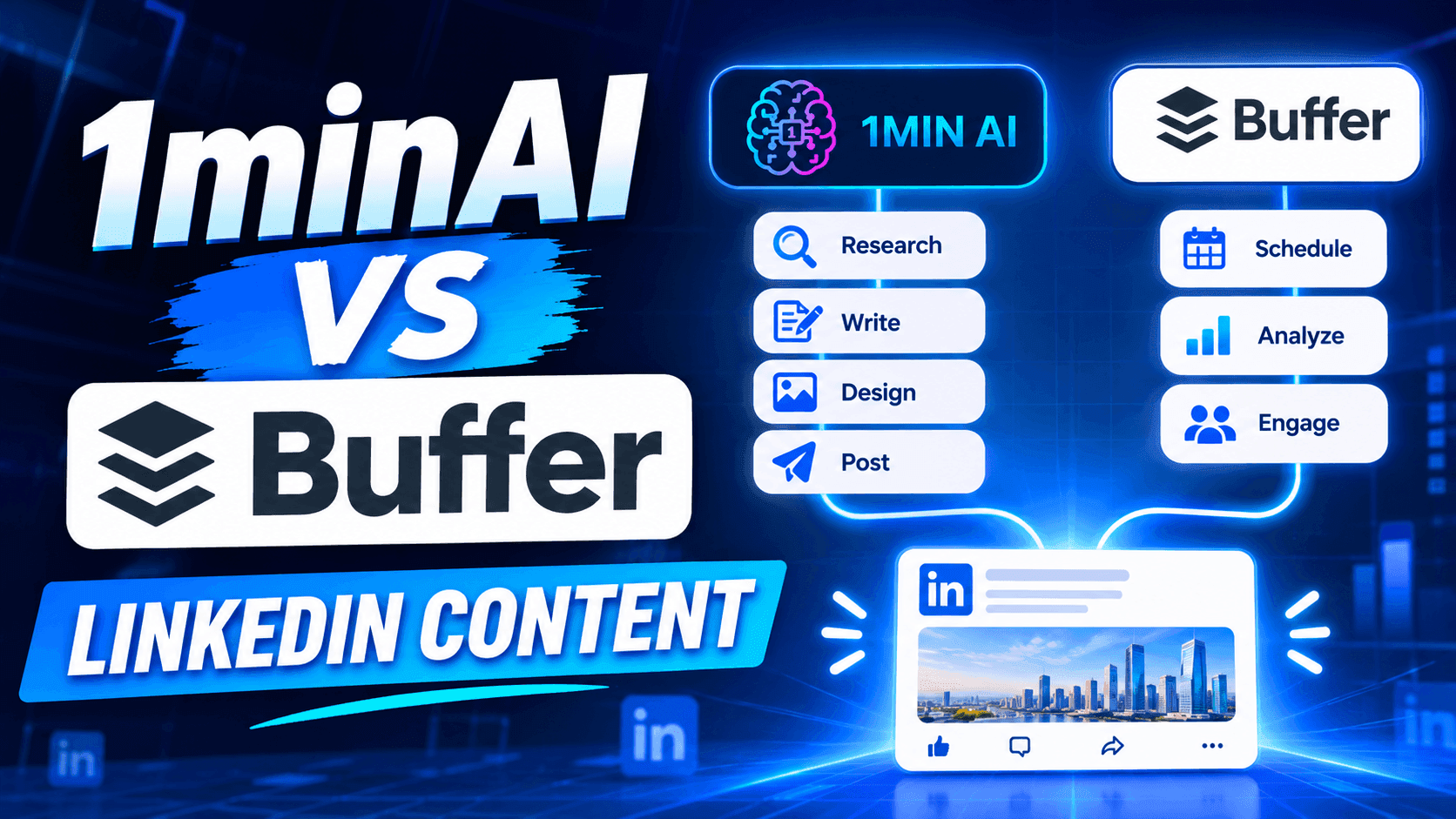
Looking for a Buffer alternative? Compare 1minAI vs Buffer for LinkedIn content creation, AI writing, image generation, scheduling, and automation.
If you're looking for a Buffer alternative, you're probably not searching for another complicated social media platform. You want a simpler way to create content, maintain a consistent posting schedule, and spend less time managing your social media presence.
Buffer is a popular choice for creators and businesses that want a clean content calendar, straightforward scheduling, and an AI Assistant built into the publishing workflow. Its free plan also makes it accessible to individuals who are just getting started. 1minAI takes a more AI-first approach to LinkedIn content. Its LinkedIn Content Agent connects information gathering, post writing, image generation, and publishing in one workflow. So, which platform should you choose?
This guide compares Buffer and 1minAI by features, pricing, workflow, and use cases to help you decide.
What Is Buffer?
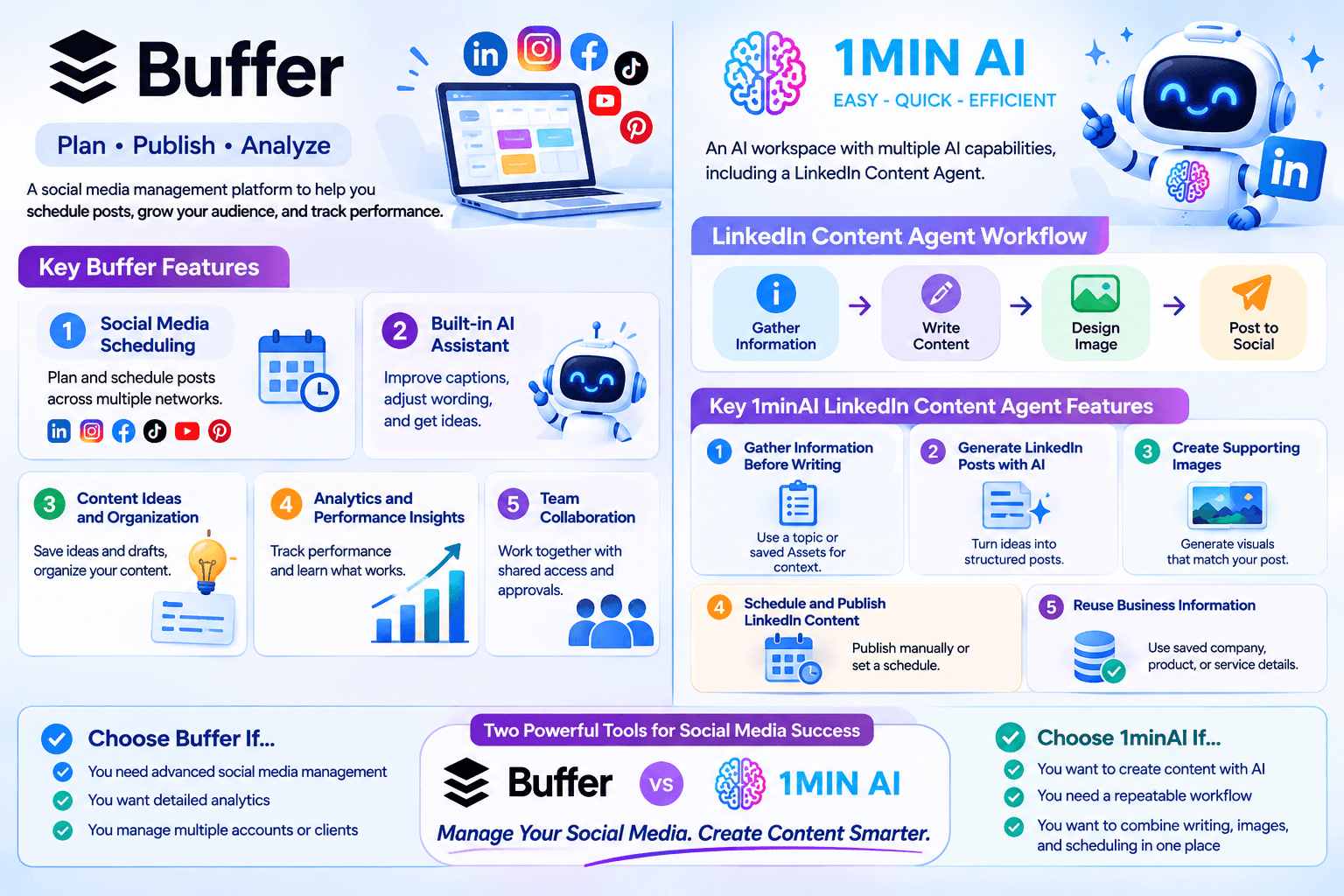
Buffer is a social media management platform designed to help creators, small businesses, and teams plan, publish, and analyze content across multiple social networks.
Rather than logging in to every social platform separately, users can connect their accounts to Buffer and manage their publishing activities from one dashboard.
Key Buffer Features
1. Social Media Scheduling
Buffer lets users plan and schedule posts across supported social networks, including LinkedIn, Instagram, Facebook, TikTok, YouTube, Pinterest, and more.
Its visual content calendar makes it easy to see upcoming posts and maintain a consistent publishing schedule.
2. Built-in AI Assistant
Buffer includes an AI Assistant that helps users refine and repurpose content. You can use it to improve captions, adjust wording, and generate ideas while working in the post composer.
This is convenient because you don't need to switch to a separate AI writing tool whenever you want to improve a caption.
3. Content Ideas and Organization
Buffer provides a space to save content ideas and drafts. Users can organize their ideas and move them toward scheduled posts when they're ready.
This is useful for creators who regularly collect inspiration but don't want to publish everything immediately.
4. Analytics and Performance Insights
Buffer offers analytics to help users understand how their social media content performs.
Depending on the plan and connected channel, users can review engagement and audience metrics, explore performance trends, and make decisions about future content.
5. Team Collaboration
Buffer also supports team collaboration through features such as shared access, notes, and approval workflows on its Team plan.
These features make it useful for businesses and marketing teams that need to coordinate publishing activities.
What Is 1minAI?
1minAI is an AI workspace that brings multiple AI capabilities together, including writing, image generation, document processing, video, audio, and AI Agents.
For LinkedIn creators and marketers, one of its relevant features is the LinkedIn Content Agent, available through 1minAI Social Agents.
Instead of using AI only to improve a caption, the Agent connects several content production stages:
Gather Information → Write Content → Design Image → Post to Social
This workflow is designed to help users turn business information, research topics, and ideas into LinkedIn-ready content.
Key 1minAI LinkedIn Content Agent Features
1. Gather Information Before Writing
A good LinkedIn post should have something useful to say.
The Agent can start with a topic or relevant business information. Users can also select saved Assets containing company, product, or service details.
This helps provide context before generating the post.
For example, a SaaS founder could use information about a new product feature, customer challenges, or industry trends as the starting point for a LinkedIn content workflow.
2. Generate LinkedIn Posts with AI
After gathering information, the Agent moves to the writing stage.
Users can configure the available writing settings and AI model options to generate content based on the selected information.
This is useful for turning a rough idea into a structured post without starting from a blank page.
3. Create Supporting Images
Text isn't the only part of a LinkedIn post.
The Agent also includes a Design Image stage, allowing users to generate a visual that supports the post's message.
This can help founders and marketers create more complete content without having to move between separate writing and image-generation tools.
4. Schedule and Publish LinkedIn Content
Once the content is ready, users can connect their LinkedIn account and configure the publishing workflow.
The Agent supports manual runs and scheduling options, including one-time and recurring schedules.
Users should still review generated content for factual accuracy, relevance, and brand consistency before relying on an automated publishing routine.
5. Reuse Business Information
Saved Assets can provide reusable context for future content.
Instead of repeatedly explaining what your company does, who your audience is, and what your product offers, you can select relevant information as the starting point for new posts.
This is particularly useful for businesses that need consistent messaging across multiple campaigns.
1minAI vs Buffer: Feature-by-Feature Comparison
Buffer and 1minAI support different parts of the social media content process.
Buffer focuses on planning, scheduling, publishing, and managing social media channels. 1minAI focuses on connecting AI-powered content production with LinkedIn publishing.
| Feature | Buffer | 1minAI |
|---|---|---|
| Main purpose | Social media management and scheduling | AI-powered content creation and publishing workflow |
| LinkedIn support | Yes | Yes |
| AI writing | Built-in AI Assistant | LinkedIn Content Agent |
| Topic and information gathering | Ideas and content planning tools | Gather Information workflow |
| Brand context | Content drafts and AI-assisted refinement | Reusable business information through saved Assets |
| AI image generation | Supports media uploads and integrations | Image generation within the Agent workflow |
| Content calendar | Yes | Agent scheduling workflow |
| Publishing | Multiple supported social channels | LinkedIn publishing through connected account |
| Free option | Yes, up to 3 channels | Free daily credits are available |
| Best for | Creators and teams managing multiple social channels | Users who want AI assistance across the LinkedIn content workflow |
The biggest difference is where each platform puts its emphasis.
Buffer helps you organize and publish content efficiently. 1minAI helps you create the content itself, including the research, writing, and visuals, before moving it toward publication.
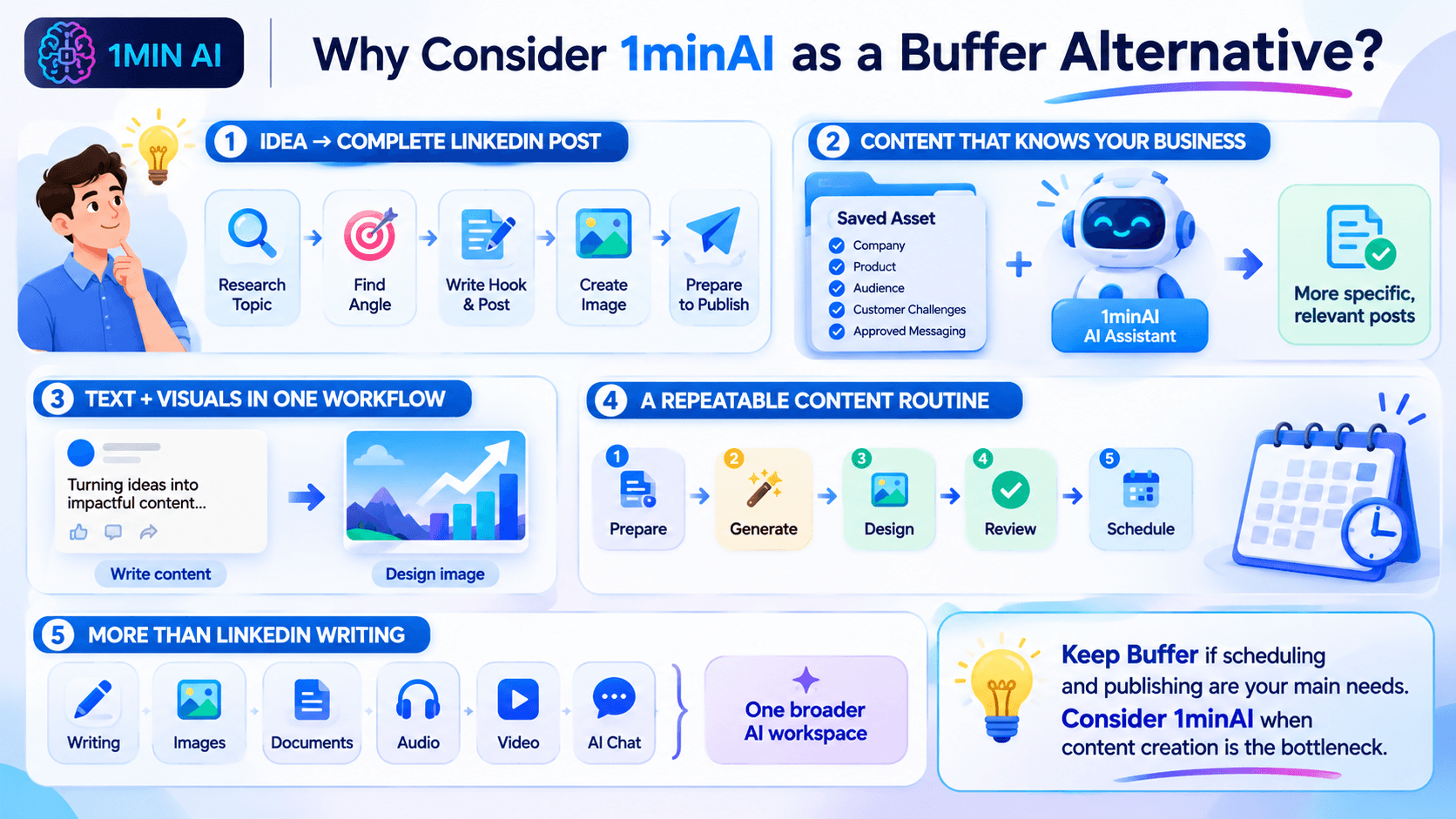
Why Consider 1minAI as a Buffer Alternative?
You don't necessarily need to replace Buffer if it already handles your publishing workflow well.
However, 1minAI may be a better fit if you want to reduce the manual work involved in creating LinkedIn content.
Here are several reasons to consider it.
Move from an Idea to a Complete LinkedIn Post
Many creators don't struggle with scheduling. They struggle with the work that happens before scheduling.
You might have an idea for a post but still need to:
- Research the topic.
- Find a useful angle.
- Write an engaging introduction.
- Organize the main points.
- Create a supporting image.
- Prepare the content for publishing.
With 1minAI, these activities are connected through one Agent workflow.
Instead of treating AI writing as a separate task, you can use an AI-assisted process to move from information to a more complete post.
Create Content Based on Your Business Information
Generic AI prompts often produce generic social media content.
Using relevant business information can help make posts more specific and useful.
For example, a company can prepare an Asset containing:
- Company background and positioning.
- Product or service information.
- Target audience.
- Common customer challenges.
- Key product benefits.
- Approved messaging and terminology.
The LinkedIn Content Agent can use that information as context when generating content.
This is especially helpful for founders, consultants, and B2B marketers who want to communicate expertise rather than publish generic motivational posts.
Generate Text and Visuals in One Workflow
A LinkedIn post can become more engaging when its visual supports the message.
With 1minAI, you can generate the written content and move to the Design Image stage without switching to an entirely separate image-generation platform.
For example, if you're creating a post about five ways to improve customer retention, you can generate the post and a related visual as part of the same workflow.
You can then review the result and make adjustments before publishing.
Build a More Consistent Content Routine
Consistency is important for maintaining a professional presence on LinkedIn.
However, publishing every day can become difficult when content creation requires several disconnected tasks.
1minAI helps connect those tasks into a repeatable process:
- Prepare your topic or business information.
- Generate a LinkedIn post.
- Create a supporting visual.
- Review the content.
- Configure your publishing schedule.
You can start with a small number of posts and adjust the schedule based on your audience and available resources.
Use More Than a LinkedIn Writing Tool
1minAI is not limited to LinkedIn content creation.
Its broader AI workspace includes tools for writing, image generation, documents, audio, video, and other AI-powered tasks.
This can be useful when your marketing workflow extends beyond social media.
For example, you might use AI to summarize a report, turn its insights into a LinkedIn post, and create a visual to accompany the post.
How to Create and Schedule LinkedIn Content with 1minAI
If you want to try an AI-first LinkedIn workflow, here's a practical way to get started.
Step 1: Open 1minAI Social Agents
Visit 1minAI Social Agents and open the LinkedIn Content Agent.
Step 2: Prepare Your Information
Choose a topic or select a relevant saved Asset containing your company, product, or service information.
For example, a marketing agency could start with a topic such as:
"Why B2B companies should build a LinkedIn thought leadership strategy."
You can also provide relevant reports or other supporting information where the workflow allows.
Step 3: Configure the Writing Stage
Review the available writing settings and select an appropriate AI model.
Make sure the content reflects your intended audience and communication style.
You can use this prompt as a starting point for a LinkedIn post:
Write a LinkedIn post for B2B marketing professionals about why thought leadership matters for building trust.
Start with a compelling hook, explain three practical benefits, include an actionable takeaway, and end with a question that encourages meaningful discussion.
Use a professional but conversational tone. Avoid exaggerated claims, generic motivational language, and unnecessary jargon.
Step 4: Generate a Supporting Image
Move to the Design Image stage and configure the available image-generation settings.
Choose a visual direction that supports the main message of your post.
For example, a post about B2B thought leadership could use a clean infographic-style visual showing how expertise, useful insights, and consistency contribute to professional credibility.
Step 5: Review and Schedule
Check the generated text and image before publishing.
Verify that:
- The post communicates an accurate message.
- The opening is relevant to your audience.
- The visual supports the written content.
- The content reflects your brand.
- The publishing time fits your content strategy.
Then configure the available publishing and scheduling options.
You can start with a manual run or set a recurring schedule that matches your content capacity.
Frequently Asked Questions
Is 1minAI a good Buffer alternative?
1minAI is worth considering if your priority is AI-assisted LinkedIn content production, including information gathering, writing, image generation, and publishing.
Buffer is generally a stronger fit if you primarily need a social media management platform with multi-channel scheduling, analytics, and community tools.
Can 1minAI generate LinkedIn posts?
Yes. The 1minAI LinkedIn Content Agent includes a writing stage that helps users generate LinkedIn content using topics or relevant business information.
Can 1minAI schedule LinkedIn posts?
The LinkedIn Content Agent supports publishing workflows with manual, one-time, and recurring scheduling options. Available options depend on the connected account and current Agent configuration.
Which is better for solo founders: Buffer or 1minAI?
It depends on the main challenge.
Buffer is useful if you already have content and need a simple way to schedule it across social channels.
1minAI may be more useful if you need help researching topics, writing posts, generating visuals, and preparing LinkedIn content without managing each step separately.
Conclusion: Choose the Workflow That Saves You More Time
Buffer and 1minAI are both useful tools, but they solve different problems. If you mainly need a reliable social media calendar, Buffer may be all you need.
But if you want to spend less time moving between research, writing, design, and publishing tools, 1minAI is a Buffer alternative worth trying.
Ready to turn your ideas and business knowledge into LinkedIn content?
Explore 1minAI Social Agents and build an AI-assisted workflow for your next LinkedIn post.
You can also explore 1minAI's AI features to discover more ways to use AI in your daily workflow.
- #Commerce
- #Information
විකල්ප
1minAI සඳහා හොඳම විකල්ප සොයාගෙන විශේෂාංග, මිල ගණන් සහ භාවිත අවස්ථා සසඳා බලන්න.

1min.AI එදිරිව OpenRouter
1min.AI එදිරිව OpenRouter: භාවිතයට සූදානම් AI නිර්මාණ නිෂ්පාදනය හා තාක්ෂණික API මෙවලම සංසන්දනය කරන්න. ඔබට කේතනයක් නැති නිර්මාණශීලී ස්ටුඩියෝවක් අවශ්යද, නැත්නම් කේතන යටිතල පහසුකම් හබ් එකක්ද කියලා හඳුනා ගන්න.
 Ngoc Hong

1min. AI vs Dola AI
Dola AI සඳහා විකල්පයක් සොයනවාද? වීඩියෝ ජනනය, නොමිලේ සැලසුම්, මිලගණන් සහ රහස්යතාවය අනුව 1min.AI vs Dola AI සසඳා ඔබට ගැළපෙන AI යෙදුම තෝරන්න.
Ngoc Hong
1minAI vs Hix AI
AI chat, පර්යේෂණය, ලිවීම, රූප, වීඩියෝ, මිලකරණය, සහ නම්යශීලී AI වැඩ ප්රවාහ සඳහා HIX AI විකල්ප 5ක් සසඳන්න.
Ngoc HongAI මෙවලම්
ඵලදායිතාවය, නිර්මාණශීලීත්වය සහ දෛනික වැඩ කටයුතු වැඩි දියුණු කිරීමට හොඳම AI මෙවලම් සොයා ගන්න.

එක නිෂ්පාදනයක්, UGC ක්රියේටිව් 10ක්: AI මඟින් අන්තර්ගත පරීක්ෂණය කොහොමද පහසු වෙන්නේ
AI UGC වීඩියෝ ජනකයක් භාවිතයෙන් වඩාත් සත්ය UGC සාදන්න, වැඩි ක්රියේටිව් කෝණ පරීක්ෂා කරන්න, සහ සෑම අනුවාදයක්ම රූගත නොකර affiliate අන්තර්ගතය පරිමාණය කරන්න.
 Lien Anh Vu

තත්පර කිහිපයකින් ස්ථාවර කාටූන් අන්තර්ගතය නිර්මාණය කරන්න
1min.AI සමඟ අදහස් පර්යේෂණයෙන් ආරම්භ කර චරිත සහ සජීවිකරණ වීඩියෝ දක්වා, සරල පියවර 3කින් TikTok සහ Reels සඳහා කාටූන් වීඩියෝ සාදන්න.
Lien Anh Vu
ආරම්භක ආයතනික නිර්මාතෘවරුන් සඳහා දැරිය හැකි AI මෙවලම් 4ක්
අදහස් සනාථ කිරීමට, නිෂ්පාදන ගොඩනැගීමට, අන්තර්ගත නිර්මාණය කිරීමට, සහ අධික වියදම් නොකර වේගයෙන් දියත් කිරීමට ආරම්භක ආයතනික නිර්මාතෘවරුන් සඳහා තිබෙන දැරිය හැකි AI මෙවලම් 4ක් සොයා ගන්න.
 Tram Ta
කෘත්රිම බුද්ධි විශේෂාංග
සම්පූර්ණ කෘත්රිම බුද්ධි විශේෂාංග — වැඩපිළිවෙළ සරල කර, කාර්යක්ෂමතාවය වැඩි කර, කණ්ඩායම්වලට වැඩි දියුණුවක් ලබාදෙයි.
එක නිෂ්පාදනයක්, UGC ක්රියේටිව් 10ක්: AI මඟින් අන්තර්ගත පරීක්ෂණය කොහොමද පහසු වෙන්නේ
AI UGC වීඩියෝ ජනකයක් භාවිතයෙන් වඩාත් සත්ය UGC සාදන්න, වැඩි ක්රියේටිව් කෝණ පරීක්ෂා කරන්න, සහ සෑම අනුවාදයක්ම රූගත නොකර affiliate අන්තර්ගතය පරිමාණය කරන්න.
Lien Anh Vuතත්පර කිහිපයකින් ස්ථාවර කාටූන් අන්තර්ගතය නිර්මාණය කරන්න
1min.AI සමඟ අදහස් පර්යේෂණයෙන් ආරම්භ කර චරිත සහ සජීවිකරණ වීඩියෝ දක්වා, සරල පියවර 3කින් TikTok සහ Reels සඳහා කාටූන් වීඩියෝ සාදන්න.
Lien Anh Vu
1minAI: නොමිලේ AI ව්යාකරණ පරීක්ෂකය
1minAI හි AI ව්යාකරණ පරීක්ෂකයෙන් නොමිලේ ව්යාකරණ පරීක්ෂා කරන්න. ව්යාකරණ, අක්ෂර වින්යාස සහ ලිවීමේ දෝෂ සොයාගෙන, පැහැදිලිකම වැඩි කර, තත්පර කිහිපයකින් ඔබේ අන්තර්ගතය පිරිපහදු කරන්න.
Tram Taකෘත්රිම බුද්ධිය භාවිත අවස්ථා
ව්යාපාර, ඵලදායීතාව සහ කර්මාන්ත-නිශ්චිත යෙදුම් සඳහා විශේෂයෙන් තෝරාගත් කෘත්රිම බුද්ධිය භාවිත අවස්ථා එකතුවක්.
එක නිෂ්පාදනයක්, UGC ක්රියේටිව් 10ක්: AI මඟින් අන්තර්ගත පරීක්ෂණය කොහොමද පහසු වෙන්නේ
AI UGC වීඩියෝ ජනකයක් භාවිතයෙන් වඩාත් සත්ය UGC සාදන්න, වැඩි ක්රියේටිව් කෝණ පරීක්ෂා කරන්න, සහ සෑම අනුවාදයක්ම රූගත නොකර affiliate අන්තර්ගතය පරිමාණය කරන්න.
Lien Anh Vuතත්පර කිහිපයකින් ස්ථාවර කාටූන් අන්තර්ගතය නිර්මාණය කරන්න
1min.AI සමඟ අදහස් පර්යේෂණයෙන් ආරම්භ කර චරිත සහ සජීවිකරණ වීඩියෝ දක්වා, සරල පියවර 3කින් TikTok සහ Reels සඳහා කාටූන් වීඩියෝ සාදන්න.
Lien Anh Vu
Instagram හි පළ කිරීමට හොඳම වේලාව: වඩා හොඳ නියැලීම සඳහා ප්රායෝගික මාර්ගෝපදේශයක්
Instagram හි පළ කිරීමට හොඳම වේලාව සොයා ගන්න. විවිධ ප්රේක්ෂකයන් සඳහා හොඳම දින සහ වේලාවන්, සහ ඔබේ ගිණුම සඳහා සුදුසු පළ කිරීමේ කාලසටහන සොයා ගැනීමට ඉඟි ද ඇතුළත් වේ.
Tram TaAI නිබන්ධන
ප්රායෝගික, පියවරෙන් පියවර නිබන්ධන සමඟ AI භාවිත කරන්නේ කෙසේදැයි ඉගෙන ගන්න.
තත්පර කිහිපයකින් ස්ථාවර කාටූන් අන්තර්ගතය නිර්මාණය කරන්න
1min.AI සමඟ අදහස් පර්යේෂණයෙන් ආරම්භ කර චරිත සහ සජීවිකරණ වීඩියෝ දක්වා, සරල පියවර 3කින් TikTok සහ Reels සඳහා කාටූන් වීඩියෝ සාදන්න.
Lien Anh Vu
2026 කළු සිකුරාදා AI මෙවලම් ගනුදෙනු
2026 කළු සිකුරාදා AI මෙවලම් ගනුදෙනු මඟින් ඔබට ලැබෙන දේ සොයාගන්න. AppSumo, Dealify, Stack Social හරහා 1min.AI ජීවිතකාලීන ගනුදෙනුව ලබාගන්නේ කෙසේදැයි දැනගෙන, Trustpilot, Slashdot, සහ Software Advice මඟින් සත්යාපනය කරන්න.
 Hang Nguyen

Seedance සමඟ AI රූපයෙන් වීඩියෝවට නිෂ්පාදන අනුකූලතාව ලබා ගනිමින් වක්රණය නවතා නිෂ්පාදන සමාලෝචන පරිමාණය කරන්න
AI රූපයෙන් වීඩියෝවට නිෂ්පාදන අනුකූලතාවයෙන් ලාංඡන වක්රණය නවතා අදම 1min.AI මත ස්ටුඩියෝ-මට්ටමේ සමාලෝචන වීඩියෝ ජනනය කරන්න.
Lien Anh VuAI මාර්ගෝපදේශ
ප්රායෝගික මාර්ගෝපදේශ, සත්ය ලෝක උදාහරණ සහ ක්රියාකාරී හොඳම භාවිතයන් සමඟින් AI වඩාත් වේගයෙන් ඉගෙන ගන්න.
තත්පර කිහිපයකින් ස්ථාවර කාටූන් අන්තර්ගතය නිර්මාණය කරන්න
1min.AI සමඟ අදහස් පර්යේෂණයෙන් ආරම්භ කර චරිත සහ සජීවිකරණ වීඩියෝ දක්වා, සරල පියවර 3කින් TikTok සහ Reels සඳහා කාටූන් වීඩියෝ සාදන්න.
Lien Anh Vu
AI මෙවලම් අන්තර්ජාලයෙන් ආරක්ෂිතව මිලදී ගන්න: 2026 Black Friday මාර්ගෝපදේශය
හොඳම Black Friday AI ගනුදෙනු අන්තර්ජාලයෙන් සොයාගෙන ආරක්ෂිතව ලබාගන්නේ කෙසේදැයි දැනගන්න. වංචා වළක්වා ගැනීමට, subscription fatigue සමඟ කටයුතු කිරීමට, සහ software තහවුරු කිරීමට විශේෂඥ උපාය මාර්ග ඉගෙන ගන්න.
Hang NguyenSeedance සමඟ AI රූපයෙන් වීඩියෝවට නිෂ්පාදන අනුකූලතාව ලබා ගනිමින් වක්රණය නවතා නිෂ්පාදන සමාලෝචන පරිමාණය කරන්න
AI රූපයෙන් වීඩියෝවට නිෂ්පාදන අනුකූලතාවයෙන් ලාංඡන වක්රණය නවතා අදම 1min.AI මත ස්ටුඩියෝ-මට්ටමේ සමාලෝචන වීඩියෝ ජනනය කරන්න.
Lien Anh VuAI විසඳුම්
ස්වයංක්රීයකරණය, කේතීකරණය, පර්යේෂණ, ඵලදායිතාව, පාරිභෝගික සහාය, අලෙවිකරණය සහ ව්යාපාරික වැඩ ප්රවාහයන් සඳහා හොඳම AI විසඳුම් සොයන්න.
එක නිෂ්පාදනයක්, UGC ක්රියේටිව් 10ක්: AI මඟින් අන්තර්ගත පරීක්ෂණය කොහොමද පහසු වෙන්නේ
AI UGC වීඩියෝ ජනකයක් භාවිතයෙන් වඩාත් සත්ය UGC සාදන්න, වැඩි ක්රියේටිව් කෝණ පරීක්ෂා කරන්න, සහ සෑම අනුවාදයක්ම රූගත නොකර affiliate අන්තර්ගතය පරිමාණය කරන්න.
Lien Anh Vuතත්පර කිහිපයකින් ස්ථාවර කාටූන් අන්තර්ගතය නිර්මාණය කරන්න
1min.AI සමඟ අදහස් පර්යේෂණයෙන් ආරම්භ කර චරිත සහ සජීවිකරණ වීඩියෝ දක්වා, සරල පියවර 3කින් TikTok සහ Reels සඳහා කාටූන් වීඩියෝ සාදන්න.
Lien Anh Vu
නොමිලේ AI ටැටූ ජනකය: අභිරුචි නිර්මාණ
1min.AI හි නොමිලේ AI ටැටූ ජනකය භාවිතයෙන් ඕනෑම අදහසක් අභිරුචි ටැටූ නිර්මාණයක් බවට පත් කරන්න. ඔබගේ අදහස විස්තර කරන්න, ශෛලියක් තෝරන්න, සහ තත්පර කිහිපයකින් බාගන්න.
 Trang Tran
AI මාදිලි
ලොව ප්රමුඛ පෙළේ AI මාදිලි එක් තැනකින් ගවේෂණය කරන්න.
එක නිෂ්පාදනයක්, UGC ක්රියේටිව් 10ක්: AI මඟින් අන්තර්ගත පරීක්ෂණය කොහොමද පහසු වෙන්නේ
AI UGC වීඩියෝ ජනකයක් භාවිතයෙන් වඩාත් සත්ය UGC සාදන්න, වැඩි ක්රියේටිව් කෝණ පරීක්ෂා කරන්න, සහ සෑම අනුවාදයක්ම රූගත නොකර affiliate අන්තර්ගතය පරිමාණය කරන්න.
Lien Anh Vuතත්පර කිහිපයකින් ස්ථාවර කාටූන් අන්තර්ගතය නිර්මාණය කරන්න
1min.AI සමඟ අදහස් පර්යේෂණයෙන් ආරම්භ කර චරිත සහ සජීවිකරණ වීඩියෝ දක්වා, සරල පියවර 3කින් TikTok සහ Reels සඳහා කාටූන් වීඩියෝ සාදන්න.
Lien Anh VuSeedance සමඟ AI රූපයෙන් වීඩියෝවට නිෂ්පාදන අනුකූලතාව ලබා ගනිමින් වක්රණය නවතා නිෂ්පාදන සමාලෝචන පරිමාණය කරන්න
AI රූපයෙන් වීඩියෝවට නිෂ්පාදන අනුකූලතාවයෙන් ලාංඡන වක්රණය නවතා අදම 1min.AI මත ස්ටුඩියෝ-මට්ටමේ සමාලෝචන වීඩියෝ ජනනය කරන්න.
Lien Anh VuAI සංසන්දන
ඔබගේ අවශ්යතාවලට ගැලපෙන හොඳම AI මෙවලම්, මාදිලි සහ වේදිකා සොයා ගැනීමට සංසන්දනය කරන්න.

Kling AI Vs Veo 3: කුමන මාදිලිය දිනනවාද?
Kling AI vs Veo 3: ඔබේ ව්යාපෘතිය සඳහා කුමන AI වීඩියෝ ජනකය ජයගනී දැයි බැලීමට චලනය, ස්වදේශීය ශ්රව්ය, මිලකරණය සහ නොමිලේ තට්ටු සසඳන්න — 1min.AI මත දෙකම උත්සාහ කරන්න.
Trang TranSeedance සමඟ AI රූපයෙන් වීඩියෝවට නිෂ්පාදන අනුකූලතාව ලබා ගනිමින් වක්රණය නවතා නිෂ්පාදන සමාලෝචන පරිමාණය කරන්න
AI රූපයෙන් වීඩියෝවට නිෂ්පාදන අනුකූලතාවයෙන් ලාංඡන වක්රණය නවතා අදම 1min.AI මත ස්ටුඩියෝ-මට්ටමේ සමාලෝචන වීඩියෝ ජනනය කරන්න.
Lien Anh Vu
DeepSeek V4 Pro vs Flash සංසන්දනය
DeepSeek V4 Pro හා DeepSeek V4 Flash මිනුම් සංසන්දනය කරන්න. අදම 1min.ai හි ඔබගේ agentic යෙදුම් ප්රශස්ත කර AI fact checking වැඩිදියුණු කරන්න.
Ngoc HongAI ඒකාබද්ධකරණ
ඔබ දැනට භාවිතා කරන මෙවලම් සමඟ AI කිසිදු බාධාවකින් තොරව ඒකාබද්ධ කර, කාර්ය ස්වයංක්රීය කර ඵලදායීත්වය ඉහළ නැංවන්න.

AI Fashion Video Generator එකක් භාවිත කරලා Fashion Week 2026 සඳහා වීඩියෝ හදන්නේ කොහොමද
AI සමඟ Fashion Week 2026 අදහස් විස්මිත fashion වීඩියෝවලට පරිවර්තනය කරන්න. සරල workflow එකකින් brainstorming, visuals නිර්මාණය, සහ images වීඩියෝවලට වෙනස් කරන ආකාරය ඉගෙන ගන්න.
Lien Anh Vu
දෘෂ්ටිකෝණය: ඔබට හැමදාම ලියන්න තියෙන්නේ 10+ පෝස්ට් නම්
AI brainstroming, image generation, සහ content creation සමඟ content creatorsට දිනකට 10+ social media posts වේගයෙන් නිර්මාණය කරන්න උදව් කරන AI content workflow එකක් ගොඩනගන්නේ කොහොමද කියලා ඉගෙන ගන්න.
Lien Anh Vu
AI යෙදුම් අතර මාරු වීම නවත්වන්න: AI ඒකාබද්ධ කිරීම සේව්ය පළකිරීමේ සන්නාමකරණය පරිවර්තනය කරන ආකාරය
AI ඒකාබද්ධ කිරීම AI ලිවීම, ලේඛන, රූප, වීඩියෝ සහ බහු AI මාදිලි එක වැඩබිමකට එක් කරමින් HR කණ්ඩායම්වලට සේව්ය පළකිරීමේ සන්නාමකරණය සරල කර ගැනීමට උපකාර කරන ආකාරය සොයා ගන්න.
Tram Taකර්මාන්ත සඳහා AI
සෞඛ්ය සේවා, මූල්ය, අධ්යාපනය, නීති, නිෂ්පාදන, සිල්ලර වෙළඳාම, දේපල වෙළඳාම් සහ තවත් බොහෝ දේ සඳහා හොඳම AI මෙවලම් සහ වැඩ ප්රවාහ සොයන්න.

නොමිලේ AI නිෂ්පාදන විස්තර ජනකය
මිනිත්තු කිහිපයකින් විකුණන නිෂ්පාදන විස්තර ලියන්න. මෙම නොමිලේ AI නිෂ්පාදන විස්තර ජනකය භාවිතයෙන් විස්තර හෝ ඡායාරූපයක් brand එකට ගැලපෙන copy එකක් බවට පරිවර්තනය කරන්න. 1min.AI උත්සාහ කරන්න.
Trang Tran
ආරම්භක ව්යාපාර සඳහා ලාභ උපරිම කිරීමට හොඳම ව්යාපාරික ඵලදායිතා මෙවලම් | 1minAI
AI සමඟ කාලය ඉතිරි කරමින්, වැඩපිළිවෙළ සරල කරමින්, නැවත නැවත කරන කාර්යයන් අඩු කරමින්, ලාභදායී වර්ධනයට සහාය වන ආරම්භක ව්යාපාර සඳහා හොඳම ව්යාපාරික ඵලදායිතා මෙවලම් සොයා ගන්න.
Tram Ta
අන්තර්ගත අලෙවිකරණය සඳහා හොඳම AI මෙවලම |1minAI
අන්තර්ගත අලෙවිකරණය සඳහා හොඳම AI මෙවලමක් සොයනවාද? 1minAI එකම AI workspace එකකින් පර්යේෂණ, ලිවීම, නැවත භාවිතය, නිර්මාණය, දෘශ්ය සෑදීම සහ පරිමාණය කිරීමට අලෙවිකරුවන්ට උදව් කරන ආකාරය බලන්න.
Tram TaAI නියෝජිතයන්
ඔබේ වැඩ සහ දෛනික ජීවිතය පුරා කාර්යයන් ස්වයංක්රීය කිරීමට AI නියෝජිතයන් සොයාගෙන ක්රියාත්මක කරන්න.
1minAI: නොමිලේ AI ව්යාකරණ පරීක්ෂකය
1minAI හි AI ව්යාකරණ පරීක්ෂකයෙන් නොමිලේ ව්යාකරණ පරීක්ෂා කරන්න. ව්යාකරණ, අක්ෂර වින්යාස සහ ලිවීමේ දෝෂ සොයාගෙන, පැහැදිලිකම වැඩි කර, තත්පර කිහිපයකින් ඔබේ අන්තර්ගතය පිරිපහදු කරන්න.
Tram Ta
Facebook සඳහා AI Agent
ඔබගේ ලේඛන සහ සංවාදවලින් Facebook සඳහා AI Agent එකක් භාවිතා කර අන්තර්ගත නිර්මාණය, රූප ජනනය, පෝස්ට් සැලසුම් කිරීම, සහ ප්රකාශනය කරන්න.
Ngoc Hong
AI Agent vs AI Assistant: නිර්මාණකරුවන්ට ඇත්තටම වැඩි කාලයක් ඉතිරි කරන්නේ කුමක්ද?
AI Agent vs AI Assistant අතර වෙනස ඉගෙන ගෙන, නැවත නැවත සිදුවන වැඩ ස්වයංක්රීය කර, සංශෝධන අඩු කර, වැඩි කාලයක් ඉතිරි කිරීමට කුමන විසඳුම නිර්මාණකරුවන්ට උපකාරීදැයි සොයා ගන්න.
Lien Anh VuAI කාර්ය ප්රවාහ
ඵලදායිතාව, අලෙවිකරණය, විකුණුම්, සහාය සහ තවත් දේ සඳහා සූදානම් AI කාර්ය ප්රවාහයන් ගවේෂණය කරන්න.
එක නිෂ්පාදනයක්, UGC ක්රියේටිව් 10ක්: AI මඟින් අන්තර්ගත පරීක්ෂණය කොහොමද පහසු වෙන්නේ
AI UGC වීඩියෝ ජනකයක් භාවිතයෙන් වඩාත් සත්ය UGC සාදන්න, වැඩි ක්රියේටිව් කෝණ පරීක්ෂා කරන්න, සහ සෑම අනුවාදයක්ම රූගත නොකර affiliate අන්තර්ගතය පරිමාණය කරන්න.
Lien Anh Vuතත්පර කිහිපයකින් ස්ථාවර කාටූන් අන්තර්ගතය නිර්මාණය කරන්න
1min.AI සමඟ අදහස් පර්යේෂණයෙන් ආරම්භ කර චරිත සහ සජීවිකරණ වීඩියෝ දක්වා, සරල පියවර 3කින් TikTok සහ Reels සඳහා කාටූන් වීඩියෝ සාදන්න.
Lien Anh VuAI Fashion Video Generator එකක් භාවිත කරලා Fashion Week 2026 සඳහා වීඩියෝ හදන්නේ කොහොමද
AI සමඟ Fashion Week 2026 අදහස් විස්මිත fashion වීඩියෝවලට පරිවර්තනය කරන්න. සරල workflow එකකින් brainstorming, visuals නිර්මාණය, සහ images වීඩියෝවලට වෙනස් කරන ආකාරය ඉගෙන ගන්න.
Lien Anh Vuනිව්ස්ලෙටර්
1minAI සමඟ සතිපතා AI නවෝත්පාදන

🔮 සතිපතා AI නවෝත්පාදන #143: GPT-6, GPT-6.1 සහ Ideogram 4.0 යාවත්කාලීන කිරීම
1min.ai මත GPT-6 Sol, Luna, GPT-6.1 Sol, සහ Ideogram 4.0 වෙත ප්රවේශ වන්න. එකම වේදිකාවකින් typography නිරවද්යතාව 98.4% දක්වා වැඩි කර reasoning latency 45% කින් අඩු කරන්න.
Hang Nguyen
🔮 සතිපතා AI නවෝත්පාදන #142: Grok 4.7, Opus 5.5 සහ Sonnet 5.5 on 1min.ai
1min.ai මත Grok 4.7, Claude Opus 5.5, සහ Sonnet 5.5 වෙත පිවිසෙන්න. දායකත්ව වියදම් 70% දක්වා අඩු කර, එක් ඒකාබද්ධ workspace එකක tokens මිලියන ගණනක් සැකසන්න.
Hang Nguyen
🔮 සතිපතා AI නවෝත්පාදන #141: Seedance 2.5 සහ Stable Audio 3: ඊළඟ පරම්පරාවේ AI
Seedance 2.0, 2.5, සහ StabilityAI හි Stable Audio 3 1min.ai මත ගවේෂණය කරන්න. ඊළඟ පරම්පරාවේ ජනන AI සමඟ studio-ගුණාත්මක ශ්රව්ය සහ සම්මුතික චලනය ජනනය කරන්න.
Hang Nguyen