
How to Create SVG Animations With Claude Fable 5.1

Lien Anh Vu
20 ноември 2026 г.
Learn how to create SVG animations with Claude Fable 5.1 on 1min.AI. Follow a simple tutorial to generate, preview, and refine animated designs.
Want to add smooth animations to your designs but don't know how to code?
Claude Fable 5.1 can help you create SVG animations by turning simple text prompts into HTML, SVG, and CSS code. Instead of building every animation from scratch, you can describe what you want, generate the code, and preview the result in your browser.
In this tutorial, we'll use Claude Fable 5.1 on 1min.AI to create an animated coffee cup for our fictional Morrow Coffee branding project.
You'll learn how to generate, preview, and customize your first SVG animation, even if you're new to coding.
What Is SVG Animation?
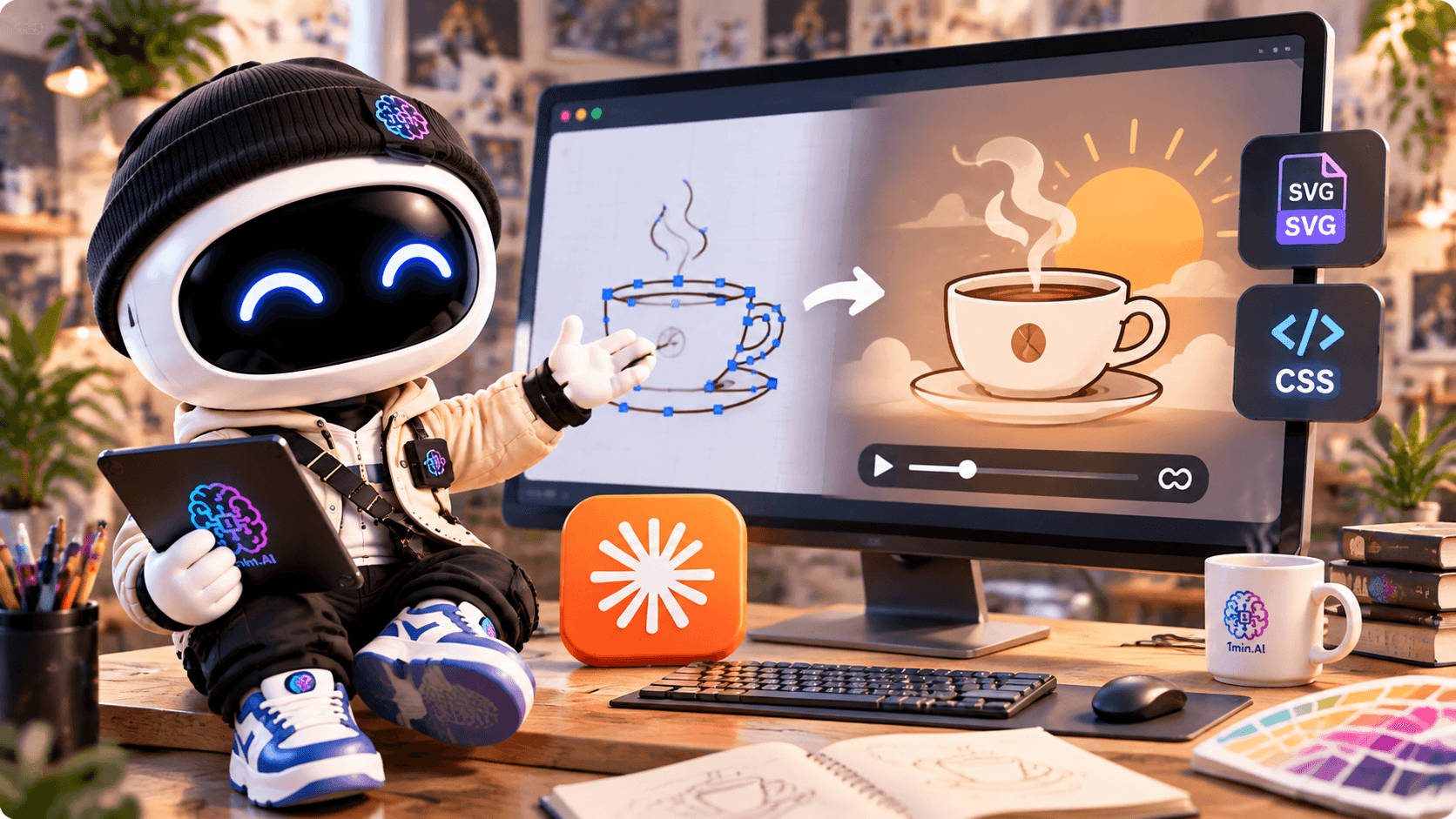
SVG (Scalable Vector Graphics) is a vector image format commonly used for icons, logos, illustrations, and website graphics.
Unlike regular images, SVG graphics can scale without losing sharpness. By adding CSS or SVG animation, you can bring individual elements to life.
For example, you can animate:
- A logo appearing smoothly.
- Steam rising from a coffee cup.
- A sun slowly moving across the background.
- Simple illustrations used in websites or portfolios.
SVG animations are especially useful for designers who want to add subtle movement to digital projects without relying on a video.
The challenge? Creating them manually often requires knowledge of SVG and CSS.
That's where Claude Fable 5.1 can help.
How to Create SVG Animations With Claude on 1min.AI
Let's create a simple coffee cup animation using Claude Fable 5.1.
Our example is inspired by Morrow Coffee — First Light, a fictional branding concept built around warm morning sunlight, calm colors, and minimal design.
Step 1: Open AI Code and Select Claude Fable 5.1
First, visit 1min.AI's Code Generator.
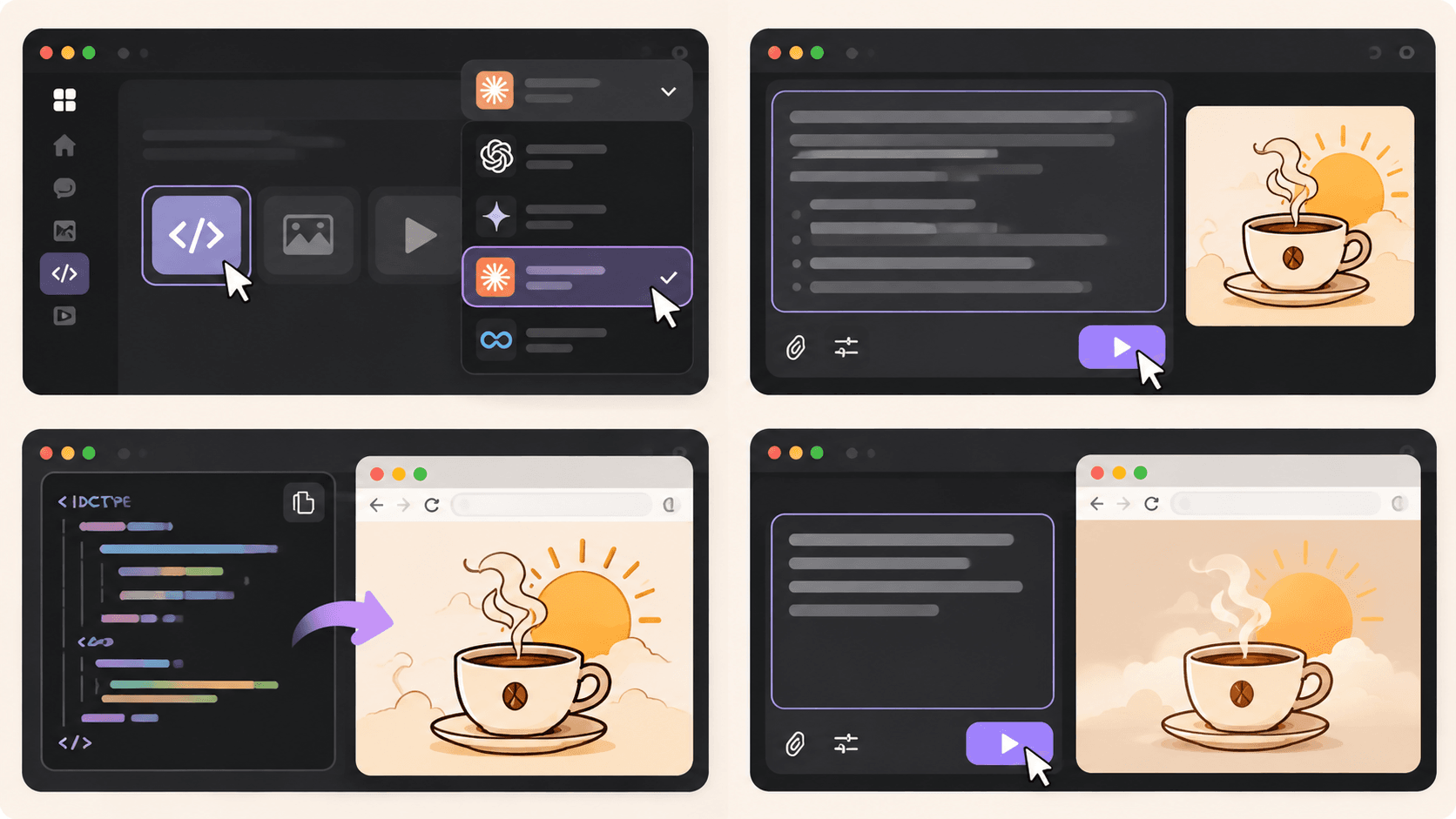
Open AI for Code → Code Generator and select Claude Fable 5.1 from the available AI models.
Next, think about the animation you want to create.
For our coffee brand, we want a hand-drawn coffee cup with gently rising steam and a warm sunrise in the background.
The more clearly you describe your idea, the easier it is for Claude to understand the intended design.
Step 2: Enter Your SVG Animation Prompt
Now, let's turn that idea into an animation.
You don't need to write the SVG or CSS yourself. Start with a detailed prompt that describes the illustration, colors, and movement.
Copy-Ready Prompt — Animated Coffee Cup
Act as a creative front-end developer specializing in SVG animations.
Create a complete, self-contained HTML file with an animated SVG illustration for Morrow Coffee, a fictional specialty coffee brand.
Creative direction: First Light — warm, minimal, calm, and inspired by peaceful mornings.
Design requirements:
- A hand-drawn coffee cup as the main illustration.
- Soft steam gently rising from the cup.
- A golden sun slowly appearing behind the cup.
- A minimal background with warm cream colors.
Brand color palette:
- First Light: #F2C98A
- Dawn Blush: #E7B497
- Morning Linen: #EADFCB
- Roast: #6B4A3A
Animation requirements:
- Use inline SVG and CSS animations.
- Make the steam move naturally and continuously.
- Add a slow, subtle sunrise effect.
- Keep the animation smooth, responsive, and seamlessly looping.
- Support
prefers-reduced-motionwith a static version.- Do not use external libraries, images, or fonts.
- Include all HTML, CSS, and SVG in one file.
Return the complete HTML code so I can save it as
coffee-animation.htmland open it directly in Chrome.
Once you've entered the prompt, click Run and let Claude generate the code.
The result should be a complete HTML file containing your SVG illustration and animation styles.
Step 3: Preview Your SVG Animation
Once Claude finishes generating the code, it's time to see your design in action.
Follow these simple steps:
- Copy the complete HTML code generated by Claude.
- Open a text editor such as Notepad or Visual Studio Code.
- Paste the code and save it as
coffee-animation.html. If you're using Notepad, choose All Files as the file type. - Double-click the HTML file to open it in Chrome.
You should now see your animated coffee cup in the browser.
For our Morrow Coffee concept, the illustration features a minimal coffee cup, rising steam, and a soft golden sun.
Tip: Save the generated code as an .html file, not a .txt file. This lets the browser render the SVG and run its CSS animations.
The preview is a web page containing an animated SVG, rather than an exported GIF or video.
Step 4: Customize Your Animation
Your first result doesn't have to be perfect.
Maybe the steam moves too quickly, the sun feels too bright, or the illustration doesn't quite match your brand.
You can return to Claude and describe what you'd like to change.
Try this follow-up prompt:
Refine the SVG animation to make it feel more natural and elegant.
Slow down the rising steam, soften the sunrise effect, and keep the movement subtle.
Maintain the original First Light color palette and illustration style.
Return the complete updated HTML code so I can replace my previous version.
Generate the updated code, save your file again, and refresh the browser to compare the results.
This process makes it easier to experiment with different animation styles without manually editing every line of CSS.
For better visual results, you can also explore our guide on how to write more intentional AI design prompts.
Real Example: Morrow Coffee SVG Animation
For our Morrow Coffee project, we wanted to create an animation that matched the brand's calm, premium personality.
Instead of using fast transitions or dramatic effects, we focused on three simple elements:
The coffee cup: A minimal, hand-drawn illustration representing the brand.
The rising steam: Gentle movement that makes the illustration feel warm and inviting.
The morning sun: A subtle sunrise effect that connects the animation to the First Light concept.
Together, these elements create a small animated illustration that could be used in a website hero section or a creative portfolio.
The most important lesson is that a good SVG animation doesn't need complicated effects. A few carefully chosen movements can make a design more engaging while preserving its visual identity.
Watch the Full Claude Animation Tutorial
Want to see the actual workflow?
In our video, we use Claude on 1min.AI to brainstorm the Morrow Coffee concept, generate an animated SVG illustration, and build a creative portfolio website.
You'll see how a simple creative idea can become working animation code.
Tips for Creating Better SVG Animations With AI
If you're using an AI SVG animation generator, a few small changes to your prompts can make a big difference.
1. Describe the movement clearly
Instead of asking for "a cool animation," explain exactly what should move and how. For example, ask for steam that rises slowly and fades naturally.
- Keep the animation simple
Start with one or two moving elements. Too many effects can distract from the design and make the animation feel overwhelming.
3. Use your brand colors
Provide specific HEX codes so Claude can keep the illustration consistent with your visual identity.
4. Test your animation in the browser
Check that everything displays correctly, loops smoothly, and works at different screen sizes. Reduce unnecessary motion and provide a static alternative when appropriate.
Where Can You Use SVG Animations?
Once your animation is working, you can use similar techniques for website illustrations, animated brand graphics, loading indicators, and portfolio presentations.
For example, a freelance designer could use an animated illustration to make a project case study more engaging.
If you want to take the next step, our guide on building a portfolio website with 1min.AI explains how to create a website using AI-generated code.
For a broader creative process, you can also explore how to organize your design workflow with 1min.AI.
Before publishing, test the animation in its intended environment. Some platforms restrict inline SVG or custom CSS, so you may need to adjust how the animation is embedded.
Start Creating SVG Animations With Claude
Creating SVG animations doesn't have to mean writing code from scratch.
With Claude Fable 5.1 on 1min.AI, you can describe an illustration, generate the HTML and SVG code, preview the animation, and refine the result until it matches your creative direction.
Whether you're experimenting with animated logos, website illustrations, or personal branding projects, start with a simple idea and build from there.
🚀 Try Claude Fable 5.1 on 1min.AI and bring your designs to life with SVG animation.
- #Informational
Алтернативи
Откријте ги најдобрите алтернативи за 1minAI и споредете ги функциите, цените и случаите на употреба.

1min.AI наспроти OpenRouter
1min.AI наспроти OpenRouter: Споредете го готовиот производ за AI-креирање со техничката API алатка. Дознајте дали ви треба креативно студио без код или хаб за инфраструктура за кодирање.
 Ngoc Hong

1min AI vs Buffer
Compare 1min.AI vs Buffer for Facebook content creation, AI writing, image generation, scheduling, pricing, and everyday marketing workflows.
Ngoc Hong
1min.AI vs. Hootsuite: Which Social Media Tool Fits Your Workflow?
Compare 1min.AI vs. Hootsuite to explore their AI content creation, social media publishing, analytics, pricing, and collaboration features. Find the right tool for your workflow.
Алатки за вештачка интелигенција
Откријте ги најдобрите алатки за вештачка интелигенција за да ја зголемите продуктивноста, креативноста и секојдневната работа.

Топ 4 прифатливи AI алатки за основачи на стартапи
Откријте ги топ 4 прифатливи AI алатки за основачи на стартапи за да ги валидирате идеите, градите производи, креирате содржина и лансирате побрзо без преголеми трошоци.
 Tram Ta

POV: Имате 10+ објави за креирање секој ден
Научете како да изградите AI работен тек за содржина што им помага на креаторите на содржини побрзо да создаваат 10+ објави за социјални мрежи дневно со AI brainstorm, генерирање слики и креирање содржина.
 Lien Anh Vu

Претворете „Направи го подобро“ во подобра содржина со AI
Користете AI за да претворите нејасни повратни информации од клиентите во јасни ревизии, да намалите непотребни измени и побрзо да испорачате подобра содржина.
Lien Anh VuAI функции
Сеопфатни AI функции кои ги поедноставуваат работните процеси, ја зголемуваат ефикасноста и им овозможуваат на тимовите да постигнат повеќе.

1minAI: Бесплатен AI проверувач на граматика
Проверете граматика бесплатно со AI проверувачот на граматика од 1minAI. Најдете граматички, правописни и пишувачки грешки, подобрете ја јасноста и доусовршете го вашиот содржај за секунди.
Tram Ta
Изградете портфолио веб-страница побрзо со 1min.AI
Дознајте како фриленс креативците можат да го користат 1min.AI за да планираат, пишуваат, дизајнираат и генерираат професионална портфолио веб-страница побрзо, дури и без силни програмерски вештини.
Lien Anh Vu
Бесплатен АИ Х коментар
Креирајте смешни, духовити или проникливи коментари за Твитер со нашиот АИ-напојуван генератор на Твитер коментари. Зголемете го вашиот ангажман и издвојте се од толпата!
 Trang Tran
Примени на вештачка интелигенција
Курирана збирка на примени на вештачка интелигенција за бизнис, подобрување на продуктивноста и индустриски апликации.

Најдобро време за објавување на Instagram: Практичен водич за подобра ангажираност
Откријте го најдоброто време за објавување на Instagram, вклучително и најдобрите денови и часови за различни публики, плус совети за да го пронајдете идеалниот распоред за објавување за вашиот профил.
Tram TaИзградете портфолио веб-страница побрзо со 1min.AI
Дознајте како фриленс креативците можат да го користат 1min.AI за да планираат, пишуваат, дизајнираат и генерираат професионална портфолио веб-страница побрзо, дури и без силни програмерски вештини.
Lien Anh VuПретворете „Направи го подобро“ во подобра содржина со AI
Користете AI за да претворите нејасни повратни информации од клиентите во јасни ревизии, да намалите непотребни измени и побрзо да испорачате подобра содржина.
Lien Anh VuТуторијали за вештачка интелигенција
Научете како да користите вештачка интелигенција со практични туторијали чекор по чекор.

Понуди за AI алатки за Black Friday во 2026
Откријте што нудат понудите за AI алатки за Black Friday 2026. Дознајте како да ја обезбедите доживотната понуда за 1min.AI преку AppSumo, Dealify, Stack Social, и проверете на Trustpilot, Slashdot и Software Advice.
 Hang Nguyen

Искусете ја Fashion Week за $0 со 1minAI Face Swap
Искусете ја Fashion Week за $0 со 1minAI Face Swap. Поставете ја вашата фотографија, изберете Fashion Week видео и создадете сопствен AI моден момент.
Ngoc Hong
Вирални Reels за неколку минути: Како да го користите Text-to-Speech на 1minAI за сатирични voiceover-и
Научете како администраторите на сатирични страници ја користат функцијата Text-to-Speech на 1minAI за да генерираат веднаш news anchor и драматични voiceover-и за TikTok, Shorts и Instagram Reels.
AI Водичи
Учете вештачка интелигенција побрзо со практични водичи, примери од реалниот свет и применливи најдобри практики.

Безбедно купете AI алатки онлајн: Водич за Black Friday 2026
Откријте како да ги најдете и обезбедите најдобрите Black Friday AI понуди онлајн. Научете стручни стратегии за да избегнете измами, да се справите со заморот од претплати и да го проверите софтверот.
Hang Nguyen
Како да започнете AI бизнис без да градите од нула
Научете како да започнете AI бизнис, да ја потврдите вашата идеја и да лансирате побрзо без да градите скапа AI инфраструктура од нула.
Ngoc Hong
AI Fashion Video Generator With Seedance 2.5 and HeyGen
Learn how to create AI fashion videos with Seedance 2.5 and HeyGen. Turn outfit photos into cinematic videos featuring your own face with 1min.AI.
Lien Anh VuРешенија за вештачка интелигенција
Разгледајте ги најдобрите решенија за вештачка интелигенција за автоматизација, кодирање, истражување, продуктивност, поддршка на клиенти, маркетинг и деловни работни процеси.

Бесплатен AI генератор на тетоважи: сопствени дизајни
Претворете која било идеја во сопствен дизајн за тетоважа со бесплатниот AI генератор за тетоважи на 1min.AI. Опишете ја вашата идеја, изберете стил и преземете за неколку секунди.
Trang TranБезбедно купете AI алатки онлајн: Водич за Black Friday 2026
Откријте како да ги најдете и обезбедите најдобрите Black Friday AI понуди онлајн. Научете стручни стратегии за да избегнете измами, да се справите со заморот од претплати и да го проверите софтверот.
Hang NguyenИскусете ја Fashion Week за $0 со 1minAI Face Swap
Искусете ја Fashion Week за $0 со 1minAI Face Swap. Поставете ја вашата фотографија, изберете Fashion Week видео и создадете сопствен AI моден момент.
Ngoc HongАИ Модели
Истражете ги водечките АИ модели во светот на едно место.

Free AI Chat With Claude Fable 5.2 On 1min.AI
Free AI chat with Claude Fable 5.2 on 1min.AI. Compare Fable 5.2 vs Opus 5.5, see Fable 5.2 benchmarks, and start chatting in minutes.
Trang Tran
GPT-6.2 Sol: Specs, Pricing & Free Access
Explore GPT-6.2 Sol specs, pricing, and how it compares with GPT-6.1 Sol and Claude Opus 5.5, then try it free in 1min.AI Multi AI Chat.
Trang Tran
GPT 6.2 Astra: Pricing, Benchmarks & Free Access
GPT 6.2 Astra release date, pricing, Reddit feedback and Opus 5.5 comparison. See what it does best and chat with it on 1min.AI for free.
Trang TranСпоредби со АИ
Споредете алатки, модели и платформи за АИ за да го пронајдете најдоброто за вашите потреби.

Gemini 4 Neon vs Hydrogen: Specs, Price & Picks
Gemini 4 Neon vs Hydrogen, Carbon and Argon: compare price, benchmarks and use cases to pick the right model, then test them side by side on 1min.AI.
Trang Tran
Kling AI Vs Veo 3: Кој модел победува?
Kling AI vs Veo 3: споредете движење, вградено аудио, цени и бесплатни нивоа за да видите кој AI генератор за видео е подобар за вашиот проект - пробајте ги двата на 1min.AI.
Trang Tran
Споредба на DeepSeek V4 Pro и Flash
Споредете ги метриките на DeepSeek V4 Pro и DeepSeek V4 Flash. Оптимизирајте ги вашите agentic апликации и подобрете го AI проверувањето факти на 1min.ai денес.
Ngoc HongAI интеграции
Безшевно интегрирајте AI со алатките што веќе ги користите за да ја автоматизирате работата и да ја зголемите продуктивноста.
POV: Имате 10+ објави за креирање секој ден
Научете како да изградите AI работен тек за содржина што им помага на креаторите на содржини побрзо да создаваат 10+ објави за социјални мрежи дневно со AI brainstorm, генерирање слики и креирање содржина.
Lien Anh Vu
Прекинете со префрлање меѓу AI апликации: Како AI интеграцијата го трансформира employer branding-от
Откријте како AI интеграцијата им помага на HR тимовите да го поедностават employer branding-от со комбинирање на AI пишување, документи, слики, видео и повеќе AI модели во еден workspace.
Tram Ta
Објаснет AI API агрегатор за развивачи
AI API агрегатор им дава на развивачите едно унифицирано API за повикување повеќе AI модели, со што се намалуваат времето за интеграција и зависноста од еден добавувач.
Trang TranВИ за индустрии
Најдете ги најдобрите алатки и работни текови за вештачка интелигенција за здравство, финансии, образование, право, производство, малопродажба, недвижности и многу повеќе.

Voice Cloning AI Free: How to Clone Any Voice Online in Minutes
Try voice cloning AI free with 1min.AI. Upload a 5-second clip, pick an ElevenLabs model, choose from 32 languages, and turn text to speech in your own voice.
Trang Tran
Claude Personal Finance Setup and Safety Guide
Claude personal finance explained: how Personal Finance in Claude works and what Claude finance can see. Plus a safe CSV method for non-US users.
Trang Tran
Free AI Image Editor With Prompt No Restrictions
Looking for a free AI image editor with prompt no restrictions? Edit backgrounds, objects and text by typing, no watermark. Try 1min.AI’s flexible editor now.
Trang TranАгенти за вештачка интелигенција
Откријте и извршете AI агенти за автоматизирање задачи во вашата работа и секојдневен живот.
1minAI: Бесплатен AI проверувач на граматика
Проверете граматика бесплатно со AI проверувачот на граматика од 1minAI. Најдете граматички, правописни и пишувачки грешки, подобрете ја јасноста и доусовршете го вашиот содржај за секунди.
Tram Ta
AI агенти за Facebook
Користете AI агент за Facebook за да креирате содржина, генерирате слики, закажувате објави и објавувате од вашите документи и разговори.
Ngoc Hong
AI агент против AI асистент: Кое навистина им заштедува повеќе време на дизајнерите?
Дознајте ја разликата меѓу AI агент и AI асистент и откријте кое решение им помага на дизајнерите да автоматизираат повторливи задачи, да ги намалат ревизиите и да заштедат повеќе време.
Lien Anh VuРаботници текови со вештачка интелигенција
Истражете ги готовите работни текови со вештачка интелигенција за продуктивност, маркетинг, продажба, поддршка и друго.
POV: Имате 10+ објави за креирање секој ден
Научете како да изградите AI работен тек за содржина што им помага на креаторите на содржини побрзо да создаваат 10+ објави за социјални мрежи дневно со AI brainstorm, генерирање слики и креирање содржина.
Lien Anh VuAI Fashion Video Generator With Seedance 2.5 and HeyGen
Learn how to create AI fashion videos with Seedance 2.5 and HeyGen. Turn outfit photos into cinematic videos featuring your own face with 1min.AI.
Lien Anh Vu
Is Seedance 2.5 the Best AI Video Generator of 2026?
Is Seedance 2.5 the best AI video generator in 2026? Explore its features, compare it with Kling and Veo, and learn how to create AI videos on 1min.AI.
Lien Anh VuБилтен
Неделни иновации во вештачката интелигенција со 1minAI

🔮 Weekly AI Innovations #145: X Content Agent & GPT 6.1 Terra on 1min.ai
Scale viral reach with the X Content Agent on 1min.ai. Discover an end-to-end 4-stage pipeline with zero token burn, plus the launch of GPT 6.1 Terra.
Hang Nguyen
🔮 Weekly AI Innovations #144: LinkedIn Content Agent: Complete B2B Publishing Pipeline
Scale B2B influence with the LinkedIn Content Agent on 1min.ai. Discover an end-to-end 4-stage pipeline with zero redundant token burn and 1-click publishing.
Hang Nguyen
🔮 Weekly AI Innovations #146: Mistral 3.5, Qwen Image & Cohere A+ are ready on 1min.ai
Deploy Mistral Large 3, Qwen Image 3.0, and Cohere Command A+ on 1min.ai. Boost RAG accuracy and cut visual generation latency in one unified AI workspace.
Hang Nguyen