
Free AI Image Editor With Prompt No Restrictions

Trang Tran
20 ноември 2026 г.

Looking for a free AI image editor with prompt no restrictions? Edit backgrounds, objects and text by typing, no watermark. Try 1min.AI’s flexible editor now.
You have a photo and a clear idea of how it should look. What you do not have is time for layers, masks and menus that only accept five preset commands. A free AI image editor with prompt no restrictions solves that. You type the change in plain English and the edit appears in seconds: a new background, a different jacket color, a stray object gone, sale text rewritten.
1min.AI puts these prompt-based tools in one workspace. Open an image, describe the edit and download the result with no watermark.
Quick answer: An AI image editor with prompt no restrictions lets you describe any edit in your own words instead of choosing from a locked list of actions. With 1min.AI you can replace backgrounds, swap objects, edit text inside images, repaint masked areas, expand and upscale, all from one place. Legal rules and each AI model’s safety policies still apply.
What Does “No Restrictions” Mean in an AI Image Editor?
Most people searching for an unrestricted AI image editor are not trying to break rules. They are tired of tools that get in the way. In practice, “no restrictions” usually means four things:
| What you run into | What “no restrictions” should mean |
|---|---|
| A short list of approved commands | Full-sentence prompts: object, position, result |
| One action available, the rest locked | Many edit types on the same image |
| Watermarked downloads | Clean results you can use right away |
| Registration before you can test anything | Open the tool and start editing |
A modern AI image editor reads your picture and your sentence together, works out which pixels need to change and leaves the rest alone. That is why one plain-language prompt can replace hours of manual selection.
Where the Limits Still Are
“No restrictions” describes freedom of workflow, not freedom from the law. Illegal content, content involving minors, and non-consensual or deceptive images of real people are off limits with any responsible provider. 1min.AI follows the usage policies of the AI models it offers. Inside those boundaries, you decide what to change and how to say it.
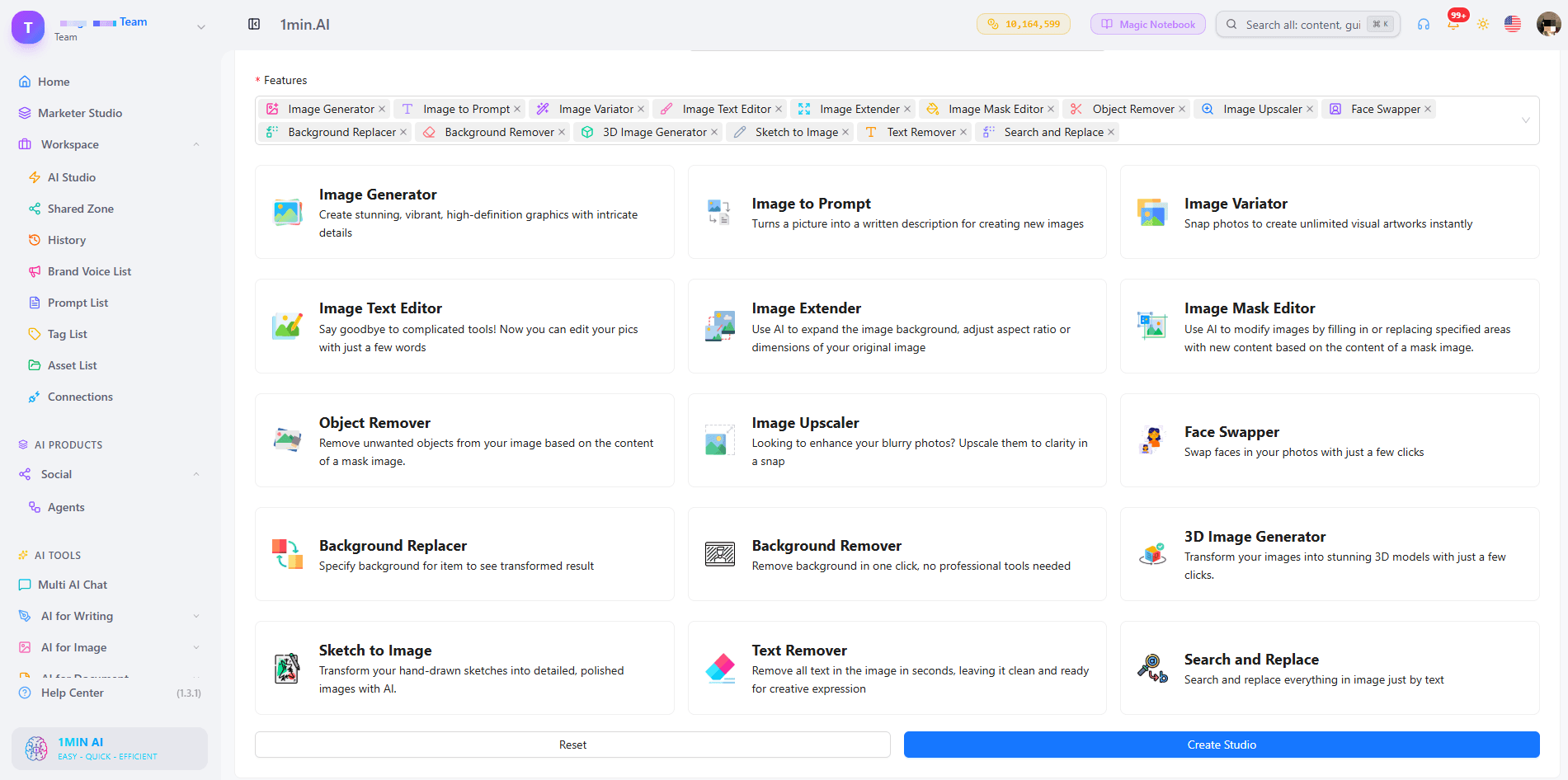
What Can You Edit With a Prompt in 1min.AI?
| Edit goal | Example prompt | 1min.AI tool |
|---|---|---|
| Swap an object or outfit | “Replace the blue jacket with a red leather jacket” | Search and Replace |
| Build a new scene | “Place the sneaker on a wet city street at dusk” | Background Replacer |
| Fix one precise area | Paint the area, then “Add a small window with a plant” | Image Mask Editor |
| Change wording in a design | “Change 20% OFF to 30% OFF” | Image Text Editor |
| Clean up clutter | “Remove the person behind the table” | Object Remover |
| Resize or sharpen | Widen the canvas, then upscale | Image Extender, Image Upscaler |
Replace Objects and Outfits With Search and Replace
Name what you want to find and what should replace it. The tool handles the selection, so you can run object search and replace edits, such as changing a sofa’s fabric or a product’s packaging color, without drawing an outline. Add “keep everything else unchanged” to protect the rest of the scene. For a deeper walkthrough, see this guide to object search and replace.
Swap Backgrounds Without Cutting Anything Out
Background Replacer removes the old scene and builds a new one from your description. Mention the place, time of day and mood, for example “sunlit studio with a soft white backdrop”. Here is a quick walkthrough:
Repaint Only the Area You Choose
The Image Mask Editor is for edits that need precision. Paint over a region, then describe what belongs there. This kind of mask-based editing keeps faces, logos and everything outside the mask untouched.
Edit Text Inside an Image
Image Text Editor lets you rewrite text that already sits inside a banner, label or screenshot. Type the new wording and the tool works to match the surrounding style. It is a fast way to update prices, dates and captions without rebuilding the design.
Start From Scratch, Then Edit
No source photo yet? Generate a base image first, then refine it with the editing tools. Creating and editing in one workspace means you never export, re-upload and start over.
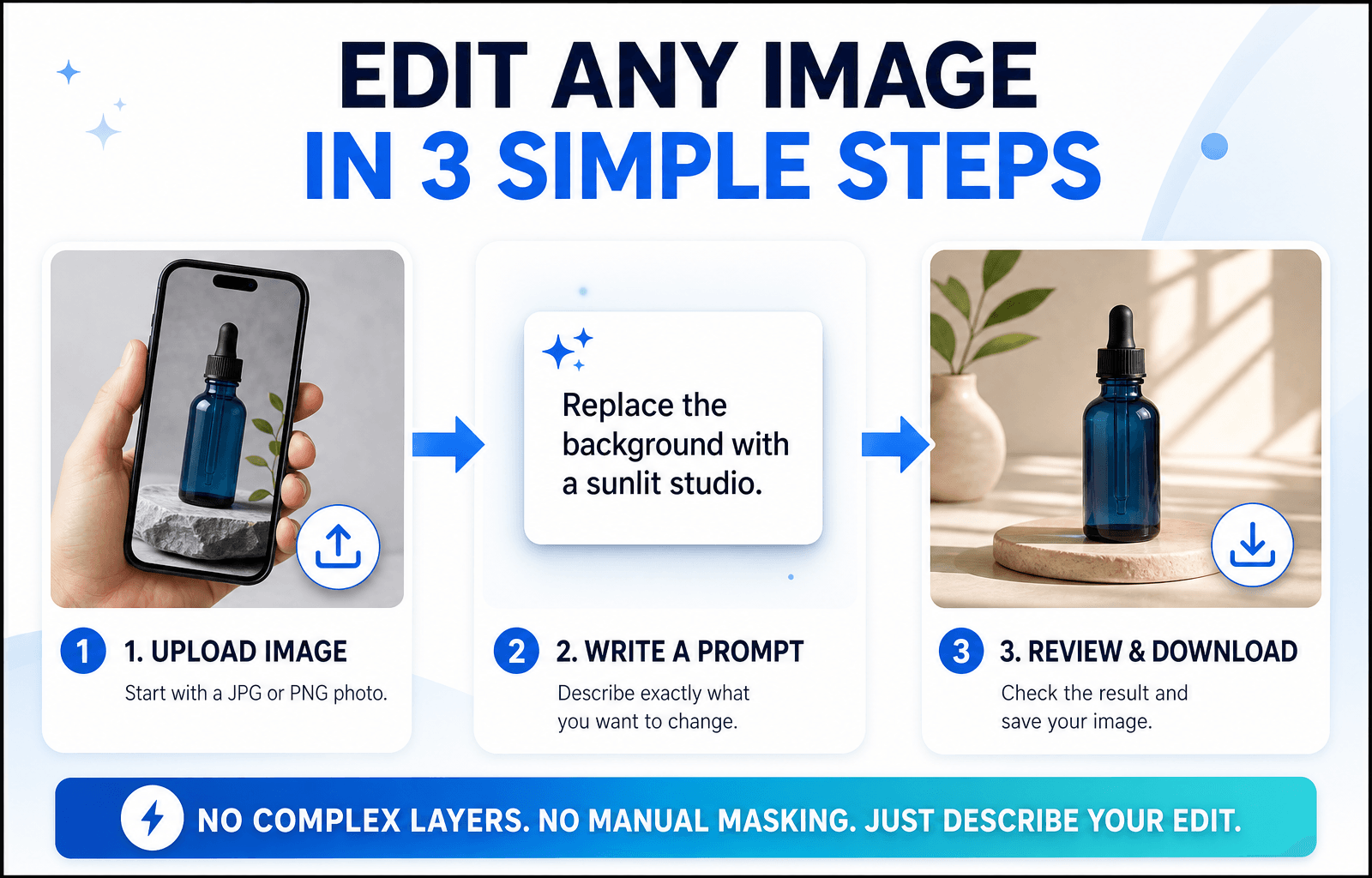
How to Edit an Image With a Prompt in 3 Steps
Step 1: Open the Editor and Upload Your Image
Choose the tool that matches your goal and upload a JPG or PNG. A sharp, well-lit photo with a clear subject gives the AI more to work with, so your edit looks more accurate.
Step 2: Write a Specific Prompt
Specific beats clever. Say what should change and what should stay the same.
The Prompt Formula
Object + Action + Style or Lighting + What stays unchanged
Three Prompts You Can Copy
- “Change the red jacket on the left to dark green denim. Keep the face and background unchanged.”
- “Replace the background with a sunlit studio and a soft white backdrop. Keep natural shadows under the product.”
- “Remove the cables on the desk and fill the area with the same wood texture.”
Edits usually miss because the prompt is too broad. This short video covers the most common mistakes:
Step 3: Review, Refine and Download
Zoom in and check edges, hands, text and shadows. If one detail is off, run a second prompt on that detail instead of stacking several requests in one line. Then download your image, which has no watermark. Save prompts that worked to your Prompt List so you can reuse them.
Editing People, Products or Landscapes: Which Setup Fits?
Photos of People
Describe clothing, hair color or background changes and add “keep the face unchanged”. For small fixes, use the mask tool so only the chosen area changes.
Product Photos
Swap backgrounds, remove reflections and recolor packaging while keeping labels sharp. Consistent backgrounds help a whole catalog look uniform.
Landscapes and Travel Shots
Remove crowds, adjust the sky or extend the frame to a wider format. Mention light and weather (“golden hour, clear sky”) so the edit blends naturally.
Browser Editor or Local Open-Source Model?
Open-source models run on your own computer. They offer deep control, but you manage installation, hardware and updates. A browser-based editor like 1min.AI needs none of that: open a tab, choose a tool and edit. If you want to start quickly or work across devices, the browser route is simpler. If you enjoy tuning models yourself, a local setup may suit you better.
What to Look for in the Best Free AI Image Editor With No Restrictions Online
Use this checklist for any tool you test:
- Full-sentence prompts rather than a fixed command menu
- Several edit types on the same image
- Precise control, such as masks for local changes
- Clean exports without a watermark
- Reusable prompts and assets so repeat work gets faster
- Clear policies about what the models can and cannot do
1min.AI covers each point in one workspace, with tools for text editing, object swapping, backgrounds, masks, extending and upscaling. AI Studio, Prompt List and Asset List are ready to use, and you can add a Shared Zone and History when you create an account.
You can also check how others rate the platform. 1min.AI holds SourceForge and Slashdot Top Business Software badges, is rated Excellent on Trustpilot and is listed on Capterra, Software Advice and GetApp.

FAQ
What is an AI image editor with prompt no restrictions?
It is an editor where you describe any change in your own words instead of picking from a locked list of actions. It still follows legal and model safety rules.
Is there a free AI image editor with prompt no restrictions?
Yes. You can try 1min.AI’s image editing tools free and download results without a watermark.
Does “no restrictions” mean anything goes?
No. Illegal content, content involving minors and deceptive or non-consensual images of real people are not allowed. Everything else is up to your creativity.
Which 1min.AI tool should I use to change text in an image?
Use Image Text Editor. Type the new wording and it updates the text inside the picture.
Do I need design skills?
No. If you can describe the change the way you would to a designer, you can edit with a prompt.
How do I write better edit prompts?
Name the object, state the action and add what should stay unchanged. Make one change per pass for the cleanest result.
Ready to Edit Your First Image?
Your next edit is one sentence away. Upload an image, type what you want to change and see the result in seconds.
- #Transaction
Алтернативи
Откријте ги најдобрите алтернативи за 1minAI и споредете ги функциите, цените и случаите на употреба.

1min.AI наспроти OpenRouter
1min.AI наспроти OpenRouter: Споредете го готовиот производ за AI-креирање со техничката API алатка. Дознајте дали ви треба креативно студио без код или хаб за инфраструктура за кодирање.
 Ngoc Hong

1min AI vs Buffer
Compare 1min.AI vs Buffer for Facebook content creation, AI writing, image generation, scheduling, pricing, and everyday marketing workflows.
Ngoc Hong
1min.AI vs. Hootsuite: Which Social Media Tool Fits Your Workflow?
Compare 1min.AI vs. Hootsuite to explore their AI content creation, social media publishing, analytics, pricing, and collaboration features. Find the right tool for your workflow.
Алатки за вештачка интелигенција
Откријте ги најдобрите алатки за вештачка интелигенција за да ја зголемите продуктивноста, креативноста и секојдневната работа.

Топ 4 прифатливи AI алатки за основачи на стартапи
Откријте ги топ 4 прифатливи AI алатки за основачи на стартапи за да ги валидирате идеите, градите производи, креирате содржина и лансирате побрзо без преголеми трошоци.
 Tram Ta

POV: Имате 10+ објави за креирање секој ден
Научете како да изградите AI работен тек за содржина што им помага на креаторите на содржини побрзо да создаваат 10+ објави за социјални мрежи дневно со AI brainstorm, генерирање слики и креирање содржина.
 Lien Anh Vu

Претворете „Направи го подобро“ во подобра содржина со AI
Користете AI за да претворите нејасни повратни информации од клиентите во јасни ревизии, да намалите непотребни измени и побрзо да испорачате подобра содржина.
Lien Anh VuAI функции
Сеопфатни AI функции кои ги поедноставуваат работните процеси, ја зголемуваат ефикасноста и им овозможуваат на тимовите да постигнат повеќе.

1minAI: Бесплатен AI проверувач на граматика
Проверете граматика бесплатно со AI проверувачот на граматика од 1minAI. Најдете граматички, правописни и пишувачки грешки, подобрете ја јасноста и доусовршете го вашиот содржај за секунди.
Tram Ta
Изградете портфолио веб-страница побрзо со 1min.AI
Дознајте како фриленс креативците можат да го користат 1min.AI за да планираат, пишуваат, дизајнираат и генерираат професионална портфолио веб-страница побрзо, дури и без силни програмерски вештини.
Lien Anh Vu
Бесплатен АИ Х коментар
Креирајте смешни, духовити или проникливи коментари за Твитер со нашиот АИ-напојуван генератор на Твитер коментари. Зголемете го вашиот ангажман и издвојте се од толпата!
 Trang Tran
Примени на вештачка интелигенција
Курирана збирка на примени на вештачка интелигенција за бизнис, подобрување на продуктивноста и индустриски апликации.

Најдобро време за објавување на Instagram: Практичен водич за подобра ангажираност
Откријте го најдоброто време за објавување на Instagram, вклучително и најдобрите денови и часови за различни публики, плус совети за да го пронајдете идеалниот распоред за објавување за вашиот профил.
Tram TaИзградете портфолио веб-страница побрзо со 1min.AI
Дознајте како фриленс креативците можат да го користат 1min.AI за да планираат, пишуваат, дизајнираат и генерираат професионална портфолио веб-страница побрзо, дури и без силни програмерски вештини.
Lien Anh VuПретворете „Направи го подобро“ во подобра содржина со AI
Користете AI за да претворите нејасни повратни информации од клиентите во јасни ревизии, да намалите непотребни измени и побрзо да испорачате подобра содржина.
Lien Anh VuТуторијали за вештачка интелигенција
Научете како да користите вештачка интелигенција со практични туторијали чекор по чекор.

Понуди за AI алатки за Black Friday во 2026
Откријте што нудат понудите за AI алатки за Black Friday 2026. Дознајте како да ја обезбедите доживотната понуда за 1min.AI преку AppSumo, Dealify, Stack Social, и проверете на Trustpilot, Slashdot и Software Advice.
 Hang Nguyen

Искусете ја Fashion Week за $0 со 1minAI Face Swap
Искусете ја Fashion Week за $0 со 1minAI Face Swap. Поставете ја вашата фотографија, изберете Fashion Week видео и создадете сопствен AI моден момент.
Ngoc Hong
Вирални Reels за неколку минути: Како да го користите Text-to-Speech на 1minAI за сатирични voiceover-и
Научете како администраторите на сатирични страници ја користат функцијата Text-to-Speech на 1minAI за да генерираат веднаш news anchor и драматични voiceover-и за TikTok, Shorts и Instagram Reels.
AI Водичи
Учете вештачка интелигенција побрзо со практични водичи, примери од реалниот свет и применливи најдобри практики.

Безбедно купете AI алатки онлајн: Водич за Black Friday 2026
Откријте како да ги најдете и обезбедите најдобрите Black Friday AI понуди онлајн. Научете стручни стратегии за да избегнете измами, да се справите со заморот од претплати и да го проверите софтверот.
Hang Nguyen
Како да започнете AI бизнис без да градите од нула
Научете како да започнете AI бизнис, да ја потврдите вашата идеја и да лансирате побрзо без да градите скапа AI инфраструктура од нула.
Ngoc Hong
AI Fashion Video Generator With Seedance 2.5 and HeyGen
Learn how to create AI fashion videos with Seedance 2.5 and HeyGen. Turn outfit photos into cinematic videos featuring your own face with 1min.AI.
Lien Anh VuРешенија за вештачка интелигенција
Разгледајте ги најдобрите решенија за вештачка интелигенција за автоматизација, кодирање, истражување, продуктивност, поддршка на клиенти, маркетинг и деловни работни процеси.

Бесплатен AI генератор на тетоважи: сопствени дизајни
Претворете која било идеја во сопствен дизајн за тетоважа со бесплатниот AI генератор за тетоважи на 1min.AI. Опишете ја вашата идеја, изберете стил и преземете за неколку секунди.
Trang TranБезбедно купете AI алатки онлајн: Водич за Black Friday 2026
Откријте како да ги најдете и обезбедите најдобрите Black Friday AI понуди онлајн. Научете стручни стратегии за да избегнете измами, да се справите со заморот од претплати и да го проверите софтверот.
Hang NguyenИскусете ја Fashion Week за $0 со 1minAI Face Swap
Искусете ја Fashion Week за $0 со 1minAI Face Swap. Поставете ја вашата фотографија, изберете Fashion Week видео и создадете сопствен AI моден момент.
Ngoc HongАИ Модели
Истражете ги водечките АИ модели во светот на едно место.

Free AI Chat With Claude Fable 5.2 On 1min.AI
Free AI chat with Claude Fable 5.2 on 1min.AI. Compare Fable 5.2 vs Opus 5.5, see Fable 5.2 benchmarks, and start chatting in minutes.
Trang Tran
GPT-6.2 Sol: Specs, Pricing & Free Access
Explore GPT-6.2 Sol specs, pricing, and how it compares with GPT-6.1 Sol and Claude Opus 5.5, then try it free in 1min.AI Multi AI Chat.
Trang Tran
GPT 6.2 Astra: Pricing, Benchmarks & Free Access
GPT 6.2 Astra release date, pricing, Reddit feedback and Opus 5.5 comparison. See what it does best and chat with it on 1min.AI for free.
Trang TranСпоредби со АИ
Споредете алатки, модели и платформи за АИ за да го пронајдете најдоброто за вашите потреби.

Gemini 4 Neon vs Hydrogen: Specs, Price & Picks
Gemini 4 Neon vs Hydrogen, Carbon and Argon: compare price, benchmarks and use cases to pick the right model, then test them side by side on 1min.AI.
Trang Tran
Kling AI Vs Veo 3: Кој модел победува?
Kling AI vs Veo 3: споредете движење, вградено аудио, цени и бесплатни нивоа за да видите кој AI генератор за видео е подобар за вашиот проект - пробајте ги двата на 1min.AI.
Trang Tran
Споредба на DeepSeek V4 Pro и Flash
Споредете ги метриките на DeepSeek V4 Pro и DeepSeek V4 Flash. Оптимизирајте ги вашите agentic апликации и подобрете го AI проверувањето факти на 1min.ai денес.
Ngoc HongAI интеграции
Безшевно интегрирајте AI со алатките што веќе ги користите за да ја автоматизирате работата и да ја зголемите продуктивноста.
POV: Имате 10+ објави за креирање секој ден
Научете како да изградите AI работен тек за содржина што им помага на креаторите на содржини побрзо да создаваат 10+ објави за социјални мрежи дневно со AI brainstorm, генерирање слики и креирање содржина.
Lien Anh Vu
Прекинете со префрлање меѓу AI апликации: Како AI интеграцијата го трансформира employer branding-от
Откријте како AI интеграцијата им помага на HR тимовите да го поедностават employer branding-от со комбинирање на AI пишување, документи, слики, видео и повеќе AI модели во еден workspace.
Tram Ta
Објаснет AI API агрегатор за развивачи
AI API агрегатор им дава на развивачите едно унифицирано API за повикување повеќе AI модели, со што се намалуваат времето за интеграција и зависноста од еден добавувач.
Trang TranВИ за индустрии
Најдете ги најдобрите алатки и работни текови за вештачка интелигенција за здравство, финансии, образование, право, производство, малопродажба, недвижности и многу повеќе.

Voice Cloning AI Free: How to Clone Any Voice Online in Minutes
Try voice cloning AI free with 1min.AI. Upload a 5-second clip, pick an ElevenLabs model, choose from 32 languages, and turn text to speech in your own voice.
Trang Tran
Claude Personal Finance Setup and Safety Guide
Claude personal finance explained: how Personal Finance in Claude works and what Claude finance can see. Plus a safe CSV method for non-US users.
Trang TranFree AI Image Editor With Prompt No Restrictions
Looking for a free AI image editor with prompt no restrictions? Edit backgrounds, objects and text by typing, no watermark. Try 1min.AI’s flexible editor now.
Trang TranАгенти за вештачка интелигенција
Откријте и извршете AI агенти за автоматизирање задачи во вашата работа и секојдневен живот.
1minAI: Бесплатен AI проверувач на граматика
Проверете граматика бесплатно со AI проверувачот на граматика од 1minAI. Најдете граматички, правописни и пишувачки грешки, подобрете ја јасноста и доусовршете го вашиот содржај за секунди.
Tram Ta
AI агенти за Facebook
Користете AI агент за Facebook за да креирате содржина, генерирате слики, закажувате објави и објавувате од вашите документи и разговори.
Ngoc Hong
AI агент против AI асистент: Кое навистина им заштедува повеќе време на дизајнерите?
Дознајте ја разликата меѓу AI агент и AI асистент и откријте кое решение им помага на дизајнерите да автоматизираат повторливи задачи, да ги намалат ревизиите и да заштедат повеќе време.
Lien Anh VuРаботници текови со вештачка интелигенција
Истражете ги готовите работни текови со вештачка интелигенција за продуктивност, маркетинг, продажба, поддршка и друго.
POV: Имате 10+ објави за креирање секој ден
Научете како да изградите AI работен тек за содржина што им помага на креаторите на содржини побрзо да создаваат 10+ објави за социјални мрежи дневно со AI brainstorm, генерирање слики и креирање содржина.
Lien Anh VuAI Fashion Video Generator With Seedance 2.5 and HeyGen
Learn how to create AI fashion videos with Seedance 2.5 and HeyGen. Turn outfit photos into cinematic videos featuring your own face with 1min.AI.
Lien Anh Vu
Is Seedance 2.5 the Best AI Video Generator of 2026?
Is Seedance 2.5 the best AI video generator in 2026? Explore its features, compare it with Kling and Veo, and learn how to create AI videos on 1min.AI.
Lien Anh VuБилтен
Неделни иновации во вештачката интелигенција со 1minAI

🔮 Weekly AI Innovations #145: X Content Agent & GPT 6.1 Terra on 1min.ai
Scale viral reach with the X Content Agent on 1min.ai. Discover an end-to-end 4-stage pipeline with zero token burn, plus the launch of GPT 6.1 Terra.
Hang Nguyen
🔮 Weekly AI Innovations #144: LinkedIn Content Agent: Complete B2B Publishing Pipeline
Scale B2B influence with the LinkedIn Content Agent on 1min.ai. Discover an end-to-end 4-stage pipeline with zero redundant token burn and 1-click publishing.
Hang Nguyen
🔮 Weekly AI Innovations #146: Mistral 3.5, Qwen Image & Cohere A+ are ready on 1min.ai
Deploy Mistral Large 3, Qwen Image 3.0, and Cohere Command A+ on 1min.ai. Boost RAG accuracy and cut visual generation latency in one unified AI workspace.
Hang Nguyen