
Free AI Image Editor No Restrictions with 1minAI

Tram Ta
ನವೆಂಬರ್ 20, 2026
Looking for a free AI image editor with no restrictions? Edit photos with prompts, replace objects, remove text, change backgrounds, and transform images with 1minAI.
You have a photo that is almost perfect, but something needs to change. Maybe the background does not match your campaign, an unwanted object distracts from the subject, or the image needs a different size for social media.
Traditional photo editing can require multiple tools, complicated selections, and time-consuming manual adjustments. A free AI image editor offers a simpler approach: upload an image, describe the change you want, and let AI help transform it.
But what does "no restrictions" really mean? Does it mean unlimited editing, no watermarks, or the freedom to create any image?
With 1minAI, the focus is on giving creators more flexibility over how they edit. You can use natural-language prompts to replace objects, change backgrounds, modify selected areas, remove text, extend images, and explore creative variations in one workspace.
This guide explains how to use a free AI image editor, which tools to choose for different editing tasks, and how to write better prompts to get the results you want.
What Can You Do With 1minAI's Free AI Image Editor?
1minAI brings multiple AI image capabilities into one workspace. Instead of relying on one editor for every task, you can choose a tool based on the specific change you want to make.
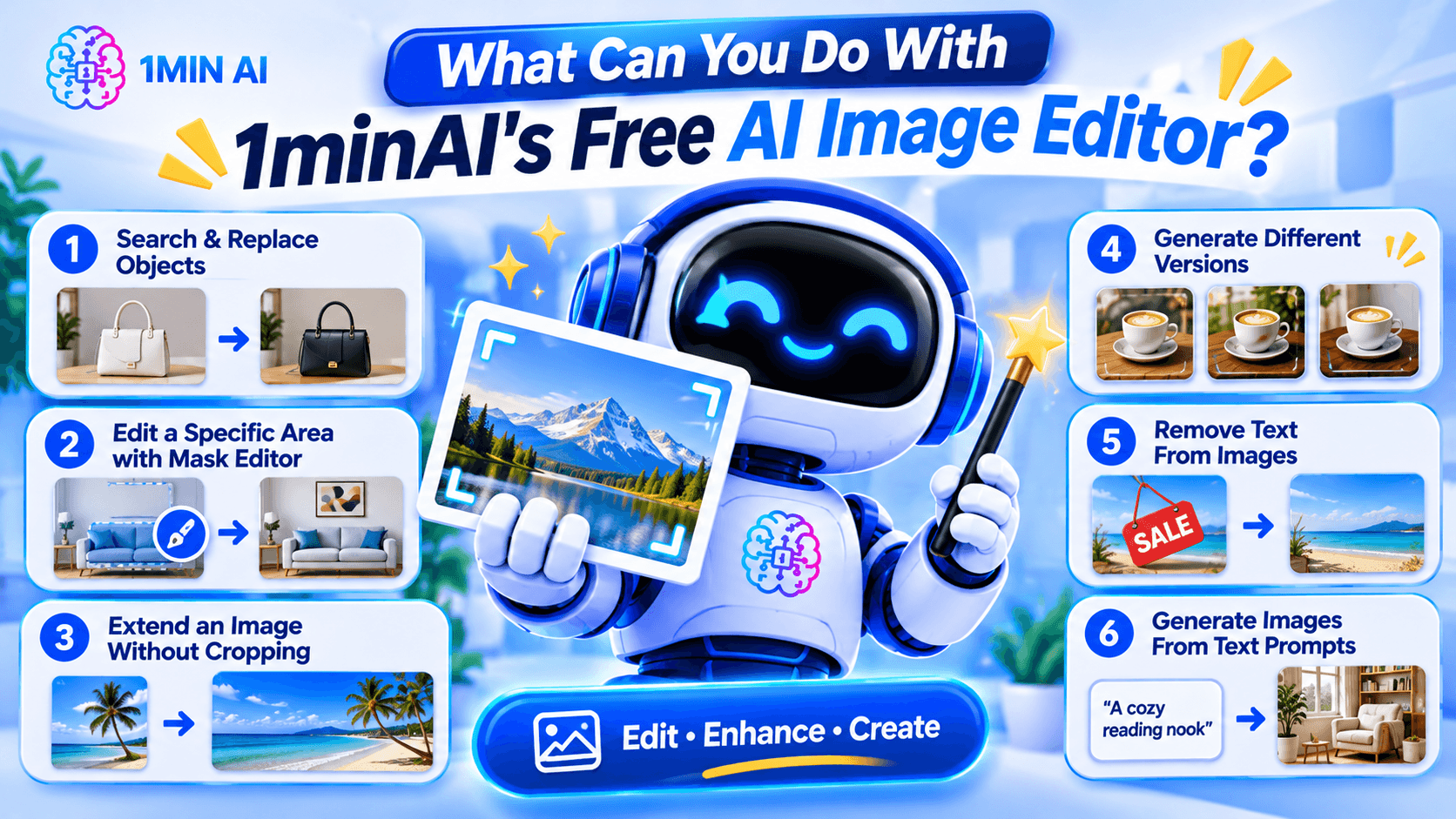
Here are some of the main editing workflows.
1. Search and Replace Objects in an Image
AI photo editing before after product image object replacement example replacing handbag color or furniture with new object realistic seamless edit" aspectRatio="16:9" width="100%" />
Sometimes an image is good except for one object.
For example, you may like a product photo but want to change the packaging color, replace a piece of furniture, or swap an accessory.
1minAI's AI Image Object Search and Replace lets you identify an object and describe what should replace it.
Example prompt:
"Replace the white ceramic vase on the table with a matte black vase. Keep the flowers, table, wall, and lighting unchanged."
This can be useful for:
- E-commerce product photography.
- Marketing and advertising creatives.
- Interior design concepts.
- Social media content.
- Creative experimentation.
The main advantage is that you can focus on the object you want to change instead of manually rebuilding the whole image.
2. Edit a Specific Area With the Image Mask Editor
Sometimes you want to modify only one part of an image while preserving everything else.
The 1minAI Image Mask Editor lets you select the area you want to edit, then describe what should appear in that region.
For example, you could:
- Change an object in the background.
- Add a decorative element.
- Fix an unwanted detail.
- Change the color of a selected item.
- Refresh part of an older image.
Example prompt:
"Replace the selected empty wall area with a framed abstract painting in warm neutral colors. Keep the furniture and room lighting unchanged."
This is especially useful when a full-image transformation would change details you want to preserve.
3. Extend an Image Without Cropping the Original Subject
Have you ever created a square image but later needed a wide banner?
Cropping may remove important details, while stretching can distort the subject.
The 1minAI Image Extender expands the canvas by generating additional background around the original image.
You can use it to:
- Turn square images into landscape banners.
- Adapt product photos for website headers.
- Create more space for advertising text.
- Reformat social media visuals.
- Expand portraits or landscapes.
Example instruction:
"Extend this image to a wide landscape composition. Continue the existing studio background naturally and keep the product centered at its original size."
This helps you adapt existing visuals to different layouts without starting over.
4. Generate Different Versions With AI Image Variator
If you like the original image but want to explore alternative styles, use the 1minAI AI Image Variator.
It creates alternative versions of an existing image while maintaining its core subject.
You can experiment with:
- Different color palettes.
- New backgrounds.
- Alternative lighting.
- Different artistic styles.
- Fresh compositions.
- Different visual moods.
Example prompt:
"Create three visual variations of this coffee product photo. Version one should have a warm minimalist kitchen background, version two should use a modern dark studio, and version three should feature a bright outdoor café setting. Keep the product design recognizable."
This can help marketers and creators explore different creative directions before choosing a final visual.
5. Remove Text From Images
Sometimes an image contains text that you no longer need.
For example, you may have an old promotional graphic with an expired discount, an outdated date, or a caption that no longer fits your campaign.
1minAI provides a Stable Diffusion XL Text Remover API for removing text elements from images through an API workflow.
The documented endpoint uses the TEXT_REMOVER feature type and stable-diffusion-xl model identifier. It accepts an image path and supports PNG, JPEG, and WebP output formats.
This is particularly useful for developers who want to integrate text removal into an image-processing application.
Example use case:
A marketing team has an old promotional image with a previous campaign date. They can use text removal to clear the outdated text and prepare the image for a new design.
Always review the result carefully, especially when text overlaps detailed textures, logos, or important visual elements.
6. Generate Images From Text Prompts
You do not always need an existing photo to start editing.
With the 1minAI AI Image Generator, you can create a new visual from a written description.
Describe:
- The main subject.
- The environment.
- The visual style.
- The lighting.
- The composition.
- The mood and color palette.
Example prompt:
"A premium skincare serum bottle on a natural stone surface, surrounded by soft green leaves, bright morning sunlight, minimalist luxury product photography, neutral beige background, realistic texture, professional commercial advertising style."
Once you have a base image, you can continue refining it with the other editing tools.
How to Edit an Image With AI in 1minAI
You do not need to master complicated editing software to get started. A simple workflow can take you from an existing photo to a refined visual.
Step 1: Open the Image Editing Workspace
Visit 1minAI's Create, Edit, and Transform Images page to explore the available image tools.
Choose the tool that matches your goal:
- Object replacement.
- Mask-based editing.
- Image extension.
- Image variation.
- Text removal.
- Image generation.
If you already have a photo, upload it to the relevant editing tool.
Step 2: Describe the Change You Want
Write a prompt explaining what should change.
A useful prompt should be specific enough for the AI to understand the subject, action, and desired result.
Try this formula:
Object + Action + Style or Setting + Details to Preserve
For example:
"Replace the wooden chair with a modern cream-colored armchair, use a Scandinavian interior style, and keep the original room layout, lighting, and camera angle unchanged."
The more clearly you describe the desired edit, the easier it is to evaluate the result.
Step 3: Generate and Review the Result
Run the edit and inspect the generated image.
Pay attention to:
- Object shapes and proportions.
- Lighting and shadows.
- Edges around edited areas.
- Text and logos.
- Background consistency.
- Unwanted changes to the original subject.
AI editing may not produce a perfect result on the first attempt. If something looks wrong, refine the prompt or make a smaller edit.
Step 4: Download and Use Your Image
Once the result looks right, download it and prepare it for your intended project.
Before using an image commercially, check the applicable tool terms, model licenses, and rights associated with any source images, logos, or people shown in the visual.
How to Choose the Right AI Image Editing Tool
Not every editing task needs the same tool.
Choosing the right workflow can save time and reduce unnecessary edits.
| Your goal | Recommended 1minAI tool |
|---|---|
| Create an image from a text description | AI Image Generator |
| Find and replace an object | AI Image Object Search and Replace |
| Change one specific area | Image Mask Editor |
| Expand the image canvas | Image Extender |
| Generate alternative versions | AI Image Variator |
| Remove text through an API | Stable Diffusion XL Text Remover |
| Explore several image tools in one place | Create, Edit, and Transform Images |
What If You Do Not Know How to Write an Image Prompt?
You can use 1minAI Image to Prompt to analyze an existing image and turn its visual details into a written prompt.
This can help you understand how to describe:
- Main subjects.
- Colors and lighting.
- Composition.
- Camera perspective.
- Artistic style.
- Background details.
For example, if you find a product image with a style you like, you can use Image to Prompt to generate a description that helps you create a similar visual direction.
Remember to use reference images you have the right to use, and avoid copying protected designs or branding without permission.
Who Can Benefit From a Free AI Image Editor?
AI image editing is useful for more than professional designers. Different types of users can apply it to everyday creative work.
E-commerce Sellers
Online sellers need product visuals for listings, advertisements, and social media.
An AI image editor can help them:
- Change product backgrounds.
- Create lifestyle product scenes.
- Explore packaging variations.
- Remove distracting objects.
- Adapt photos for different platforms.
For example, a seller could start with one product photo and create several campaign concepts for seasonal promotions.
Digital Marketers
Marketing teams often need multiple creative assets for different campaigns.
They can use AI editing to test different backgrounds, colors, product placements, and visual styles without rebuilding every design from scratch.
Content Creators
Creators may need images for blog posts, thumbnails, social media, and presentations.
AI tools can help them turn a basic photo into a more polished visual, extend the canvas, or create alternative styles.
Small Business Owners
Small businesses may not have an in-house designer.
A prompt-based editor gives owners a way to make straightforward visual adjustments, prepare promotional materials, and explore design ideas without mastering professional editing software.
Designers and Creative Professionals
AI does not replace professional creative judgment. However, it can help designers explore concepts, generate alternatives, and handle repetitive editing tasks.
Professionals can use it as an additional tool in their creative process while retaining control over the final design.
Conclusion
A free AI image editor can make visual editing easier by turning written instructions into practical image transformations.
Whether you want to replace an object, remove text, extend a photo, create alternative versions, or generate a new visual, the right AI tool can reduce repetitive manual work and help you explore more creative ideas.
With 1minAI, you can move between image generation and editing tools in one workspace. Start with an existing photo or a text prompt, describe the change you want, review the result, and refine it until it fits your project.
More creative control starts with a clearer prompt. Try 1minAI's AI image tools and turn your next image-editing idea into reality.
- #Commerce
- #Information
ಪರ್ಯಾಯಗಳು
1minAI ಗೆ ಉತ್ತಮ ಪರ್ಯಾಯಗಳನ್ನು ಅನ್ವೇಷಿಸಿ ಮತ್ತು ವೈಶಿಷ್ಟ್ಯಗಳು, ಬೆಲೆ ಮತ್ತು ಬಳಕೆಯ ಪ್ರಕರಣಗಳನ್ನು ಹೋಲಿಕೆ ಮಾಡಿ.

1min.AI vs OpenRouter
1min.AI vs. OpenRouter: ಸಿದ್ಧಸೇವೆ AI ಸೃಜನಶೀಲ ಉತ್ಪನ್ನವನ್ನು ತಾಂತ್ರಿಕ API ಸಾಧನದೊಂದಿಗೆ ಹೋಲಿಸಿ. ನಿಮಗೆ ಕೋಡ್ ರಹಿತ ಕ್ರಿಯೇಟಿವ್ ಸ್ಟುಡಿಯೋ ಬೇಕೋ ಅಥವಾ ಕೋಡಿಂಗ್ ಮೂಲಸೌಕರ್ಯ ಹಬ್ ಬೇಕೋ ತಿಳಿಯಿರಿ.
 Ngoc Hong

1min AI vs Buffer
Compare 1min.AI vs Buffer for Facebook content creation, AI writing, image generation, scheduling, pricing, and everyday marketing workflows.
Ngoc Hong
1min.AI vs. Hootsuite: Which Social Media Tool Fits Your Workflow?
Compare 1min.AI vs. Hootsuite to explore their AI content creation, social media publishing, analytics, pricing, and collaboration features. Find the right tool for your workflow.
AI ಪರಿಕರಗಳು
ಉತ್ಪಾದಕತೆ, ಸೃಜನಶೀಲತೆ ಮತ್ತು ದೈನಂದಿನ ಕೆಲಸವನ್ನು ಹೆಚ್ಚಿಸಲು ಉತ್ತಮ AI ಪರಿಕರಗಳನ್ನು ಅನ್ವೇಷಿಸಿ.

ಸ್ಟಾರ್ಟ್ಅಪ್ ಸಂಸ್ಥಾಪಕರಿಗಾಗಿ ಕೈಗೆಟುಕುವ ಟಾಪ್ 4 AI ಸಾಧನಗಳು
ಸ್ಟಾರ್ಟ್ಅಪ್ ಸಂಸ್ಥಾಪಕರು ಐಡಿಯಾಗಳನ್ನು ಪರಿಶೀಲಿಸಲು, ಉತ್ಪನ್ನಗಳನ್ನು ನಿರ್ಮಿಸಲು, ವಿಷಯ ರಚಿಸಲು ಮತ್ತು ಹೆಚ್ಚು ಖರ್ಚು ಮಾಡದೇ ವೇಗವಾಗಿ ಲಾಂಚ್ ಮಾಡಲು ಕೈಗೆಟುಕುವ ಟಾಪ್ 4 AI ಸಾಧನಗಳನ್ನು ಕಂಡುಹಿಡಿಯಿರಿ.
 Tram Ta

POV: ನಿಮಗೆ ಪ್ರತಿದಿನ 10+ ಪೋಸ್ಟ್ಗಳು ಮಾಡಬೇಕಿದೆ
AI ಬ್ರೇನ್ಸ್ಟಾರ್ಮಿಂಗ್, ಇಮೇಜ್ ಜನರೇಷನ್, ಮತ್ತು ಕಂಟೆಂಟ್ ಸೃಷ್ಟಿಯನ್ನು ಬಳಸಿ, ಕಂಟೆಂಟ್ ಕ್ರಿಯೇಟರ್ಗಳು ದಿನಕ್ಕೆ 10+ ಸೋಶಿಯಲ್ ಮೀಡಿಯಾ ಪೋಸ್ಟ್ಗಳನ್ನು ವೇಗವಾಗಿ ತಯಾರಿಸಲು ನೆರವಾಗುವ AI ಕಂಟೆಂಟ್ ವರ್ಕ್ಫ್ಲೋವನ್ನು ಹೇಗೆ ನಿರ್ಮಿಸಬೇಕು ಎಂಬುದನ್ನು ತಿಳಿಯಿರಿ.
 Lien Anh Vu

“ಮೇಕ್ ಇಟ್ ಬೆಟರ್” ಅನ್ನು AI ಮೂಲಕ ಉತ್ತಮ ವಿಷಯವನ್ನಾಗಿ ಪರಿವರ್ತಿಸಿ
AI ಬಳಸಿ ಅಸ್ಪಷ್ಟ ಕ್ಲೈಂಟ್ ಪ್ರತಿಕ್ರಿಯೆಯನ್ನು ಸ್ಪಷ್ಟ ಪರಿಷ್ಕರಣೆಗಳಾಗಿ ರೂಪಿಸಿ, ಅನಗತ್ಯ ಎಡಿಟ್ಗಳನ್ನು ಕಡಿಮೆ ಮಾಡಿ, ಮತ್ತು ಉತ್ತಮ ವಿಷಯವನ್ನು ವೇಗವಾಗಿ ಒದಗಿಸಿ.
Lien Anh Vuಎಐ ವೈಶಿಷ್ಟ್ಯಗಳು
ವಿಸ್ತೃತ ಎಐ ವೈಶಿಷ್ಟ್ಯಗಳು ಕಾರ್ಯಪ್ರವಾಹವನ್ನು ಸರಳಗೊಳಿಸಿ, ಕಾರ್ಯದಕ್ಷತೆಯನ್ನು ಸುಧಾರಿಸಿ ಮತ್ತು ತಂಡಗಳನ್ನು ಇನ್ನಷ್ಟು ಸಾಧಿಸಲು ಸಶಕ್ತಗೊಳಿಸುತ್ತವೆ.

1minAI: ಉಚಿತ AI ವ್ಯಾಕರಣ ಪರಿಶೀಲಕ
1minAIನ AI ವ್ಯಾಕರಣ ಪರಿಶೀಲಕದಿಂದ ಉಚಿತವಾಗಿ ವ್ಯಾಕರಣ ಪರಿಶೀಲಿಸಿ. ವ್ಯಾಕರಣ, ಅಕ್ಷರದೋಷ ಮತ್ತು ಬರವಣಿಗೆಯ ತಪ್ಪುಗಳನ್ನು ಹುಡುಕಿ, ಸ್ಪಷ್ಟತೆಯನ್ನು ಹೆಚ್ಚಿಸಿ, ಮತ್ತು ನಿಮ್ಮ ವಿಷಯವನ್ನು ಕ್ಷಣಗಳಲ್ಲಿ ಮೆರಗುಪಡಿಸಿ.
Tram Ta
1min.AI ಜೊತೆಗೆ ಪೋರ್ಟ್ಫೋಲಿಯೋ ವೆಬ್ಸೈಟ್ ಅನ್ನು ಇನ್ನಷ್ಟು ವೇಗವಾಗಿ ನಿರ್ಮಿಸಿ
ಸ್ವತಂತ್ರ ಸೃಜನಶೀಲರು 1min.AI ಅನ್ನು ಬಳಸಿ ಯೋಜನೆ ರೂಪಿಸಲು, ಬರೆಯಲು, ವಿನ್ಯಾಸ ಮಾಡಲು, ಮತ್ತು ವೃತ್ತಿಪರ ಪೋರ್ಟ್ಫೋಲಿಯೋ ವೆಬ್ಸೈಟ್ ಅನ್ನು ಹೆಚ್ಚು ವೇಗವಾಗಿ ರಚಿಸಲು ಹೇಗೆ ಸಾಧ್ಯ ಎಂಬುದನ್ನು ತಿಳಿಯಿರಿ — ಬಲವಾದ ಕೋಡಿಂಗ್ ಕೌಶಲ್ಯಗಳಿಲ್ಲದಿದ್ದರೂ ಸಹ.
Lien Anh Vu
ಉಚಿತ AI X ಕಾಮೆಂಟ್
ನಮ್ಮ AI-ಚಾಲಿತ Twitter ಕಾಮೆಂಟ್ ಜನರೇಟರ್ನೊಂದಿಗೆ Twitter ಗಾಗಿ ತಮಾಷೆಯ, ಚುರುಕಾದ ಅಥವಾ ಒಳನೋಟವುಳ್ಳ ಕಾಮೆಂಟ್ಗಳನ್ನು ರಚಿಸಿ. ನಿಮ್ಮ ನಿಶ್ಚಿತಾರ್ಥವನ್ನು ಹೆಚ್ಚಿಸಿ ಮತ್ತು ಜನಸಂದಣಿಯಲ್ಲಿ ಎದ್ದು ಕಾಣಿ!
 Trang Tran
ಎಐ ಉಪಯೋಗ ಪ್ರಕರಣಗಳು
ವ್ಯಾಪಾರ, ಉತ್ಪಾದಕತೆ ಮತ್ತು ಉದ್ಯಮ-ನಿರ್ದಿಷ್ಟ ಅನ್ವಯಗಳಿಗಾಗಿ ಆಯ್ದ ಎಐ ಉಪಯೋಗ ಪ್ರಕರಣಗಳ ಸಂಗ್ರಹ.

ಇನ್ಸ್ಟಾಗ್ರಾಮ್ನಲ್ಲಿ ಪೋಸ್ಟ್ ಮಾಡಲು ಉತ್ತಮ ಸಮಯ: ಉತ್ತಮ ಎಂಗೇಜ್ಮೆಂಟ್ಗಾಗಿ ಪ್ರಾಯೋಗಿಕ ಮಾರ್ಗದರ್ಶಿ
ಇನ್ಸ್ಟಾಗ್ರಾಮ್ನಲ್ಲಿ ಪೋಸ್ಟ್ ಮಾಡಲು ಉತ್ತಮ ಸಮಯವನ್ನು ತಿಳಿದುಕೊಳ್ಳಿ. ವಿಭಿನ್ನ ಪ್ರೇಕ್ಷಕರಿಗೆ ಉತ್ತಮ ದಿನಗಳು ಮತ್ತು ಸಮಯಗಳು, ಜೊತೆಗೆ ನಿಮ್ಮ ಖಾತೆಗೆ ಆದರ್ಶ ಪೋಸ್ಟ್ ವೇಳಾಪಟ್ಟಿಯನ್ನು ಕಂಡುಹಿಡಿಯುವ ಸಲಹೆಗಳು ಸಹ ಇಲ್ಲಿ ಇವೆ.
Tram Ta1min.AI ಜೊತೆಗೆ ಪೋರ್ಟ್ಫೋಲಿಯೋ ವೆಬ್ಸೈಟ್ ಅನ್ನು ಇನ್ನಷ್ಟು ವೇಗವಾಗಿ ನಿರ್ಮಿಸಿ
ಸ್ವತಂತ್ರ ಸೃಜನಶೀಲರು 1min.AI ಅನ್ನು ಬಳಸಿ ಯೋಜನೆ ರೂಪಿಸಲು, ಬರೆಯಲು, ವಿನ್ಯಾಸ ಮಾಡಲು, ಮತ್ತು ವೃತ್ತಿಪರ ಪೋರ್ಟ್ಫೋಲಿಯೋ ವೆಬ್ಸೈಟ್ ಅನ್ನು ಹೆಚ್ಚು ವೇಗವಾಗಿ ರಚಿಸಲು ಹೇಗೆ ಸಾಧ್ಯ ಎಂಬುದನ್ನು ತಿಳಿಯಿರಿ — ಬಲವಾದ ಕೋಡಿಂಗ್ ಕೌಶಲ್ಯಗಳಿಲ್ಲದಿದ್ದರೂ ಸಹ.
Lien Anh Vu“ಮೇಕ್ ಇಟ್ ಬೆಟರ್” ಅನ್ನು AI ಮೂಲಕ ಉತ್ತಮ ವಿಷಯವನ್ನಾಗಿ ಪರಿವರ್ತಿಸಿ
AI ಬಳಸಿ ಅಸ್ಪಷ್ಟ ಕ್ಲೈಂಟ್ ಪ್ರತಿಕ್ರಿಯೆಯನ್ನು ಸ್ಪಷ್ಟ ಪರಿಷ್ಕರಣೆಗಳಾಗಿ ರೂಪಿಸಿ, ಅನಗತ್ಯ ಎಡಿಟ್ಗಳನ್ನು ಕಡಿಮೆ ಮಾಡಿ, ಮತ್ತು ಉತ್ತಮ ವಿಷಯವನ್ನು ವೇಗವಾಗಿ ಒದಗಿಸಿ.
Lien Anh VuAI ಟ್ಯುಟೋರಿಯಲ್ಸ್
ಪ್ರಾಯೋಗಿಕ, ಹಂತ-ಹಂತದ ಟ್ಯುಟೋರಿಯಲ್ಗಳೊಂದಿಗೆ AI ಅನ್ನು ಹೇಗೆ ಬಳಸುವುದು ಎಂದು ತಿಳಿಯಿರಿ.

2026ರ ಬ್ಲಾಕ್ ಫ್ರೈಡೇ AI ಟೂಲ್ ಡೀಲ್ಸ್
2026ರ ಬ್ಲಾಕ್ ಫ್ರೈಡೇ AI ಟೂಲ್ ಡೀಲ್ಸ್ ಏನು ನೀಡುತ್ತವೆ ಎಂದು ತಿಳಿಯಿರಿ. AppSumo, Dealify, Stack Social ಮೂಲಕ 1min.AI ಲೈಫ್ಟೈಮ್ ಡೀಲ್ ಅನ್ನು ಹೇಗೆ ಪಡೆದುಕೊಳ್ಳುವುದು ಮತ್ತು Trustpilot, Slashdot, Software Advice ನಲ್ಲಿ ಹೇಗೆ ಪರಿಶೀಲಿಸುವುದು ಎಂಬುದನ್ನು ಕಂಡುಹಿಡಿಯಿರಿ.
 Hang Nguyen

1minAI Face Swapನೊಂದಿಗೆ $0ಕ್ಕೆ Fashion Week ಅನುಭವಿಸಿ
1minAI Face Swapನೊಂದಿಗೆ $0ಕ್ಕೆ Fashion Week ಅನುಭವಿಸಿ. ನಿಮ್ಮ ಫೋಟೋವನ್ನು ಅಪ್ಲೋಡ್ ಮಾಡಿ, Fashion Week ವೀಡಿಯೊವನ್ನು ಆಯ್ಕೆ ಮಾಡಿ, ಮತ್ತು ನಿಮ್ಮದೇ AI ಫ್ಯಾಷನ್ ಕ್ಷಣವನ್ನು ರಚಿಸಿ.
Ngoc Hong
ನಿಮಿಷಗಳಲ್ಲಿ ವೈರಲ್ ರೀಲ್ಸ್: ವ್ಯಂಗ್ಯ ಧ್ವನಿ-ಓವರ್ಗಳಿಗೆ 1minAIನ Text-to-Speech ಅನ್ನು ಹೇಗೆ ಬಳಸುವುದು
ಸಾಟೈರ್ ಪೇಜ್ ಆಡ್ಮಿನ್ಗಳು 1minAIನ Text-to-Speech ವೈಶಿಷ್ಟ್ಯವನ್ನು ಬಳಸಿ TikTok, Shorts ಮತ್ತು Instagram Reelsಗಾಗಿ ತಕ್ಷಣದ ನ್ಯೂಸ್ ಆಂಕರ್ ಮತ್ತು ಡ್ರಾಮಾಟಿಕ್ ಧ್ವನಿ-ಓವರ್ಗಳನ್ನು ಹೇಗೆ ಸೃಷ್ಟಿಸುತ್ತಾರೆ ಎಂಬುದನ್ನು ತಿಳಿಯಿರಿ.
AI ಮಾರ್ಗದರ್ಶಿಗಳು
ಪ್ರಾಯೋಗಿಕ ಮಾರ್ಗದರ್ಶಿಗಳು, ನೈಜ-ಪ್ರಪಂಚದ ಉದಾಹರಣೆಗಳು ಮತ್ತು ಕಾರ್ಯಸಾಧ್ಯವಾದ ಉತ್ತಮ ಅಭ್ಯಾಸಗಳೊಂದಿಗೆ AI ಅನ್ನು ವೇಗವಾಗಿ ಕಲಿಯಿರಿ.

AI ಟೂಲ್ಗಳನ್ನು ಸುರಕ್ಷಿತವಾಗಿ ಆನ್ಲೈನ್ನಲ್ಲಿ ಖರೀದಿಸಿ: 2026 ಬ್ಲಾಕ್ ಫ್ರೈಡೇ ಗೈಡ್
ಅತ್ಯುತ್ತಮ ಬ್ಲಾಕ್ ಫ್ರೈಡೇ AI ಡೀಲ್ಗಳನ್ನು ಆನ್ಲೈನ್ನಲ್ಲಿ ಹೇಗೆ ಕಂಡುಹಿಡಿದು ಸುರಕ್ಷಿತಗೊಳಿಸಬೇಕು ಎಂಬುದನ್ನು ತಿಳಿಯಿರಿ. ಮೋಸಗಳನ್ನು ತಪ್ಪಿಸಲು, ಸಬ್ಸ್ಕ್ರಿಪ್ಶನ್ ದಣಿವನ್ನು ಎದುರಿಸಲು, ಮತ್ತು ಸಾಫ್ಟ್ವೇರ್ ಪರಿಶೀಲಿಸಲು ತಜ್ಞರ ತಂತ್ರಗಳನ್ನು ಕಲಿಯಿರಿ.
Hang Nguyen
ಮೂಲದಿಂದಲೇ ನಿರ್ಮಿಸದೇ AI ವ್ಯವಹಾರವನ್ನು ಹೇಗೆ ಆರಂಭಿಸುವುದು
AI ವ್ಯವಹಾರವನ್ನು ಹೇಗೆ ಆರಂಭಿಸಬೇಕು, ನಿಮ್ಮ ಆಲೋಚನೆಯನ್ನು ಹೇಗೆ ಪರಿಶೀಲಿಸಬೇಕು, ಮತ್ತು ದುಬಾರಿ AI ಮೂಲಸೌಕರ್ಯವನ್ನು ಆರಂಭದಿಂದಲೇ ನಿರ್ಮಿಸದೇ ಬೇಗ ಲಾಂಚ್ ಮಾಡಬೇಕು ಎಂಬುದನ್ನು ತಿಳಿಯಿರಿ.
Ngoc Hong
AI Fashion Video Generator With Seedance 2.5 and HeyGen
Learn how to create AI fashion videos with Seedance 2.5 and HeyGen. Turn outfit photos into cinematic videos featuring your own face with 1min.AI.
Lien Anh VuAI ಪರಿಹಾರಗಳು
ಸ್ವಯಂಚಾಲಿತೀಕರಣ, ಕೋಡಿಂಗ್, ಸಂಶೋಧನೆ, ಉತ್ಪಾದಕತೆ, ಗ್ರಾಹಕ ಬೆಂಬಲ, ಮಾರ್ಕೆಟಿಂಗ್ ಮತ್ತು ವ್ಯಾಪಾರ ಕೆಲಸದ ಹರಿವುಗಳಿಗಾಗಿ ಉತ್ತಮ AI ಪರಿಹಾರಗಳನ್ನು ಬ್ರೌಸ್ ಮಾಡಿ.

ಉಚಿತ AI ಟ್ಯಾಟೂ ಜನರೇಟರ್: ಕಸ್ಟಮ್ ವಿನ್ಯಾಸಗಳು
1min.AI ಯ ಉಚಿತ AI ಟ್ಯಾಟೂ ಜನರೇಟರ್ ಬಳಸಿ ಯಾವುದೇ ಆಲೋಚನೆಯನ್ನು ಕಸ್ಟಮ್ ಟ್ಯಾಟೂ ವಿನ್ಯಾಸವಾಗಿ ಮಾಡಿರಿ. ನಿಮ್ಮ ಐಡಿಯಾವನ್ನು ವಿವರಿಸಿ, ಶೈಲಿಯನ್ನು ಆರಿಸಿ, ಮತ್ತು ಕೆಲ ಸೆಕೆಂಡುಗಳಲ್ಲಿ ಡೌನ್ಲೋಡ್ ಮಾಡಿರಿ.
Trang TranAI ಟೂಲ್ಗಳನ್ನು ಸುರಕ್ಷಿತವಾಗಿ ಆನ್ಲೈನ್ನಲ್ಲಿ ಖರೀದಿಸಿ: 2026 ಬ್ಲಾಕ್ ಫ್ರೈಡೇ ಗೈಡ್
ಅತ್ಯುತ್ತಮ ಬ್ಲಾಕ್ ಫ್ರೈಡೇ AI ಡೀಲ್ಗಳನ್ನು ಆನ್ಲೈನ್ನಲ್ಲಿ ಹೇಗೆ ಕಂಡುಹಿಡಿದು ಸುರಕ್ಷಿತಗೊಳಿಸಬೇಕು ಎಂಬುದನ್ನು ತಿಳಿಯಿರಿ. ಮೋಸಗಳನ್ನು ತಪ್ಪಿಸಲು, ಸಬ್ಸ್ಕ್ರಿಪ್ಶನ್ ದಣಿವನ್ನು ಎದುರಿಸಲು, ಮತ್ತು ಸಾಫ್ಟ್ವೇರ್ ಪರಿಶೀಲಿಸಲು ತಜ್ಞರ ತಂತ್ರಗಳನ್ನು ಕಲಿಯಿರಿ.
Hang Nguyen1minAI Face Swapನೊಂದಿಗೆ $0ಕ್ಕೆ Fashion Week ಅನುಭವಿಸಿ
1minAI Face Swapನೊಂದಿಗೆ $0ಕ್ಕೆ Fashion Week ಅನುಭವಿಸಿ. ನಿಮ್ಮ ಫೋಟೋವನ್ನು ಅಪ್ಲೋಡ್ ಮಾಡಿ, Fashion Week ವೀಡಿಯೊವನ್ನು ಆಯ್ಕೆ ಮಾಡಿ, ಮತ್ತು ನಿಮ್ಮದೇ AI ಫ್ಯಾಷನ್ ಕ್ಷಣವನ್ನು ರಚಿಸಿ.
Ngoc HongAI ಮಾದರಿಗಳು
ವಿಶ್ವದ ಪ್ರಮುಖ AI ಮಾದರಿಗಳನ್ನು ಒಂದೇ ಸ್ಥಳದಲ್ಲಿ ಅನ್ವೇಷಿಸಿ.

Free AI Chat With Claude Fable 5.2 On 1min.AI
Free AI chat with Claude Fable 5.2 on 1min.AI. Compare Fable 5.2 vs Opus 5.5, see Fable 5.2 benchmarks, and start chatting in minutes.
Trang Tran
GPT-6.2 Sol: Specs, Pricing & Free Access
Explore GPT-6.2 Sol specs, pricing, and how it compares with GPT-6.1 Sol and Claude Opus 5.5, then try it free in 1min.AI Multi AI Chat.
Trang Tran
GPT 6.2 Astra: Pricing, Benchmarks & Free Access
GPT 6.2 Astra release date, pricing, Reddit feedback and Opus 5.5 comparison. See what it does best and chat with it on 1min.AI for free.
Trang TranAI ಹೋಲಿಕೆಗಳು
ನಿಮ್ಮ ಅಗತ್ಯಗಳಿಗೆ ಸೂಕ್ತವಾದ AI ಪರಿಕರಗಳು, ಮಾದರಿಗಳು ಮತ್ತು ವೇದಿಕೆಗಳನ್ನು ಹುಡುಕಲು ಹೋಲಿಕೆ ಮಾಡಿ.

Gemini 4 Neon vs Hydrogen: Specs, Price & Picks
Gemini 4 Neon vs Hydrogen, Carbon and Argon: compare price, benchmarks and use cases to pick the right model, then test them side by side on 1min.AI.
Trang Tran
Kling AI Vs Veo 3: ಯಾವ ಮಾದರಿ ಗೆಲ್ಲುತ್ತದೆ?
Kling AI vs Veo 3: ನಿಮ್ಮ ಪ್ರಾಜೆಕ್ಟ್ಗೆ ಯಾವ AI ವೀಡಿಯೊ ಜನರೇಟರ್ ಗೆಲ್ಲುತ್ತದೆ ಎಂದು ನೋಡಲು ಚಲನ, ನೆಟಿವ್ ಆಡಿಯೋ, ಬೆಲೆ ಮತ್ತು ಉಚಿತ ಟಿಯರ್ಗಳನ್ನು ಹೋಲಿಸಿ - 1min.AI ನಲ್ಲಿ ಎರಡನ್ನೂ ಪ್ರಯತ್ನಿಸಿ.
Trang Tran
DeepSeek V4 Pro vs Flash ಹೋಲಿಕೆ
DeepSeek V4 Pro ಮತ್ತು DeepSeek V4 Flash ಮೆಟ್ರಿಕ್ಗಳನ್ನು ಹೋಲಿಸಿ. ಇಂದು 1min.ai ನಲ್ಲಿ ನಿಮ್ಮ ಏಜೆಂಟಿಕ್ ಅಪ್ಲಿಕೆಷನ್ಗಳನ್ನು ಆಪ್ಟಿಮೈಸ್ ಮಾಡಿ ಮತ್ತು AI ಫ್ಯಾಕ್ಟ್ ಚೆಕ್ಕಿಂಗ್ ಅನ್ನು ಉತ್ತಮಗೊಳಿಸಿ.
Ngoc Hongಎಐ ಸಂಯೋಜನೆಗಳು
ನೀವು ಈಗಾಗಲೇ ಬಳಸುವ ಸಾಧನಗಳೊಂದಿಗೆ ತಡೆರಹಿತವಾಗಿ ಎಐ ಅನ್ನು ಸಂಯೋಜಿಸಿ, ಕೆಲಸವನ್ನು ಸ್ವಯಂಚಾಲಿತಗೊಳಿಸಿ ಮತ್ತು ಉತ್ಪಾದಕತೆಯನ್ನು ಹೆಚ್ಚಿಸಿ.
POV: ನಿಮಗೆ ಪ್ರತಿದಿನ 10+ ಪೋಸ್ಟ್ಗಳು ಮಾಡಬೇಕಿದೆ
AI ಬ್ರೇನ್ಸ್ಟಾರ್ಮಿಂಗ್, ಇಮೇಜ್ ಜನರೇಷನ್, ಮತ್ತು ಕಂಟೆಂಟ್ ಸೃಷ್ಟಿಯನ್ನು ಬಳಸಿ, ಕಂಟೆಂಟ್ ಕ್ರಿಯೇಟರ್ಗಳು ದಿನಕ್ಕೆ 10+ ಸೋಶಿಯಲ್ ಮೀಡಿಯಾ ಪೋಸ್ಟ್ಗಳನ್ನು ವೇಗವಾಗಿ ತಯಾರಿಸಲು ನೆರವಾಗುವ AI ಕಂಟೆಂಟ್ ವರ್ಕ್ಫ್ಲೋವನ್ನು ಹೇಗೆ ನಿರ್ಮಿಸಬೇಕು ಎಂಬುದನ್ನು ತಿಳಿಯಿರಿ.
Lien Anh Vu
AI ಆ್ಯಪ್ಗಳ ನಡುವೆ ಬದಲಾವಣೆ ನಿಲ್ಲಿಸಿ: AI ಇಂಟಿಗ್ರೇಷನ್ ಉದ್ಯೋಗದಾತ ಬ್ರ್ಯಾಂಡಿಂಗ್ನ್ನು ಹೇಗೆ ಪರಿವರ್ತಿಸುತ್ತದೆ
AI ಇಂಟಿಗ್ರೇಷನ್ AI ಬರವಣಿಗೆ, ಡಾಕ್ಯುಮೆಂಟ್ಗಳು, ಚಿತ್ರಗಳು, ವೀಡಿಯೊ ಮತ್ತು ಹಲವಾರು AI ಮಾದರಿಗಳನ್ನು ಒಂದೇ ಕಾರ್ಯಸ್ಥಳದಲ್ಲಿ ಸೇರಿಸಿ HR ತಂಡಗಳು ಉದ್ಯೋಗದಾತ ಬ್ರ್ಯಾಂಡಿಂಗ್ನ್ನು ಸರಳಗೊಳಿಸಲು ಹೇಗೆ ಸಹಾಯ ಮಾಡುತ್ತದೆ ಎಂಬುದನ್ನು ತಿಳಿಯಿರಿ.
Tram Ta
ಡೆವಲಪರ್ಗಳಿಗಾಗಿ AI API ಅಗ್ಗ್ರಿಗೇಟರ್ ವಿವರಿಸಲಾಗಿದೆ
AI API ಅಗ್ಗ್ರಿಗೇಟರ್ ಡೆವಲಪರ್ಗಳಿಗೆ ಒಂದೇ ಏಕೀಕೃತ API ಮೂಲಕ ಹಲವು AI ಮಾದರಿಗಳನ್ನು ಕರೆಸಲು ಅವಕಾಶ ಕೊಡುತ್ತದೆ, ಇದರಿಂದ ಇಂಟಿಗ್ರೇಶನ್ ಸಮಯ ಕಡಿಮೆಯಾಗುತ್ತದೆ ಮತ್ತು ವENDOR ಲಾಕ್-ಇನ್ ತಗ್ಗುತ್ತದೆ.
Trang Tranಕೈಗಾರಿಕೆಗಳಿಗಾಗಿ AI
ಆರೋಗ್ಯ ರಕ್ಷಣೆ, ಹಣಕಾಸು, ಶಿಕ್ಷಣ, ಕಾನೂನು, ಉತ್ಪಾದನೆ, ಚಿಲ್ಲರೆ ವ್ಯಾಪಾರ, ರಿಯಲ್ ಎಸ್ಟೇಟ್ ಮತ್ತು ಹೆಚ್ಚಿನವುಗಳಿಗಾಗಿ ಅತ್ಯುತ್ತಮ AI ಉಪಕರಣಗಳು ಮತ್ತು ಕೆಲಸದ ಹರಿವುಗಳನ್ನು ಹುಡುಕಿ.

Voice Cloning AI Free: How to Clone Any Voice Online in Minutes
Try voice cloning AI free with 1min.AI. Upload a 5-second clip, pick an ElevenLabs model, choose from 32 languages, and turn text to speech in your own voice.
Trang Tran
Claude Personal Finance Setup and Safety Guide
Claude personal finance explained: how Personal Finance in Claude works and what Claude finance can see. Plus a safe CSV method for non-US users.
Trang Tran
Free AI Image Editor With Prompt No Restrictions
Looking for a free AI image editor with prompt no restrictions? Edit backgrounds, objects and text by typing, no watermark. Try 1min.AI’s flexible editor now.
Trang TranAI ಏಜೆಂಟ್ಗಳು
ನಿಮ್ಮ ಕೆಲಸ ಮತ್ತು ದೈನಂದಿನ ಜೀವನದಲ್ಲಿ ಕಾರ್ಯಗಳನ್ನು ಸ್ವಯಂಚಾಲಿತಗೊಳಿಸಲು AI ಏಜೆಂಟ್ಗಳನ್ನು ಅನ್ವೇಷಿಸಿ ಮತ್ತು ಚಲಾಯಿಸಿ.
1minAI: ಉಚಿತ AI ವ್ಯಾಕರಣ ಪರಿಶೀಲಕ
1minAIನ AI ವ್ಯಾಕರಣ ಪರಿಶೀಲಕದಿಂದ ಉಚಿತವಾಗಿ ವ್ಯಾಕರಣ ಪರಿಶೀಲಿಸಿ. ವ್ಯಾಕರಣ, ಅಕ್ಷರದೋಷ ಮತ್ತು ಬರವಣಿಗೆಯ ತಪ್ಪುಗಳನ್ನು ಹುಡುಕಿ, ಸ್ಪಷ್ಟತೆಯನ್ನು ಹೆಚ್ಚಿಸಿ, ಮತ್ತು ನಿಮ್ಮ ವಿಷಯವನ್ನು ಕ್ಷಣಗಳಲ್ಲಿ ಮೆರಗುಪಡಿಸಿ.
Tram Ta
ಫೇಸ್ಬುಕ್ಗಾಗಿ AI ಏಜೆಂಟ್ಗಳು
ದಸ್ತಾವೇಜುಗಳು ಮತ್ತು ಸಂಭಾಷಣೆಗಳಿಂದ ವಿಷಯ ರಚಿಸಲು, ಚಿತ್ರಗಳನ್ನು ಸೃಷ್ಟಿಸಲು, ಪೋಸ್ಟ್ಗಳನ್ನು ವೇಳಾಪಡಿಸಲು, ಮತ್ತು ಪ್ರಕಟಿಸಲು ಫೇಸ್ಬುಕ್ಗಾಗಿ AI ಏಜೆಂಟ್ ಬಳಸಿ.
Ngoc Hong
AI ಏಜೆಂಟ್ ವಿರುದ್ಧ AI ಅಸಿಸ್ಟೆಂಟ್: ಡಿಸೈನರ್ಗಳಿಗೆ ನಿಜವಾಗಿಯೂ ಹೆಚ್ಚು ಸಮಯ ಉಳಿಸುವುದು ಯಾವುದು?
AI Agent vs AI Assistant ನಡುವಿನ ವ್ಯತ್ಯಾಸವನ್ನು ತಿಳಿದು, ಡಿಸೈನರ್ಗಳಿಗೆ ಪುನರಾವರ್ತಿತ ಕೆಲಸಗಳನ್ನು ಸ್ವಯಂಚಾಲಿತಗೊಳಿಸಿ, ತಿದ್ದುಪಡಿಗಳನ್ನು ಕಡಿಮೆ ಮಾಡಿ, ಹೆಚ್ಚು ಸಮಯ ಉಳಿಸಲು ಯಾವ ಪರಿಹಾರ ಸಹಾಯಕವೆಂದು ತಿಳಿಯಿರಿ.
Lien Anh VuAI ಕಾರ್ಯಪ್ರವಾಹಗಳು
ಉತ್ಪಾದಕತೆ, ಮಾರ್ಕೆಟಿಂಗ್, ಮಾರಾಟ, ಬೆಂಬಲ ಮತ್ತು ಹೆಚ್ಚಿನವುಗಳಿಗಾಗಿ ಸಿದ್ಧ-ಬಳಕೆಗೆ AI ಕಾರ್ಯಪ್ರವಾಹಗಳನ್ನು ಅನ್ವೇಷಿಸಿ.
POV: ನಿಮಗೆ ಪ್ರತಿದಿನ 10+ ಪೋಸ್ಟ್ಗಳು ಮಾಡಬೇಕಿದೆ
AI ಬ್ರೇನ್ಸ್ಟಾರ್ಮಿಂಗ್, ಇಮೇಜ್ ಜನರೇಷನ್, ಮತ್ತು ಕಂಟೆಂಟ್ ಸೃಷ್ಟಿಯನ್ನು ಬಳಸಿ, ಕಂಟೆಂಟ್ ಕ್ರಿಯೇಟರ್ಗಳು ದಿನಕ್ಕೆ 10+ ಸೋಶಿಯಲ್ ಮೀಡಿಯಾ ಪೋಸ್ಟ್ಗಳನ್ನು ವೇಗವಾಗಿ ತಯಾರಿಸಲು ನೆರವಾಗುವ AI ಕಂಟೆಂಟ್ ವರ್ಕ್ಫ್ಲೋವನ್ನು ಹೇಗೆ ನಿರ್ಮಿಸಬೇಕು ಎಂಬುದನ್ನು ತಿಳಿಯಿರಿ.
Lien Anh VuAI Fashion Video Generator With Seedance 2.5 and HeyGen
Learn how to create AI fashion videos with Seedance 2.5 and HeyGen. Turn outfit photos into cinematic videos featuring your own face with 1min.AI.
Lien Anh Vu
Is Seedance 2.5 the Best AI Video Generator of 2026?
Is Seedance 2.5 the best AI video generator in 2026? Explore its features, compare it with Kling and Veo, and learn how to create AI videos on 1min.AI.
Lien Anh Vuಸುದ್ದಿಪತ್ರಿಕೆ
1minAI ಜೊತೆ ವಾರದ AI ನವೀನತೆಗಳು

🔮 Weekly AI Innovations #145: X Content Agent & GPT 6.1 Terra on 1min.ai
Scale viral reach with the X Content Agent on 1min.ai. Discover an end-to-end 4-stage pipeline with zero token burn, plus the launch of GPT 6.1 Terra.
Hang Nguyen
🔮 Weekly AI Innovations #144: LinkedIn Content Agent: Complete B2B Publishing Pipeline
Scale B2B influence with the LinkedIn Content Agent on 1min.ai. Discover an end-to-end 4-stage pipeline with zero redundant token burn and 1-click publishing.
Hang Nguyen
🔮 Weekly AI Innovations #146: Mistral 3.5, Qwen Image & Cohere A+ are ready on 1min.ai
Deploy Mistral Large 3, Qwen Image 3.0, and Cohere Command A+ on 1min.ai. Boost RAG accuracy and cut visual generation latency in one unified AI workspace.
Hang Nguyen